2018 INFINITI QX30 Display message
[x] Cancel search: Display messagePage 304 of 538
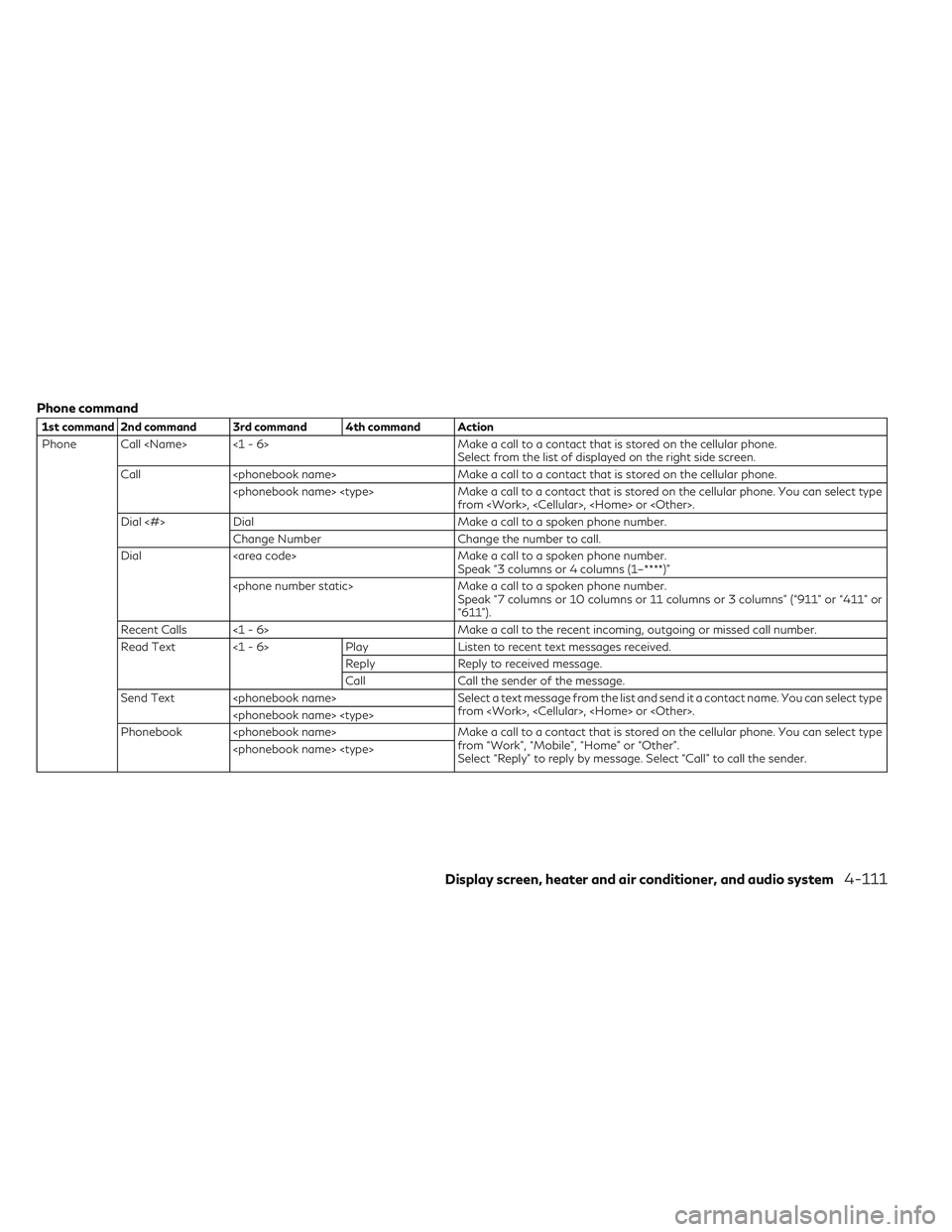
Phone command
1st command 2nd command 3rd command 4th command Action
Phone Call
Call
from
Dial <#> Dial Make a call to a spoken phone number.
Change Number Change the number to call.
Dial Make a call to a spoken phone number.
Speak “3 columns or 4 columns (1–****)”
Speak “7 columns or 10 columns or 11 columns or 3 columns” (“911” or “411” or
“611”).
Recent Calls <1 - 6> Make a call to the recent incoming, outgoing or missed call number.
Read Text <1 - 6> PlayListen to recent text messages received.
Reply Reply to received message.
Call Call the sender of the message.
Send Text
from
Phonebook
from “Work”, “Mobile”, “Home” or “Other”.
Select “Reply” to reply by message. Select “Call” to call the sender.
Display screen, heater and air conditioner, and audio system4-111
Page 305 of 538

Phone command
1st command 2nd command 3rd command 4th command Action
Phone Favorites
Redial Make a call to the last outgoing phone number.
International Call
You may need to include the international call prefixes and country codes.
Add Phone Use this command to connect a compatible Bluetooth® device to the system.
Follow the on screen instructions to complete the pairing process from your
handset.
Call
your cellular phone between “Call” and “Work”.
Call
lar <1 - 6>
To call someone's cellular phone, say the person's name stored in the phonebook
on your cellular phone between “Call” and “Mobile”.
Call
cellular phone between “Call” and “Home”.
Call
in the phonebook on your cellular phone between “Call” and “Other”.
NOTE
The system can read out SMS text messages
in voice. However, it cannot always read the
text correctly.
4-112Display screen, heater and air conditioner, and audio system
Page 311 of 538

SIRIUSXM TRAVEL LINK®
SiriusXM Travel Link Information is a sub-
scription service offered by SiriusXM Satellite
Radio. It is necessary to subscribe to use the
SiriusXM Travel Link information.
This service provides real-time information
regarding current weather, fuel prices, sports
scores, stock tickers and movie times where
available. The SiriusXM Travel Link is broad-
cast to the vehicle by SiriusXM Satellite Ra-
dio.
The service enables you to view detailed in-
formation and forecasts of an area of inter-
est.
WARNING
SiriusXM Travel Link information is not a
substitute for attentive driving. Weather
conditions change constantly and emer-
gency situations can arise without warn-
ing. Relying only on SiriusXM Travel Link
information could result in serious personal
injury.
Viewing SiriusXM Travel Link®
SiriusXM Travel Link information is available
in limited markets. To subscribe to or check if
this service is available in the area, call
1–866–635–2349 or access
www.siriusxm.com/travellink.
NOTE
•If a contract is not completed for the
SiriusXM Travel Link information service, a
message appears.
•The weather information is available only
for areas that provide weather informa-
tion to SiriusXM Travel Link. To access the SiriusXM Information menu:
1. Push
Page 315 of 538
![INFINITI QX30 2018 Owners Manual Default City Settings information
Menu itemAction
[Default City] State list City list Set the current location. This setting is necessary to display weather informa-
tion and movie information.
[Chang](/manual-img/42/41114/w960_41114-314.png "INFINITI QX30 2018 Owners Manual Default City Settings information
Menu itemAction
[Default City] State list City list Set the current location. This setting is necessary to display weather informa-
tion and movie information.
[Chang")
Default City Settings information
Menu itemAction
[Default City] State list City list Set the current location. This setting is necessary to display weather informa-
tion and movie information.
[Change Country] Select country.
SETTINGS MENU
The Infiniti InTouch system can be customized to make it easier for you to use by adjusting various settings.
Push
Page 318 of 538

SymptomPossible causePossible solution
The screen turns blue or an error message is displayed on the display. The SD card is not inserted into the slot correctly. If the SD card containing map data is accidentally
removed, after re-inserting the SD card
containing map data into the slot, place the
ignition switch in the OFF position and then back in the ON position again.
A system malfunction has occurred. It is recommended you contact an INFINITI
retailer for inspection.
AUDIO SYSTEM
HD Radio Technology
Sound:
Symptom Possible cause Possible solution
Delay in digital audio on HD Radio broadcasts. The radio acquires an analog station first and blends to a digital signal.This is not a malfunction.
Audio skip, stutter or echo. The radio station has not properly aligned the digi-
tal and analog audio. Verify correct operation on another station. Report
any station with poor performance.
Volume changing up/down. The radio station has not properly aligned digital
and analog audio level. Verify correct operation on another station and
check www.hdradio.com for stations in the area. Report any station with poor performance.
Sound fading in and out. The transition between analog and digital is taking
place (blending). Verify transition performance on several stations in
the area. Report any station with poor perfor- mance.
Excessive blending (Transition between analog and digital). The receiver is located near the edge of the digital
coverage area. Refer to www.hdradio.com to verify stations in
your coverage area.
Digital audio not better than analog audio. Audio processing on the digital audio at a station can potentially decrease the digital audio soundquality. Verify correct operation on another station. Report
any station with poor performance.
Display screen, heater and air conditioner, and audio system4-125
Page 330 of 538

SymptomPossible cause Possible solution
The USB memory device cannot operate with voice recognition. Depending on the device, an iPhone® or iPod® may
be recognized as a USB memory device. This is not a malfunction
More than one audio device is connected to USB port. Only one audio device can be operated with the
voice recognition system even when multiple
numbers of devices are connected. Select an audio source to operate with the voice recognition system.
The USB/iPod operation screen is grayed out. The audio device is not connected.Connect an audio device to the system.
An audio source to be operated with the voice recognition system has not been selected. Select an audio source to be operated with the
voice recognition system.
An error message is displayed when trying to select a track and operate the USB/iPod. The track information is being processed for
registration by the system. Song information will be loaded into the system
when a new audio device is registered for the first time or when the song information in the
pre-registered device has been changed. Wait for
the loading to complete (this may take from a few minutes to up to an hour).
The number of songs stored on the connected audio device exceeds its capacity. Decrease the number of songs stored on the audio
device.
No song is stored on the audio device. Store songs on the connected audio device. Storing songs with information such as artist name, album
name, song name, and playlist, etc., will make voice recognition song search available.
The Navigation item is not displayed in the voice operation menu screen. Voice Recognition command preparation for the
navigation system is not completed immediately after the system is started. Display any screen other than the Voice
Recognition screen, and then push <
>.
Display screen, heater and air conditioner, and audio system4-137
Page 338 of 538

can be driven on a flat tire depends on
outside temperature, vehicle load,
road conditions and other factors.
– If you detect any unusual sounds or
vibrations while driving with a punc-
tured run-flat tire, pull off the road to
a safe location and stop the vehicle as
soon as possible. The tire may be se-
riously damaged and need to be re-
placed.
•Replacing tires with those not originally
specified by INFINITI could affect the
proper operation of the TPMS.
•If you used Emergency Tire Sealant to
repair a minor tire puncture, the TPMS
sensor should be checked when repair-
ing or replacing the tire (for models
equipped with the emergency tire punc-
ture repair kit). It is recommended you
visit an INFINITI retailer for this service.
•INFINITI recommends using only
INFINITI Genuine Emergency Tire Seal-
ant provided with your vehicle. Other
tire sealants may damage the valve stem
seal which can cause the tire to lose air
pressure (for models equipped with the
emergency tire puncture repair kit).
CAUTION
•The TPMS may not function properly
when the wheels are equipped with
snow chains or the wheels are buried in
snow.
•Do not place metallized film or any metal
parts (antenna, etc.) on the windows.
This may cause poor reception of the
signals from the tire pressure sensors,
and the TPMS will not function
properly.
It is the driver's responsibility to set the tire
pressure to the recommended cold tire pres-
sure suitable for the operating situation (see
"Wheels and tires" in the "8. Do-it-yourself"
section). Note that the correct tire pressure
for the current operating situation must first
be taught-in to the tire pressure monitor (see
"Restarting TPMS" later in this section).
If there is a substantial loss of pressure, the
warning threshold for the warning message
is aligned to the reference values taught-in.
Restart the tire pressure monitor after ad-
justing to the cold tire pressure. The current
pressures are saved as new reference values.
This will ensure that a warning message will
only appear if the tire pressure drops signifi-
cantly. The tire pressure monitor does not warn you
of an incorrectly set tire pressure.
TPMS is not able to warn you of a sudden
loss of pressure, e. g. if the tire is penetrated
by a foreign object. In the event of a sudden
loss of pressure, bring the vehicle to a halt by
braking carefully. Avoid abrupt steering ma-
neuvers.
TPMS has a yellow warning light in the com-
bination meter for indicating a pressure loss
or malfunction. Depending on how the warn-
ing light flashes or lights up, a tire pressure
that is too low or a malfunction in TPMS is
indicated:
•If the warning light is lit continuously, the
tire pressure on one or more tires is signifi-
cantly too low. TPMS is not malfunction-
ing.
•If the warning light flashes for around a
minute and then remains lit constantly, the
TPMS is malfunctioning.
In addition to the warning light, a message
appears in the vehicle information display.
Observe the information on display mes-
sages (see "Safety systems" in the "2. Instru-
ments and controls" section
It may take up to ten minutes for a malfunc-
tion of the tire pressure monitor to be indi-
cated. A malfunction will be indicated by the
Starting and driving5-7
Page 339 of 538

tire pressure warning light flashing for ap-
proximately one minute and then remaining
lit. When the fault has been rectified, the tire
pressure warning light goes out after you
have driven for a few minutes.
The tire pressure values indicated by the ve-
hicle information display may differ from
those measured at a filling station using a
pressure gauge. The tire pressures shown by
the vehicle information display are those
measured at sea level. At high altitudes, the
tire pressure values indicated by a pressure
gauge are higher than those shown by the
vehicle information display. In this case, do
not reduce the tire pressures.
The operation of the tire pressure monitor
can be affected by interference from radio
transmitting equipment (e.g. radio head
phones, two-way radios) that may be being
operated in or near the vehicle.
Checking the tire pressure
electronically
1. Make sure that the ignition switch is in theON position.
2. Press the
orbutton on the
steering wheel to select the [Serv.] menu.
3. Press the
orbutton to select
[Tire Pressure]. 4. Press
The current tire pressure for each wheel
will be displayed in the vehicle information
display.
If the vehicle was parked for longer than 20
minutes, the [Tire pressures will be displayed
after driving a few minutes] message is
shown.
After a teach-in period, the tire pressure
monitor automatically detects new wheels or
new sensors. If a clear allocation of tire pres-
sure to individual wheels is not possible, the
Tire pressure monitor active message is
shown instead of the tire pressure display.
The tire pressures are already being moni-
tored.
If a replacement wheel is fitted, for a few
minutes the system may continue to show
the tire pressure of the wheel that has been
removed. If this occurs, note that the value
displayed for the position where the replace-
ment wheel is fitted is not the same as the
current tire pressure of the replacement
wheel.
NSD660
5-8Starting and driving