Page 165 of 570
Features of your vehicle
62
4
Compass function
The Compass can be turned ON and
OFF and will remember the last state
when the ignition is cycled. To turn
the display feature ON/OFF:
1. Press and release the button
within 1 second to turn the display
feature OFF.
2. Press and release the button again within 1 second to turn the
display back ON.
Additional options can be set with
press and hold sequences of the
button and are detailed below.
There is a difference between mag-
netic north and true north. The com-
pass in the mirror can compensate
for this difference when it knows the
Magnetic Zone in which it is operat-
ing. This is set either by the dealer or
by the user. The operating Zone
Numbers for North America are
shown in the figure on the following
section.
B520C05NF
Page 166 of 570
463
Features of your vehicle
To adjust the Zone setting:
1. Determine the desired ZoneNumber based upon your current
location on the Zone Map.
2. Press and hold the button for 6 seconds, the current Zone
Number will appear on the display.
3. Pressing and holding the button again will cause the numbers to
increment (Note: they will repeat
…13, 14, 15, 1, 2, …). Releasing
the button when the desired Zone
Number appears on the display
will set the new Zone.
4. Within about 5 seconds the com- pass will start displaying a com-
pass heading again.
There are some conditions that can
cause changes to the vehicle mag-
nets, such as installing a ski rack or
a CB antenna. Body repair work on
the vehicle can also cause changes
to the vehicle's magnetic field. In
these situations, the compass will
need to be re-calibrated to quickly
correct for these changes. To re-cali-
brate the compass: 1. Press and hold the button for
more than 9 seconds. When the
compass memory is cleared a "C"
will appear in the display.
2. To calibrate the compass, drive the vehicle in 2 complete circles at
less than 5 mph (8 km/h). Integrated HomeLink®Wireless
Control System
The HomeLink
®Wireless Control
System provides a convenient way to
replace up to three hand-held radio-
frequency (RF) transmitters with a
single built-in device. This innovative
feature will learn the radio frequency
codes of most current transmitters to
operate devices such as gate opera-
tors, garage door openers, entry
door locks, security systems, even
home lighting. Both standard and
rolling code-equipped transmitters
can be programmed by following the
outlined procedures. Additional
HomeLink
®information can be found
at: www.homelink.com or by calling
1-800-355-3515.
Page 175 of 570
Features of your vehicle
72
4
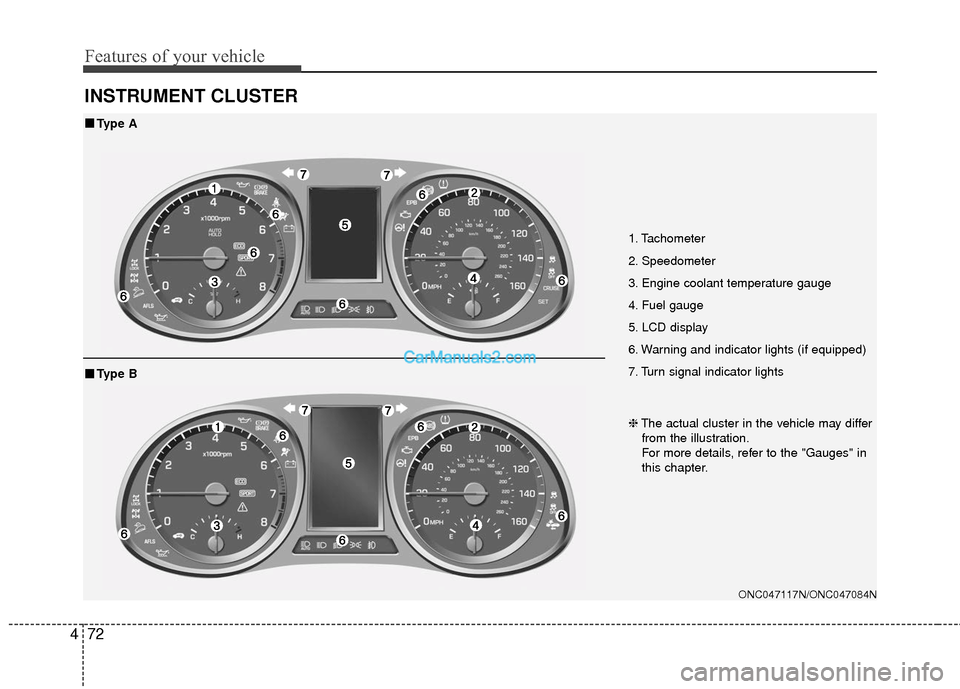
INSTRUMENT CLUSTER
1. Tachometer
2. Speedometer
3. Engine coolant temperature gauge
4. Fuel gauge
5. LCD display
6. Warning and indicator lights (if equipped)
7. Turn signal indicator lights
ONC047117N/ONC047084N
■
■
Type A
❈The actual cluster in the vehicle may differ
from the illustration.
For more details, refer to the "Gauges" in
this chapter.
■
■ Type B
Page 179 of 570
Features of your vehicle
76
4
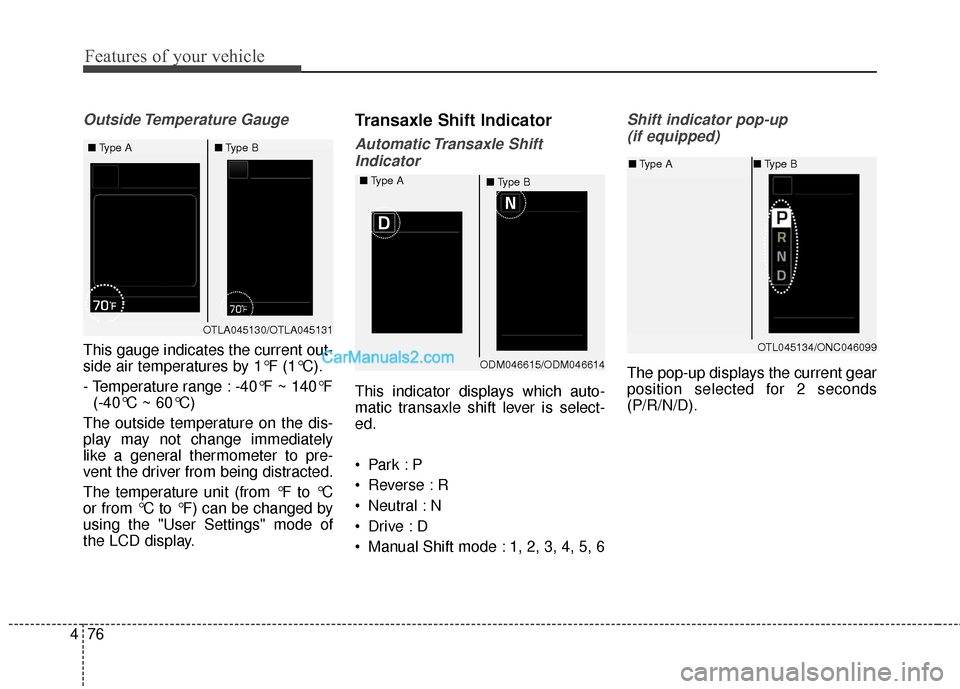
Outside Temperature Gauge
This gauge indicates the current out-
side air temperatures by 1°F (1°C).
- Temperature range : -40°F ~ 140°F
(-40°C ~ 60°C)
The outside temperature on the dis-
play may not change immediately
like a general thermometer to pre-
vent the driver from being distracted.
The temperature unit (from °F to °C
or from °C to °F) can be changed by
using the "User Settings" mode of
the LCD display.
Transaxle Shift Indicator
Automatic Transaxle Shift Indicator
This indicator displays which auto-
matic transaxle shift lever is select-
ed.
Reverse : R
Neutral : N
Manual Shift mode : 1, 2, 3, 4, 5, 6
Shift indicator pop-up (if equipped)
The pop-up displays the current gear
position selected for 2 seconds
(P/R/N/D).
OTLA045130/OTLA045131
■
Type A ■Type B
ODM046615/ODM046614
■
Type A
■Type B
OTL045134/ONC046099
■Type A ■Type B
Page 180 of 570

477
Features of your vehicle
LCD Display Control
The LCD display modes can be
changed by using the control buttons
on the steering wheel.
(1) : MODE button for changingmodes
(2) : MOVE button for changing items
(3) : SELECT/RESET button for setting or resetting the
selected item
LCD Modes
LCD DISPLAY
Modes SymbolExplanation
Tr i p
ComputerThis mode displays driving information like the tripmeter,
fuel economy, and so on.
For more details, refer to "Trip Computer" in this chapter.
Tu r n B y Tu r n (if equipped)This mode displays the state of the navigation.
SCC/LDWS
(if equipped)
This mode displays the state of the Advanced Smart
Cruise Control system (SCC) and Lane Departure Warning
System (LDWS). For more details, refer to "Advanced
Smart Cruise Control system (SCC)" or "Lane Departure
Warning System (LDWS)" in chapter 5.
A/V
(if equipped)This mode displays the state of the A/V system.
Service
This mode informs of service interval and pressure sta-
tus of each tire.
This mode informs of warning messages related to
washer fluid or malfunction of Blind Spot Detection
system (BSD) and so on.
When the any door is not closed securely, this symbol is
illuminated.
User SettingsIn this mode, you can change settings of the doors,
lamps and so on.
ODM042224
Page 181 of 570
Features of your vehicle
78
4
Trip Computer Mode
The trip computer mode displays
information related to vehicle driving
parameters including range, fuel
economy, trip meter information and
vehicle speed.
For more information, refer to "Trip
Computer" in this chapter.
Turn By Turn (TBT) Mode
(if equipped)
This mode displays the state of the
navigation.
SCC/LDWS Mode (if equipped)
This mode displays the state of the
Advanced Smart Cruise Control sys-
tem (SCC) or Lane Departure
Warning System (LDWS).
For more information, refer to
"Advanced Smart Cruise Control
system (SCC)" or "Lane Departure
Warning System (LDWS)" in chapter
5.
OTLA045187/OTLA045188
■ Type A ■Type B
ODM046611/ODM046610
■Type A ■Type B
OTLA045175/OTLA045176
■Type A ■Type B
Page 182 of 570
479
Features of your vehicle
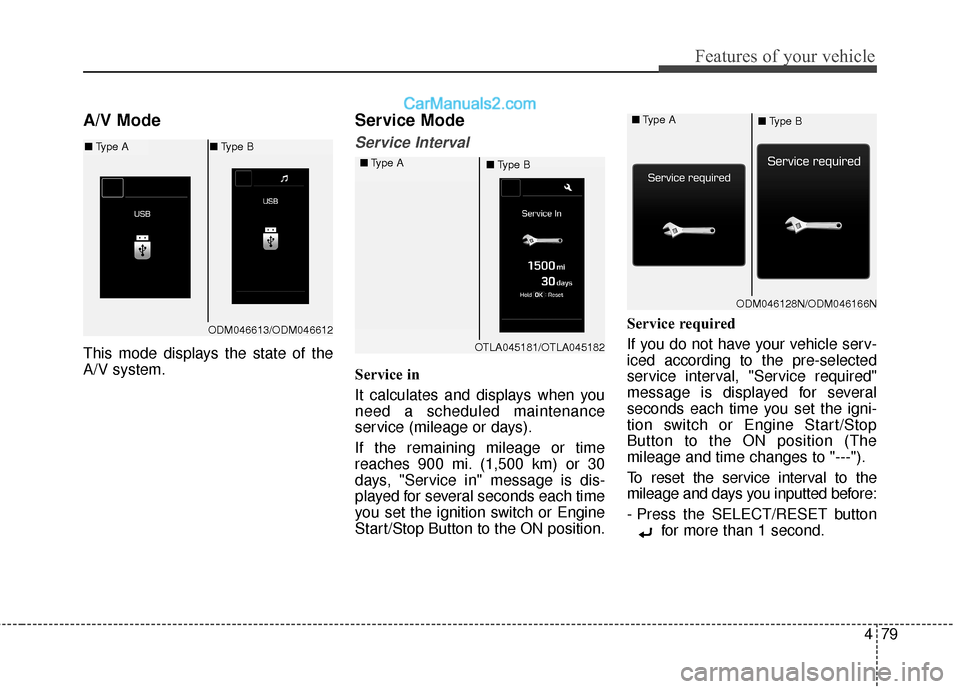
A/V Mode
This mode displays the state of the
A/V system.
Service Mode
Service Interval
Service in
It calculates and displays when you
need a scheduled maintenance
service (mileage or days).
If the remaining mileage or time
reaches 900 mi. (1,500 km) or 30
days, "Service in" message is dis-
played for several seconds each time
you set the ignition switch or Engine
Start/Stop Button to the ON position.Service required
If you do not have your vehicle serv-
iced according to the pre-selected
service interval, "Service required"
message is displayed for several
seconds each time you set the igni-
tion switch or Engine Start/Stop
Button to the ON position (The
mileage and time changes to "---").
To reset the service interval to the
mileage and days you inputted before:
- Press the SELECT/RESET button
for more than 1 second.
OTLA045181/OTLA045182
■
Type A
■Type B
ODM046128N/ODM046166N
■
Type A
■Type B
ODM046613/ODM046612
■Type A ■Type B
Page 183 of 570

Features of your vehicle
80
4
Service in OFF
If the service interval is not set,
"Service in OFF" message is dis-
played on the LCD display.
✽ ✽
NOTICE
If any of the following conditions
occur, the mileage and days may be
incorrect.
- The battery cable is disconnected.
- The fuse switch is turned off.
- The battery is discharged.
Master Warning Mode
(if equipped)
This warning light informs the driv-
er the following situations:
- Low washer fluid (if equipped).
- Blind Spot Detection (BSD) mal-function (if equipped).
- Lane Departure warning system (LDWS) malfunction (if equipped).
- Smart cruise control system (SCC) malfunction (if equipped).
- Service reminder and so on.
The Master Warning Light illumi-
nates when more than one of the
above warning situations occur. At
this time, the LCD Modes Icon will
change from ( ) to ( ).
If the warning situation is solved, the
master warning light will be turned
off and the LCD Modes Icon will be
changed back to its previous icon
( ). (ex : refill the washer fluid)User Settings Mode
Description
On this mode, you can change set-
ting of the doors, lamps, and so on.
ODM046178L
ODM046607N/ODM046608N
■
Type A
■Type B