2018 Hyundai Kona ESP
[x] Cancel search: ESPPage 119 of 523
3-36
Convenient features of your vehicle
Information
Make sure to refuel your vehicle
according to the "Fuel Requirements"
suggested in the Introduction chapter.
Do not spill fuel on the exterior surfaces of the vehicle. Any type of fuel spilled on painted sur-
faces may damage the paint.
If the fuel filler cap requires replacement, use only a genuine
HYUNDAI cap or the equivalent
specified for your vehicle. Anincorrect fuel filler cap canresult in a serious malfunctionof the fuel system or emission
control system.
NOTICE
iDo not use matches or a lighter and do not smoke or
leave a lit cigarette in your
vehicle while at a gas station,
especially during refueling.
Do not over-fill or top-off your
vehicle tank, which can cause
gasoline spillage.
If a fire breaks out during refu-
eling, leave the vicinity of the
vehicle, and immediately con-
tact the manager of the gasstation and then contact the
local fire department. Follow
any safety instructions they
provide.
If pressurized fuel sprays out,
it can cover your clothes or
skin and thus subject you to
the risk of fire and burns.
Always remove the fuel cap
carefully and slowly. If the cap
is venting fuel or if you hear a
hissing sound, wait until the
condition stops before com-
pletely removing the cap.
Always check that the fuel cap
is installed securely to prevent
fuel spillage in the event of anaccident.
When refueling, always move
the shift lever to the P (Park)
position (for dual clutch trans-
mission) or first gear or R
(Reverse, for manual transmis-
sion), set the parking brake, and
place the ignition switch to the
LOCK/OFF position. Sparks pro-
duced by electrical componentsrelated to the engine can ignite
fuel vapors causing a fire.
When using an approved
portable fuel container, be sureto place the container on the
ground prior to refueling. Static
electricity discharge from the
container can ignite fuel vapors
causing a fire. Once refueling
has begun, contact between
your bare hand and the vehicleshould be maintained until the
filling is complete.
Use only approved portable
plastic fuel containers designed
to carry and store gasoline.
Page 149 of 523
3-66
Convenient features of your vehicle
Shift to P to edit settings /Engage parking brake to edit
settings
This warning message illuminates if
you try to select an item from the
User Settings mode while driving.
- Manual transmission
For your safety, change the User
Settings after engaging the parking
brake.
- Dual clutch transmission For your safety, change the User
Settings after parking the vehicle,
applying the parking brake and
moving the shift lever to P (Park).
Quick guide (Help, if equipped)
This mode provides quick guides forthe systems in the User Settings
mode. Select an item, press and hold the
OK button.
For more details about each sys-
tem, refer to this Owner’s Manual.
Trip computer mode
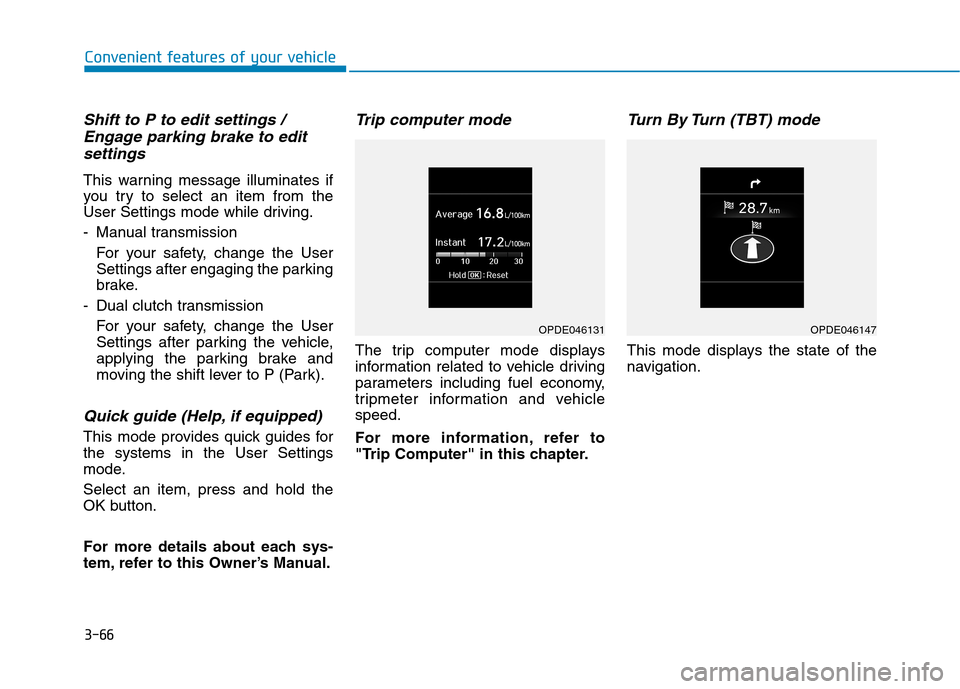
The trip computer mode displays
information related to vehicle driving
parameters including fuel economy,
tripmeter information and vehiclespeed.
For more information, refer to
"Trip Computer" in this chapter.
Turn By Turn (TBT) mode
This mode displays the state of the
navigation.
OPDE046131OPDE046147
Page 171 of 523
3-88
Convenient features of your vehicle
Turn signals and lane changesignals
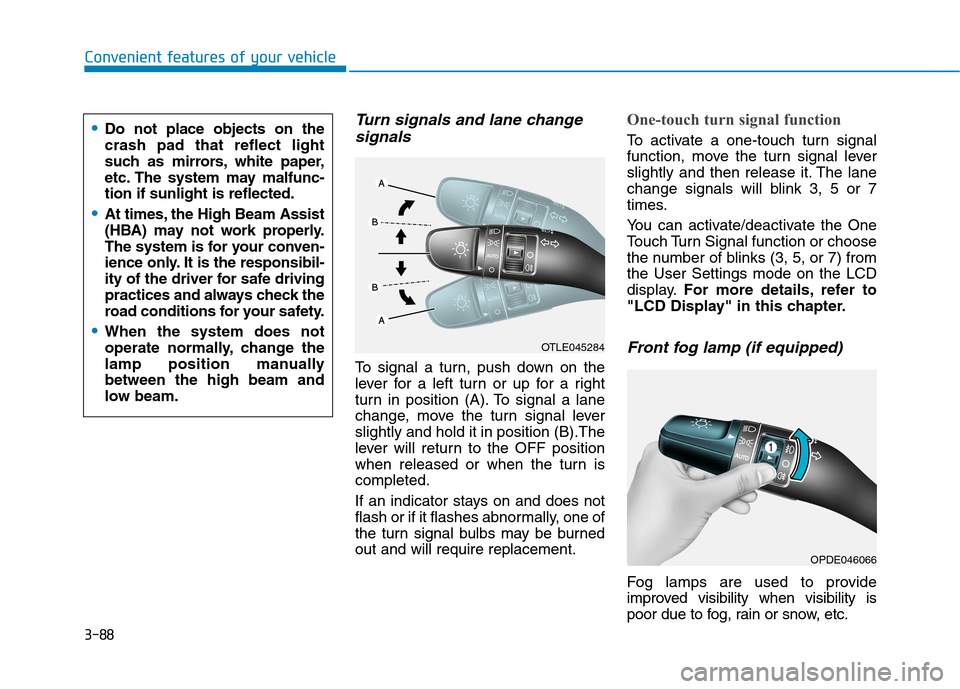
To signal a turn, push down on the
lever for a left turn or up for a right
turn in position (A). To signal a lane
change, move the turn signal leverslightly and hold it in position (B).The
lever will return to the OFF position
when released or when the turn iscompleted.
If an indicator stays on and does not
flash or if it flashes abnormally, one of
the turn signal bulbs may be burnedout and will require replacement.
One-touch turn signal function
To activate a one-touch turn signal
function, move the turn signal lever
slightly and then release it. The lane
change signals will blink 3, 5 or 7
times.
You can activate/deactivate the One
Touch Turn Signal function or choose
the number of blinks (3, 5, or 7) fromthe User Settings mode on the LCD
display. For more details, refer to
"LCD Display" in this chapter.
Front fog lamp (if equipped)
Fog lamps are used to provide
improved visibility when visibility is
poor due to fog, rain or snow, etc.
OPDE046066
OTLE045284
Do not place objects on the crash pad that reflect light
such as mirrors, white paper,
etc. The system may malfunc-tion if sunlight is reflected.
At times, the High Beam Assist
(HBA) may not work properly.
The system is for your conven-
ience only. It is the responsibil-
ity of the driver for safe driving
practices and always check the
road conditions for your safety.
When the system does not
operate normally, change the
lamp position manuallybetween the high beam and
low beam.
Page 174 of 523
3-91
Convenient features of your vehicle
3
Daytime running light (DRL) (if equipped)
The Daytime Running Lights (DRL)
can make it easier for others to see
the front of your vehicle during the
day, especially after dawn and beforesunset.
The DRL system will turn the dedi- cated lamp OFF when:
1. The headlamps or front fog lights are in the ON position.
2. The position light switch is in the ON position.
3. The engine is turned off.
Headlamp leveling device (if equipped)
Manual type
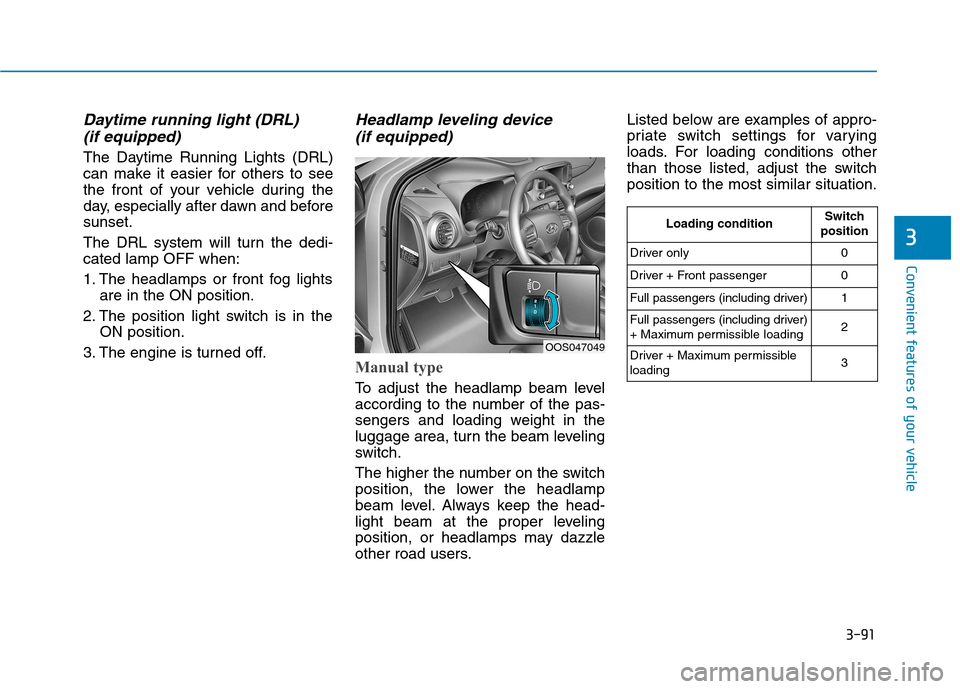
To adjust the headlamp beam level
according to the number of the pas-
sengers and loading weight in the
luggage area, turn the beam leveling
switch.
The higher the number on the switch
position, the lower the headlamp
beam level. Always keep the head-
light beam at the proper leveling
position, or headlamps may dazzle
other road users. Listed below are examples of appro-
priate switch settings for varying
loads. For loading conditions other
than those listed, adjust the switchposition to the most similar situation.
OOS047049
Loading conditionSwitch
position
Driver only0
Driver + Front passenger0
Full passengers (including driver)1
Full passengers (including driver)
+ Maximum permissible loading2
Driver + Maximum permissible loading 3
Page 179 of 523

3-96
Convenient features of your vehicle
Windshield wipers
Operates as follows when the igni-
tion switch is turned ON./MIST : For a single wiping cycle,
move the lever down ( ) or up (MIST) and release
it. The wipers will operate
continuously if the lever isheld in this position.
O/OFF : Wiper is not in operation
---/INT : Wiper operates intermittently
at the same wiping intervals.
Use this mode in light rain or
mist. To vary the speed set-
ting, turn the speed control
knob.
1/LO : Normal wiper speed
2/HI : Fast wiper speed
Information
If there is heavy accumulation of snow
or ice on the windshield, defrost the
windshield for about 10 minutes, or until
the snow and/or ice is removed before
using the windshield wipers to ensure
proper operation.
If you do not remove the snow and/or ice
before using the wiper and washer, it may
damage the wiper and washer system.
AUTO (Automatic) control (if equipped)
The rain sensor located on the upperend of the windshield glass senses
the amount of rainfall and controls
the wiping cycle for the proper inter-
val. The more it rains, the faster the
wiper operates.
When the rain stops, the wiper stops.
To vary the speed setting, turn thespeed control knob (1).
If the wiper switch is set in AUTO
mode when the ignition switch is inthe ON position, the wiper will oper-
ate once to perform a self-check of
the system. Set the wiper to OFF
position when the wiper is not in use.
When washing the vehicle, set the wiper switch in the O (OFF) positionto stop the auto wiper operation.
The wiper may operate and be dam-
aged if the switch is set in the AUTO
mode while washing the vehicle.
Do not remove the sensor cover located on the upper end of the
passenger side windshield glass.
Damage to system parts could
occur and may not be covered by
your vehicle warranty.
NOTICE
i
OOS047322L
Sensor To avoid personal injury from the
windshield wipers, when theengine is running and the wind-
shield wiper switch is placed in
the AUTO mode:
Do not touch the upper end of the windshield glass facing the
rain sensor.
Do not wipe the upper end of the windshield glass with a
damp or wet cloth.
Do not put pressure on the windshield glass.
WARNING
Page 182 of 523
3-99
Convenient features of your vehicle
3
DDRRIIVV EERR AA SSSSIISS TT SS YY SSTT EEMM
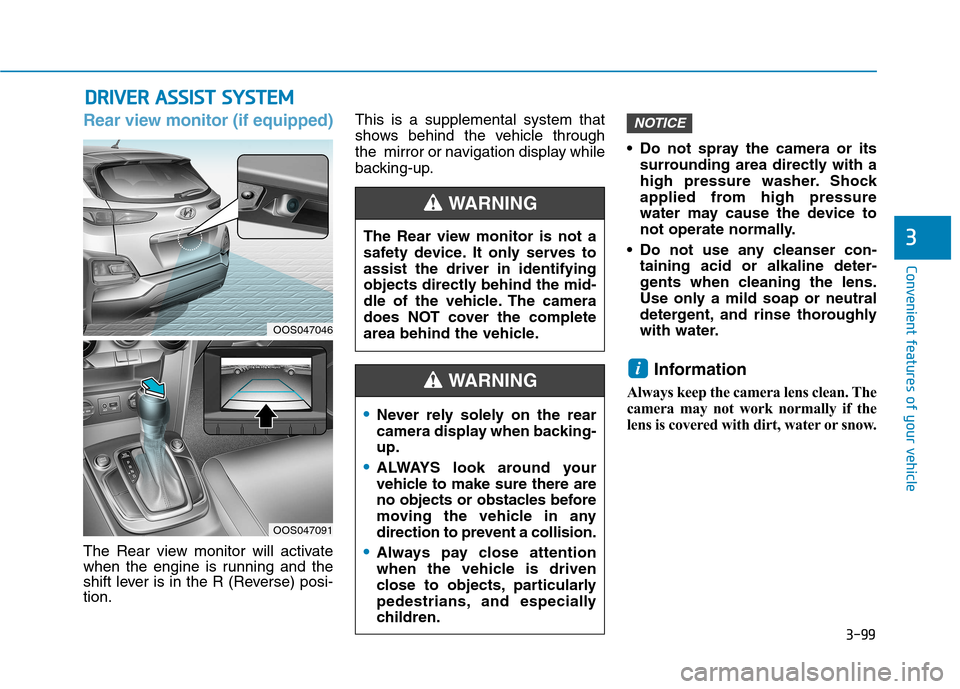
Rear view monitor (if equipped)
The Rear view monitor will activate
when the engine is running and the
shift lever is in the R (Reverse) posi-tion. This is a supplemental system that
shows behind the vehicle through
the mirror or navigation display while
backing-up.
Do not spray the camera or its
surrounding area directly with a
high pressure washer. Shock
applied from high pressure
water may cause the device to
not operate normally.
Do not use any cleanser con- taining acid or alkaline deter-
gents when cleaning the lens.
Use only a mild soap or neutral
detergent, and rinse thoroughly
with water.
Information
Always keep the camera lens clean. The
camera may not work normally if the
lens is covered with dirt, water or snow.
i
NOTICE
The Rear view monitor is not a
safety device. It only serves toassist the driver in identifying
objects directly behind the mid-
dle of the vehicle. The camera
does NOT cover the complete
area behind the vehicle.
WARNING
Never rely solely on the rear
camera display when backing-up.
ALWAYS look around your
vehicle to make sure there are
no objects or obstacles before
moving the vehicle in any
direction to prevent a collision.
Always pay close attention
when the vehicle is driven
close to objects, particularly
pedestrians, and especially
children.
WARNING
OOS047046
OOS047091
Page 183 of 523
![Hyundai Kona 2018 Owners Manual 3-100
Convenient features of your vehicle
Parking Distance Warning
(Reverse) system (if equipped)
[A] : Sensor
The Parking Distance Warning
(Reverse) system assists the driver
during reverse moveme](/manual-img/35/16231/w960_16231-182.png "Hyundai Kona 2018 Owners Manual 3-100
Convenient features of your vehicle
Parking Distance Warning
(Reverse) system (if equipped)
[A] : Sensor
The Parking Distance Warning
(Reverse) system assists the driver
during reverse moveme")
3-100
Convenient features of your vehicle
Parking Distance Warning
(Reverse) system (if equipped)
[A] : Sensor
The Parking Distance Warning
(Reverse) system assists the driver
during reverse movement of the vehi-
cle by chiming if any object is sensedwithin the distance of 120 cm (50
inches) behind the vehicle. This system is a supplemental sys- tem that senses objects within the
range and location of the sensors, itcannot detect objects in other areaswhere sensors are not installed.
Operation of the ParkingDistance Warning (Reverse)
system
Operating condition
This system will activate when backing up with the ignition switch
in the ON position. However, if vehi-
cle speed exceeds 5 km/h (3 mph),
the system may not detect objects.
If vehicle speed exceeds 10 km/h (6 mph), the system will not warn you
even though objects are detected.
When more than two objects are sensed at the same time, the clos-
est one will be recognized first.
ALWAYS look around your vehi-
cle to make sure there are not
any objects or obstacles before
moving the vehicle in any direc-
tion to prevent a collision.
Always pay close attention
when the vehicle is driven close
to objects, particularly pedestri-
ans, and especially children.
Be aware that some objects
may not be visible on the
screen or be detected by the
sensors, due to the objects
distance, size or material, all of
which can limit the effective-
ness of the sensor.
WARNING
OOS047042
Page 187 of 523
![Hyundai Kona 2018 Owners Manual 3-104
Convenient features of your vehicle
Parking Distance Warning
(Reverse/Forward) system (if equipped)
[A] : Rear Sensor, [B] : Front SensorThe Parking Distance Warning
(Reverse/Forward) system a](/manual-img/35/16231/w960_16231-186.png "Hyundai Kona 2018 Owners Manual 3-104
Convenient features of your vehicle
Parking Distance Warning
(Reverse/Forward) system (if equipped)
[A] : Rear Sensor, [B] : Front SensorThe Parking Distance Warning
(Reverse/Forward) system a")
3-104
Convenient features of your vehicle
Parking Distance Warning
(Reverse/Forward) system (if equipped)
[A] : Rear Sensor, [B] : Front SensorThe Parking Distance Warning
(Reverse/Forward) system assists
the driver during movement of the
vehicle by chiming if any object issensed within the distance of 100 cm(39 inches) in front and 120 cm (47
inches) behind the vehicle. This system is a supplemental sys- tem that senses objects within the
range and location of the sensors, itcannot detect objects in other areaswhere sensors are not installed.
Operation of the Parking
Distance Warning
(Reverse/Forward) system
Operating condition
This system will activate when the Parking Distance Warning (Reverse/
Forward) system button is pressed
with the engine r unning.
ALWAYS look around your vehi-
cle to make sure there are no
objects or obstacles before
moving the vehicle in any direc-
tion to prevent a collision.
Always pay close attention
when the vehicle is driven close
to objects, particularly pedestri-
ans, and especially children.
Be aware that some objects
may not be visible on the
screen or be detected by the
sensors, due to the objects
distance, size or material, all of
which can limit the effective-
ness of the sensor.
WARNING
OOS047045OOS047043
OOS047042
■Front sensor
■Rear sensor