2018 Hyundai Kona ESP
[x] Cancel search: ESPPage 189 of 523

3-106
Convenient features of your vehicle
Non-operational conditions ofParking Distance Warning
(Reverse/Forward) system
Parking Distance Warning
(Reverse/Forward) system may not
operate normally when:
Moisture is frozen to the sensor.
Sensor is covered with foreign mat- ter, such as snow or water, or the
sensor cover is blocked.
There is a possibility of Parking
Distance Warning (Reverse/Forward)
system malfunction when:
Driving on uneven road surfacessuch as unpaved roads, gravel,
bumps, or gradient.
Objects generating excessive noise such as vehicle horns, loud motor-
cycle engines, or truck air brakes
can interfere with the sensor.
Heavy rain or water spray is present.
Wireless transmitters or mobile phones are present near the sensor.
The sensor is covered with snow.
Any non-factory equipment or accessories have been installed, or
if the vehicle bumper height or sen-sor installation has been modified.
Detecting range may decrease when:
Outside air temperature isextremely hot or cold.
Undetectable objects smaller than 1 m and narrower than 14 cm in
diameter.
The following objects may not be
recognized by the sensor:
Sharp or slim objects such asropes, chains or small poles.
Objects, which tend to absorb sen- sor frequency such as clothes,
spongy material or snow.
Parking Distance Warning
(Reverse/Forward) system
precautions
The Parking Distance Warning (Reverse/Forward) system may notsound consistently depending on thespeed and shapes of the objectsdetected.
The Parking Distance Warning (Reverse/Forward) system may mal-
function if the vehicle bumper heightor sensor installation has been mod-
ified or damaged. Any non-factory
installed equipment or accessories
may also interfere with the sensor
performance.
The sensor may not recognize objects less than 30 cm (11 in.) from
the sensor, or it may sense an incor-
rect distance. Use caution.
When the sensor is frozen or stained with snow, dirt, or water, the sensor
may be inoperative until the stains
are removed using a soft cloth.
Do not push, scratch or strike the sensor. Sensor damage could occur.
Do not spray the sensors or its sur- rounding area directly with a high
pressure washer. Shock applied
from high pressure water may cause
the device to not operate normally.
Your new vehicle warranty does
not cover any accidents or dam-
age to the vehicle or injuries toits occupants related to a
Parking Distance Warning
(Reverse/Forward) system.
Always drive safely and cau-
tiously.
WARNING
Page 207 of 523

3-124
WWIINN DDSSHH IIEE LLDD DD EEFFRR OO SSTT IINN GG AA NN DD DD EEFFOO GGGGIINN GG
Convenient features of your vehicle
For maximum windshield defrost-
ing, set the temperature control
knob to the highest temperature
setting and the fan control knob to
the highest fan speed. Select the
front defrost button on the climate
control display. After the engine
warm-up period, warm air will bedirected to the front windshield.
If warm air to the floor is desired while defrosting or defogging, set themode to the floor-defrost position.
Before driving, clear all snow and ice from the windshield, rear win-
dow, outside rear view mirrors, and
all side windows.
Clear all snow and ice from the hood and air inlet in the cowl grill to
improve heater and defroster effi-ciency and to reduce the probability
of fogging up inside of the wind-shield.
Information
If the engine temperature is still cold
after starting, then a brief engine warm
up period may be required for the
vented air flow to become warm or hot.Manual climate control system
To defog inside windshield
1. Select any fan speed except “0” position.
2. Select the desired temperature.
3. Select the or position.
4. The outside (fresh) air will be select- ed automatically. Additionally, the air conditioning (if equipped) will auto-
matically operate if the mode is
selected to the position.
If the air conditioning and outside(fresh) air position are not selected
automatically, press the correspon-
ding button manually.
i
Windshield heating
Do not use the or posi- tion during cooling operation in
extremely humid weather. The
difference between the temper-ature of the outside air and thatof the windshield could causethe outer surface of the wind-
shield to fog up, causing loss of
visibility. In this case, set the
mode selection knob or button
to the position and fan
speed control knob or button to
lower speed.
WARNING
OOS047309
Page 221 of 523

3-138
Roof rack (if equipped)
If the vehicle has a roof rack, you can
load cargo on top of your vehicle.
If the vehicle is equipped with a
sunroof, be sure not to position
cargo onto the roof rack in such a
way that it could interfere with
sunroof operation. When carrying cargo on the roof
rack, take the necessary precau-
tions to make sure the cargo does
not damage the roof of the vehicle.
When carrying large objects on the roof rack, make sure they do
not exceed the overall roof lengthor width.
NOTICE
NOTICE
EEXX TTEERR IIOO RR FF EE AA TTUU RREESS
Convenient features of your vehicle
OOS047317The following specification is
the maximum weight that can
be loaded onto the roof rack.
Distribute the load as evenly
as possible onto the roof rack
and secure the load firmly.
Loading cargo or luggage in
excess of the specified weight
limit on the roof rack may
damage your vehicle.
The vehicle center of gravity will be higher when items are
loaded onto the roof rack.
Avoid sudden starts, braking,
sharp turns, abrupt maneuvers
or high speeds that may result
in loss of vehicle control or
rollover resulting in an accident.
Always drive slowly and turn
corners carefully when carry-
ing items on the roof rack.
Severe wind updrafts, caused
by passing vehicles or natural
causes, can cause sudden
upward pressure on items
loaded on the roof rack. This
is especially true when carry-
ing large, flat items such as
wood panels or mattresses.This could cause the items to
fall off the roof rack and cause
damage to your vehicle or
others around you.
To prevent damage or loss of
cargo while driving, check fre-
quently before or while drivingto make sure the items on the
roof rack are securely fastened.
WARNING
ROOF 80 kg (176 lbs.)
RACK EVENLY DISTRIBUTED
Page 227 of 523
4-6
Multimedia System
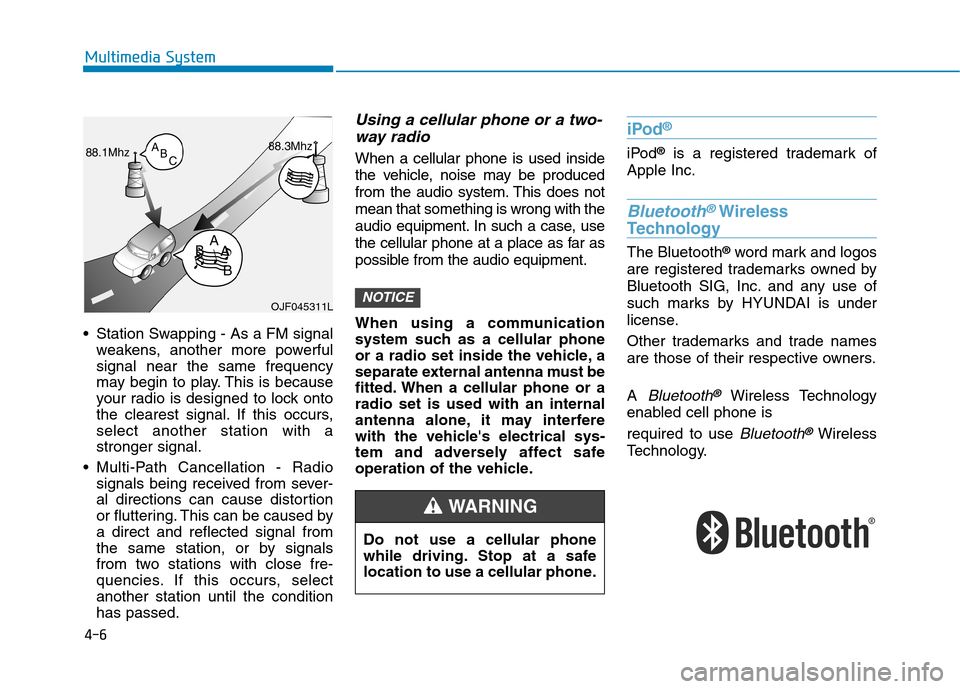
Station Swapping - As a FM signalweakens, another more powerful signal near the same frequency
may begin to play. This is because
your radio is designed to lock onto
the clearest signal. If this occurs,select another station with astronger signal.
Multi-Path Cancellation - Radio signals being received from sever-
al directions can cause distortion
or fluttering. This can be caused bya direct and reflected signal from
the same station, or by signals
from two stations with close fre-
quencies. If this occurs, selectanother station until the conditionhas passed.
Using a cellular phone or a two-
way radio
When a cellular phone is used inside
the vehicle, noise may be produced
from the audio system. This does notmean that something is wrong with the
audio equipment. In such a case, use
the cellular phone at a place as far as
possible from the audio equipment.
When using a communication
system such as a cellular phone
or a radio set inside the vehicle, a
separate external antenna must be
fitted. When a cellular phone or aradio set is used with an internal
antenna alone, it may interfere
with the vehicle's electrical sys-
tem and adversely affect safe
operation of the vehicle.
iPod ®
iPod
®
is a registered trademark of
Apple Inc.
Bluetooth®Wireless
Technology
The Bluetooth ®
word mark and logos
are registered trademarks owned by
Bluetooth SIG, Inc. and any use of
such marks by HYUNDAI is under
license.
Other trademarks and trade names
are those of their respective owners. A
Bluetooth®Wireless Technology
enabled cell phone is required to use
Bluetooth®Wireless
Technology.
NOTICEOJF045311L
Do not use a cellular phone
while driving. Stop at a safe
location to use a cellular phone.
WARNING
Page 232 of 523
4-11
Multimedia System
4
Do not stare at the screen
while driving. Staring at the
screen for prolonged periodsof time could lead to trafficaccidents.
Do not disassemble, assem-
ble, or modify the audio sys-
tem. Such acts could result in
accidents, fire, or electric
shock.
Using the phone while driving
may lead to a lack of attentionof traffic conditions andincrease the likelihood of
accidents. Use the phone fea-
ture after parking the vehicle.
Exercise caution not to spill
water or introduce foreign
objects into the device. Such
acts could lead to smoke, fire,
or product malfunction.
WARNINGPlease refrain from use if the
screen is blank or no sound
can be heard as these signs
may indicate product mal-
function. Continued use in
such conditions could lead to
accidents (fires, electric
shock) or product malfunc-tions.
Do not touch the antenna dur- ing thunder or lightening as
such acts may lead to light-
ning induced electric shock.
Do not stop or park in park- ing-restricted areas to operate
the product. Such acts couldlead to traffic accidents.
Use the system with the vehi-
cle engine turned on.
Prolonged use with the igni-
tion turned on only could
result in battery discharge.
Driving while distracted can
result in a loss of vehicle con-
trol that may lead to an acci-
dent, severe personal injury,
and death. The driver’s primary
responsibility is in the safe and
legal operation of a vehicle, and
use of any handheld devices,
other equipment, or vehicle sys-
tems which take the driver’s
eyes, attention and focus away
from the safe operation of a
vehicle or which are not permis-
sible by law should never beused during operation of the
vehicle.
WARNING
Page 248 of 523
![Hyundai Kona 2018 Owners Manual 4-27
Multimedia System
4
If there are connected devices
Press the [PHONE]button on the
audio system ➟Select [Settings] ➟
Select [Connections] ➟Select
Bluetooth ®
device to connect ➟Select](/manual-img/35/16231/w960_16231-247.png "Hyundai Kona 2018 Owners Manual 4-27
Multimedia System
4
If there are connected devices
Press the [PHONE]button on the
audio system ➟Select [Settings] ➟
Select [Connections] ➟Select
Bluetooth ®
device to connect ➟Select")
4-27
Multimedia System
4
If there are connected devices
Press the [PHONE]button on the
audio system ➟Select [Settings] ➟
Select [Connections] ➟Select
Bluetooth ®
device to connect ➟Select
[Connect] ➟Connect Bluetooth ®
.
Information
Only one Bluetooth ®
device can be
connected at a time.
When a Bluetooth ®
device is con-
nected, other devices cannot be
paired.
Accepting/rejecting phone calls
Receiving phone calls with Bluetooth ®
connected.
(1) Caller name: If the caller number is in your contacts, the correspon-
ding name is displayed.
(2) Incoming phone number: Incoming phone number is displayed.
(3) Accept: Accept call.
(4) Reject: Reject call. Information
When the incoming call screen is displayed, audio mode and the set-
tings screen cannot be shown. Only
call volume control is supported.
Some Bluetooth ®
devices may not
support the call reject function.
Some Bluetooth ®
devices may not
support the phone number display
function.
i
i
Page 249 of 523
![Hyundai Kona 2018 Owners Manual 4-28
Multimedia System
Operation during calls
Incoming call with Bluetooth®
con-
nected ➟Select [Accept].
(1) Call duration: Call duration display.
(2) Caller name: If the caller number is in yo](/manual-img/35/16231/w960_16231-248.png "Hyundai Kona 2018 Owners Manual 4-28
Multimedia System
Operation during calls
Incoming call with Bluetooth®
con-
nected ➟Select [Accept].
(1) Call duration: Call duration display.
(2) Caller name: If the caller number is in yo")
4-28
Multimedia System
Operation during calls
Incoming call with Bluetooth®
con-
nected ➟Select [Accept].
(1) Call duration: Call duration display.
(2) Caller name: If the caller number is in your contacts, the corresponding
name is displayed.
(3) Incoming phone number: Incoming phone number is displayed.
(4) Private: Call is transferred to a cell phone.
(5) End: End call.
(6) Mute: Block outgoing voice.
Menu
Press the [MENU]button and select
the desired function.
Switch: Switch between calls if connected to two or more calls.
Microphone Volume: Adjust outgo- ing voice volume.
Information
Some Bluetooth ®
devices may not
support the Private function.
The outgoing voice volume may vary depending on the type of
Bluetooth ®
device. If the outgoing
voice volume is too high or low,
adjust the Microphone Volume.
The Switch menu will only be dis- played if connected to two or more
calls.
Favourites
Press the [PHONE]button on the
audio system ➟Select [Favourites] ➟
Favourites list displayed.
(1) Add to favourites: Add a down- loaded phone number to
favourites.
(2) Favourites list: A list of paired favourite is displayed Connect a call when selected.
Menu
Press the [MENU]button, and select
the desired function.
Delete: Delete a saved favourites.
i
Page 259 of 523
5-5
Driving your vehicle
5
NEVER drink or take drugs and
drive. Drinking or taking drugs and
driving is dangerous and mayresult in an accident and SERI-
OUS INJURY or DEATH.
Drunk driving is the number
one contributor to the highway
death toll each year. Even asmall amount of alcohol will
affect your reflexes, percep-
tions and judgment. Just one
drink can reduce your ability to
respond to changing conditions
and emergencies and your reac-
tion time gets worse with each
additional drink. Driving while under the influ-
ence of drugs is as dangerous
or more dangerous than drivingunder the influence of alcohol.
WARNING You are much more likely to have
a serious accident if you drink or
take drugs and drive. If you are
drinking or taking drugs, don't
drive. Do not ride with a driver
who has been drinking or taking
drugs. Choose a designated driv-er or call a taxi.