2018 Hyundai Ioniq Electric tailgate
[x] Cancel search: tailgatePage 186 of 541
3-101
Convenient features of your vehicle
3
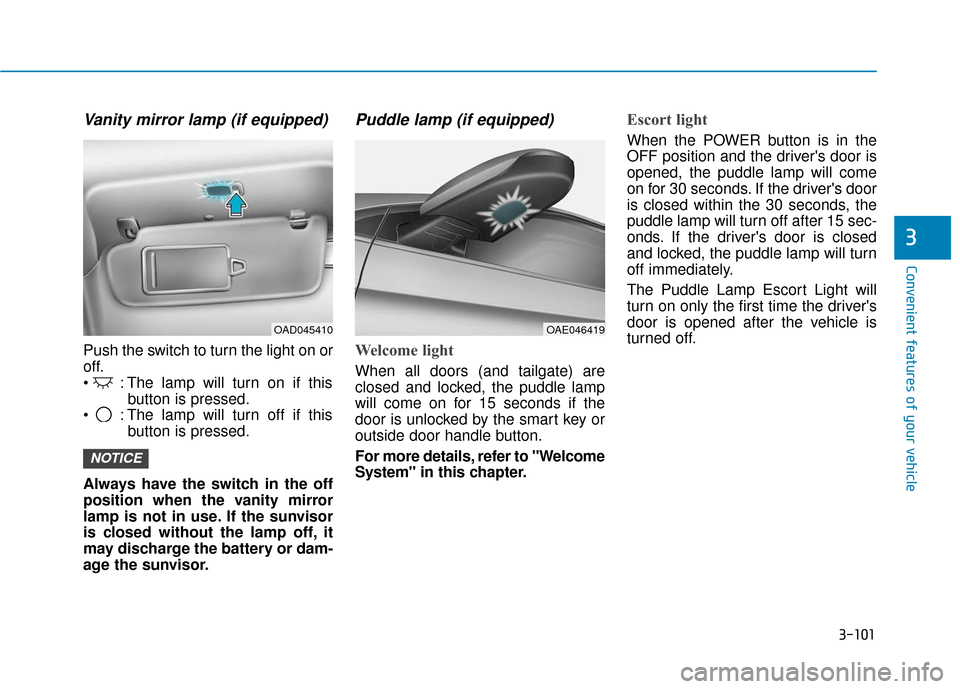
Vanity mirror lamp (if equipped)
Push the switch to turn the light on or
off.
: The lamp will turn on if thisbutton is pressed.
: The lamp will turn off if this button is pressed.
Always have the switch in the off
position when the vanity mirror
lamp is not in use. If the sunvisor
is closed without the lamp off, it
may discharge the battery or dam-
age the sunvisor.
Puddle lamp (if equipped)
Welcome light
When all doors (and tailgate) are
closed and locked, the puddle lamp
will come on for 15 seconds if the
door is unlocked by the smart key or
outside door handle button.
For more details, refer to "Welcome
System" in this chapter.
Escort light
When the POWER button is in the
OFF position and the driver's door is
opened, the puddle lamp will come
on for 30 seconds. If the driver's door
is closed within the 30 seconds, the
puddle lamp will turn off after 15 sec-
onds. If the driver's door is closed
and locked, the puddle lamp will turn
off immediately.
The Puddle Lamp Escort Light will
turn on only the first time the driver's
door is opened after the vehicle is
turned off.
NOTICE
OAE046419OAD045410
Page 187 of 541
3-102
Convenient features of your vehicle
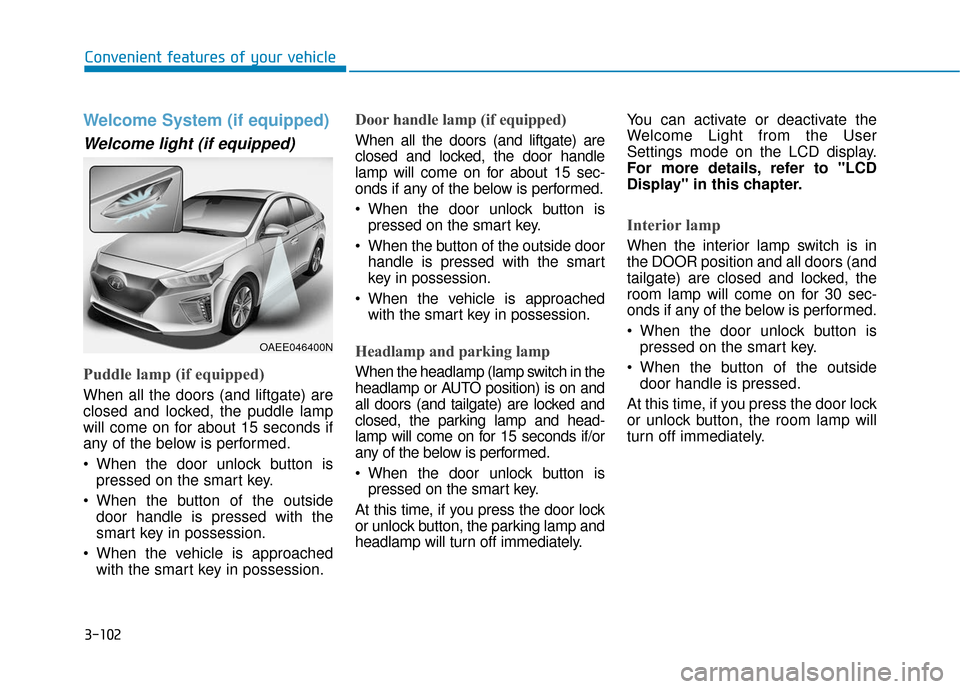
Welcome System (if equipped)
Welcome light (if equipped)
Puddle lamp (if equipped)
When all the doors (and liftgate) are
closed and locked, the puddle lamp
will come on for about 15 seconds if
any of the below is performed.
When the door unlock button ispressed on the smart key.
When the button of the outside door handle is pressed with the
smart key in possession.
When the vehicle is approached with the smart key in possession.
Door handle lamp (if equipped)
When all the doors (and liftgate) are
closed and locked, the door handle
lamp will come on for about 15 sec-
onds if any of the below is performed.
When the door unlock button ispressed on the smart key.
When the button of the outside door handle is pressed with the smart
key in possession.
When the vehicle is approached with the smart key in possession.
Headlamp and parking lamp
When the headlamp (lamp switch in the
headlamp or AUTO position) is on and
all doors (and tailgate) are locked and
closed, the parking lamp and head-
lamp will come on for 15 seconds if/or
any of the below is performed.
When the door unlock button ispressed on the smart key.
At this time, if you press the door lock
or unlock button, the parking lamp and
headlamp will turn off immediately. You can activate or deactivate the
Welcome Light from the User
Settings mode on the LCD display.
For more details, refer to "LCD
Display" in this chapter.
Interior lamp
When the interior lamp switch is in
the DOOR position and all doors (and
tailgate) are closed and locked, the
room lamp will come on for 30 sec-
onds if any of the below is performed.
When the door unlock button is
pressed on the smart key.
When the button of the outside door handle is pressed.
At this time, if you press the door lock
or unlock button, the room lamp will
turn off immediately.
OAEE046400N
Page 281 of 541
5-20
Driving your vehicle
Information
• For your safety, you can engage theEPB even though the POWER but-
ton is in the OFF position, but you
cannot release it.
• For your safety, depress the brake pedal and release the parking brake
manually with the EPB switch when
you drive downhill or when backing
up the vehicle.
If the parking brake warning light is still on even though the EPB
has been released, have the sys-
tem checked an authorized
HYUNDAI dealer.
Do not drive your vehicle with the EPB applied. It may cause
excessive brake pad and brake
rotor wear.
EPB (Electronic Parking Brake)
may be automatically applied
when:
Requested by other systems
The vehicle is turned off with theEPB applied
Information
If the driver turns the vehicle off while
Auto Hold is operating, EPB will be
automatically applied. However, if
you press the EPB switch within one
second after the vehicle is turned off,
the EPB will not be applied.
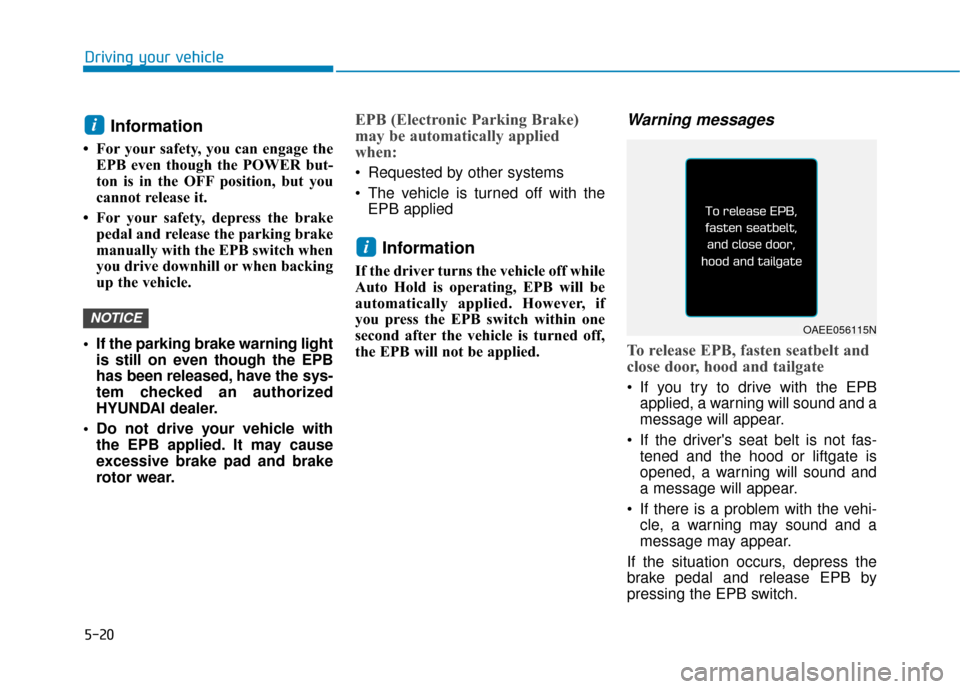
Warning messages
To release EPB, fasten seatbelt and
close door, hood and tailgate
If you try to drive with the EPBapplied, a warning will sound and a
message will appear.
If the driver's seat belt is not fas- tened and the hood or liftgate is
opened, a warning will sound and
a message will appear.
If there is a problem with the vehi- cle, a warning may sound and a
message may appear.
If the situation occurs, depress the
brake pedal and release EPB by
pressing the EPB switch.
i
NOTICE
i
OAEE056115N
Page 288 of 541
![Hyundai Ioniq Electric 2018 Owners Manual 5-27
Driving your vehicle
5
Press brake pedal to deactivate
AUTO HOLD
If you did not apply the brake pedal
when you release the Auto Hold by
pressing the [AUTO HOLD] switch, a
warning will sound and a](/manual-img/35/14904/w960_14904-287.png "Hyundai Ioniq Electric 2018 Owners Manual 5-27
Driving your vehicle
5
Press brake pedal to deactivate
AUTO HOLD
If you did not apply the brake pedal
when you release the Auto Hold by
pressing the [AUTO HOLD] switch, a
warning will sound and a")
5-27
Driving your vehicle
5
Press brake pedal to deactivate
AUTO HOLD
If you did not apply the brake pedal
when you release the Auto Hold by
pressing the [AUTO HOLD] switch, a
warning will sound and a message
will appear.
AUTO HOLD conditions not met.
Fasten seatbelt and close door, hood
and tailgate
When you press the [AUTO HOLD]
switch, if the driver's door, hood and
liftgate are not closed or the driver’s
seat belt is unfastened, a warning
will sound and a message will
appear on the LCD display.
Press the [AUTO HOLD] switch after
closing the driver’s door, hood and
liftgate and fastening the seat belt.
Anti-lock Brake System (ABS)
OAEE056116LOAEE056118N
An Anti-Lock Braking System
(ABS) or an Electronic Stability
Control (ESC) system will not
prevent accidents due to
improper or dangerous driving
maneuvers. Even though vehi-
cle control is improved during
emergency braking, always
maintain a safe distance
between you and objects ahead
of you. Vehicle speeds should
always be reduced during
extreme road conditions. The
braking distance for cars
equipped with ABS or ESC may
be longer than for those without
these systems in the following
road conditions.
Drive your vehicle at reduced
speeds during the following
conditions:
Rough, gravel or snow-cov-
ered roads.(Continued)
WARNING
Page 383 of 541
6-22
What to do in an emergency
When towing your vehicle in an
emergency without wheel dollies:
1. While depressing the brake pedal shift to the N (Neutral) position
and turn the vehicle off. The
POWER button will be in the ACC
position.
2. Release the parking brake.
Failure to shift to N (Neutral) may
cause internal damage to the vehi-
cle.
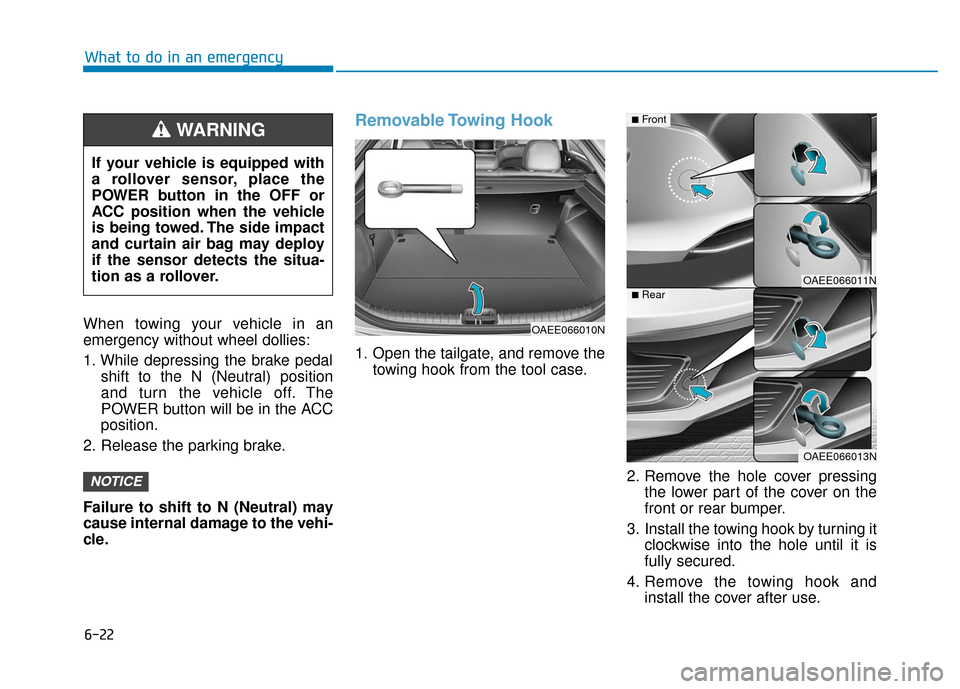
Removable Towing Hook
1. Open the tailgate, and remove the towing hook from the tool case.
2. Remove the hole cover pressingthe lower part of the cover on the
front or rear bumper.
3. Install the towing hook by turning it clockwise into the hole until it is
fully secured.
4. Remove the towing hook and install the cover after use.
NOTICE
If your vehicle is equipped with
a rollover sensor, place the
POWER button in the OFF or
ACC position when the vehicle
is being towed. The side impact
and curtain air bag may deploy
if the sensor detects the situa-
tion as a rollover.
WARNING
OAEE066010N
OAEE066011N
OAEE066013N
■Front
■Rear
Page 437 of 541
7-52
Maintenance
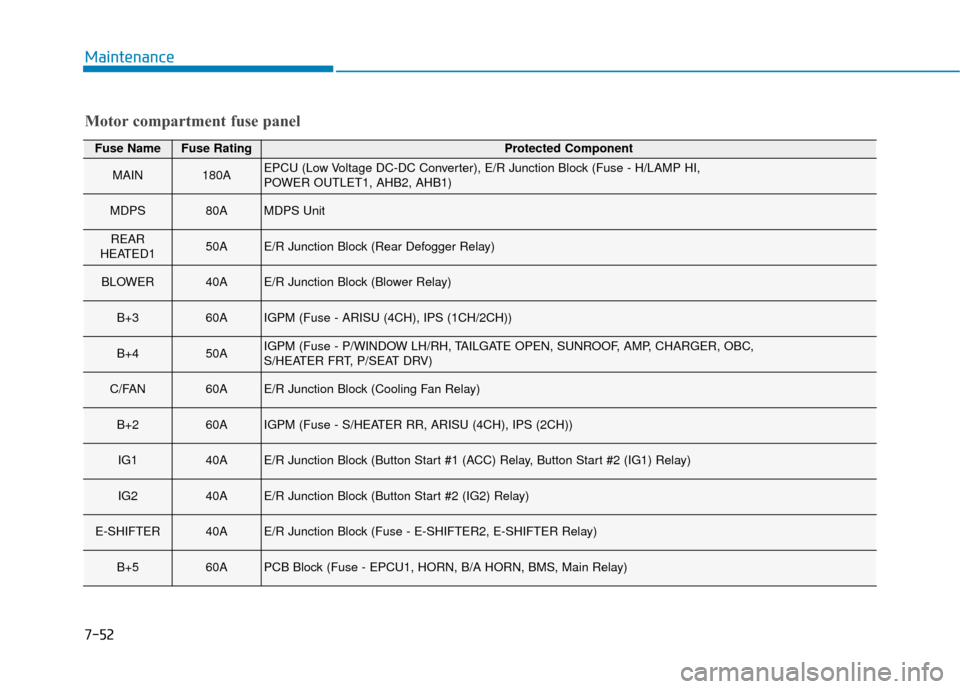
Motor compartment fuse panel
Fuse NameFuse RatingProtected Component
MAIN180AEPCU (Low Voltage DC-DC Converter), E/R Junction Block (Fuse - H/LAMP HI,
POWER OUTLET1, AHB2, AHB1)
MDPS80AMDPS Unit
REAR
HEATED150AE/R Junction Block (Rear Defogger Relay)
BLOWER40AE/R Junction Block (Blower Relay)
B+360AIGPM (Fuse - ARISU (4CH), IPS (1CH/2CH))
B+450AIGPM (Fuse - P/WINDOW LH/RH, TAILGATE OPEN, SUNROOF, AMP, CHARGER, OBC,
S/HEATER FRT, P/SEAT DRV)
C/FAN60AE/R Junction Block (Cooling Fan Relay)
B+260AIGPM (Fuse - S/HEATER RR, ARISU (4CH), IPS (2CH))
IG140AE/R Junction Block (Button Start #1 (ACC) Relay, Button Start #2 (IG1) Relay)
IG240AE/R Junction Block (Button Start #2 (IG2) Relay)
E-SHIFTER40AE/R Junction Block (Fuse - E-SHIFTER2, E-SHIFTER Relay)
B+560APCB Block (Fuse - EPCU1, HORN, B/A HORN, BMS, Main Relay)
Page 476 of 541
I-8
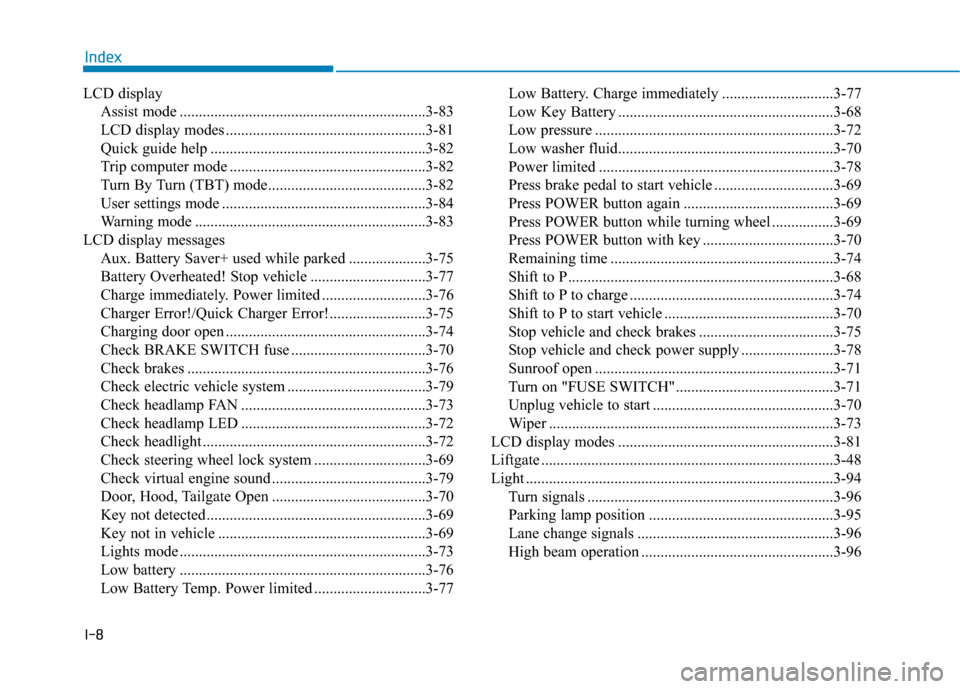
LCD displayAssist mode ................................................................3-83
LCD display modes ....................................................3-81
Quick guide help ........................................................3-82
Trip computer mode ...................................................3-82
Turn By Turn (TBT) mode.........................................3-82
User settings mode .....................................................3-84
Warning mode ............................................................3-83
LCD display messages Aux. Battery Saver+ used while parked ....................3-75
Battery Overheated! Stop vehicle ..............................3-77
Charge immediately. Power limited ...........................3-76
Charger Error!/Quick Charger Error!.........................3-75
Charging door open ....................................................3-74
Check BRAKE SWITCH fuse ...................................3-70
Check brakes ..............................................................3-76
Check electric vehicle system ....................................3-79
Check headlamp FAN ................................................3-73
Check headlamp LED ................................................3-72
Check headlight ..........................................................3-72
Check steering wheel lock system .............................3-69
Check virtual engine sound ........................................3-79
Door, Hood, Tailgate Open ........................................3-70
Key not detected .........................................................3-69
Key not in vehicle ......................................................3-69
Lights mode ................................................................3-73
Low battery ................................................................3-76
Low Battery Temp. Power limited .............................3-77 Low Battery. Charge immediately .............................3-77
Low Key Battery ........................................................3-68
Low pressure ..............................................................3-72
Low washer fluid........................................................3-70
Power limited .............................................................3-78
Press brake pedal to start vehicle ...............................3-69
Press POWER button again .......................................3-69
Press POWER button while turning wheel ................3-69
Press POWER button with key ..................................3-70
Remaining time ..........................................................3-74
Shift to P.....................................................................3-6\
8
Shift to P to charge .....................................................3-74
Shift to P to start vehicle ............................................3-70
Stop vehicle and check brakes ...................................3-75
Stop vehicle and check power supply ........................3-78
Sunroof open ..............................................................3-71
Turn on "FUSE SWITCH".........................................3-71
Unplug vehicle to start ...............................................3-70
Wiper ........................................................................\
..3-73
LCD display modes ........................................................3-81
Liftgate ........................................................................\
....3-48
Light ........................................................................\
........3-94 Turn signals ................................................................3-96
Parking lamp position ................................................3-95
Lane change signals ...................................................3-96
High beam operation ..................................................3-96
Index