Page 326 of 591
324
uuCustomized Features u
Features
*1:Default Setting
*2:Does not appear when you change the screen interface design.
*3:Appears only when you change the screen interface design.Setup
Group Customizable Features
DescriptionSelectable Settings
System Clock Clock/
Wallpaper
Type
*2/
Clock
Type
*3
Clock
See
Info on P. 315
Wallpaper
Clock Adjustment
Auto Time Zone
*
Manual Time Zone
Auto Daylight Saving Time
Clock Format
Clock Display
Overlay Clock Location
Clock Reset
Others Language Change the display language. English (United
States)
*1/
Français /
Español
* Not available on all models
18 CLARITY PHEV CSS-31TRW6000.book 324 ページ 2017年12月25日 月曜日 午後2時22分
Page 327 of 591
325
uuCustomized Features u
Continued
Features
*1:Default Setting
*2:Does not appear when you chan ge the screen interface design.
Setup
Group Customizable Features Description
Selectable Settings
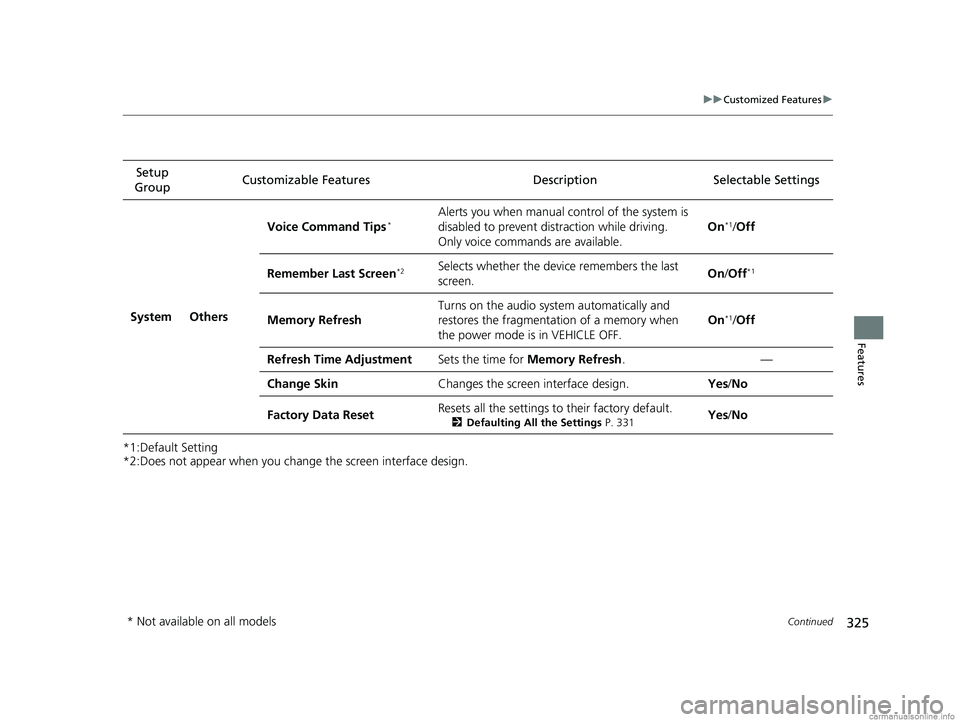
System Others Voice Command Tips
*Alerts you when manual c
ontrol of the system is
disabled to prevent distraction while driving.
Only voice comman ds are available. On*1/
Off
Remember Last Screen
*2Selects whether the device remembers the last
screen. On
/Off*1
Memory Refresh Turns on the audio system automatically and
restores the fragmentation of a memory when
the power mode is in VEHICLE OFF. On*1/
Off
Refresh Time Adjustment Sets the time for Memory Refresh . —
Change Skin Changes the screen interface design. Yes/No
Factory Data Reset Resets all the settings to their factory default.
2
Defaulting All the Settings P. 331Yes/No
* Not available on all models
18 CLARITY PHEV CSS-31TRW6000.book 325 ページ 2017年12月25日 月曜日 午後2時22分
Page 328 of 591
326
uuCustomized Features u
Features
*1:Default SettingSetup
Group Customizable Features Desc
ription Selectable Settings
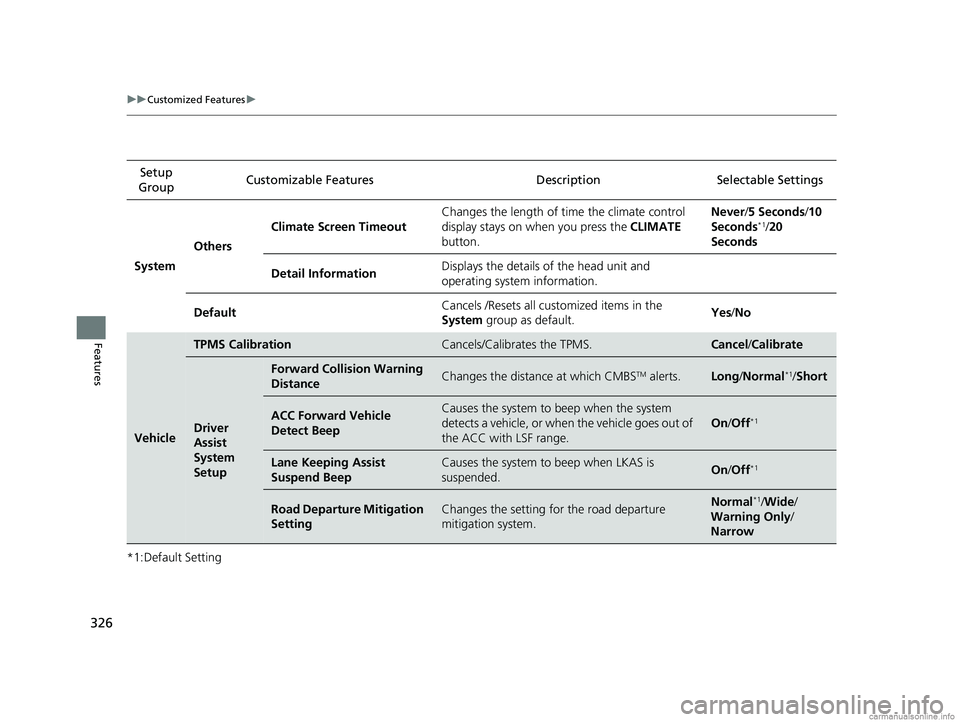
System Others Climate Screen Timeout
Changes the length of time the climate control
display stays on when you press the
CLIMATE
button. Never/
5 Seconds /10
Seconds
*1/ 20
Seconds
Detail Information Displays the details of the head unit and
operating system information.
Default Cancels /Resets all cust
omized items in the
System group as default. Yes
/No
Vehicle
TPMS CalibrationCancels/Calibrates the TPMS.Cancel /Calibrate
Driver
Assist
System
Setup
Forward Collision Warning
DistanceChanges the distance at which CMBSTM alerts.Long /Normal*1/Short
ACC Forward Vehicle
Detect BeepCauses the system to beep when the system
detects a vehicle, or when the vehicle goes out of
the ACC with LSF range.
On /Off*1
Lane Keeping Assist
Suspend BeepCauses the system to beep when LKAS is
suspended.On /Off*1
Road Departure Mitigation
SettingChanges the setting for the road departure
mitigation system.Normal*1/Wide /
Warning Only /
Narrow
18 CLARITY PHEV CSS-31TRW6000.book 326 ページ 2017年12月25日 月曜日 午後2時22分
Page 329 of 591
327
uuCustomized Features u
Continued
Features
*1:Default SettingSetup
Group Customizable Features Description Selectable Settings
VehicleMeter
Setup
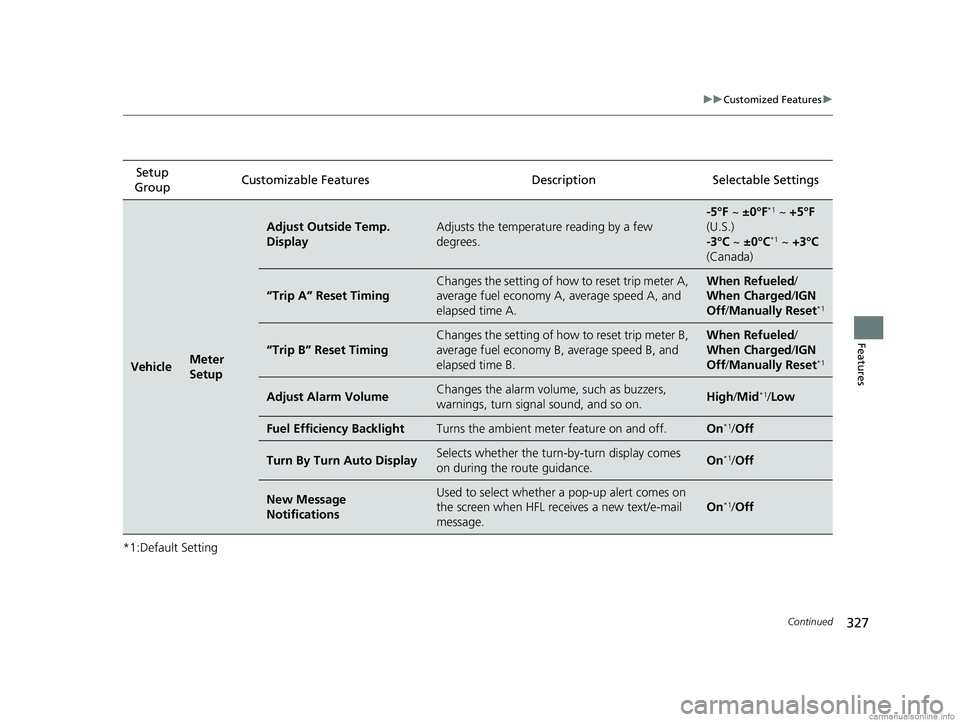
Adjust Outside Temp.
DisplayAdjusts the temperature reading by a few
degrees.
-5°F ~
±0°F*1 ~ +5°F
(U.S.)
-3°C ~ ±0°C
*1 ~ +3°C
(Canada)
“Trip A” Reset Timing
Changes the setting of how to reset trip meter A,
average fuel economy A, average speed A, and
elapsed time A.When Refueled /
When Charged/ IGN
Off /Manually Reset
*1
“Trip B” Reset Timing
Changes the setting of how to reset trip meter B,
average fuel economy B, average speed B, and
elapsed time B.When Refueled /
When Charged/ IGN
Off /Manually Reset
*1
Adjust Alarm VolumeChanges the alarm volu me, such as buzzers,
warnings, turn signal sound, and so on.High /Mid*1/ Low
Fuel Efficiency BacklightTurns the ambient meter feature on and off.On*1/Off
Turn By Turn Auto DisplaySelects whether the turn -by-turn display comes
on during the route guidance.On*1/ Off
New Message
NotificationsUsed to select whether a pop-up alert comes on
the screen when HFL receives a new text/e-mail
message.
On*1/Off
18 CLARITY PHEV CSS-31TRW6000.book 327 ページ 2017年12月25日 月曜日 午後2時22分
Page 332 of 591

330
uuCustomized Features u
Features
*1:Default SettingSetup
Group Customizable Features Desc
ription Selectable Settings
Vehicle
Door/
Window
Setup
Auto Door LockUsed to change the setting for when the doors
automatically lock.With Vehicle
Speed*1/ Shift from P /
Off
Auto Door UnlockChanges the setting for when the doors unlock
automatically.
All Doors When
Driver’s Door
Opens
*1/ All Doors
When Shifted to
Park/ All Doors When
Ignition Switched
Off /Off
Key and Remote Unlock
ModeSets up the driver’s door or all the doors to unlock
on the first push of the remote.Driver Door*1/All
Doors
Keyless Lock Answer BackLOCK/UNLOCK- The exterior lights flash.
LOCK (2nd push)- The beeper sounds.On*1/ Off
Security Relock Timer
Changes the time it takes for the doors to relock
and the security system to set after you unlock
the vehicle without opening any door.90seconds /
60seconds /
30seconds
*1
Walk Away Auto LockChanges the settings for the auto lock function
when you walk away from the vehicle.On /Off*1
Maintenance Info.Resets the Maintenance MinderTM display when
you have performed the maintenance service.—
18 CLARITY PHEV CSS-31TRW6000.book 330 ページ 2017年12月25日 月曜日 午後2時22分
Page 333 of 591
331
uuCustomized Features uDefaulting All the Settings
Features
Defaulting All the Settings
Reset all the menu and customized settings as the factory defaults.
1.Select .
2. Select Settings .
3. Select System.
4. Select the Others tab.
5. Select Factory Data Reset .
u A confirmation message appears on the
screen.
6. Select Yes to reset the settings.
7. Select Yes again to reset the settings.
u A confirmation message appears on the
screen. Select OK.
u After selecting OK, the system will
reboot.1 Defaulting All the Settings
When you transfer the vehicle to a third party, reset
all settings to default a nd delete all personal data.
If you perform Factory Data Reset , it will reset the
preinstalled apps to their factory default.
If you perform Factory Data Reset , you cannot use
the HondaLink ® because it becomes off line.
2 HondaLink ® P. 269
18 CLARITY PHEV CSS-31TRW6000.book 331 ページ 2017年12月25日 月曜日 午後2時22分
Page 342 of 591
340
uuBluetooth ® HandsFreeLink ®u HFL Menus
Features
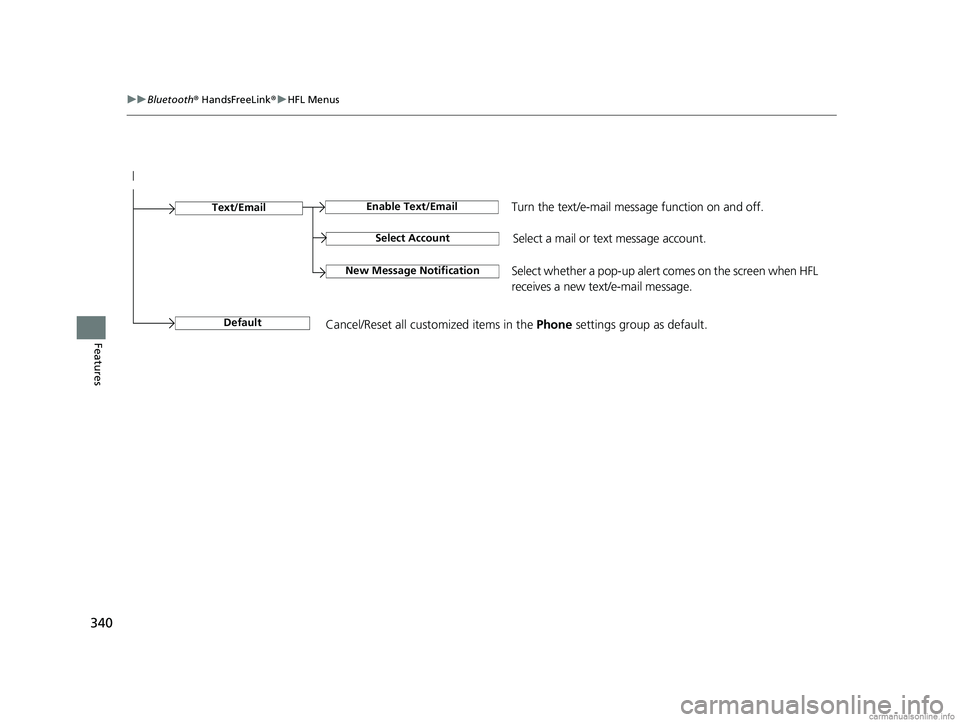
Select Account
Enable Text/EmailText/Email
New Message NotificationSelect whether a pop-up alert co mes on the screen when HFL
receives a new text/e-mail message.
Turn the text/e-mail message function on and off.
Select a mail or te xt message account.
DefaultCancel/Reset all customized items in the Phone settings group as default.
18 CLARITY PHEV CSS-31TRW6000.book 340 ページ 2017年12月25日 月曜日 午後2時22分
Page 478 of 591
476
uuMaintenance MinderTMuTo Use Maintenance MinderTM
Maintenance
The system message indicator ( ) comes on al ong with the Maintenance Minder message.
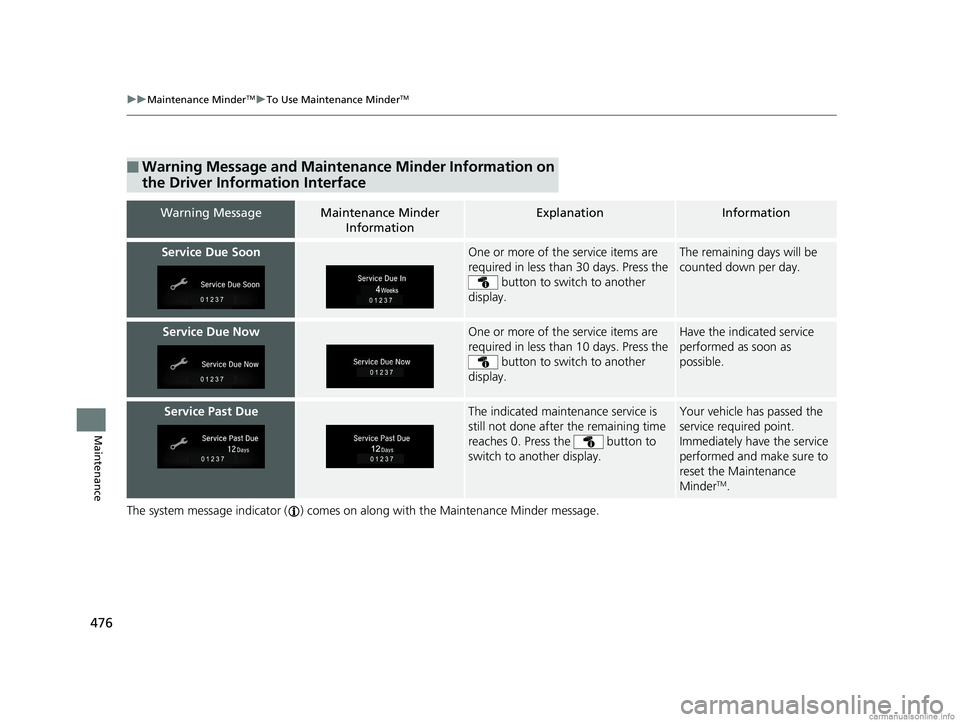
■Warning Message and Maintenance Minder Information on
the Driver Information Interface
Warning MessageMaintenance Minder
InformationExplanationInformation
Service Due SoonOne or more of the service items are
required in less than 30 days. Press the button to switch to another
display.The remaining days will be
counted down per day.
Service Due NowOne or more of the service items are
required in less than 10 days. Press the button to switch to another
display.Have the indicated service
performed as soon as
possible.
Service Past DueThe indicated maintenance service is
still not done after the remaining time
reaches 0. Press the button to
switch to another display.Your vehicle has passed the
service required point.
Immediately have the service
performed and make sure to
reset the Maintenance
Minder
TM.
18 CLARITY PHEV CSS-31TRW6000.book 476 ページ 2017年12月25日 月曜日 午後2時22分