Page 314 of 591
312
uuCustomized Features u
Features
Driver Assist System SetupForward Collision Warning Distance
ACC Forward Vehicle Detect Beep
Lane Keeping Assist Suspend Beep
Road Departure Mi tigation Setting
Adjust Outside Temp. Display
“Trip A” Reset Timing
“Trip B” Reset Timing
Vehicle
Meter Setup
Adjust Alarm Volume
New Message Notifications
Turn By Turn Auto Display
Reverse Alert Tone
CancelTPMS Calibration
Calibrate
Fuel Efficiency Backlight
Memory Position LinkDriving Position Setup*Speed/Distance Units
* Not available on all models
18 CLARITY PHEV CSS-31TRW6000.book 312 ページ 2017年12月25日 月曜日 午後2時22分
Page 316 of 591
314
uuCustomized Features u
Features
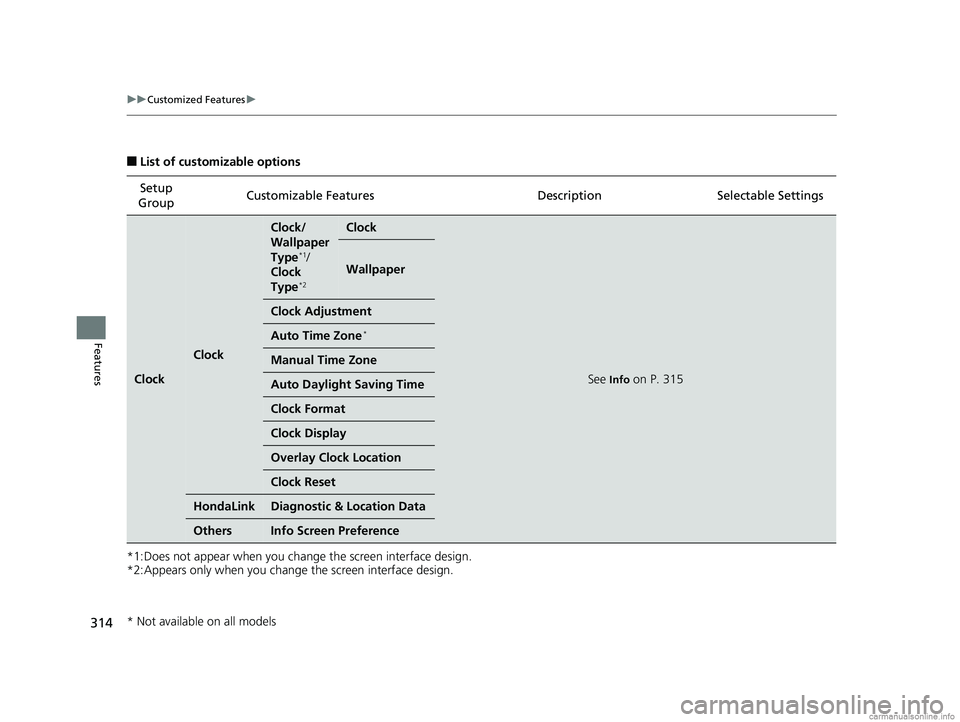
■List of customizable options
*1:Does not appear when you change the screen interface design.
*2:Appears only when you change the screen interface design. Setup
Group Customizable Features Descri
ption Selectable Settings
Clock
Clock
Clock/
Wallpaper
Type
*1/
Clock
Type
*2
Clock
See Info on P. 315
Wallpaper
Clock Adjustment
Auto Time Zone*
Manual Time Zone
Auto Daylight Saving Time
Clock Format
Clock Display
Overlay Clock Location
Clock Reset
HondaLinkDiagnostic & Location Data
OthersInfo Screen Preference
* Not available on all models
18 CLARITY PHEV CSS-31TRW6000.book 314 ページ 2017年12月25日 月曜日 午後2時22分
Page 317 of 591
315
uuCustomized Features u
Continued
Features
*1:Default Setting
*2:Does not appear when you chan ge the screen interface design.
*3:Appears only when you change the screen interface design. Setup
Group Customizable Features Description Selectable Settings
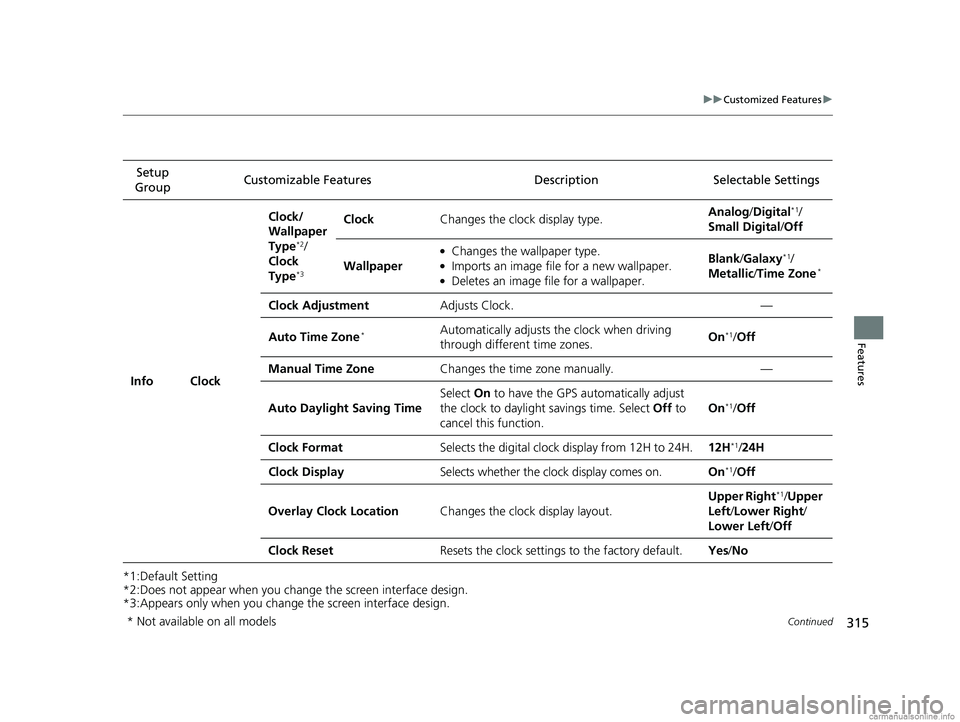
Info Clock Clock/
Wallpaper
Type
*2/
Clock
Type
*3
Clock Changes the clock display type. Analog
/Digital*1/
Small Digital /Off
Wallpaper
●Changes the wallpaper type.●Imports an image file for a new wallpaper.●Deletes an image file for a wallpaper. Blank
/Galaxy
*1/
Metallic /Time Zone*
Clock Adjustment Adjusts Clock. —
Auto Time Zone
*Automatically adjusts the clock when driving
through different time zones. On*1/
Off
Manual Time Zone Changes the time zone manually. —
Auto Daylight Saving Time Select
On to have the GPS automatically adjust
the clock to daylight savings time. Select Off to
cancel this function. On
*1/
Off
Clock Format Selects the digital clock display from 12H to 24H. 12H
*1/24H
Clock Display Selects whether the clock display comes on. On
*1/Off
Overlay Clock Location Changes the clock display layout. Upper Right
*1/
Upper
Left/ Lower Right/
Lower Left /Off
Clock Reset Resets the clock settings to the factory default. Yes/No
* Not available on all models
18 CLARITY PHEV CSS-31TRW6000.book 315 ページ 2017年12月25日 月曜日 午後2時22分
Page 319 of 591
317
uuCustomized Features u
Continued
Features
*1:Default SettingSetup
Group Customizable Features Descri
ption Selectable Settings
Camera
Rear
Camera
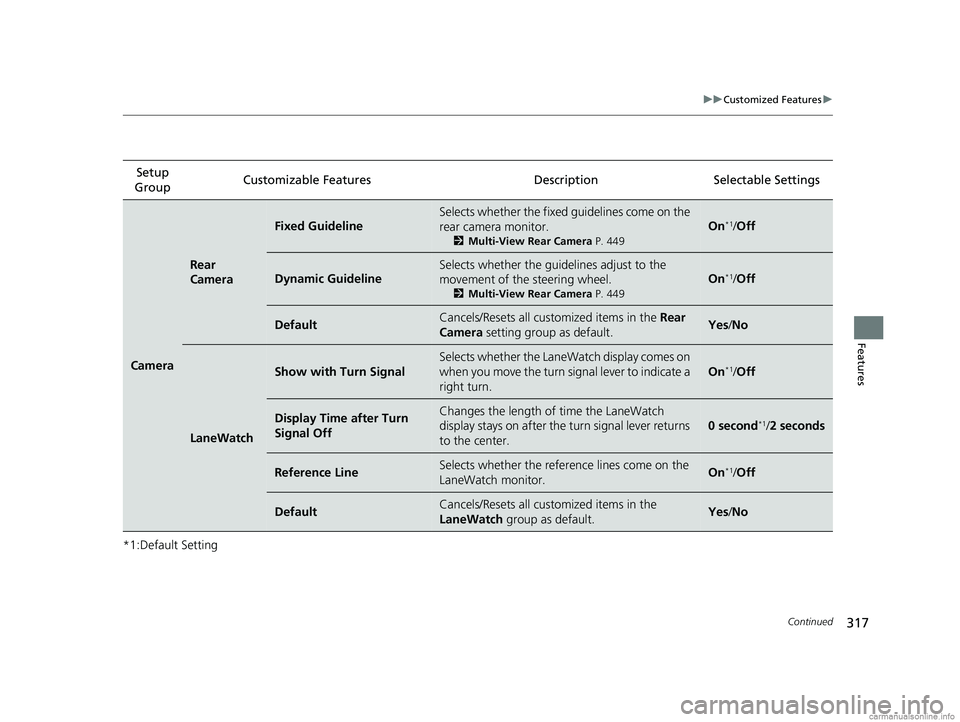
Fixed Guideline
Selects whether the fixed guidelines come on the
rear camera monitor.
2Multi-View Rear Camera P. 449
On*1/Off
Dynamic Guideline
Selects whether the guidelines adjust to the
movement of the steering wheel.
2 Multi-View Rear Camera P. 449
On*1/Off
DefaultCancels/Resets all cust omized items in the Rear
Camera setting group as default.Yes /No
LaneWatch
Show with Turn Signal
Selects whether the LaneWatch display comes on
when you move the turn signal lever to indicate a
right turn.
On*1/Off
Display Time after Turn
Signal OffChanges the length of time the LaneWatch
display stays on after the turn signal lever returns
to the center.
0 second*1/ 2 seconds
Reference LineSelects whether the refere nce lines come on the
LaneWatch monitor.On*1/ Off
DefaultCancels/Resets all cust omized items in the
LaneWatch group as default.Yes/No
18 CLARITY PHEV CSS-31TRW6000.book 317 ページ 2017年12月25日 月曜日 午後2時22分
Page 320 of 591
318
uuCustomized Features u
Features
*1:Default SettingSetup
Group Customizable Featur
es Description Sel ectable Settings
Bluetooth/
Wi-Fi Bluetooth
Bluetooth On/Off Status
Changes the Bluetooth® status. On
*1/Off
Bluetooth Device List Pairs a new phone to HFL, edits or deletes a
paired phone.
2
Phone Setup P. 343
—
Edit Pairing Code Edits a pairing code.
2
To change the pairing code setting P. 344Random/Fixed*1
Wi-Fi Wi-Fi On/Off Status
Changes the Wi-Fi mode. On/Off
*1
Wi-Fi Device List Connects, disconnects, or deletes the Wi-Fi
device. —
Wi-Fi Information Shows the Wi-Fi information of the head unit. —
Default Cancels/Resets all customized items in the
Bluetooth/Wi-Fi
group as default. Yes
/No
Smartphone
Apple CarPlaySets up the Apple CarPlay connection.—
Android AutoSets up the Android Auto connection.—
DefaultCancels/Resets all customized items in the
Smartphone group as default.Yes/No
18 CLARITY PHEV CSS-31TRW6000.book 318 ページ 2017年12月25日 月曜日 午後2時22分
Page 321 of 591
319
uuCustomized Features u
Continued
Features
*1:Default SettingSetup
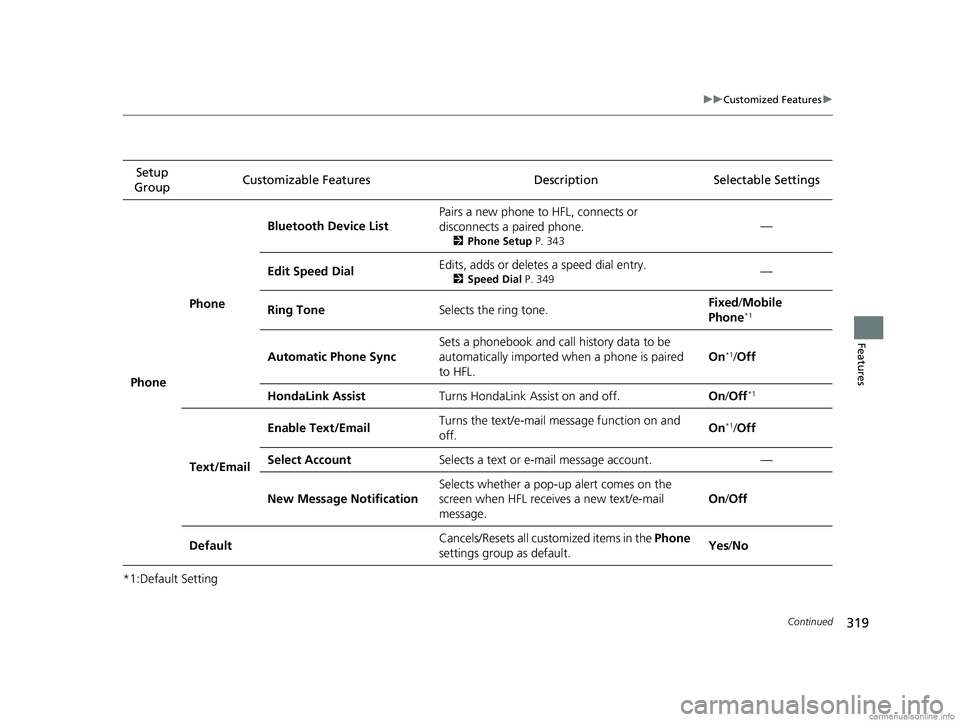
Group Customizable Features Description Selectable Settings
Phone Phone
Bluetooth Device List
Pairs a new phone to HFL, connects or
disconnects a paired phone.
2
Phone Setup P. 343
—
Edit Speed Dial Edits, adds or deletes a speed dial entry.
2
Speed Dial P. 349—
Ring Tone Selects the ring tone. Fixed
/Mobile
Phone
*1
Automatic Phone Sync Sets a phonebook and call history data to be
automatically imported when a phone is paired
to HFL. On*1/
Off
HondaLink Assist Turns HondaLink Assist on and off. On/Off
*1
Text/Email Enable Text/Email
Turns the text/e-mail
message function on and
off. On
*1/
Off
Select Account Selects a text or e-mail message account. —
New Message Notification Selects whether a pop-up
alert comes on the
screen when HFL receives a new text/e-mail
message. On
/Off
Default Cancels/Resets all customized items in the
Phone
settings group as default. Yes
/No
18 CLARITY PHEV CSS-31TRW6000.book 319 ページ 2017年12月25日 月曜日 午後2時22分
Page 322 of 591
320
uuCustomized Features u
Features
*1:Default SettingSetup
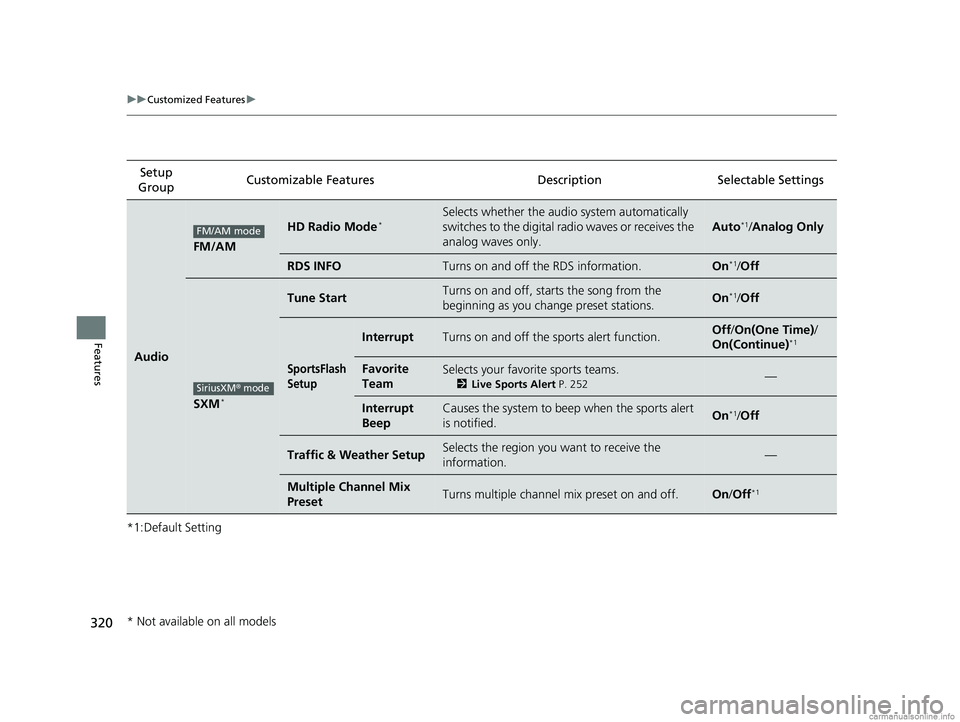
Group Customizable Features Description Selectable Settings
Audio
FM/AM
HD Radio Mode*Selects whether the audi
o system automatically
switches to the digital radio waves or receives the
analog waves only.
Auto*1/ Analog Only
RDS INFOTurns on and off the RDS information.On*1/Off
SXM*
Tune StartTurns on and off, starts the song from the
beginning as you change preset stations.On*1/Off
SportsFlash
Setup
InterruptTurns on and off the sp orts alert function.Off/On(One Time) /
On(Continue)*1
Favorite
TeamSelects your favorite sports teams.
2 Live Sports Alert P. 252—
Interrupt
BeepCauses the system to beep when the sports alert
is notified.On*1/ Off
Traffic & Weather SetupSelects the region you want to receive the
information.—
Multiple Channel Mix
PresetTurns multiple channel mix preset on and off.On /Off*1
FM/AM mode
SiriusXM® mode
* Not available on all models
18 CLARITY PHEV CSS-31TRW6000.book 320 ページ 2017年12月25日 月曜日 午後2時22分
Page 323 of 591
321
uuCustomized Features u
Continued
Features
*1:Default Setting
*2:Appears only when you change the screen interface design.Setup
Group Customizable Features Descri
ption Selectable Settings
Audio
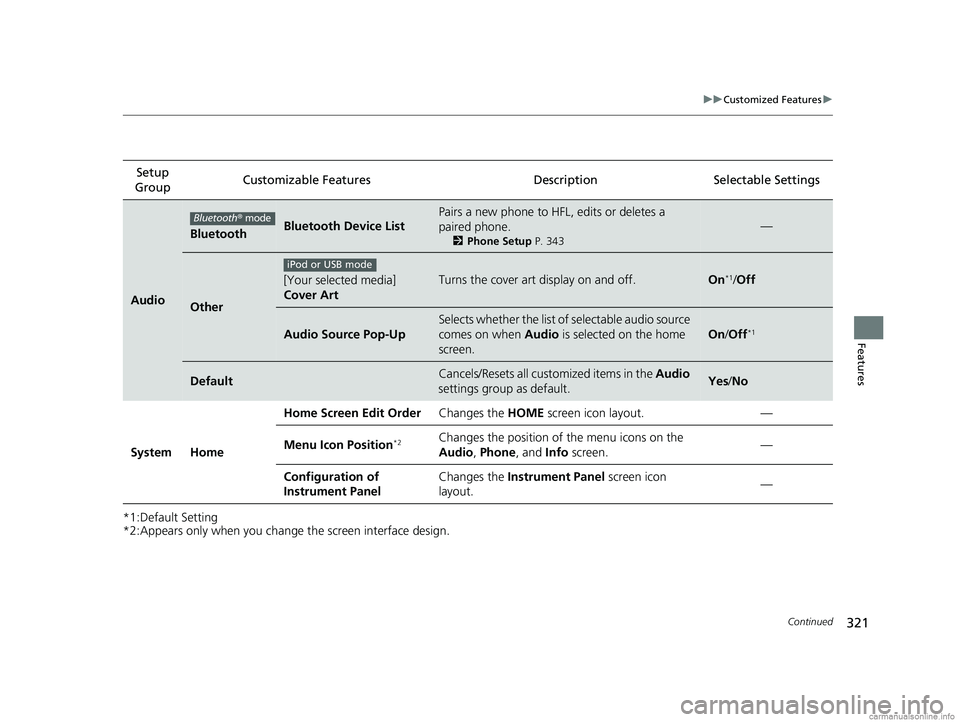
BluetoothBluetooth Device List
Pairs a new phone to HFL, edits or deletes a
paired phone.
2Phone Setup P. 343
—
Other
[Your selected media]
Cover ArtTurns the cover art display on and off.On*1/Off
Audio Source Pop-Up
Selects whether the list of selectable audio source
comes on when Audio is selected on the home
screen.
On /Off*1
DefaultCancels/Resets all customized items in the Audio
settings group as default.Yes /No
System Home Home Screen Edit Order
Changes the HOME screen icon layout. —
Menu Icon Position
*2Changes the position of the menu icons on the
Audio, Phone, and Info screen. —
Configuration of
Instrument Panel Changes the
Instrument Panel screen icon
layout. —
Bluetooth
® mode
iPod or USB mode
18 CLARITY PHEV CSS-31TRW6000.book 321 ページ 2017年12月25日 月曜日 午後2時22分