Page 163 of 591
161uu Operating the Switches Around the Steering Wheel u Turn Signals
Controls
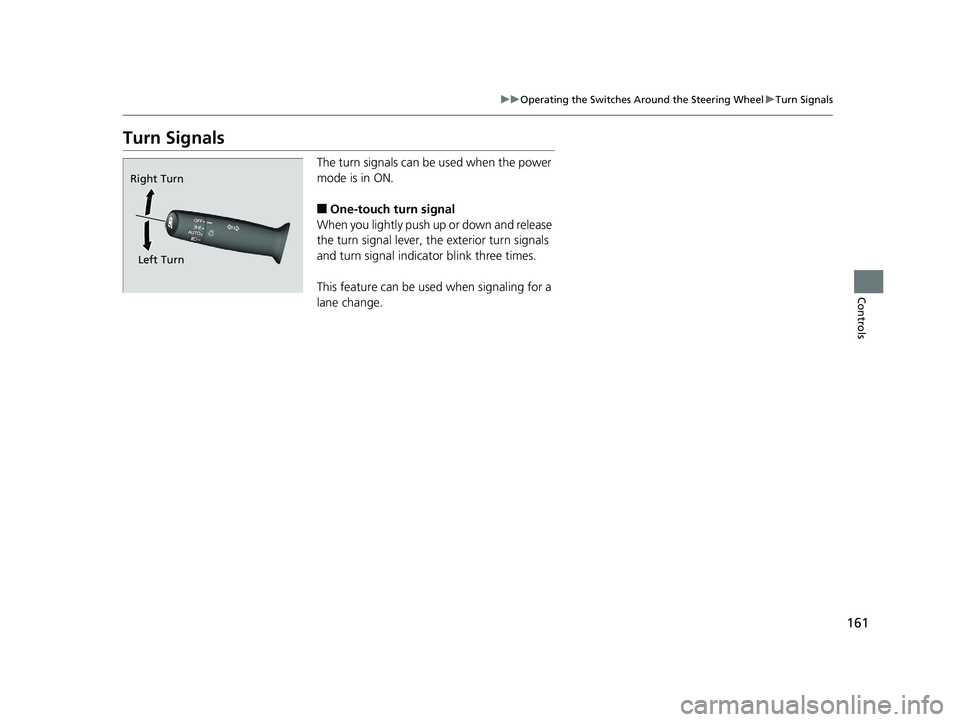
Turn Signals The turn signals can be used when the power
mode is in ON.
■ One-touch turn signal
When you lightly push up or down and release
the turn signal lever, th e exterior turn signals
and turn signal indicator blink three times.
This feature can be used when signaling for a
lane change.Right Turn
Left Turn18 CLARITY PHEV CSS-31TRW6000.book 161 ページ 2017年8月31日 木曜日 午後2時49分
Page 245 of 591
243uu Audio System Basic Operation u Playing AM/FM Radio
Continued
Features
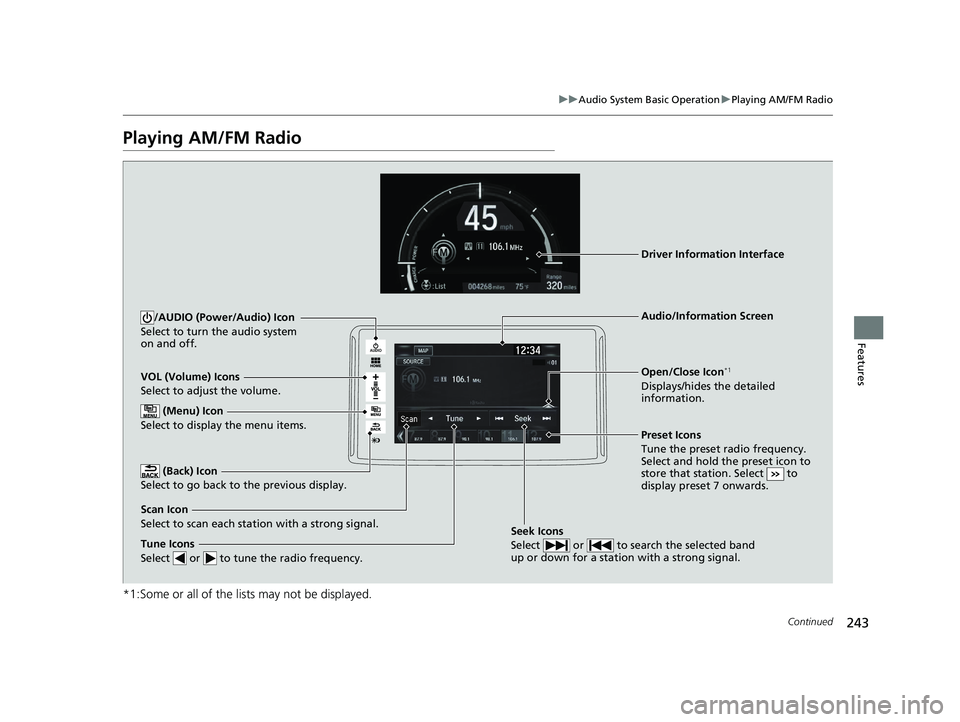
Playing AM/FM Radio
*1:Some or all of the lists may not be displayed. VOL (Volume) Icons
Select to adjust the volume.
(Back) Icon
Select to go back to the previous display. /AUDIO (Power/Audio) Icon
Select to turn the audio system
on and off.
Open/Close Icon *1
Displays/hides the detailed
information.
(Menu) Icon
Select to display the menu items.
Tune Icons
Select or to tune the radio frequency. Audio/Information Screen
Scan Icon
Select to scan each station with a strong signal. Preset Icons
Tune the preset radio frequency.
Select and hold the preset icon to
store that station. Select to
display preset 7 onwards.Driver Information Interface
Seek Icons
Select or to search the selected band
up or down for a station with a strong signal.18 CLARITY PHEV CSS-31TRW6000.book 243 ページ 2017年8月31日 木曜日 午後2時49分
Page 247 of 591
Continued
245uu Audio System Basic Operation u Playing AM/FM Radio
Features
Samples each of the strongest stations on th e selected band for 10 seconds. To turn
off scan, select Cancel or .
Displays the subchannel list when an HD Radio TM
station is selected while listening to
an FM station.
1. Select .
2. Select HD Radio Subchannel .
3. Select the channel number.
Provides text data information related to your selected RDS-capable FM station.
■ To find an RDS station from Station List
1. Select the open/close icon to display a list while listening to an FM station.
2. Select the Station List tab.
3. Select the station.
■ Manual update
Updates your available st ation list at any time.
1. Select the open/close icon to display a list while listening to an FM station.
2. Select the Station List tab.
3. Select Refresh .■ Scan
■ HD Subchannel
■ Radio Data System (RDS) Models with HD Radio TM
feature
1 Radio Data System (RDS)
When you select an RDS-capable FM station, the RDS
automatically turns on, and the frequency display
changes to the station name. However, when the
signals of that station become weak, the display
changes from the statio n name to the frequency.18 CLARITY PHEV CSS-31TRW6000.book 245 ページ 2017年8月31日 木曜日 午後2時49分
Page 310 of 591
308 uu Customized Features u
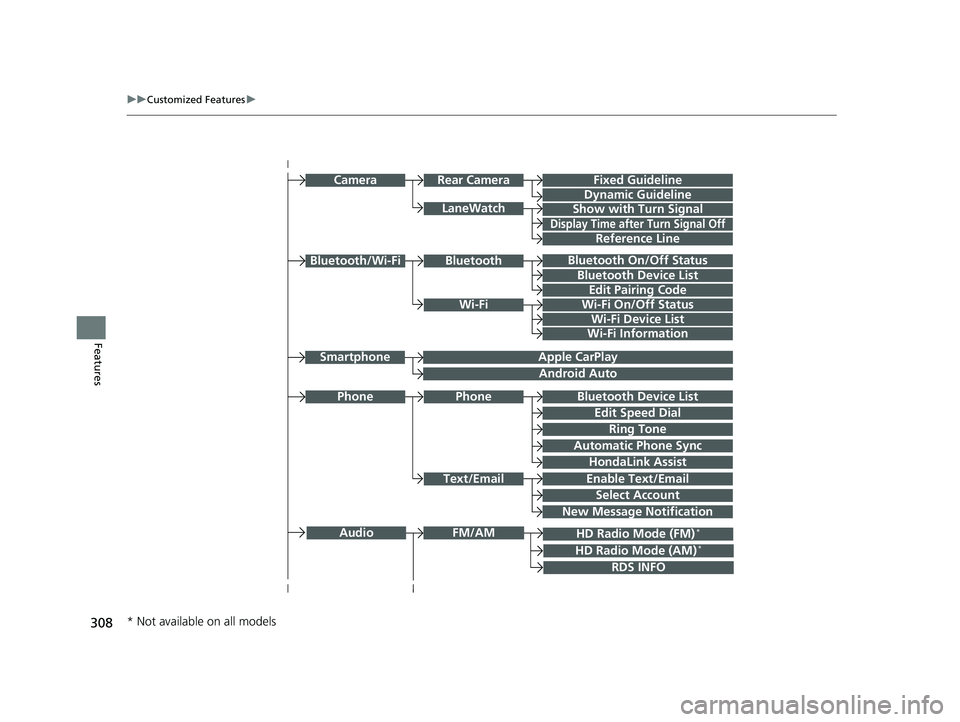
Features Bluetooth On/Off Status
Bluetooth Device List
Edit Pairing Code
Wi-Fi On/Off Status
Wi-Fi Device ListWi-FiBluetoothBluetooth/Wi-Fi
Wi-Fi Information
Text/Email Bluetooth Device List
Edit Speed Dial
Ring TonePhone
Automatic Phone Sync
HondaLink Assist
Enable Text/Email
Select Account
New Message NotificationPhone LaneWatch Fixed Guideline
Dynamic Guideline
Show with Turn SignalRear CameraCamera
Display Time after Turn Signal Off
Reference Line
HD Radio Mode (FM) *
RDS INFOAudio FM/AM
HD Radio Mode (AM) *Apple CarPlay
Android AutoSmartphone
* Not available on all models 18 CLARITY PHEV CSS-31TRW6000.book 308 ページ 2017年8月31日 木曜日 午後2時49分
Page 319 of 591
317 uu Customized Features u
Continued
Features
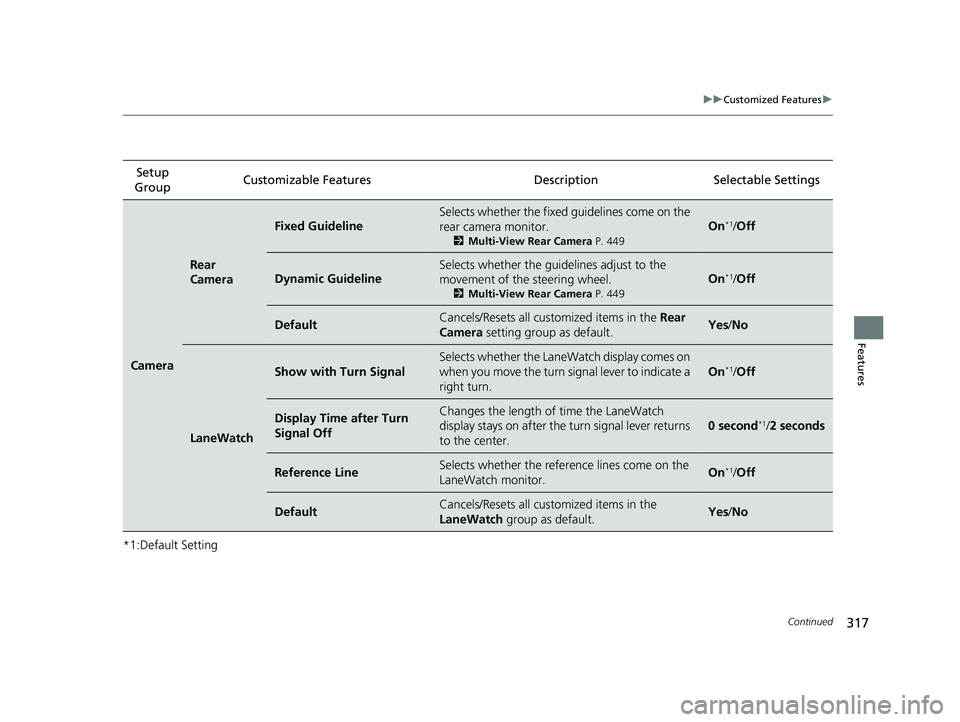
*1:Default Setting Setup
Group Customizable Features Descri ption Selectable Settings
Camera Rear
Camera Fixed Guideline Selects whether the fixed guidelines come on the
rear camera monitor. 2 Multi-View Rear Camera P. 449
On *1
/ Off
Dynamic Guideline Selects whether the guide lines adjust to the
movement of the steering wheel. 2 Multi-View Rear Camera P. 449
On *1
/ Off
Default Cancels/Resets all cust omized items in the Rear
Camera setting group as default. Yes / No
LaneWatch Show with Turn Signal Selects whether the LaneWatch display comes on
when you move the turn signal lever to indicate a
right turn. On *1
/ Off
Display Time after Turn
Signal Off Changes the length of time the LaneWatch
display stays on after the turn signal lever returns
to the center. 0 second *1
/ 2 seconds
Reference Line Selects whether the reference lines come on the
LaneWatch monitor. On *1
/ Off
Default Cancels/Resets all cust omized items in the
LaneWatch group as default. Yes / No18 CLARITY PHEV CSS-31TRW6000.book 317 ページ 2017年8月31日 木曜日 午後2時49分
Page 329 of 591
327 uu Customized Features u
Continued
Features
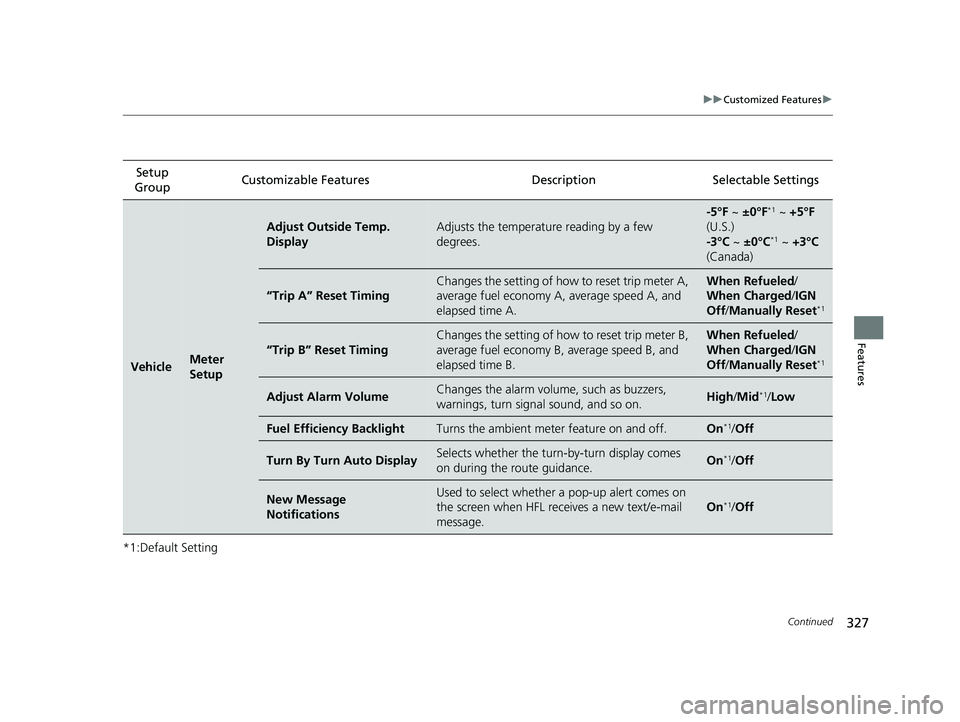
*1:Default Setting Setup
Group Customizable Features Description Selectable Settings
Vehicle Meter
Setup Adjust Outside Temp.
Display Adjusts the temperature reading by a few
degrees. -5°F ~ ±0°F *1
~ +5°F
(U.S.)
-3°C ~ ±0°C *1
~ +3°C
(Canada)
“Trip A” Reset Timing Changes the setting of how to reset trip meter A,
average fuel economy A, average speed A, and
elapsed time A. When Refueled /
When Charged / IGN
Off / Manually Reset *1
“Trip B” Reset Timing Changes the setting of how to reset trip meter B,
average fuel economy B, average speed B, and
elapsed time B. When Refueled /
When Charged / IGN
Off / Manually Reset *1
Adjust Alarm Volume Changes the alarm volu me, such as buzzers,
warnings, turn signal sound, and so on. High / Mid *1
/ Low
Fuel Efficiency Backlight Turns the ambient meter feature on and off. On *1
/ Off
Turn By Turn Auto Display Selects whether the turn -by-turn display comes
on during the route guidance. On *1
/ Off
New Message
Notifications Used to select whether a pop-up alert comes on
the screen when HFL receives a new text/e-mail
message. On *1
/ Off18 CLARITY PHEV CSS-31TRW6000.book 327 ページ 2017年8月31日 木曜日 午後2時49分
Page 398 of 591
396 uu When Driving u Road Departure Mitigation (RDM) System
Driving Road Departure Mitigation (RDM) System Alerts and helps to assist you when the system detects a possibility of your vehicle
unintentionally crossing over detected la ne markings and/or leaving the roadway
altogether.
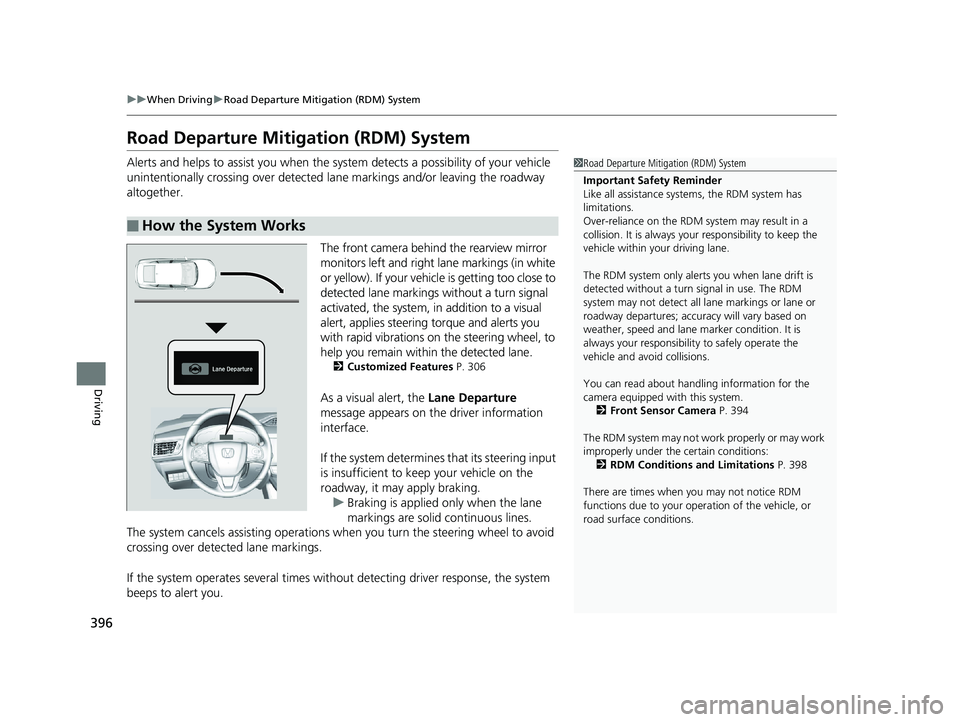
The front camera behind the rearview mirror
monitors left and right lane markings (in white
or yellow). If your vehicl e is getting too close to
detected lane markings without a turn signal
activated, the system, in addition to a visual
alert, applies steering torque and alerts you
with rapid vibrations on the steering wheel, to
help you remain within the detected lane. 2 Customized Features P. 306
As a visual alert, the Lane Departure
message appears on the driver information
interface.
If the system determines that its steering input
is insufficient to keep your vehicle on the
roadway, it may apply braking.
u Braking is applied only when the lane
markings are solid continuous lines.
The system cancels assisting operations when you turn th e steering wheel to avoid
crossing over detected lane markings.
If the system operates several times without detecting driver response, the system
beeps to alert you.■ How the System Works 1 Road Departure Mitigation (RDM) System
Important Safety Reminder
Like all assistance systems, the RDM system has
limitations.
Over-reliance on the RDM system may result in a
collision. It is always your responsibility to keep the
vehicle within your driving lane.
The RDM system only alerts you when lane drift is
detected without a turn signal in use. The RDM
system may not detect all la ne markings or lane or
roadway departures; accu racy will vary based on
weather, speed and lane marker condition. It is
always your responsibilit y to safely operate the
vehicle and avoid collisions.
You can read about handling information for the
camera equipped with this system.
2 Front Sensor Camera P. 394
The RDM system may not wo rk properly or may work
improperly under the certain conditions:
2 RDM Conditions and Limitations P. 398
There are times when you may not notice RDM
functions due to your opera tion of the vehicle, or
road surface conditions.18 CLARITY PHEV CSS-31TRW6000.book 396 ページ 2017年8月31日 木曜日 午後2時49分
Page 399 of 591
Continued
397uu When Driving u Road Departure Mitigation (RDM) System
Driving
The system becomes ready to start sear ching for lane mark ings when all the
following conditions are met:
• The vehicle is traveling between about 45 and 90 mph (72 and 145 km/h).
• The vehicle is on a straight or slightly curved road.
• The turn signals are off.
• The brake pedal is not depressed.
• The wipers are not in continuous operation.
• The vehicle is not accelera ting or braking, and the steering wheel is not being
turned.
• The system makes a determination that th e driver is not actively accelerating,
braking or steering.■ How the System Activates 1 How the System Activates
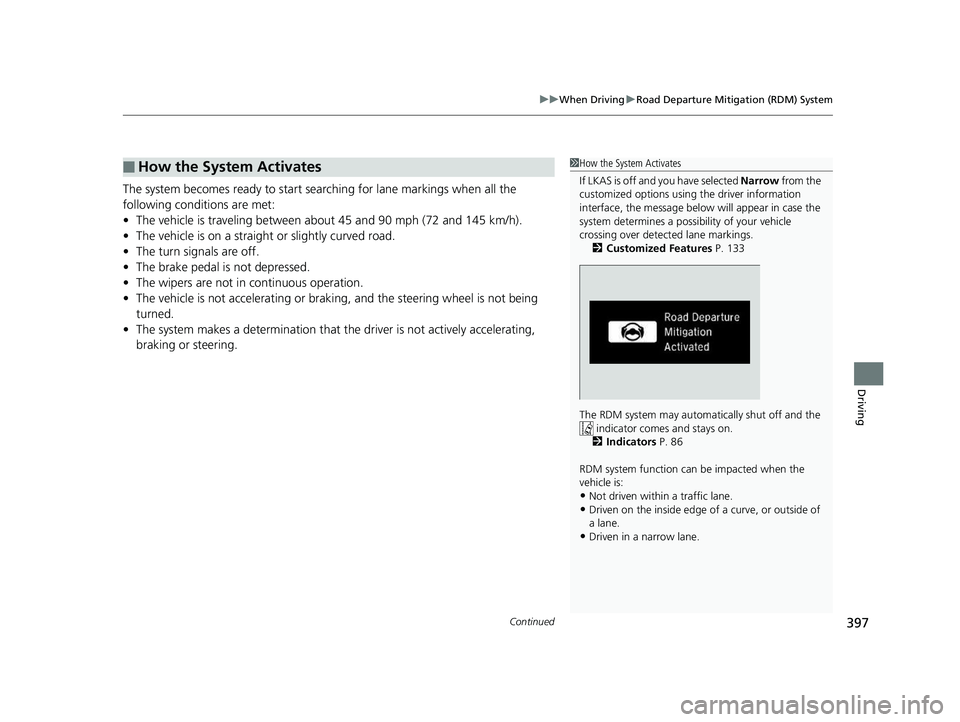
If LKAS is off and you have selected Narrow from the
customized options using the driver information
interface, the message below will appear in case the
system determines a possibility of your vehicle
crossing over detect ed lane markings.
2 Customized Features P. 133
The RDM system may automa tically shut off and the
indicator comes and stays on.
2 Indicators P. 86
RDM system function can be impacted when the
vehicle is:
• Not driven within a traffic lane.
• Driven on the inside edge of a curve, or outside of
a lane.
• Driven in a narrow lane.18 CLARITY PHEV CSS-31TRW6000.book 397 ページ 2017年8月31日 木曜日 午後2時49分