2018 FORD TRANSIT lock
[x] Cancel search: lockPage 253 of 521

Parking Lamp and Direction Indicator
Lamp
1. Remove the headlamp. See
Removing a Headlamp (page 248).
2. Turn the bulb holder counterclockwise
and remove it.
3. Remove the bulb by pulling it straight out.
Headlamp Low Beam and Daytime
Running Lamp 1. Remove the headlamp. See
Removing a Headlamp
(page 248).
2. Remove the cover.
3. Turn the bulb counterclockwise and remove it.
4. Disconnect the electrical connector.
Note: Do not touch the bulb glass. Note:
You cannot separate the bulb from
the bulb holder.
Headlamp High Beam 1. Remove the headlamp. See
Removing a Headlamp
(page 248).
2. Remove the cover.
3. Turn the bulb counterclockwise and remove it.
4. Disconnect the electrical connector.
Note: Do not touch the bulb glass.
Note: You cannot separate the bulb from
the bulb holder.
250
2018 Transit (TTH) Canada/United States of America, JK3J 19A321 AA enUSA, Edition date: 201705, Third-Printing- Maintenance3
E175741
2 43
2
E175742 4
3
2E175743
Page 254 of 521

Front Clearance Lamp (If Equipped)
1. Carefully remove the lamp.
2.
Turn the bulb holder counterclockwise
and remove it.
3. Remove the bulb by pulling it straight out. Side Direction Indicator (If Equipped) 1. Remove the large mirror glass. Tilt the
mirror glass fully up, pull the mirror
glass toward you from the bottom.
2. Remove the small mirror glass. Tilt the
mirror glass fully down, pull the mirror
glass toward you from the top.
3. Remove the screws.
4. Remove the lamp lens.
5. Remove the bulb.
Rear Lamps 1. Remove the screws.
2. Remove the lamp.
251
2018 Transit (TTH) Canada/United States of America, JK3J 19A321 AA enUSA, Edition date: 201705, Third-Printing- MaintenanceE181397
2
1 E1692093
1
4
5
2 E175758
2
1
Page 255 of 521

3.
Turn the bulb holder counterclockwise
and remove it. Tail and brake lamp.
A
Reversing lamp.
B
Rear clearance lamp.
C
4. Remove the bulb by pulling it straight
out.
Central High Mounted Brake Lamp
This is not a serviceable item, see an
authorized dealer if it fails. License Plate Lamp
1. Carefully release the spring clip.
2. Remove the lamp.
3.
Turn the bulb holder counterclockwise
and remove it. Pull the bulb straight
out.
Interior Lamp
Vehicles with Interior Sensors 1. Carefully remove the lens.
2. Remove the bulb.
252
2018 Transit (TTH) Canada/United States of America, JK3J 19A321 AA enUSA, Edition date: 201705, Third-Printing- Maintenance3
E175745 A
B
C
4
E175746 3
2
1
E72789 1
2
E154370
Page 256 of 521
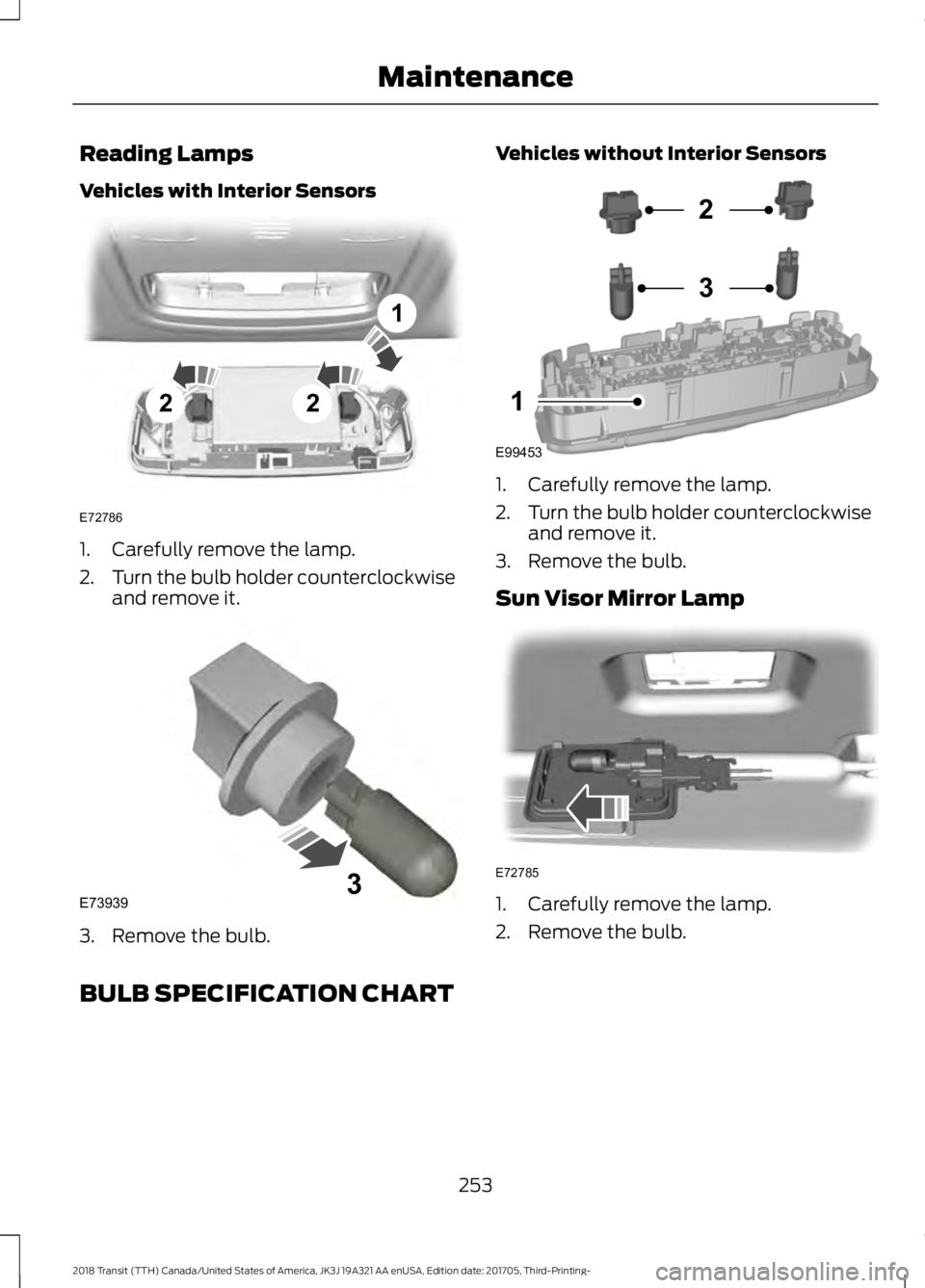
Reading Lamps
Vehicles with Interior Sensors
1. Carefully remove the lamp.
2.
Turn the bulb holder counterclockwise
and remove it. 3. Remove the bulb. Vehicles without Interior Sensors
1. Carefully remove the lamp.
2.
Turn the bulb holder counterclockwise
and remove it.
3. Remove the bulb.
Sun Visor Mirror Lamp 1. Carefully remove the lamp.
2. Remove the bulb.
BULB SPECIFICATION CHART
253
2018 Transit (TTH) Canada/United States of America, JK3J 19A321 AA enUSA, Edition date: 201705, Third-Printing- Maintenance22
1
E72786 E739393 E99453
2
3
1 E72785
Page 259 of 521
4.
Carefully lift the air filter housing cover.
Remove the air filter element from the
air filter housing.
5. Install a new air filter element. Make sure that the groove seal on the
pleated paper filter traps both sides of
the vertical partition of the air box.
6. Replace the air filter housing. Engage the clamps that secure the air filter
housing cover to the air filter housing.
Be careful not to crimp the filter
element edges between the air filter
housing and cover. Make sure that the
tabs on the edge are correctly aligned
into the slots.
7. Slip the air tube onto the air filter cover
and snugly tighten the bolt on the air
tube clamp, but do not overtighten.
8. Reconnect the mass air flow sensor electrical connector to the outlet tube.
Make sure the locking tab on the
connector is in the locked position.
CHANGING THE ENGINE AIR
FILTER - 3.5L ECOBOOST™ WARNING: To reduce the risk of
vehicle damage and personal burn injuries,
do not start your engine with the air cleaner
removed and do not remove it while the
engine is running.
Note: Failure to use the correct air filter
element may result in severe engine
damage. The vehicle Warranty may be void
for any damage to the engine if the correct
air filter element is not used.
Only use the specified air filter.
See
Capacities and Specifications (page
305).
Change the air filter element at the proper
interval.
See Scheduled Maintenance
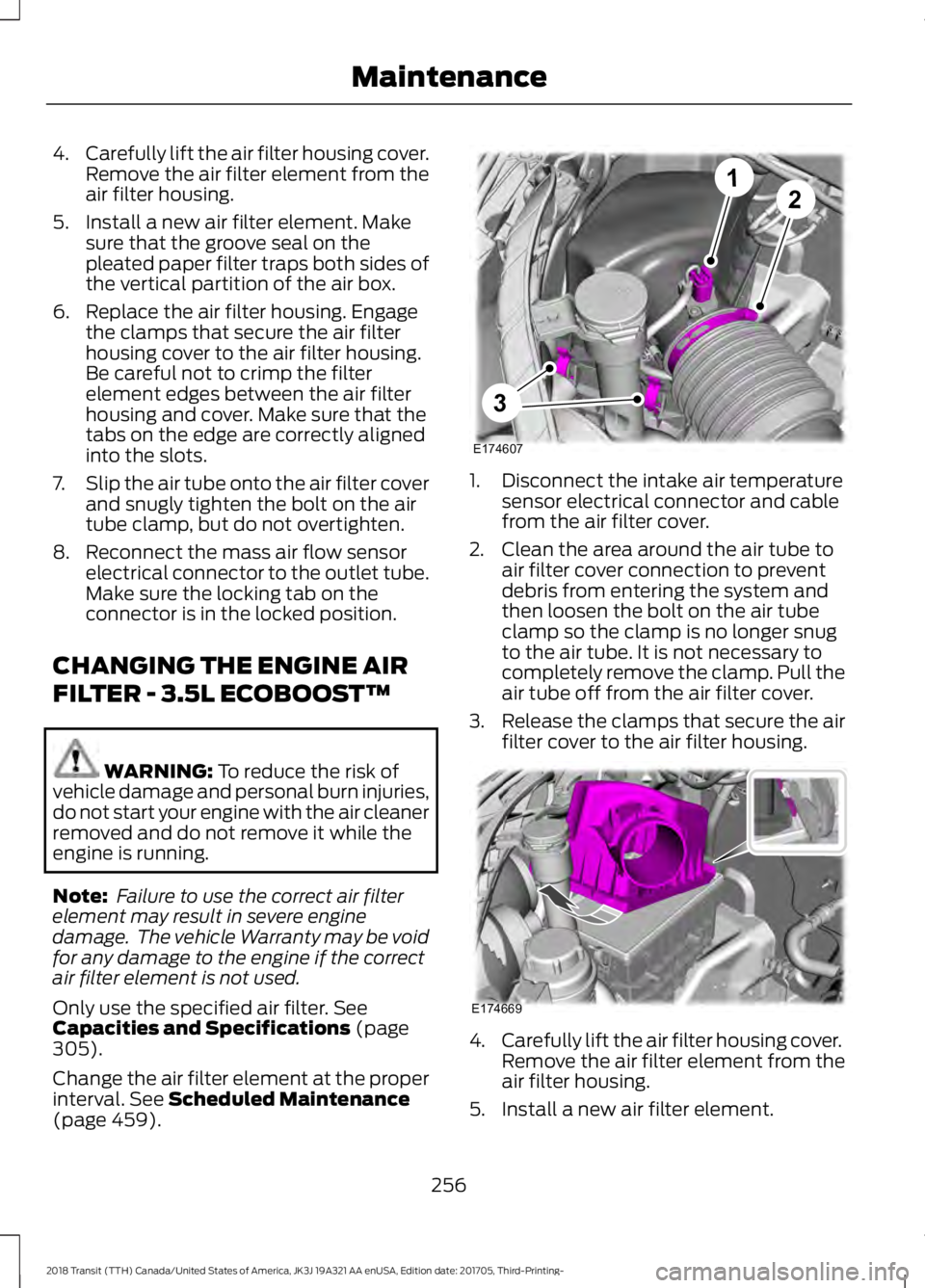
(page 459). 1. Disconnect the intake air temperature
sensor electrical connector and cable
from the air filter cover.
2. Clean the area around the air tube to air filter cover connection to prevent
debris from entering the system and
then loosen the bolt on the air tube
clamp so the clamp is no longer snug
to the air tube. It is not necessary to
completely remove the clamp. Pull the
air tube off from the air filter cover.
3. Release the clamps that secure the air
filter cover to the air filter housing. 4.
Carefully lift the air filter housing cover.
Remove the air filter element from the
air filter housing.
5. Install a new air filter element.
256
2018 Transit (TTH) Canada/United States of America, JK3J 19A321 AA enUSA, Edition date: 201705, Third-Printing- MaintenanceE174607
12
3 E174669
Page 260 of 521
6. Replace the air filter housing cover.
Engage the clamps that secure the air
filter housing cover to the air filter
housing. Be careful not to crimp the
filter element edges between the air
filter housing and cover. Make sure
that the tabs on the edge are correctly
aligned into the slots.
7. Slip the air tube onto the air filter cover
and snugly tighten the bolt on the air
tube clamp, but do not overtighten.
8. Reconnect the intake air temperature sensor electrical connector to the
outlet tube. Make sure the locking tab
on the connector is in the locked
position.
CHANGING THE ENGINE AIR
FILTER - 3.7L WARNING: To reduce the risk of
vehicle damage and personal burn injuries,
do not start your engine with the air cleaner
removed and do not remove it while the
engine is running.
Note: Failure to use the correct air filter
element may result in severe engine
damage. The vehicle Warranty may be void
for any damage to the engine if the correct
air filter element is not used.
Only use the specified air filter. See
Capacities and Specifications
(page
305).
Change the air filter element at the proper
interval. See
Scheduled Maintenance
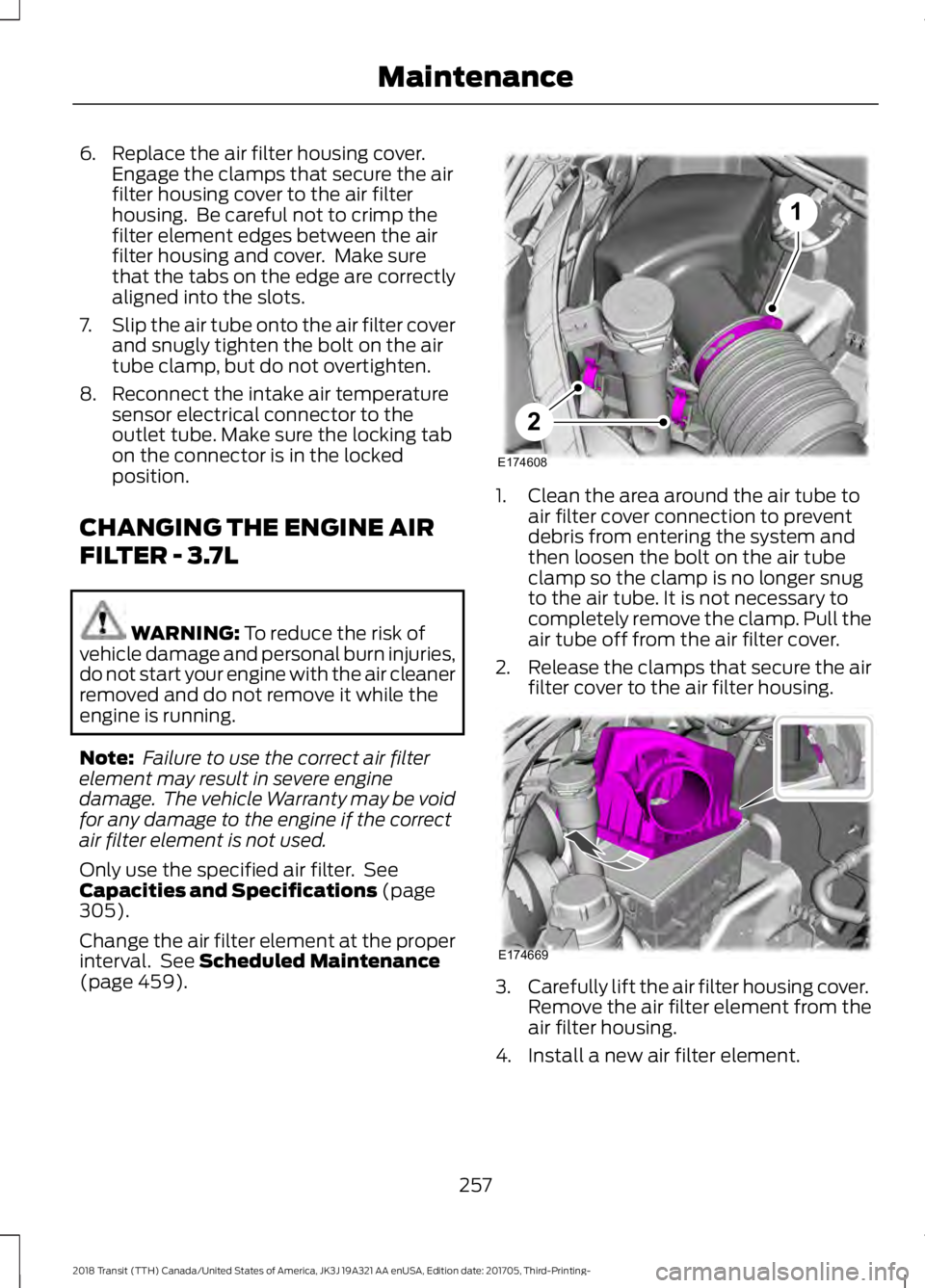
(page 459). 1. Clean the area around the air tube to
air filter cover connection to prevent
debris from entering the system and
then loosen the bolt on the air tube
clamp so the clamp is no longer snug
to the air tube. It is not necessary to
completely remove the clamp. Pull the
air tube off from the air filter cover.
2. Release the clamps that secure the air
filter cover to the air filter housing. 3.
Carefully lift the air filter housing cover.
Remove the air filter element from the
air filter housing.
4. Install a new air filter element.
257
2018 Transit (TTH) Canada/United States of America, JK3J 19A321 AA enUSA, Edition date: 201705, Third-Printing- Maintenance1
2
E174608 E174669
Page 265 of 521
Note:
Do not apply cleaning product to hot
surfaces and do not leave cleaning product
on chrome surfaces for a period of time
exceeding that which is recommended.
Note: Industrial-strength (heavy-duty)
cleaners, or cleaning chemicals, may cause
damage over a period of time.
Body Paintwork Preservation
We recommend that you wax the
paintwork once or twice a year.
Note: Do not apply polish in strong sunlight
as this dries the polish too quickly.
Note: Do not allow polish to come in
contact with plastic surfaces as it can be
difficult to remove.
Note: Do not apply polish to the windshield
or rear window. A contaminated windshield
or contaminated wiper blades may lead to
increased wiper noise, reduced wipe quality
or reduced rain sensor performance.
Sliding Door Tracks (If Equipped) WARNING: Do not open or close the
sliding doors when your hands are near the
tracks or rollers.
To clean the sliding door tracks, wipe the
surface using a clean, cotton cloth with a
mild soap and water solution.
Do not use a commercial or high-pressure
washer.
WAXING
Regular waxing is necessary to protect your
car's paint from the elements. We
recommend that you wash and wax the
painted surface once or twice a year. When washing and waxing, park your
vehicle in a shaded area out of direct
sunlight. Always wash your vehicle before
applying wax.
•
Use a quality wax that does not contain
abrasives.
• Follow the manufacturer ’s instructions
to apply and remove the wax.
• Apply a small amount of wax in a
back-and-forth motion, not in circles.
• Do not allow wax to come in contact
with any non-body (low-gloss black)
colored trim. The wax will discolor or
stain the parts over time.
•Roof racks.
• Bumpers.
• Grained door handles.
• Side moldings.
• Mirror housings.
• Windshield cowl area.
• Do not apply wax to glass areas.
• After waxing, your car's paint should
feel smooth, and be free of streaks and
smudges.
CLEANING THE ENGINE
Engines are more efficient when they are
clean because grease and dirt buildup keep
the engine warmer than normal.
When washing:
• Take care when using a power washer
to clean the engine. The high-pressure
fluid could penetrate the sealed parts
and cause damage.
• Do not spray a hot engine with cold
water to avoid cracking the engine
block or other engine components.
262
2018 Transit (TTH) Canada/United States of America, JK3J 19A321 AA enUSA, Edition date: 201705, Third-Printing- Vehicle Care
Page 295 of 521

1. Drive your vehicle above 20 mph
(32 km/h) for at least two minutes and
then park in a safe location where you
can easily get to all four tires and have
access to a tire inflation pump.
2. Switch the ignition off.
3. Switch the ignition on with the engine off.
4. Turn the hazard flashers on then off three times, this must be completed
within 10 seconds. If the reset mode
has been entered successfully, the horn
will chirp once and the system indicator
will flash. If this does not occur, repeat
the procedure from step 2. If after
repeated attempts to enter the reset
mode, the horn does not chirp and the
system indicator does not flash, have
your vehicle checked by an authorized
dealer as soon as possible.
5. Train the system sensors in the tires using the following reset sequence
starting with the left front tire and
following a clockwise order: Left front,
right front, right rear, left rear.
6. Remove the valve cap from the valve stem on the left front tire. Decrease the
air pressure until the horn chirps.
Note: The single horn chirp confirms that
the sensor identification code has been
learned by your vehicle for this position. If a
double horn chirp is heard, the reset
procedure was unsuccessful and must be
repeated.
7. Remove the valve cap from the valve stem on the right front tire. Decrease
the air pressure until the horn chirps.
8. Remove the valve cap from the valve stem on the right rear tire. Decrease the
air pressure until the horn chirps. 9. Remove the valve cap from the valve
stem on the left rear tire. Decrease the
air pressure until the horn chirps.
Training is complete when the horn
chirps after the last system sensor (left
rear) has been trained and the system
indicator stops flashing.
10. Switch the ignition off. If two short horn chirps are heard, the reset
procedure was unsuccessful and
must be repeated.
Note: If after repeating the procedure two
short horn chirps are heard again, have your
vehicle checked by an authorized dealer as
soon as possible.
11. Set all four tires to the correct pressure
See Maintenance (page
229). or the tire inflation pressure label
(located on the edge of driver door or
the B-Pillar).
CHANGING A ROAD WHEEL WARNING:
Do not use tire sealants
as they may damage the tire pressure
monitoring system. WARNING:
If the tire pressure
monitor sensor becomes damaged it may
not function.
Note: The tire pressure monitoring system
indicator light will illuminate when the spare
tire is in use. To restore the full function of
the monitoring system, all road wheels
equipped with tire pressure monitoring
sensors must be mounted on this vehicle.
If you get a flat tire while driving, do not
apply the brake heavily. Instead, gradually
decrease your speed. Hold the steering
wheel firmly and slowly move to a safe
place on the side of the road.
292
2018 Transit (TTH) Canada/United States of America, JK3J 19A321 AA enUSA, Edition date: 201705, Third-Printing- Wheels and Tires