2018 FORD FUSION/HYBRID instrument cluster
[x] Cancel search: instrument clusterPage 179 of 538

If you turn your vehicle off when moving,
your vehicle first shifts into neutral (N) until
it slows down enough to shift into park (P)
automatically.
Note:
If you have waited an extended
period of time (2-15 minutes) before starting
your vehicle, unlatching your seatbelt causes
this feature to activate, even with the
driver's door closed.
Note: This feature may not work properly
if the door ajar switch is malfunctioning. If
your door ajar indicator does not illuminate
when you open the driver ’s door or the
indicator illuminates with the driver ’s door
closed, see your authorized dealer.
Reverse (R)
With the transmission selector in reverse
(R), your vehicle moves backward. Always
come to a complete stop before shifting
into and out of reverse (R).
Neutral (N)
With the transmission selector in neutral
(N), your vehicle can be started and is free
to roll. Hold the brake pedal down when in
this position.
Stay in Neutral Mode
Note: Always put your vehicle in Stay in
Neutral mode when entering an automatic
car wash. Failure to do this could result in
vehicle damage not covered by warranty.
Note: When entering an automatic car
wash, always shift to Neutral (N). If you are
exiting the vehicle before the car wash, Stay
in Neutral Mode is available.
Stay in Neutral mode allows your vehicle
to stay in neutral when you exit your
vehicle. Your vehicle must be stationary to
enter this mode. To enter Stay in Neutral mode:
1.
Switch your vehicle on but do not start
the engine. See Keyless Starting
(page 145).
2. Place your foot on the brake pedal and
rotate the transmission selector to
neutral (N).
Note: When in neutral (N), a message
appears in the display screen informing you
how to access Stay in Neutral mode.
3. Press either the low (L) or sport (S) button in the middle of the
transmission selector to enter Stay in
Neutral mode.
A message appears in the display screen
confirming your vehicle is in Stay in Neutral
mode. The neutral (N) indicator light on
the transmission selector also flashes.
To exit Stay in Neutral mode, place your
foot on the brake pedal and rotate the
transmission selector to park (P).
Drive (D)
Drive (D) is the normal driving position for
the best fuel economy.
Grade Assist Press the grade assist button to
activate grade assist. The grade
assist lamp appears in the
instrument cluster. Press the button again
to switch it off.
176
Fusion Energi / Fusion Hybrid (CC7) Hybrid Electric Vehicle (HEV)/Plug-In Hybrid Electric Vehicle (PHEV), Canada/United States of America, enUSA, Edition date: 201705, Second Printing TransmissionE144523
Page 180 of 538

Grade assist:
•
Provides additional grade braking with
a combination of engine motoring and
high-voltage battery charging to help
maintain vehicle speed when
descending a grade.
• As your vehicle determines the amount
of engine motoring and high-voltage
battery charging, you may notice the
engine speed increasing and
decreasing to help maintain your
vehicle speed when descending a
grade.
• The grade assist lamp in the instrument
cluster is illuminated.
Low (L)
• Provides maximum engine braking.
• The transmission may be shifted into
low (L) at any vehicle speed.
• Is not intended for use under extended
or normal driving conditions and results
in lower fuel economy.
Brake-Shift Interlock Override WARNINGS
When doing this procedure, you need
to take the transmission out of park
(P) which means your vehicle can
roll freely. To avoid unwanted vehicle
movement, always fully apply the parking
brake prior to doing this procedure. Use
wheels chocks if appropriate. If the parking brake is fully released,
but the brake warning lamp remains
illuminated, the brakes may not be
working properly. Have your vehicle
checked as soon as possible. Note:
Do not drive your vehicle until you
verify that the brake lamps are working.
Note: See your authorized dealer as soon
as possible if this procedure is used. Note:
For some markets this feature is
disabled.
Note: This feature only functions if your
12-volt battery has power. If vehicle battery
voltage is not sufficient, an external 12-volt
power source (for example, jumper cables,
battery charger or jump pack) may be
required to function the interlock override
switch.
Use the brake-shift interlock override to
move your transmission from the park
position in the event of an electrical
malfunction. If your vehicle has a dead
battery, an external power source is
required.
1. Apply the parking brake and turn your ignition off before performing this
procedure. 2. Locate your brake-shift interlock
access slot. The slot is located in your
center console storage bin. The access
slot does not have a label.
Note: Make sure that you correctly identify
the access hole as not to damage the media
hub.
3. Using a tool, press and hold the brake shift interlock switch. The transmission
selector indicator flashes for three
seconds when your vehicle is in
override mode.
177
Fusion Energi / Fusion Hybrid (CC7) Hybrid Electric Vehicle (HEV)/Plug-In Hybrid Electric Vehicle (PHEV), Canada/United States of America, enUSA, Edition date: 201705, Second Printing TransmissionE258561
Page 205 of 538

The adaptive cruise controls are on the
steering wheel.
Switching Adaptive Cruise Control
On
Press ON.
The indicator, current gap setting
and set speed appear in the
information display.
Setting the Adaptive Cruise Speed
Note:
When adaptive cruise control is
active, the speedometer may vary slightly
from the set speed displayed in the
information display.
1. Drive to desired speed.
2. Press
SET-.
3. A green indicator light, the current gap
setting and your set speed appear in
the information display.
4. Take your foot off the accelerator pedal. 5. A vehicle image illuminates if the
system detects a vehicle in front of you. Setting the Adaptive Cruise Speed
When Your Vehicle is Stationary
1. Follow a vehicle to a complete stop.
2. Keep the brake pedal fully pressed.
3. Press
RES+.
4. The set speed adjusts to
20 mph
(30 km/h).
5. A green indicator light, the current gap
setting and your set speed appear in
the information display.
Following a Vehicle WARNINGS
When following a vehicle, your
vehicle does not always decelerate
quickly enough to avoid a crash
without driver intervention. Always apply
the brakes when necessary. Failing to do
so may result in a crash, serious injury or
death. Adaptive cruise control only warns
of vehicles detected by the radar
sensor. In some cases there may be
no warning or a delayed warning. You
should always apply the brakes when
necessary. Failure to do so may result in a
crash, serious injury or death. Note:
When you are following a vehicle and
you switch on a direction indicator, adaptive
cruise control may provide a small
temporary acceleration to help you pass.
Note: The brakes may emit noise when
applied by the system.
When a vehicle ahead of you enters the
same lane or a slower vehicle is ahead in
the same lane, the vehicle speed adjusts
to maintain a preset gap distance. A
vehicle graphic illuminates in the
instrument cluster.
202
Fusion Energi / Fusion Hybrid (CC7) Hybrid Electric Vehicle (HEV)/Plug-In Hybrid Electric Vehicle (PHEV), Canada/United States of America, enUSA, Edition date: 201705, Second Printing Cruise ControlE144529 E164805 E164805
Page 213 of 538

WARNINGS
The sensor may incorrectly track lane
markings as other structures or
objects. This can result in a false or
missed warning. Large contrasts in outside lighting
can limit sensor performance.
The system may not operate
properly if the sensor is blocked.
Keep the windshield free from
obstruction. If damage occurs in the immediate
area surrounding the sensor, have
your vehicle checked as soon as
possible. The system may not correctly
operate if your vehicle is fitted with
a suspension kit not approved by us.
Note:
The system works above 40 mph
(64 km/h).
Note: The system works as long as the
camera can detect one lane marking.
Note: The system may not function if the
camera is blocked, or if the windshield is
damaged or dirty.
Note: When aid mode is on and the system
detects no steering activity for a short
period, the system alerts you to put your
hands on the steering wheel. The system
may detect a light grip or touch on the
steering wheel as hands off driving. The system notifies you to stay in your lane
through the steering system and the
instrument cluster display when the front
camera detects an unintentional drift out
of your lane is likely to occur. The system
automatically detects and tracks the road
lane markings using a camera mounted
behind the interior rear view mirror.
Switching the System On and Off
Note:
The system on or off setting is stored
until it is manually changed, unless a
MyKey ™ is detected. If the system detects
a MyKey ™, it defaults to on and the mode
is set to alert. Press the button on the direction indicator
stalk to switch the system on or off.
210
Fusion Energi / Fusion Hybrid (CC7) Hybrid Electric Vehicle (HEV)/Plug-In Hybrid Electric Vehicle (PHEV), Canada/United States of America, enUSA, Edition date: 201705, Second Printing Driving AidsE249505 E132099
Page 237 of 538
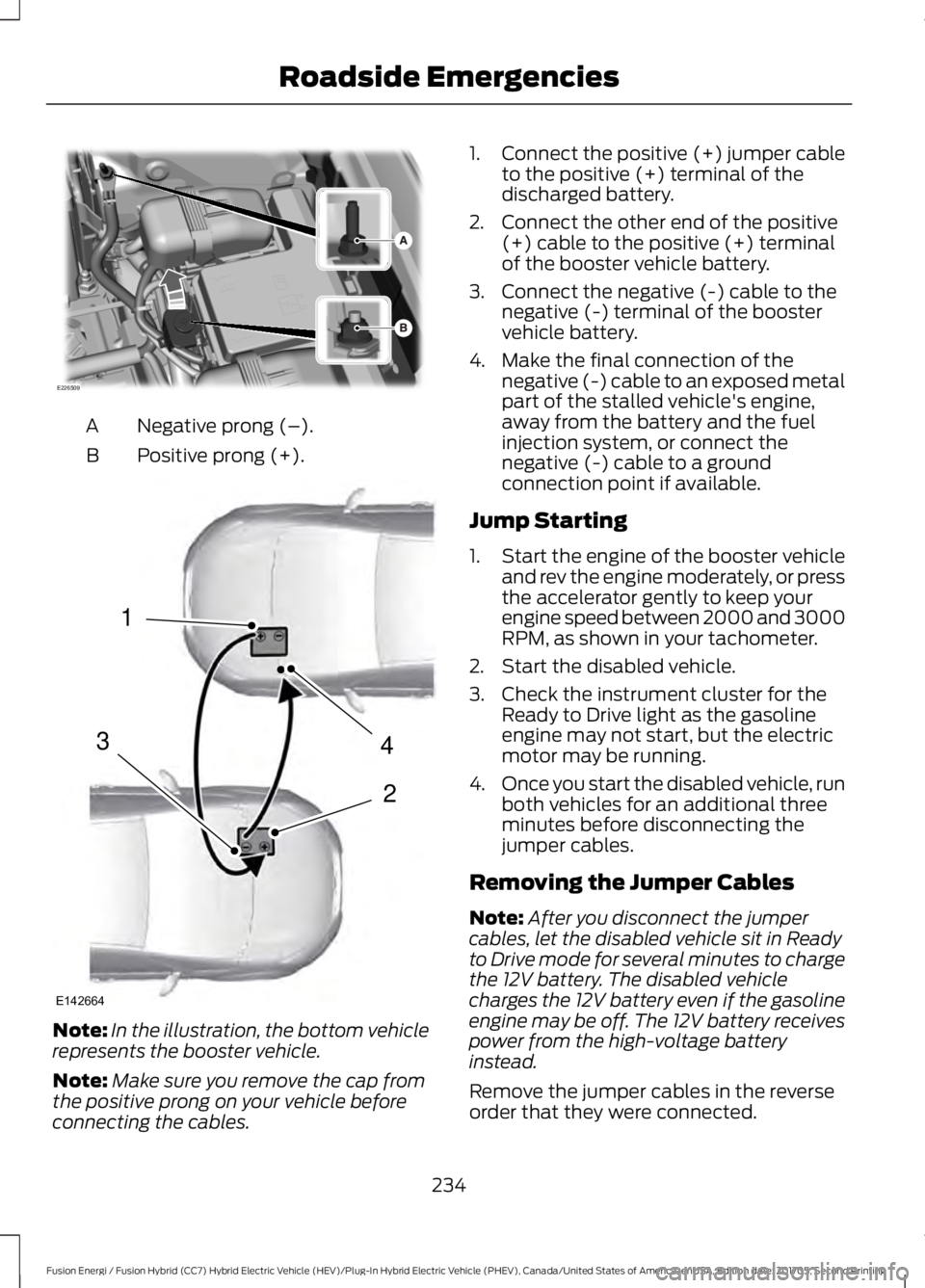
Negative prong (–).
A
Positive prong (+).
B Note:
In the illustration, the bottom vehicle
represents the booster vehicle.
Note: Make sure you remove the cap from
the positive prong on your vehicle before
connecting the cables. 1.
Connect the positive (+) jumper cable
to the positive (+) terminal of the
discharged battery.
2. Connect the other end of the positive (+) cable to the positive (+) terminal
of the booster vehicle battery.
3. Connect the negative (-) cable to the negative (-) terminal of the booster
vehicle battery.
4. Make the final connection of the negative (-) cable to an exposed metal
part of the stalled vehicle's engine,
away from the battery and the fuel
injection system, or connect the
negative (-) cable to a ground
connection point if available.
Jump Starting
1. Start the engine of the booster vehicle
and rev the engine moderately, or press
the accelerator gently to keep your
engine speed between 2000 and 3000
RPM, as shown in your tachometer.
2. Start the disabled vehicle.
3. Check the instrument cluster for the Ready to Drive light as the gasoline
engine may not start, but the electric
motor may be running.
4. Once you start the disabled vehicle, run
both vehicles for an additional three
minutes before disconnecting the
jumper cables.
Removing the Jumper Cables
Note: After you disconnect the jumper
cables, let the disabled vehicle sit in Ready
to Drive mode for several minutes to charge
the 12V battery. The disabled vehicle
charges the 12V battery even if the gasoline
engine may be off. The 12V battery receives
power from the high-voltage battery
instead.
Remove the jumper cables in the reverse
order that they were connected.
234
Fusion Energi / Fusion Hybrid (CC7) Hybrid Electric Vehicle (HEV)/Plug-In Hybrid Electric Vehicle (PHEV), Canada/United States of America, enUSA, Edition date: 201705, Second Printing Roadside EmergenciesE226509 4
2
1
3
E142664
Page 257 of 538

Protected Component
Fuse Rating
Fuse or Relay
Number
Subwoofer amplifier.
20A 1
5
Not used (spare).
10A 2
6
Not used (spare).
10A 2
7
Not used (spare).
10A 2
8
Not used (spare).
10A 2
9
Keypad.
5A 2
10
Cell phone passport module.
Not used (spare).
5A 2
11
Climate control.
7.5A 2
12
Gear shift.
Steering wheel column.
7.5A 2
13
Instrument cluster.
Datalink logic.
Extended power module.
10A 2
14
Datalink-gateway module.
10A 2
15
Child lock.
15A 1
16
Decklid release.
Not used (spare).
5A 2
17
Push button start stop switch.
5A 2
18
Extended power module.
7.5A 2
19
Adaptive headlamps.
7.5A 2
20
Humidity and in–car temperature sensor.
5A 2
21
Not used (spare).
5A 2
22
Delayed accessory (power inverter logic,
moonroof logic, driver master switch).
10A 1
23
254
Fusion Energi / Fusion Hybrid (CC7) Hybrid Electric Vehicle (HEV)/Plug-In Hybrid Electric Vehicle (PHEV), Canada/United States of America, enUSA, Edition date: 201705, Second Printing Fuses
Page 264 of 538

1. Remove the filler cap.
2. Add engine oil that meets the Ford
specifications. See Capacities and
Specifications (page 308).
3. Replace the filler cap. Turn it until you feel a strong resistance.
OIL CHANGE INDICATOR
RESET
Use the information display controls on
the steering wheel to reset the oil change
indicator.
From the main menu scroll to: Action and description
Message
Press the right arrow button,
then from this menu scroll
to the following message.
Settings
Press the right arrow button,
then from this menu scroll
to the following message.
Vehicle
Press the right arrow button,
then from this menu scroll
to the following message.
Oil Life
Press and hold the
OK
button until the instrument
cluster displays the
following message.
Hold OK to
Reset
Reset Successful
When the oil change indic-
ator resets the instrument
cluster displays 100%.
Remaining Life
{00}% Action and description
Message
If the instrument cluster
displays one of the following
messages, repeat the
process.
Not Reset
Reset Cancelled
ENGINE COOLANT CHECK WARNINGS
Never remove the coolant reservoir
cap when the engine is running or
hot.
Do not put coolant in the windshield
washer reservoir. If sprayed on the
windshield, coolant could make it
difficult to see through the windshield. To reduce the risk of personal injury,
make sure the engine is cool before
unscrewing the coolant pressure
relief cap. The cooling system is under
pressure. Steam and hot liquid can come
out forcefully when you loosen the cap
slightly. Do not add coolant further than the
MAX mark.
Your vehicle has two separate cooling
systems. One for cooling the engine and a
separate system for cooling the inverter
system controller that is specific to the
hybrid operating system. The two systems
operate similarly, with the inverter system
controller cooling system generally
operating at a lower temperature and
pressure.
When the engine is cold, check the
concentration and level of the coolant at
the intervals listed in the scheduled
maintenance information. See Scheduled
Maintenance
(page 473).
261
Fusion Energi / Fusion Hybrid (CC7) Hybrid Electric Vehicle (HEV)/Plug-In Hybrid Electric Vehicle (PHEV), Canada/United States of America, enUSA, Edition date: 201705, Second Printing Maintenance
Page 280 of 538

Note:
Do not use razor blades or other
sharp objects to clean or remove decals
from the inside of the heated rear window.
The vehicle warranty does not cover
damage caused to the heated rear window
grid lines.
CLEANING THE INTERIOR WARNINGS
Do not use cleaning solvents, bleach
or dye on the vehicle's seatbelts, as
these actions may weaken the belt
webbing. On vehicles equipped with
seat-mounted airbags, do not use
chemical solvents or strong
detergents. Such products could
contaminate the side airbag system and
affect performance of the side airbag in a
crash. For fabric, carpets, cloth seats and seats
equipped with side airbags:
•
Remove dust and loose dirt with a
vacuum cleaner.
• Remove light stains and soil with
Motorcraft Professional Strength
Carpet & Upholstery Cleaner.
• If grease or tar is present on the
material, spot-clean the area first with
Motorcraft Spot and Stain Remover. In
Canada, use Motorcraft Multi-Purpose
Cleaner.
• If a ring forms on the fabric after spot
cleaning, clean the entire area
immediately (but do not oversaturate)
or the ring will set.
• Do not use household cleaning
products or glass cleaners, which can
stain and discolor the fabric and affect
the flame retardant abilities of the seat
materials. CLEANING THE INSTRUMENT
PANEL AND INSTRUMENT
CLUSTER LENS WARNING
Do not use chemical solvents or
strong detergents when cleaning the
steering wheel or instrument panel
to avoid contamination of the airbag
system. Note:
Follow the same procedure as
cleaning leather seats for cleaning leather
instrument panels and leather interior trim
surfaces. See Cleaning Leather Seats
(page 278).
Clean the instrument panel and cluster
lens with a clean, damp and soft cloth,
then use a clean, dry and soft cloth to dry
these areas.
• Avoid cleaners or polishes that increase
the gloss of the upper portion of the
instrument panel. The dull finish in this
area helps protect you from
undesirable windshield reflection.
• Do not use any household cleaning
products or glass cleaners as these
may damage the finish of the
instrument panel, interior trim and
cluster lens.
• Wash or wipe your hands clean if you
have been in contact with certain
products such as insect repellent and
suntan lotion to avoid possible damage
to the interior painted surfaces.
• Do not allow air fresheners and hand
sanitizers to spill onto interior surfaces.
If a spill occurs, wipe off immediately.
Your warranty may not cover these
damages.
If a staining liquid like coffee or juice has
been spilled on the instrument panel or on
interior trim surfaces:
277
Fusion Energi / Fusion Hybrid (CC7) Hybrid Electric Vehicle (HEV)/Plug-In Hybrid Electric Vehicle (PHEV), Canada/United States of America, enUSA, Edition date: 201705, Second Printing Vehicle Care