Page 95 of 473
GENERAL INFORMATION
WARNING
Driving while distracted can result inloss of vehicle control, crash andinjury. We strongly recommend thatyou use extreme caution when using anydevice that may take your focus off theroad. Your primary responsibility is the safeoperation of your vehicle. We recommendagainst the use of any hand-held devicewhile driving and encourage the use ofvoice-operated systems when possible.Make sure you are aware of all applicablelocal laws that may affect the use ofelectronic devices while driving.
You can control various systems on yourvehicle using the information displaycontrols on the steering wheel.
The information display shows thecorresponding information.
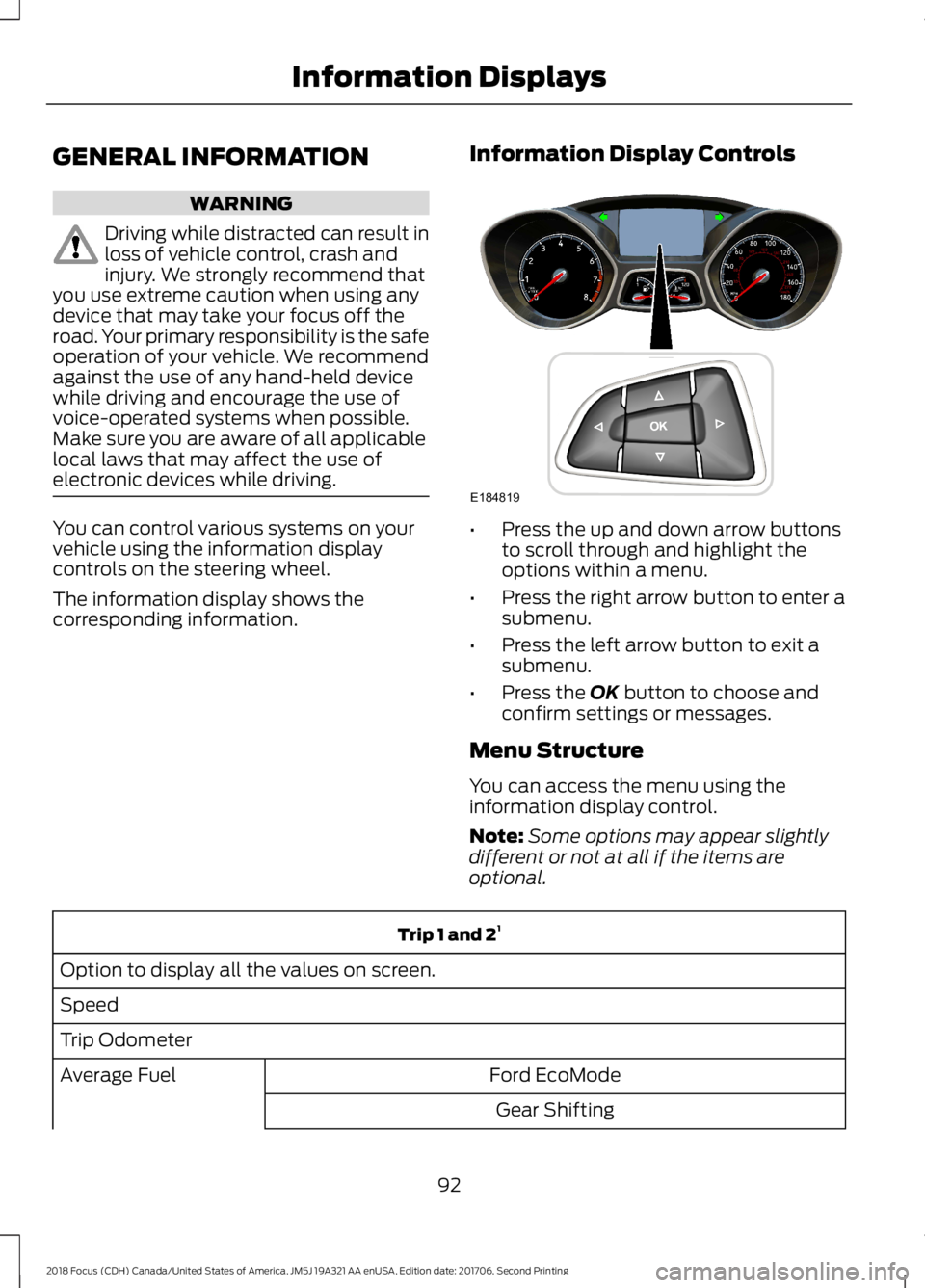
Information Display Controls
•Press the up and down arrow buttonsto scroll through and highlight theoptions within a menu.
•Press the right arrow button to enter asubmenu.
•Press the left arrow button to exit asubmenu.
•Press the OK button to choose andconfirm settings or messages.
Menu Structure
You can access the menu using theinformation display control.
Note:Some options may appear slightlydifferent or not at all if the items areoptional.
Trip 1 and 21
Option to display all the values on screen.
Speed
Trip Odometer
Ford EcoModeAverage Fuel
Gear Shifting
922018 Focus (CDH) Canada/United States of America, JM5J 19A321 AA enUSA, Edition date: 201706, Second PrintingInformation DisplaysE184819
Page 97 of 473
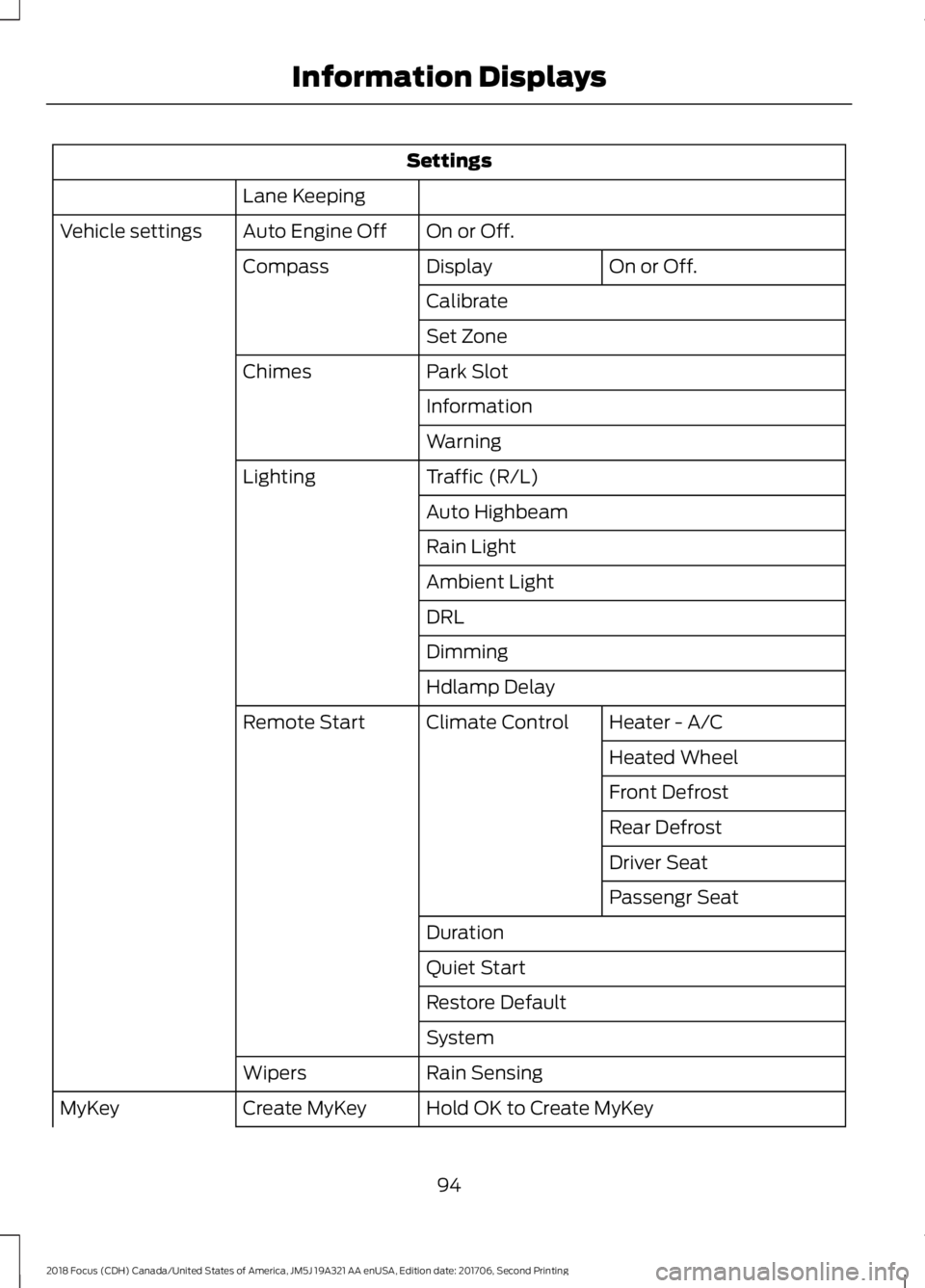
Settings
Lane Keeping
On or Off.Auto Engine OffVehicle settings
On or Off.DisplayCompass
Calibrate
Set Zone
Park SlotChimes
Information
Warning
Traffic (R/L)Lighting
Auto Highbeam
Rain Light
Ambient Light
DRL
Dimming
Hdlamp Delay
Heater - A/CClimate ControlRemote Start
Heated Wheel
Front Defrost
Rear Defrost
Driver Seat
Passengr Seat
Duration
Quiet Start
Restore Default
System
Rain SensingWipers
Hold OK to Create MyKeyCreate MyKeyMyKey
942018 Focus (CDH) Canada/United States of America, JM5J 19A321 AA enUSA, Edition date: 201706, Second PrintingInformation Displays
Page 98 of 473

Settings
Always On or User Selectable.Traction Ctrl
Always On or User Selectable.ESC
Always On or User Selectable.911 Assist
xx MPH (xx km/h) or Off.Max Speed
xx MPH (xx km/h) or Off.Speed Warning
Volume Limiter
Always On or User Selectable.Do Not Disturb
Hold OK to Clear All MyKeysClear MyKeys
Navigation infoDisplay
Choose your applicable setting.Language
On or Off.Vehicle Graphic
Choose your applicable setting.Distance
Choose your applicable setting.Temperature
System Check
Active warnings appear first. The systemcheck menu may appear different basedupon equipment options and currentvehicle status. Use the up and down arrowbuttons to scroll through the list. SeeInformation Messages (page 96).
TRIP COMPUTER
Resetting the Trip Computer
Press and hold OK on the current screento reset the respective trip, distance, timeand average fuel consumption information.
All Values
Indicates all the respective trip, distance,time and average fuel consumptioninformation.
Average Fuel Consumption
Indicates the average fuel consumptionsince the function was last reset.
Instantaneous Fuel (If Equipped)
Indicates the current fuel consumption.
Distance to Empty
Indicates the approximate distance yourvehicle will travel on the fuel remaining inthe tank. Changes in driving pattern maycause the value to vary.
Outside Air Temperature
Shows the outside air temperature.
Trip Odometer
Registers the distance traveled ofindividual journeys.
952018 Focus (CDH) Canada/United States of America, JM5J 19A321 AA enUSA, Edition date: 201706, Second PrintingInformation Displays
Page 104 of 473
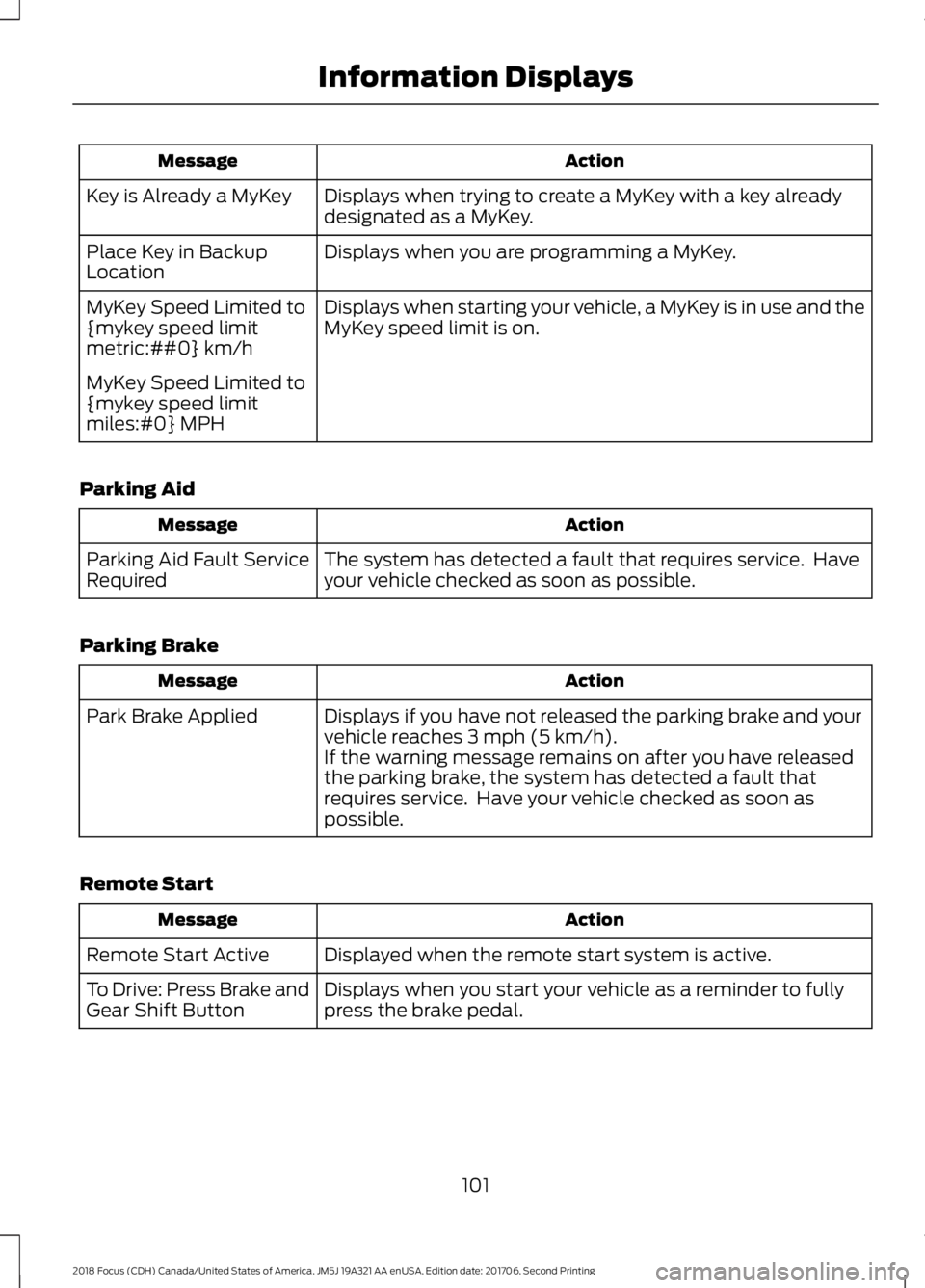
ActionMessage
Displays when trying to create a MyKey with a key alreadydesignated as a MyKey.Key is Already a MyKey
Displays when you are programming a MyKey.Place Key in BackupLocation
Displays when starting your vehicle, a MyKey is in use and theMyKey speed limit is on.MyKey Speed Limited to{mykey speed limitmetric:##0} km/h
MyKey Speed Limited to{mykey speed limitmiles:#0} MPH
Parking Aid
ActionMessage
The system has detected a fault that requires service. Haveyour vehicle checked as soon as possible.Parking Aid Fault ServiceRequired
Parking Brake
ActionMessage
Displays if you have not released the parking brake and yourvehicle reaches 3 mph (5 km/h).Park Brake Applied
If the warning message remains on after you have releasedthe parking brake, the system has detected a fault thatrequires service. Have your vehicle checked as soon aspossible.
Remote Start
ActionMessage
Displayed when the remote start system is active.Remote Start Active
Displays when you start your vehicle as a reminder to fullypress the brake pedal.To Drive: Press Brake andGear Shift Button
1012018 Focus (CDH) Canada/United States of America, JM5J 19A321 AA enUSA, Edition date: 201706, Second PrintingInformation Displays
Page 106 of 473
ActionMessage
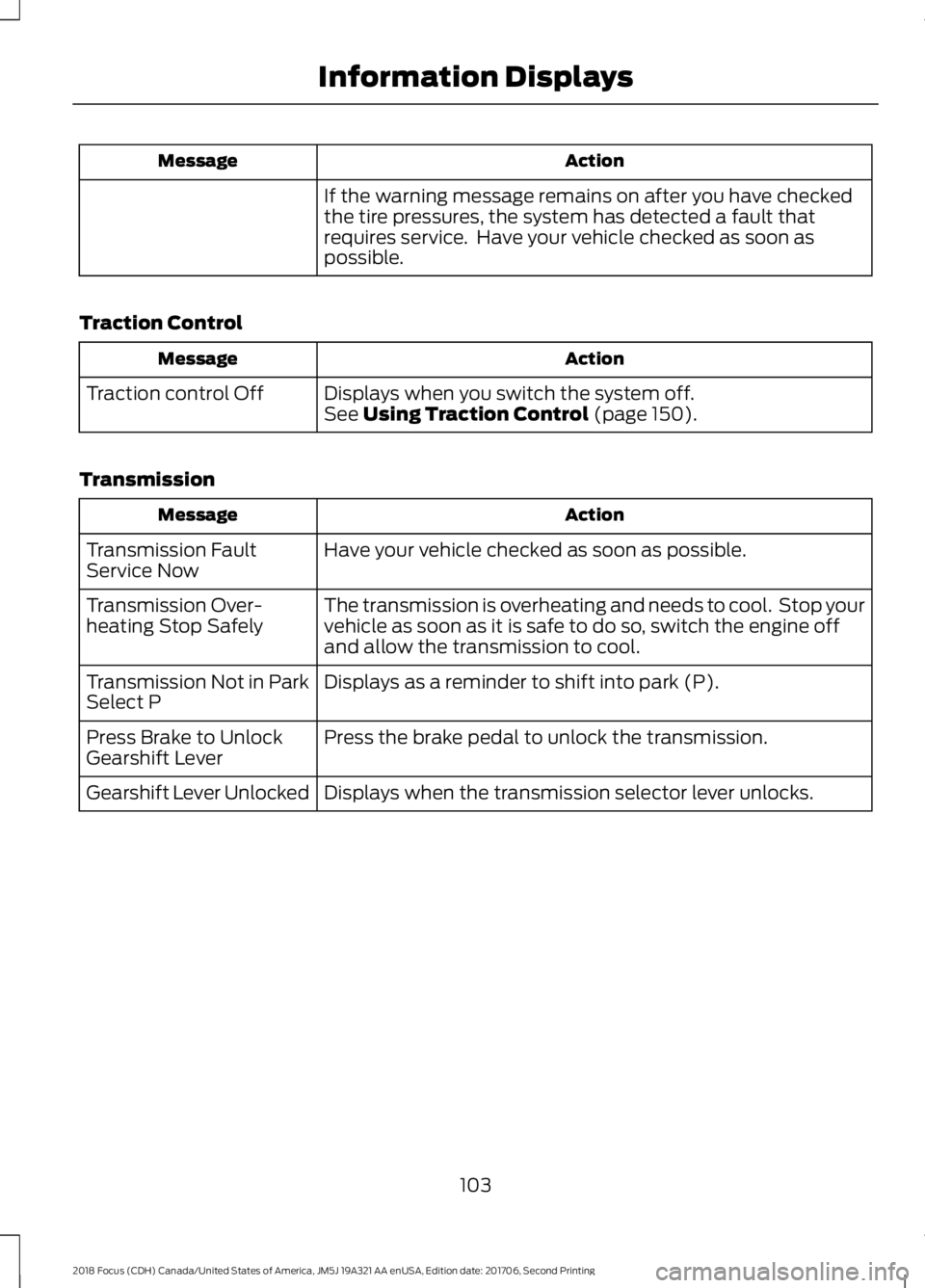
If the warning message remains on after you have checkedthe tire pressures, the system has detected a fault thatrequires service. Have your vehicle checked as soon aspossible.
Traction Control
ActionMessage
Displays when you switch the system off.Traction control OffSee Using Traction Control (page 150).
Transmission
ActionMessage
Have your vehicle checked as soon as possible.Transmission FaultService Now
The transmission is overheating and needs to cool. Stop yourvehicle as soon as it is safe to do so, switch the engine offand allow the transmission to cool.
Transmission Over-heating Stop Safely
Displays as a reminder to shift into park (P).Transmission Not in ParkSelect P
Press the brake pedal to unlock the transmission.Press Brake to UnlockGearshift Lever
Displays when the transmission selector lever unlocks.Gearshift Lever Unlocked
1032018 Focus (CDH) Canada/United States of America, JM5J 19A321 AA enUSA, Edition date: 201706, Second PrintingInformation Displays
Page 114 of 473
SITTING IN THE CORRECT
POSITION
WARNINGS
Do not recline the seatback too faras this can cause the occupant toslide under the seatbelt, resulting inserious injury in the event of a collision.
Always sit upright against yourseatback with your feet on the floor.
Do not place objects higher than thetop of the seat backrest. Failure tofollow this instruction could result inpersonal injury or death in the event of asudden stop or crash.
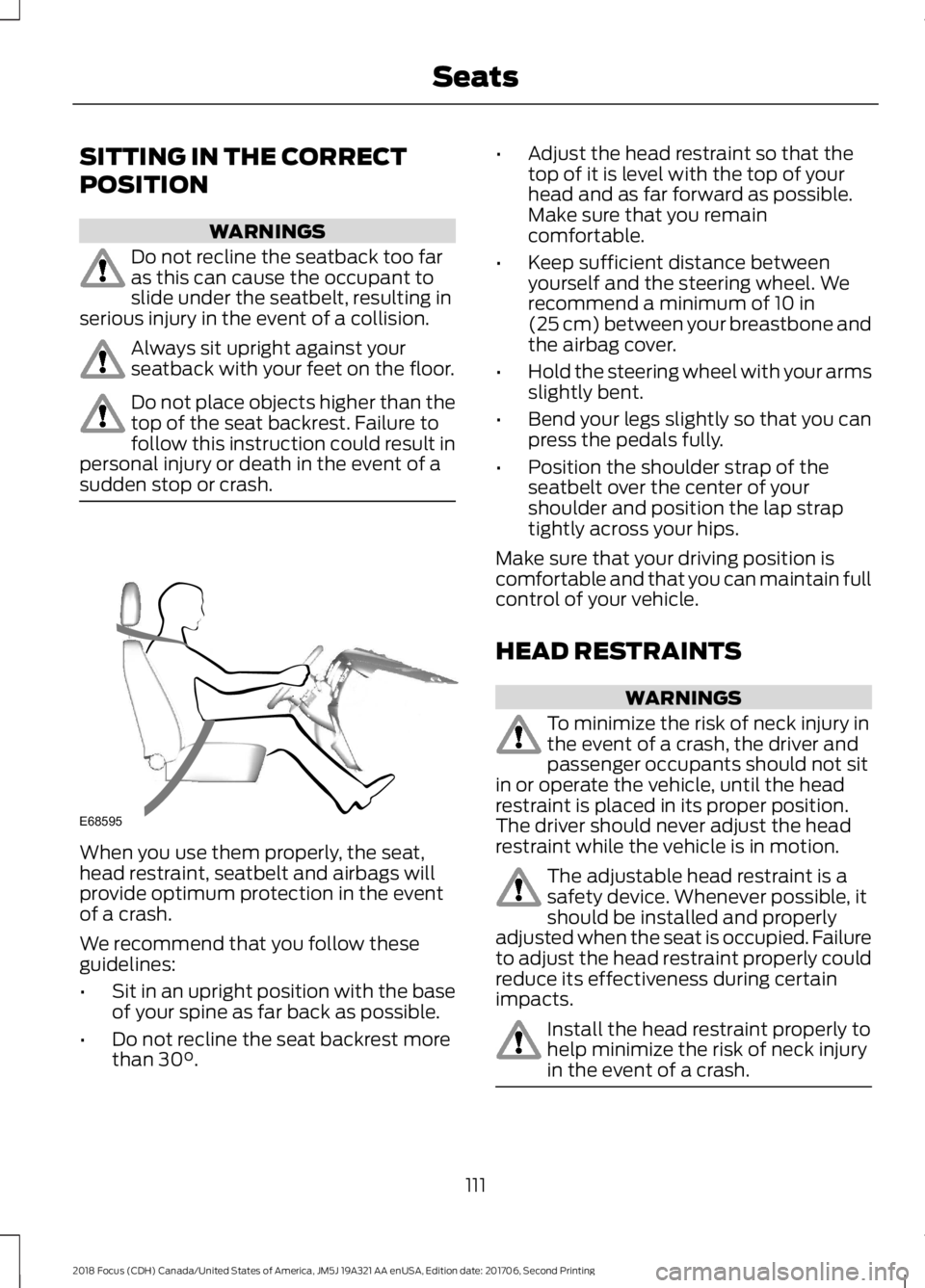
When you use them properly, the seat,head restraint, seatbelt and airbags willprovide optimum protection in the eventof a crash.
We recommend that you follow theseguidelines:
•Sit in an upright position with the baseof your spine as far back as possible.
•Do not recline the seat backrest morethan 30°.
•Adjust the head restraint so that thetop of it is level with the top of yourhead and as far forward as possible.Make sure that you remaincomfortable.
•Keep sufficient distance betweenyourself and the steering wheel. Werecommend a minimum of 10 in(25 cm) between your breastbone andthe airbag cover.
•Hold the steering wheel with your armsslightly bent.
•Bend your legs slightly so that you canpress the pedals fully.
•Position the shoulder strap of theseatbelt over the center of yourshoulder and position the lap straptightly across your hips.
Make sure that your driving position iscomfortable and that you can maintain fullcontrol of your vehicle.
HEAD RESTRAINTS
WARNINGS
To minimize the risk of neck injury inthe event of a crash, the driver andpassenger occupants should not sitin or operate the vehicle, until the headrestraint is placed in its proper position.The driver should never adjust the headrestraint while the vehicle is in motion.
The adjustable head restraint is asafety device. Whenever possible, itshould be installed and properlyadjusted when the seat is occupied. Failureto adjust the head restraint properly couldreduce its effectiveness during certainimpacts.
Install the head restraint properly tohelp minimize the risk of neck injuryin the event of a crash.
1112018 Focus (CDH) Canada/United States of America, JM5J 19A321 AA enUSA, Edition date: 201706, Second PrintingSeatsE68595
Page 116 of 473
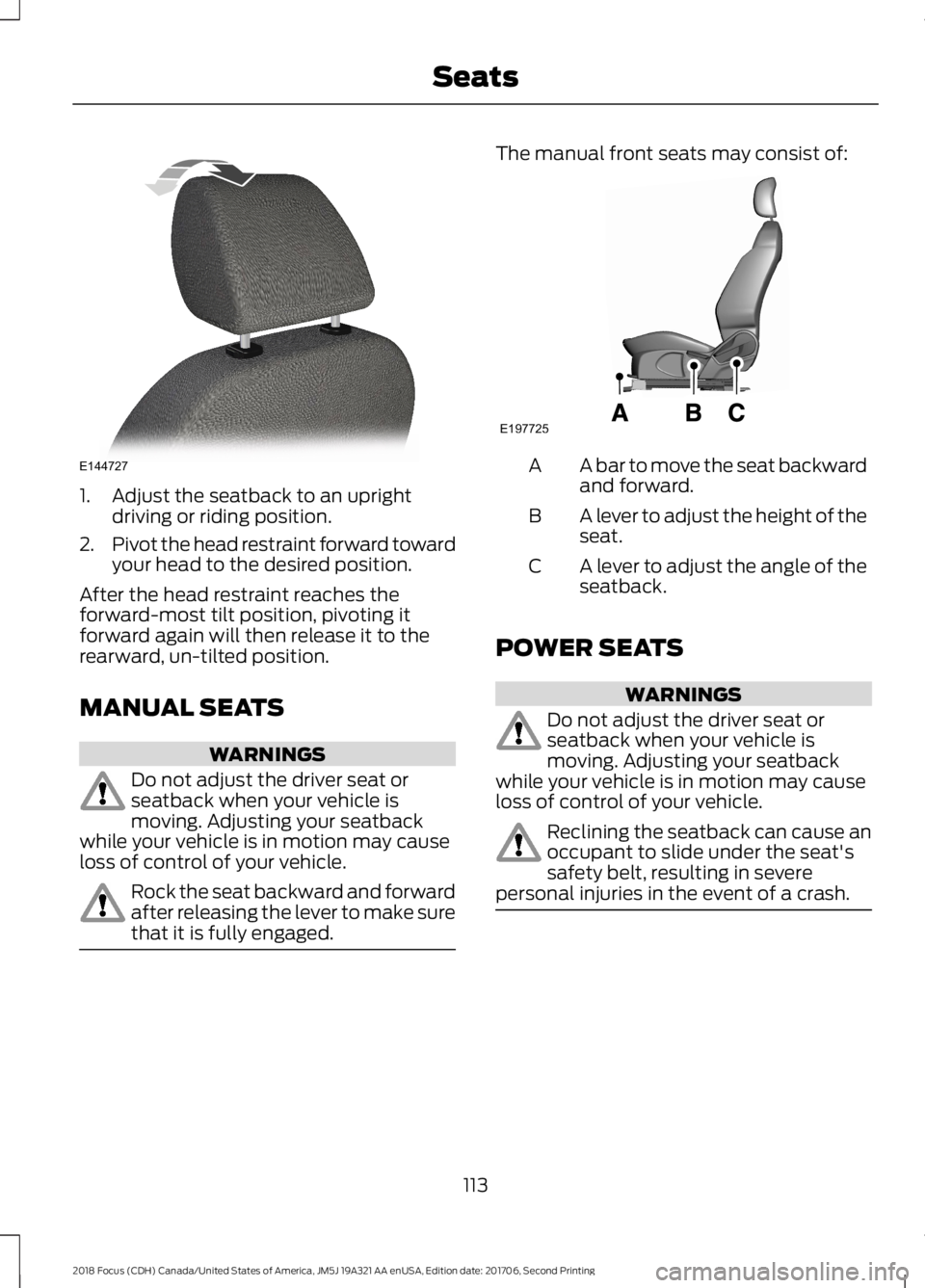
1.Adjust the seatback to an uprightdriving or riding position.
2.Pivot the head restraint forward towardyour head to the desired position.
After the head restraint reaches theforward-most tilt position, pivoting itforward again will then release it to therearward, un-tilted position.
MANUAL SEATS
WARNINGS
Do not adjust the driver seat orseatback when your vehicle ismoving. Adjusting your seatbackwhile your vehicle is in motion may causeloss of control of your vehicle.
Rock the seat backward and forwardafter releasing the lever to make surethat it is fully engaged.
The manual front seats may consist of:
A bar to move the seat backwardand forward.A
A lever to adjust the height of theseat.B
A lever to adjust the angle of theseatback.C
POWER SEATS
WARNINGS
Do not adjust the driver seat orseatback when your vehicle ismoving. Adjusting your seatbackwhile your vehicle is in motion may causeloss of control of your vehicle.
Reclining the seatback can cause anoccupant to slide under the seat'ssafety belt, resulting in severepersonal injuries in the event of a crash.
1132018 Focus (CDH) Canada/United States of America, JM5J 19A321 AA enUSA, Edition date: 201706, Second PrintingSeatsE144727 E197725
Page 118 of 473
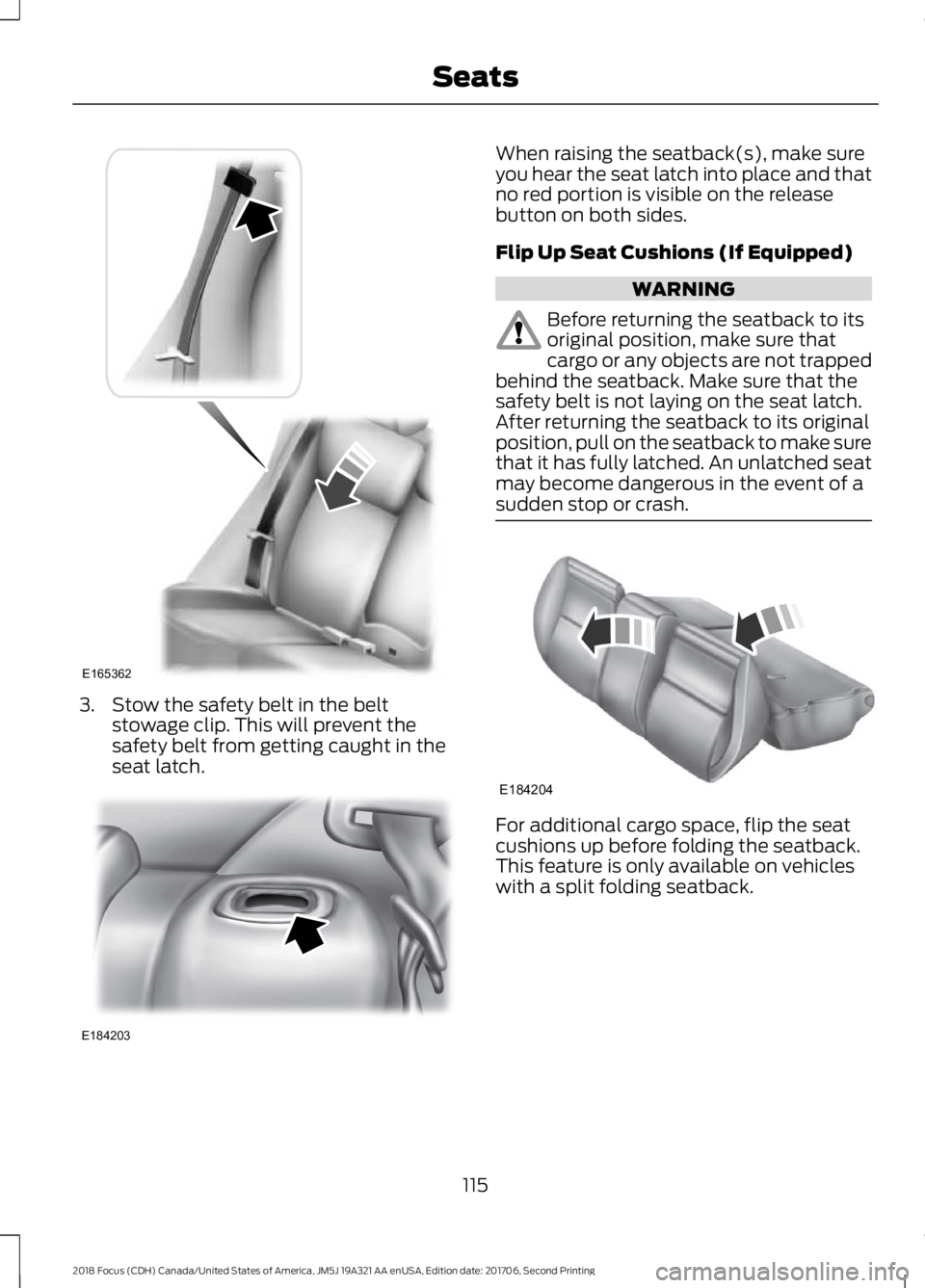
3.Stow the safety belt in the beltstowage clip. This will prevent thesafety belt from getting caught in theseat latch.
When raising the seatback(s), make sureyou hear the seat latch into place and thatno red portion is visible on the releasebutton on both sides.
Flip Up Seat Cushions (If Equipped)
WARNING
Before returning the seatback to itsoriginal position, make sure thatcargo or any objects are not trappedbehind the seatback. Make sure that thesafety belt is not laying on the seat latch.After returning the seatback to its originalposition, pull on the seatback to make surethat it has fully latched. An unlatched seatmay become dangerous in the event of asudden stop or crash.
For additional cargo space, flip the seatcushions up before folding the seatback.This feature is only available on vehicleswith a split folding seatback.
1152018 Focus (CDH) Canada/United States of America, JM5J 19A321 AA enUSA, Edition date: 201706, Second PrintingSeatsE165362 E184203 E184204