2018 FORD FOCUS lock
[x] Cancel search: lockPage 148 of 473

Brake-Shift Interlock
WARNINGS
Do not drive your vehicle until youverify that the brake lamps areworking.
When doing this procedure, you willbe taking your vehicle out of park (P)which means your vehicle can rollfreely. To avoid unwanted vehiclemovement, always fully set the parkingbrake prior to doing this procedure. Usewheel chocks if appropriate.
If you fully release the parking brakeand the brake warning lamp remainsilluminated, the brakes may not beworking properly. See your authorizeddealer.
Note:For some markets this feature will bedisabled.
Your vehicle is equipped with a brake-shiftinterlock feature that prevents moving thegearshift lever from park (P) when theignition is in the on position and the brakepedal is not pressed.
If you cannot move the gearshift lever outof park (P) position with the ignition in theon position and the brake pedal pressed,a malfunction may have occurred. It ispossible that a fuse has blown or yourvehicle’s brake lamps are not operatingproperly. See Fuse Specification Chart(page 200).
If the fuse is not blown and the brakelamps are working properly, the followingprocedure will allow you to move thegearshift lever from park (P):
1.Remove the side panel on the right sideof the gearshift lever.
2.Locate the access hole.
1452018 Focus (CDH) Canada/United States of America, JM5J 19A321 AA enUSA, Edition date: 201706, Second PrintingTransmissionE155984 E155985 E155983
Page 150 of 473
GENERAL INFORMATION
Wet brakes result in reduced brakingefficiency. Gently press the brake pedal afew times when driving from a car wash orstanding water to dry the brakes.
Note: Occasional brake noise is normal. Ifa metal-to-metal, continuous grinding orcontinuous squeal sound is present, thebrake linings may be worn-out. Have thesystem checked by an authorized dealer. Ifyour vehicle has continuous vibration orshudder in the steering wheel while braking,have it checked by an authorized dealer.
Note:Brake dust may accumulate on thewheels, even under normal drivingconditions. Some dust is inevitable as thebrakes wear and does not contribute tobrake noise. See Cleaning the Wheels(page 241).
Note:Depending on applicable laws andregulations in the country for which yourvehicle was originally built, the brake lampscould flash during heavy braking. Followingthis, the hazard lights could also flash whenyour vehicle comes to a stop.
Brake Over Accelerator
In the event that the accelerator pedalbecomes stuck or entrapped, apply steadyand firm pressure to the brake pedal toslow your vehicle and reduce enginepower. If you experience this condition,apply the brakes and bring your vehicle toa safe stop. Move the transmission to park(P), switch the engine off and apply theparking brake. Inspect the acceleratorpedal for any interference. If none arefound and the condition persists, have yourvehicle towed to the nearest authorizeddealer.
Brake Assist
Brake assist detects when you rapidlybrake by measuring the rate at which youpress the brake pedal. It providesmaximum braking efficiency as long as youpress the pedal, and can reduce stoppingdistances in critical situations
Anti-Lock Brake System
This system helps you maintain steeringcontrol during emergency stops by keepingthe brakes from locking.
If it illuminates when you aredriving, this indicates amalfunction. Your vehiclecontinues to have normal braking withoutthe anti-lock brake system function. Haveyour vehicle checked as soon as possible.
It also momentarily illuminates when youswitch the ignition on to confirm the lampis functional. If it does not illuminate whenyou switch the ignition on, or begins toflash at any time, have the system checkedby an authorized dealer.
It illuminates when you engagethe parking brake and theignition is on.
If it illuminates when your vehicle ismoving, make sure the parking brake isdisengaged. If the parking brake isdisengaged, this indicates low brake fluidlevel or a brake system fault. Have yourvehicle immediately checked.
It also momentarily illuminates when youswitch the ignition on to confirm the lampis functional. If it does not illuminate whenyou switch the ignition on, or begins toflash at any time, have the system checkedby an authorized dealer.
1472018 Focus (CDH) Canada/United States of America, JM5J 19A321 AA enUSA, Edition date: 201706, Second PrintingBrakes E138644
Page 151 of 473
HINTS ON DRIVING WITH
ANTI-LOCK BRAKES
The anti-lock braking system does noteliminate the risks when:
•You drive too closely to the vehicle infront of you.
•Your vehicle is hydroplaning.
•You take corners too fast.
•The road surface is poor.
Note: If the system activates, the brakepedal may pulse and may travel further.Maintain pressure on the brake pedal. Youmay also hear a noise from the system. Thisis normal.
PARKING BRAKE
Vehicles With AutomaticTransmission
WARNING
Always set the parking brake fullyand leave your vehicle with thetransmission selector lever inposition P.
Note:If you park your vehicle on a hill andfacing uphill move the transmission selectorlever to position P and turn the steeringwheel away from the curb.
Note:If you park your vehicle on a hill andfacing downhill move the transmissionselector lever to position P and turn thesteering wheel toward the curb.
Vehicles With ManualTransmission
WARNING
Always set the parking brake fully.
Note:If you park your vehicle on a hill andfacing uphill select first gear and turn thesteering wheel away from the curb.
Note:If you park your vehicle on a hill andfacing downhill select reverse gear and turnthe steering wheel toward the curb.
All Vehicles
Note:Do not press the release button whilepulling the lever up.
To apply the parking brake:
1.Press the foot brake pedal firmly.
2.Pull the parking brake lever up to itsfullest extent.
To release the parking brake:
1.Press the brake pedal firmly.
2.Pull the lever up slightly.
3.Press the release button and push thelever down.
HILL START ASSIST
WARNINGS
The system does not replace theparking brake. When you leave yourvehicle, always apply the parkingbrake and shift the transmission into park(P) for automatic transmission or first gearfor manual transmission.
You must remain in your vehiclewhen the system turns on. At alltimes, you are responsible forcontrolling your vehicle, supervising thesystem and intervening, if required. Failureto take care may result in the loss ofcontrol of your vehicle, serious personalinjury or death.
The system turns off if there is amalfunction or if you excessively revthe engine.
1482018 Focus (CDH) Canada/United States of America, JM5J 19A321 AA enUSA, Edition date: 201706, Second PrintingBrakes
Page 156 of 473

PRINCIPLE OF OPERATION
WARNINGS
To help avoid personal injury, pleaseread and understand the limitationsof the system as contained in thissection. Sensing is only an aid for some(generally large and fixed) objects whenmoving on a flat surface at parking speeds.Certain objects with surfaces that absorbultrasonic waves, surrounding vehicle'sparking aid systems, traffic controlsystems, fluorescent lamps, inclementweather, air brakes, and external motorsand fans may also affect the function ofthe sensing system; this may includereduced performance or a false activation.
To help avoid personal injury, alwaysuse caution when in reverse (R) andwhen using the sensing system.
This system is not designed toprevent contact with small or movingobjects. The system is designed toprovide a warning to assist the driver indetecting large stationary objects to avoiddamaging your vehicle. The system maynot detect smaller objects, particularlythose close to the ground.
Certain add-on devices such as largetrailer hitches, bike or surfboard racksand any device that may block thenormal detection zone of the system, maycreate false beeps.
Note:Keep the sensors, located on thebumper or fascia, free from snow, ice andlarge accumulations of dirt. If the sensorsare covered, the system’s accuracy can beaffected. Do not clean the sensors withsharp objects.
Note:If your vehicle sustains damage tothe bumper or fascia, leaving it misalignedor bent, the sensing zone may be alteredcausing inaccurate measurement ofobstacles or false alarms.
Note:The sensing system cannot be turnedoff when a MyKey is present. See Principleof Operation (page 55).
Note:If you attach certain add-on devicessuch as a trailer or bike rack, the rear sensingsystem may detect that add-on device andtherefore provide warnings. It is suggestedthat you disable the rear sensing systemwhen you attach an add-on device to yourvehicle to prevent these warnings.
The sensing system warns the driver ofobstacles within a certain range of yourvehicle. The system turns on automaticallywhenever you switch the ignition on.
You can turn the system on oroff by pressing the parking aidbutton. If your vehicle does nothave a parking aid button, the system canbe switched off through the informationdisplay menu or from the pop-up messagethat appears once you shift thetransmission into reverse (R). See GeneralInformation (page 92).
If a fault is present in the system, a warningmessage appears in the informationdisplay. See Information Messages(page 96).
REAR PARKING AID (If Equipped)
The rear parking aid sensors automaticallyturn on when you shift into reverse (R).
As your vehicle moves closer to theobstacle, the rate of the audible warningincreases. When the obstacle is less than12 in (30 cm) away, the warning soundscontinuously. If the system detects anobject farther than 12 in (30 cm) from thecorners of the bumper, the tone sounds foronly three seconds. If the system detectsan approaching object the warning soundsagain.
1532018 Focus (CDH) Canada/United States of America, JM5J 19A321 AA enUSA, Edition date: 201706, Second PrintingParking AidsE139213
Page 160 of 473
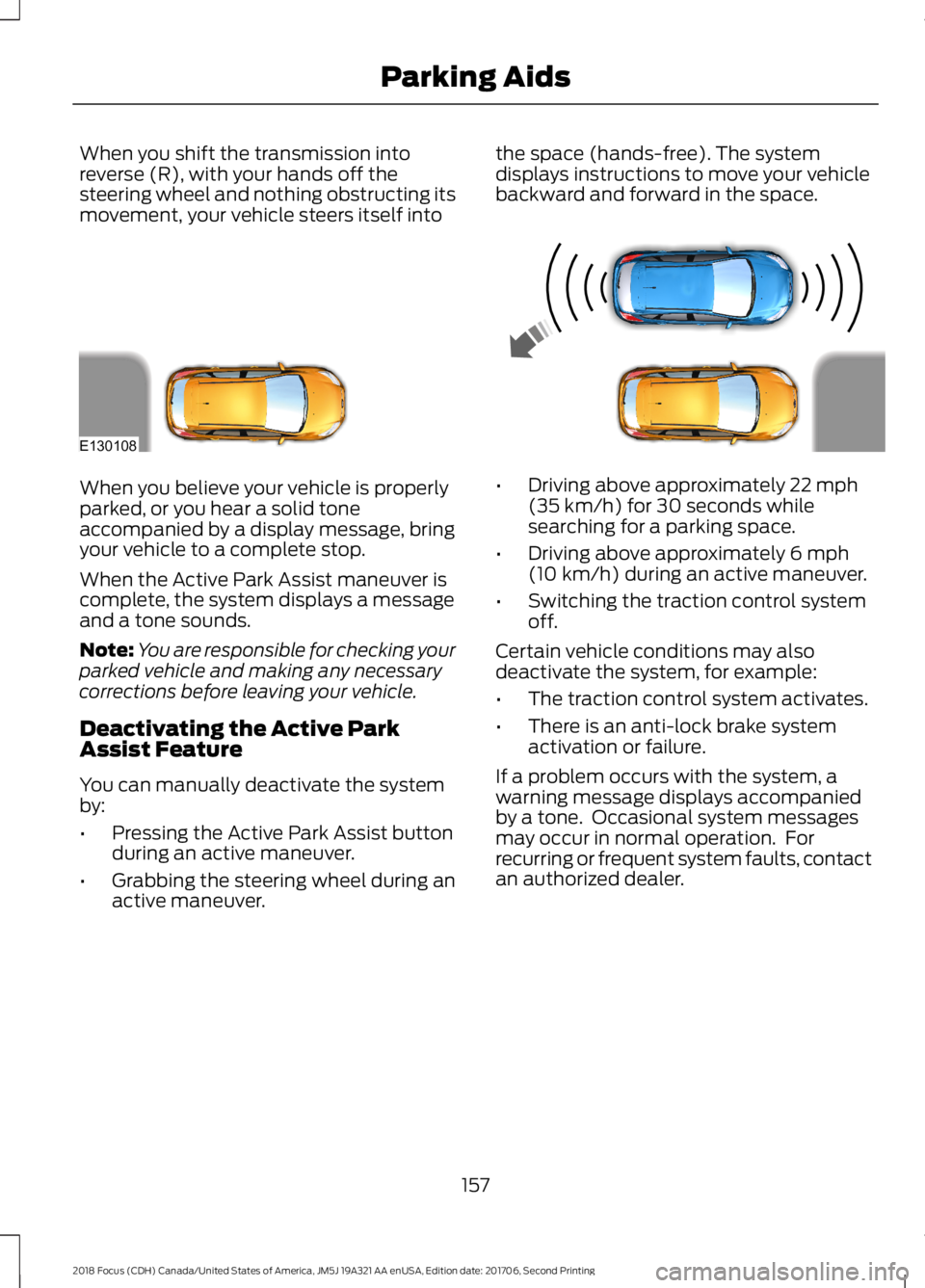
When you shift the transmission intoreverse (R), with your hands off thesteering wheel and nothing obstructing itsmovement, your vehicle steers itself into
the space (hands-free). The systemdisplays instructions to move your vehiclebackward and forward in the space.
When you believe your vehicle is properlyparked, or you hear a solid toneaccompanied by a display message, bringyour vehicle to a complete stop.
When the Active Park Assist maneuver iscomplete, the system displays a messageand a tone sounds.
Note:You are responsible for checking yourparked vehicle and making any necessarycorrections before leaving your vehicle.
Deactivating the Active ParkAssist Feature
You can manually deactivate the systemby:
•Pressing the Active Park Assist buttonduring an active maneuver.
•Grabbing the steering wheel during anactive maneuver.
•Driving above approximately 22 mph(35 km/h) for 30 seconds whilesearching for a parking space.
•Driving above approximately 6 mph(10 km/h) during an active maneuver.
•Switching the traction control systemoff.
Certain vehicle conditions may alsodeactivate the system, for example:
•The traction control system activates.
•There is an anti-lock brake systemactivation or failure.
If a problem occurs with the system, awarning message displays accompaniedby a tone. Occasional system messagesmay occur in normal operation. Forrecurring or frequent system faults, contactan authorized dealer.
1572018 Focus (CDH) Canada/United States of America, JM5J 19A321 AA enUSA, Edition date: 201706, Second PrintingParking AidsE130108
Page 167 of 473
DRIVER ALERT
Principle of Operation
WARNINGS
The system is designed to aid thedriver. It is not intended to replaceyour attention and judgment. You arestill responsible to drive with due care andattention.
At all times, you are responsible forcontrolling your vehicle, supervisingthe system and intervening, ifrequired. Failure to take care may result inthe loss of control of your vehicle, seriouspersonal injury or death.
The system may not function if thesensor is blocked.
Take regular rest breaks if you feeltired. Do not wait for the system towarn you.
Certain driving styles may result inthe system warning you even if youare not feeling tired.
In cold and severe weatherconditions the system may notfunction. Rain, snow and spray canall limit sensor performance.
The system will not operate if thesensor cannot track the road lanemarkings.
If damage occurs in the immediatearea surrounding the sensor, haveyour vehicle checked as soon aspossible.
The system may not correctlyoperate if your vehicle is fitted witha suspension kit not approved by us.
Note:Keep the windshield free fromobstructions for example bird droppings,insects and snow or ice.
Note:The system assists you when drivingon fast main roads and freeways.
Note:The system calculates an alertnesslevel at vehicle speeds above approximately40 mph (65 km/h).
The system automatically monitors yourdriving behavior.
The system is designed to alert you if itdetects that you are becoming drowsy orif your driving deteriorates.
Using Driver Alert
Switching the System On and Off
Switch the system on using the informationdisplay. See Information Displays (page92).
Note:The system remains on or offdepending on how it was last set.
The system calculates your alertness levelbased upon your driving behavior in relationto the lane markings and other factors.
System Warnings
Note:The system does not warn you if thevehicle speed falls below approximately40 mph (65 km/h).
The warning system has two stages:
1.A temporary warning is issued to adviseyou to take a rest. This message onlyappears for a short time.
2.If you do not rest and the systemcontinues to detect that your drivingdeteriorates, it issues a further warning.This remains in the information displayuntil you cancel it. See InformationMessages (page 96).
Press OK on the steering wheel control toremove the warning.
1642018 Focus (CDH) Canada/United States of America, JM5J 19A321 AA enUSA, Edition date: 201706, Second PrintingDriving Aids
Page 168 of 473
System Display
When active the system runs automaticallyin the background and only issue warningsif required. You can view the status at anytime using the information display. SeeGeneral Information (page 92).
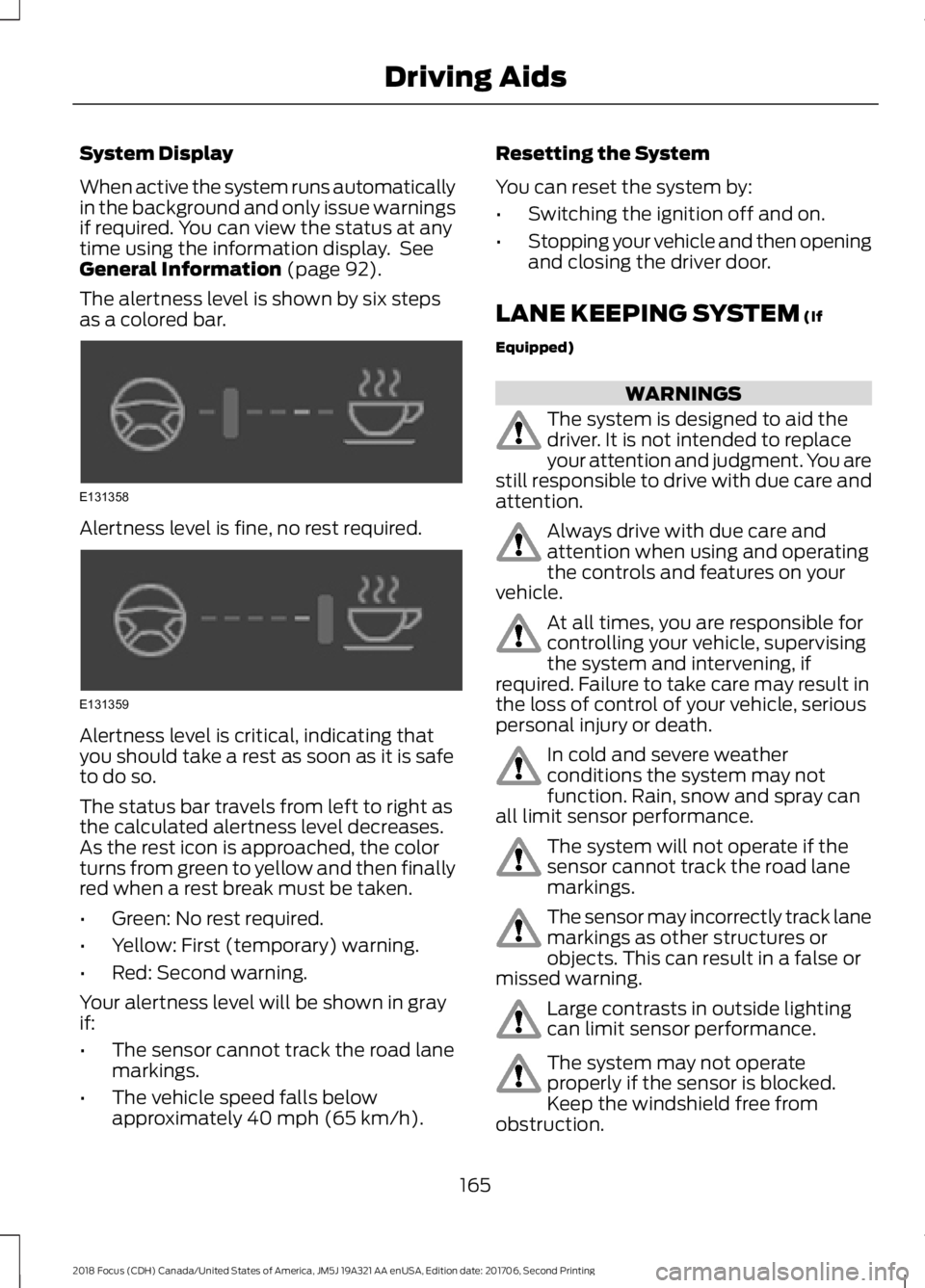
The alertness level is shown by six stepsas a colored bar.
Alertness level is fine, no rest required.
Alertness level is critical, indicating thatyou should take a rest as soon as it is safeto do so.
The status bar travels from left to right asthe calculated alertness level decreases.As the rest icon is approached, the colorturns from green to yellow and then finallyred when a rest break must be taken.
•Green: No rest required.
•Yellow: First (temporary) warning.
•Red: Second warning.
Your alertness level will be shown in grayif:
•The sensor cannot track the road lanemarkings.
•The vehicle speed falls belowapproximately 40 mph (65 km/h).
Resetting the System
You can reset the system by:
•Switching the ignition off and on.
•Stopping your vehicle and then openingand closing the driver door.
LANE KEEPING SYSTEM (If
Equipped)
WARNINGS
The system is designed to aid thedriver. It is not intended to replaceyour attention and judgment. You arestill responsible to drive with due care andattention.
Always drive with due care andattention when using and operatingthe controls and features on yourvehicle.
At all times, you are responsible forcontrolling your vehicle, supervisingthe system and intervening, ifrequired. Failure to take care may result inthe loss of control of your vehicle, seriouspersonal injury or death.
In cold and severe weatherconditions the system may notfunction. Rain, snow and spray canall limit sensor performance.
The system will not operate if thesensor cannot track the road lanemarkings.
The sensor may incorrectly track lanemarkings as other structures orobjects. This can result in a false ormissed warning.
Large contrasts in outside lightingcan limit sensor performance.
The system may not operateproperly if the sensor is blocked.Keep the windshield free fromobstruction.
1652018 Focus (CDH) Canada/United States of America, JM5J 19A321 AA enUSA, Edition date: 201706, Second PrintingDriving AidsE131358 E131359
Page 169 of 473
WARNINGS
If damage occurs in the immediatearea surrounding the sensor, haveyour vehicle checked as soon aspossible.
The sensor is located near the rear viewmirror.
Note:The system works above 40 mph(64 km/h).
Note:The system works as long as thecamera can detect one lane marking.
Note:The system may not function if thecamera is blocked or there is damage to thewindshield.
Note:When Aid mode is on and the systemdetects no steering activity for a shortperiod, the system will alert you to put yourhands on the steering wheel. The systemmay detect a light grip or touch on thesteering wheel as hands off driving.
The system notifies you to stay in your lanethrough the steering system and theinstrument cluster display when the frontcamera detects an unintentional drift outof your lane is likely to occur. The systemautomatically detects and tracks the roadlane markings using a camera mountedbehind the interior rear view mirror.
Switching the System On and Off
Note:The system on or off setting is storeduntil it is manually changed, unless a MyKeyis detected. If the system detects a MyKeyit defaults to on and the mode is set to Alert.
Note:If a MyKey is detected, pressing thebutton will not affect the on or off status ofthe system.
Press the button on the steeringwheel stalk to switch the systemon or off.
System Settings
The system has optional setting menusavailable. The system stores thelast-known selection for each of thesesettings. You do not need to readjust yoursettings each time you turn on the system.
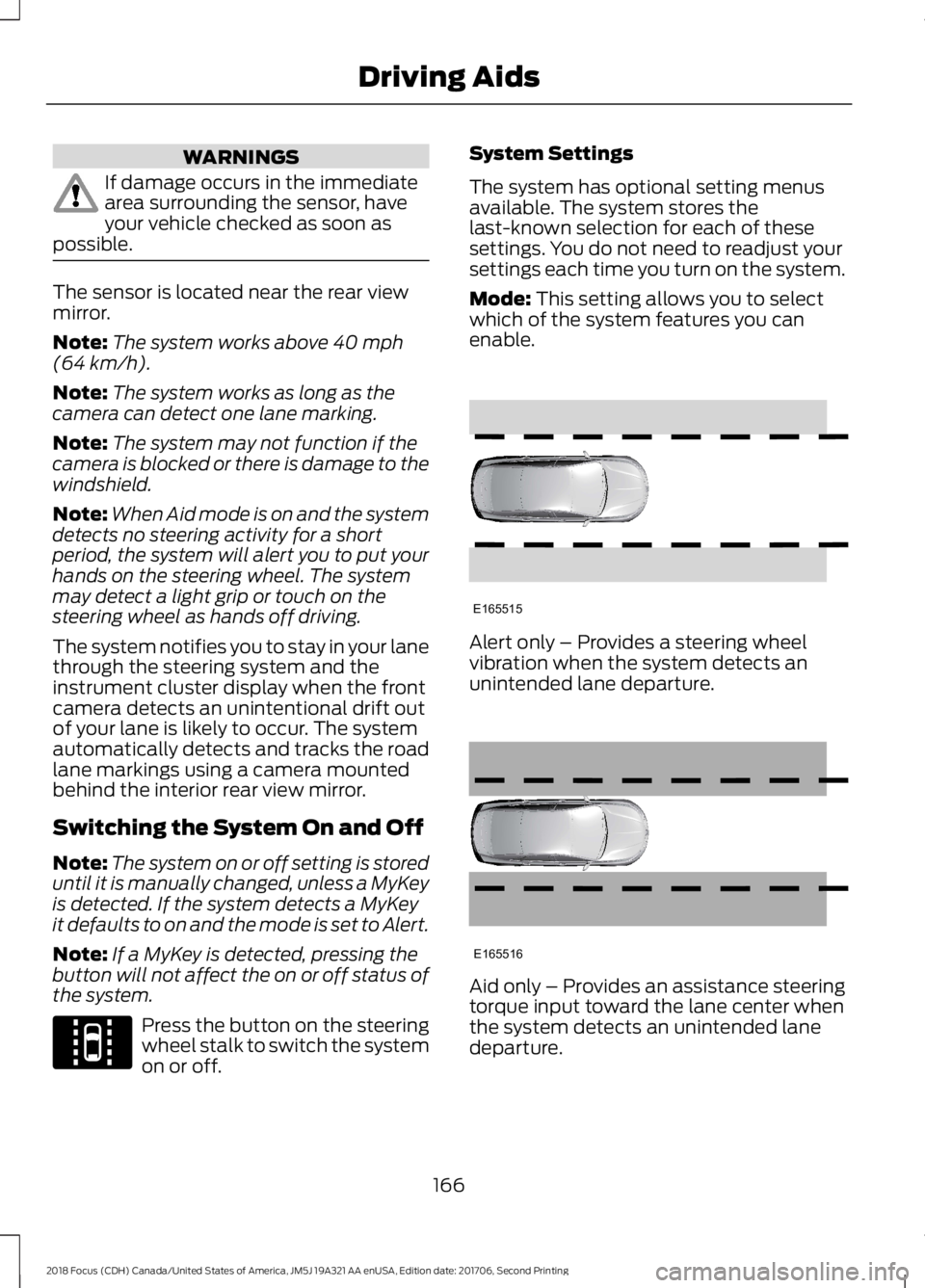
Mode: This setting allows you to selectwhich of the system features you canenable.
Alert only – Provides a steering wheelvibration when the system detects anunintended lane departure.
Aid only – Provides an assistance steeringtorque input toward the lane center whenthe system detects an unintended lanedeparture.
1662018 Focus (CDH) Canada/United States of America, JM5J 19A321 AA enUSA, Edition date: 201706, Second PrintingDriving AidsE144813 E165515 E165516