2018 FORD FOCUS lock
[x] Cancel search: lockPage 268 of 473

WARNINGS
Make sure there is no grease or oil onthe threads or the surface betweenthe wheel lugs and nuts. This cancause the lug nuts to loosen while driving.
When one of the front wheels is offthe ground, the transmission alonewill not prevent the vehicle frommoving or slipping off the jack, even if thetransmission is in park (P).
To help prevent your vehicle frommoving when changing a wheel, shiftthe transmission into park (P), setthe parking brake and use an appropriateblock or wheel chock to secure the wheeldiagonally opposite to the wheel beingchanged. For example, when changing thefront left wheel, place an appropriate blockor wheel chock on the right rear wheel.
Do not attempt to change a tire onthe side of the vehicle close tomoving traffic. Pull far enough off theroad to avoid the danger of being hit whenoperating the jack or changing the wheel.
Always use the jack provided asoriginal equipment with your vehicle.If using a jack other than the oneprovided, make sure the jack capacity isadequate for the vehicle weight, includingany vehicle cargo or modifications. If youare unsure if the jack capacity is adequate,contact the authorized dealer.
Make sure all passengers are out ofyour vehicle.
1.Park on a level surface, set the parkingbrake and activate the hazard flashers.
2.Place the transmission in park (P)(automatic transmission) or neutral(N) (manual transmission) and turnthe engine off.
3.Remove the carpeted wheel cover.
4.Remove the spare tire bolt securing thespare tire by turning itcounterclockwise.
5.Remove the spare tire from the sparetire compartment
6.Remove the retaining bolt securing thejack by turning it counterclockwise.
7.Remove the jack.
8.Block the diagonally opposite wheel.
9.Loosen each wheel lug nut one-halfturn counterclockwise, but do notremove them until the wheel is raisedoff the ground.
10.The vehicle jacking points are shownhere, and are depicted on the warninglabel on the jack.Note: Jack at thespecified locations to avoid damageto the vehicle.
11.Indentations in the sills show thelocation of the jacking points.
2652018 Focus (CDH) Canada/United States of America, JM5J 19A321 AA enUSA, Edition date: 201706, Second PrintingWheels and TiresE142551 E145908
Page 269 of 473
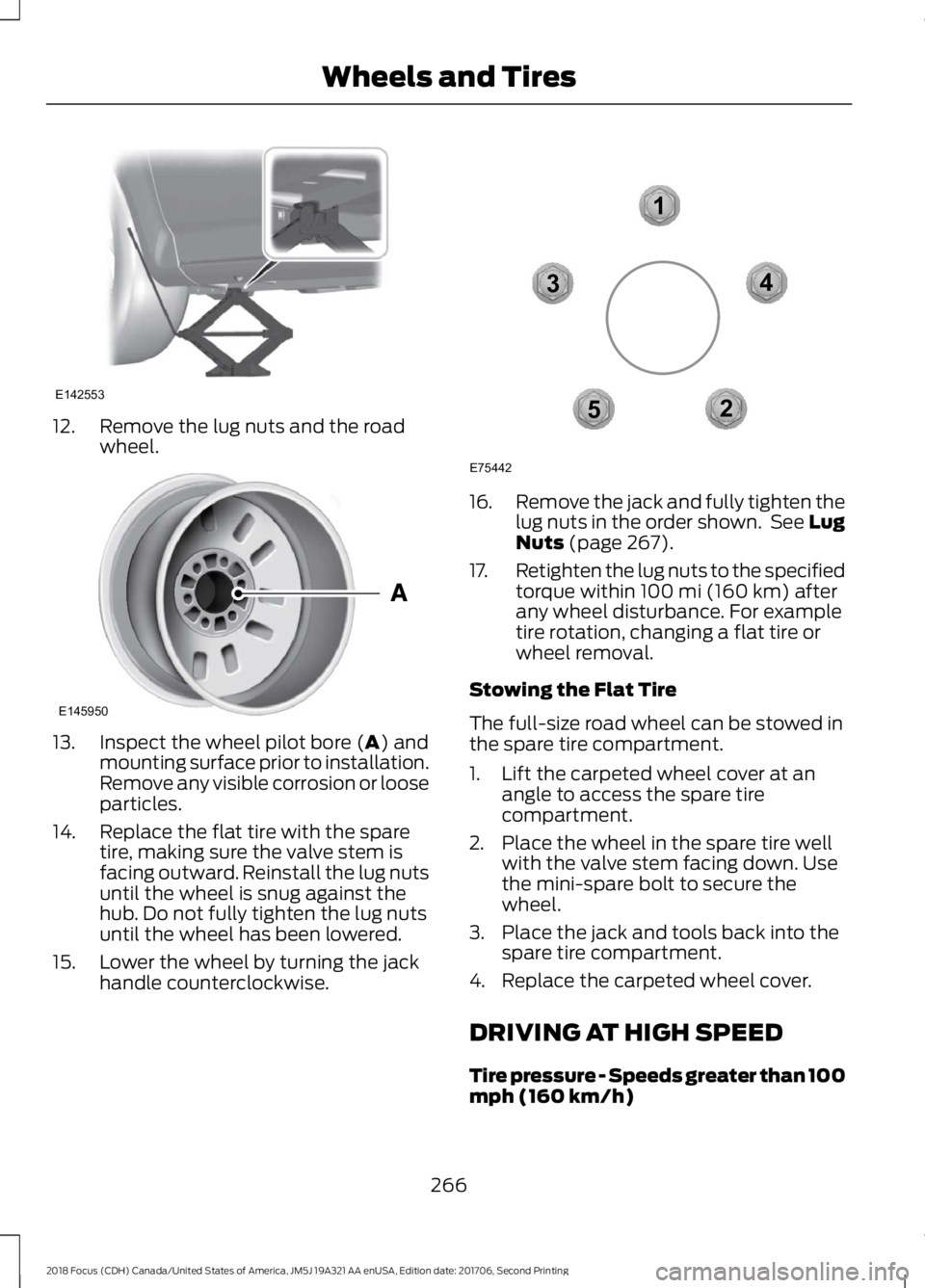
12.Remove the lug nuts and the roadwheel.
13.Inspect the wheel pilot bore (A) andmounting surface prior to installation.Remove any visible corrosion or looseparticles.
14.Replace the flat tire with the sparetire, making sure the valve stem isfacing outward. Reinstall the lug nutsuntil the wheel is snug against thehub. Do not fully tighten the lug nutsuntil the wheel has been lowered.
15.Lower the wheel by turning the jackhandle counterclockwise.
16.Remove the jack and fully tighten thelug nuts in the order shown. See LugNuts (page 267).
17.Retighten the lug nuts to the specifiedtorque within 100 mi (160 km) afterany wheel disturbance. For exampletire rotation, changing a flat tire orwheel removal.
Stowing the Flat Tire
The full-size road wheel can be stowed inthe spare tire compartment.
1.Lift the carpeted wheel cover at anangle to access the spare tirecompartment.
2.Place the wheel in the spare tire wellwith the valve stem facing down. Usethe mini-spare bolt to secure thewheel.
3.Place the jack and tools back into thespare tire compartment.
4.Replace the carpeted wheel cover.
DRIVING AT HIGH SPEED
Tire pressure - Speeds greater than 100mph (160 km/h)
2662018 Focus (CDH) Canada/United States of America, JM5J 19A321 AA enUSA, Edition date: 201706, Second PrintingWheels and TiresE142553 E145950 12345E75442
Page 278 of 473
SpecificationName
Motorcraft® SAE 5W-20 Synthetic Motor Oil / Huile moteursynthétique SAE 5W-20 Motorcraft® (Canada)XO-5W20-QFS (U.S.)CXO-5W20-LFS6 (Canada)
WSS-M97B44-D2Motorcraft® Orange Prediluted Antifreeze/Coolant (U.S.)Motorcraft® Orange Prediluted Antifreeze/Coolant / Antigel/liquidede refroidissement prédilué orange Motorcraft® (Canada)VC-3DIL-B (U.S.)CVC-3DIL-B (Canada)
WSS-M6C65-A2Motorcraft® DOT 4 LV High Performance Motor Vehicle Brake Fluid(U.S.)Motorcraft® DOT 4 LV High Performance Motor Vehicle Brake Fluid/ Liquide de frein automobile haute performance DOT 4 LVMotorcraft® (Canada)PM-20 (U.S. & Canada)
WSS-M2C200-D2Motorcraft® Dual Clutch Transmission Fluid (U.S.)Motorcraft® Dual Clutch Transmission Fluid / Huile pour boîtesembrayage double Motorcraft® (Canada)XT-11-QDC (U.S. & Canada)
MERCON® LVMotorcraft® MERCON® LV Automatic Transmission Fluid (U.S.)WSS-M2C938-AMotorcraft® MERCON® LV Automatic Transmission Fluid / Huilepour boîte automatique MERCON® LV Motorcraft® (Canada)XT-10-QLVC (U.S.)CXT-10-LV12 (Canada)
WSS-M14P19-AMotorcraft® Premium Windshield Wash Concentrate with Bitterant(U.S.)Motorcraft® Premium Quality Windshield Washer Fluid / Liquidelave-glace de haute qualité Motorcraft® (Canada)ZC-32-B2 (U.S.)CXC-37-A/B/D/F (Canada)
WSS-M17B21-AR-1234yf Refrigerant (U.S.)R-1234yf Refrigerant / Frigorigène R-1234yf (Canada)YN-33-A (U.S.)HS7Z-19B519-BA (Canada)
WSS-M2C300-A2Motorcraft® R-1234yf Refrigerant PAG Oil (U.S.)Motorcraft® R-1234yf Refrigerant PAG Oil / Huile PAG pourfrigorigène R-1234yf Motorcraft® (Canada)YN-35 (U.S. & Canada)
ESB-M1C93-BMotorcraft® Multi-Purpose Grease Spray (U.S.)Motorcraft® Multi-Purpose Grease Spray / Graisse tout usage enaérosol Motorcraft® (Canada)XL-5-A (U.S. & Canada)
-Motorcraft® Penetrating and Lock Lubricant (U.S.)
2752018 Focus (CDH) Canada/United States of America, JM5J 19A321 AA enUSA, Edition date: 201706, Second PrintingCapacities and Specifications
Page 282 of 473
SpecificationName
Motorcraft® Premium Quality Windshield Washer Fluid / Liquidelave-glace de haute qualité Motorcraft® (Canada)ZC-32-B2 (U.S.)CXC-37-A/B/D/F (Canada)
WSS-M17B21-AR-1234yf Refrigerant (U.S.)R-1234yf Refrigerant / Frigorigène R-1234yf (Canada)YN-33-A (U.S.)HS7Z-19B519-BA (Canada)
WSS-M2C300-A2Motorcraft® R-1234yf Refrigerant PAG Oil (U.S.)Motorcraft® R-1234yf Refrigerant PAG Oil / Huile PAG pourfrigorigène R-1234yf Motorcraft® (Canada)YN-35 (U.S. & Canada)
ESB-M1C93-BMotorcraft® Multi-Purpose Grease Spray (U.S.)Motorcraft® Multi-Purpose Grease Spray / Graisse tout usage enaérosol Motorcraft® (Canada)XL-5-A (U.S. & Canada)
-Motorcraft® Penetrating and Lock Lubricant (U.S.)Motorcraft® Penetrating Fluid / Liquide dégrippant Motorcraft®(Canada)XL-1 (U.S.)CXC-51-A (Canada)
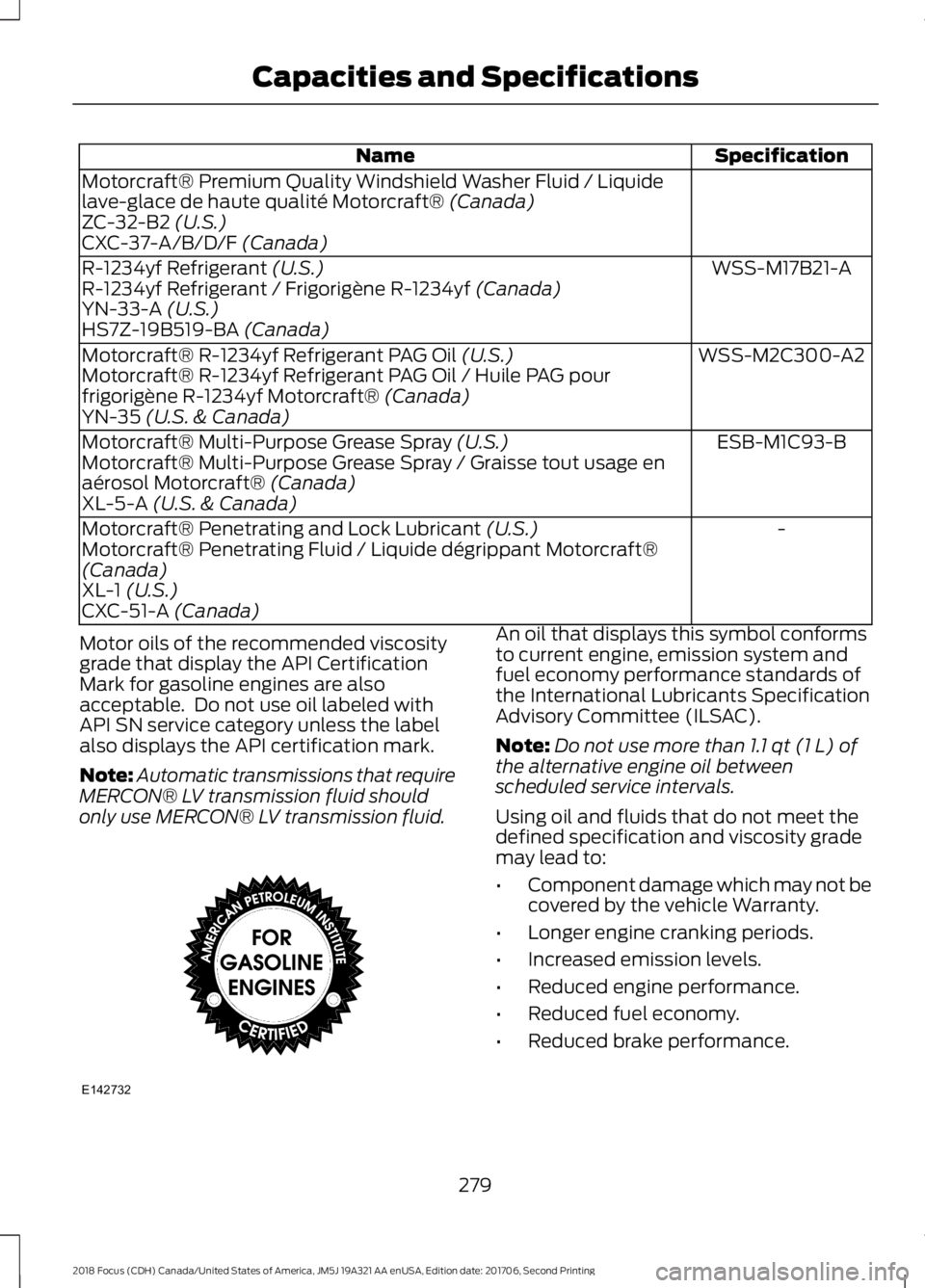
Motor oils of the recommended viscositygrade that display the API CertificationMark for gasoline engines are alsoacceptable. Do not use oil labeled withAPI SN service category unless the labelalso displays the API certification mark.
Note:Automatic transmissions that requireMERCON® LV transmission fluid shouldonly use MERCON® LV transmission fluid.
An oil that displays this symbol conformsto current engine, emission system andfuel economy performance standards ofthe International Lubricants SpecificationAdvisory Committee (ILSAC).
Note:Do not use more than 1.1 qt (1 L) ofthe alternative engine oil betweenscheduled service intervals.
Using oil and fluids that do not meet thedefined specification and viscosity grademay lead to:
•Component damage which may not becovered by the vehicle Warranty.
•Longer engine cranking periods.
•Increased emission levels.
•Reduced engine performance.
•Reduced fuel economy.
•Reduced brake performance.
2792018 Focus (CDH) Canada/United States of America, JM5J 19A321 AA enUSA, Edition date: 201706, Second PrintingCapacities and SpecificationsE142732
Page 286 of 473
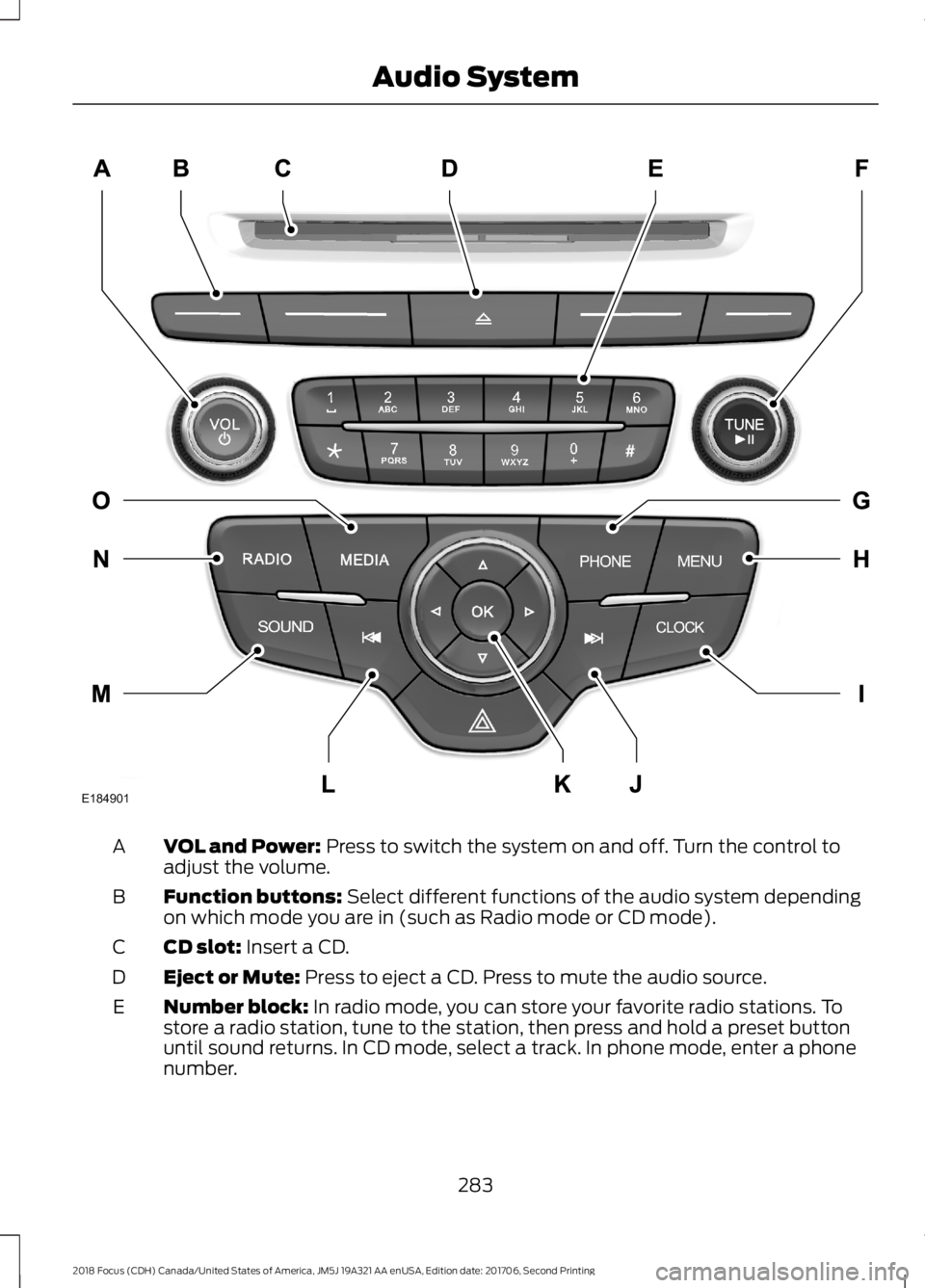
VOL and Power: Press to switch the system on and off. Turn the control toadjust the volume.A
Function buttons: Select different functions of the audio system dependingon which mode you are in (such as Radio mode or CD mode).B
CD slot: Insert a CD.C
Eject or Mute: Press to eject a CD. Press to mute the audio source.D
Number block: In radio mode, you can store your favorite radio stations. Tostore a radio station, tune to the station, then press and hold a preset buttonuntil sound returns. In CD mode, select a track. In phone mode, enter a phonenumber.
E
2832018 Focus (CDH) Canada/United States of America, JM5J 19A321 AA enUSA, Edition date: 201706, Second PrintingAudio SystemE184901
Page 287 of 473
TUNE and Play or Pause: In radio mode, turn to search the frequency bandin individual increments. Press to mute the station. In media mode, turn to selecta new track. Press to either play or pause a track. This button also mutes theradio sources.
F
PHONE: Press to access the phone features of the SYNC system. See yourSYNC information.G
MENU: Press to access different audio system features. See Menu Structurelater in this chapter.H
CLOCK: If not in phone mode, press to display the clock.I
Seek and Fast Forward: In radio mode, select a frequency band and pressthis button. The system stops at the first station up the band. Press and holdthe button to move quickly, then release to stop at the next available station.In CD mode, press to select the next track. Press and hold the button to movequickly forward through the current track.
J
OK and Arrow buttons: Press OK to confirm menu selections. Press to scrollthrough the menu choices.K
Seek and Reverse: In radio mode, select a frequency band and press thisbutton. The system stops at the first station down the band. Press and holdthe button to move quickly, then release to stop at the previous available station.In CD mode, press to select the previous track. Press and hold the button tomove quickly backward through the current track.
L
SOUND: Press to access settings for Treble, Midrange, Bass, Fade or Balance.Use the up and down arrow buttons to select the various settings. When youmake your selection, press the left and right arrow buttons to change thesettings. Press OK to set or press MENU to exit. Sound settings can be set foreach audio source independently.
M
RADIO: Press this multiple times to select a radio band. Press and hold toselect the autostore function. Press to return to the main screen of the activeradio band.
N
MEDIA: Press to open the media source menu. You can press this multipletimes to change to CD or to a SYNC-Media device or scroll through the mediasources using the arrow buttons. Press OK to select a source.
O
2842018 Focus (CDH) Canada/United States of America, JM5J 19A321 AA enUSA, Edition date: 201706, Second PrintingAudio System
Page 290 of 473
SIRIUS
Select for a brief sampling of all available channels.Scan
Select to view your satellite radio electronic serial number(ESN). You need this number when communicating withSirius to activate, modify or track your account.
Show ESN
Select to view available satellite radio channels. Press OKto open a list of the following options for this channel:Tune Channel, Skip Channel or Lock Channel. Once youskip or lock a channel, you can only access it by pressingDirect and entering the channel number. Locking orunlocking a channel requires your PIN.
Channel Guide
Select to view channel categories (such as Pop, Rock orNews). If you select a category, seek and scan functionsonly stop on channels in that category.
Set Sirius Category
Select to switch on or off alerts for songs, artists or teams.The system alerts you when the selection is playing onanother channel. Save up to 20 alerts.
Alerts
Use your PIN to unlock previously locked stations.Unlock All Stations
Use to restore any channels you previously skipped.Skip No Stations
Select to create a PIN, which allows you to lock or unlockchannels. Your initial PIN is 1234.Parental Lock (PIN)
Audio Settings
Automatically adjusts the volume to compensate forspeed and wind noise. You can set the system between0 and +7.
Speed CompensatedVolume
Select to adjust settings for Treble, Midrange, Bass, Fadeor Balance.Sound
Select to optimize sound quality for the chosen seatingposition.Occupancy Mode
Choose between the stereo modes.DSP
2872018 Focus (CDH) Canada/United States of America, JM5J 19A321 AA enUSA, Edition date: 201706, Second PrintingAudio System
Page 291 of 473

CD Settings
Select to scan all disc selections.Scan All
Select to scan all music in the current MP3 folder.Scan Folder
Select to bring soft and loud passages together for a moreconsistent listening level.CD Compression
Clock Settings
Select to set the time.Set Time
Select to set the calendar date.Set Date
Select to view clock time in a 12-hour mode or 24-hourmode.24h Mode
Display Settings
Select to change display brightness.Dimming
Select to display the language in English, French orSpanish.Language
Select to display the outside temperature in Fahrenheitor Celsius.Temp. Setting
2882018 Focus (CDH) Canada/United States of America, JM5J 19A321 AA enUSA, Edition date: 201706, Second PrintingAudio System