2018 FORD FOCUS door lock
[x] Cancel search: door lockPage 168 of 473
System Display
When active the system runs automaticallyin the background and only issue warningsif required. You can view the status at anytime using the information display. SeeGeneral Information (page 92).
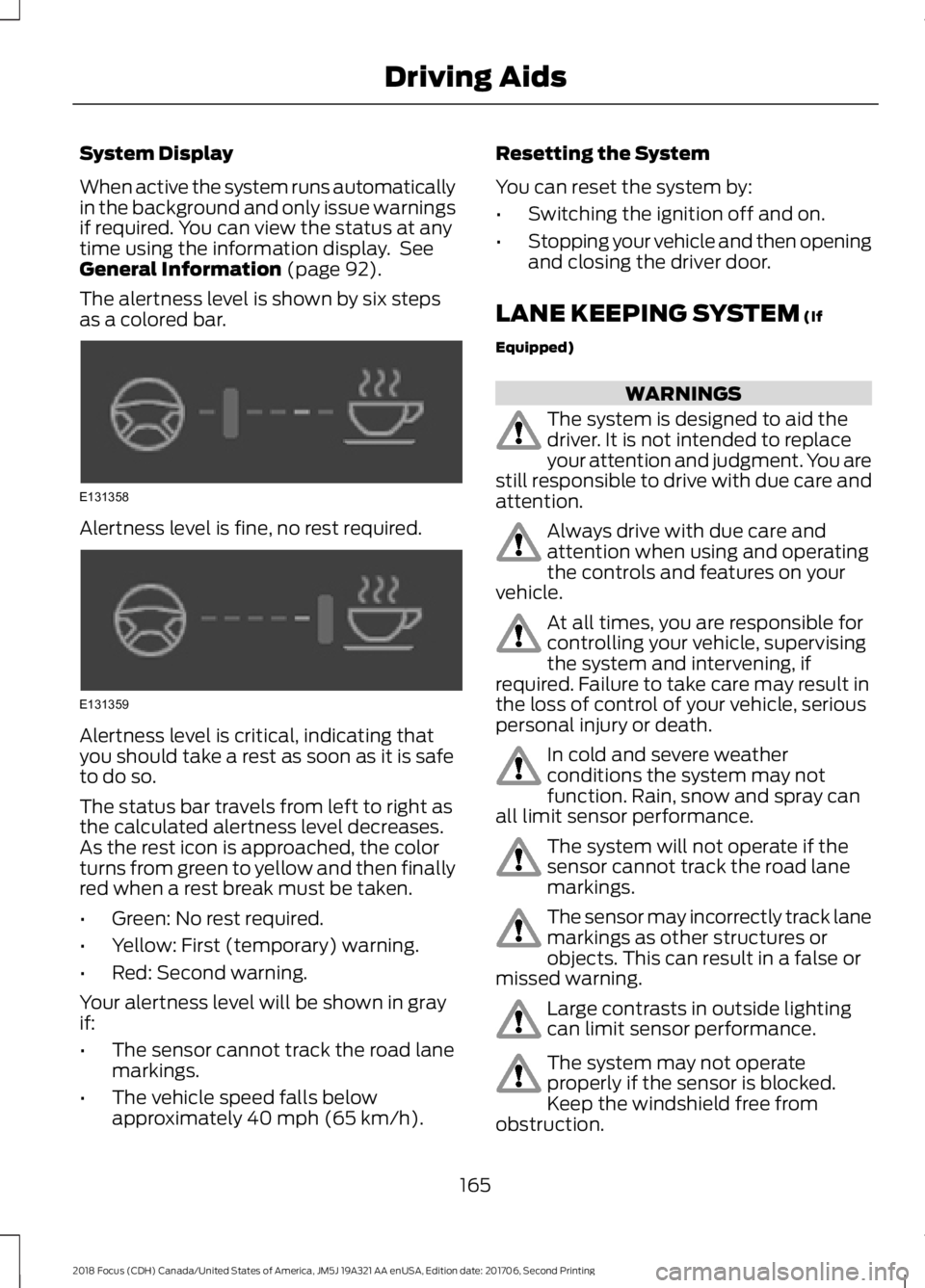
The alertness level is shown by six stepsas a colored bar.
Alertness level is fine, no rest required.
Alertness level is critical, indicating thatyou should take a rest as soon as it is safeto do so.
The status bar travels from left to right asthe calculated alertness level decreases.As the rest icon is approached, the colorturns from green to yellow and then finallyred when a rest break must be taken.
•Green: No rest required.
•Yellow: First (temporary) warning.
•Red: Second warning.
Your alertness level will be shown in grayif:
•The sensor cannot track the road lanemarkings.
•The vehicle speed falls belowapproximately 40 mph (65 km/h).
Resetting the System
You can reset the system by:
•Switching the ignition off and on.
•Stopping your vehicle and then openingand closing the driver door.
LANE KEEPING SYSTEM (If
Equipped)
WARNINGS
The system is designed to aid thedriver. It is not intended to replaceyour attention and judgment. You arestill responsible to drive with due care andattention.
Always drive with due care andattention when using and operatingthe controls and features on yourvehicle.
At all times, you are responsible forcontrolling your vehicle, supervisingthe system and intervening, ifrequired. Failure to take care may result inthe loss of control of your vehicle, seriouspersonal injury or death.
In cold and severe weatherconditions the system may notfunction. Rain, snow and spray canall limit sensor performance.
The system will not operate if thesensor cannot track the road lanemarkings.
The sensor may incorrectly track lanemarkings as other structures orobjects. This can result in a false ormissed warning.
Large contrasts in outside lightingcan limit sensor performance.
The system may not operateproperly if the sensor is blocked.Keep the windshield free fromobstruction.
1652018 Focus (CDH) Canada/United States of America, JM5J 19A321 AA enUSA, Edition date: 201706, Second PrintingDriving AidsE131358 E131359
Page 187 of 473
You can flat-tow (all wheels on theground, regardless of the powertrain andtransmission configuration) your disabledvehicle (without access to wheel dollies,car-hauling trailer, or flatbed transportvehicle) under the following conditions:
•Your vehicle is facing forward so youtow it in a forward direction.
•You place the transmission in neutral(N). If you cannot place thetransmission in neutral (N), you mayneed to override it. See Transmission(page 140).
•Maximum speed is 35 mph (56 km/h).
•Maximum distance is 50 mi (80 km).
Recreational Towing
Vehicles with an Ignition Key
Note: Put your climate control system inrecirculated air mode to prevent exhaustfumes from entering the vehicle. SeeClimate Control (page 104).
Note:There must be battery power to movethe transmission's internal components toneutral (N) properly in Step 3. In addition,moving the gearshift to the neutral (N)position without first switching the ignitionto the on position limits the towingcapability to 35 mph (56 km/h) and 50 mi(80 km).
1.Release the parking brake.
2.Switch the ignition to the on position.
3.Press the brake pedal, and then movethe gearshift to the neutral (N)position.
4.Wait for a message in the informationand entertainment display indicatingthat the transmission is ready, and thenswitch off the ignition and release thebrake pedal.
5.Disconnect the negative (black) cablefrom the battery. See Changing the12V Battery (page 222).
Note:The anti-theft system does not workuntil you reconnect the battery cable.
Note:The maximum towing speed is70 mph (112 km/h).
Note:There is no limit on towing distance.
After towing, start the engine within 15minutes of reconnecting the battery cable.See Changing the 12V Battery (page 222).
Vehicles with Keyless Start
Note: Put your climate control system inrecirculated air mode to prevent exhaustfumes from entering the vehicle. SeeClimate Control (page 104).
Note:There must be battery power to movethe transmission's internal components toneutral (N) properly in Step 3. In addition,moving the gearshift to the neutral (N)position without first switching the ignitionto the on position limits the towingcapability to 35 mph (56 km/h) and 50 mi(80 km).
1.Release the parking brake.
2.Switch on the ignition by pressing thekeyless start button, but do not applythe brake pedal.
3.Press the brake pedal, and then movethe gearshift to the neutral (N)position. Release the brake pedal.
4.Wait for a message indicating that thetransmission is ready in the informationand entertainment display, and thenswitch off the ignition by pressing thekeyless start button.
5.Disconnect the negative (black) cablefrom the battery. You need the doorkey to lock and unlock doors when thebattery cable is disconnected. SeeChanging the 12V Battery (page 222).
Note:The anti-theft system does not workuntil you reconnect the battery cable.
Note:The maximum towing speed is70 mph (112 km/h).
1842018 Focus (CDH) Canada/United States of America, JM5J 19A321 AA enUSA, Edition date: 201706, Second PrintingTowing
Page 208 of 473
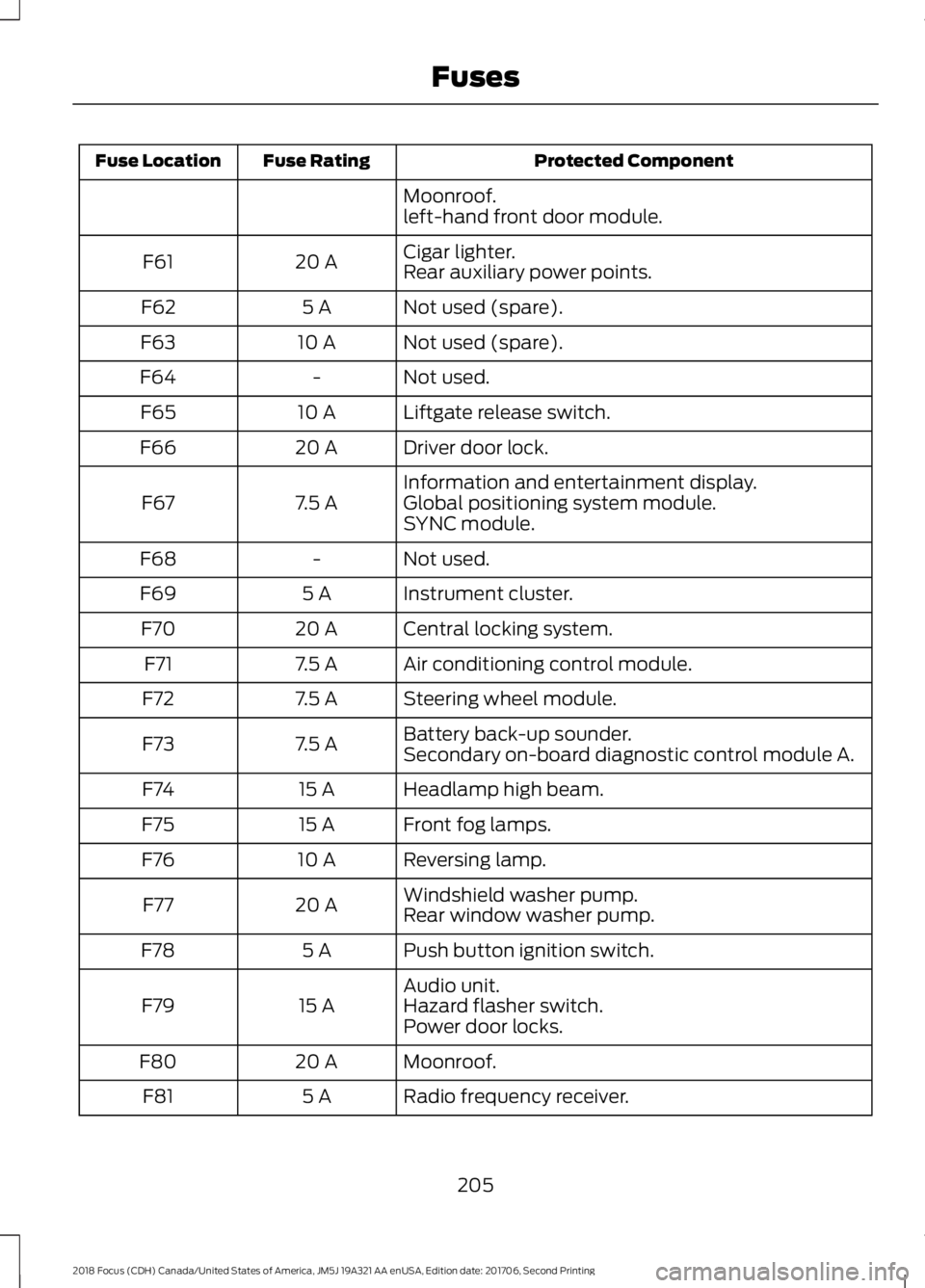
Protected ComponentFuse RatingFuse Location
Moonroof.left-hand front door module.
Cigar lighter.20 AF61Rear auxiliary power points.
Not used (spare).5 AF62
Not used (spare).10 AF63
Not used.-F64
Liftgate release switch.10 AF65
Driver door lock.20 AF66
Information and entertainment display.7.5 AF67Global positioning system module.SYNC module.
Not used.-F68
Instrument cluster.5 AF69
Central locking system.20 AF70
Air conditioning control module.7.5 AF71
Steering wheel module.7.5 AF72
Battery back-up sounder.7.5 AF73Secondary on-board diagnostic control module A.
Headlamp high beam.15 AF74
Front fog lamps.15 AF75
Reversing lamp.10 AF76
Windshield washer pump.20 AF77Rear window washer pump.
Push button ignition switch.5 AF78
Audio unit.15 AF79Hazard flasher switch.Power door locks.
Moonroof.20 AF80
Radio frequency receiver.5 AF81
2052018 Focus (CDH) Canada/United States of America, JM5J 19A321 AA enUSA, Edition date: 201706, Second PrintingFuses
Page 209 of 473
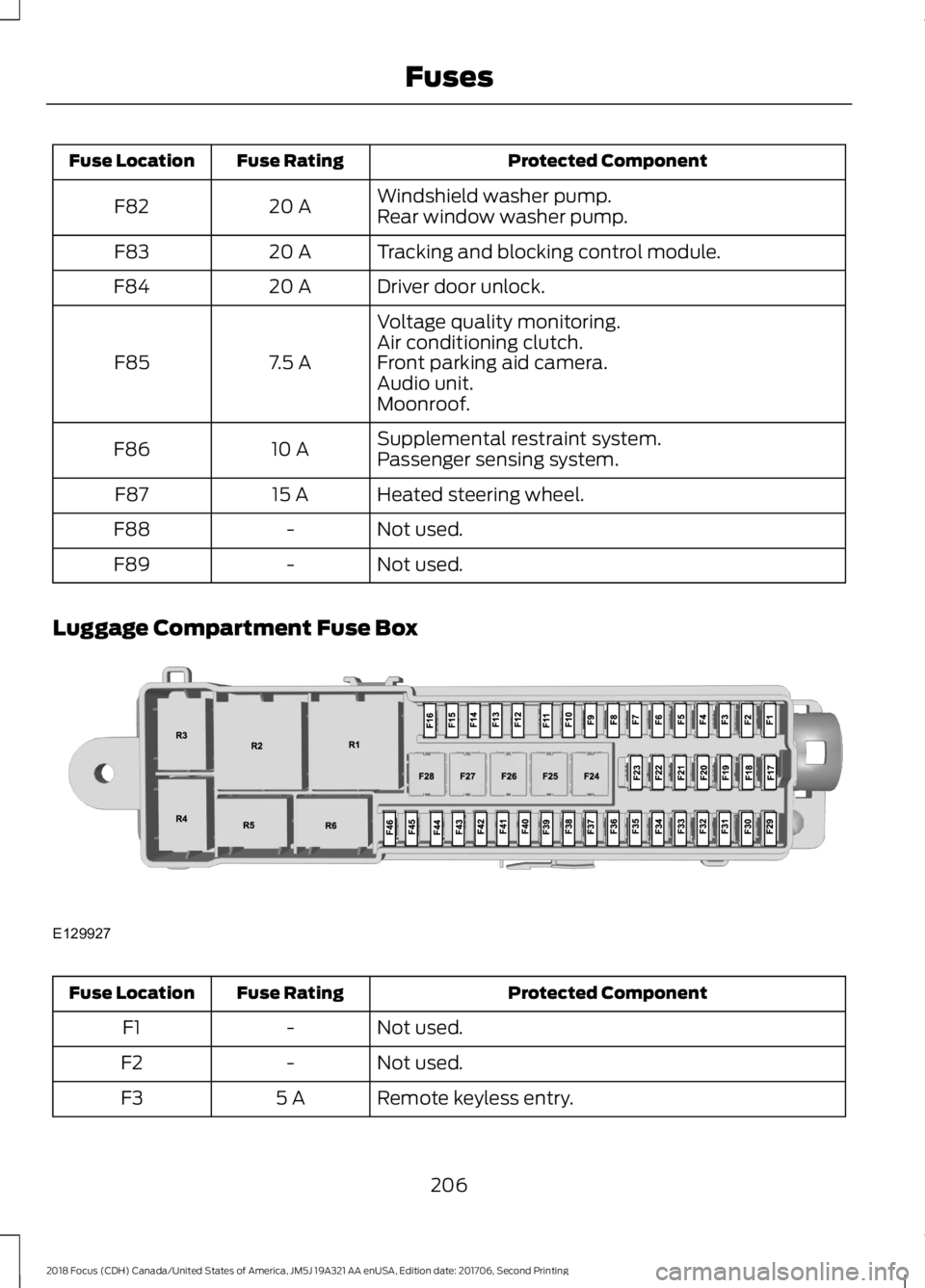
Protected ComponentFuse RatingFuse Location
Windshield washer pump.20 AF82Rear window washer pump.
Tracking and blocking control module.20 AF83
Driver door unlock.20 AF84
Voltage quality monitoring.
7.5 AF85Air conditioning clutch.Front parking aid camera.Audio unit.Moonroof.
Supplemental restraint system.10 AF86Passenger sensing system.
Heated steering wheel.15 AF87
Not used.-F88
Not used.-F89
Luggage Compartment Fuse Box
Protected ComponentFuse RatingFuse Location
Not used.-F1
Not used.-F2
Remote keyless entry.5 AF3
2062018 Focus (CDH) Canada/United States of America, JM5J 19A321 AA enUSA, Edition date: 201706, Second PrintingFusesE129927
Page 233 of 473
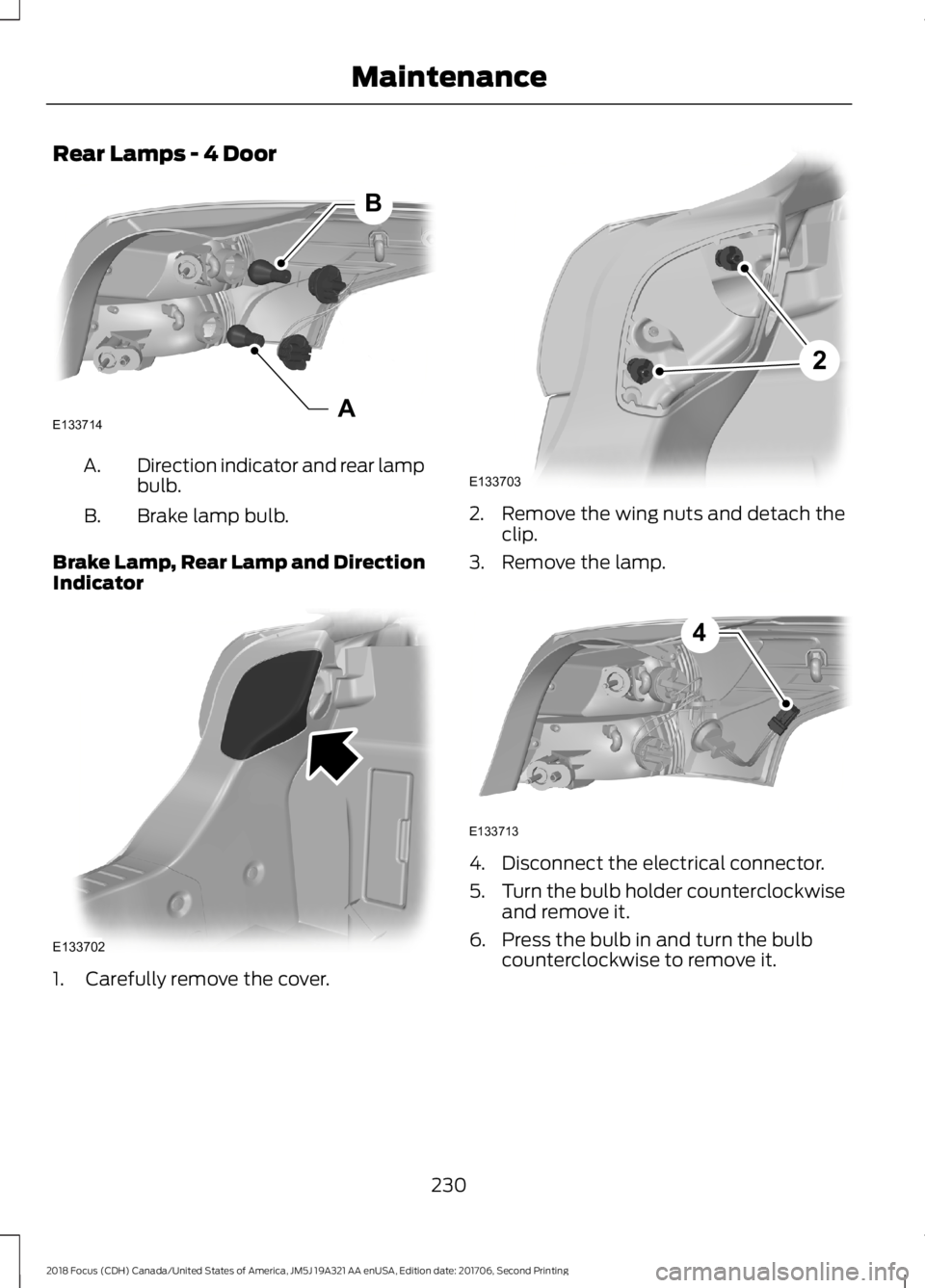
Rear Lamps - 4 Door
Direction indicator and rear lampbulb.A.
Brake lamp bulb.B.
Brake Lamp, Rear Lamp and DirectionIndicator
1.Carefully remove the cover.
2.Remove the wing nuts and detach theclip.
3.Remove the lamp.
4.Disconnect the electrical connector.
5.Turn the bulb holder counterclockwiseand remove it.
6.Press the bulb in and turn the bulbcounterclockwise to remove it.
2302018 Focus (CDH) Canada/United States of America, JM5J 19A321 AA enUSA, Edition date: 201706, Second PrintingMaintenanceABE133714 E133702 2E133703 E1337134
Page 241 of 473
Stripes or Graphics (If Equipped)
Hand washing your vehicle is preferredhowever, pressure washing may be usedunder the following conditions:
•Do not use water pressure higher than2,000 psi (14,000 kPa).
•Do not use water hotter than 179°F(82°C).
•Use a spray with a 40° wide sprayangle pattern.
•Keep the nozzle at a 12 in (305 mm)distance and 90° angle to yourvehicle's surface.
Note:Holding the pressure washer nozzleat an angle to the vehicle's surface maydamage graphics and cause the edges topeel away from the vehicle's surface.
Underbody
Regularly clean the underside of yourvehicle using water. Keep body and doordrain holes free of debris or foreignmaterial.
Under Hood
For removing black rubber marks fromunder the hood we recommend MotorcraftWheel and Tire Cleaner or Motorcraft Bugand Tar Remover.
WAXING
Regular waxing is necessary to protect yourcar's paint from the elements. Werecommend that you wash and wax thepainted surface once or twice a year.
When washing and waxing, park yourvehicle in a shaded area out of directsunlight. Always wash your vehicle beforeapplying wax.
•Use a quality wax that does not containabrasives.
•Follow the manufacturer’s instructionsto apply and remove the wax.
•Apply a small amount of wax in aback-and-forth motion, not in circles.
•Do not allow wax to come in contactwith any non-body (low-gloss black)colored trim. The wax will discolor orstain the parts over time.
•Roof racks.
•Bumpers.
•Grained door handles.
•Side moldings.
•Mirror housings.
•Windshield cowl area.
•Do not apply wax to glass areas.
•After waxing, your car's paint shouldfeel smooth, and be free of streaks andsmudges.
CLEANING THE ENGINE
Engines are more efficient when they areclean because grease and dirt buildup keepthe engine warmer than normal.
When washing:
•Take care when using a power washerto clean the engine. The high-pressurefluid could penetrate the sealed partsand cause damage.
•Do not spray a hot engine with coldwater to avoid cracking the engineblock or other engine components.
•Spray Motorcraft Engine Shampoo andDegreaser on all parts that requirecleaning and pressure rinse clean. InCanada, use Motorcraft EngineShampoo.
•Never wash or rinse the engine while itis hot or running; water in the runningengine may cause internal damage.
2382018 Focus (CDH) Canada/United States of America, JM5J 19A321 AA enUSA, Edition date: 201706, Second PrintingVehicle Care
Page 339 of 473

Action and DescriptionMenu ItemItem
This bar displays icons and messages pertaining to currentsystem activities including climate settings, voicecommands and phone functions such as text messages.
Status BarA
This button is available on the main screens. Pressing ittakes you to the home screen view.HomeB
This shows the current time. You can set the clock manuallyor have it controlled by the vehicle's GPS location. SeeSettings (page 379).
ClockC
This displays the current outside temperature.OutsideTemperatureD
You can touch any of the buttons on this bar to select afeature.Feature BarE
The touchscreen allows you quick accessto all of your comfort, navigation,communication and entertainmentoptions. Using the status and feature baryou can quickly select the feature you wantto use.
Note:Your system is equipped with afeature that allows you to access andcontrol audio features for 10 minutes afteryou switch the ignition off (and no doorsopen).
The Status Bar
Additional icons also display in the statusbar depending on market, vehicle optionsand current operation. If a feature is notactive, the icon does not display. Certainicons may move to the left or rightdepending on what options are active.
3362018 Focus (CDH) Canada/United States of America, JM5J 19A321 AA enUSA, Edition date: 201706, Second PrintingSYNC™ 3
Page 396 of 473
Valet Mode
Valet mode allows you to lock the system.No information is accessible until thesystem is unlocked with the correct PIN.
When you select valet mode a pop upappears informing you that a four digitcode must be entered to enable anddisable valet mode. You can use any PINyou chose but you must use the same PINto disable valet mode. The system asksyou to input the code.
Note:If the system is locked and youcannot remember the PIN, please contactthe Customer Relationship Center.
United States: 1-800-392-3673Canada: 1-800-565-3673
To enable valet mode, enter your chosenPIN. The system then asks to confirm yourPIN by reentering it. The system then locks.
To unlock the system, enter the same pinnumber. The system reconnects to yourphone and all of your options are availableagain.
SYNC™ 3 TROUBLESHOOTING
Your SYNC 3 system is easy to use.However, should questions arise, pleaserefer to the tables below.
To check your cell phone's compatibility,visit the Ford website.
Website
owner.ford.comwww.syncmyride.cawww.syncmaroute.ca
Cell phone issues
Possible solutionPossible causeIssue
Refer to your device's manual about audioadjustments.
The audio controlsettings on your cellphone may be affectingSYNC 3 performance.
There is back-ground noiseduring a phonecall.
Try switching your cell phone off, resettingit or removing the battery, then try again.Possible cell phonemalfunction.
During a call, Ican hear theother personbut they cannothear me.
Make sure that the microphone for SYNC3 is not set to off. Look for the microphoneicon on the phone screen.
To restart your system, shut down theengine, open and close the door, and thenlock the door and wait for 2-3 minutes.Make sure that your SYNC 3 screen is blackand the lighted USB port is off.
The system may need tobe restarted.
During a call, Icannot hear theother personand they cannothear me.
Check your cell phone's compatibility.This is a cell phone-dependent feature.SYNC 3 is notable to down-load my phone-book.
3932018 Focus (CDH) Canada/United States of America, JM5J 19A321 AA enUSA, Edition date: 201706, Second PrintingSYNC™ 3