2018 FORD FOCUS page 39
[x] Cancel search: page 39Page 56 of 473

Note:Do not wipe off any grease on thebattery terminals or on the back surface ofthe circuit board.
Note: Replacing the battery does notdelete the transmitter from your vehicle.The transmitter should operate normally.
Locating Your Vehicle
Press the lock button on the key twicewithin three seconds. The horn sounds andthe direction indicators flash. Werecommend you use this method to locateyour vehicle, rather than using the panicalarm.
The horn sounds twice and the directionindicators do not flash if:
•Locking was not successful.
•Any door or the liftgate is open.
•The hood is open on vehicles with ananti-theft alarm or remote start.
Sounding the Panic Alarm (If Equipped)
Press the button to activate thealarm. Press the button again orswitch the ignition on todeactivate it.
Note:The panic alarm only operates whenthe ignition is off.
Remote Start
WARNING
To prevent drawing exhaust fumesinto your vehicle, do not use remotestart if your vehicle is parked indoorsor areas that are not well ventilated.
The remote start button is on thetransmitter.
This feature allows you to start yourvehicle from the outside. The transmitterhas an extended operating range.
Vehicles with automatic climate controlcan be configured to operate when yourvehicle is remote started. See AutomaticClimate Control (page 105).
Many states and provinces haverestrictions for the use of remote start.Check your local and state or provinciallaws for specific requirements regardingremote start systems.
Note:Do not use remote start if your vehicleis low on fuel.
The remote start system does not work ifany of the following occur:
•The ignition is on.
•The alarm system activates.
•You turn off the feature.
•The hood is open.
•The transmission is not in park (P).
•Your vehicle battery has no charge.
•The powertrain fault indicator was onthe last time you drove your vehicle.
Remote Starting your Vehicle
Note: You must press each button withinthree seconds of each other. If you do notfollow this sequence, your vehicle does notstart remotely, the direction indicators donot flash twice and the horn does not sound.
The label on your transmitter details thestarting procedure.
To remote start your vehicle:
532018 Focus (CDH) Canada/United States of America, JM5J 19A321 AA enUSA, Edition date: 201706, Second PrintingKeys and Remote ControlsE138624 E138625 E138626
Page 57 of 473

1.Press the lock button to lock all thedoors.
2.Press the remote start button twice.The direction indicators flash twice.
The horn sounds if the system fails to start,unless quiet start is on. Quiet start runs theblower fan at a slower speed to reducenoise. You can switch it on or off using theinformation display. See GeneralInformation (page 92).
The power windows do not work duringremote start and the radio does not turnon automatically.
The parking lamps remain on and yourvehicle runs for 5, 10 or 15 minutes,depending on the setting.
Note:If you remote start your vehicle withan intelligent access transmitter, you mustpress the push button ignition switch on theinstrument panel once while applying thebrake pedal before driving your vehicle.
Extending the Engine Running Time
To extend the engine running time durationof your vehicle during remote start, repeatsteps 1 and 2 while the engine is running.If the duration is set to 10 minutes, theduration extends by another 10 minutes.For example, if your vehicle had beenrunning from the first remote start for 5minutes, your vehicle continues to run nowfor a total of 20 minutes. You can extendthe engine running time duration to amaximum of 30 minutes.
Wait at least five seconds before remotestarting after a vehicle shutdown.
Turning Your Vehicle Off After RemoteStarting
Press the button once. Theparking lamps turn off.
You may have to be closer to your vehiclethan when starting due to ground reflectionand the added noise of the running vehicle.
You can turn the remote start system onor off using the information display. SeeGeneral Information (page 92).
REPLACING A LOST KEY OR
REMOTE CONTROL
You can purchase replacement keys orremote controls from an authorized dealer.Authorized dealers can program remotecontrols for your vehicle. See PassiveAnti-Theft System (page 68).
To re-program the passive anti-theftsystem see an authorized dealer.
542018 Focus (CDH) Canada/United States of America, JM5J 19A321 AA enUSA, Edition date: 201706, Second PrintingKeys and Remote ControlsE138625
Page 59 of 473
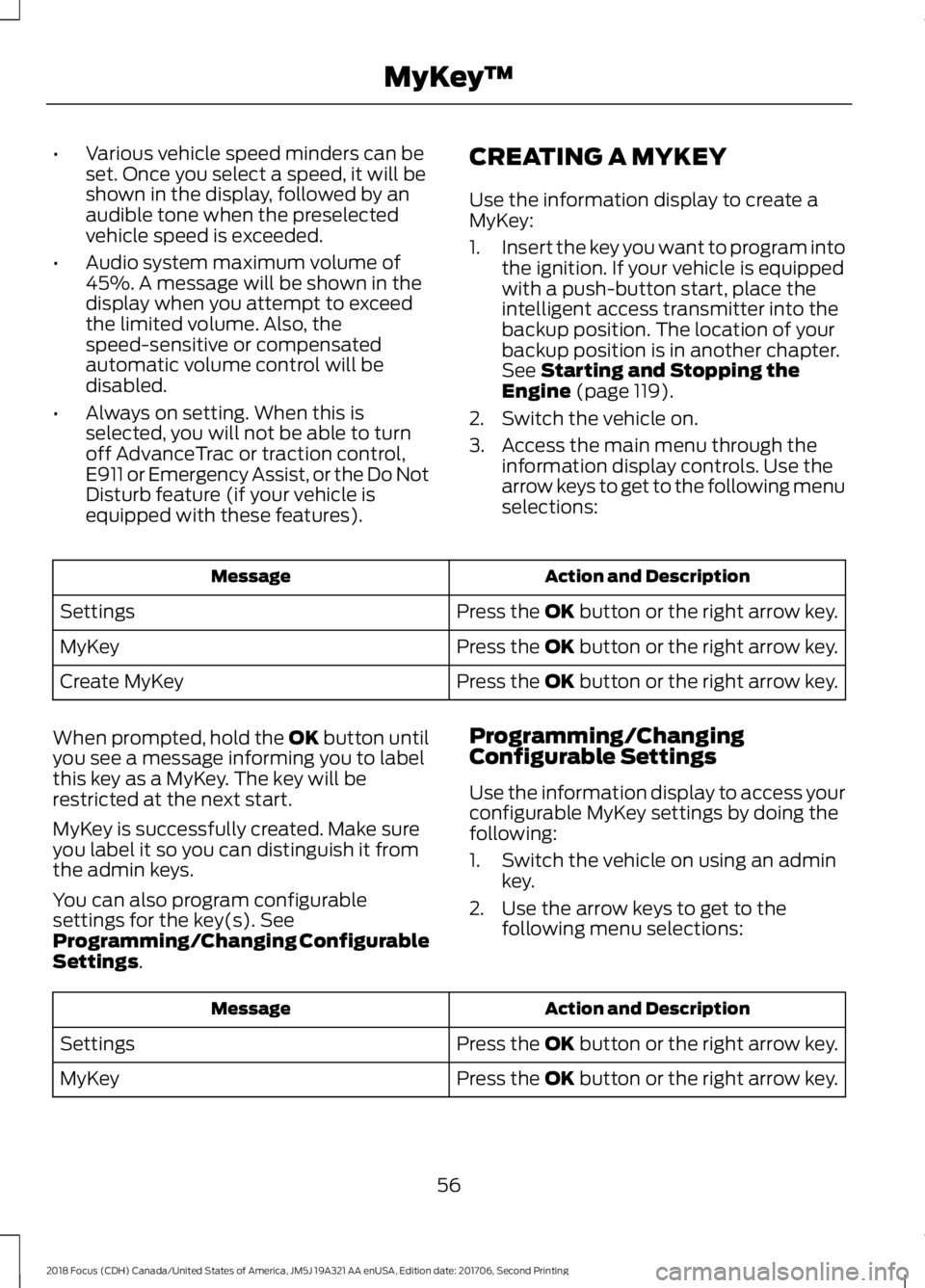
•Various vehicle speed minders can beset. Once you select a speed, it will beshown in the display, followed by anaudible tone when the preselectedvehicle speed is exceeded.
•Audio system maximum volume of45%. A message will be shown in thedisplay when you attempt to exceedthe limited volume. Also, thespeed-sensitive or compensatedautomatic volume control will bedisabled.
•Always on setting. When this isselected, you will not be able to turnoff AdvanceTrac or traction control,E911 or Emergency Assist, or the Do NotDisturb feature (if your vehicle isequipped with these features).
CREATING A MYKEY
Use the information display to create aMyKey:
1.Insert the key you want to program intothe ignition. If your vehicle is equippedwith a push-button start, place theintelligent access transmitter into thebackup position. The location of yourbackup position is in another chapter.See Starting and Stopping theEngine (page 119).
2.Switch the vehicle on.
3.Access the main menu through theinformation display controls. Use thearrow keys to get to the following menuselections:
Action and DescriptionMessage
Press the OK button or the right arrow key.Settings
Press the OK button or the right arrow key.MyKey
Press the OK button or the right arrow key.Create MyKey
When prompted, hold the OK button untilyou see a message informing you to labelthis key as a MyKey. The key will berestricted at the next start.
MyKey is successfully created. Make sureyou label it so you can distinguish it fromthe admin keys.
You can also program configurablesettings for the key(s). SeeProgramming/Changing ConfigurableSettings.
Programming/ChangingConfigurable Settings
Use the information display to access yourconfigurable MyKey settings by doing thefollowing:
1.Switch the vehicle on using an adminkey.
2.Use the arrow keys to get to thefollowing menu selections:
Action and DescriptionMessage
Press the OK button or the right arrow key.Settings
Press the OK button or the right arrow key.MyKey
562018 Focus (CDH) Canada/United States of America, JM5J 19A321 AA enUSA, Edition date: 201706, Second PrintingMyKey™
Page 60 of 473

Note:You can clear or change your MyKeysettings at any time during the same keycycle as you created the MyKey. Once youhave switched the vehicle off, however, youwill need an admin key to change or clearyour MyKey settings.
Note:When you make any changes to yourMyKey settings, you change the settings forevery MyKey. You cannot make individualchanges to apply to certain MyKeys.
CLEARING ALL MYKEYS
You can clear or change your MyKeysettings using the information displaycontrol on the steering wheel. SeeInformation Displays (page 92).
Switch the ignition on using an admin key.
To clear all MyKeys of all MyKey settings, press the left arrow button to accessthe main menu and scroll to:
Action and DescriptionMessage
Press the OK button or the right arrow button.Settings
Press the OK button or the right arrow button.MyKey
Press and hold the OK button until the instrument clusterdisplays the following message.Clear MyKey
All MyKeys
Cleared
Note:When you clear your MyKeys, you remove all restrictions and return all MyKeys totheir original admin key status.
572018 Focus (CDH) Canada/United States of America, JM5J 19A321 AA enUSA, Edition date: 201706, Second PrintingMyKey™
Page 61 of 473
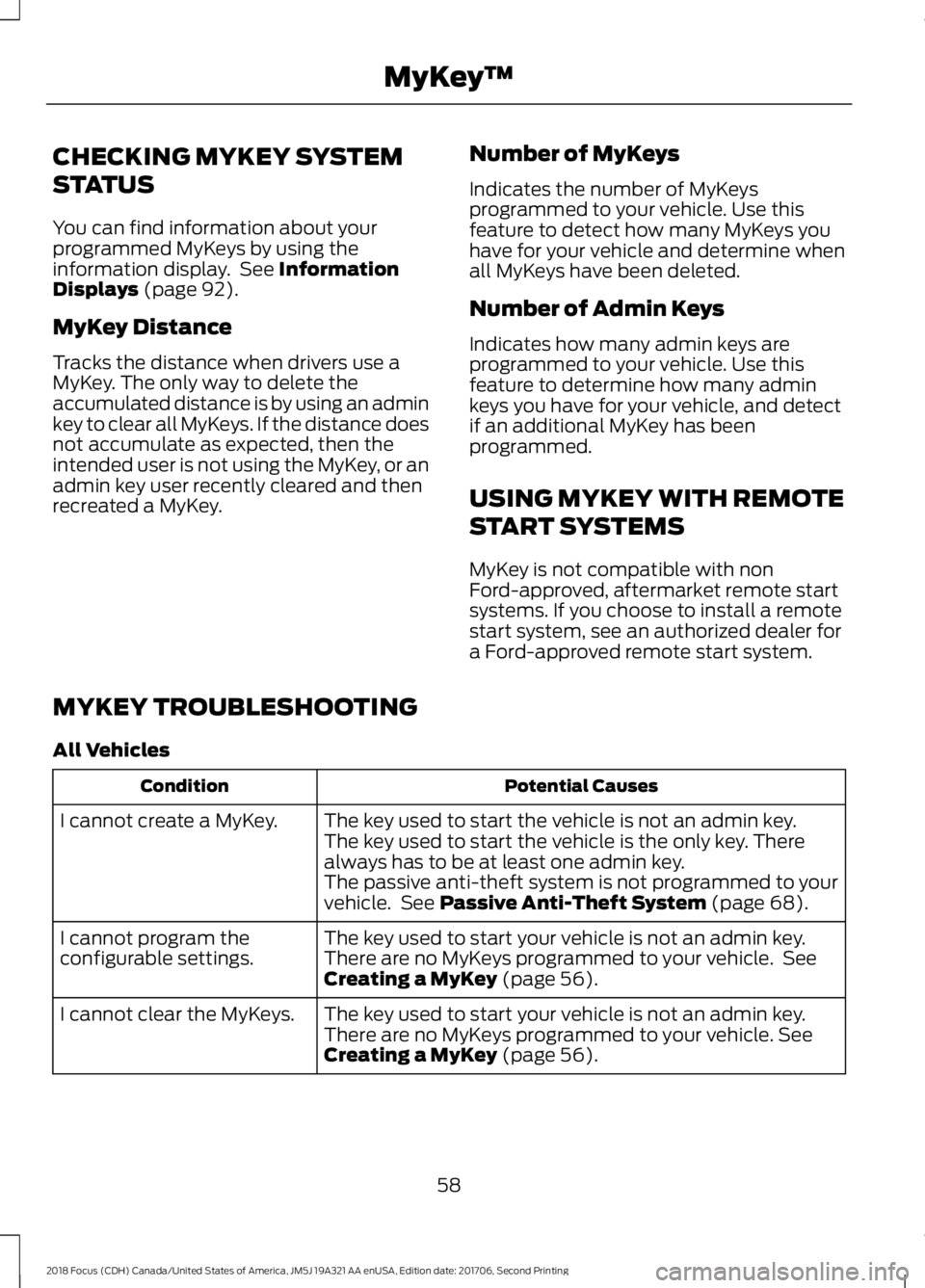
CHECKING MYKEY SYSTEM
STATUS
You can find information about yourprogrammed MyKeys by using theinformation display. See InformationDisplays (page 92).
MyKey Distance
Tracks the distance when drivers use aMyKey. The only way to delete theaccumulated distance is by using an adminkey to clear all MyKeys. If the distance doesnot accumulate as expected, then theintended user is not using the MyKey, or anadmin key user recently cleared and thenrecreated a MyKey.
Number of MyKeys
Indicates the number of MyKeysprogrammed to your vehicle. Use thisfeature to detect how many MyKeys youhave for your vehicle and determine whenall MyKeys have been deleted.
Number of Admin Keys
Indicates how many admin keys areprogrammed to your vehicle. Use thisfeature to determine how many adminkeys you have for your vehicle, and detectif an additional MyKey has beenprogrammed.
USING MYKEY WITH REMOTE
START SYSTEMS
MyKey is not compatible with nonFord-approved, aftermarket remote startsystems. If you choose to install a remotestart system, see an authorized dealer fora Ford-approved remote start system.
MYKEY TROUBLESHOOTING
All Vehicles
Potential CausesCondition
The key used to start the vehicle is not an admin key.I cannot create a MyKey.The key used to start the vehicle is the only key. Therealways has to be at least one admin key.The passive anti-theft system is not programmed to yourvehicle. See Passive Anti-Theft System (page 68).
The key used to start your vehicle is not an admin key.I cannot program theconfigurable settings.There are no MyKeys programmed to your vehicle. SeeCreating a MyKey (page 56).
The key used to start your vehicle is not an admin key.I cannot clear the MyKeys.There are no MyKeys programmed to your vehicle. SeeCreating a MyKey (page 56).
582018 Focus (CDH) Canada/United States of America, JM5J 19A321 AA enUSA, Edition date: 201706, Second PrintingMyKey™
Page 62 of 473
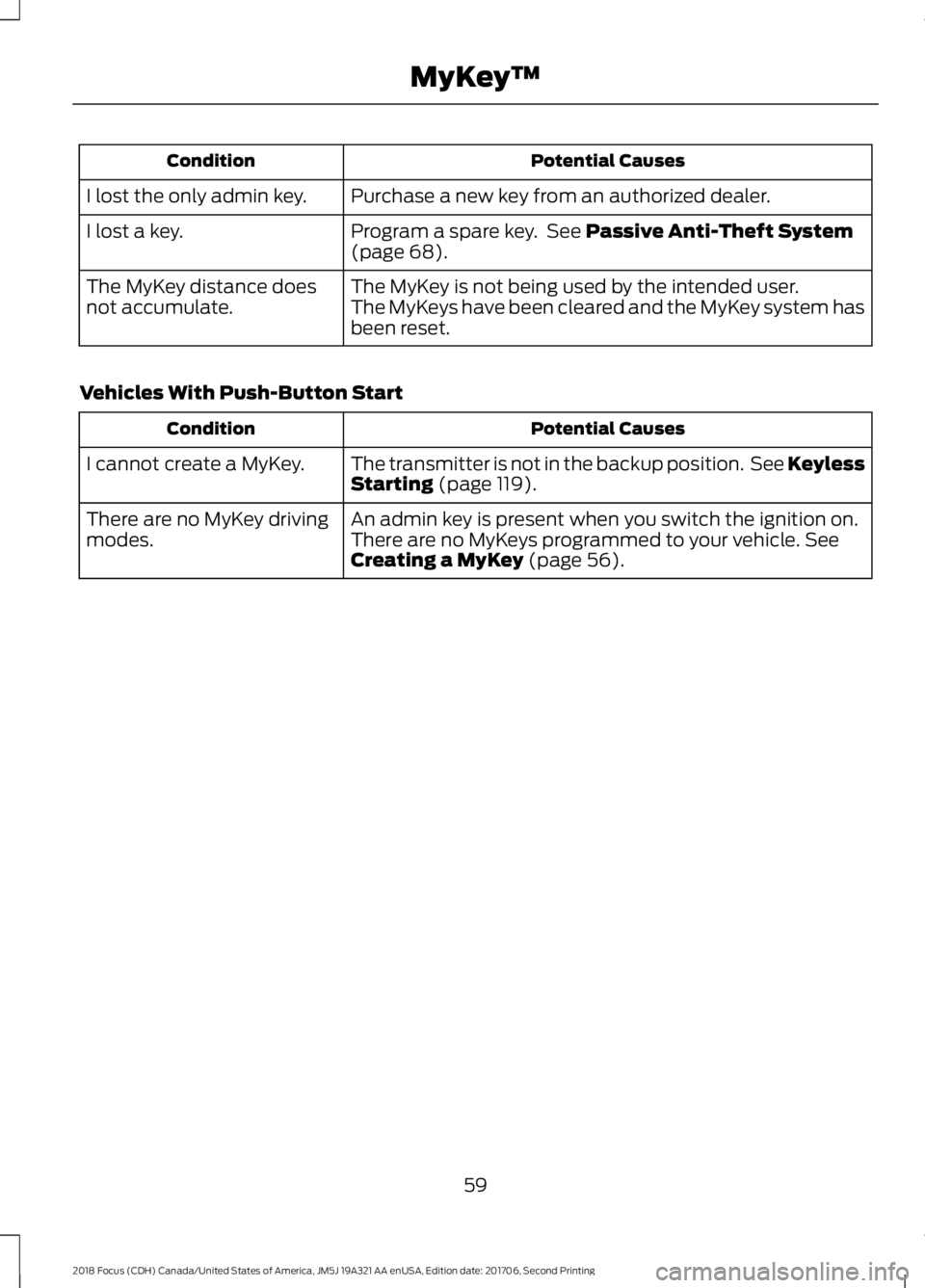
Potential CausesCondition
Purchase a new key from an authorized dealer.I lost the only admin key.
Program a spare key. See Passive Anti-Theft System(page 68).I lost a key.
The MyKey is not being used by the intended user.The MyKey distance doesnot accumulate.The MyKeys have been cleared and the MyKey system hasbeen reset.
Vehicles With Push-Button Start
Potential CausesCondition
The transmitter is not in the backup position. See KeylessStarting (page 119).I cannot create a MyKey.
An admin key is present when you switch the ignition on.There are no MyKey drivingmodes.There are no MyKeys programmed to your vehicle. SeeCreating a MyKey (page 56).
592018 Focus (CDH) Canada/United States of America, JM5J 19A321 AA enUSA, Edition date: 201706, Second PrintingMyKey™
Page 64 of 473
Mislock
If any door or the liftgate or luggagecompartment is open, or if the hood isopen on vehicles with an anti-theft alarmor remote start, the horn will sound twiceand the direction indicators will not flash.
Opening the Liftgate or LuggageCompartment
Press twice within three secondsto unlatch the liftgate or luggagecompartment.
Make sure to close and latch the liftgateor luggage compartment before drivingyour vehicle. An unlatched liftgate orluggage compartment may cause objectsto fall out or block your view.
Closing the Liftgate or LuggageCompartment
The liftgate or luggage compartment willnot fully close if an intelligent access keyis located inside the luggage compartmentwith the doors locked.
Note:If a second intelligent access key islocated within the liftgate or luggagecompartment detection range, the liftgateor luggage compartment can be fully closed.
Activating Intelligent Access (If
Equipped)
The system will not function if:
•Your vehicle battery has no charge.
•The intelligent access key battery hasno charge.
•The intelligent access key frequenciesare jammed.
Note:If the system does not function, usethe key blade to lock and unlock yourvehicle. See Keys and Remote Controls(page 47).
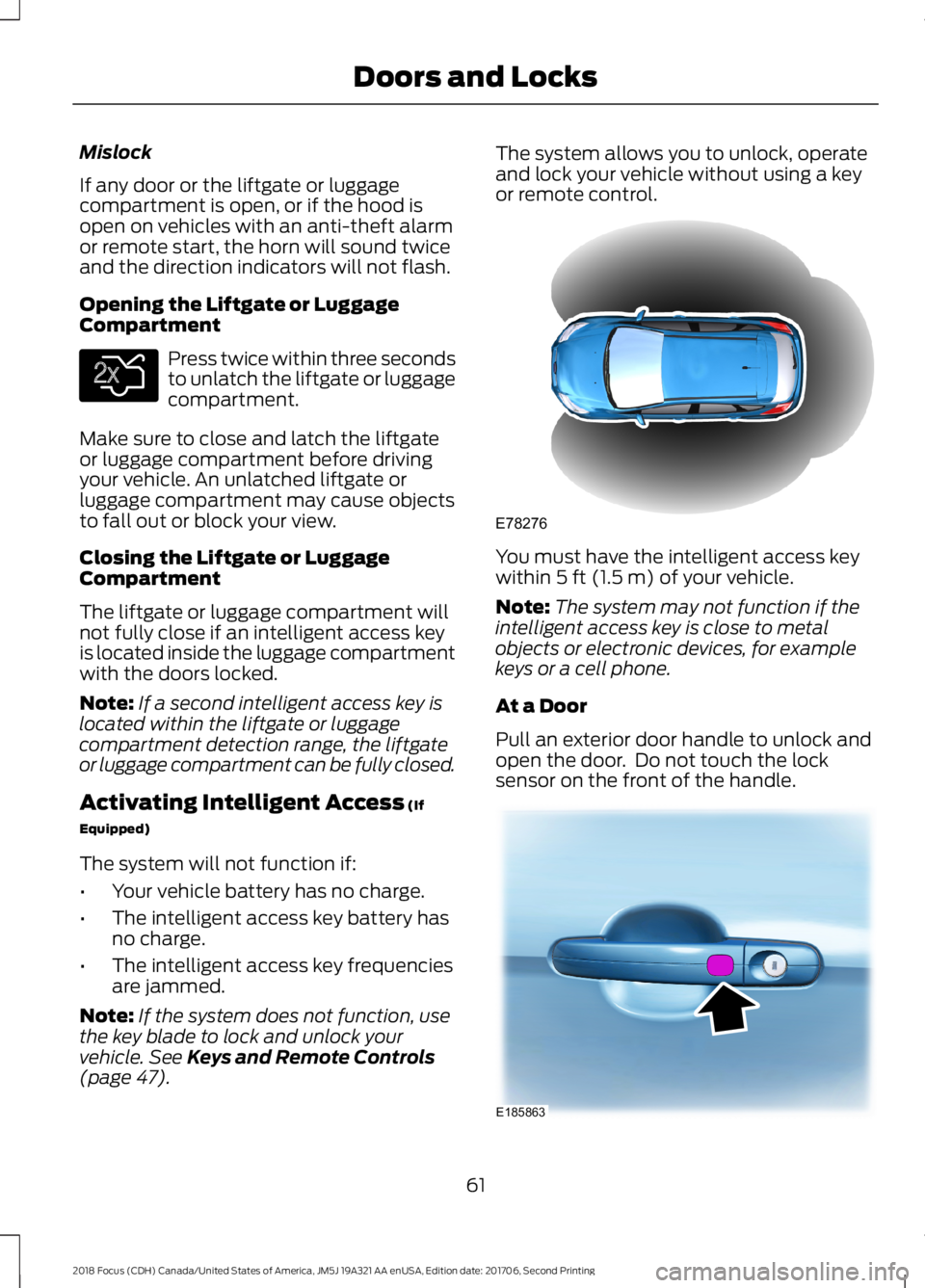
The system allows you to unlock, operateand lock your vehicle without using a keyor remote control.
You must have the intelligent access keywithin 5 ft (1.5 m) of your vehicle.
Note:The system may not function if theintelligent access key is close to metalobjects or electronic devices, for examplekeys or a cell phone.
At a Door
Pull an exterior door handle to unlock andopen the door. Do not touch the locksensor on the front of the handle.
612018 Focus (CDH) Canada/United States of America, JM5J 19A321 AA enUSA, Edition date: 201706, Second PrintingDoors and LocksE138630 E78276 E185863
Page 69 of 473
2.Press 1·2 on the keypad within fiveseconds.
3.Enter your personal five-digit code. Youmust enter each number within fiveseconds of each other.
4.Press 1·2 on the keypad to savepersonal code 1.
The doors lock then unlock to confirm thatprogramming was successful.
To program additional personal entrycodes, repeat Steps 1-3, then for Step 4:
•Press 3·4 to save personal code 2.
•Press 5·6 to save personal code 3.
•Press 7·8 to save personal code 4.
•Press 9·0 to save personal code 5.
Hints:
•Do not set a code that uses five of thesame number.
•Do not use five numbers in sequentialorder.
•The factory-set code works even if youhave set your own personal code.
Erasing a Personal Code
1.Enter the factory-set five-digit code.
2.Press and release 1·2 on the keypadwithin five seconds.
3.Press and hold 1·2 for two seconds.You must do this within five secondsof completing step 2.
All personal codes erase and only thefactory-set five-digit code works.
Anti-Scan Feature
The keypad goes into an anti-scan modeif you enter the wrong code seven times.This mode turns off the keypad for oneminute and the keypad lamp flashes.
The anti-scan feature turns off after anyof the following occur:
•One minute of keypad inactivity.
•You press the unlock button on theremote control.
•You switch your vehicle on.
•You unlock the vehicle using intelligentaccess.
Locking and Unlocking the Doors
Locking All Doors
Press and hold 7·8 and 9·0 on the keypadsimultaneously with the driver door closed.You do not need to enter a code first.
Unlocking All Doors
Enter the factory-set code or your personalcode, then press 3·4 on the keypad withinfive seconds.
Unlocking Only the Driver Door
Enter the factory-set or your personalfive-digit code. You must press eachnumber within five seconds of each other.The interior lamps illuminate.
Note:All doors unlock if the two-stageunlocking feature is turned off. See Lockingand Unlocking (page 60).
INTERIOR LUGGAGE
COMPARTMENT RELEASE - 4-
DOOR
WARNINGS
Keep vehicle doors and luggagecompartment locked and keep keysand remote transmitters out of achild’s reach. Unsupervised children couldlock themselves in the trunk and risk injury.Children should be taught not to play invehicles.
662018 Focus (CDH) Canada/United States of America, JM5J 19A321 AA enUSA, Edition date: 201706, Second PrintingDoors and Locks