2018 FORD FOCUS ELECTRIC display
[x] Cancel search: displayPage 96 of 375
Remote Start
Action
Message
Displayed when the remote start system is active.
Remote Start Active
Displays when you start your vehicle as a reminder to fully
press the brake pedal.
To Drive: Press Brake
and Gear Shift Button
Tire Pressure Monitoring System Action
Message
One or more tires on your vehicle has low tire pressure. See
Tire Pressure Monitoring System (page 212).
Low Tire Pressure
The tire pressure monitoring system is malfunctioning. If the
warning stays on or continues to come on, contact an
authorized dealer. See
Tire Pressure Monitoring System
(page 212).
Tire Pressure Monitor
Fault
A tire pressure sensor is malfunctioning, or your spare tire is
in use. For more information on how the system operates
under these conditions.
See Tire Pressure Monitoring
System (page 212). If the warning stays on or continues to
come on, contact an authorized dealer as soon as possible.
Tire Pressure Sensor
Fault
Traction Control Action
Message
Displays when you switch the system off.
See
Using Traction Control (page 123).
Traction control Off
Transmission Action
Message
A reminder to shift into park (P).
Transmission Not in Park
93
2018 Focus (CDH) Battery Electric Vehicle (BEV), Canada/United States of America, JM5J 19A321 RA enUSA, Edition date: 201706, First Printing Information Displays
Page 97 of 375
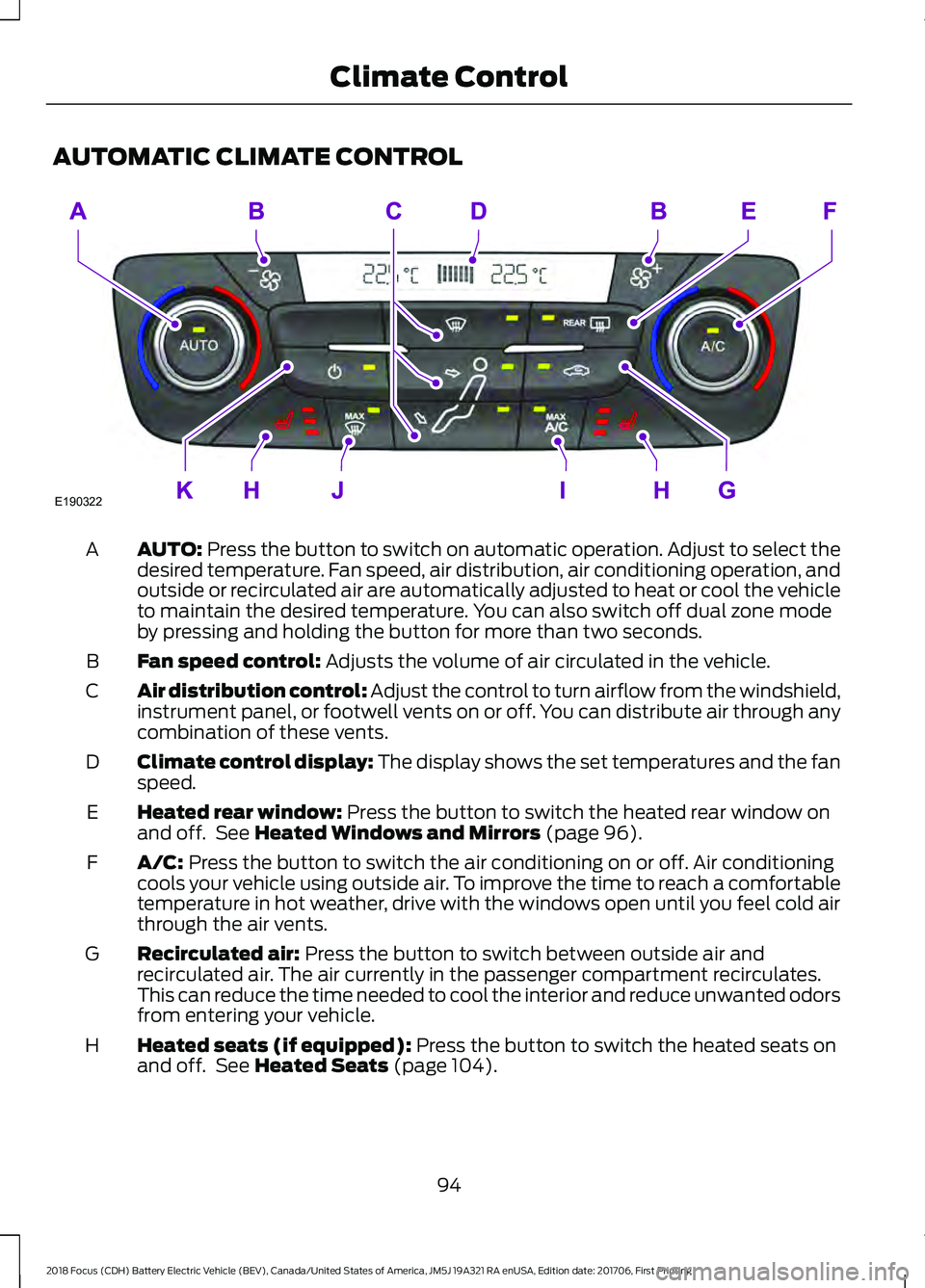
AUTOMATIC CLIMATE CONTROL
AUTO: Press the button to switch on automatic operation. Adjust to select the
desired temperature. Fan speed, air distribution, air conditioning operation, and
outside or recirculated air are automatically adjusted to heat or cool the vehicle
to maintain the desired temperature. You can also switch off dual zone mode
by pressing and holding the button for more than two seconds.
A
Fan speed control:
Adjusts the volume of air circulated in the vehicle.
B
Air distribution control: Adjust the control to turn airflow from the windshield,
instrument panel, or footwell vents on or off. You can distribute air through any
combination of these vents.
C
Climate control display: The display shows the set temperatures and the fan
speed.
D
Heated rear window:
Press the button to switch the heated rear window on
and off. See Heated Windows and Mirrors (page 96).
E
A/C:
Press the button to switch the air conditioning on or off. Air conditioning
cools your vehicle using outside air. To improve the time to reach a comfortable
temperature in hot weather, drive with the windows open until you feel cold air
through the air vents.
F
Recirculated air:
Press the button to switch between outside air and
recirculated air. The air currently in the passenger compartment recirculates.
This can reduce the time needed to cool the interior and reduce unwanted odors
from entering your vehicle.
G
Heated seats (if equipped):
Press the button to switch the heated seats on
and off. See Heated Seats (page 104).
H
94
2018 Focus (CDH) Battery Electric Vehicle (BEV), Canada/United States of America, JM5J 19A321 RA enUSA, Edition date: 201706, First Printing Climate ControlE190322
Page 98 of 375
MAX A/C: Press the button for maximum cooling. Recirculated air flows through
the instrument panel vents, air conditioning automatically turns on and the fan
automatically adjusts to the highest speed.
I
MAX Defrost: Press the button to switch on defrost. Outside air flows through
the windshield vents, air conditioning automatically turns on, and fan
automatically adjusts to the highest speed. You can also use this setting to
defrost and clear the windshield of a thin covering of ice. The heated rear window
also automatically turns on when you select maximum defrost.
J
Power: Press the button to switch the system on and off. When the system is
off, it prevents outside air from entering the vehicle.
K
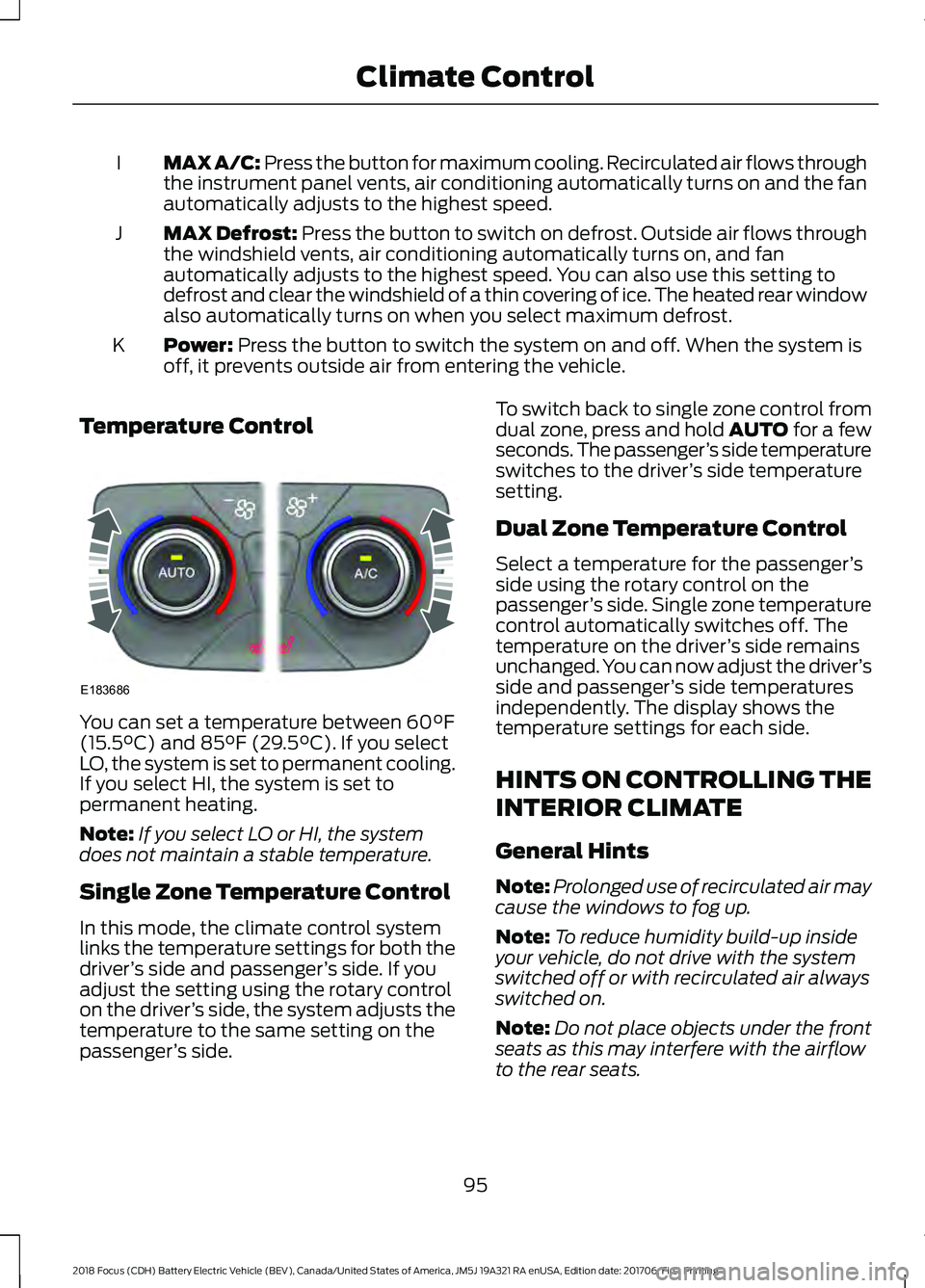
Temperature Control You can set a temperature between
60°F
(15.5°C) and 85°F (29.5°C). If you select
LO, the system is set to permanent cooling.
If you select HI, the system is set to
permanent heating.
Note: If you select LO or HI, the system
does not maintain a stable temperature.
Single Zone Temperature Control
In this mode, the climate control system
links the temperature settings for both the
driver ’s side and passenger ’s side. If you
adjust the setting using the rotary control
on the driver ’s side, the system adjusts the
temperature to the same setting on the
passenger ’s side. To switch back to single zone control from
dual zone, press and hold AUTO for a few
seconds. The passenger
’s side temperature
switches to the driver ’s side temperature
setting.
Dual Zone Temperature Control
Select a temperature for the passenger ’s
side using the rotary control on the
passenger ’s side. Single zone temperature
control automatically switches off. The
temperature on the driver ’s side remains
unchanged. You can now adjust the driver ’s
side and passenger ’s side temperatures
independently. The display shows the
temperature settings for each side.
HINTS ON CONTROLLING THE
INTERIOR CLIMATE
General Hints
Note: Prolonged use of recirculated air may
cause the windows to fog up.
Note: To reduce humidity build-up inside
your vehicle, do not drive with the system
switched off or with recirculated air always
switched on.
Note: Do not place objects under the front
seats as this may interfere with the airflow
to the rear seats.
95
2018 Focus (CDH) Battery Electric Vehicle (BEV), Canada/United States of America, JM5J 19A321 RA enUSA, Edition date: 201706, First Printing Climate ControlE183686
Page 100 of 375
Press the button to clear the
heated rear window of thin ice
and fog. The heated rear
window will automatically turn off after a
short period of time.
Note: Do not use razor blades or other
sharp objects to clean or remove decals
from the inside of the heated rear window.
The vehicle warranty does not cover
damage caused to the heated rear window
grid lines.
Heated Exterior Mirrors (If Equipped) When you switch the heated rear
window on, the heated exterior
mirrors will automatically turn
on.
Note: Do not remove ice from the mirrors
with a scraper or adjust the mirror glass
when it is frozen in place.
Note: Do not clean the mirror housing or
glass with harsh abrasives, fuel or other
petroleum-based cleaning products.
CABIN AIR FILTER
Your vehicle is equipped with a cabin air
filter. It is located behind the center
console.
The particulate filtration system reduces
the concentration of airborne particles
such as dust, spores and pollen in the air
supplied to the interior of your vehicle.
Note: Make sure you have a cabin air filter
installed at all times. This prevents foreign
objects from entering the system. Running
the system without a filter in place could
result in degradation or damage to the
system. The particulate filtration system gives you
and your passengers the following
benefits:
•
It improves your driving comfort by
reducing particle concentration.
• It improves the interior compartment
cleanliness.
• It protects the climate control
components from particle deposits.
Replace the filter at regular intervals. See
Scheduled Maintenance (page 320).
For additional cabin air filter information,
or to replace the filter, see an authorized
dealer.
REMOTE START
The climate control system adjusts the
cabin temperature during remote start.
You cannot adjust the system during
remote start operation. Switch on the
ignition to return the system to its previous
settings. You can now make adjustments.
You need to switch on certain
vehicle-dependent features, such as:
• Heated mirrors.
• Heated rear window.
You can adjust the settings using the
information display controls. See
Information Displays
(page 80).
Note: You can control the system through
SYNC using a smartphone app. See
Apps
(page 288).
Automatic Settings
You can set the climate control to operate
in AUTO mode through the information
display setting: Remote Start > Climate
Control > Heater-A/C > Auto. The climate
control system automatically sets the
interior temperature to
72°F (22°C).
97
2018 Focus (CDH) Battery Electric Vehicle (BEV), Canada/United States of America, JM5J 19A321 RA enUSA, Edition date: 201706, First Printing Climate ControlE72507 E72507
Page 101 of 375
In hot weather, the system is set to 72°F
(22°C).
In cold weather, the system is set to
72°F
(22°C). The rear defroster and heated
mirrors automatically turn on.
Last Settings
You can set the climate control to operate
using the last climate control settings
through the information display setting:
Remote Start > Climate Control >
Heater –A/C > Last Settings. The climate
control system automatically uses the
settings last selected before you turned
off the vehicle.
Heated and Cooled Devices
Heated devices typically switch on during
cold weather, and cooled devices during
hot weather.
98
2018 Focus (CDH) Battery Electric Vehicle (BEV), Canada/United States of America, JM5J 19A321 RA enUSA, Edition date: 201706, First Printing Climate Control
Page 110 of 375
STARTING THE ELECTRIC
MOTOR
Keyless Starting
Note:
The system may not function if the
passive key is close to metal objects or
electronic devices, for example keys or a cell
phone.
Note: A valid passive key must be located
inside your vehicle to switch the power on
and start your vehicle.
Note: Passive keys left inside your vehicle
when locked are disabled. A message may
appear in the information display indicating
that there is no key detected when you try
to start your vehicle. Press the unlock
button on the remote control to enable it,
and then start your vehicle.
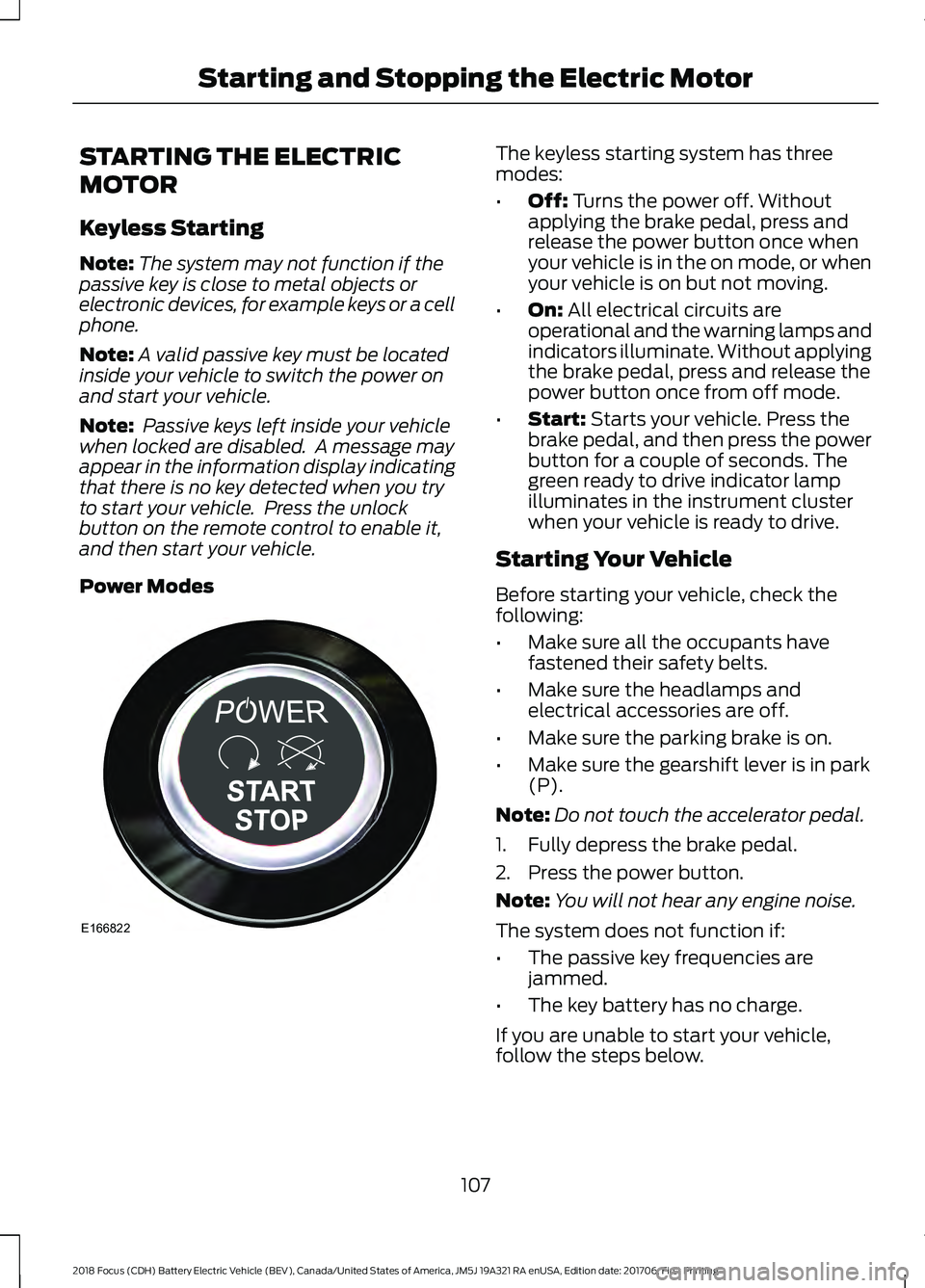
Power Modes The keyless starting system has three
modes:
•
Off: Turns the power off. Without
applying the brake pedal, press and
release the power button once when
your vehicle is in the on mode, or when
your vehicle is on but not moving.
• On:
All electrical circuits are
operational and the warning lamps and
indicators illuminate. Without applying
the brake pedal, press and release the
power button once from off mode.
• Start:
Starts your vehicle. Press the
brake pedal, and then press the power
button for a couple of seconds. The
green ready to drive indicator lamp
illuminates in the instrument cluster
when your vehicle is ready to drive.
Starting Your Vehicle
Before starting your vehicle, check the
following:
• Make sure all the occupants have
fastened their safety belts.
• Make sure the headlamps and
electrical accessories are off.
• Make sure the parking brake is on.
• Make sure the gearshift lever is in park
(P).
Note: Do not touch the accelerator pedal.
1. Fully depress the brake pedal.
2. Press the power button.
Note: You will not hear any engine noise.
The system does not function if:
• The passive key frequencies are
jammed.
• The key battery has no charge.
If you are unable to start your vehicle,
follow the steps below.
107
2018 Focus (CDH) Battery Electric Vehicle (BEV), Canada/United States of America, JM5J 19A321 RA enUSA, Edition date: 201706, First Printing Starting and Stopping the Electric MotorE166822
Page 116 of 375
Your vehicle is equipped with a standard
DC charge feature. You can charge your
vehicle using SAEJ1772 compatible
charging stations. Charging to 80% takes
approximately 33 minutes, or to 75 miles
range in 30 minutes.
Note:
If charging for your plug-in vehicle
fails, please call the Customer Relationship
Center, or click on Call for support or Live
chat at www.owner.ford.com
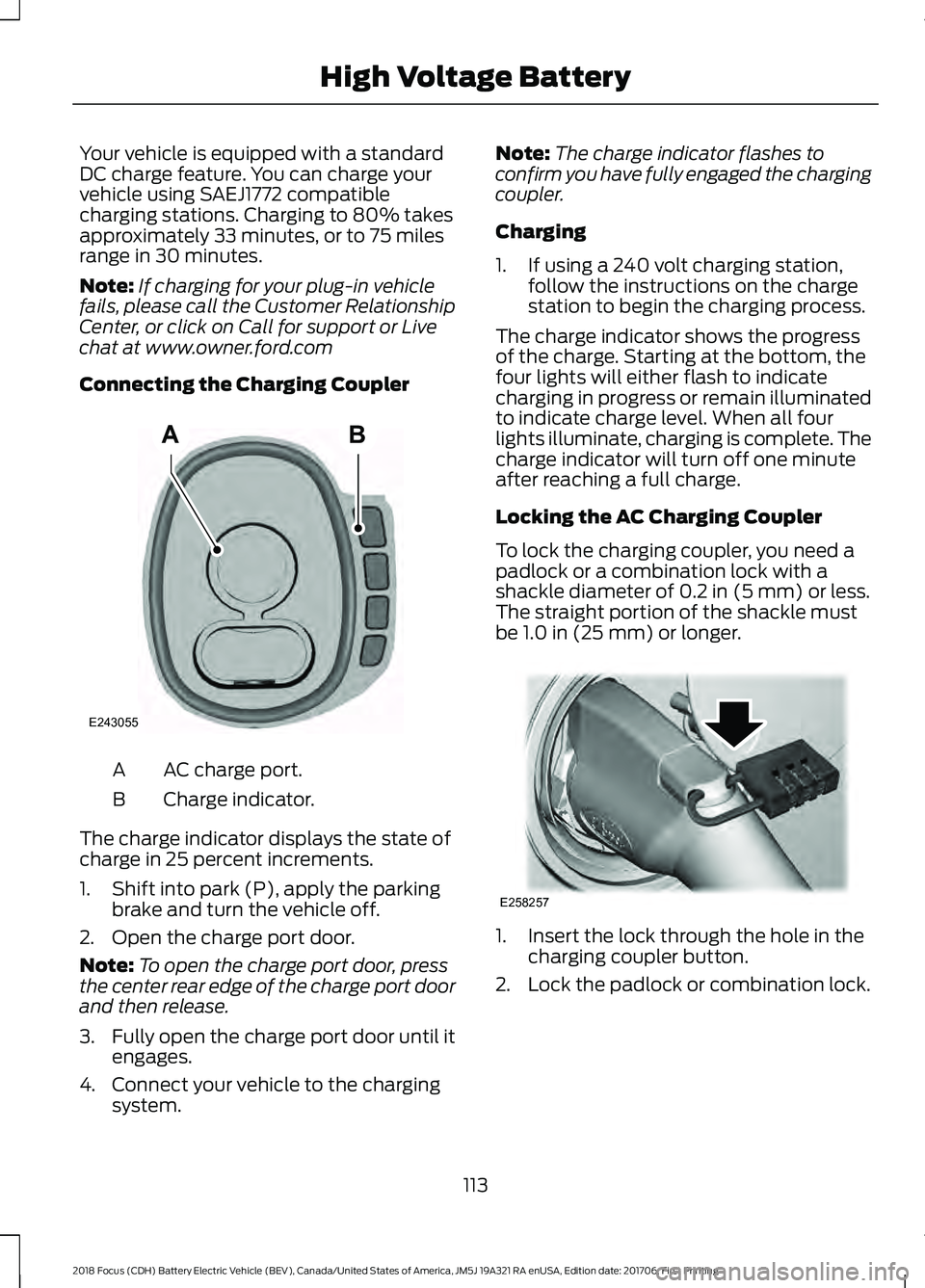
Connecting the Charging Coupler AC charge port.
A
Charge indicator.
B
The charge indicator displays the state of
charge in 25 percent increments.
1. Shift into park (P), apply the parking brake and turn the vehicle off.
2. Open the charge port door.
Note: To open the charge port door, press
the center rear edge of the charge port door
and then release.
3. Fully open the charge port door until it
engages.
4. Connect your vehicle to the charging system. Note:
The charge indicator flashes to
confirm you have fully engaged the charging
coupler.
Charging
1. If using a 240 volt charging station, follow the instructions on the charge
station to begin the charging process.
The charge indicator shows the progress
of the charge. Starting at the bottom, the
four lights will either flash to indicate
charging in progress or remain illuminated
to indicate charge level. When all four
lights illuminate, charging is complete. The
charge indicator will turn off one minute
after reaching a full charge.
Locking the AC Charging Coupler
To lock the charging coupler, you need a
padlock or a combination lock with a
shackle diameter of 0.2 in (5 mm) or less.
The straight portion of the shackle must
be
1.0 in (25 mm) or longer. 1. Insert the lock through the hole in the
charging coupler button.
2. Lock the padlock or combination lock.
113
2018 Focus (CDH) Battery Electric Vehicle (BEV), Canada/United States of America, JM5J 19A321 RA enUSA, Edition date: 201706, First Printing High Voltage BatteryAB
E243055 E258257
Page 117 of 375
Waiting to Charge
You can personalize the charge settings.
See Charging the High Voltage Battery
(page 110). When you select Value Charge,
the vehicle may delay charging to take
advantage of off-peak electricity rates. The
vehicle will optimize the charge schedule
to be complete by the next GO Time.
When waiting to charge, the charge
indicator will show the current state of
charge of the high voltage battery.
When all four lights are off the charge level
is between 0 and 25 percent.
Note: When the vehicle is waiting to charge,
the charge indicator will turn off one minute
after displaying the current state of charge.
When the vehicle automatically begins
charging, the charge indicator will turn on
and indicate the progress of the charge.
Note: If the system detects a vehicle
charging system fault at any point in a
charge cycle, the entire charge indicator will
flash continuously for one minute and then
turn off. If this happens, unplug the charging
coupler and then plug it back into the charge
port. If the problem persists, contact an
authorized dealer.
Disconnecting the Charging Coupler
1. Press and hold the button on the charging coupler and disconnect from
the charging port.
Note: Do not pull the wall plug from the
wall while the vehicle is charging. Doing so
may damage the outlet and the cord.
2. Close the charge port door.
Note: To close the charge port door, press
the center rear edge of the charge port door
and then release. Convenience Charging and MyFord
Mobile
Use the MyFord Mobile app to set up the
charging convenience features. Visit
myfordmobile.com for more complete
information and to set up your MyFord
Mobile account.
Your vehicle has the following features to
improve your charging experience.
Value Charge
The vehicle schedules charging at the
lowest available utility rates. Contact your
utility company to see what rates are
available.
Charge Now
Fully charge your vehicle at the quickest
rate. The vehicle starts charging
immediately after you connect the
charging plug into the vehicle.
My GO Time
Setting My GO Times through the MyFord
Mobile application allows you to set
charging schedules and cabin
preconditioning settings so your vehicle is
ready to drive when you are. By setting a
My GO Time the vehicles charge can be
completed before your next set drive time.
A calendar view allows you to program two
My GO Times per day for each of the seven
days of the week. Remember, your vehicle
must be plugged in for My GO Time to
work.
Cabin Preconditioning
Get the most miles out of every charge by
preconditioning your vehicle while it’
s still
plugged in and charging. Use your smart
phone to set the cabin temperature and
departure time before you leave so you use
energy from your home wall outlet instead
of your battery to heat or cool your vehicle.
114
2018 Focus (CDH) Battery Electric Vehicle (BEV), Canada/United States of America, JM5J 19A321 RA enUSA, Edition date: 201706, First Printing High Voltage Battery