2018 FORD FOCUS ELECTRIC instrument cluster
[x] Cancel search: instrument clusterPage 81 of 375
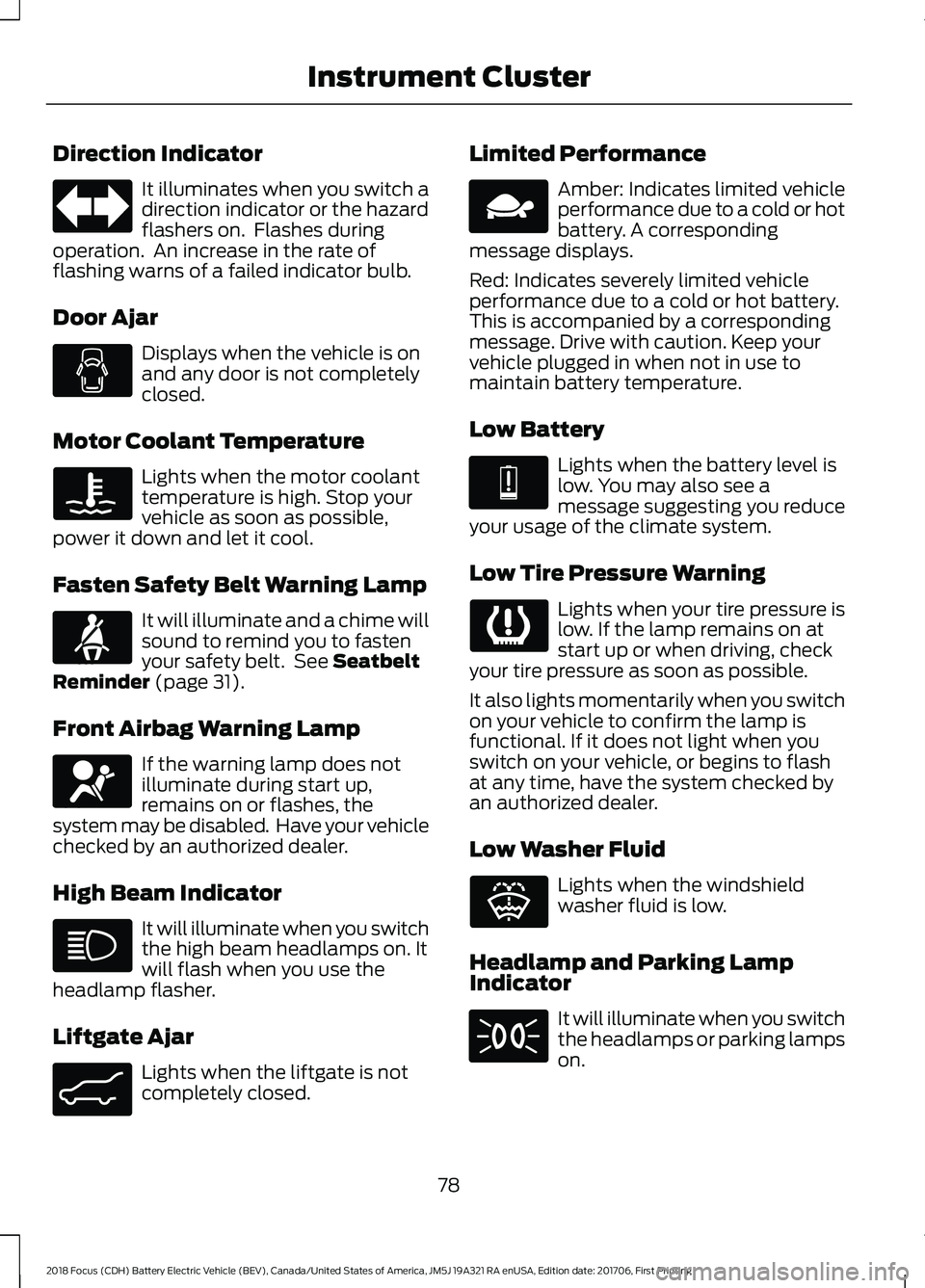
Direction Indicator
It illuminates when you switch a
direction indicator or the hazard
flashers on. Flashes during
operation. An increase in the rate of
flashing warns of a failed indicator bulb.
Door Ajar Displays when the vehicle is on
and any door is not completely
closed.
Motor Coolant Temperature Lights when the motor coolant
temperature is high. Stop your
vehicle as soon as possible,
power it down and let it cool.
Fasten Safety Belt Warning Lamp It will illuminate and a chime will
sound to remind you to fasten
your safety belt. See Seatbelt
Reminder (page 31).
Front Airbag Warning Lamp If the warning lamp does not
illuminate during start up,
remains on or flashes, the
system may be disabled. Have your vehicle
checked by an authorized dealer.
High Beam Indicator It will illuminate when you switch
the high beam headlamps on. It
will flash when you use the
headlamp flasher.
Liftgate Ajar Lights when the liftgate is not
completely closed. Limited Performance Amber: Indicates limited vehicle
performance due to a cold or hot
battery. A corresponding
message displays.
Red: Indicates severely limited vehicle
performance due to a cold or hot battery.
This is accompanied by a corresponding
message. Drive with caution. Keep your
vehicle plugged in when not in use to
maintain battery temperature.
Low Battery Lights when the battery level is
low. You may also see a
message suggesting you reduce
your usage of the climate system.
Low Tire Pressure Warning Lights when your tire pressure is
low. If the lamp remains on at
start up or when driving, check
your tire pressure as soon as possible.
It also lights momentarily when you switch
on your vehicle to confirm the lamp is
functional. If it does not light when you
switch on your vehicle, or begins to flash
at any time, have the system checked by
an authorized dealer.
Low Washer Fluid Lights when the windshield
washer fluid is low.
Headlamp and Parking Lamp
Indicator It will illuminate when you switch
the headlamps or parking lamps
on.
78
2018 Focus (CDH) Battery Electric Vehicle (BEV), Canada/United States of America, JM5J 19A321 RA enUSA, Edition date: 201706, First Printing Instrument Cluster E71880 E67017 E162453 E144690 E144691 E132353
Page 82 of 375
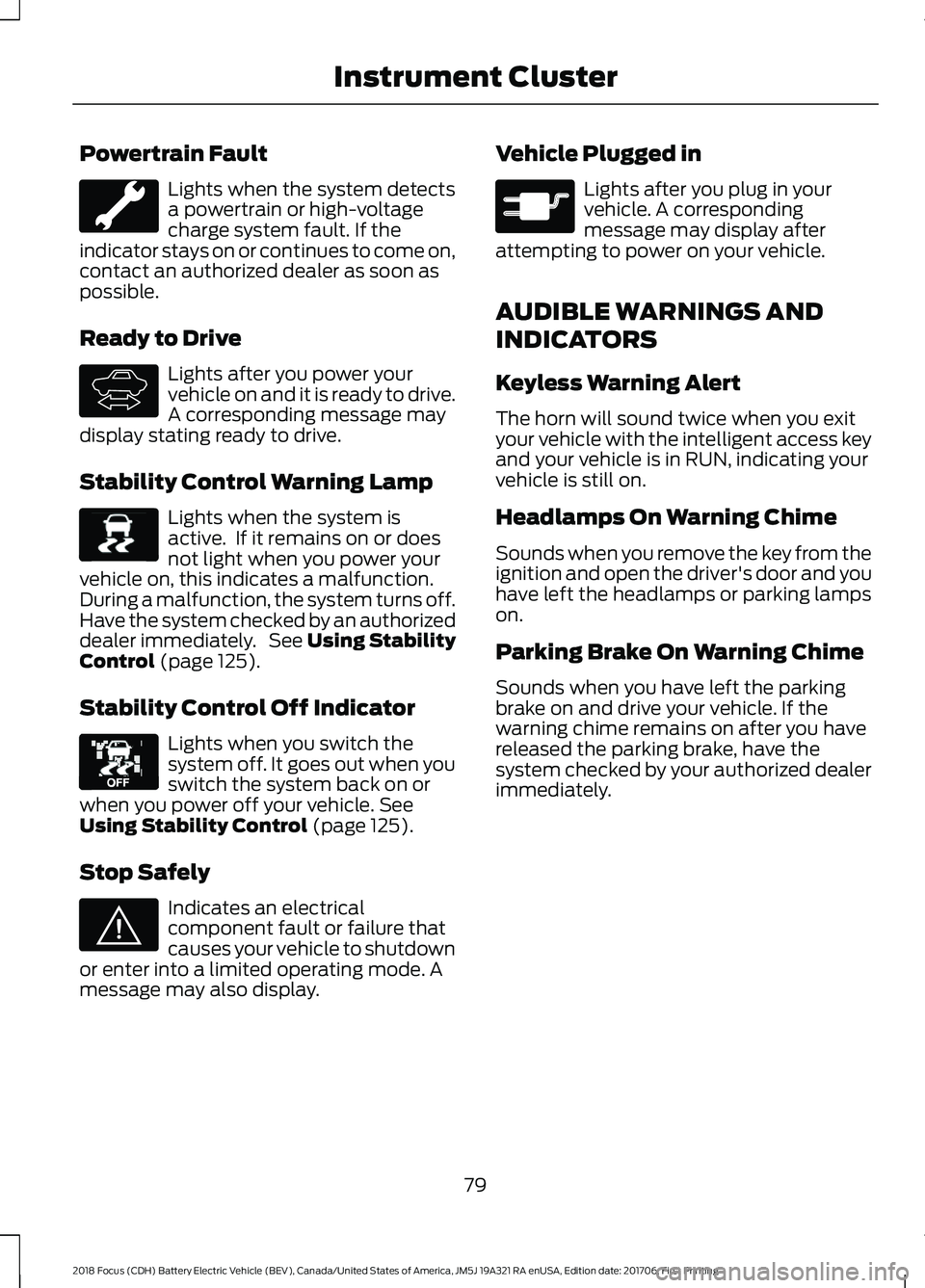
Powertrain Fault
Lights when the system detects
a powertrain or high-voltage
charge system fault. If the
indicator stays on or continues to come on,
contact an authorized dealer as soon as
possible.
Ready to Drive Lights after you power your
vehicle on and it is ready to drive.
A corresponding message may
display stating ready to drive.
Stability Control Warning Lamp Lights when the system is
active. If it remains on or does
not light when you power your
vehicle on, this indicates a malfunction.
During a malfunction, the system turns off.
Have the system checked by an authorized
dealer immediately. See Using Stability
Control (page 125).
Stability Control Off Indicator Lights when you switch the
system off. It goes out when you
switch the system back on or
when you power off your vehicle.
See
Using Stability Control (page 125).
Stop Safely Indicates an electrical
component fault or failure that
causes your vehicle to shutdown
or enter into a limited operating mode. A
message may also display. Vehicle Plugged in Lights after you plug in your
vehicle. A corresponding
message may display after
attempting to power on your vehicle.
AUDIBLE WARNINGS AND
INDICATORS
Keyless Warning Alert
The horn will sound twice when you exit
your vehicle with the intelligent access key
and your vehicle is in RUN, indicating your
vehicle is still on.
Headlamps On Warning Chime
Sounds when you remove the key from the
ignition and open the driver's door and you
have left the headlamps or parking lamps
on.
Parking Brake On Warning Chime
Sounds when you have left the parking
brake on and drive your vehicle. If the
warning chime remains on after you have
released the parking brake, have the
system checked by your authorized dealer
immediately.
79
2018 Focus (CDH) Battery Electric Vehicle (BEV), Canada/United States of America, JM5J 19A321 RA enUSA, Edition date: 201706, First Printing Instrument Cluster E144692 E138639 E130458 E144693 E144694
Page 110 of 375
STARTING THE ELECTRIC
MOTOR
Keyless Starting
Note:
The system may not function if the
passive key is close to metal objects or
electronic devices, for example keys or a cell
phone.
Note: A valid passive key must be located
inside your vehicle to switch the power on
and start your vehicle.
Note: Passive keys left inside your vehicle
when locked are disabled. A message may
appear in the information display indicating
that there is no key detected when you try
to start your vehicle. Press the unlock
button on the remote control to enable it,
and then start your vehicle.
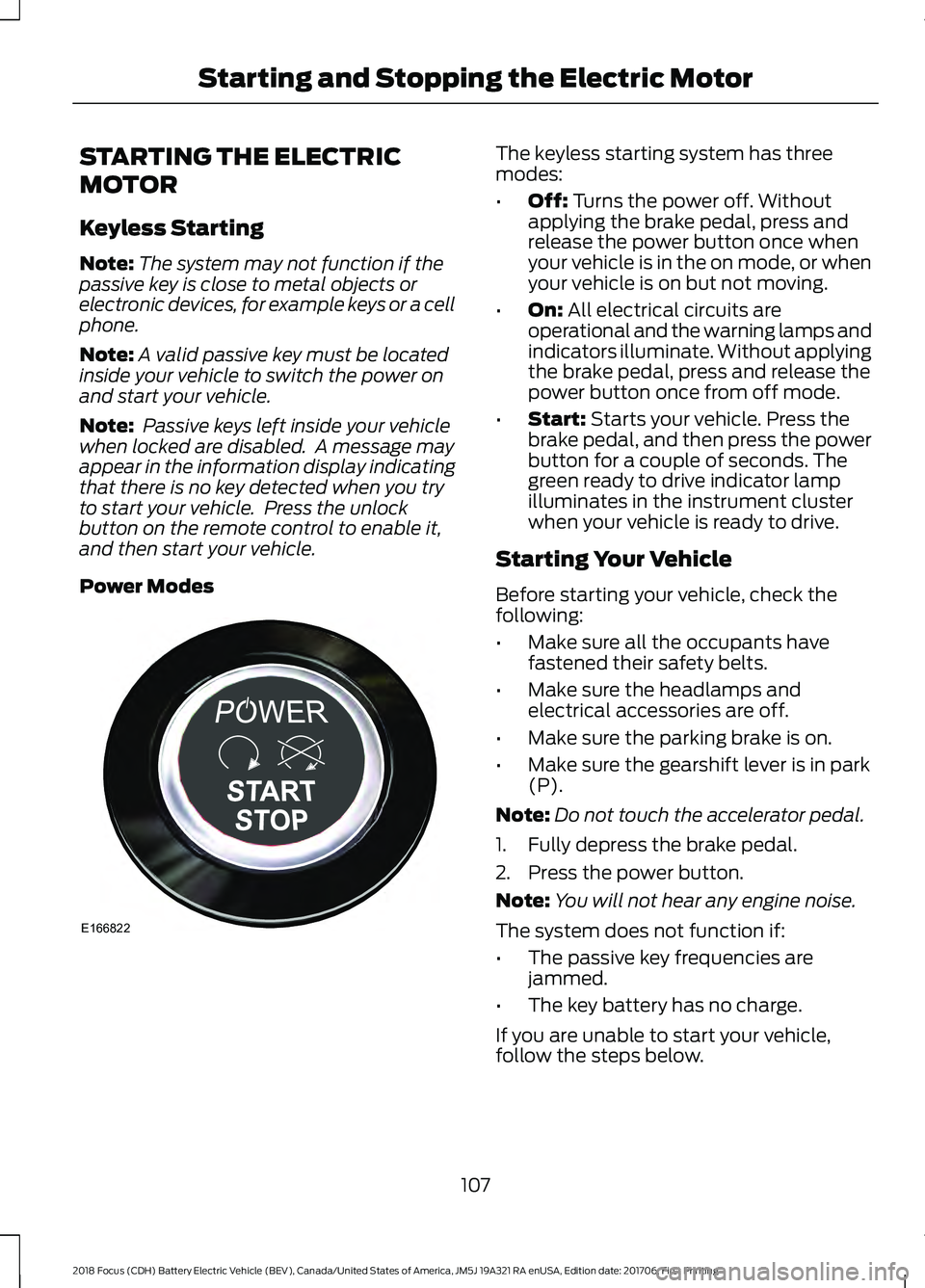
Power Modes The keyless starting system has three
modes:
•
Off: Turns the power off. Without
applying the brake pedal, press and
release the power button once when
your vehicle is in the on mode, or when
your vehicle is on but not moving.
• On:
All electrical circuits are
operational and the warning lamps and
indicators illuminate. Without applying
the brake pedal, press and release the
power button once from off mode.
• Start:
Starts your vehicle. Press the
brake pedal, and then press the power
button for a couple of seconds. The
green ready to drive indicator lamp
illuminates in the instrument cluster
when your vehicle is ready to drive.
Starting Your Vehicle
Before starting your vehicle, check the
following:
• Make sure all the occupants have
fastened their safety belts.
• Make sure the headlamps and
electrical accessories are off.
• Make sure the parking brake is on.
• Make sure the gearshift lever is in park
(P).
Note: Do not touch the accelerator pedal.
1. Fully depress the brake pedal.
2. Press the power button.
Note: You will not hear any engine noise.
The system does not function if:
• The passive key frequencies are
jammed.
• The key battery has no charge.
If you are unable to start your vehicle,
follow the steps below.
107
2018 Focus (CDH) Battery Electric Vehicle (BEV), Canada/United States of America, JM5J 19A321 RA enUSA, Edition date: 201706, First Printing Starting and Stopping the Electric MotorE166822
Page 119 of 375
Disconnecting the Charging Coupler
1. Press and hold the button on the
charging coupler and disconnect from
the charging port.
Note: Do not try to disconnect the charging
coupler with force. This could damage the
charging port and charging coupler.
Note: You cannot disconnect the charging
coupler until charging has been stopped or
completed.
2. Replace the charge port cover.
3. Close the charge port door.
Note: To close the charge port door, press
the center rear edge of the charge port door
and then release.
Overriding the Lock
If DC charging has stopped and you are still
unable to disconnect the charging coupler,
you must complete the following button
sequence within 10 seconds.
1. Press the charge unlock button on the center console.
2. Touch the charge unlock button in the touchscreen vehicle settings menu.
3. Press the charge unlock button on the center console.
Note: A message requesting confirmation
that your vehicle is unplugged appears on
the instrument cluster. See Information
Messages (page 87).
4. Switch the power off, leave your vehicle and close the door.
5. After one minute, press and hold the button on the charging coupler and
disconnect from the charging port.
If the previous steps fail to unlock the
charging coupler, you may need to switch
the power off, then on, and off again and
wait another minute to allow the system
to reset. If your first attempt was unsuccessful,
repeat steps 1 through 5.
If you are still unable to disconnect the
charging coupler, press the emergency
stop button on the charging system.
Note:
For additional instructions, please
refer to information available from the
charging networks or the charging system
site.
Call the Ford Roadside Assistance at
1-800-241-3673 for US sold vehicles
traveling within the US or Canada and
1-800-665-2006 for Canadian sold
vehicles traveling with the US or Canada
for additional information.
HIGH VOLTAGE BATTERY CUT-
OFF SWITCH
The high voltage shut off operation shuts
off power from the high-voltage battery
after a collision, or if your vehicle receives
a substantial physical jolt.
To reactivate your vehicle after either
event, perform the following steps:
1. Press the
START/STOP button to
power off your vehicle.
2. Wait for your vehicle to fully shut down
and the instrument cluster to turn off.
Note: Your vehicle may take between 30
to 90 seconds to shut down.
3. Press the brake pedal and press the START/STOP
button.
4. If your vehicle is not powered after this
sequence, repeat steps 1 through 3 up
to two more times.
Note: During this process, your vehicle
detects if the electrical system is safe and
reactivates. Once your vehicle determines
the electrical system safe, you can start your
vehicle as you would normally by pressing
the brake in combination with the
START/STOP
button.
116
2018 Focus (CDH) Battery Electric Vehicle (BEV), Canada/United States of America, JM5J 19A321 RA enUSA, Edition date: 201706, First Printing High Voltage Battery
Page 134 of 375
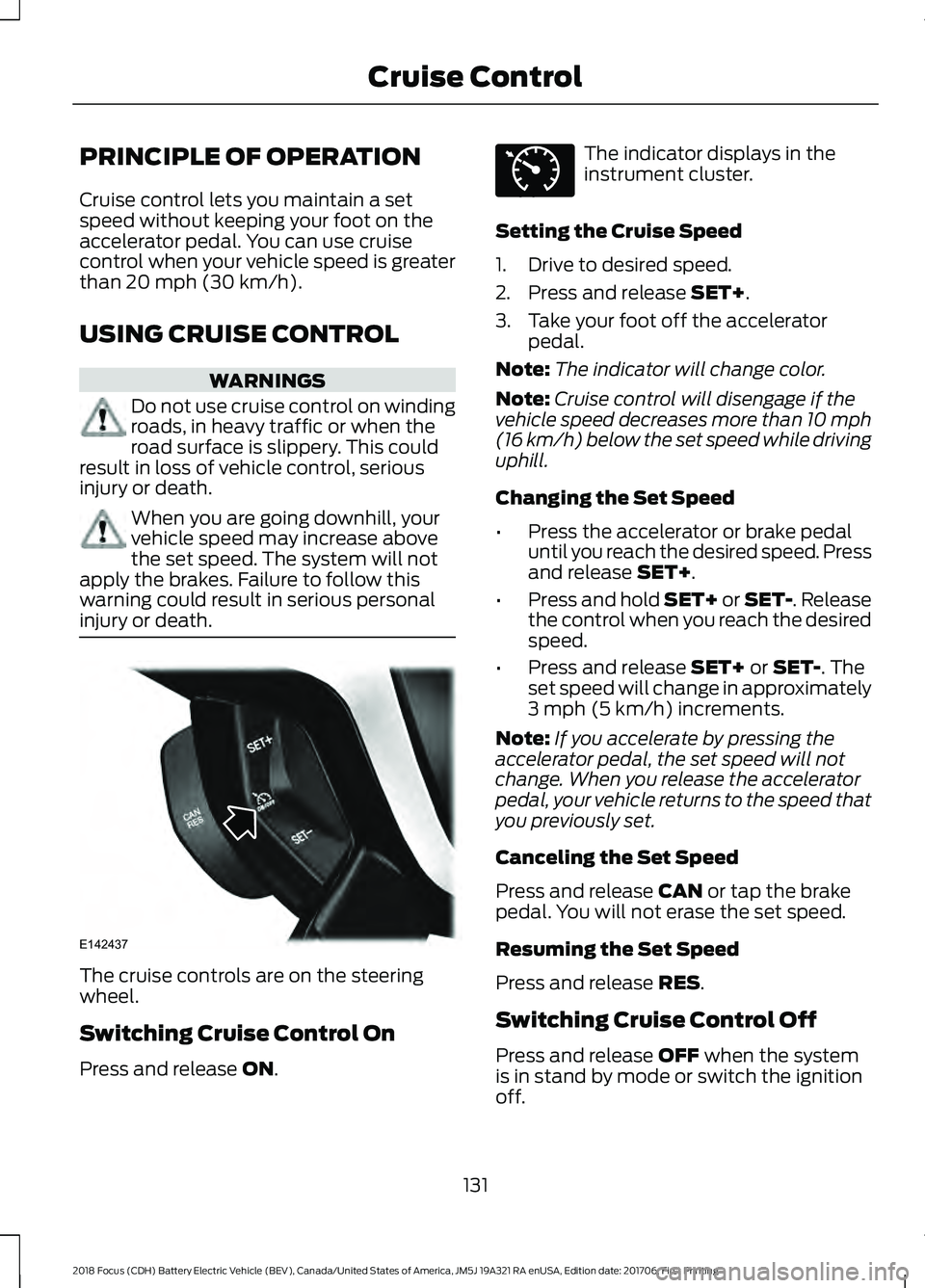
PRINCIPLE OF OPERATION
Cruise control lets you maintain a set
speed without keeping your foot on the
accelerator pedal. You can use cruise
control when your vehicle speed is greater
than 20 mph (30 km/h).
USING CRUISE CONTROL WARNINGS
Do not use cruise control on winding
roads, in heavy traffic or when the
road surface is slippery. This could
result in loss of vehicle control, serious
injury or death. When you are going downhill, your
vehicle speed may increase above
the set speed. The system will not
apply the brakes. Failure to follow this
warning could result in serious personal
injury or death. The cruise controls are on the steering
wheel.
Switching Cruise Control On
Press and release
ON. The indicator displays in the
instrument cluster.
Setting the Cruise Speed
1. Drive to desired speed.
2. Press and release
SET+.
3. Take your foot off the accelerator pedal.
Note: The indicator will change color.
Note: Cruise control will disengage if the
vehicle speed decreases more than 10 mph
(16 km/h) below the set speed while driving
uphill.
Changing the Set Speed
• Press the accelerator or brake pedal
until you reach the desired speed. Press
and release
SET+.
• Press and hold SET+ or SET-. Release
the control when you reach the desired
speed.
• Press and release
SET+ or SET-. The
set speed will change in approximately
3 mph (5 km/h)
increments.
Note: If you accelerate by pressing the
accelerator pedal, the set speed will not
change. When you release the accelerator
pedal, your vehicle returns to the speed that
you previously set.
Canceling the Set Speed
Press and release
CAN or tap the brake
pedal. You will not erase the set speed.
Resuming the Set Speed
Press and release
RES.
Switching Cruise Control Off
Press and release
OFF when the system
is in stand by mode or switch the ignition
off.
131
2018 Focus (CDH) Battery Electric Vehicle (BEV), Canada/United States of America, JM5J 19A321 RA enUSA, Edition date: 201706, First Printing Cruise ControlE142437 E71340
Page 166 of 375
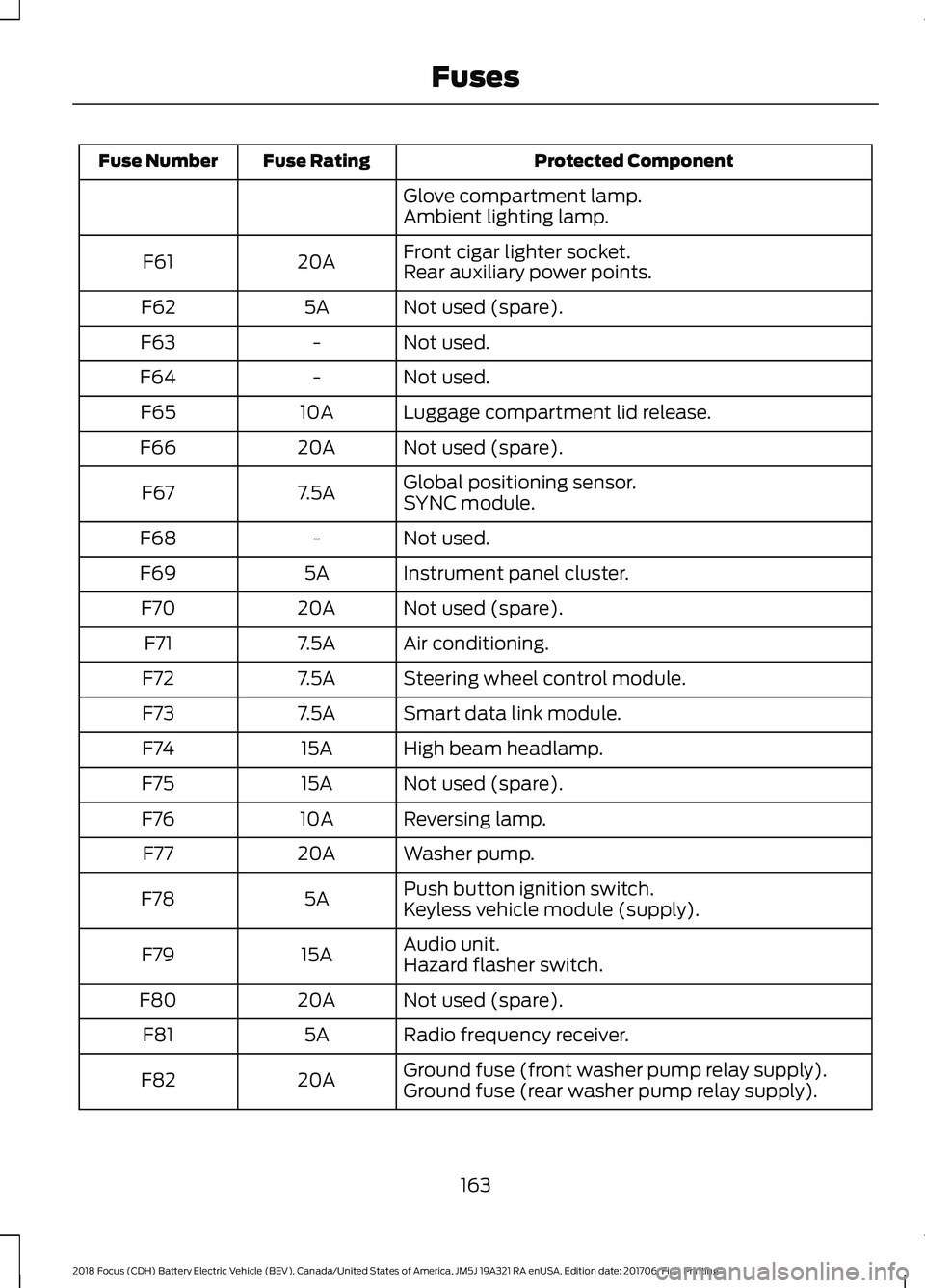
Protected Component
Fuse Rating
Fuse Number
Glove compartment lamp.
Ambient lighting lamp.
Front cigar lighter socket.
20A
F61
Rear auxiliary power points.
Not used (spare).
5A
F62
Not used.
-
F63
Not used.
-
F64
Luggage compartment lid release.
10A
F65
Not used (spare).
20A
F66
Global positioning sensor.
7.5A
F67
SYNC module.
Not used.
-
F68
Instrument panel cluster.
5A
F69
Not used (spare).
20A
F70
Air conditioning.
7.5A
F71
Steering wheel control module.
7.5A
F72
Smart data link module.
7.5A
F73
High beam headlamp.
15A
F74
Not used (spare).
15A
F75
Reversing lamp.
10A
F76
Washer pump.
20A
F77
Push button ignition switch.
5A
F78
Keyless vehicle module (supply).
Audio unit.
15A
F79
Hazard flasher switch.
Not used (spare).
20A
F80
Radio frequency receiver.
5A
F81
Ground fuse (front washer pump relay supply).
20A
F82
Ground fuse (rear washer pump relay supply).
163
2018 Focus (CDH) Battery Electric Vehicle (BEV), Canada/United States of America, JM5J 19A321 RA enUSA, Edition date: 201706, First Printing Fuses
Page 190 of 375
CLEANING THE INSTRUMENT
PANEL AND INSTRUMENT
CLUSTER LENS
WARNING
Do not use chemical solvents or
strong detergents when cleaning the
steering wheel or instrument panel
to avoid contamination of the airbag
system. Note:
Follow the same procedure as
cleaning leather seats for cleaning leather
instrument panels and leather interior trim
surfaces. See Cleaning Leather Seats
(page 187).
Clean the instrument panel and cluster
lens with a clean, damp and soft cloth,
then use a clean, dry and soft cloth to dry
these areas.
• Avoid cleaners or polishes that increase
the gloss of the upper portion of the
instrument panel. The dull finish in this
area helps protect you from
undesirable windshield reflection.
• Do not use any household cleaning
products or glass cleaners as these
may damage the finish of the
instrument panel, interior trim and
cluster lens.
• Wash or wipe your hands clean if you
have been in contact with certain
products such as insect repellent and
suntan lotion to avoid possible damage
to the interior painted surfaces.
• Do not allow air fresheners and hand
sanitizers to spill onto interior surfaces.
If a spill occurs, wipe off immediately.
Your warranty may not cover these
damages.
If a staining liquid like coffee or juice has
been spilled on the instrument panel or on
interior trim surfaces: 1. Wipe up spilled liquid using a clean,
soft cloth as quickly as possible.
2. Use Motorcraft Premium Leather and Vinyl Cleaner or a commercially
available leather cleaning product for
automotive interiors. Test any cleaner
or stain remover on an inconspicuous
area.
3. Alternatively, wipe the surface with a clean, soft cloth and a mild soap and
water solution. Dry the area with a
clean, soft cloth.
4. If necessary, apply more soap and water solution or cleaning product to
a clean, soft cloth and press it onto the
soiled area. Allow this to set at room
temperature for 30 minutes.
5. Remove the soaked cloth, then with a clean, damp cloth, use a rubbing
motion for 60 seconds on the soiled
area.
6. Dry the area with a clean, soft cloth.
CLEANING LEATHER SEATS
(If
Equipped)
Note: Follow the same procedure as
cleaning leather seats for cleaning leather
instrument panels and leather interior trim
surfaces.
For routine cleaning, wipe the surface with
a soft, damp cloth and a mild soap and
water solution. Dry the area with a clean,
soft cloth.
For cleaning and removing stains such as
dye transfer, use Motorcraft Premium
Leather and Vinyl Cleaner or a
commercially available leather cleaning
product for automotive interiors.
Note: Test any cleaner or stain remover on
an inconspicuous area.
187
2018 Focus (CDH) Battery Electric Vehicle (BEV), Canada/United States of America, JM5J 19A321 RA enUSA, Edition date: 201706, First Printing Vehicle Care
Page 265 of 375
Button
Start
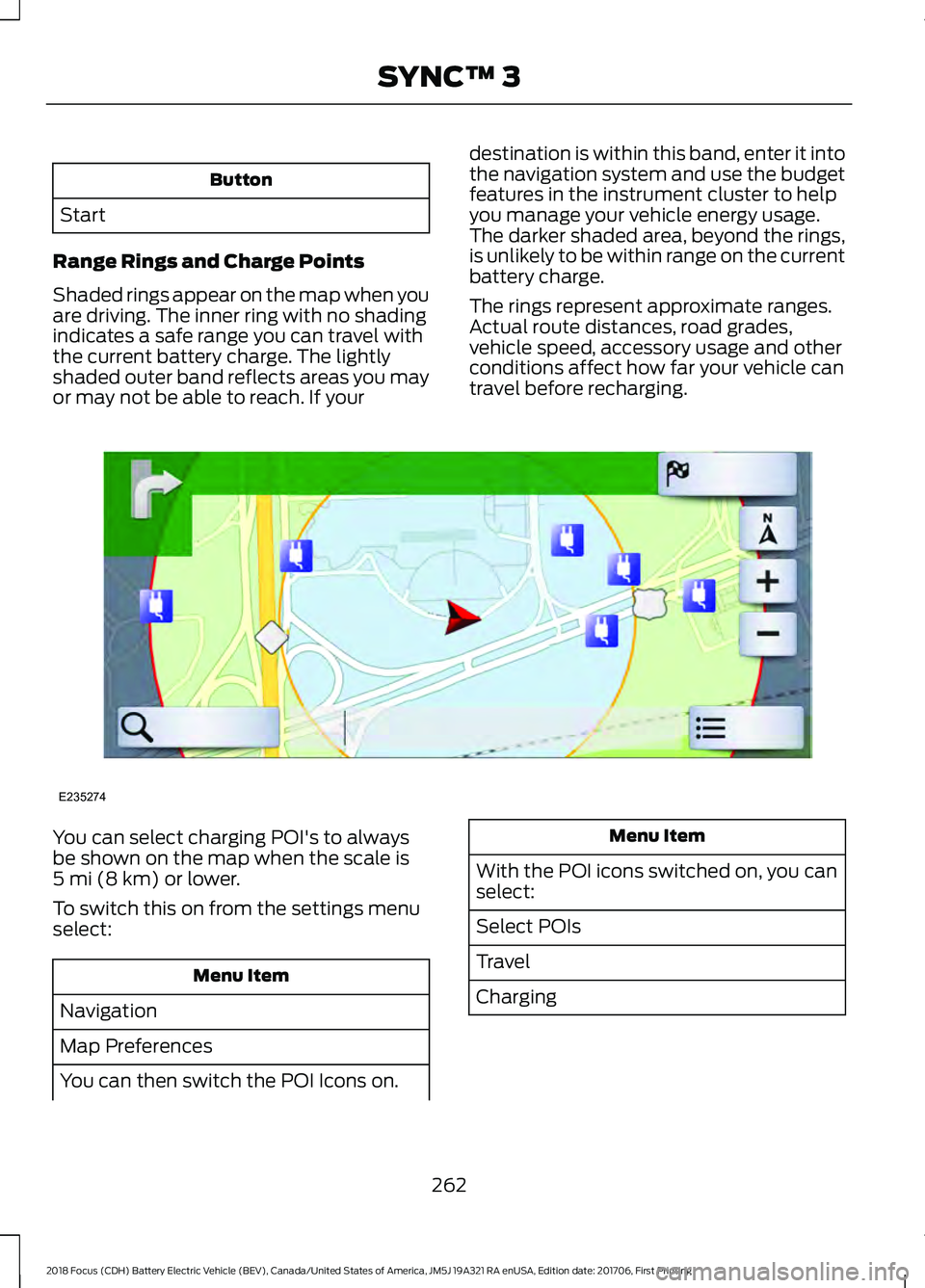
Range Rings and Charge Points
Shaded rings appear on the map when you
are driving. The inner ring with no shading
indicates a safe range you can travel with
the current battery charge. The lightly
shaded outer band reflects areas you may
or may not be able to reach. If your destination is within this band, enter it into
the navigation system and use the budget
features in the instrument cluster to help
you manage your vehicle energy usage.
The darker shaded area, beyond the rings,
is unlikely to be within range on the current
battery charge.
The rings represent approximate ranges.
Actual route distances, road grades,
vehicle speed, accessory usage and other
conditions affect how far your vehicle can
travel before recharging.You can select charging POI's to always
be shown on the map when the scale is
5 mi (8 km) or lower.
To switch this on from the settings menu
select: Menu Item
Navigation
Map Preferences
You can then switch the POI Icons on. Menu Item
With the POI icons switched on, you can
select:
Select POIs
Travel
Charging
262
2018 Focus (CDH) Battery Electric Vehicle (BEV), Canada/United States of America, JM5J 19A321 RA enUSA, Edition date: 201706, First Printing SYNC™ 3E235274