2018 FORD FIESTA ac system
[x] Cancel search: ac systemPage 139 of 449

PRINCIPLE OF OPERATION
Electronic Stability Program
WARNING: The system does not
relieve you of your responsibility to drive
with due care and attention. Failure to drive
with due care and attention could lead to
loss of vehicle control. WARNING:
Vehicle modifications
involving braking system, aftermarket roof
racks, suspension, steering system, tire
construction and wheel and tire size may
change the handling characteristics of the
vehicle and may adversely affect the
performance of the AdvanceTrac system.
In addition, installing any stereo
loudspeakers may interfere with and
adversely affect the AdvanceTrac system.
Install any aftermarket stereo loudspeaker
as far as possible from the front center
console, the tunnel, and the front seats in
order to minimize the risk of interfering with
the AdvanceTrac sensors. Reducing the
effectiveness of the AdvanceTrac system
could lead to an increased risk of loss of
vehicle control, vehicle rollover, personal
injury and death. WARNING:
Remember that even
advanced technology cannot defy the laws
of physics. It’ s always possible to lose
control of a vehicle due to inappropriate
driver input for the conditions. Aggressive
driving on any road condition can cause
you to lose control of your vehicle
increasing the risk of personal injury or
property damage. Activation of the
AdvanceTrac system is an indication that
at least some of the tires have exceeded their ability to grip the road; this could
reduce the operator
’s ability to control the
vehicle potentially resulting in a loss of
vehicle control, vehicle rollover, personal
injury and death. If your AdvanceTrac
system activates, SLOW DOWN. Without Advance Trac
A
With Advance Trac
B
The system supports stability when your
vehicle starts to slide away from your
intended path. This is performed by braking
individual wheels and reducing engine
torque as needed.
The system also provides an enhanced
traction control function by reducing
engine torque if the wheels spin when you
accelerate. This improves your ability to
pull away on slippery roads or loose
surfaces, and improves comfort by limiting
wheel spin in hairpin bends.
136
2018 Fiesta (CCT) Canada/United States of America, JE8J 19A321 AB enUSA, Edition date: 201706, First-Printing Stability Control
(If Equipped)E72903A
AA
B
BB
B
Page 140 of 449
Stability Control Warning Lamp
While driving, it flashes when the system
is operating. See Warning Lamps and
Indicators (page 80).
USING STABILITY CONTROL
Note: The system automatically turns on
each time you switch the ignition on.
You can switch the traction control system
off and on .
See Using Traction Control
(page 135).
137
2018 Fiesta (CCT) Canada/United States of America, JE8J 19A321 AB enUSA, Edition date: 201706, First-Printing Stability Control
(If Equipped)
Page 141 of 449

PRINCIPLE OF OPERATION
WARNING: To help avoid personal
injury, please read and understand the
limitations of the system as contained in
this section. Sensing is only an aid for some
(generally large and fixed) objects when
moving on a flat surface at parking speeds.
Certain objects with surfaces that absorb
ultrasonic waves, surrounding vehicle's
parking aid systems, traffic control
systems, fluorescent lamps, inclement
weather, air brakes, and external motors
and fans may also affect the function of
the sensing system. This may include
reduced performance or a false activation. WARNING:
Always drive with due
care and attention when using and
operating the controls and features on your
vehicle. WARNING:
Only use the Ford
approved trailer wiring kit (including the
trailer wiring module) when towing with
your vehicle. Using generic trailer wiring kits
may prevent the correct operation of the
rear parking sensors (where fitted) and
could damage the electrical systems of
your vehicle. WARNING:
The sensors may not
detect objects in heavy rain or other
conditions that cause interference. WARNING:
The parking aid system
may not prevent contact with small or
moving objects that are close to the
ground. The parking aid system gives an
audible warning when it detects a large
object helping to avoid damage to your
vehicle. To help avoid personal injury you
must take care when using the parking aid
system. Note:
If you use a high pressure spray to
wash your vehicle, only spray the sensors
briefly from a distance not less than
8 in
(20 cm).
Note: If your vehicle has a tow ball arm, the
system is turned off automatically when
trailer lamps (or lighting boards) are
connected to the 13-pin socket through a
Ford approved trailer tow module.
Note: Keep the sensors free from dirt, ice
or snow. Do not clean with sharp objects.
Note: The system may emit false alerts if
it detects a signal using the same frequency
as the sensors or if your vehicle is fully
loaded.
Note: The outer sensors may detect the
side walls of a garage. If the distance
between the outer sensors and the side wall
remains constant for three seconds, the
alert will turn off. As you continue the inner
sensors will detect objects directly behind
your vehicle.
Note: If your vehicle sustains damage to
the bumper or fascia, the sensing zone may
be altered causing inaccurate measure of
obstacles or false alerts.
REAR PARKING AID WARNING:
To help avoid personal
injury, please read and understand the
limitations of the system as contained in
this section. Sensing is only an aid for some
(generally large and fixed) objects when
moving on a flat surface at parking speeds.
Certain objects with surfaces that absorb
ultrasonic waves, surrounding vehicle's
parking aid systems, traffic control
systems, fluorescent lamps, inclement
weather, air brakes, and external motors
and fans may also affect the function of
the sensing system. This may include
reduced performance or a false activation.
138
2018 Fiesta (CCT) Canada/United States of America, JE8J 19A321 AB enUSA, Edition date: 201706, First-Printing Parking Aids
(If Equipped)
Page 142 of 449

WARNING: To help avoid personal
injury, always use caution when in reverse
(R) and when using the sensing system. WARNING:
The parking aid system
may not prevent contact with small or
moving objects that are close to the
ground. The parking aid system gives an
audible warning when it detects a large
object helping to avoid damage to your
vehicle. To help avoid personal injury you
must take care when using the parking aid
system.
Note: Some add-on accessories such as
large trailer hitches, bike or surfboard racks
can cause reduced performance or false
alerts.
Note: Keep the sensors free from snow, ice
and large accumulations of dirt. Blocked
sensors may affect system accuracy. Do
not clean the sensors with sharp objects.
Note: If your vehicle sustains damage
leaving the sensors misaligned, this will
cause inaccurate measurements or false
alerts.
The system warns you of objects that are
within the detection zone of the bumper
areas.
When the parking aid system sounds a
tone, the audio system may reduce the set
volume. When the warning ends, the audio
system will return to the previously set
volume.
The rear parking aid sensors automatically
turn on when you shift into reverse (R). Coverage area of up to 72 in (183
cm) from the bumper. There is
decreased coverage area at the
outer corners of the bumper.
A
As your vehicle moves closer an obstacle,
the rate of the audible warning increases.
When the obstacle is less than
12 in
(30 cm) away, the audible warning sounds
continuously. If a stationary or receding
object is detected
12 in (30 cm) or more
from the side of your vehicle, the audible
warning sounds for only three seconds.
Once the system detects an object
approaching, the audible warning sounds
again.
The system detects objects when you shift
into reverse (R) and:
• Your vehicle is moving toward a
stationary object at a speed of
3 mph
(5 km/h) or less.
• Your vehicle is moving at a speed of
3 mph (5 km/h)
or less, and an object
is approaching your vehicle at a speed
of
3 mph (5 km/h) or less.
If a fault is present in the system, a warning
message appears in the information
display and does not allow you to switch
the system on.
139
2018 Fiesta (CCT) Canada/United States of America, JE8J 19A321 AB enUSA, Edition date: 201706, First-Printing Parking Aids
(If Equipped)E130178
Page 143 of 449

FRONT PARKING AID (If Equipped)
WARNING:
To help avoid personal
injury, please read and understand the
limitations of the system as contained in
this section. Sensing is only an aid for some
(generally large and fixed) objects when
moving on a flat surface at parking speeds.
Certain objects with surfaces that absorb
ultrasonic waves, surrounding vehicle's
parking aid systems, traffic control
systems, fluorescent lamps, inclement
weather, air brakes, and external motors
and fans may also affect the function of
the sensing system. This may include
reduced performance or a false activation. WARNING:
To help avoid personal
injury, always use caution when in reverse
(R) and when using the sensing system. WARNING:
The parking aid system
may not prevent contact with small or
moving objects that are close to the
ground. The parking aid system gives an
audible warning when it detects a large
object helping to avoid damage to your
vehicle. To help avoid personal injury you
must take care when using the parking aid
system.
Note: Keep the sensors free from snow, ice
and large accumulations of dirt. Blocked
sensors may affect system accuracy. Do
not clean the sensors with sharp objects.
Note: If your vehicle sustains damage
leaving the sensors misaligned, this will
cause inaccurate measurements or false
alerts.
The system warns you of objects that are
within the detection zone of the bumper
areas. When the parking aid system sounds a
tone, the audio system may reduce the set
volume. When the warning ends, the audio
system will return to the previously set
volume.
The front parking aid sensors automatically
turn on when you shift into reverse (R) or
you press the parking aid button.
Coverage area of up to 31 in (80
cm) from the center of the
bumper and up to 14 in (35 cm)
to the side of the bumper.
A
As your vehicle moves closer an obstacle,
the rate of the audible warning increases.
When the obstacle is less than
12 in
(30 cm) away, the audible warning sounds
continuously. If a stationary or receding
object is detected
12 in (30 cm) or more
from the side of your vehicle, the audible
warning sounds for only three seconds.
Once the system detects an object
approaching, the audible warning sounds
again.
140
2018 Fiesta (CCT) Canada/United States of America, JE8J 19A321 AB enUSA, Edition date: 201706, First-Printing Parking Aids
(If Equipped)E184301
A
Page 144 of 449

The system detects objects when you shift
into reverse (R) or you press the parking
aid button and:
•
Your vehicle is moving toward a
stationary object at a speed of 3 mph
(5 km/h) or less.
• Your vehicle is moving at a speed of
3 mph (5 km/h)
or less, and an object
is approaching your vehicle at a speed
of
3 mph (5 km/h) or less.
If a fault is present in the system, a warning
message appears in the information
display and does not allow you to switch
the system on.
Sensing System Audible Warnings
Audible warnings sound when large objects
are within the sensor coverage areas of
either bumper in the following manner:
• You will hear a high-pitched tone from
the front audio system speakers when
large objects are within the sensor
coverage area of the front bumper.
• You will hear a lower-pitched tone
from the rear audio system speakers
when large objects are within the
sensor coverage area of the rear
bumper.
• The parking aid system prioritises
audible warnings based on large
objects that are the closest to your
vehicle ’s front or rear bumper. For
example, if an object is
24 in (60 cm)
from the front bumper and at the same
time, an object is only
16 in (40 cm)
from the rear bumper, you will hear the
lower-pitched tone from the rear audio
system speakers. •
You will hear an alternating audible
warning from the front and rear audio
system speakers if large objects are
less than
12 in (30 cm) from the front
and rear bumpers.
• If the object is more than 12 in (30 cm)
from the side of the bumper area, the
audible warning sounds for three
seconds. If the object is less than
12 in
(30 cm) from the side of the bumper
area the audible warning sounds
continuously.
Switching the Parking Aid System
Off
Press the button to switch the system off.
The system remains off until you switch
the ignition off.
REAR VIEW CAMERA WARNING:
Do not place objects in
front of the camera. WARNING:
The rear view camera
system is a reverse aid supplement device
that still requires the driver to use it in
conjunction with the interior and exterior
mirrors for maximum coverage. WARNING:
Objects that are close
to either corner of the bumper or under the
bumper, might not be seen on the screen
due to the limited coverage of the camera
system. WARNING:
Reverse your vehicle
slowly. Failure to follow this instruction
could result in the loss of control of your
vehicle, personal injury or death.
141
2018 Fiesta (CCT) Canada/United States of America, JE8J 19A321 AB enUSA, Edition date: 201706, First-Printing Parking Aids
(If Equipped)
Page 145 of 449
WARNING: Use caution when the
liftgate is ajar. If the liftgate is ajar, the
camera will be out of position and the
video image may be incorrect. All
guidelines disappear when the liftgate is
ajar. Failure to follow this instruction could
result in personal injury. WARNING:
Do not switch the
camera features on or off when your
vehicle is moving. WARNING:
To help avoid personal
injury always use caution when in reverse
(R) and when using the rear view camera.
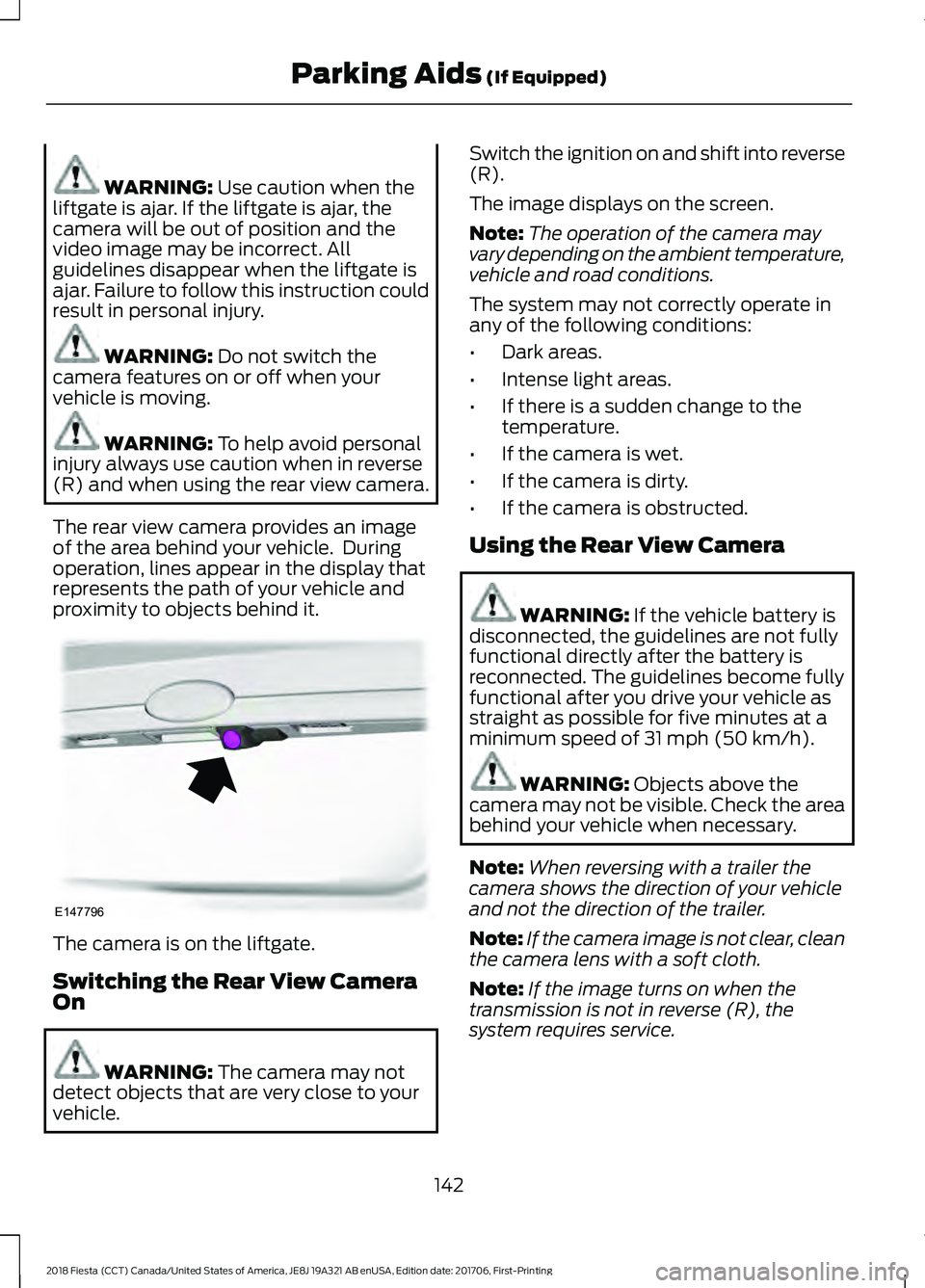
The rear view camera provides an image
of the area behind your vehicle. During
operation, lines appear in the display that
represents the path of your vehicle and
proximity to objects behind it. The camera is on the liftgate.
Switching the Rear View Camera
On
WARNING:
The camera may not
detect objects that are very close to your
vehicle. Switch the ignition on and shift into reverse
(R).
The image displays on the screen.
Note:
The operation of the camera may
vary depending on the ambient temperature,
vehicle and road conditions.
The system may not correctly operate in
any of the following conditions:
• Dark areas.
• Intense light areas.
• If there is a sudden change to the
temperature.
• If the camera is wet.
• If the camera is dirty.
• If the camera is obstructed.
Using the Rear View Camera WARNING:
If the vehicle battery is
disconnected, the guidelines are not fully
functional directly after the battery is
reconnected. The guidelines become fully
functional after you drive your vehicle as
straight as possible for five minutes at a
minimum speed of
31 mph (50 km/h). WARNING:
Objects above the
camera may not be visible. Check the area
behind your vehicle when necessary.
Note: When reversing with a trailer the
camera shows the direction of your vehicle
and not the direction of the trailer.
Note: If the camera image is not clear, clean
the camera lens with a soft cloth.
Note: If the image turns on when the
transmission is not in reverse (R), the
system requires service.
142
2018 Fiesta (CCT) Canada/United States of America, JE8J 19A321 AB enUSA, Edition date: 201706, First-Printing Parking Aids
(If Equipped)E147796
Page 146 of 449
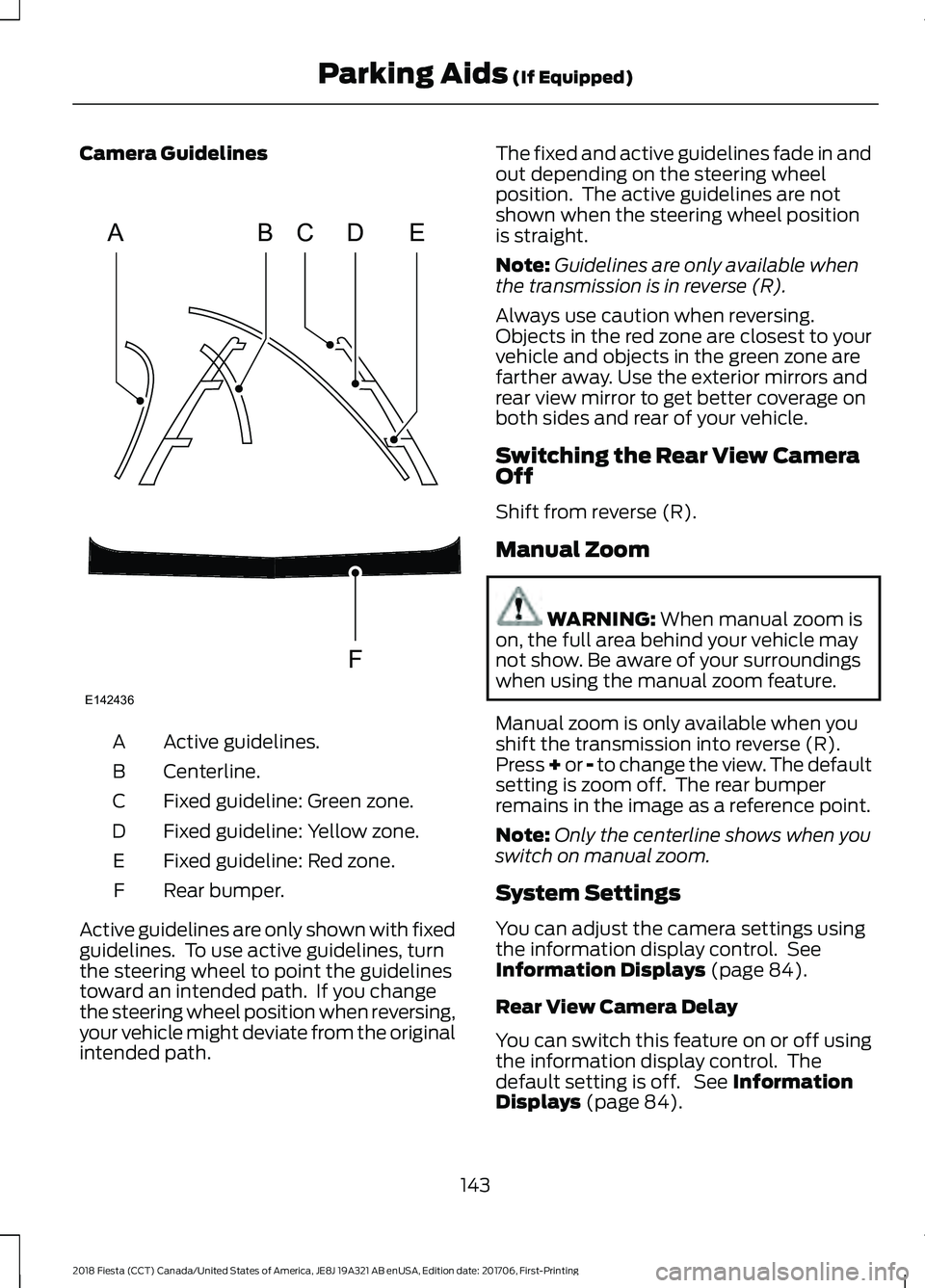
Camera Guidelines
Active guidelines.
A
Centerline.
B
Fixed guideline: Green zone.
C
Fixed guideline: Yellow zone.
D
Fixed guideline: Red zone.
E
Rear bumper.
F
Active guidelines are only shown with fixed
guidelines. To use active guidelines, turn
the steering wheel to point the guidelines
toward an intended path. If you change
the steering wheel position when reversing,
your vehicle might deviate from the original
intended path. The fixed and active guidelines fade in and
out depending on the steering wheel
position. The active guidelines are not
shown when the steering wheel position
is straight.
Note:
Guidelines are only available when
the transmission is in reverse (R).
Always use caution when reversing.
Objects in the red zone are closest to your
vehicle and objects in the green zone are
farther away. Use the exterior mirrors and
rear view mirror to get better coverage on
both sides and rear of your vehicle.
Switching the Rear View Camera
Off
Shift from reverse (R).
Manual Zoom WARNING: When manual zoom is
on, the full area behind your vehicle may
not show. Be aware of your surroundings
when using the manual zoom feature.
Manual zoom is only available when you
shift the transmission into reverse (R).
Press + or - to change the view. The default
setting is zoom off. The rear bumper
remains in the image as a reference point.
Note: Only the centerline shows when you
switch on manual zoom.
System Settings
You can adjust the camera settings using
the information display control. See
Information Displays
(page 84).
Rear View Camera Delay
You can switch this feature on or off using
the information display control. The
default setting is off. See
Information
Displays (page 84).
143
2018 Fiesta (CCT) Canada/United States of America, JE8J 19A321 AB enUSA, Edition date: 201706, First-Printing Parking Aids
(If Equipped)ABCD
F
E
E142436