2018 FORD F250 SUPER DUTY Digital radio
[x] Cancel search: Digital radioPage 8 of 656

Draining the Fuel Filter Water Trap - 6.7L
Diesel............................................................352
Fuel Filter - 6.2L/6.8L.................................353
Changing the 12V Battery.........................354
Checking the Wiper Blades.....................356
Changing the Wiper Blades.....................356
Adjusting the Headlamps
........................356
Changing a Bulb..........................................358
Bulb Specification Chart...........................361
Changing the Engine Air Filter - 6.2L/ 6.8L...............................................................363
Changing the Engine Air Filter - 6.7L Diesel...........................................................364
Changing the Engine-Mounted and Diesel Fuel Conditioner Module Fuel
Filters - 6.7L Diesel..................................366
Vehicle Care
General Information
.....................................371
Cleaning Products
........................................371
Cleaning the Exterior
....................................371
Waxing..............................................................372
Cleaning the Engine....................................373
Cleaning the Exhaust - 6.7L Diesel........373
Cleaning the Windows and Wiper Blades..........................................................374
Cleaning the Interior...................................374
Cleaning the Instrument Panel and Instrument Cluster Lens........................375
Cleaning Leather Seats.............................376
Cleaning the Wheels...................................377
Vehicle Storage.............................................377
Wheels and Tires
General Information
...................................380
Tire Care..........................................................382
Using Snow Chains....................................400
Tire Pressure Monitoring System..........400
Changing a Road Wheel..........................408
Technical Specifications
...........................419 Capacities and Specific-
ations
Engine Specifications - 6.2L
.....................421
Engine Specifications - 6.7L Diesel
........421
Engine Specifications - 6.8L
....................422
Motorcraft Parts - 6.2L
..............................423
Motorcraft Parts - 6.7L Diesel.................424
Motorcraft Parts - 6.8L..............................425
Vehicle Identification Number................426
Vehicle Certification Label
.......................427
Transmission Code Designation............427
Capacities and Specifications - 6.2L....428
Capacities and Specifications - 6.7L Diesel...........................................................433
Capacities and Specifications - 6.8L
..............................................................440
Audio System
General Information
...................................446
Audio Unit - Vehicles With: AM/FM......447
Audio Unit - Vehicles With: AM/FM/CD/ SYNC...........................................................448
Audio Unit - Vehicles With: AM/FM/CD/ Touchscreen Display
..............................453
Digital Radio
..................................................454
Satellite Radio..............................................456
USB Port
.........................................................459
SYNC™
General Information
..................................460
Using Voice Recognition...........................462
Using SYNC™ With Your Phone...........464
SYNC™ Applications and Services
......476
Using SYNC™ With Your Media Player............................................................481
SYNC™ Troubleshooting.........................490
SYNC™ 3
General Information
..................................498
Home Screen
................................................509
5
Super Duty (TFE) Canada/United States of America, enUSA, Edition date: 201709, First Printing Table of Contents
Page 457 of 656
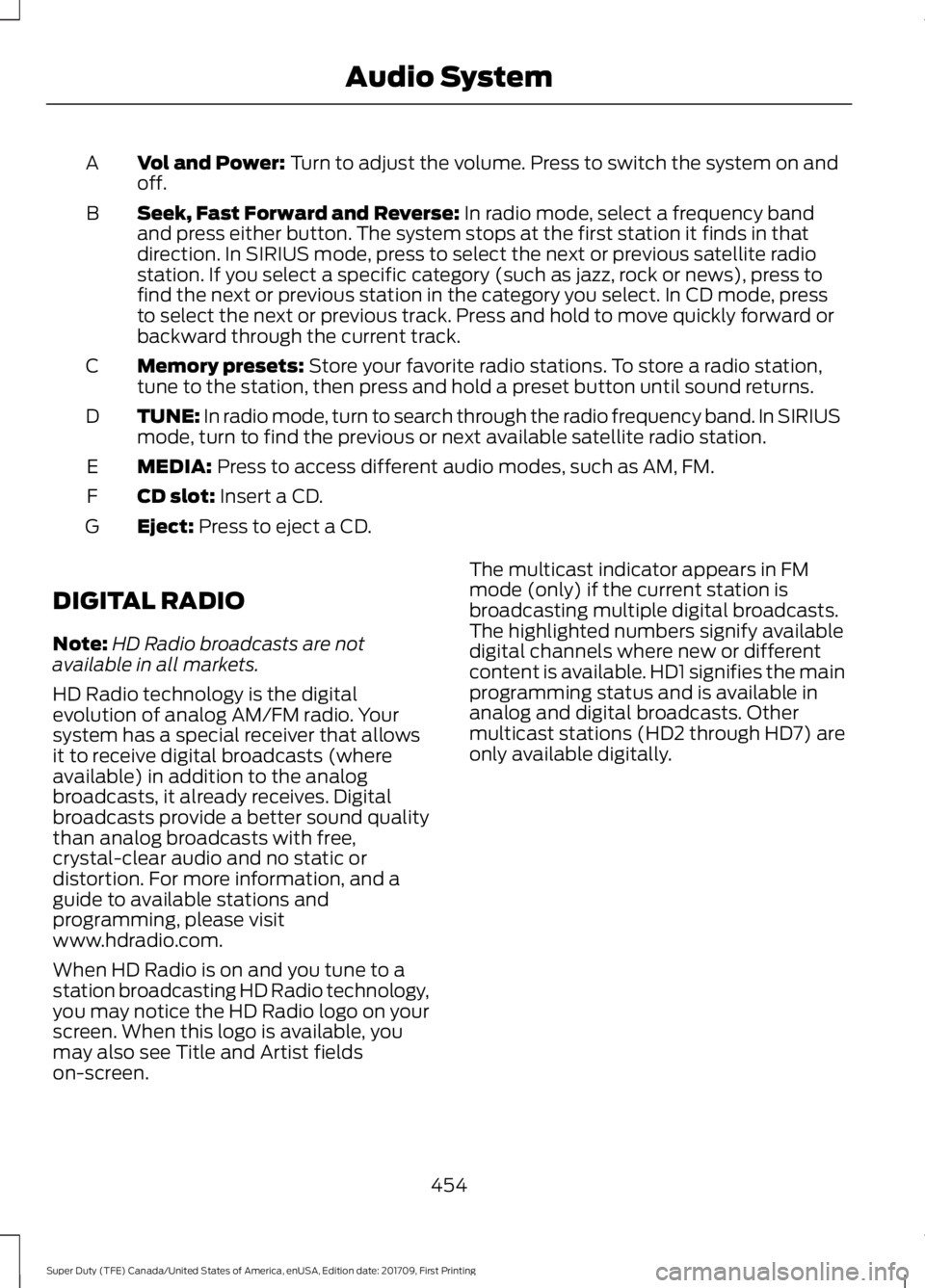
Vol and Power: Turn to adjust the volume. Press to switch the system on and
off.
A
Seek, Fast Forward and Reverse:
In radio mode, select a frequency band
and press either button. The system stops at the first station it finds in that
direction. In SIRIUS mode, press to select the next or previous satellite radio
station. If you select a specific category (such as jazz, rock or news), press to
find the next or previous station in the category you select. In CD mode, press
to select the next or previous track. Press and hold to move quickly forward or
backward through the current track.
B
Memory presets:
Store your favorite radio stations. To store a radio station,
tune to the station, then press and hold a preset button until sound returns.
C
TUNE: In radio mode, turn to search through the radio frequency band. In SIRIUS
mode, turn to find the previous or next available satellite radio station.
D
MEDIA:
Press to access different audio modes, such as AM, FM.
E
CD slot:
Insert a CD.
F
Eject:
Press to eject a CD.
G
DIGITAL RADIO
Note: HD Radio broadcasts are not
available in all markets.
HD Radio technology is the digital
evolution of analog AM/FM radio. Your
system has a special receiver that allows
it to receive digital broadcasts (where
available) in addition to the analog
broadcasts, it already receives. Digital
broadcasts provide a better sound quality
than analog broadcasts with free,
crystal-clear audio and no static or
distortion. For more information, and a
guide to available stations and
programming, please visit
www.hdradio.com.
When HD Radio is on and you tune to a
station broadcasting HD Radio technology,
you may notice the HD Radio logo on your
screen. When this logo is available, you
may also see Title and Artist fields
on-screen. The multicast indicator appears in FM
mode (only) if the current station is
broadcasting multiple digital broadcasts.
The highlighted numbers signify available
digital channels where new or different
content is available. HD1 signifies the main
programming status and is available in
analog and digital broadcasts. Other
multicast stations (HD2 through HD7) are
only available digitally.
454
Super Duty (TFE) Canada/United States of America, enUSA, Edition date: 201709, First Printing Audio System
Page 458 of 656
When HD Radio broadcasts are active, you
can access the following functions:
•
Scan allows you to hear a brief
sampling of all available stations. This
feature still works when HD Radio
reception is on, although it does not
scan for HD2-HD7 channels. You may
see the HD logo appear if the station
has a digital broadcast. •
Memory presets
allow you to save an
active channel as a memory preset.
Touch and hold a memory preset slot
until the sound returns. There is a brief
mute while the radio saves the station.
Sound returns when finished. When
switching to an HD2 or HD3 memory
preset, the sound mutes before the
digital audio plays, because the system
has to reacquire the digital signal.
Note: As with any saved radio station, you
cannot access a station you save if your
vehicle is outside the station ’s reception
area.
HD Radio Reception and Station Troubleshooting Potential Reception Issues
If you are listening to a multicast station and you are on
the fringe of the reception area, the station may mute due
to weak signal strength.
Reception area
If you are listening to HD1, the system switches back to
the analog broadcast until the digital broadcast is available
again. However, if you are listening to any of the possible
HD2-HD7 multicast channels, the station mutes and stays
muted unless it is able to connect to the digital signal
again.
When the system first receives a station (aside from HD2-
HD7 multicast stations), it first plays the station in the
analog version. Once the receiver verifies the station is an
HD Radio station, it shifts to the digital version. Depending
on the station quality, you may hear a slight sound change
when the station changes from analog to digital. Blending
is the shift from analog to digital sound or digital back to
analog sound.
Station blending
In order to provide the best possible
experience, use the contact form to report
any station issues found while listening to
a station broadcasting with HD Radio
technology. Independent entities own and
operate each station. These stations are
responsible for ensuring all audio streams
and data fields are accurate. 455
Super Duty (TFE) Canada/United States of America, enUSA, Edition date: 201709, First Printing Audio System
Page 459 of 656
Potential Station Issues
Action
Cause
Issues
No action required. This is a
broadcast issue.
This is poor time alignment
by the radio broadcaster.
Echo, stutter, skip or repeat
in audio.
Increase or decrease in
audio volume.
No action required. The
reception issue may clear up
as you continue to drive.
The radio is shifting between
analog and digital audio.
Sound fading or blending in
and out.
No action required. This is
normal behavior. Wait until
the audio is available.
The digital multicast is not
available until the HD Radio
broadcast is decoded. Once
decoded, the audio is avail-
able.
There is an audio mute
delay when selecting HD2 or
HD3, multicast preset or
Direct Tune.
No action required. The
station is not available in
your current location.
The previously stored
multicast preset or direct
tune is not available in your
current reception area.
Cannot access HD2 or HD3
multicast channel when
recalling a preset or from a
direct tune.
Fill out the station issue
form at website listed
below.*
Data service issue by the
radio broadcaster.
Text information does not
match currently playing
audio.
Fill out the station issue
form at website listed
below.*
Data service issue by the
radio broadcaster.
There is no text information
shown for currently selected
frequency.
No action required. This is
normal behavior.
Pressing
Scan disables
HD2-HD7 channel search.
HD2-HD7 stations not found
when Scan is pressed.
* http://hdradio.com/stations/feedback
HD Radio Technology manufactured under
license from DTS U.S. and foreign patents.
HD Radio and the HD and HD Radio logos
are proprietary trademarks of DTS Ford
Motor Company and DTS are not
responsible for the content sent using HD
Radio technology. Content may be
changed, added or deleted at any time at
the station owner's discretion. SATELLITE RADIO
(If Equipped)
SiriusXM® broadcasts a variety of music,
news, sports, weather, traffic and
entertainment satellite radio channels. For
more information and a complete list of
SiriusXM satellite radio channels, visit
www.siriusxm.com in the United States,
www.siriusxm.ca in Canada, or call
SiriusXM at 1-888-539-7474.
456
Super Duty (TFE) Canada/United States of America, enUSA, Edition date: 201709, First Printing Audio System
Page 525 of 656
HD Radio technology is the digital
evolution of analog AM/FM radio. Your
system has a special receiver that allows
it to receive digital broadcasts (where
available) in addition to the analog
broadcasts, it already receives. Digital
broadcasts provide a better sound quality
than analog broadcasts with free,
crystal-clear audio and no static or
distortion. For more information, and a
guide to available stations and
programming, please visit:
Website
www.hdradio.com
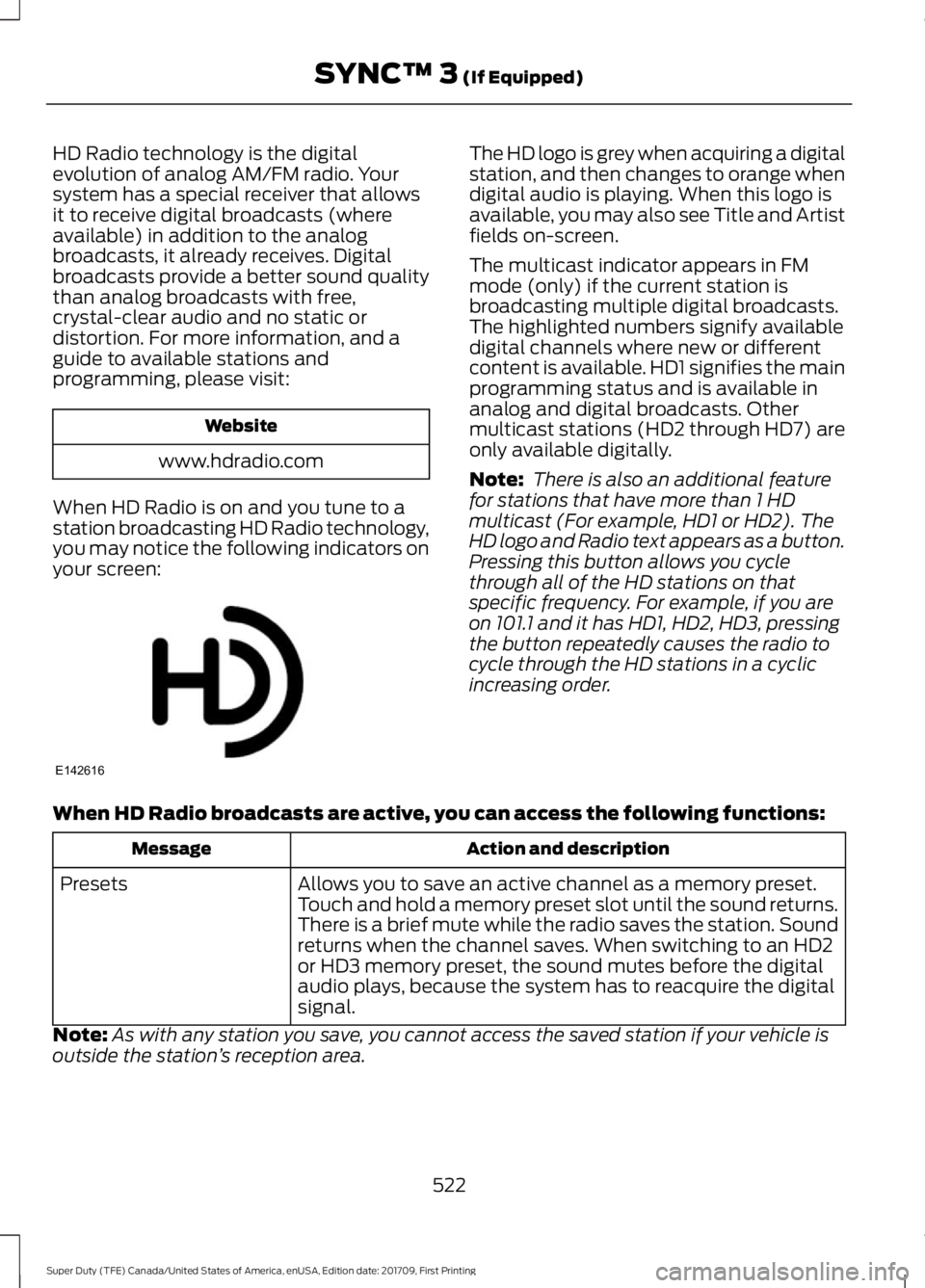
When HD Radio is on and you tune to a
station broadcasting HD Radio technology,
you may notice the following indicators on
your screen: The HD logo is grey when acquiring a digital
station, and then changes to orange when
digital audio is playing. When this logo is
available, you may also see Title and Artist
fields on-screen.
The multicast indicator appears in FM
mode (only) if the current station is
broadcasting multiple digital broadcasts.
The highlighted numbers signify available
digital channels where new or different
content is available. HD1 signifies the main
programming status and is available in
analog and digital broadcasts. Other
multicast stations (HD2 through HD7) are
only available digitally.
Note:
There is also an additional feature
for stations that have more than 1 HD
multicast (For example, HD1 or HD2). The
HD logo and Radio text appears as a button.
Pressing this button allows you cycle
through all of the HD stations on that
specific frequency. For example, if you are
on 101.1 and it has HD1, HD2, HD3, pressing
the button repeatedly causes the radio to
cycle through the HD stations in a cyclic
increasing order.
When HD Radio broadcasts are active, you can access the following functions: Action and description
Message
Allows you to save an active channel as a memory preset.
Touch and hold a memory preset slot until the sound returns.
There is a brief mute while the radio saves the station. Sound
returns when the channel saves. When switching to an HD2
or HD3 memory preset, the sound mutes before the digital
audio plays, because the system has to reacquire the digital
signal.
Presets
Note: As with any station you save, you cannot access the saved station if your vehicle is
outside the station ’s reception area.
522
Super Duty (TFE) Canada/United States of America, enUSA, Edition date: 201709, First Printing SYNC™ 3 (If Equipped)E142616
Page 526 of 656
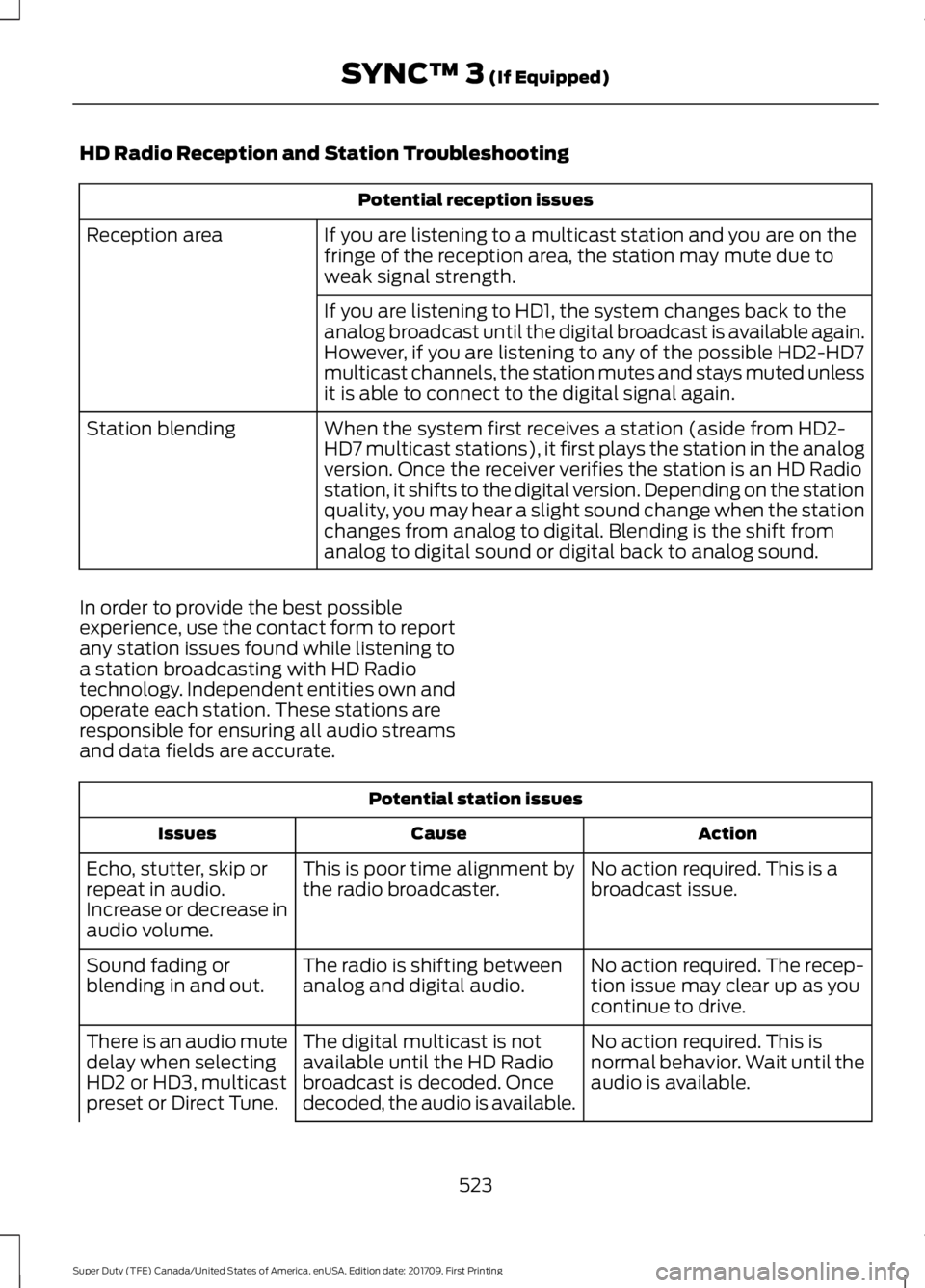
HD Radio Reception and Station Troubleshooting
Potential reception issues
If you are listening to a multicast station and you are on the
fringe of the reception area, the station may mute due to
weak signal strength.
Reception area
If you are listening to HD1, the system changes back to the
analog broadcast until the digital broadcast is available again.
However, if you are listening to any of the possible HD2-HD7
multicast channels, the station mutes and stays muted unless
it is able to connect to the digital signal again.
When the system first receives a station (aside from HD2-
HD7 multicast stations), it first plays the station in the analog
version. Once the receiver verifies the station is an HD Radio
station, it shifts to the digital version. Depending on the station
quality, you may hear a slight sound change when the station
changes from analog to digital. Blending is the shift from
analog to digital sound or digital back to analog sound.
Station blending
In order to provide the best possible
experience, use the contact form to report
any station issues found while listening to
a station broadcasting with HD Radio
technology. Independent entities own and
operate each station. These stations are
responsible for ensuring all audio streams
and data fields are accurate. Potential station issues
Action
Cause
Issues
No action required. This is a
broadcast issue.
This is poor time alignment by
the radio broadcaster.
Echo, stutter, skip or
repeat in audio.
Increase or decrease in
audio volume.
No action required. The recep-
tion issue may clear up as you
continue to drive.
The radio is shifting between
analog and digital audio.
Sound fading or
blending in and out.
No action required. This is
normal behavior. Wait until the
audio is available.
The digital multicast is not
available until the HD Radio
broadcast is decoded. Once
decoded, the audio is available.
There is an audio mute
delay when selecting
HD2 or HD3, multicast
preset or Direct Tune.
523
Super Duty (TFE) Canada/United States of America, enUSA, Edition date: 201709, First Printing SYNC™ 3 (If Equipped)
Page 529 of 656
Function
Button
Audio books
Composers
This button allows you to choose a specific
letter to view within the category you are
browsing.
A-Z Jump
If available, this allows you to browse the
folders and files on your USB device.
Explore Device
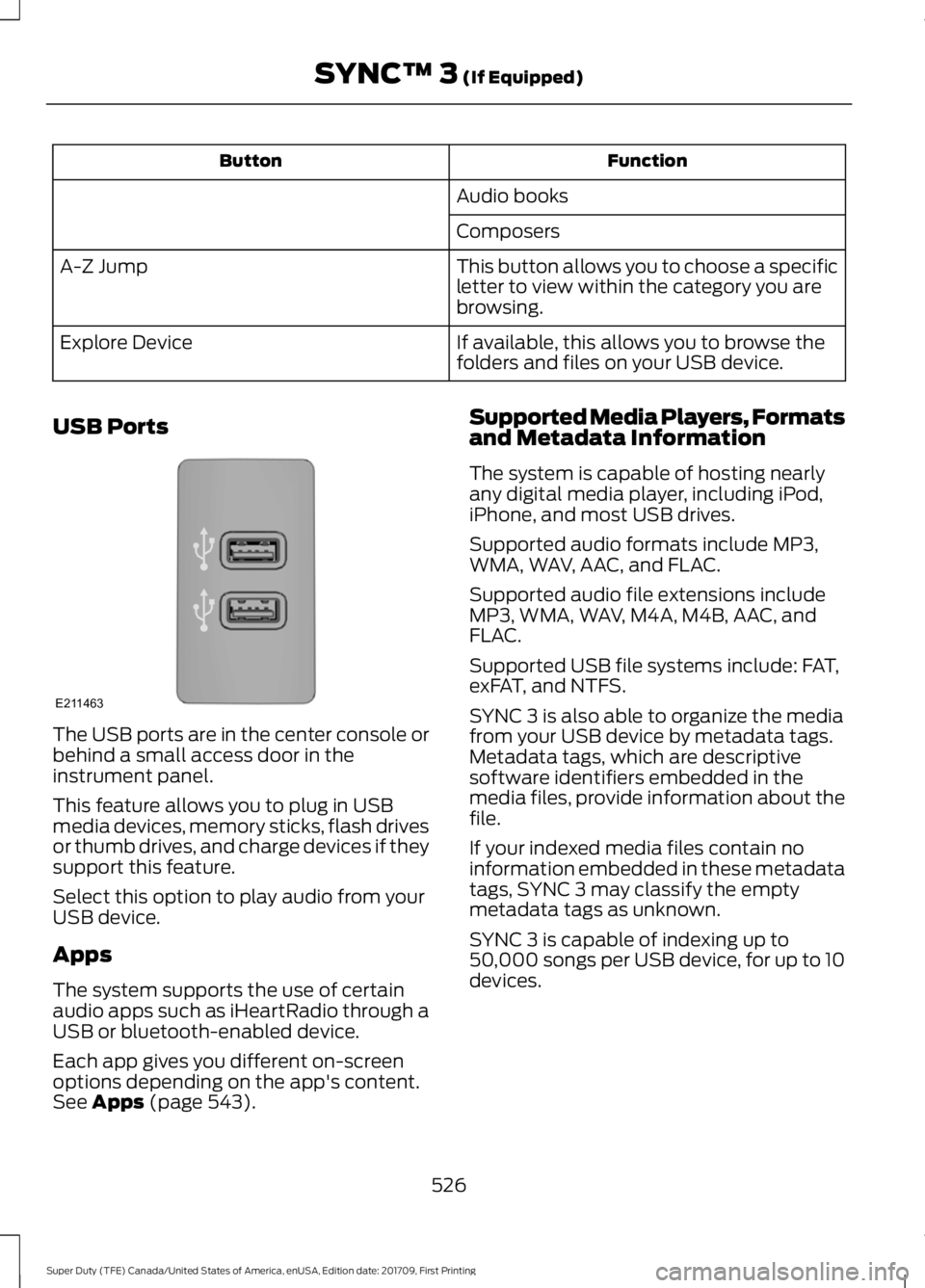
USB Ports The USB ports are in the center console or
behind a small access door in the
instrument panel.
This feature allows you to plug in USB
media devices, memory sticks, flash drives
or thumb drives, and charge devices if they
support this feature.
Select this option to play audio from your
USB device.
Apps
The system supports the use of certain
audio apps such as iHeartRadio through a
USB or bluetooth-enabled device.
Each app gives you different on-screen
options depending on the app's content.
See Apps (page 543). Supported Media Players, Formats
and Metadata Information
The system is capable of hosting nearly
any digital media player, including iPod,
iPhone, and most USB drives.
Supported audio formats include MP3,
WMA, WAV, AAC, and FLAC.
Supported audio file extensions include
MP3, WMA, WAV, M4A, M4B, AAC, and
FLAC.
Supported USB file systems include: FAT,
exFAT, and NTFS.
SYNC 3 is also able to organize the media
from your USB device by metadata tags.
Metadata tags, which are descriptive
software identifiers embedded in the
media files, provide information about the
file.
If your indexed media files contain no
information embedded in these metadata
tags, SYNC 3 may classify the empty
metadata tags as unknown.
SYNC 3 is capable of indexing up to
50,000 songs per USB device, for up to 10
devices.
526
Super Duty (TFE) Canada/United States of America, enUSA, Edition date: 201709, First Printing SYNC™ 3
(If Equipped)E211463
Page 646 of 656
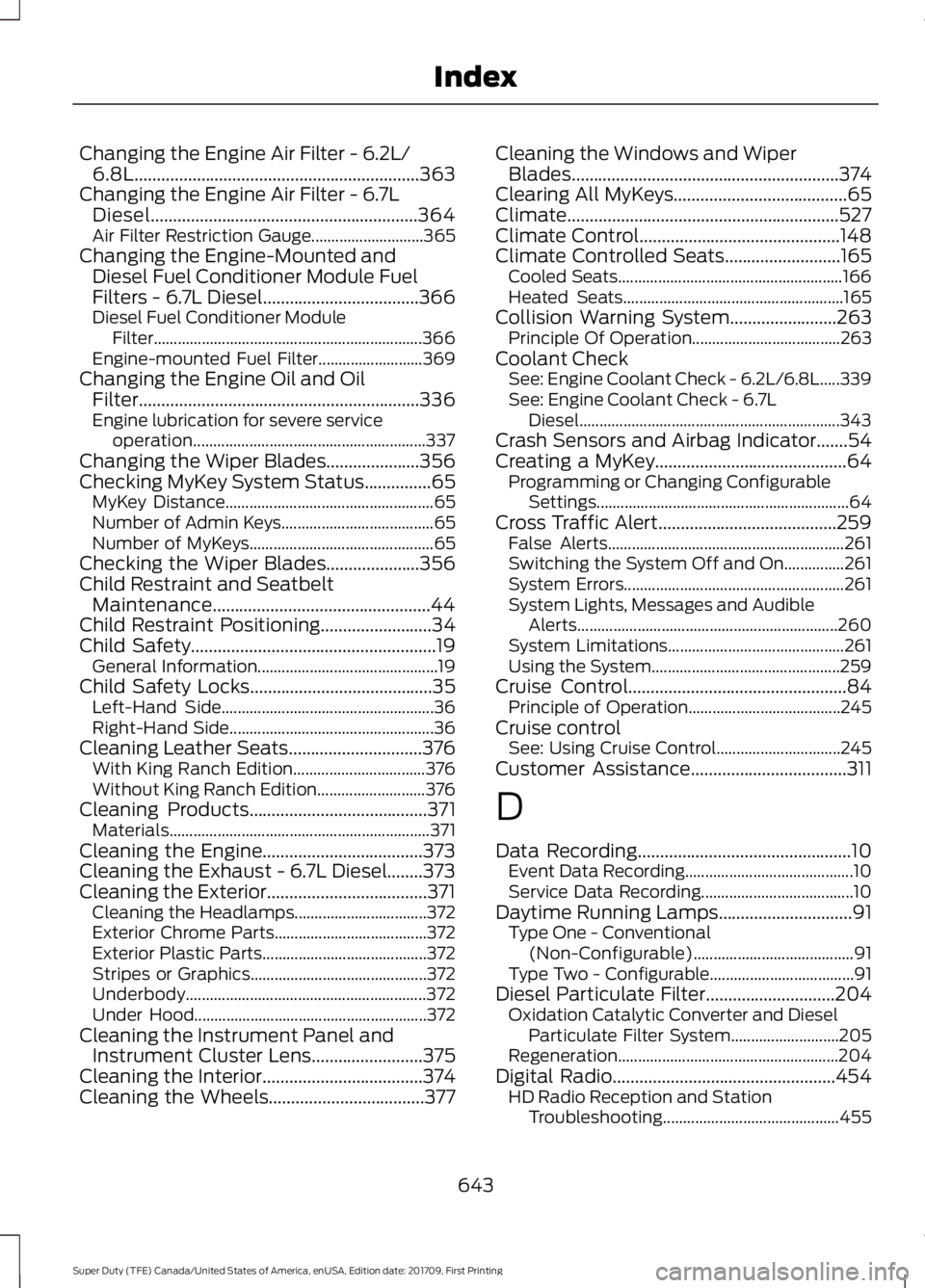
Changing the Engine Air Filter - 6.2L/
6.8L................................................................363
Changing the Engine Air Filter - 6.7L Diesel............................................................364
Air Filter Restriction Gauge............................ 365
Changing the Engine-Mounted and Diesel Fuel Conditioner Module Fuel
Filters - 6.7L Diesel...................................366
Diesel Fuel Conditioner Module Filter................................................................... 366
Engine-mounted Fuel Filter.......................... 369
Changing the Engine Oil and Oil Filter...............................................................336
Engine lubrication for severe service operation.......................................................... 337
Changing the Wiper Blades.....................356
Checking MyKey System Status...............65 MyKey Distance.................................................... 65
Number of Admin Keys...................................... 65
Number of MyKeys.............................................. 65
Checking the Wiper Blades
.....................356
Child Restraint and Seatbelt Maintenance.................................................44
Child Restraint Positioning
.........................34
Child Safety.......................................................19
General Information............................................. 19
Child Safety Locks
.........................................35
Left-Hand Side..................................................... 36
Right-Hand Side................................................... 36
Cleaning Leather Seats..............................376 With King Ranch Edition................................. 376
Without King Ranch Edition........................... 376
Cleaning Products
........................................371
Materials................................................................. 371
Cleaning the Engine....................................373
Cleaning the Exhaust - 6.7L Diesel........373
Cleaning the Exterior....................................371 Cleaning the Headlamps................................. 372
Exterior Chrome Parts...................................... 372
Exterior Plastic Parts......................................... 372
Stripes or Graphics............................................ 372
Underbody............................................................ 372
Under Hood.......................................................... 372
Cleaning the Instrument Panel and Instrument Cluster Lens
.........................375
Cleaning the Interior....................................374
Cleaning the Wheels...................................377 Cleaning the Windows and Wiper
Blades............................................................374
Clearing All MyKeys.......................................65
Climate.............................................................527
Climate Control
.............................................148
Climate Controlled Seats..........................165
Cooled Seats........................................................ 166
Heated Seats....................................................... 165
Collision Warning System........................263 Principle Of Operation..................................... 263
Coolant Check See: Engine Coolant Check - 6.2L/6.8L.....339
See: Engine Coolant Check - 6.7L
Diesel................................................................. 343
Crash Sensors and Airbag Indicator.......54
Creating a MyKey...........................................64 Programming or Changing Configurable
Settings............................................................... 64
Cross Traffic Alert........................................259 False Alerts........................................................... 261
Switching the System Off and On...............261
System Errors....................................................... 261
System Lights, Messages and Audible Alerts................................................................. 260
System Limitations............................................ 261
Using the System............................................... 259
Cruise Control
.................................................84
Principle of Operation...................................... 245
Cruise control See: Using Cruise Control............................... 245
Customer Assistance...................................311
D
Data Recording
................................................10
Event Data Recording.......................................... 10
Service Data Recording...................................... 10
Daytime Running Lamps..............................91 Type One - Conventional
(Non-Configurable)........................................ 91
Type Two - Configurable.................................... 91
Diesel Particulate Filter
.............................204
Oxidation Catalytic Converter and Diesel
Particulate Filter System........................... 205
Regeneration....................................................... 204
Digital Radio..................................................454 HD Radio Reception and Station
Troubleshooting............................................ 455
643
Super Duty (TFE) Canada/United States of America, enUSA, Edition date: 201709, First Printing Index