2018 FORD F-150 ECO mode
[x] Cancel search: ECO modePage 114 of 641

Parking Lamps
It illuminates when you switch
the parking lamps on.
Powertrain Malfunction/Reduced
Power/Electronic Throttle Control Illuminates when the system has
detected a powertrain or a
four-wheel drive fault. Contact
an authorized dealer as soon as possible.
Service Engine Soon If it illuminates when the engine
is running this indicates a
malfunction. The On Board
Diagnostics system has detected a
malfunction of the vehicle emission control
system.
If it flashes, engine misfire may be
occurring. Increased exhaust gas
temperatures could damage the catalytic
converter or other vehicle components.
Drive in a moderate fashion (avoid heavy
acceleration and deceleration) and have
your vehicle immediately serviced.
It illuminates when you switch the ignition
on prior to engine start to check the bulb
and to indicate whether your vehicle is
ready for Inspection and Maintenance
(I/M) testing.
Normally, it illuminates until the engine is
cranked and automatically turns off if no
malfunctions are present. However, if after
15 seconds it flashes eight times, this
indicates that your vehicle is not ready for
Inspection and Maintenance (I/M) testing.
See Emission Law (page 194).
Sport Mode Illuminates when you switch the
sport mode on. Stability Control and Traction
Control Indicator Flashes during operation.
If it does not illuminate when you
switch the ignition on, or remains
on when the engine is running, this
indicates a malfunction. Have your vehicle
checked as soon as possible.
See Using Stability Control (page 229).
Stability Control and Traction
Control Off Warning Lamp It illuminates when you switch
the system off.
Tow Haul Indicator
(If Equipped) It illuminates when you switch
the system on.
Wait To Start
(If Equipped) Illuminates when you switch the
ignition on as part of the
pre-start system. Wait until the
wait to start indicator turns off before
attempting to start vehicle. See
Starting
a Diesel Engine (page 175).
Water In Fuel
(If Equipped) WARNING:
Do not drain the
water-in-fuel separator while the engine
is running. Failure to follow this warning
may result in fire, serious injury, death or
property damage.
111
F-150 (TFC) Canada/United States of America, enUSA, Edition date: 201709, Fifth-Printing Instrument Cluster E176099 E138639 E130458 E161509
Page 120 of 641
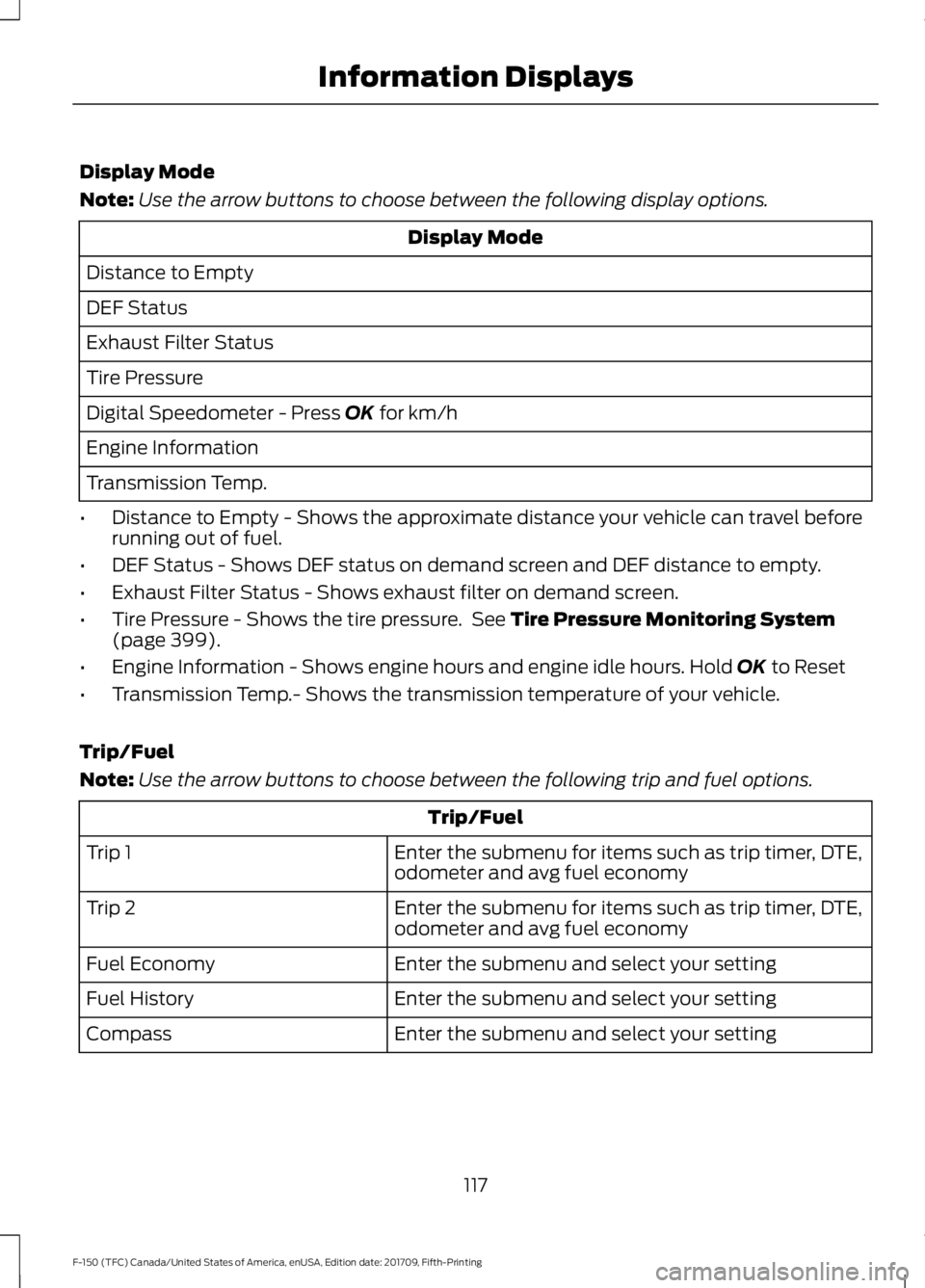
Display Mode
Note:
Use the arrow buttons to choose between the following display options. Display Mode
Distance to Empty
DEF Status
Exhaust Filter Status
Tire Pressure
Digital Speedometer - Press OK for km/h
Engine Information
Transmission Temp.
• Distance to Empty - Shows the approximate distance your vehicle can travel before
running out of fuel.
• DEF Status - Shows DEF status on demand screen and DEF distance to empty.
• Exhaust Filter Status - Shows exhaust filter on demand screen.
• Tire Pressure - Shows the tire pressure. See
Tire Pressure Monitoring System
(page 399).
• Engine Information - Shows engine hours and engine idle hours. Hold
OK to Reset
• Transmission Temp.- Shows the transmission temperature of your vehicle.
Trip/Fuel
Note: Use the arrow buttons to choose between the following trip and fuel options. Trip/Fuel
Enter the submenu for items such as trip timer, DTE,
odometer and avg fuel economy
Trip 1
Enter the submenu for items such as trip timer, DTE,
odometer and avg fuel economy
Trip 2
Enter the submenu and select your setting
Fuel Economy
Enter the submenu and select your setting
Fuel History
Enter the submenu and select your setting
Compass
117
F-150 (TFC) Canada/United States of America, enUSA, Edition date: 201709, Fifth-Printing Information Displays
Page 125 of 641

Trip/Fuel
Enter the submenu and select your setting
Navigation/Compass
Auto StartStop
Trip 1 or 2
• Trip Timer - Registers the time of individual journeys.
• DTE - Shows the approximate distance your vehicle can travel before running out of
fuel.
• Odometer - Registers the distance of individual journeys.
• Avg - Shows the average fuel economy for a given trip.
Fuel Economy - Shows your instantaneous fuel usage as a bar graph and average fuel
economy.
Fuel History - Shows your fuel usage based on time. The graph is updated each minute
with the fuel economy that you achieved during 30 minutes of driving.
Average Speed - Shows the average speed your vehicle travels.
Navigation/Compass - Shows navigation turn by turn or compass direction when a route
is not set.
Auto StartStop - Shows the current status of the Auto StartStop system.
Note: Press and hold OK to reset the currently displayed information.
Truck Info In this mode, off-road
information depicted with
graphics are available.
Note: Use the arrow buttons to choose between the following display options. Truck Info
Gauge View
Tire Pressure
Digital Speedometer
Diesel Exhaust Fluid Status
Diesel Exhaust Filter Status
122
F-150 (TFC) Canada/United States of America, enUSA, Edition date: 201709, Fifth-Printing Information DisplaysE163181
Page 133 of 641
Action
Message
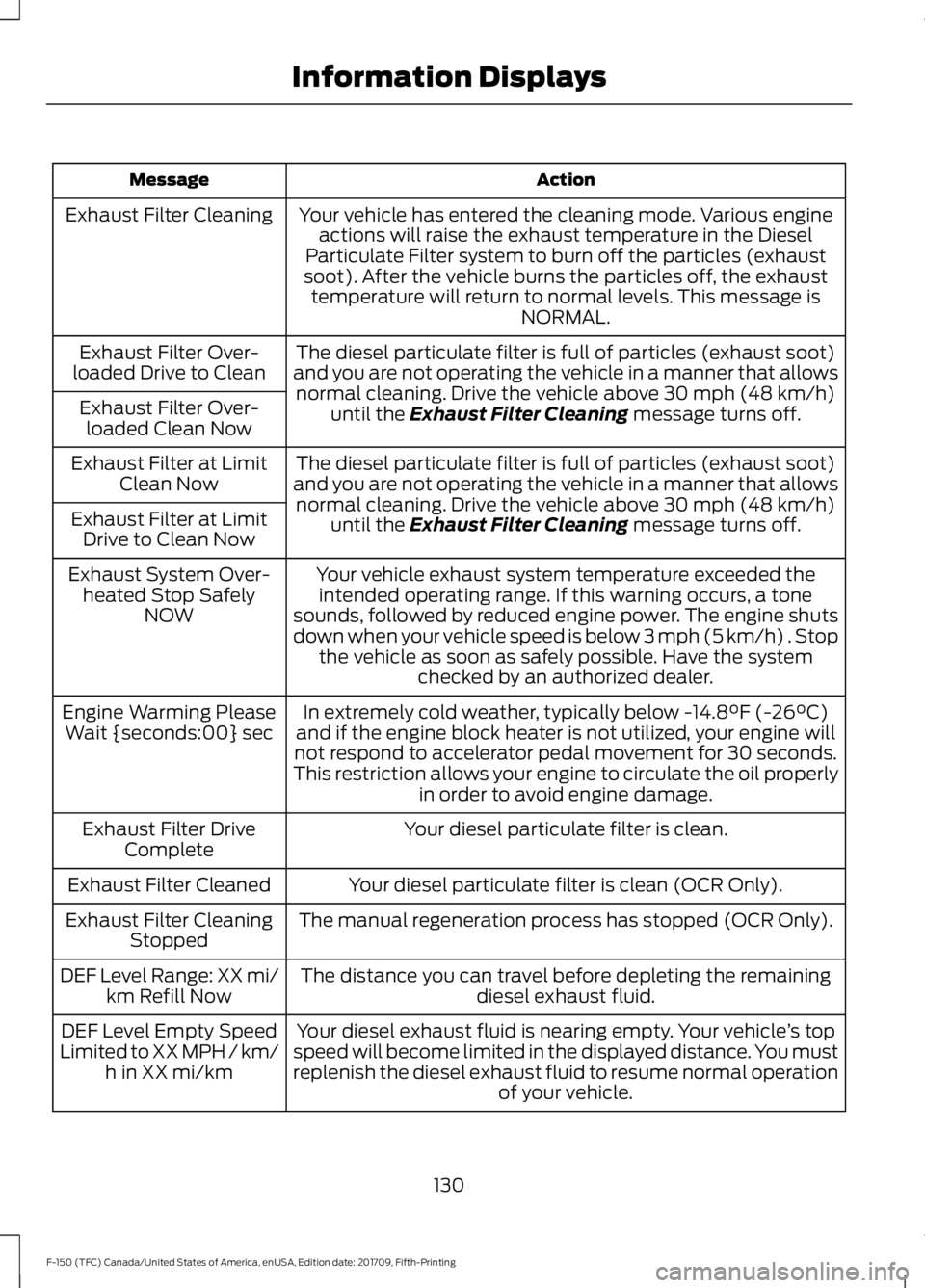
Your vehicle has entered the cleaning mode. Various engineactions will raise the exhaust temperature in the Diesel
Particulate Filter system to burn off the particles (exhaust
soot). After the vehicle burns the particles off, the exhaust temperature will return to normal levels. This message is NORMAL.
Exhaust Filter Cleaning
The diesel particulate filter is full of particles (exhaust soot)
and you are not operating the vehicle in a manner that allows normal cleaning. Drive the vehicle above 30 mph (48 km/h)
until the Exhaust Filter Cleaning message turns off.
Exhaust Filter Over-
loaded Drive to Clean
Exhaust Filter Over-loaded Clean Now
The diesel particulate filter is full of particles (exhaust soot)
and you are not operating the vehicle in a manner that allows normal cleaning. Drive the vehicle above
30 mph (48 km/h)
until the Exhaust Filter Cleaning message turns off.
Exhaust Filter at Limit
Clean Now
Exhaust Filter at Limit Drive to Clean Now
Your vehicle exhaust system temperature exceeded theintended operating range. If this warning occurs, a tone
sounds, followed by reduced engine power. The engine shuts
down when your vehicle speed is below 3 mph (5 km/h) . Stop the vehicle as soon as safely possible. Have the system checked by an authorized dealer.
Exhaust System Over-
heated Stop Safely NOW
In extremely cold weather, typically below
-14.8°F (-26°C)
and if the engine block heater is not utilized, your engine will
not respond to accelerator pedal movement for 30 seconds.
This restriction allows your engine to circulate the oil properly in order to avoid engine damage.
Engine Warming Please
Wait {seconds:00} sec
Your diesel particulate filter is clean.
Exhaust Filter Drive
Complete
Your diesel particulate filter is clean (OCR Only).
Exhaust Filter Cleaned
The manual regeneration process has stopped (OCR Only).
Exhaust Filter Cleaning
Stopped
The distance you can travel before depleting the remaining diesel exhaust fluid.
DEF Level Range: XX mi/
km Refill Now
Your diesel exhaust fluid is nearing empty. Your vehicle ’s top
speed will become limited in the displayed distance. You must
replenish the diesel exhaust fluid to resume normal operation of your vehicle.
DEF Level Empty Speed
Limited to XX MPH / km/ h in XX mi/km
130
F-150 (TFC) Canada/United States of America, enUSA, Edition date: 201709, Fifth-Printing Information Displays
Page 134 of 641
Action
Message
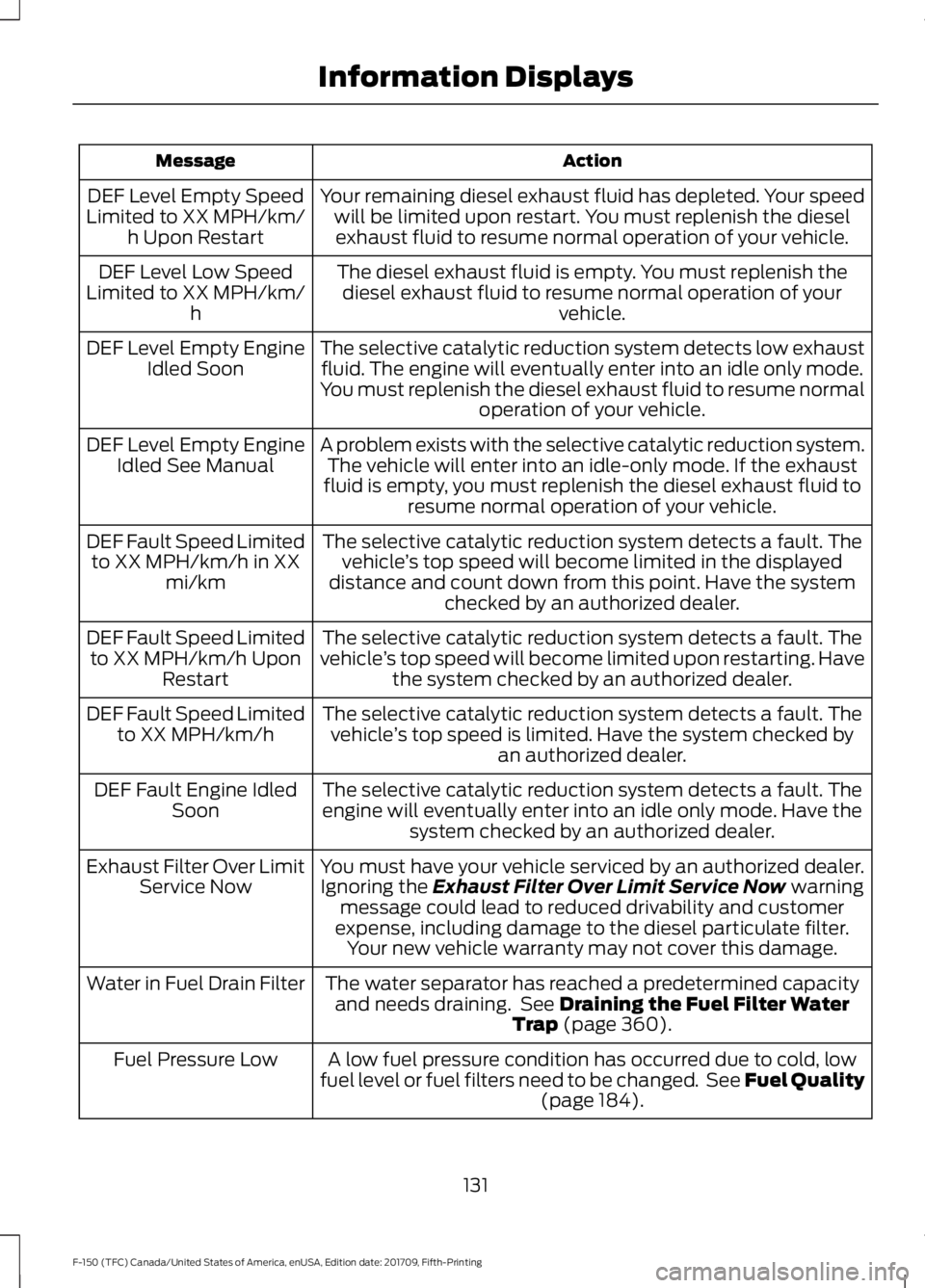
Your remaining diesel exhaust fluid has depleted. Your speedwill be limited upon restart. You must replenish the dieselexhaust fluid to resume normal operation of your vehicle.
DEF Level Empty Speed
Limited to XX MPH/km/ h Upon Restart
The diesel exhaust fluid is empty. You must replenish thediesel exhaust fluid to resume normal operation of your vehicle.
DEF Level Low Speed
Limited to XX MPH/km/ h
The selective catalytic reduction system detects low exhaustfluid. The engine will eventually enter into an idle only mode.
You must replenish the diesel exhaust fluid to resume normal operation of your vehicle.
DEF Level Empty Engine
Idled Soon
A problem exists with the selective catalytic reduction system.The vehicle will enter into an idle-only mode. If the exhaust
fluid is empty, you must replenish the diesel exhaust fluid to resume normal operation of your vehicle.
DEF Level Empty Engine
Idled See Manual
The selective catalytic reduction system detects a fault. Thevehicle ’s top speed will become limited in the displayed
distance and count down from this point. Have the system checked by an authorized dealer.
DEF Fault Speed Limited
to XX MPH/km/h in XX mi/km
The selective catalytic reduction system detects a fault. The
vehicle ’s top speed will become limited upon restarting. Have
the system checked by an authorized dealer.
DEF Fault Speed Limited
to XX MPH/km/h Upon Restart
The selective catalytic reduction system detects a fault. Thevehicle ’s top speed is limited. Have the system checked by
an authorized dealer.
DEF Fault Speed Limited
to XX MPH/km/h
The selective catalytic reduction system detects a fault. Theengine will eventually enter into an idle only mode. Have the system checked by an authorized dealer.
DEF Fault Engine Idled
Soon
You must have your vehicle serviced by an authorized dealer.Ignoring the Exhaust Filter Over Limit Service Now warning
message could lead to reduced drivability and customer
expense, including damage to the diesel particulate filter. Your new vehicle warranty may not cover this damage.
Exhaust Filter Over Limit
Service Now
The water separator has reached a predetermined capacityand needs draining. See
Draining the Fuel Filter Water
Trap (page 360).
Water in Fuel Drain Filter
A low fuel pressure condition has occurred due to cold, low
fuel level or fuel filters need to be changed. See Fuel Quality (page
184).
Fuel Pressure Low
131
F-150 (TFC) Canada/United States of America, enUSA, Edition date: 201709, Fifth-Printing Information Displays
Page 148 of 641

AUTO: Press to switch on
automatic operation. Adjust to
select the desired temperature.
Fan speed, air distribution, air
conditioning operation, and
outside or recirculated air adjust
A
to heat or cool the vehicle to
maintain the desired
temperature. You can also
switch off dual zone mode by
pressing and holding for more
than two seconds.
MAX Defrost:
Press to switch
on defrost. The driver and
passenger settings set to HI, air
flows through the windshield
vents, and the fan adjusts to the
highest speed. You can also use
this setting to defog and clear
the windshield of a thin covering
of ice. The heated rear window
also turns on when you select
maximum defrost.
B Note:
To prevent window
fogging, you cannot select
recirculated air when maximum
defrost is on.
Power:
Press to switch the
system on and off. When the
system is off, it prevents outside
air from entering the vehicle.
C
Air distribution control: Press
to switch air flow from the
windshield, instrument panel or
footwell vents on or off. You can
distribute air through any
combination of these vents.
D
Recirculated air:
Press to
switch between outside air and
recirculated air. The air currently
in the passenger compartment
recirculates. This may reduce the
time needed to cool the interior
(when used with A/C) and
reduce unwanted odors from
entering your vehicle.
E
145
F-150 (TFC) Canada/United States of America, enUSA, Edition date: 201709, Fifth-Printing Climate ControlE248538
Page 158 of 641
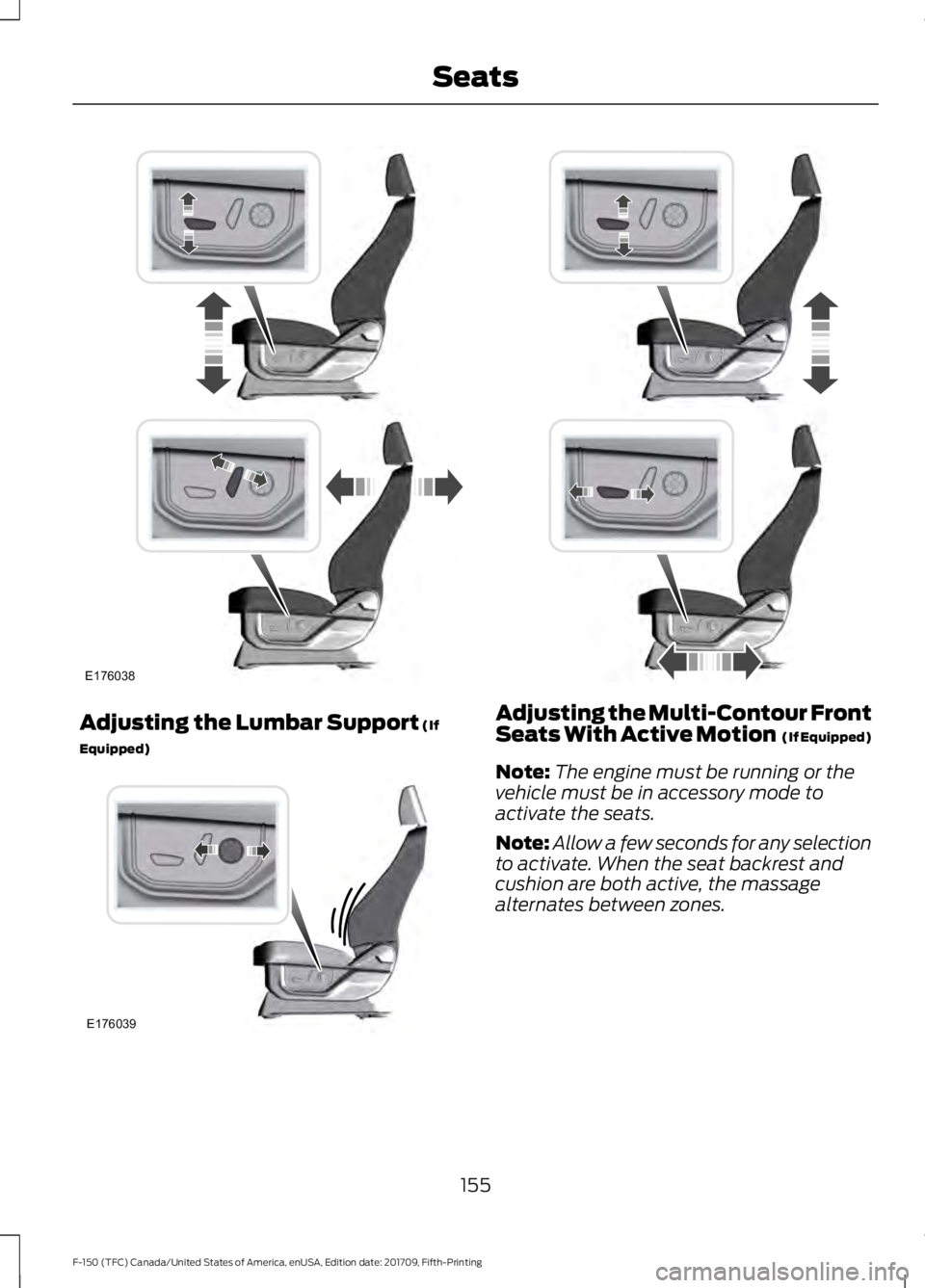
Adjusting the Lumbar Support (If
Equipped) Adjusting the Multi-Contour Front
Seats With Active Motion (If Equipped)
Note: The engine must be running or the
vehicle must be in accessory mode to
activate the seats.
Note: Allow a few seconds for any selection
to activate. When the seat backrest and
cushion are both active, the massage
alternates between zones.
155
F-150 (TFC) Canada/United States of America, enUSA, Edition date: 201709, Fifth-Printing SeatsE176038 E176039
Page 159 of 641
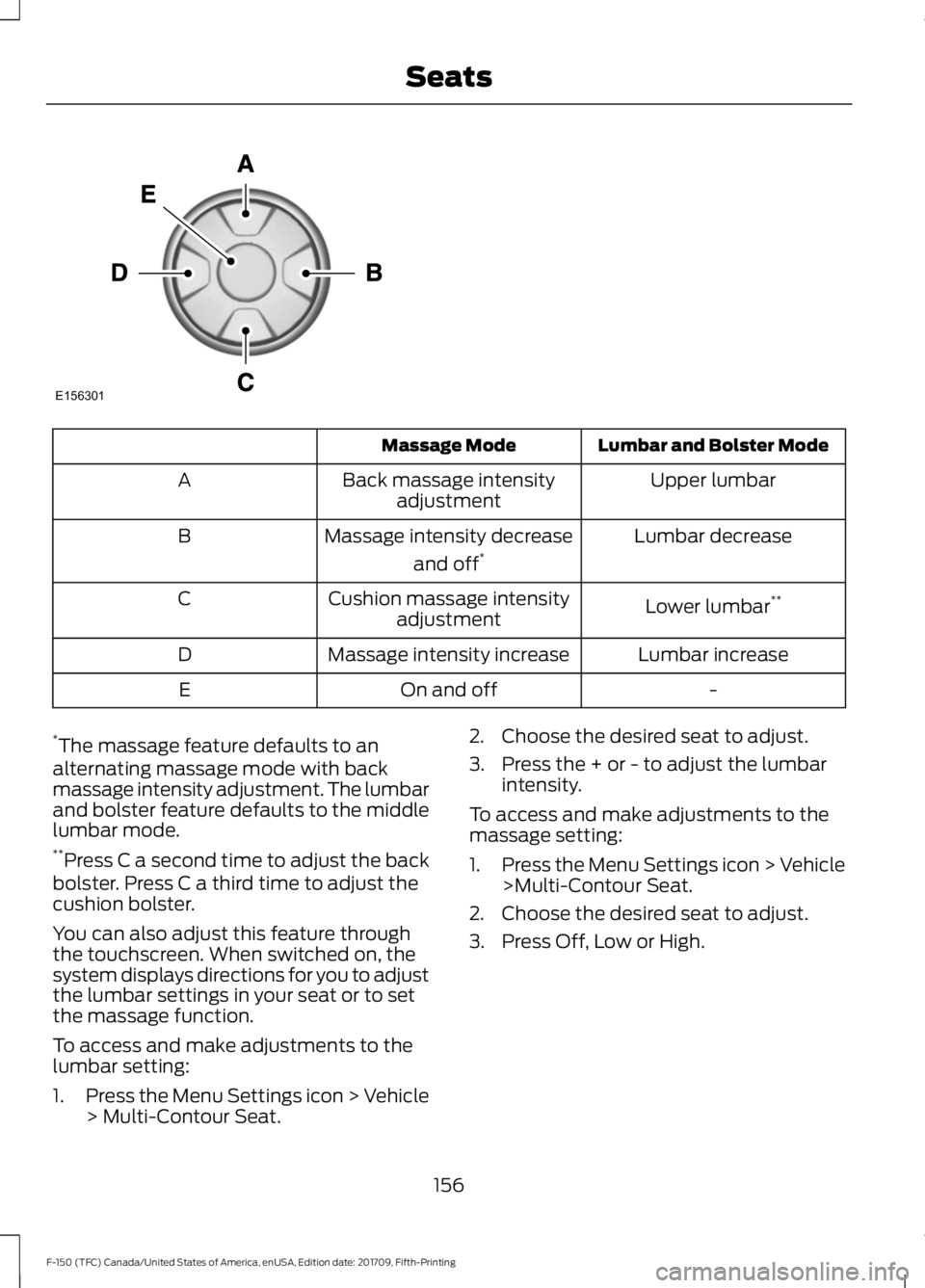
Lumbar and Bolster Mode
Massage Mode
Upper lumbar
Back massage intensity
adjustment
A
Lumbar decrease
Massage intensity decrease
and off*
B
Lower lumbar**
Cushion massage intensity
adjustment
C
Lumbar increase
Massage intensity increase
D
-
On and off
E
* The massage feature defaults to an
alternating massage mode with back
massage intensity adjustment. The lumbar
and bolster feature defaults to the middle
lumbar mode.
** Press C a second time to adjust the back
bolster. Press C a third time to adjust the
cushion bolster.
You can also adjust this feature through
the touchscreen. When switched on, the
system displays directions for you to adjust
the lumbar settings in your seat or to set
the massage function.
To access and make adjustments to the
lumbar setting:
1. Press the Menu Settings icon > Vehicle
> Multi-Contour Seat. 2. Choose the desired seat to adjust.
3. Press the + or - to adjust the lumbar
intensity.
To access and make adjustments to the
massage setting:
1. Press the Menu Settings icon > Vehicle
>Multi-Contour Seat.
2. Choose the desired seat to adjust.
3. Press Off, Low or High.
156
F-150 (TFC) Canada/United States of America, enUSA, Edition date: 201709, Fifth-Printing SeatsE156301