2018 FORD ECOSPORT lock
[x] Cancel search: lockPage 371 of 452

Valet Mode
Valet mode allows you to lock the system.No information is accessible until thesystem is unlocked with the correct PIN.
When you select valet mode a pop upappears informing you that a four digitcode must be entered to enable anddisable valet mode. You can use any PINyou chose but you must use the same PINto disable valet mode. The system asksyou to input the code.
Note:If the system is locked and youcannot remember the PIN, please contactthe Customer Relationship Center.
United States: 1-800-392-3673Canada: 1-800-565-3673
To enable valet mode, enter your chosenPIN. The system then asks to confirm yourPIN by reentering it. The system then locks.
To unlock the system, enter the same pinnumber. The system reconnects to yourphone and all of your options are availableagain.
SYNC™ 3 TROUBLESHOOTING
Your SYNC 3 system is easy to use.However, should questions arise, pleaserefer to the tables below.
To check your cell phone's compatibility,visit the Ford website.
Website
owner.ford.comwww.syncmyride.cawww.syncmaroute.ca
Cell phone issues
Possible solutionPossible causeIssue
Refer to your device's manual about audioadjustments.
The audio controlsettings on your cellphone may be affectingSYNC 3 performance.
There is back-ground noiseduring a phonecall.
Try switching your cell phone off, resettingit or removing the battery, then try again.Possible cell phonemalfunction.
During a call, Ican hear theother personbut they cannothear me.
Make sure that the microphone for SYNC3 is not set to off. Look for the microphoneicon on the phone screen.
To restart your system, shut down theengine, open and close the door, and thenlock the door and wait for 2-3 minutes.Make sure that your SYNC 3 screen is blackand the lighted USB port is off.
The system may need tobe restarted.
During a call, Icannot hear theother personand they cannothear me.
Check your cell phone's compatibility.This is a cell phone-dependent feature.SYNC 3 is notable to down-load my phone-book.
367EcoSport (CBW) Canada/United States of America, Vehicles Built From: 14-08-2017, GN15-19G219-ZFB enUSA, First PrintingSYNC™ 3
Page 373 of 452

Cell phone issues
Possible solutionPossible causeIssue
iPhone•Go to your cell phone's Settings.
•Go to the Bluetooth Menu.
•Press the blue circle to the right of thedevice named with your vehicle makeand model to enter the next menu.
•Turn Show Notifications on.
•Disconnect then reconnect your iPhonefrom the SYNC 3 system to activate thissettings update.
Your iPhone is now set up to forwardincoming text messages to SYNC 3.Repeat these steps for every other SYNC 3vehicle that you connect. Your iPhone willonly forward incoming text messages toSYNC 3 if the iPhone is not unlocked in themessaging application.Replying to text messages using SYNC 3 isnot supported by iPhone.Text messages from WhatsApp and Face-book Messenger are not supported.
Your cell phone must support downloadingtext messages through Bluetooth to receiveincoming text messages.
This is a cell phone-dependent feature.
Audible textmessages donot work on mycell phone.
Because each cell phone is different, referto your device's manual for the specific cellphone you are pairing. In fact, there can bedifferences between cell phones due tobrand, model, service provider and softwareversion.
This is a cell phone limita-tion.
369EcoSport (CBW) Canada/United States of America, Vehicles Built From: 14-08-2017, GN15-19G219-ZFB enUSA, First PrintingSYNC™ 3
Page 374 of 452
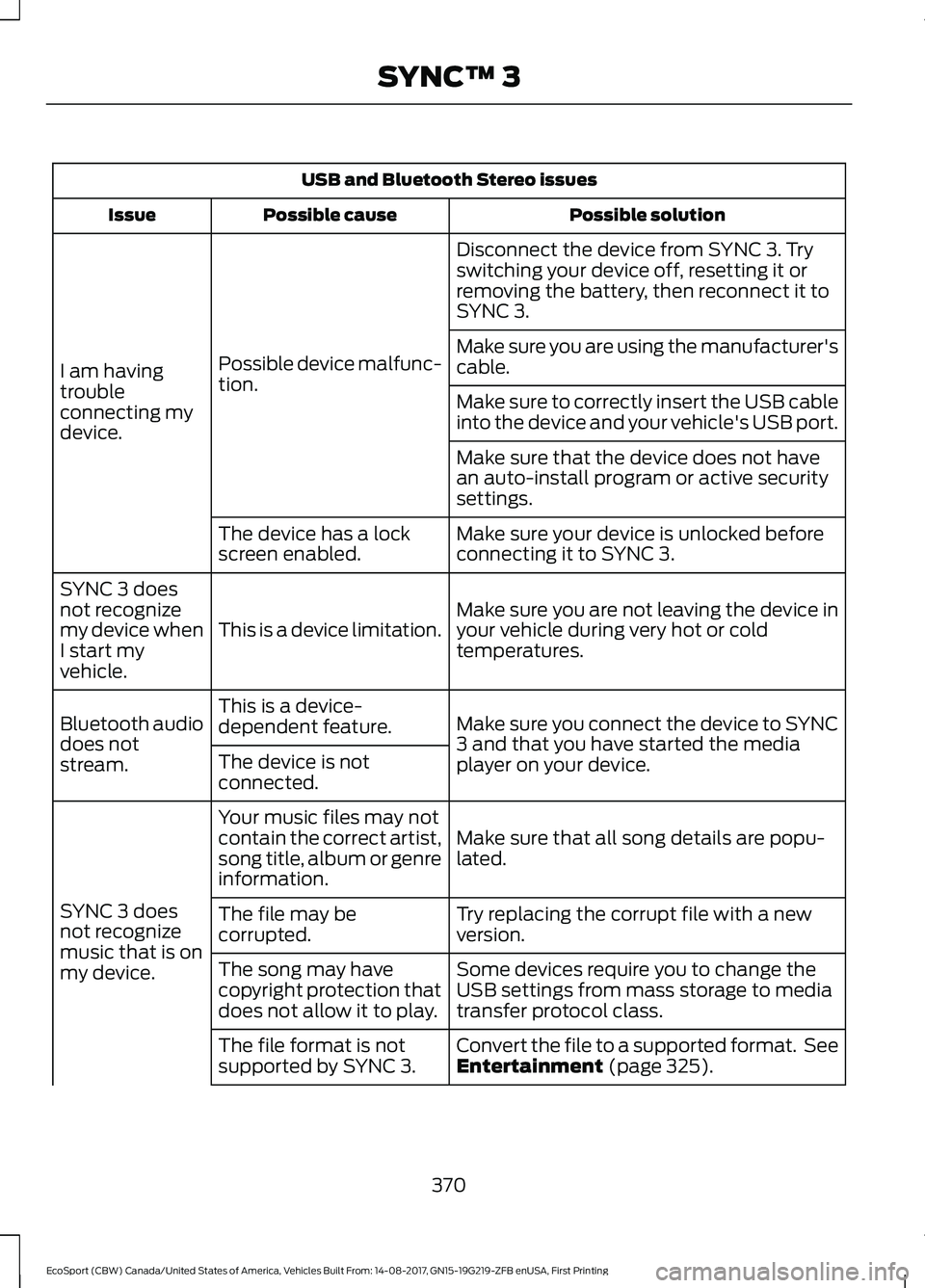
USB and Bluetooth Stereo issues
Possible solutionPossible causeIssue
Disconnect the device from SYNC 3. Tryswitching your device off, resetting it orremoving the battery, then reconnect it toSYNC 3.
Possible device malfunc-tion.I am havingtroubleconnecting mydevice.
Make sure you are using the manufacturer'scable.
Make sure to correctly insert the USB cableinto the device and your vehicle's USB port.
Make sure that the device does not havean auto-install program or active securitysettings.
Make sure your device is unlocked beforeconnecting it to SYNC 3.The device has a lockscreen enabled.
Make sure you are not leaving the device inyour vehicle during very hot or coldtemperatures.This is a device limitation.
SYNC 3 doesnot recognizemy device whenI start myvehicle.
Make sure you connect the device to SYNC3 and that you have started the mediaplayer on your device.
This is a device-dependent feature.Bluetooth audiodoes notstream.The device is notconnected.
Make sure that all song details are popu-lated.
Your music files may notcontain the correct artist,song title, album or genreinformation.
SYNC 3 doesnot recognizemusic that is onmy device.
Try replacing the corrupt file with a newversion.The file may becorrupted.
Some devices require you to change theUSB settings from mass storage to mediatransfer protocol class.
The song may havecopyright protection thatdoes not allow it to play.
Convert the file to a supported format. SeeEntertainment (page 325).The file format is notsupported by SYNC 3.
370EcoSport (CBW) Canada/United States of America, Vehicles Built From: 14-08-2017, GN15-19G219-ZFB enUSA, First PrintingSYNC™ 3
Page 375 of 452
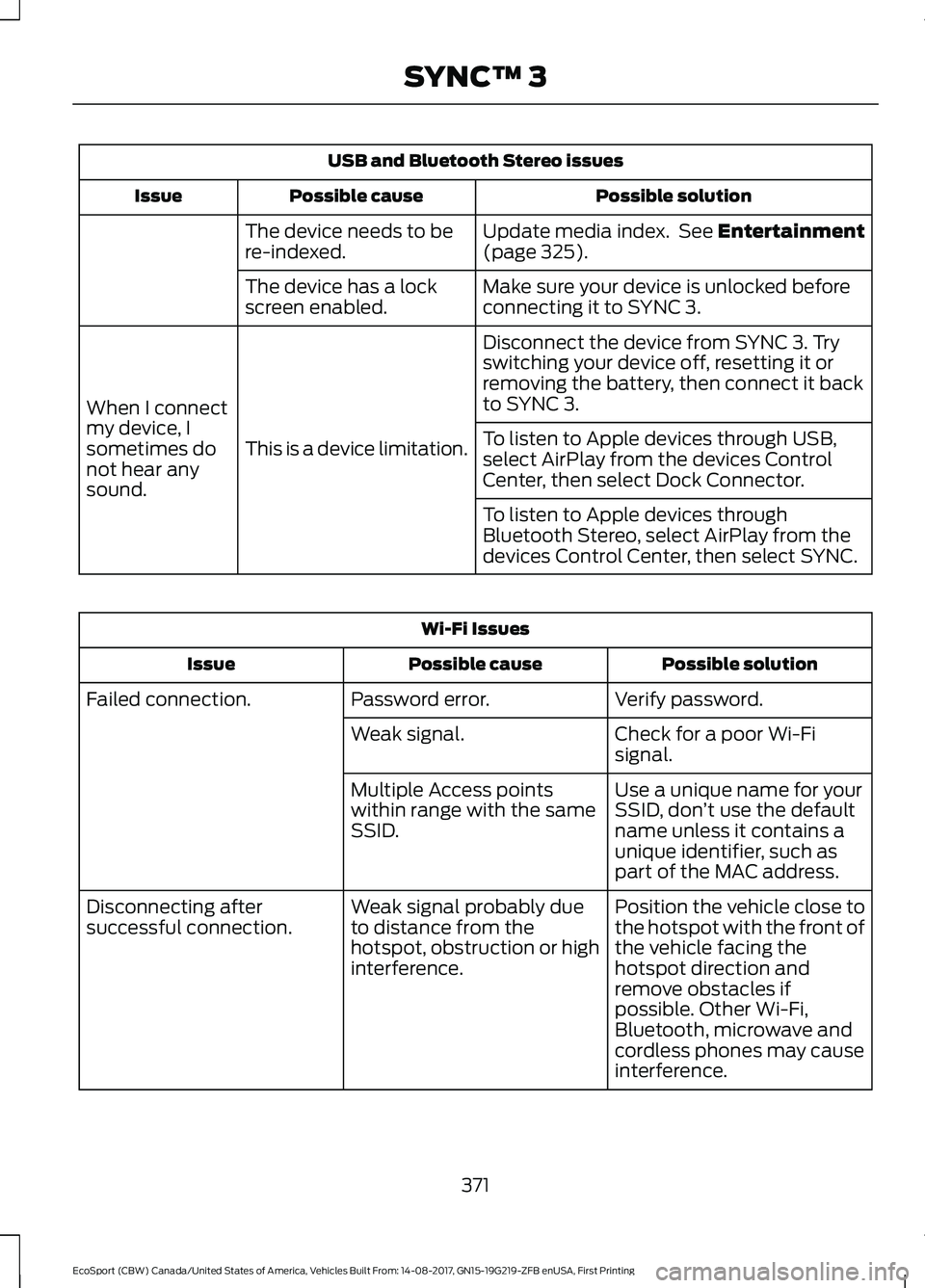
USB and Bluetooth Stereo issues
Possible solutionPossible causeIssue
Update media index. See Entertainment(page 325).The device needs to bere-indexed.
Make sure your device is unlocked beforeconnecting it to SYNC 3.The device has a lockscreen enabled.
Disconnect the device from SYNC 3. Tryswitching your device off, resetting it orremoving the battery, then connect it backto SYNC 3.
This is a device limitation.
When I connectmy device, Isometimes donot hear anysound.
To listen to Apple devices through USB,select AirPlay from the devices ControlCenter, then select Dock Connector.
To listen to Apple devices throughBluetooth Stereo, select AirPlay from thedevices Control Center, then select SYNC.
Wi-Fi Issues
Possible solutionPossible causeIssue
Verify password.Password error.Failed connection.
Check for a poor Wi-Fisignal.Weak signal.
Use a unique name for yourSSID, don’t use the defaultname unless it contains aunique identifier, such aspart of the MAC address.
Multiple Access pointswithin range with the sameSSID.
Position the vehicle close tothe hotspot with the front ofthe vehicle facing thehotspot direction andremove obstacles ifpossible. Other Wi-Fi,Bluetooth, microwave andcordless phones may causeinterference.
Weak signal probably dueto distance from thehotspot, obstruction or highinterference.
Disconnecting aftersuccessful connection.
371EcoSport (CBW) Canada/United States of America, Vehicles Built From: 14-08-2017, GN15-19G219-ZFB enUSA, First PrintingSYNC™ 3
Page 385 of 452

PROTECT YOURSELF FROM THE RISINGCOST OF VEHICLE REPAIRS WITH A FORDPROTECT EXTENDED SERVICE PLAN.
Ford Protect Extended ServicePlans (U.S. Only)
Ford Protect extended service plan meanspeace of mind. It’s the extended serviceplan backed by Ford Motor Company, andprovides more protection beyond the NewVehicle Limited Warranty coverage. Whenyou visit your Ford Dealer, Insist on FordProtect extended service plans!
Ford Protect Can Quickly Pay for Itself
One trip to the Service Center could easilyexceed the price of your Ford Protectextended service plan. With Ford Protectextended service plan you minimize yourrisk for unexpected repair bills and risingrepair costs.
Up to 1,000+ Covered VehicleComponents
There are four mechanical Ford Protectextended service plans with different levelsof coverage. Ask your authorized dealer fordetails.
1.PremiumCARE - Our mostcomprehensive coverage. With over1,000 covered components, this planis so complete it’s probably easier tolist what’s not covered.
2.ExtraCARE - Covers 113 components,and includes many high-tech items.
3.BaseCARE - Covers 84 components.
4.PowertrainCARE - Covers 29 criticalcomponents.
Ford Protect extended service plans arehonored by all authorized Ford dealers inthe U.S., Canada and Mexico.
That means you get:
•Reliable, quality service at any Ford orLincoln dealership.
•Repairs performed by factory trainedtechnicians, using genuine parts.
Rental Car Reimbursement
1st day Rental Benefit
If you bring your car into your dealer forservice, we’ll give you a loaner to use forthe day.
Extended Rental Benefits
If your vehicle is kept overnight for coveredrepairs, you are eligible for rental carcoverage, including warranty repairs, andField Service Actions.
Roadside Assistance
Exclusive 24/7 roadside assistance,including:
•Towing, flat-tire change and batteryjump starts.
•Out of fuel and lock-out assistance.
•Travel expense reimbursement forlodging, meals and rental car.
•Assistance for taxi, shuttle, rental carcoverage or other transportation.
Transferable Coverage
If you sell your vehicle before your FordProtect extended service plan coverageexpires, you can transfer any remainingcoverage to the new owner. Which shouldgive you and your potential buyer a littlemore peace of mind.
381EcoSport (CBW) Canada/United States of America, Vehicles Built From: 14-08-2017, GN15-19G219-ZFB enUSA, First PrintingFord Protect
Page 389 of 452

Check every month
Engine oil level.
Function of all interior and exterior lights.
Tires (including spare) for wear and proper pressure.
Windshield washer fluid level.
Check every six months
Battery connections. Clean if necessary.
Body and door drain holes for obstructions. Clean if necessary.
Cooling system fluid level and coolant strength.
Door weatherstrips for wear. Lubricate if necessary.
Hinges, latches and outside locks for proper operation. Lubricate if necessary.
Parking brake for proper operation.
Safety belts and seat latches for wear and function.
Safety warning lamps (brake, ABS, airbag and safety belt) for operation.
Washer spray and wiper operation. Clean or replace blades as necessary.
Multi-Point Inspection
In order to keep your vehicle running right,it is important to have the systems on yourvehicle checked regularly. This can helpidentify potential issues and prevent majorproblems. We recommend having thefollowing multi-point inspection performedat every scheduled maintenance intervalto help make sure your vehicle keepsrunning great.
385EcoSport (CBW) Canada/United States of America, Vehicles Built From: 14-08-2017, GN15-19G219-ZFB enUSA, First PrintingScheduled Maintenance
Page 439 of 452

4
4WDSee: Four-Wheel Drive......................................142
A
A/CSee: Climate Control..........................................98About This Manual...........................................7ABSSee: Brakes...........................................................146ABS driving hintsSee: Hints on Driving With Anti-LockBrakes................................................................146Accessories....................................................379Exterior Style........................................................379Interior Style.........................................................379Lifestyle.................................................................379Peace of Mind......................................................379AccessoriesSee: Replacement PartsRecommendation............................................12Adjusting the Headlamps..........................216Horizontal Aim Adjustment.............................217Vertical Aim Adjustment..................................216Adjusting the Steering Wheel...................65Airbag Disposal...............................................44Air ConditioningSee: Climate Control..........................................98Air FilterSee: Changing the Engine Air Filter.............227Air Vents............................................................98Center Air Vents....................................................98Side Air Vents........................................................98AlarmSee: Anti-Theft Alarm........................................63Ambient Lighting............................................75Anti-Theft Alarm............................................63Alarm System........................................................63Arming the Alarm.................................................64Disarming the Alarm...........................................64Triggering the Alarm............................................63Appendices....................................................401Apps.................................................................350..................................................................................350SiriusXM Traffic and Travel Link...................352
Audible Warnings and Indicators.............84Automatic Transmission...................................84Headlamps On Warning Chime.....................84Key Outside Car....................................................84Low Fuel Reminder.............................................84Seatbelt Reminder..............................................84Audio Control..................................................65Seek, Next or Previous.......................................66Audio System................................................285General Information.........................................285Audio Unit - Vehicles With: SYNC3......................................................................288Adjusting the Volume......................................288Changing Radio Stations................................289Pausing or Playing Media...............................289Seek Down and Previous TrackButton...............................................................289Seek Up and Next Track Button..................289Sound Settings...................................................289Switching the Audio Unit On and Off........288Switching the Screen On and Off...............289Audio Unit - Vehicles With: SYNC.........285Adjusting the Volume......................................286Apps........................................................................287Changing Radio Stations................................286Pausing or Playing Media................................287Returning to the Previous Screen................287Scrolling Through the Menu Options.........287Seek Down and Previous TrackButton................................................................287Seek Up and Next Track Button...................287Selecting a Menu Option................................287Selecting Media.................................................286Selecting the Radio..........................................286Sound Settings...................................................287Switching the Audio Unit On and Off........286System Settings.................................................287Using a Cell Phone............................................288Autolamps..........................................................71Autolamps Delay..................................................72Windshield Wiper ActivatedHeadlamps.........................................................72Automatic Climate Control - VehiclesWith: Electronic AutomaticTemperature Control (EATC)...............100Adjusting the Blower Motor Speed.............100Adjusting the Temperature............................100Changing the Direction of Airflow...............100
435EcoSport (CBW) Canada/United States of America, Vehicles Built From: 14-08-2017, GN15-19G219-ZFB enUSA, First PrintingIndex
Page 440 of 452

Switching Air Conditioning On andOff.......................................................................100Switching Climate Control On andOff.......................................................................100Switching Maximum Cooling On andOff.......................................................................100Switching Maximum Defrost On andOff.......................................................................100Switching Recirculated Air On andOff.......................................................................100Swtiching Auto Mode On and Off...............100Automatic Engine Shutdown...................124Automatic Transmission...........................138Automatic Transmission AdaptiveLearning..............................................................141Emergency Park Position ReleaseLever...................................................................140If Your Vehicle Gets Stuck In Mud orSnow....................................................................141Selector Lever Positions..................................138SelectShift™ AutomaticTransmission...................................................139Automatic Transmission FluidCheck..............................................................212Auto-Start-Stop............................................125Disabling Auto-Start-Stop..............................126Enabling Auto-Start-Stop...............................125Autowipers........................................................67Auxiliary Power Points.................................115110 Volt AC Power Point....................................11512 Volt DC Power Point......................................115Locations................................................................115
B
BatterySee: Changing the 12V Battery.......................213Blind Spot Information System..............158Switching the System Off and On...............159System Errors.......................................................159Using the Blind Spot InformationSystem...............................................................158BLISSee: Blind Spot Information System..........158Body Styling Kits..........................................236Bonnet LockSee: Opening and Closing the Hood..........202
Booster Seats..................................................23Types of Booster Seats......................................24Brake Fluid Check.........................................212Brakes...............................................................146General Information..........................................146Breaking-In......................................................178Brakes and Clutch...............................................178Tires..........................................................................178Bulb Specification Chart...........................226
C
Cabin Air Filter...............................................103California Proposition 65..............................11Capacities and Specifications - 1.0LEcoBoost™.................................................279Alternative Engine Oil for Extremely ColdClimates............................................................281Capacities.............................................................279Specifications......................................................279Capacities and Specifications -2.0L................................................................282Alternative Engine Oil for Extremely ColdClimates...........................................................284Capacities.............................................................282Specifications.....................................................282Capacities and Specifications.................271Car WashSee: Cleaning the Exterior..............................230Catalytic Converter......................................135On-Board Diagnostics (OBD-II)...................136Readiness for Inspection and Maintenance(I/M) Testing...................................................136Center Console................................................117Changing a Bulb............................................218Central High Mounted Brake Lamp............225Direction indicators............................................221Front Fog Lamps................................................220Glove box lamp...................................................220Headlamp..............................................................218Interior Lamp.......................................................225Luggage Compartment Lamp, FootwellLamp and Tailgate Lamp...........................226Map Lamp (driver side)...................................226Reading Lamps...................................................226Rear lamps...........................................................223Reversing Lamp..................................................224Side Marker...........................................................219
436EcoSport (CBW) Canada/United States of America, Vehicles Built From: 14-08-2017, GN15-19G219-ZFB enUSA, First PrintingIndex