Page 421 of 516
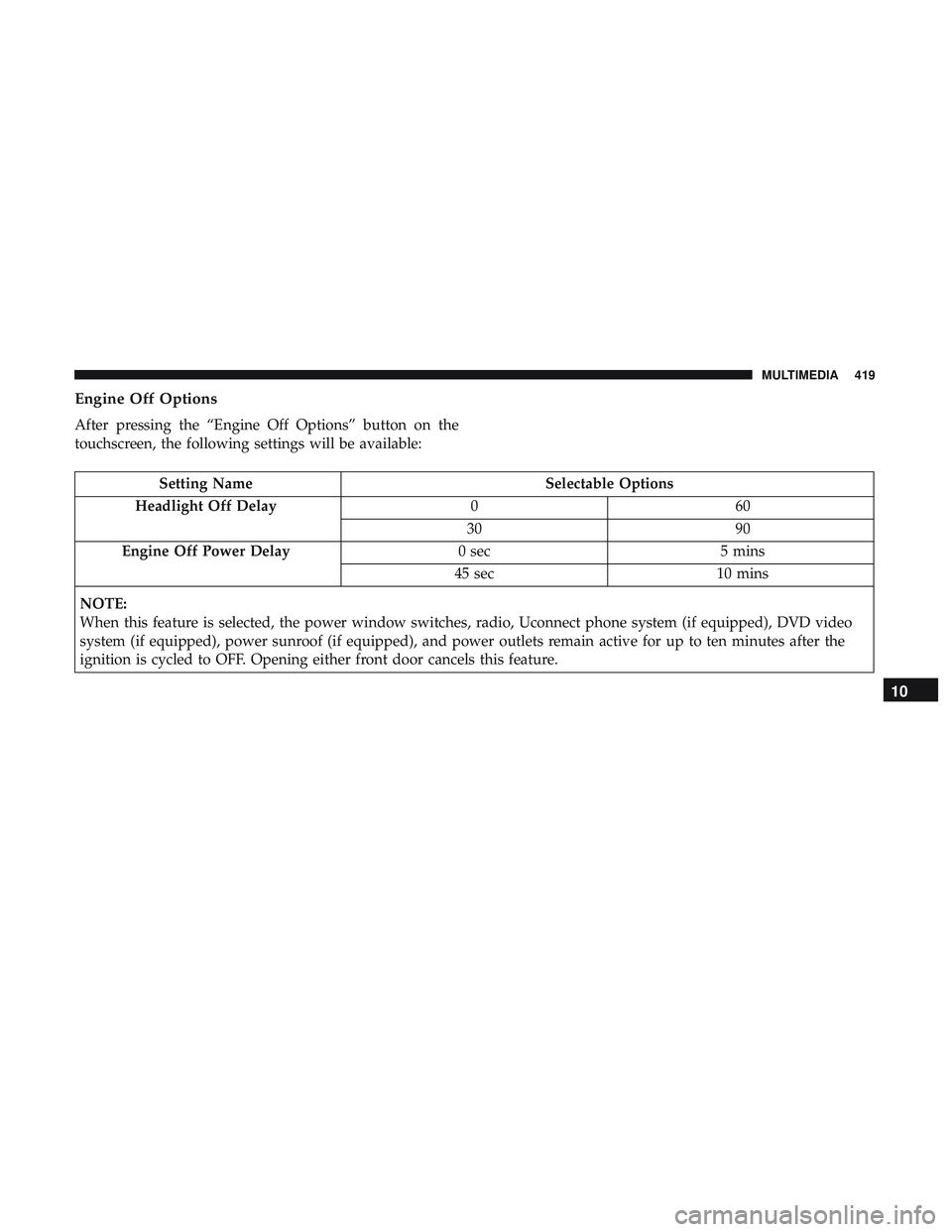
Engine Off Options
After pressing the “Engine Off Options” button on the
touchscreen, the following settings will be available:
Setting NameSelectable Options
Headlight Off Delay 060
30 90
Engine Off Power Delay 0 sec5 mins
45 sec 10 mins
NOTE:
When this feature is selected, the power window switches, radio, Uconnect phone system (if equipped), DVD video
system (if equipped), power sunroof (if equipped), and power outlets remain active for up to ten minutes after the
ignition is cycled to OFF. Opening either front door cancels this feature.
10
MULTIMEDIA 419
Page 434 of 516
Setting NameSelectable Options
Set Time Hours +–
Set Time Minutes +–
Time Format 12 hrs24 hrs
AM PM
Show Time In Status Bar — If Equipped On
Off
NOTE:
The “Show Time In Status Bar” feature will allow you to turn on or shut off the digital clock in the status bar.
Camera
After pressing the “Camera” button on the touchscreen, the
following settings will be available:
Setting Name Selectable Options
ParkView Backup Camera Delay OnOff
NOTE:
The “ParkView Backup Camera Delay” setting determines whether or not the screen will display the rear view image
with dynamic grid lines for up to ten seconds after the vehicle is shifted out of REVERSE. This delay will be canceled
if the vehicle’s speed exceeds 8 mph (13 km/h), the transmission is shifted into PARK, or the ignition is switched to
the OFF position.
432 MULTIMEDIA
Page 436 of 516
Setting NameSelectable Options
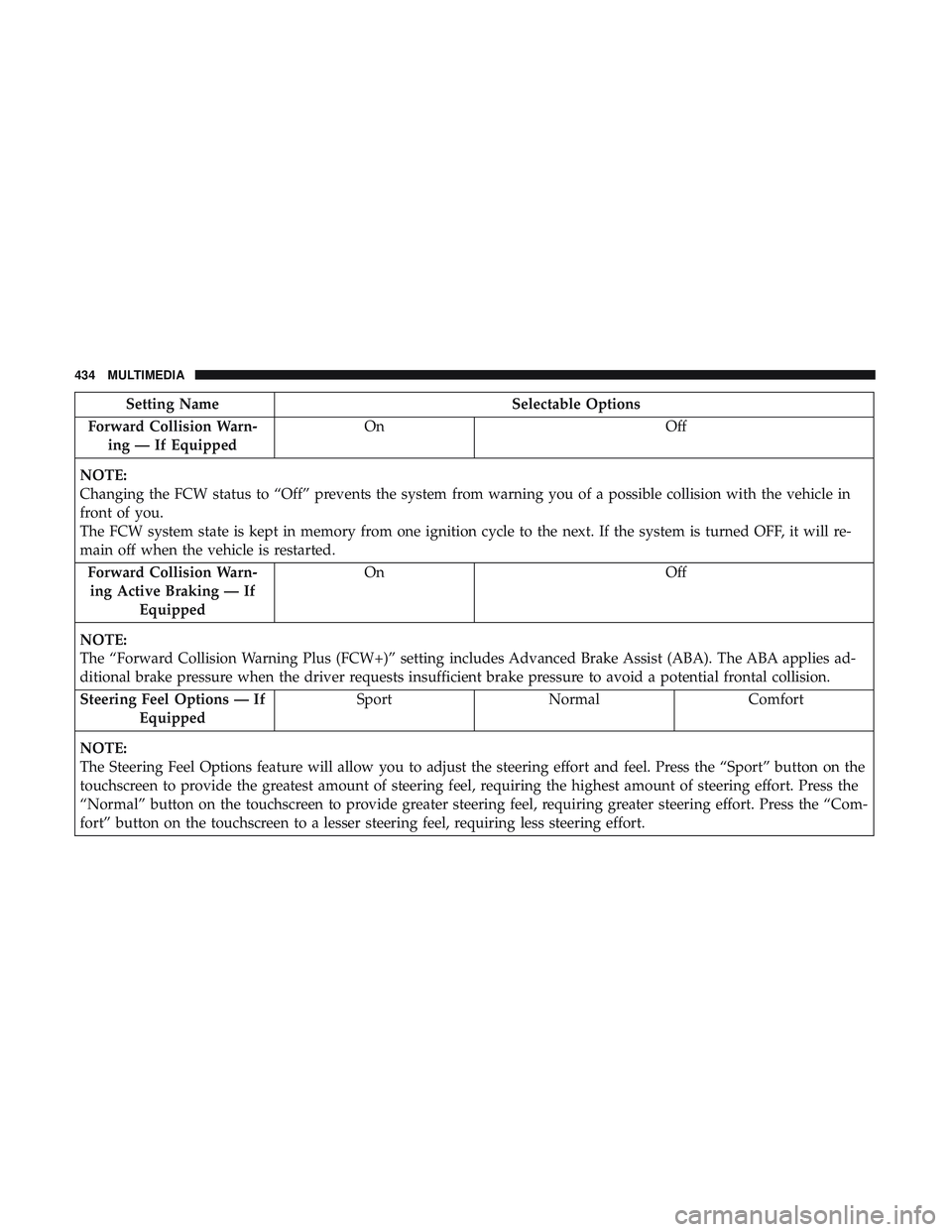
Forward Collision Warn- ing — If Equipped On
Off
NOTE:
Changing the FCW status to “Off” prevents the system from warning you of a possible collision with the vehicle in
front of you.
The FCW system state is kept in memory from one ignition cycle to the next. If the system is turned OFF, it will re-
main off when the vehicle is restarted. Forward Collision Warn-ing Active Braking — If Equipped On
Off
NOTE:
The “Forward Collision Warning Plus (FCW+)” setting includes Advanced Brake Assist (ABA). The ABA applies ad-
ditional brake pressure when the driver requests insufficient brake pressure to avoid a potential frontal collision. Steering Feel Options — If Equipped Sport
Normal Comfort
NOTE:
The Steering Feel Options feature will allow you to adjust the steering effort and feel. Press the “Sport” button on the
touchscreen to provide the greatest amount of steering feel, requiring the highest amount of steering effort. Press the
“Normal” button on the touchscreen to provide greater steering feel, requiring greater steering effort. Press the “Com-
fort” button on the touchscreen to a lesser steering feel, requiring less steering effort.
434 MULTIMEDIA
Page 437 of 516
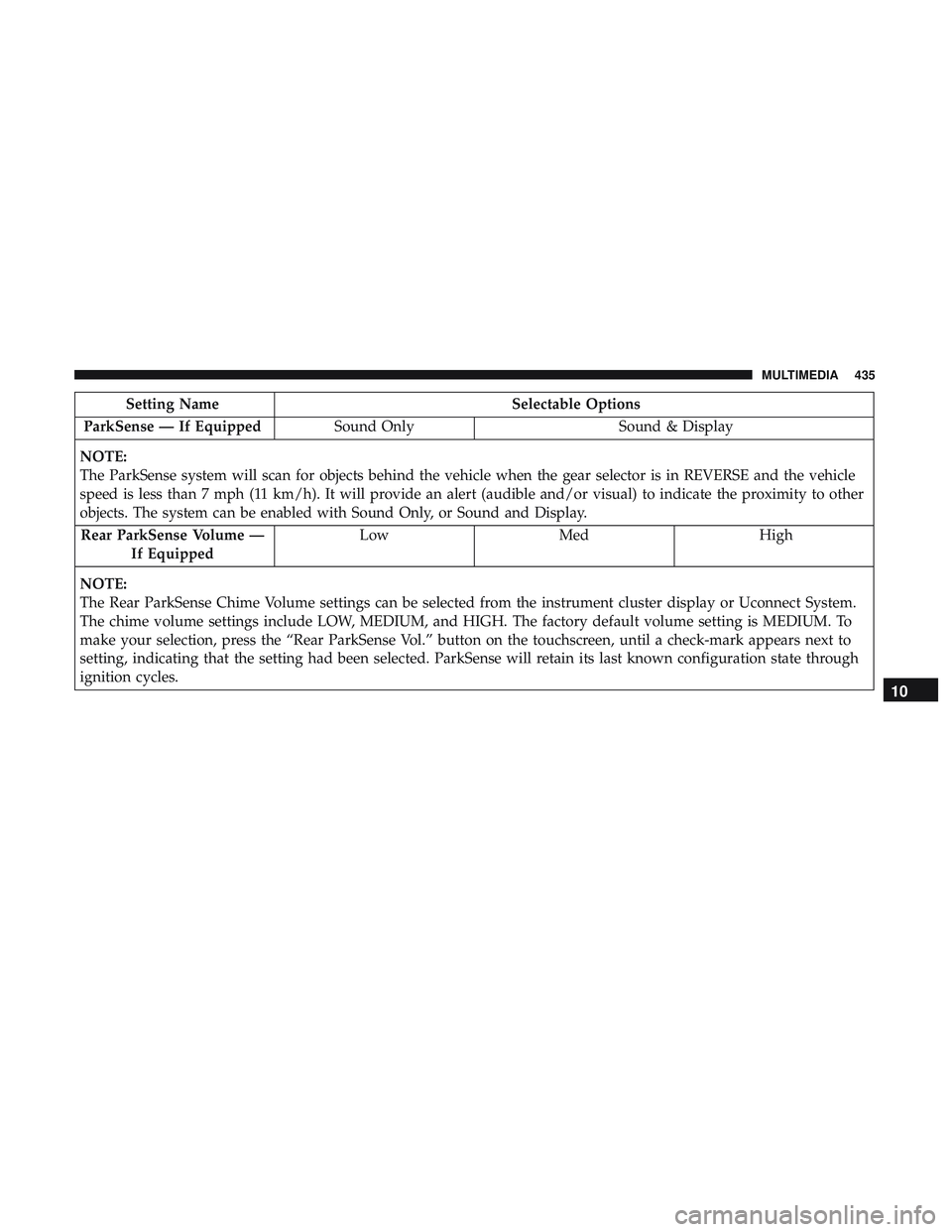
Setting NameSelectable Options
ParkSense — If Equipped Sound Only Sound & Display
NOTE:
The ParkSense system will scan for objects behind the vehicle when the gear selector is in REVERSE and the vehicle
speed is less than 7 mph (11 km/h). It will provide an alert (audible and/or visual) to indicate the proximity to other
objects. The system can be enabled with Sound Only, or Sound and Display. Rear ParkSense Volume — If Equipped Low
Med High
NOTE:
The Rear ParkSense Chime Volume settings can be selected from the instrument cluster display or Uconnect System.
The chime volume settings include LOW, MEDIUM, and HIGH. The factory default volume setting is MEDIUM. To
make your selection, press the “Rear ParkSense Vol.” button on the touchscreen, until a check-mark appears next to
setting, indicating that the setting had been selected. ParkSense will retain its last known configuration state through
ignition cycles.
10
MULTIMEDIA 435
Page 444 of 516
Setting NameSelectable Options
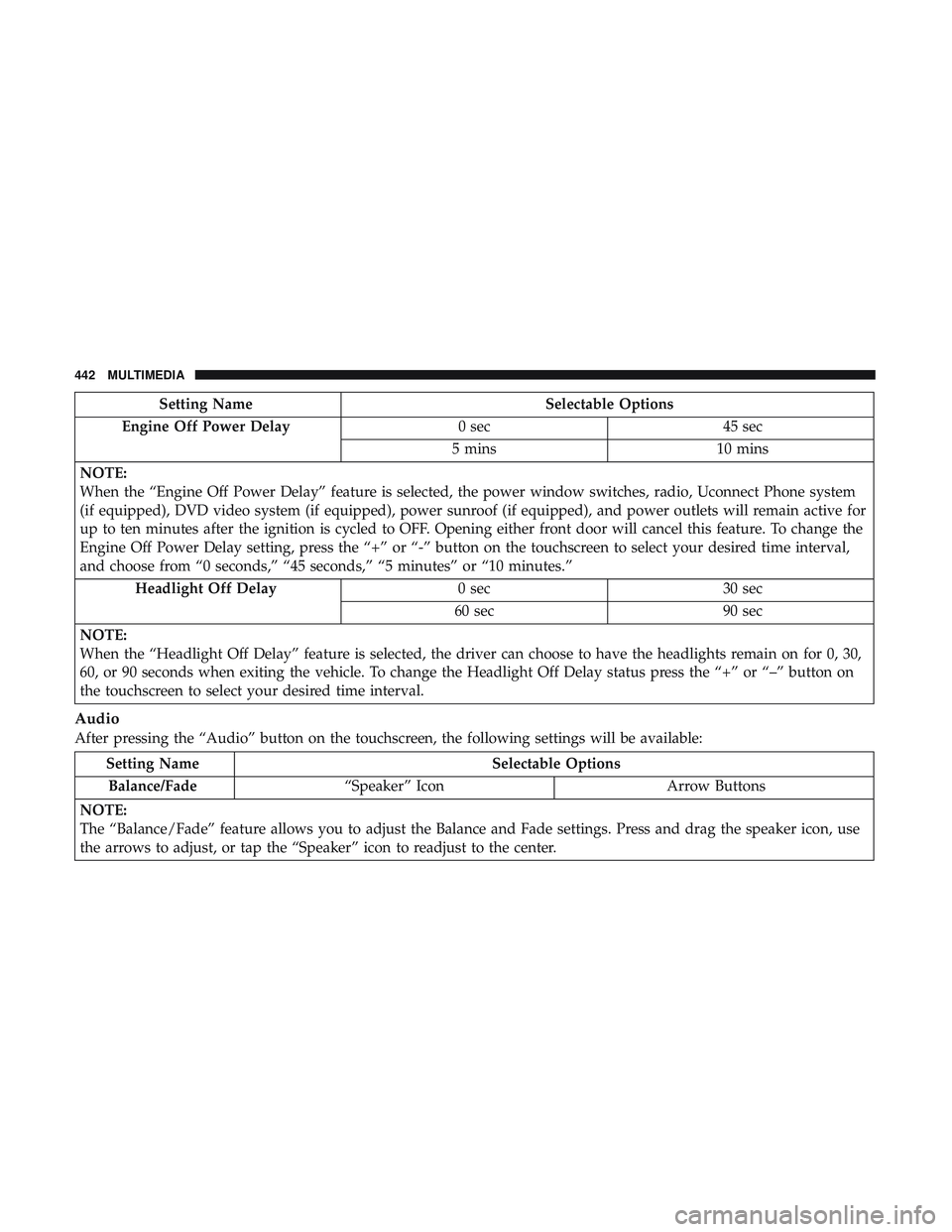
Engine Off Power Delay 0 sec45 sec
5 mins 10 mins
NOTE:
When the “Engine Off Power Delay” feature is selected, the power window switches, radio, Uconnect Phone system
(if equipped), DVD video system (if equipped), power sunroof (if equipped), and power outlets will remain active for
up to ten minutes after the ignition is cycled to OFF. Opening either front door will cancel this feature. To change the
Engine Off Power Delay setting, press the “+” or “-” button on the touchscreen to select your desired time interval,
and choose from “0 seconds,” “45 seconds,” “5 minutes” or “10 minutes.” Headlight Off Delay 0 sec30 sec
60 sec 90 sec
NOTE:
When the “Headlight Off Delay” feature is selected, the driver can choose to have the headlights remain on for 0, 30,
60, or 90 seconds when exiting the vehicle. To change the Headlight Off Delay status press the “+” or “–” button on
the touchscreen to select your desired time interval.
Audio
After pressing the “Audio” button on the touchscreen, the following settings will be available:
Setting Name Selectable Options
Balance/Fade “Speaker” Icon Arrow Buttons
NOTE:
The “Balance/Fade” feature allows you to adjust the Balance and Fade settings. Press and drag the speaker icon, use
the arrows to adjust, or tap the “Speaker” icon to readjust to the center.
442 MULTIMEDIA
Page 506 of 516

Hood Release..............................78
Ignition ..................................23
Switch .................................23
Information Center, Vehicle ....................99
Inside Rearview Mirror ....................50, 269
Instrument Cluster Descriptions ......................... .96, 117
Display .............................. .102
Instrument Panel Lens Cleaning ................386
Interior Appearance Care .....................385
Interior Lights ..............................58
Intermittent Wipers (Delay Wipers) ...............61
Introduction ................................4
iPod/USB/MP3 Control ..................... .469
Bluetooth Streaming Audio .................469
Jacking Instructions ........................ .293
Jack Location ............................ .291
Jack Operation ........................ .293, 358
Jump Starting ..................... .305, 306, 307
Key Fob Arm The System ..........................31
Panic Alarm .............................19 Programming Additional Key Fobs
..........22, 30
Unlatch The Trunk ........................19
Key Fob Battery Service (Remote Keyless Entry) .....20
Key Fob Programming (Remote Keyless Entry) ......22
Key-In Reminder ............................25
Keyless Enter-N-Go ..........................34
Enter The Trunk ..........................19
Keys ....................................17
Replacement ......................... .22, 30
Lane Change And Turn Signals .................58
Lane Change Assist ..........................58
Lap/Shoulder Belts ........................ .150
Latches ................................. .191
Hood ..................................78
Lead Free Gasoline ........................ .391
Leaks, Fluid ............................. .191
Life Of Tires ............................. .372
Light Bulbs .......................... .191, 275
Lights .................................. .191
AirBag ........................ .108, 158, 188
Automatic
Headlights ......................56
Brake Assist Warning ..................... .128
Brake Warning ...................... .109, 389
Bulb Replacement ....................... .275
504 INDEX