Page 134 of 696
A/C Air Filter
The climate control system filters out dust and pollen from
the air. Refer to an authorized dealer for filter replacement
instructions.
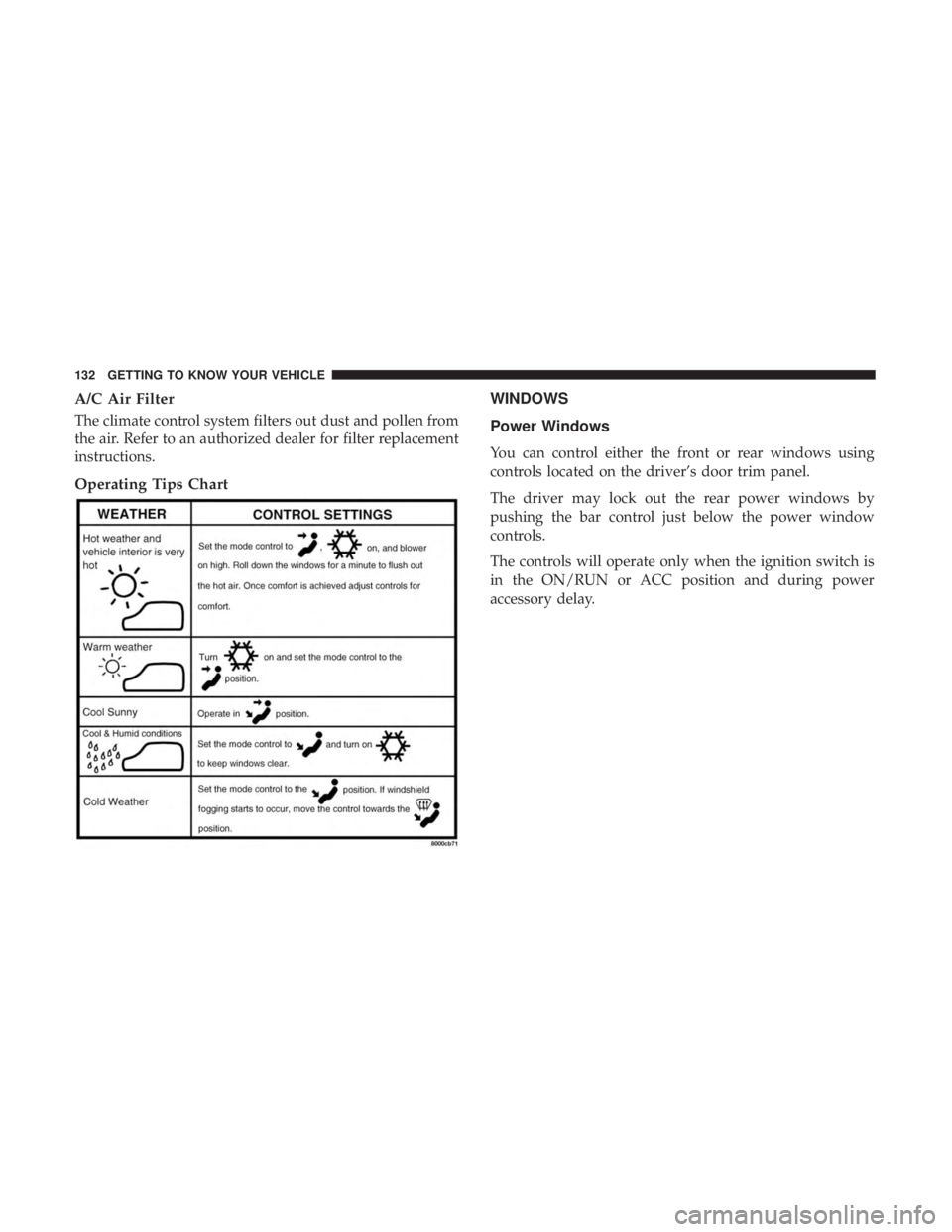
Operating Tips ChartWINDOWS
Power Windows
You can control either the front or rear windows using
controls located on the driver’s door trim panel.
The driver may lock out the rear power windows by
pushing the bar control just below the power window
controls.
The controls will operate only when the ignition switch is
in the ON/RUN or ACC position and during power
accessory delay.
132 GETTING TO KNOW YOUR VEHICLE
Page 144 of 696
Settings, the liftgate will only unlock with handle activa-
tion. Refer to “Uconnect Settings” in “Multimedia” for
further information.
Closing
To Close The Liftgate
Grasp the liftgate closing handle and initiate lowering the
liftgate. Release the handle when the liftgate takes over the
closing effort.
To Lock The Vehicle
With a valid Passive Entry key fob within 5 ft (1.5 m) of the
liftgate, pushing the passive entry lock button located to
the right of the outside handle will lock the vehicle.
WARNING!
•Driving with the liftgate open can allow poisonous
exhaust gases into your vehicle. You and your pas-
sengers could be injured by these fumes. Keep the
liftgate closed when you are operating the vehicle.
• If you are required to drive with the liftgate open,
make sure that all windows are closed, and the
climate control blower switch is set at high speed. Do
not use the recirculation mode.
Power Liftgate — If Equipped
The power liftgate may be opened or closed in several
ways:
• Overhead console liftgate button
• Key fob
• Outside handle (opens liftgate only)
• Button just inside the liftgate on the upper left trim
(when liftgate is open)
• Hands-Free Liftgate (opens liftgate only) — If Equipped
Using the above ways:
• When the liftgate is fully closed, the liftgate will open
• When the liftgate is fully open, the liftgate will close
• When the liftgate is moving, the liftgate will reverse
Push the Power Liftgate button on the Overhead Console
to open or close the liftgate.
Push the liftgate button on the key fob twice within five
seconds to open or close the liftgate.
142 GETTING TO KNOW YOUR VEHICLE
Page 148 of 696
•If the power liftgate encounters multiple obstructions
within the same cycle, the system will automatically
stop. If this occurs, the liftgate must be operated manu-
ally.
• The power liftgate will release, but not power open, in
temperatures below 12° F (24° C). Be sure to remove
any buildup of snow or ice from the liftgate before
opening the liftgate.
• If the liftgate is left open for an extended period of time,
the liftgate may need to be closed manually to reset
power liftgate functionality.
WARNING!
•Driving with the liftgate open can allow poisonous
exhaust gases into your vehicle. You and your pas-
sengers could be injured by these fumes. Keep the
liftgate closed when you are operating the vehicle.
• If you are required to drive with the liftgate open,
make sure that all windows are closed, and the
climate control blower switch is set at high speed. Do
not use the recirculation mode. Gas props support the liftgate in the open position. How-
ever, because the gas pressure drops with temperature, it
may be necessary to assist the props when opening the
liftgate in cold weather.
NOTE:
Allow the power system to open the liftgate.
Manually pushing or pulling the liftgate may activate the
liftgate obstacle detection feature and stop the power
operation or reverse its direction.
WARNING!
During power operation, personal injury or cargo
damage may occur. Ensure the liftgate travel path is
clear. Make sure the liftgate is closed and latched
before driving away.
Cargo Area Features
Cargo Area Storage
When the third row seats are not in the stowed position,
there is a large area for cargo storage.
146 GETTING TO KNOW YOUR VEHICLE
Page 303 of 696
Exhaust Gas
WARNING!
Exhaust gases can injure or kill. They contain carbon
monoxide (CO), which is colorless and odorless.
Breathing it can make you unconscious and can even-
tually poison you. To avoid breathing (CO), follow
these safety tips:
•Do not run the engine in a closed garage or in
confined areas any longer than needed to move your
vehicle in or out of the area.
• If you are required to drive with the trunk/liftgate/
rear doors open, make sure that all windows are
closed and the climate control BLOWER switch is set
at high speed. DO NOT use the recirculation mode.
• If it is necessary to sit in a parked vehicle with the
engine running, adjust your heating or cooling con-
trols to force outside air into the vehicle. Set the
blower at high speed.
The best protection against carbon monoxide entry into the
vehicle body is a properly maintained engine exhaust
system.
Whenever a change is noticed in the sound of the exhaust
system, when exhaust fumes can be detected inside the vehicle, or when the underside or rear of the vehicle is
damaged, have a competent mechanic inspect the complete
exhaust system and adjacent body areas for broken, dam-
aged, deteriorated, or mispositioned parts. Open seams or
loose connections could permit exhaust fumes to seep into
the passenger compartment. In addition, inspect the ex-
haust system each time the vehicle is raised for lubrication
or oil change. Replace as required.
Safety Checks You Should Make Inside The Vehicle
Seat Belts
Inspect the seat belt system periodically, checking for cuts,
frays, and loose parts. Damaged parts must be replaced
immediately. Do not disassemble or modify the system.
Front seat belt assemblies must be replaced after a collision.
Rear seat belt assemblies must be replaced after a collision
if they have been damaged (i.e., bent retractor, torn web-
bing, etc.). If there is any question regarding seat belt or
retractor condition, replace the seat belt.
Air Bag Warning Light
The Air Bag warning lightwill turn on for four to
eight seconds as a bulb check when the ignition switch
is first turned to ON/RUN. If the light is either not on
during starting, stays on, or turns on while driving, 5
SAFETY 301
Page 542 of 696

The suggested rotation method is the “forward cross”
shown in the following diagram. This rotation pattern does
not apply to some directional tires that must not be
reversed.
DEPARTMENT OF TRANSPORTATION UNIFORM
TIRE QUALITY GRADES
The following tire grading categories were established
by the National Highway Traffic Safety Administration.
The specific grade rating assigned by the tire’s manu-
facturer in each category is shown on the sidewall of the
tires on your vehicle.All passenger vehicle tires must conform to Federal
safety requirements in addition to these grades.
Treadwear
The Treadwear grade is a comparative rating, based on
the wear rate of the tire when tested under controlled
conditions on a specified government test course. For
example, a tire graded 150 would wear one and one-half
times as well on the government course as a tire graded
100. The relative performance of tires depends upon the
actual conditions of their use, however, and may depart
significantly from the norm due to variations in driving
habits, service practices, and differences in road charac-
teristics and climate.
Traction Grades
The Traction grades, from highest to lowest, are AA, A,
B, and C. These grades represent the tire’s ability to stop
on wet pavement, as measured under controlled condi-
tions on specified government test surfaces of asphalt
and concrete. A tire marked C may have poor traction
performance.
Tire Rotation
540 SERVICING AND MAINTENANCE
Page 562 of 696

▫Uconnect Theater Apps ...................631
▫ Using The Rear Video USB Port .............633
▫ Play Video Games ..................... .633
▫ Headphones Operation ...................634
▫ Display Settings ........................637
▫ Listening To Audio With The Screen Closed . . . .638
▫ Rear Climate Controls....................638
▫ Accessibility — If Equipped ...............640
▫ Wireless Streaming — If Equipped ...........640
▫ BD And DVD Region Codes ...............643
▫ Product Agreement .....................645
▫ General Information .....................648
▫ FCC/IC Regulatory Notices ...............649
� RADIO OPERATION AND MOBILE PHONES . . .650
▫ Regulatory And Safety Information ..........650
� UCONNECT VOICE RECOGNITION
QUICK TIPS .......................... .651▫
Introducing Uconnect ....................651
▫ Get Started .......................... .652
▫ Basic Voice Commands ...................653
▫ Radio ...............................653
▫ Media ...............................654
▫ Phone ...............................656
▫ Voice Text Reply .......................657
▫ Climate ............................. .658
▫ Navigation (4C NAV) ....................660
▫ SiriusXM Guardian (4C/4C NAV)—
If Equipped .......................... .661
▫ Register (4C/4C
NAV) ...................661
▫ Vehicle Health Report/Alert (4C/4C NAV) .....662
▫ Mobile App (4C/4C NAV) ................662
▫ SiriusXM Travel Link (4C NAV) .............663
▫ Siri Eyes Free — If Equipped ..............663
▫ Using Do Not Disturb ...................665
560 MULTIMEDIA
Page 618 of 696
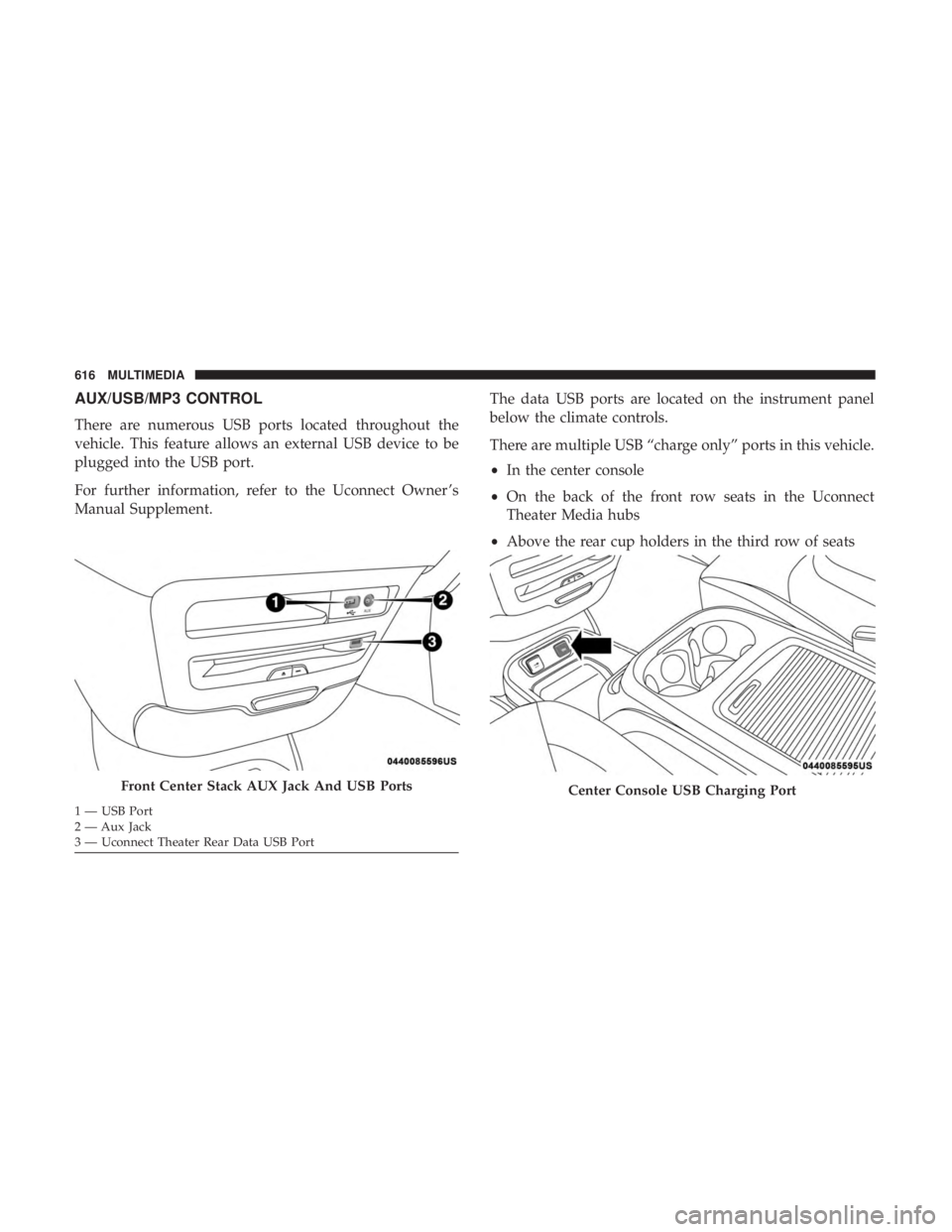
AUX/USB/MP3 CONTROL
There are numerous USB ports located throughout the
vehicle. This feature allows an external USB device to be
plugged into the USB port.
For further information, refer to the Uconnect Owner ’s
Manual Supplement.The data USB ports are located on the instrument panel
below the climate controls.
There are multiple USB “charge only” ports in this vehicle.
•
In the center console
• On the back of the front row seats in the Uconnect
Theater Media hubs
• Above the rear cup holders in the third row of seats
Front Center Stack AUX Jack And USB Ports
1 — USB Port
2 — Aux Jack
3 — Uconnect Theater Rear Data USB Port
Center Console USB Charging Port
616 MULTIMEDIA
Page 627 of 696
Replacing The Remote Control Batteries
Each remote control requires two AAA batteries for opera-
tion.
To replace the batteries:
1. Locate the battery compartment on the back of theremote, then slide the battery cover downward.
2. Remove the old batteries and follow battery recycling procedures for your area.
3. Install new batteries, making sure to orient them accord- ing to the polarity diagram shown inside the battery
compartment.
4. Replace the battery compartment cover.
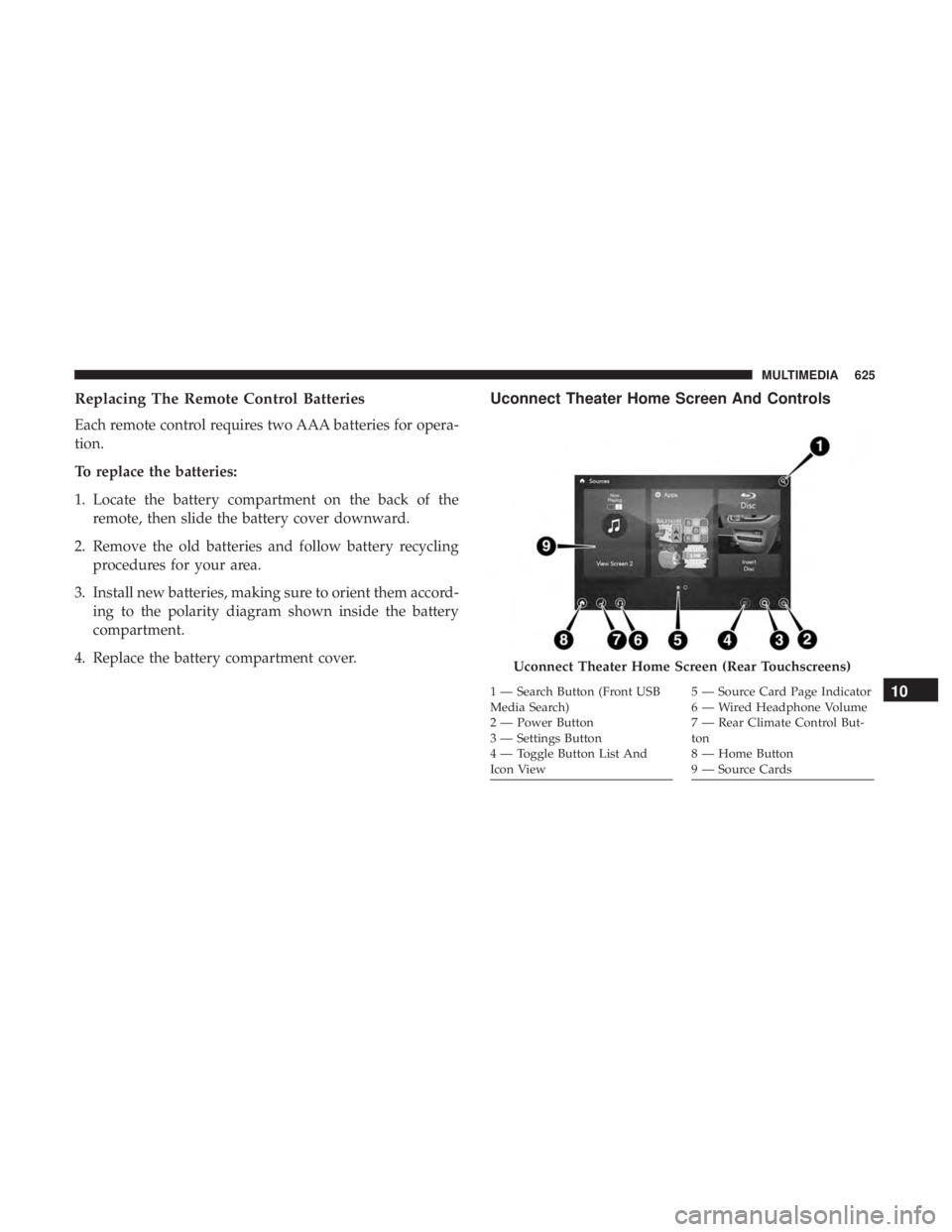
Uconnect Theater Home Screen And Controls
Uconnect Theater Home Screen (Rear Touchscreens)
1 — Search Button (Front USB
Media Search)
2 — Power Button
3 — Settings Button
4 — Toggle Button List And
Icon View5 — Source Card Page Indicator
6 — Wired Headphone Volume
7 — Rear Climate Control But-
ton
8 — Home Button
9 — Source Cards10
MULTIMEDIA 625