Page 455 of 696
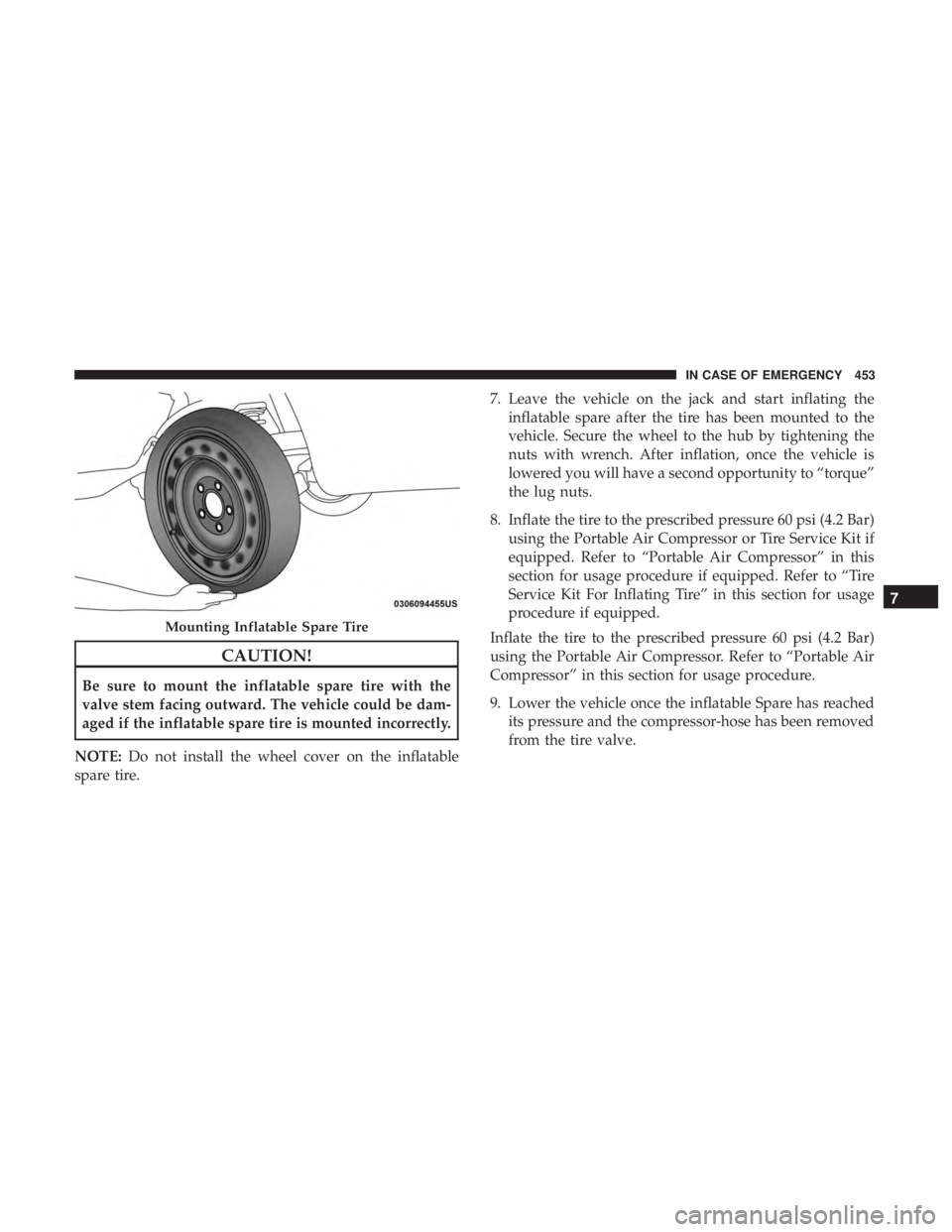
CAUTION!
Be sure to mount the inflatable spare tire with the
valve stem facing outward. The vehicle could be dam-
aged if the inflatable spare tire is mounted incorrectly.
NOTE: Do not install the wheel cover on the inflatable
spare tire. 7. Leave the vehicle on the jack and start inflating the
inflatable spare after the tire has been mounted to the
vehicle. Secure the wheel to the hub by tightening the
nuts with wrench. After inflation, once the vehicle is
lowered you will have a second opportunity to “torque”
the lug nuts.
8. Inflate the tire to the prescribed pressure 60 psi (4.2 Bar) using the Portable Air Compressor or Tire Service Kit if
equipped. Refer to “Portable Air Compressor” in this
section for usage procedure if equipped. Refer to “Tire
Service Kit For Inflating Tire” in this section for usage
procedure if equipped.
Inflate the tire to the prescribed pressure 60 psi (4.2 Bar)
using the Portable Air Compressor. Refer to “Portable Air
Compressor” in this section for usage procedure.
9. Lower the vehicle once the inflatable Spare has reached its pressure and the compressor-hose has been removed
from the tire valve.
Mounting Inflatable Spare Tire
7
IN CASE OF EMERGENCY 453
Page 459 of 696
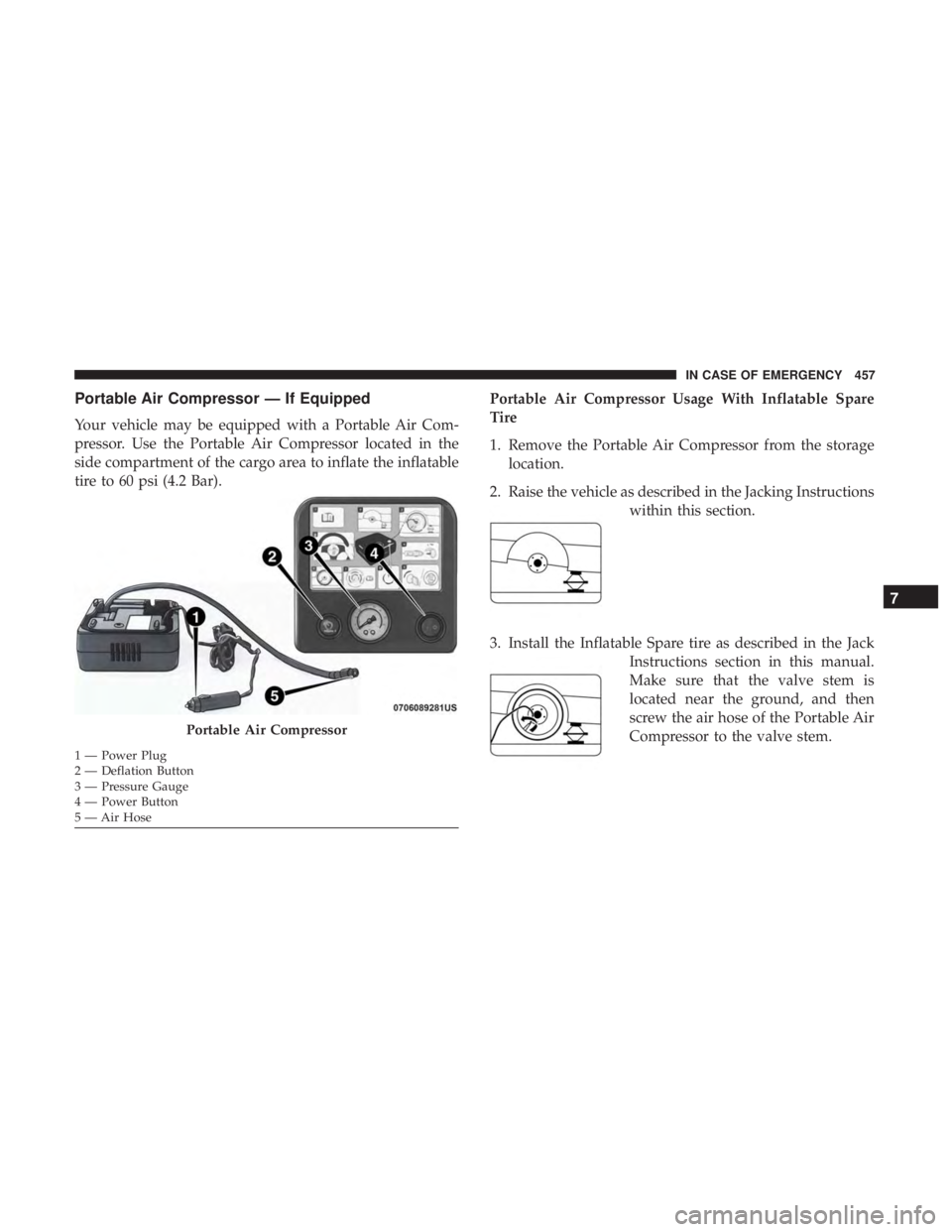
Portable Air Compressor — If Equipped
Your vehicle may be equipped with a Portable Air Com-
pressor. Use the Portable Air Compressor located in the
side compartment of the cargo area to inflate the inflatable
tire to 60 psi (4.2 Bar).Portable Air Compressor Usage With Inflatable Spare
Tire
1. Remove the Portable Air Compressor from the storage
location.
2. Raise the vehicle as described in the Jacking Instructions within this section.
3. Install the Inflatable Spare tire as described in the Jack Instructions section in this manual.
Make sure that the valve stem is
located near the ground, and then
screw the air hose of the Portable Air
Compressor to the valve stem.
Portable Air Compressor
1 — Power Plug
2 — Deflation Button
3 — Pressure Gauge
4 — Power Button
5 — Air Hose
7
IN CASE OF EMERGENCY 457
Page 460 of 696
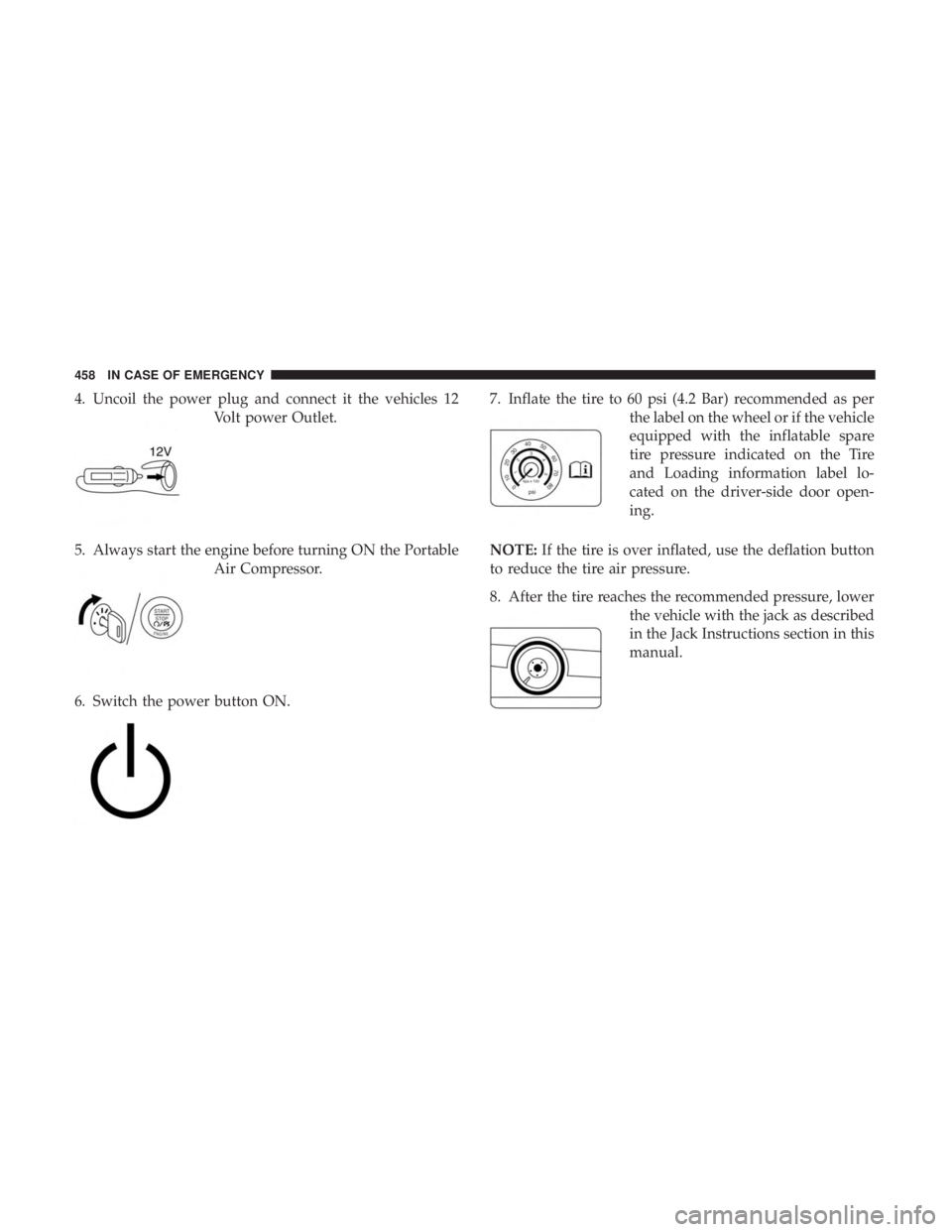
4. Uncoil the power plug and connect it the vehicles 12Volt power Outlet.
5. Always start the engine before turning ON the Portable Air Compressor.
6. Switch the power button ON. 7. Inflate the tire to 60 psi (4.2 Bar) recommended as per
the label on the wheel or if the vehicle
equipped with the inflatable spare
tire pressure indicated on the Tire
and Loading information label lo-
cated on the driver-side door open-
ing.
NOTE: If the tire is over inflated, use the deflation button
to reduce the tire air pressure.
8. After the tire reaches the recommended pressure, lower the vehicle with the jack as described
in the Jack Instructions section in this
manual.
458 IN CASE OF EMERGENCY
Page 461 of 696
9. Remove the speed limit label sticker from the PortableAir Compressor and place it on the
center of the steering wheel.
10. Return the Portable Air Compressor to the foam tray and secure it with the strap. Store the foam tray in the
cargo area.
WARNING!
•Do not lift or carry the Portable Air Compressor by
the hose.
• Always stow the Portable Air Compressor only in the
provided place.
• The metal end fitting from Power Plug may get hot
after use, so it should be handled carefully.
• Keep the Portable Air Compressor away from open
flames or heat source.
Tire Service Kit For Inflating Tire — If Equipped
Your vehicle may be equipped with a Tire Service Kit. Use
the Tire Service Kit located in the side compartment of the
cargo area to inflate the inflatable tire to 60 psi (4.2 Bar).
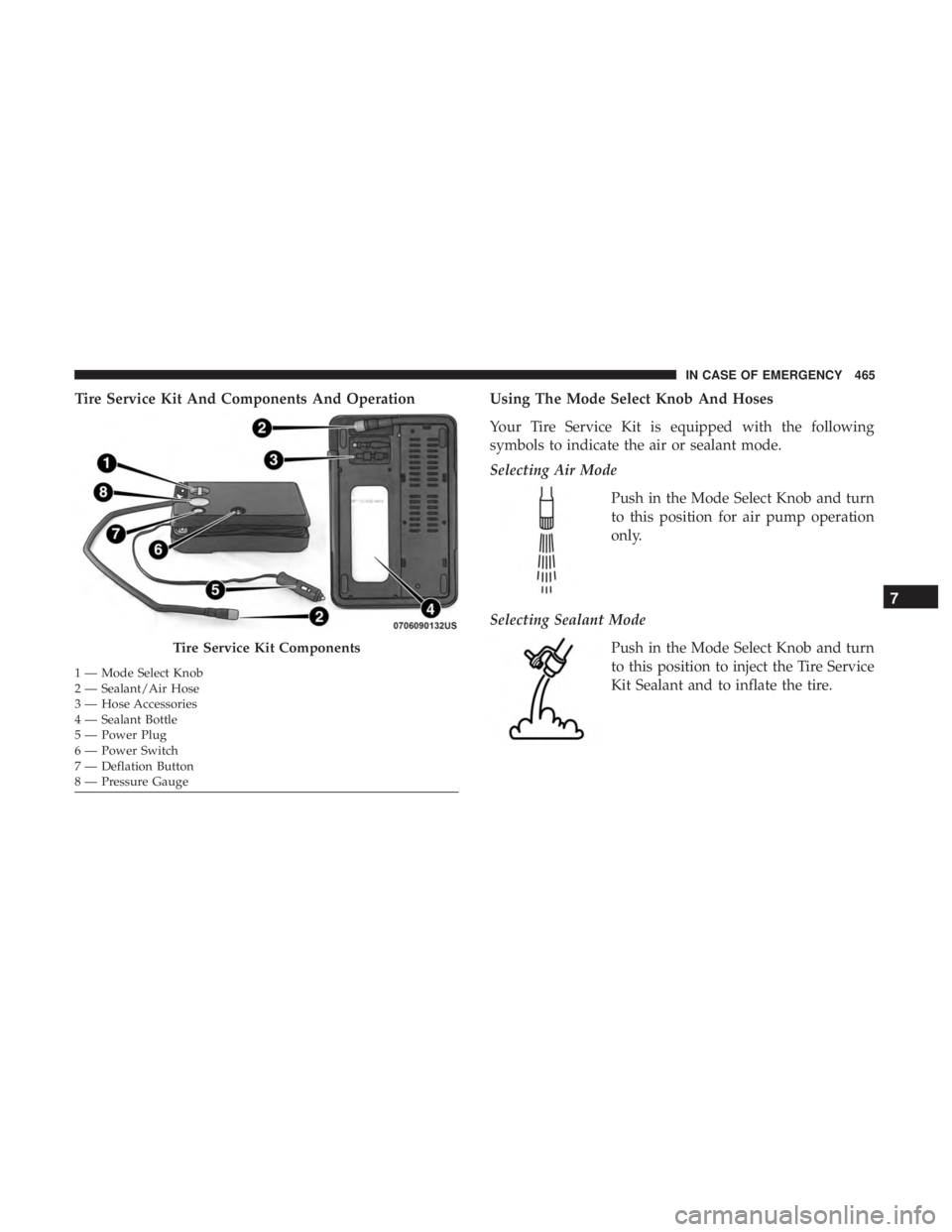
Tire Service Kit And Components And Operation
Tire Service Kit Components
1 — Mode Select Knob
2 — Sealant/Air Hose
3 — Hose Accessories
4 — Sealant Bottle5 — Power Plug
6 — Power Switch
7 — Deflation Button
8 — Pressure Gauge
7
IN CASE OF EMERGENCY 459
Page 462 of 696
Using The Mode Select Knob And Hoses
Your Tire Service Kit is equipped with the following
symbols to indicate the air or sealant mode.
Selecting Air ModePush in the Mode Select Knob and turn
to this position for air mode operation
only.
Selecting Sealant Mode Push in the Mode Select Knob and turn
to this position to inject the Tire Service
Kit Sealant and to inflate the tire. Using The Power Button
Push and release the Power Button once
to turn On the Tire Service Kit. Push and
release the Power Button again to turn
Off the Tire Service Kit.
Using The Deflation Button Push the Deflation Button to reduce the
air pressure in the tire if it becomes
over-inflated.
WARNING!
•Keep Tire Service Kit away from open flames or heat
source.
• A loose Tire Service Kit thrown forward in a collision
or hard stop could endanger the occupants of the
vehicle. Always stow the Tire Service Kit in the place
(Continued)
460 IN CASE OF EMERGENCY
Page 465 of 696
9. Inflate the tire to 60 psi (4.2 Bar) recommended as perthe label on the wheel or if the vehicle
equipped with the inflatable spare
tire pressure indicated on the Tire
and Loading information label lo-
cated on the driver-side door open-
ing.
NOTE: If the tire is over inflated, use the deflation button
to reduce the tire air pressure.
10. After the tire reaches the recommended pressure, lower the vehicle with the jack as
described in the Jack Instructions
section in this manual. 11. Remove the speed limit label sticker from the Tire
Service Kit and place it on the center
of the steering wheel.
12. Return the Tire Service Kit to the foam tray and secure it with the strap. Store the foam tray in the cargo area.
Return Inflatable Spare Tire
To return Inflatable Spare Tire to its storage location.
1. Return the Jack.
2. Deflate the spare tire. Use the Tire Service Kit or PortableAir Compressor and push the deflation button to do this
step. Refer to “Tire Service Kit” or “Portable Air Com-
pressor” if equipped in this section for additional infor-
mation. The inflatable spare tire will return to its origi-
nal shape.
7
IN CASE OF EMERGENCY 463
Page 467 of 696
Tire Service Kit And Components And OperationUsing The Mode Select Knob And Hoses
Your Tire Service Kit is equipped with the following
symbols to indicate the air or sealant mode.
Selecting Air Mode
Push in the Mode Select Knob and turn
to this position for air pump operation
only.
Selecting Sealant Mode Push in the Mode Select Knob and turn
to this position to inject the Tire Service
Kit Sealant and to inflate the tire.
Tire Service Kit Components
1 — Mode Select Knob
2 — Sealant/Air Hose
3 — Hose Accessories
4 — Sealant Bottle
5 — Power Plug
6 — Power Switch
7 — Deflation Button
8 — Pressure Gauge
7
IN CASE OF EMERGENCY 465
Page 468 of 696
Using The Power ButtonPush and release the Power Button once
to turn On the Tire Service Kit. Push and
release the Power Button again to turn
Off the Tire Service Kit.
Using The Deflation Button Push the Deflation Button to reduce the
air pressure in the tire if it becomes
over-inflated.
Tire Service Kit Usage Precautions
• Replace the Tire Service Kit Sealant Bottle prior to the
expiration date (printed at the lower right hand corner
on the bottle label) to assure optimum operation of the
system. Refer to “Sealant Bottle Replacement” in this
section. •
The Sealant Bottle is a one tire application use and needs
to be replaced after each use. Always replace these
components immediately at your original equipment
vehicle dealer.
• When the Tire Service Kit sealant is in a liquid form,
clean water, and a damp cloth will remove the material
from the vehicle or tire and wheel components. Once the
sealant dries, it can easily be peeled off and properly
discarded.
• For optimum performance, make sure the valve stem on
the wheel is free of debris before connecting the Tire
Service Kit.
• The Tire Service Kit Sealant is only intended to seal
punctures less than 1/4 inch (6 mm) diameter in the
tread/contact surface of your vehicle’s tires.
• The Tire Service Kit Sealant is not intended to seal
punctures on the tires’ side walls.
• You can use the Tire Service Kit air pump to inflate
bicycle tires. The kit also comes with two needles,
located in the Accessory Storage Compartment (on the
bottom of the air pump) for inflating sport balls, rafts, or
similar inflatable items. However, use only the Air Pump
466 IN CASE OF EMERGENCY