Page 64 of 696
Vehicles Equipped With Remote Start
On models that are equipped with remote start, the venti-
lated seats can be programed to come on during a remote
start.
This feature can be programmed through the Uconnect
system. Refer to “Uconnect Settings” in “Multimedia” for
further information.
Stow ’n Go Seating
On vehicles equipped with Stow ’n Go seating, the second
and third row seats can be folded into the floor for
convenient storage.
Auto Advance ‘n Return — If Equipped
On vehicles equipped with the Auto Advance ‘n Return
feature, the front seat will move forward automatically to a
location that will allow the second row Stow ‘n Go seat
movement, without interference by the front seat. After the
second row seat is stowed, the front seat will move back to
the previous location once the Auto Advance ‘n Return
button is pushed again.
The Auto Advance ‘n Return feature is available to both the
front driver and passenger power seats, if equipped.
WARNING!
During power seat operation, personal injury or cargo
damage may occur. Ensure the front seat is not occu-
pied and the seat travel path is clear.
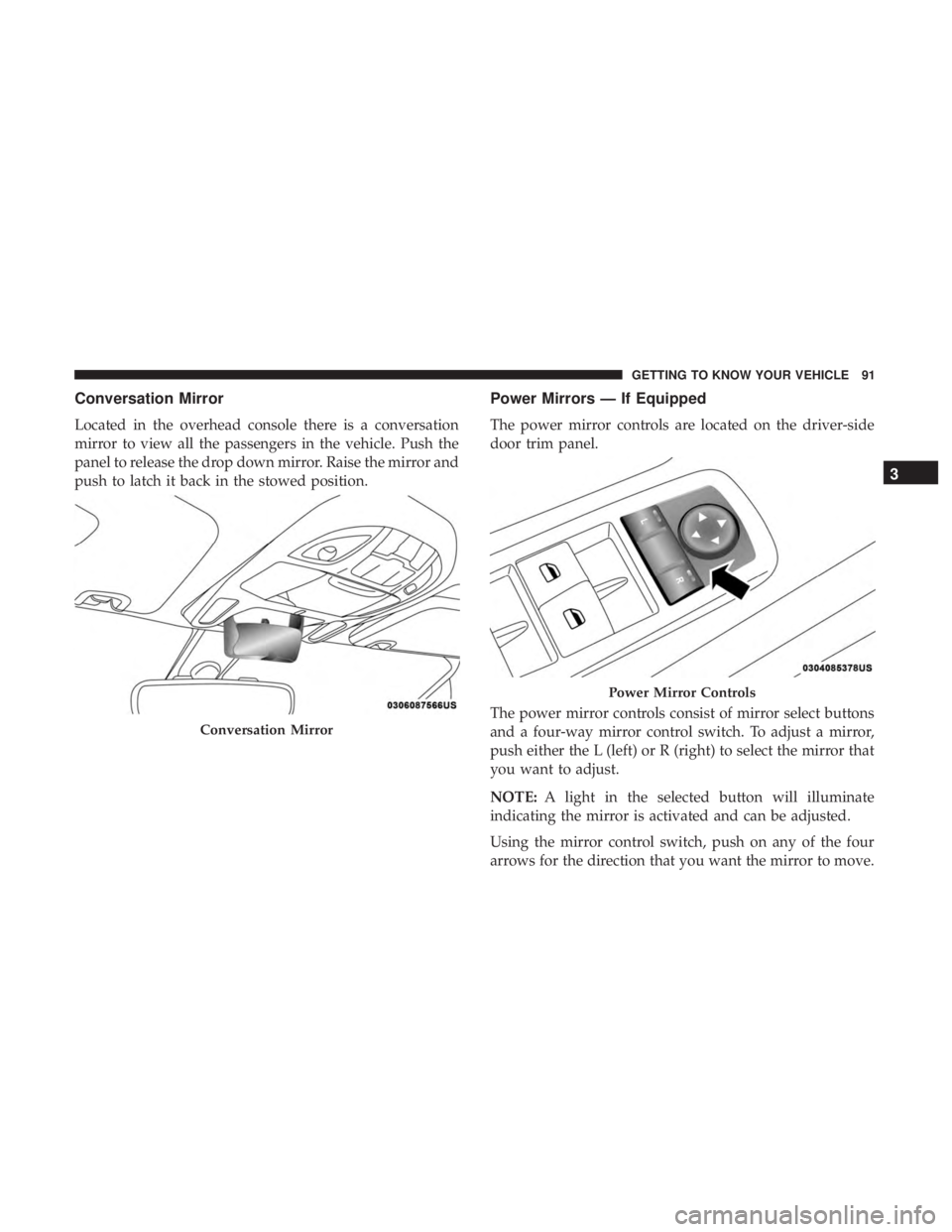
A one-touch Auto Advance ‘n Return button is located on
the B-pillar trim panel, just in front of the power sliding
door.
Auto Advance ‘n Return Button
62 GETTING TO KNOW YOUR VEHICLE
Page 65 of 696

Using the Auto Advance ‘n Return Feature
NOTE:
•The button is only functional when the power sliding
door is open and the vehicle is in PARK. If the door is
not open or the vehicle is not in PARK when the button
is pushed, the front seat will not move and a message
will be displayed in instrument cluster display.
• If the power sliding door is closing when the button is
pushed, the front seat will not move and a message will
be displayed in the instrument cluster display.
1. Push and release the Auto Advance ‘n Return button. The front seat cushion and seat back will move as
necessary to a location that will allow space for the
second row Stow ‘n Go seat movement.
2. Perform the second row Stow ‘n Go seat movement. Refer to “Second Row Stow ‘n Go” for further informa-
tion.
3. Push and release the Auto Advance ‘n Return button a second time. The front seat cushion and seat back will
return to the original starting location. NOTE:
•
To abort seat operation while seat is in motion, push the
Auto Advance ‘n Return button, or push the front power
seat button to stop the seat movement. Pushing the Auto
Advance ‘n Return button again will return the front
seat to the original starting location.
• The Auto Advance ‘n Return system includes obstacle
detection. When the system detects an obstacle, the seat
will stop, reverse direction, and return to the previous
location. A message will be displayed in the instrument
cluster indicating that an obstacle has been detected.
• If the front seat is already in a location that will allow
space for Stow ‘n Go of the second row seat, the front
seat will not move and a message will be displayed in
the instrument cluster.
• If calibration of the front seat is lost, the seat will
automatically re-calibrate when the Auto Advance ‘n
Return button is pushed. This may result in the seat
cushion moving forward and downward, before moving
to the location that will allow space for the second row
Stow ‘n Go seat movement.
3
GETTING TO KNOW YOUR VEHICLE 63
Page 93 of 696
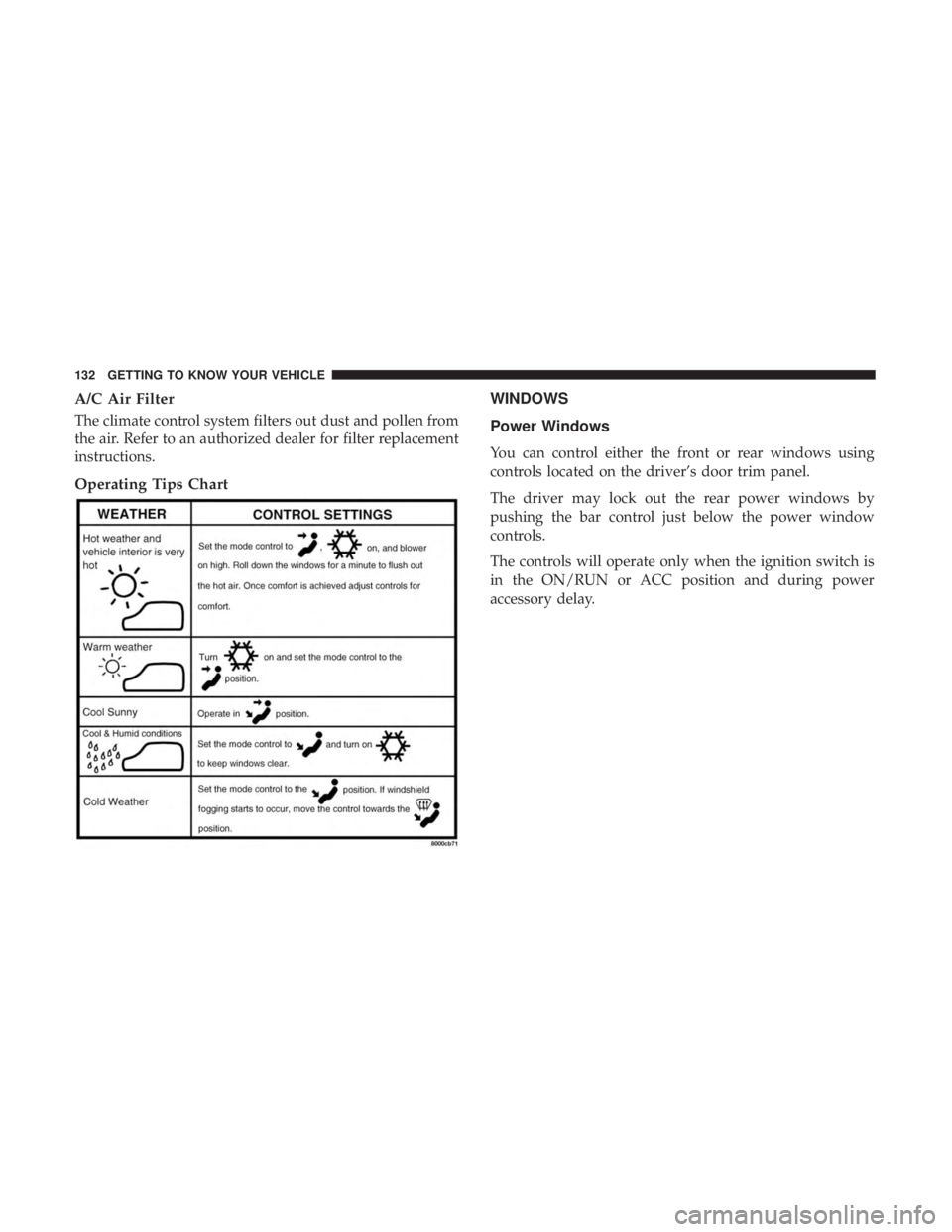
Conversation Mirror
Located in the overhead console there is a conversation
mirror to view all the passengers in the vehicle. Push the
panel to release the drop down mirror. Raise the mirror and
push to latch it back in the stowed position.
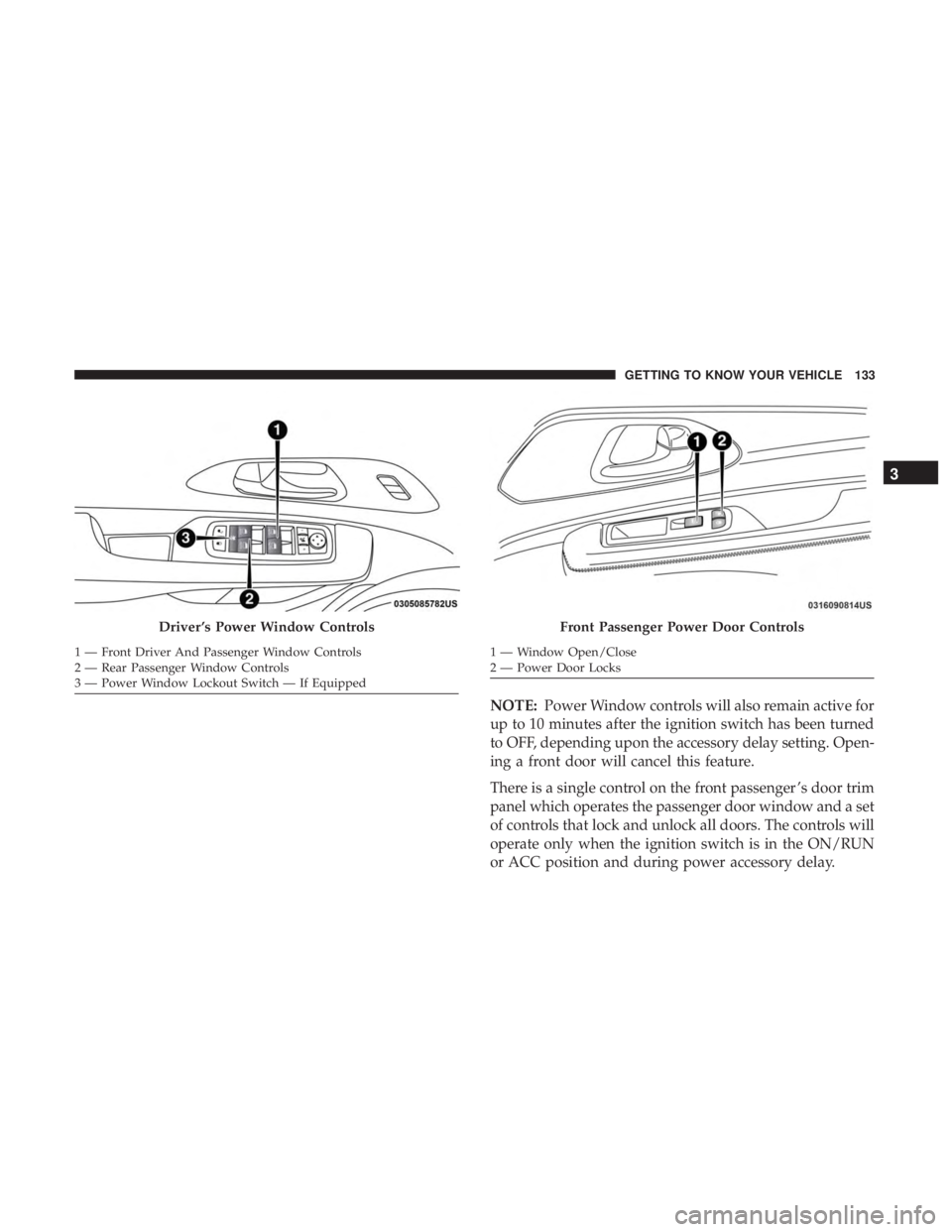
Power Mirrors — If Equipped
The power mirror controls are located on the driver-side
door trim panel.
The power mirror controls consist of mirror select buttons
and a four-way mirror control switch. To adjust a mirror,
push either the L (left) or R (right) to select the mirror that
you want to adjust.
NOTE:A light in the selected button will illuminate
indicating the mirror is activated and can be adjusted.
Using the mirror control switch, push on any of the four
arrows for the direction that you want the mirror to move.
Conversation Mirror
Power Mirror Controls
3
GETTING TO KNOW YOUR VEHICLE 91
Page 94 of 696
Left and Right side power mirror preselected positions can
be controlled by the optional Driver Memory Seat Feature.
Refer to “Driver Memory Seat” in “Seats” for further
information.
Outside Mirrors Folding Feature
All outside mirrors are hinged and may be moved either
forward or rearward to resist damage. The hinges have
three detent positions:
•Full forward position
• Full rearward position
• Normal position
Heated Mirrors — If Equipped
These mirrors are heated to melt frost or ice. This
feature will be activated whenever you turn on the
rear window defroster (if equipped). Refer to “Climate
Controls” in this section for further information.
Tilt Side Mirrors In Reverse (Available With
Memory Seat Only) — If Equipped
Tilt Side Mirrors In Reverse provides automatic outside
mirror positioning which will aid the driver ’s view of the
ground rearward of the front doors. The driver’s outside
mirror will move slightly downward from the present
position when the vehicle is shifted into REVERSE. The
driver’s outside mirror will then return to the original
position when the vehicle is shifted out of the REVERSE
position. Each stored memory setting will have an associ-
ated Tilt Side Mirrors In Reverse position.
NOTE: The Tilt Side Mirrors In Reverse feature is not
enabled when delivered from the factory. The Tilt Side
Mirrors In Reverse feature can be enabled or disabled in
the instrument cluster display. Refer to “Uconnect Set-
tings” in “Multimedia” for further information.
Power Folding Mirrors — If Equipped
The switch for the power folding mirrors is located be-
tween the power mirror switches L (left) and R (right).
Push the switch once and the mirrors will fold in, pushing
the switch a second time will return the mirrors to the
normal driving position.
92 GETTING TO KNOW YOUR VEHICLE
Page 134 of 696
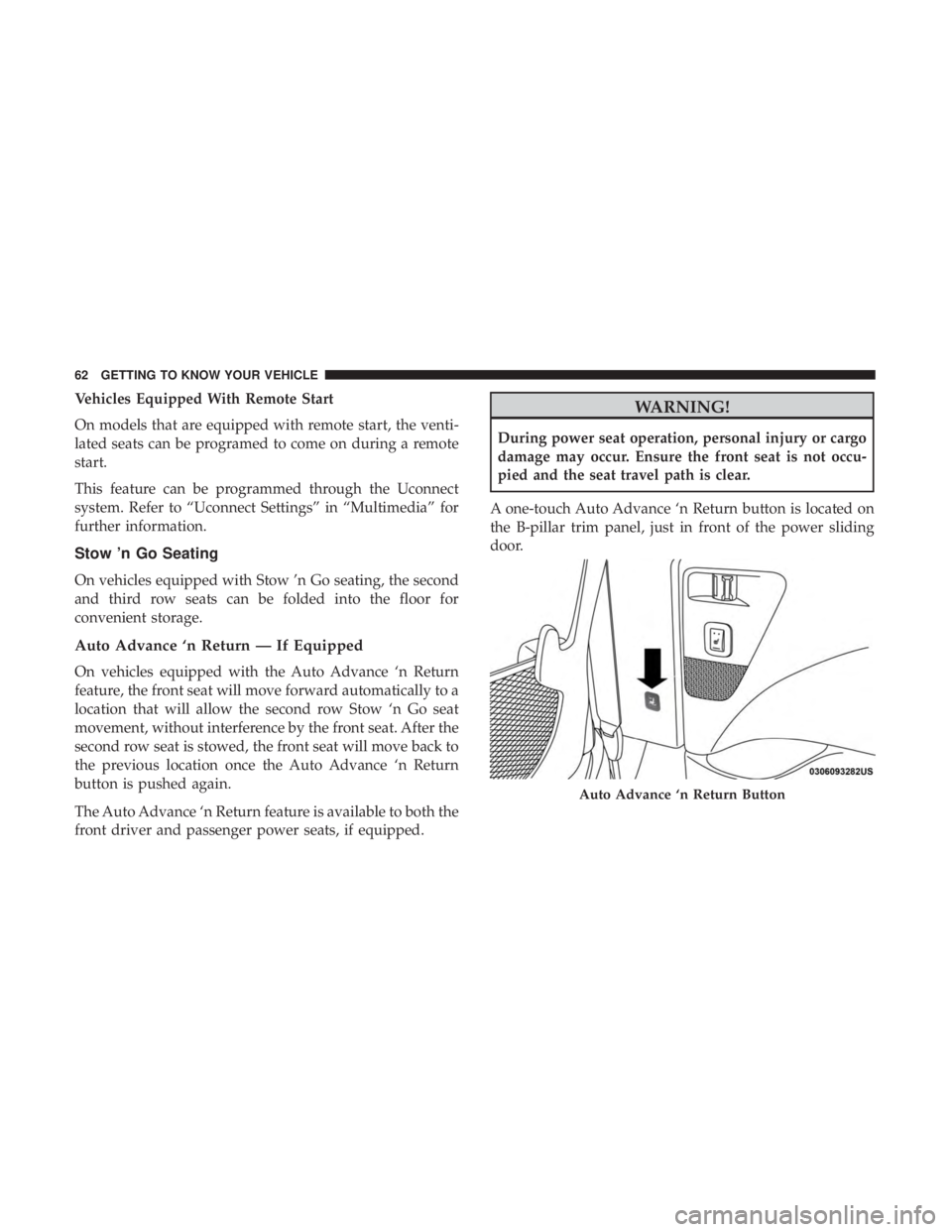
A/C Air Filter
The climate control system filters out dust and pollen from
the air. Refer to an authorized dealer for filter replacement
instructions.
Operating Tips ChartWINDOWS
Power Windows
You can control either the front or rear windows using
controls located on the driver’s door trim panel.
The driver may lock out the rear power windows by
pushing the bar control just below the power window
controls.
The controls will operate only when the ignition switch is
in the ON/RUN or ACC position and during power
accessory delay.
132 GETTING TO KNOW YOUR VEHICLE
Page 135 of 696
NOTE:Power Window controls will also remain active for
up to 10 minutes after the ignition switch has been turned
to OFF, depending upon the accessory delay setting. Open-
ing a front door will cancel this feature.
There is a single control on the front passenger ’s door trim
panel which operates the passenger door window and a set
of controls that lock and unlock all doors. The controls will
operate only when the ignition switch is in the ON/RUN
or ACC position and during power accessory delay.
Driver ’s Power Window Controls
1 — Front Driver And Passenger Window Controls
2 — Rear Passenger Window Controls
3 — Power Window Lockout Switch — If Equipped
Front Passenger Power Door Controls
1 — Window Open/Close
2 — Power Door Locks
3
GETTING TO KNOW YOUR VEHICLE 133
Page 136 of 696
Auto Up Feature With Anti-Pinch Protection — If
Equipped
The front driver and front passenger controls may be
equipped with an Auto Up feature. Lift the window control
fully upward to the second detent, release, and the window
will go up automatically.
To stop the window from going all the way up during the
Auto Up operation, push down on the control briefly.
To close the window part way, lift the window control to
the first detent and release when you want the window to
stop.
NOTE:
•If the window runs into any obstacle during auto-
closure, it will reverse direction and then go back down.
Remove the obstacle and use the window control again
to close the window.
• Any impact due to rough road conditions may trigger
the auto reverse function unexpectedly during auto-
closure. If this happens, pull the control lightly to the
first detent and hold to close window manually.WARNING!
There is no anti-pinch protection when the window is
almost closed. To avoid personal injury be sure to clear
your arms, hands, fingers and all objects from the
window path before closing.
Auto Up Reset — If Equipped
To reactivate the Auto Up feature, perform the following
steps after vehicle power is restored:
1. Pull the window control up to close the window com- pletely and continue to hold the control up for an
additional two seconds after the window is closed.
2. Push the window control down firmly to the second detent to open the window completely and continue to
hold the control down for an additional two seconds
after the window is fully open.
Sliding Side Door Power Window Control — If Equipped
Second row passengers may open and close the sliding door
window by a single control on the door handle assembly.
The controls will operate only when the ignition switch is
in the ON/RUN or ACC position and during power
accessory delay.
134 GETTING TO KNOW YOUR VEHICLE
Page 137 of 696
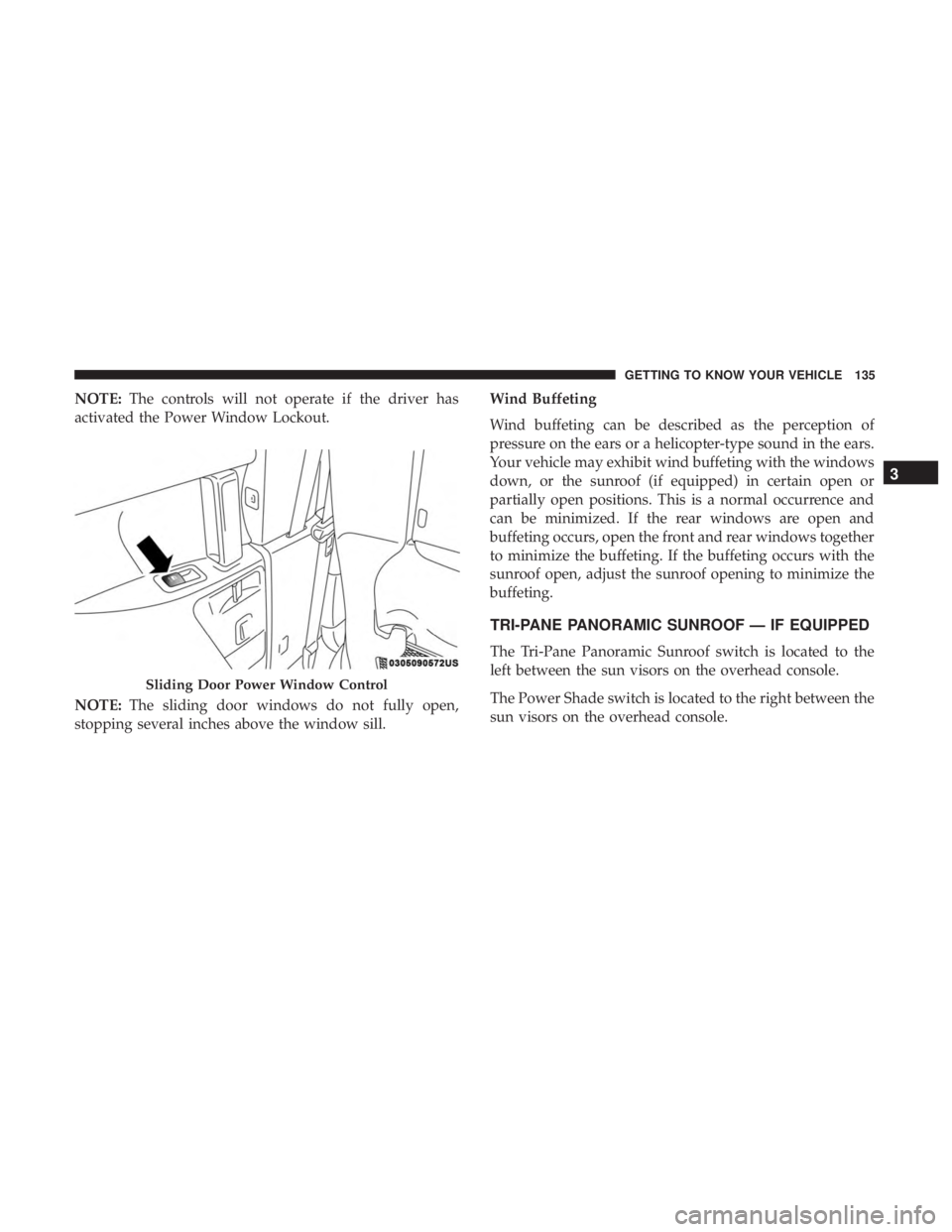
NOTE:The controls will not operate if the driver has
activated the Power Window Lockout.
NOTE: The sliding door windows do not fully open,
stopping several inches above the window sill. Wind Buffeting
Wind buffeting can be described as the perception of
pressure on the ears or a helicopter-type sound in the ears.
Your vehicle may exhibit wind buffeting with the windows
down, or the sunroof (if equipped) in certain open or
partially open positions. This is a normal occurrence and
can be minimized. If the rear windows are open and
buffeting occurs, open the front and rear windows together
to minimize the buffeting. If the buffeting occurs with the
sunroof open, adjust the sunroof opening to minimize the
buffeting.
TRI-PANE PANORAMIC SUNROOF — IF EQUIPPED
The Tri-Pane Panoramic Sunroof switch is located to the
left between the sun visors on the overhead console.
The Power Shade switch is located to the right between the
sun visors on the overhead console.
Sliding Door Power Window Control
3
GETTING TO KNOW YOUR VEHICLE 135