Page 383 of 614
WARNING!(Continued)
Emergency Services Agent. All occupants should exit
the vehicle immediately and move to a safe location.
•
Never place anything on or near the vehicle’s operable
network and GPS antennas. You could prevent oper-
able network and GPS signal reception, which can
prevent your vehicle from placing an emergency call.
An operable network and GPS signal reception is
required for the SOS Call system to function properly.
• The SOS Call system is embedded into the vehicle’s
electrical system. Do not add aftermarket electrical
equipment to the vehicle’s electrical system. This
may prevent your vehicle from sending a signal to
initiate an emergency call. To avoid interference that
can cause the SOS Call system to fail, never add
aftermarket equipment (e.g., two-way mobile radio,
CB radio, data recorder, etc.) to your vehicle’s electri-
cal system or modify the antennas on your vehicle. IF
YOUR VEHICLE LOSES BATTERY POWER FOR
ANY REASON (INCLUDING DURING OR AFTER
AN ACCIDENT), THE UCONNECT FEATURES,
APPS AND SERVICES, AMONG OTHERS, WILL
NOT OPERATE.
(Continued)
WARNING! (Continued)
•Modifications to any part of the SOS Call system
could cause the air bag system to fail when you need
it. You could be injured if the air bag system is not
there to help protect you.
SOS Call System Limitations
Vehicles sold in Mexico DO NOThave SOS Call system
capabilities.
SOS or other emergency line operators in Mexico may not
answer or respond to SOS system calls.
If the SOS Call system detects a malfunction, any of the
following may occur at the time the malfunction is de-
tected, and at the beginning of each ignition cycle:
• The Rearview Mirror light located between the ASSIST
and SOS buttons will continuously be illuminated red.
• The Device Screen will display the following message
“Vehicle device requires service. Please contact your
dealer.”
• An In-Vehicle Audio message will state “Vehicle device
requires service. Please contact your dealer.”
7
IN CASE OF EMERGENCY 381
Page 422 of 614
Preparations For Jump Start
The remote battery posts in your vehicle is located on the
left side of the engine compartment.
WARNING!
You can be seriously injured or killed working on or
around a motor vehicle:
•Keep hands away from the radiator cooling fan when
the hood is raised. The fan starts automatically and
may start at any time, whether the engine is running
or not.
• Remove any jewelry such as rings, watches and
bracelets that could make an inadvertent electrical
contact.
• Keep open flames or sparks away from the battery.
Batteries contain sulfuric acid that can burn your
skin or eyes and generate hydrogen gas which is
flammable and explosive.
1. Apply the parking brake and place the ignition to OFF.
NOTE: If the 12V Battery has been sufficiently discharged,
this may not be possible.
2. Turn off the heater, radio, and all unnecessary electrical accessories.
Jump Starting Locations
(+) — Positive Battery Post
(-) — Negative Battery Post 420 IN CASE OF EMERGENCY
Page 492 of 614
CAUTION!
Do not use Alcohol and Alcohol-based and/or Ketone
based cleaning products to clean leather seats, as
damage to the seat may result.
Glass Surfaces
All glass surfaces should be cleaned on a regular basis with
Mopar Glass Cleaner, or any commercial household-type
glass cleaner. Never use an abrasive type cleaner. Use
caution when cleaning the inside rear window equipped
with electric defrosters or windows equipped with radio
antennas. Do not use scrapers or other sharp instruments
that may scratch the elements.
When cleaning the rear view mirror, spray cleaner on the
towel or cloth that you are using. Do not spray cleaner
directly on the mirror.
490 SERVICING AND MAINTENANCE
Page 506 of 614

▫Play Video Games ..................... .553
▫ Headphones Operation ...................553
▫ Display Settings ....................... .556
▫ Listening To Audio With The Screen Closed . . . .556
▫ Rear Climate Controls....................557
▫ Accessibility — If Equipped ...............559
▫ Wireless Streaming — If Equipped ...........559
▫ BD And DVD Region Codes ...............562
▫ Product Agreement .....................564
▫ General Information .....................567
▫ FCC/IC Regulatory Notices ...............568
� RADIO OPERATION AND MOBILE PHONES . . .569
▫ Regulatory And Safety Information ..........569
� UCONNECT VOICE RECOGNITION
QUICK TIPS .......................... .570
▫ Introducing Uconnect ....................570
▫ Get Started .......................... .571▫
Basic Voice Commands ...................572
▫ Radio .............................. .572
▫ Media .............................. .573
▫ Phone .............................. .574
▫ Voice Text Reply ...................... .575
▫ Climate (4C/4C NAV) ...................576
▫ Navigation (4C NAV) ....................577
▫ SiriusXM Guardian (4C/4C NAV) —
If Equipped .......................... .578
▫ Register (4C/4C NAV) ...................579
▫ Vehicle Health Report/Alert (4C/4C NAV) .....579
▫ Mobile
App (4C/4C NAV) ................579
▫ SiriusXM Travel Link (4C NAV) .............580
▫ Siri Eyes Free — If Equipped ..............581
▫ Do Not Disturb ....................... .582
▫ Android Auto — If Equipped ..............582
▫ Apple CarPlay — If Equipped ..............583
504 MULTIMEDIA
Page 512 of 614
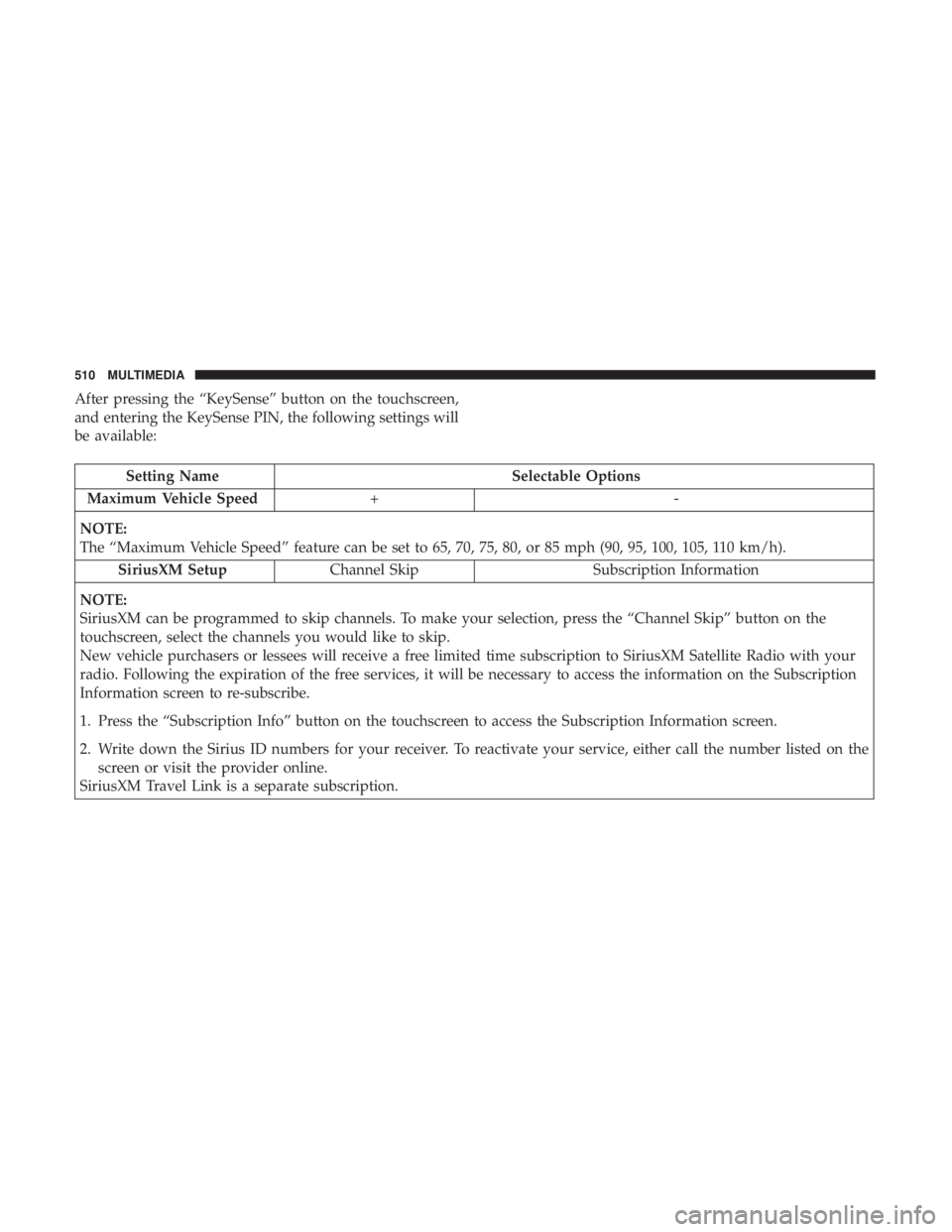
After pressing the “KeySense” button on the touchscreen,
and entering the KeySense PIN, the following settings will
be available:
Setting NameSelectable Options
Maximum Vehicle Speed +-
NOTE:
The “Maximum Vehicle Speed” feature can be set to 65, 70, 75, 80, or 85 mph (90, 95, 100, 105, 110 km/h). SiriusXM Setup Channel Skip Subscription Information
NOTE:
SiriusXM can be programmed to skip channels. To make your selection, press the “Channel Skip” button on the
touchscreen, select the channels you would like to skip.
New vehicle purchasers or lessees will receive a free limited time subscription to SiriusXM Satellite Radio with your
radio. Following the expiration of the free services, it will be necessary to access the information on the Subscription
Information screen to re-subscribe.
1. Press the “Subscription Info” button on the touchscreen to access the Subscription Information screen.
2. Write down the Sirius ID numbers for your receiver. To reactivate your service, either call the number listed on the screen or visit the provider online.
SiriusXM Travel Link is a separate subscription.
510 MULTIMEDIA
Page 518 of 614
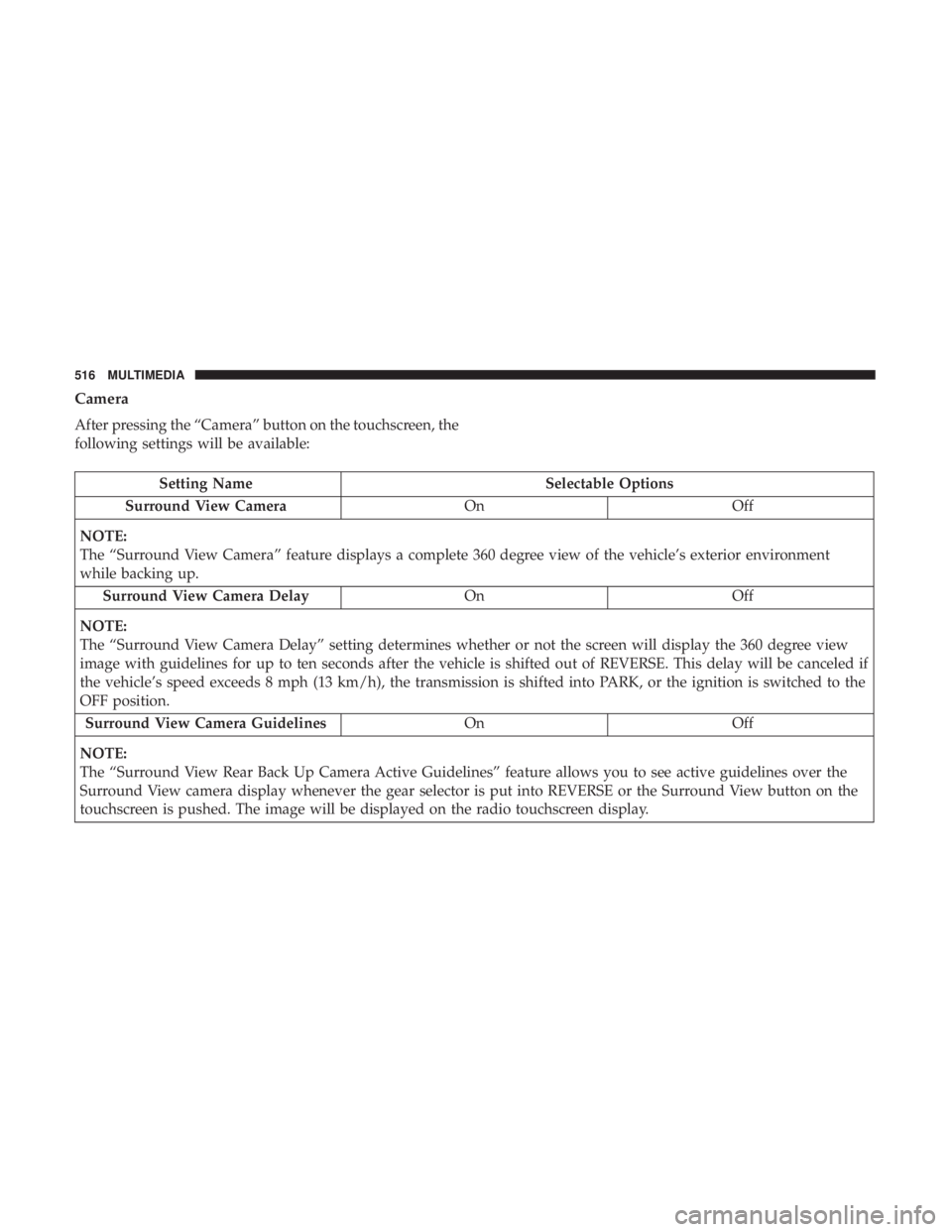
Camera
After pressing the “Camera” button on the touchscreen, the
following settings will be available:
Setting NameSelectable Options
Surround View Camera OnOff
NOTE:
The “Surround View Camera” feature displays a complete 360 degree view of the vehicle’s exterior environment
while backing up. Surround View Camera Delay OnOff
NOTE:
The “Surround View Camera Delay” setting determines whether or not the screen will display the 360 degree view
image with guidelines for up to ten seconds after the vehicle is shifted out of REVERSE. This delay will be canceled if
the vehicle’s speed exceeds 8 mph (13 km/h), the transmission is shifted into PARK, or the ignition is switched to the
OFF position. Surround View Camera Guidelines OnOff
NOTE:
The “Surround View Rear Back Up Camera Active Guidelines” feature allows you to see active guidelines over the
Surround View camera display whenever the gear selector is put into REVERSE or the Surround View button on the
touchscreen is pushed. The image will be displayed on the radio touchscreen display.
516 MULTIMEDIA
Page 528 of 614
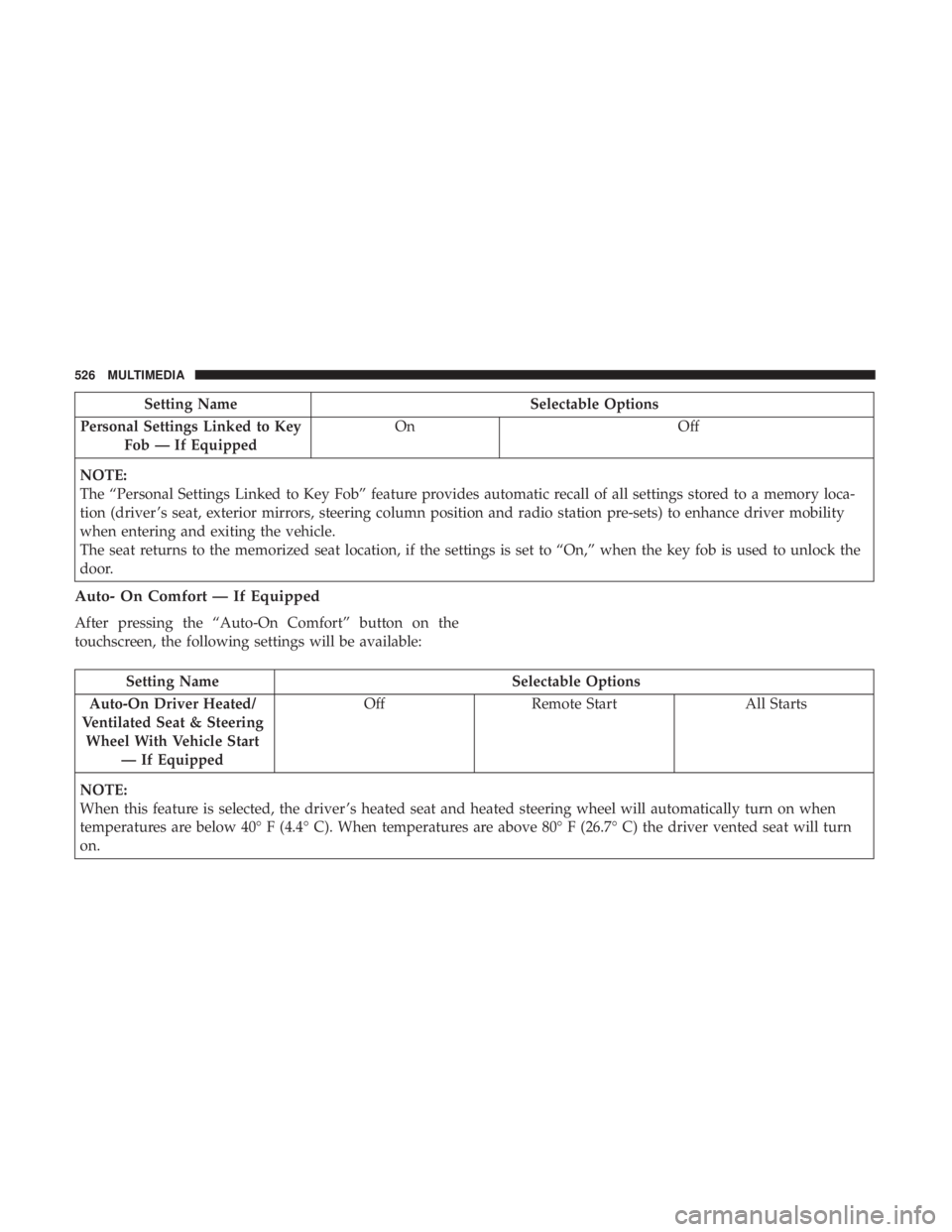
Setting NameSelectable Options
Personal Settings Linked to Key Fob — If Equipped On
Off
NOTE:
The “Personal Settings Linked to Key Fob” feature provides automatic recall of all settings stored to a memory loca-
tion (driver ’s seat, exterior mirrors, steering column position and radio station pre-sets) to enhance driver mobility
when entering and exiting the vehicle.
The seat returns to the memorized seat location, if the settings is set to “On,” when the key fob is used to unlock the
door.
Auto- On Comfort — If Equipped
After pressing the “Auto-On Comfort” button on the
touchscreen, the following settings will be available:
Setting Name Selectable Options
Auto-On Driver Heated/
Ventilated Seat & Steering Wheel With Vehicle Start — If Equipped Off
Remote Start All Starts
NOTE:
When this feature is selected, the driver ’s heated seat and heated steering wheel will automatically turn on when
temperatures are below 40° F (4.4° C). When temperatures are above 80° F (26.7° C) the driver vented seat will turn
on.
526 MULTIMEDIA
Page 529 of 614
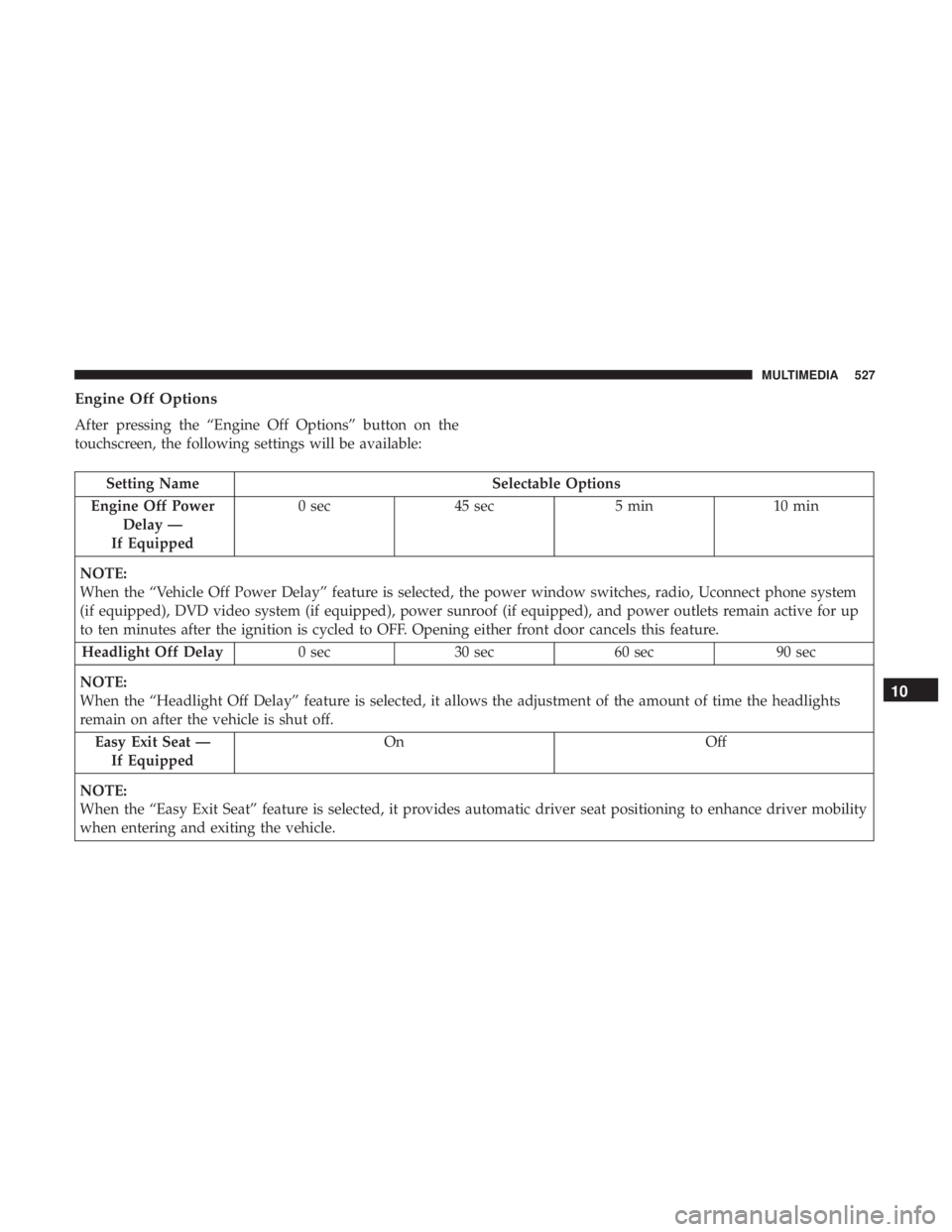
Engine Off Options
After pressing the “Engine Off Options” button on the
touchscreen, the following settings will be available:
Setting NameSelectable Options
Engine Off Power Delay —
If Equipped 0 sec
45 sec 5 min10 min
NOTE:
When the “Vehicle Off Power Delay” feature is selected, the power window switches, radio, Uconnect phone system
(if equipped), DVD video system (if equipped), power sunroof (if equipped), and power outlets remain active for up
to ten minutes after the ignition is cycled to OFF. Opening either front door cancels this feature. Headlight Off Delay 0 sec30 sec 60 sec 90 sec
NOTE:
When the “Headlight Off Delay” feature is selected, it allows the adjustment of the amount of time the headlights
remain on after the vehicle is shut off. Easy Exit Seat — If Equipped On
Off
NOTE:
When the “Easy Exit Seat” feature is selected, it provides automatic driver seat positioning to enhance driver mobility
when entering and exiting the vehicle.
10
MULTIMEDIA 527