Page 525 of 614
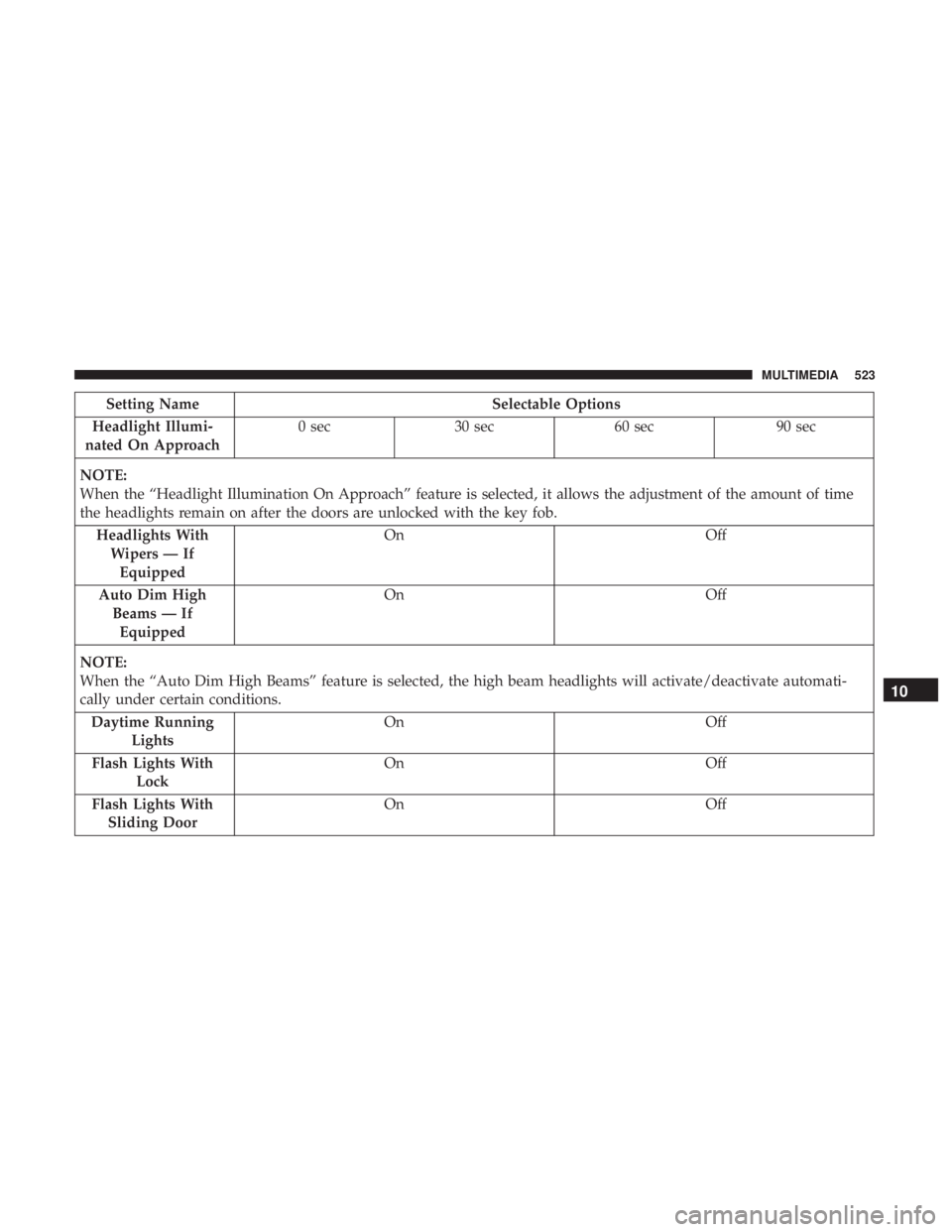
Setting NameSelectable Options
Headlight Illumi-
nated On Approach 0 sec
30 sec 60 sec 90 sec
NOTE:
When the “Headlight Illumination On Approach” feature is selected, it allows the adjustment of the amount of time
the headlights remain on after the doors are unlocked with the key fob. Headlights WithWipers — IfEquipped On
Off
Auto Dim High Beams — IfEquipped On
Off
NOTE:
When the “Auto Dim High Beams” feature is selected, the high beam headlights will activate/deactivate automati-
cally under certain conditions. Daytime Running Lights On
Off
Flash Lights With Lock On
Off
Flash Lights With Sliding Door On
Off
10
MULTIMEDIA 523
Page 526 of 614
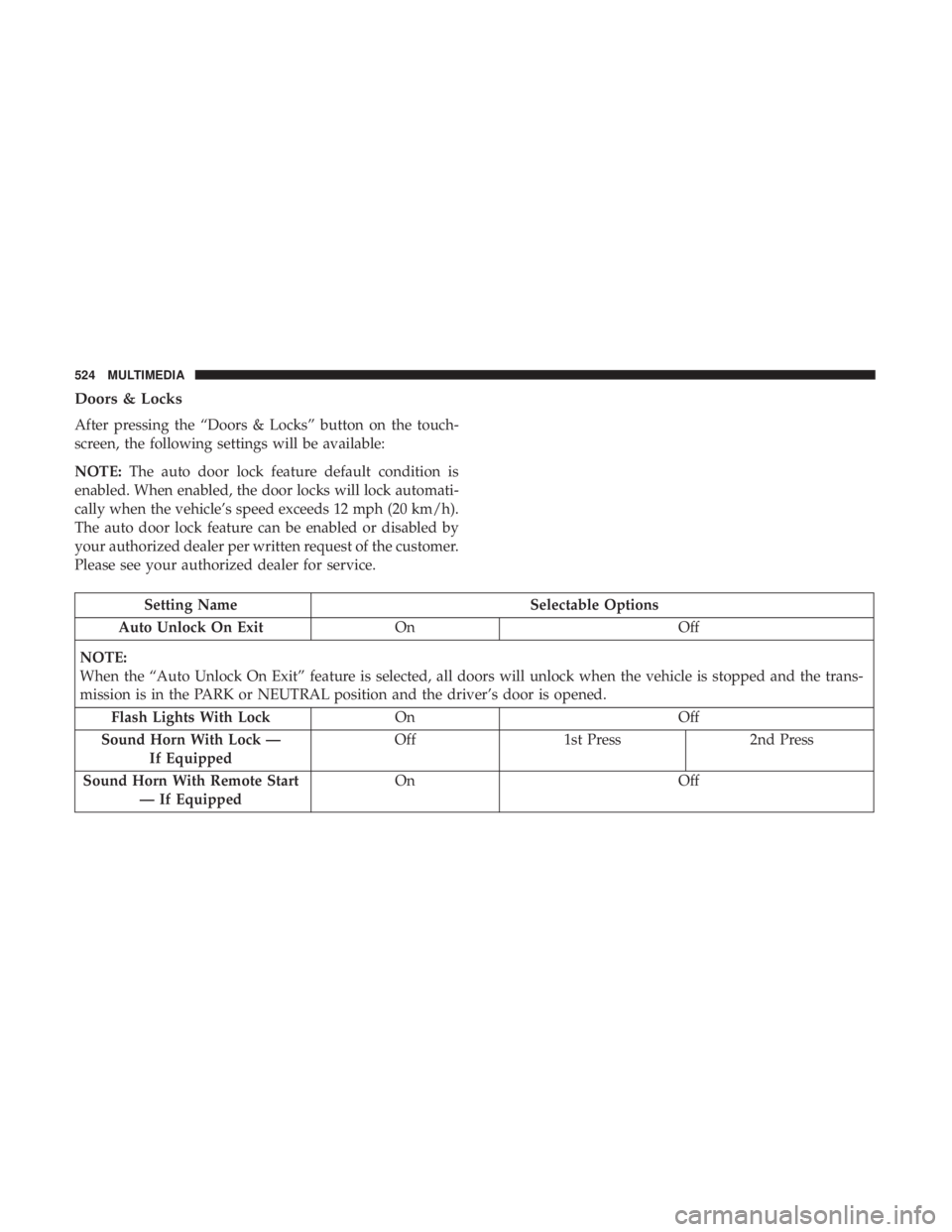
Doors & Locks
After pressing the “Doors & Locks” button on the touch-
screen, the following settings will be available:
NOTE:The auto door lock feature default condition is
enabled. When enabled, the door locks will lock automati-
cally when the vehicle’s speed exceeds 12 mph (20 km/h).
The auto door lock feature can be enabled or disabled by
your authorized dealer per written request of the customer.
Please see your authorized dealer for service.
Setting Name Selectable Options
Auto Unlock On Exit On Off
NOTE:
When the “Auto Unlock On Exit” feature is selected, all doors will unlock when the vehicle is stopped and the trans-
mission is in the PARK or NEUTRAL position and the driver’s door is opened. Flash Lights With Lock OnOff
Sound Horn With Lock — If Equipped Off
1st Press 2nd Press
Sound Horn With Remote Start — If Equipped On
Off
524 MULTIMEDIA
Page 527 of 614
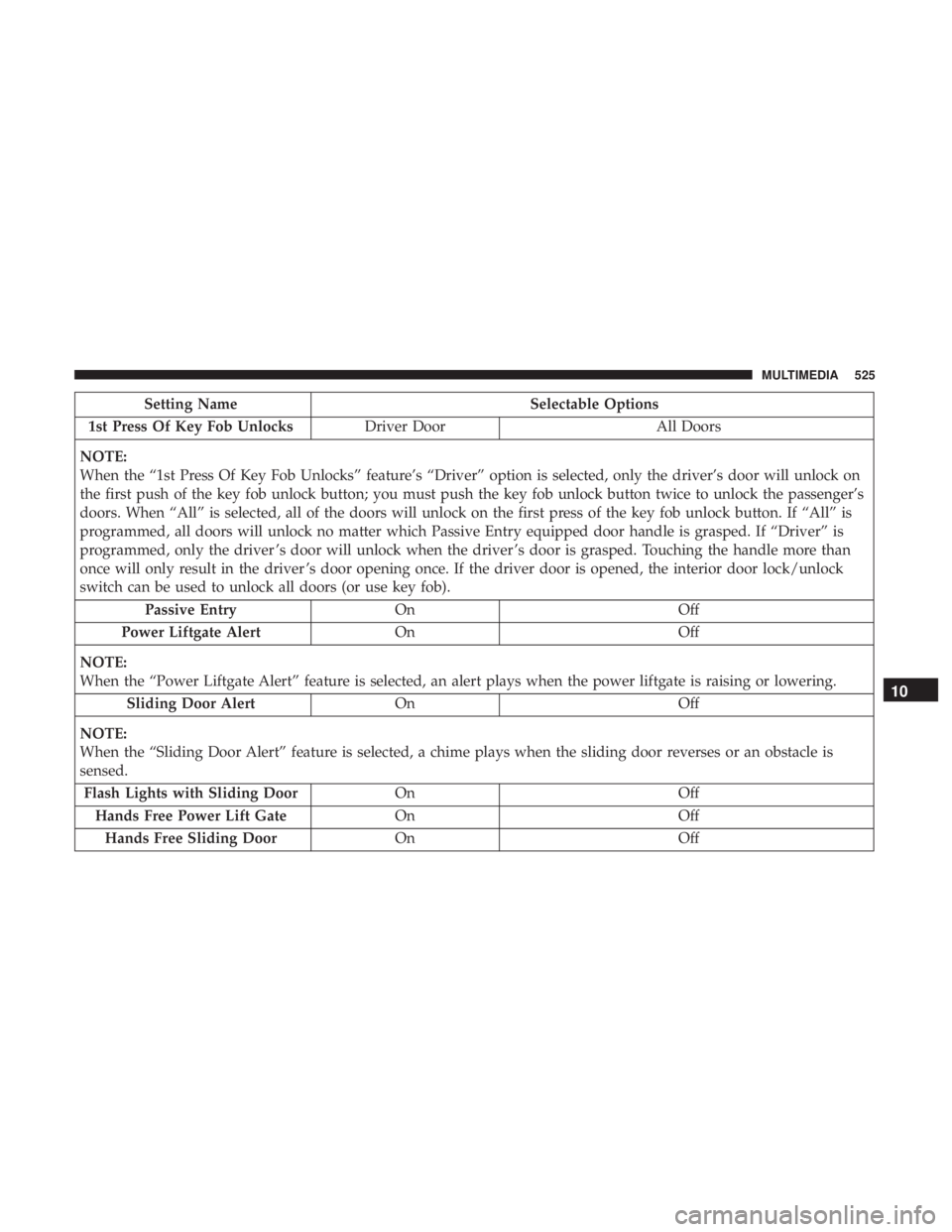
Setting NameSelectable Options
1st Press Of Key Fob Unlocks Driver Door All Doors
NOTE:
When the “1st Press Of Key Fob Unlocks” feature’s “Driver” option is selected, only the driver’s door will unlock on
the first push of the key fob unlock button; you must push the key fob unlock button twice to unlock the passenger’s
doors. When “All” is selected, all of the doors will unlock on the first press of the key fob unlock button. If “All” is
programmed, all doors will unlock no matter which Passive Entry equipped door handle is grasped. If “Driver” is
programmed, only the driver ’s door will unlock when the driver ’s door is grasped. Touching the handle more than
once will only result in the driver ’s door opening once. If the driver door is opened, the interior door lock/unlock
switch can be used to unlock all doors (or use key fob). Passive Entry On Off
Power Liftgate Alert On Off
NOTE:
When the “Power Liftgate Alert” feature is selected, an alert plays when the power liftgate is raising or lowering. Sliding Door Alert On Off
NOTE:
When the “Sliding Door Alert” feature is selected, a chime plays when the sliding door reverses or an obstacle is
sensed. Flash Lights with Sliding Door OnOff
Hands Free Power Lift Gate OnOff
Hands Free Sliding Door OnOff
10
MULTIMEDIA 525
Page 529 of 614
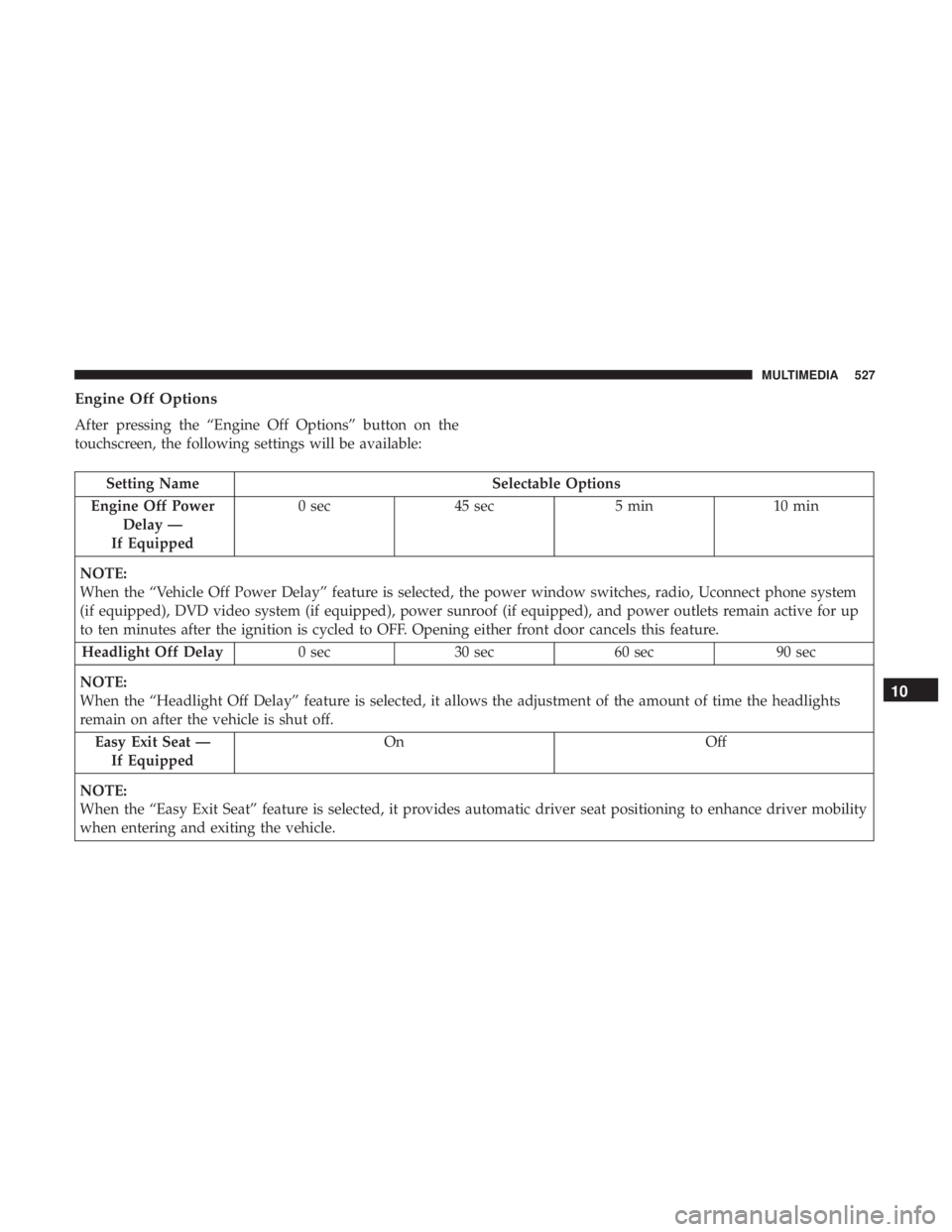
Engine Off Options
After pressing the “Engine Off Options” button on the
touchscreen, the following settings will be available:
Setting NameSelectable Options
Engine Off Power Delay —
If Equipped 0 sec
45 sec 5 min10 min
NOTE:
When the “Vehicle Off Power Delay” feature is selected, the power window switches, radio, Uconnect phone system
(if equipped), DVD video system (if equipped), power sunroof (if equipped), and power outlets remain active for up
to ten minutes after the ignition is cycled to OFF. Opening either front door cancels this feature. Headlight Off Delay 0 sec30 sec 60 sec 90 sec
NOTE:
When the “Headlight Off Delay” feature is selected, it allows the adjustment of the amount of time the headlights
remain on after the vehicle is shut off. Easy Exit Seat — If Equipped On
Off
NOTE:
When the “Easy Exit Seat” feature is selected, it provides automatic driver seat positioning to enhance driver mobility
when entering and exiting the vehicle.
10
MULTIMEDIA 527
Page 543 of 614
3. Press the “Remote” button towards the bottom of theUconnect Theater touchscreen, within the settings
menu.
4. Press the “Pair Remote” option. Press the “OK” button. A touchscreen notification will appear indicating that
your remote has been paired successfully or unsuccess-
fully.
5. Test to make sure the remote is successfully paired by dragging your finger across the gesture pad. If you do
not see the on screen arrow, try using the “Screen”
button on the remote to switch between rear screen one
and rear screen two to make sure the remote is control-
ling the intended screen. It may take several seconds for
the remote to react when initially paired.
NOTE:
• If pairing fails try resetting the remote by, pressing and
holding the Play/Pause, Down arrow, and the Screen
button simultaneously for about five seconds until the
back light flashes.
• If remote is ever non-operational, try re-pairing remote.
• The system can accommodate up to ten paired remote
controls.Unpairing The Remote
In events such as updating the Uconnect Theater software,
or taking a remote to another vehicle, the remote will need
to be unpaired from your Uconnect Theater system. To
unpair the remote:
1. Press the Settings icon found in the lower right portion of the Uconnect Theater touchscreen.
2. Press the “Remote” button towards the bottom of the Uconnect Theater touchscreen, within the settings
menu.
3. Select “Manage Remote Controls” from the Remote section of �Settings” and follow the on screen instruc-
tions to complete the unpairing process.
4. Once complete, the remote will be ready to pair again.
NOTE: There will be a touchscreen notification message
when unpairing is successful. Repeat the above steps to
unpair a second remote.
10
MULTIMEDIA 541
Page 545 of 614
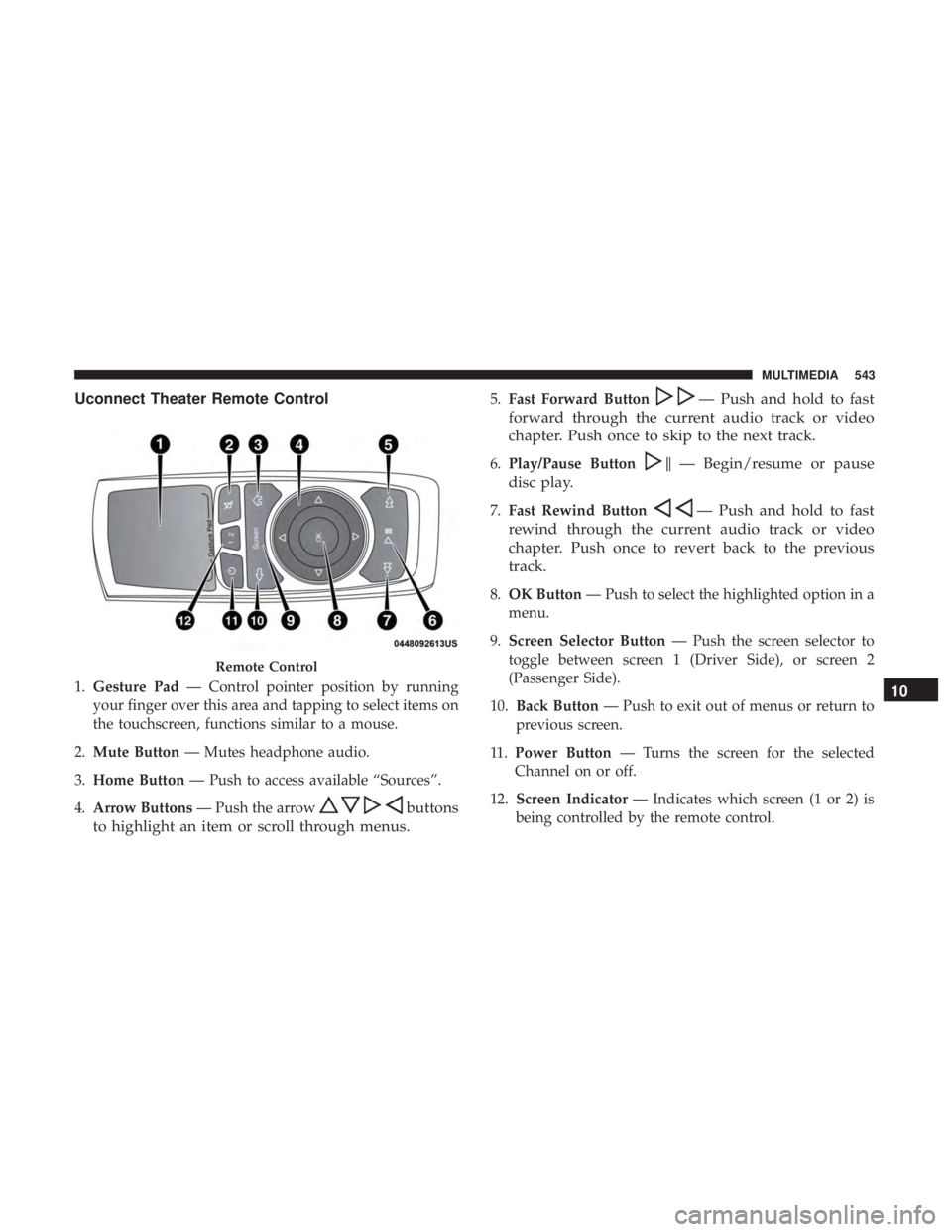
Uconnect Theater Remote Control
1.Gesture Pad — Control pointer position by running
your finger over this area and tapping to select items on
the touchscreen, functions similar to a mouse.
2. Mute Button — Mutes headphone audio.
3. Home Button — Push to access available “Sources”.
4. Arrow Buttons — Push the arrow
buttons
to highlight an item or scroll through menus.
5. Fast Forward Button— Push and hold to fast
forward through the current audio track or video
chapter. Push once to skip to the next track.
6. Play/Pause Button�— Begin/resume or pause
disc play.
7. Fast Rewind Button— Push and hold to fast
rewind through the current audio track or video
chapter. Push once to revert back to the previous
track.
8. OK Button — Push to select the highlighted option in a
menu.
9. Screen Selector Button — Push the screen selector to
toggle between screen 1 (Driver Side), or screen 2
(Passenger Side).
10. Back Button — Push to exit out of menus or return to
previous screen.
11 . Power Button — Turns the screen for the selected
Channel on or off.
12. Screen Indicator — Indicates which screen (1 or 2) is
being controlled by the remote control.
Remote Control
10
MULTIMEDIA 543
Page 547 of 614

You can choose sources such as HDMI, USB, Apps, or
Blu-ray. You may also view content of the opposite screen
in one step by choosing the “View Screen” source card.
NOTE:
•Source card order can be changed by pressing the
Settings button on the touchscreen and scrolling down
to �Source Card Order�.
• Use the “View Screen” function to pull content from one
screen to the other in a single press of a button. Doing
this however will disable and gray out certain player
controls on the screen viewing the other screen’s content. General Settings
To change source card order, select “Source Card Reorder”,
then press and hold source card on the touchscreen, and
drag and drop in desired order.
You can also adjust settings such as:
•
Brightness
• Media port lighting on and off
• Clock on and off
NOTE: System information can also be displayed under
General Settings.
Remote Settings
Under this setting, you can access the following:
• Manage Remotes (this allows you to unpair remotes)
• Pair Remote
• Remote sensitivity (This adjusts the speed and sensi-
tivity of cursor on screen when using gesture pad)
Source Card Selection
10
MULTIMEDIA 545
Page 575 of 614
Media
Uconnect offers connections via USB, Bluetooth and auxil-
iary ports (If Equipped). Voice operation is only available
for connected USB and AUX devices.
Push the VR button
. After the beep, say one of the
following commands and follow the prompts to switch
your media source or choose an artist.
• “Change source to Bluetooth”
• “Change source to AUX”
• “Change source to USB”
• “Play artist Beethoven”; “ Play albumGreatest Hits”; “
Play song Moonlight Sonata”; “ Play genreClassical”
TIP: Press the Browse button on the touchscreen to see all
of the music on your USB device. Your Voice Command
must match exactlyhow the artist, album, song and genre
information is displayed.
Uconnect 4C/4C NAV Media10
MULTIMEDIA 573