2018 CHEVROLET MALIBU camera
[x] Cancel search: cameraPage 245 of 413
Chevrolet Malibu Owner Manual (GMNA-Localizing-U.S./Canada/Mexico-
11348460) - 2018 - crc - 5/3/17
244 Driving and Operating
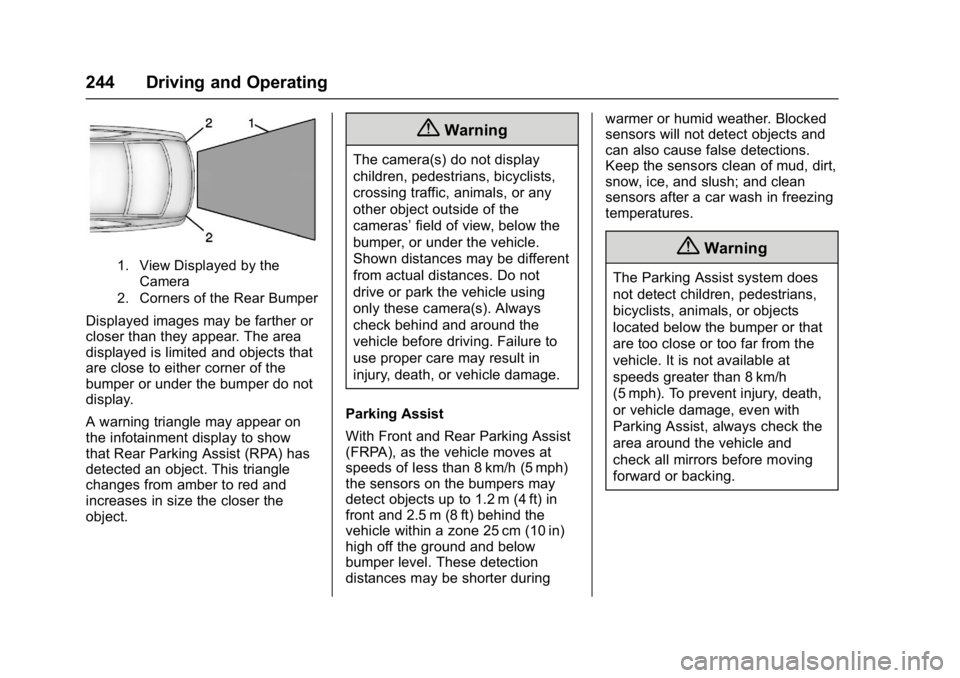
1. View Displayed by theCamera
2. Corners of the Rear Bumper
Displayed images may be farther or
closer than they appear. The area
displayed is limited and objects that
are close to either corner of the
bumper or under the bumper do not
display.
A warning triangle may appear on
the infotainment display to show
that Rear Parking Assist (RPA) has
detected an object. This triangle
changes from amber to red and
increases in size the closer the
object.
{Warning
The camera(s) do not display
children, pedestrians, bicyclists,
crossing traffic, animals, or any
other object outside of the
cameras’ field of view, below the
bumper, or under the vehicle.
Shown distances may be different
from actual distances. Do not
drive or park the vehicle using
only these camera(s). Always
check behind and around the
vehicle before driving. Failure to
use proper care may result in
injury, death, or vehicle damage.
Parking Assist
With Front and Rear Parking Assist
(FRPA), as the vehicle moves at
speeds of less than 8 km/h (5 mph)
the sensors on the bumpers may
detect objects up to 1.2 m (4 ft) in
front and 2.5 m (8 ft) behind the
vehicle within a zone 25 cm (10 in)
high off the ground and below
bumper level. These detection
distances may be shorter during warmer or humid weather. Blocked
sensors will not detect objects and
can also cause false detections.
Keep the sensors clean of mud, dirt,
snow, ice, and slush; and clean
sensors after a car wash in freezing
temperatures.
{Warning
The Parking Assist system does
not detect children, pedestrians,
bicyclists, animals, or objects
located below the bumper or that
are too close or too far from the
vehicle. It is not available at
speeds greater than 8 km/h
(5 mph). To prevent injury, death,
or vehicle damage, even with
Parking Assist, always check the
area around the vehicle and
check all mirrors before moving
forward or backing.
Page 246 of 413
Chevrolet Malibu Owner Manual (GMNA-Localizing-U.S./Canada/Mexico-
11348460) - 2018 - crc - 5/3/17
Driving and Operating 245
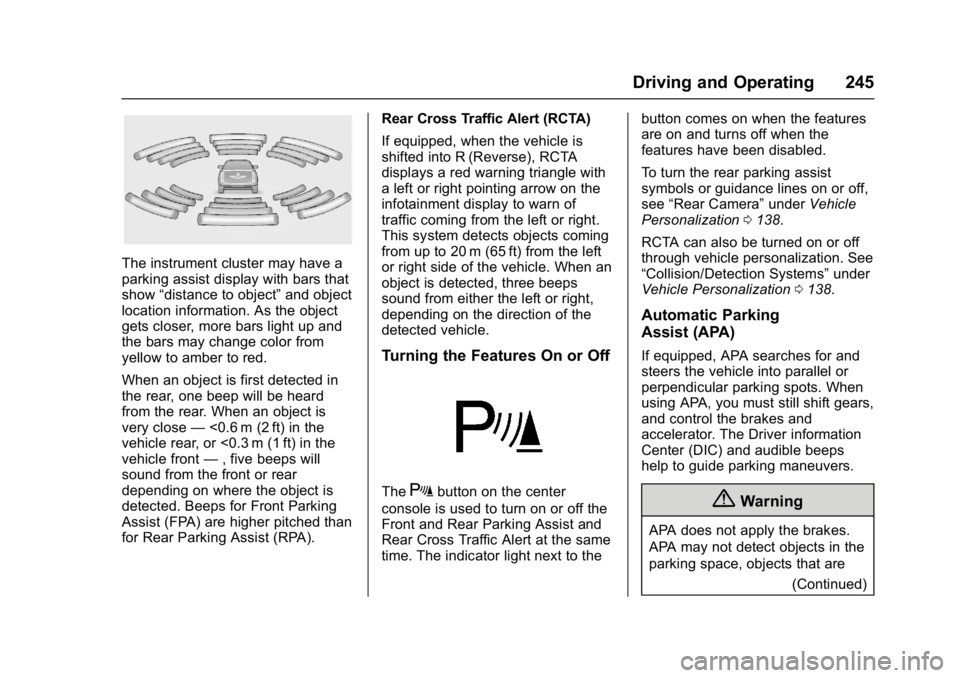
The instrument cluster may have a
parking assist display with bars that
show“distance to object” and object
location information. As the object
gets closer, more bars light up and
the bars may change color from
yellow to amber to red.
When an object is first detected in
the rear, one beep will be heard
from the rear. When an object is
very close —<0.6 m (2 ft) in the
vehicle rear, or <0.3 m (1 ft) in the
vehicle front —, five beeps will
sound from the front or rear
depending on where the object is
detected. Beeps for Front Parking
Assist (FPA) are higher pitched than
for Rear Parking Assist (RPA). Rear Cross Traffic Alert (RCTA)
If equipped, when the vehicle is
shifted into R (Reverse), RCTA
displays a red warning triangle with
a left or right pointing arrow on the
infotainment display to warn of
traffic coming from the left or right.
This system detects objects coming
from up to 20 m (65 ft) from the left
or right side of the vehicle. When an
object is detected, three beeps
sound from either the left or right,
depending on the direction of the
detected vehicle.
Turning the Features On or Off
TheXbutton on the center
console is used to turn on or off the
Front and Rear Parking Assist and
Rear Cross Traffic Alert at the same
time. The indicator light next to the button comes on when the features
are on and turns off when the
features have been disabled.
To turn the rear parking assist
symbols or guidance lines on or off,
see
“Rear Camera” underVehicle
Personalization 0138.
RCTA can also be turned on or off
through vehicle personalization. See
“Collision/Detection Systems” under
Vehicle Personalization 0138.
Automatic Parking
Assist (APA)
If equipped, APA searches for and
steers the vehicle into parallel or
perpendicular parking spots. When
using APA, you must still shift gears,
and control the brakes and
accelerator. The Driver information
Center (DIC) and audible beeps
help to guide parking maneuvers.
{Warning
APA does not apply the brakes.
APA may not detect objects in the
parking space, objects that are
(Continued)
Page 257 of 413
Chevrolet Malibu Owner Manual (GMNA-Localizing-U.S./Canada/Mexico-
11348460) - 2018 - crc - 5/3/17
256 Driving and Operating
camera to detect lane markings
between 60 km/h (37 mph) and
180 km/h (112 mph).
{Warning
The LKA system does not
continuously steer the vehicle.
It may not keep the vehicle in the
lane or give a Lane Departure
Warning (LDW) alert, even if a
lane marking is detected.
The LKA and LDW systems
may not:. Provide an alert or enough
steering assist to avoid a
lane departure or crash.
. Detect lane markings under
poor weather or visibility
conditions. This can occur if
the windshield or
headlamps are blocked by
dirt, snow, or ice, if they are
not in proper condition, or if
the sun shines directly into
the camera.
. Detect road edges.
(Continued)
Warning (Continued)
.Detect lanes on winding or
hilly roads.
If LKA only detects lane markings
on one side of the road, it will
only assist or provide an LDW
alert when approaching the lane
on the side where it has detected
a lane marking. Even with LKA
and LDW, you must steer the
vehicle. Always keep your
attention on the road and
maintain proper vehicle position
within the lane, or vehicle
damage, injury, or death could
occur. Always keep the
windshield, headlamps, and
camera sensors clean and in
good repair. Do not use LKA in
bad weather conditions.
{Warning
Using LKA while towing a trailer
or on slippery roads could cause
loss of control of the vehicle and
a crash. Turn the system off.
How the System Works
The LKA camera sensor is on the
windshield ahead of the rearview
mirror.
To turn LKA on and off, press
A
on the steering wheel.
When on,
Ais green if LKA is
available to assist and provide LDW
alerts. It may assist by gently
turning the steering wheel and
display
Aas amber if the vehicle
approaches a detected lane marking
without using a turn signal in that
direction. It may also provide an
LDW alert by flashing
Aamber
as the lane marking is crossed.
Additionally, there may be three
beeps on the right or left, depending
on the lane departure direction.
Page 258 of 413
Chevrolet Malibu Owner Manual (GMNA-Localizing-U.S./Canada/Mexico-
11348460) - 2018 - crc - 5/3/17
Driving and Operating 257
Take Steering
The LKA system does not
continuously steer the vehicle.
If LKA does not detect active driver
steering, an alert, chime, or DIC
message may be provided. Move
the steering wheel to dismiss.
When the System Does Not
Seem to Work Properly
The system performance may be
affected by:
.Close vehicles ahead.
. Sudden lighting changes, such
as when driving through tunnels.
. Banked roads.
. Roads with poor lane markings,
such as two-lane roads. If the LKA system is not functioning
properly when lane markings are
clearly visible, cleaning the
windshield may help.
A system unavailable message may
display if the camera is blocked.
The LKA system does not need
service.
LKA assistance and/or LDW alerts
may occur due to tar marks,
shadows, cracks in the road,
temporary or construction lane
markings, or other road
imperfections. This is normal system
operation; the vehicle does not need
service. Turn LKA off if these
conditions continue.
Fuel
GM recommends the use of TOP
TIER®detergent gasoline to keep
the engine cleaner and reduce
engine deposits. See
www.toptiergas.com for a list of TOP
TIER detergent gasoline marketers
and applicable countries.
Do not use any fuel labeled E85 or
FlexFuel. Do not use gasoline with
ethanol levels greater than 15% by
volume.
For vehicles with the 1.5L L4 engine
and the 1.8L Hybrid, use regular
unleaded gasoline meeting ASTM
specification D4814 with a posted
Page 408 of 413

Chevrolet Malibu Owner Manual (GMNA-Localizing-U.S./Canada/Mexico-
11348460) - 2018 - crc - 5/3/17
Index 407
OrderingService Publications . . . . . . . . . . 384
Outlets Power . . . . . . . . . . . . . . . . . . . . . . . . 109
Overheating, Engine . . . . . . . . . . . . 288
Overview . . . . . . . . . . . . . . . . . . . . . . . 164
P
Park Shifting Into . . . . . . . . . . . . . . . . . . . 221
Shifting Out of . . . . . . . . . . . . . . . . 222
Parking
Brake . . . . . . . . . . . . . . . . . . . . . . . . . 227
Brake and P (Park)Mechanism Check . . . . . . . . . . 294
Extended . . . . . . . . . . . . . . . . . . . . . 222
Over Things That Burn . . . . . . . 222
Parking Assist . . . . . . . . . . . . . . . . . . 243
Parking or Backing Assistance Systems . . . . . . . . . . 243
Passenger Airbag Status
Indicator . . . . . . . . . . . . . . . . . . . . . . 121
Passenger Compartment Air Filter . . . . . . . . . . . . . . . . . . . . . . . . . . 203
Passenger Sensing System . . . . . 78
Pedestrian Ahead Indicator . . . . . 126
Perchlorate Materials Requirements, California . . . . . . 270 Personalization
Vehicle . . . . . . . . . . . . . . . . . . . . . . . 138
Phone Apple CarPlay andAndroid Auto . . . . . . . . . . . . . . . . 191
Bluetooth . . . . . . . . . . . 182, 183, 187
Hands-Free . . . . . . . . . . . . . . . . . . . 192
Port USB . . . . . . . . . . . . . . . . . . . . . . . . . . 176
Power Door Locks . . . . . . . . . . . . . . . . . . . . . 42
Flows . . . . . . . . . . . . . . . . . . . . . . . . . 130
Indicator Gauge . . . . . . . . . . . . . . .119
Mirrors . . . . . . . . . . . . . . . . . . . . . . . . . . 49
Outlets . . . . . . . . . . . . . . . . . . . . . . . 109
Protection, Battery . . . . . . . . . . . . 161
Retained Accessory (RAP) . . . 221
Seat Adjustment . . . . . . . . . . . . . . . . 57
Windows . . . . . . . . . . . . . . . . . . . . . . . 50
Pregnancy, Using Seat Belts . . . . 70
Privacy Vehicle Data Recording . . . . . . . 387
Program Courtesy Transportation . . . . . . 381
Proposition
65 Warning,
California . . . . . . . . . . . .269, 291, 343, Back Cover
R
Radio Frequency Statement . . . . 385
Radio Reception . . . . . . . . . . . . . . . . 174
RadiosAM-FM Radio . . . . . . . . . . . . . . . . . 170
Satellite . . . . . . . . . . . . . . . . . . . . . . . 173
Reading Lamps . . . . . . . . . . . . . . . . . 159
Ready Indicator . . . . . . . . . . . . . . . . . 129
Rear Seat Armrest . . . . . . . . . . . . . . . 65
Rear Seats . . . . . . . . . . . . . . . . . . . . . . 63
Rear Vision Camera (RVC) . . . . . 243
Rearview Mirrors . . . . . . . . . . . . . . . . 50 Automatic Dimming . . . . . . . . . . . . . 50
Reclining Seatbacks . . . . . . . . . . . . . 57
Recommended Fluids and
Lubricants . . . . . . . . . . . . . . . . . . . . . 369
Records Maintenance . . . . . . . . . . . . . . . . . . 371
Recreational Vehicle Towing . . . . 347
Regenerative Braking . . . . . . . . . . . 230
Reimbursement Program,
GM Mobility . . . . . . . . . . . . . . . . . . . 379
Remote Keyless Entry (RKE) System . . . . . . . . . . . . . . . . . . . . . . . . . 32
Remote Vehicle Start . . . . . . . . . . . . 38
Replacement Parts Airbags . . . . . . . . . . . . . . . . . . . . . . . . . 84
Maintenance . . . . . . . . . . . . . . . . . . 370