2018 CHEVROLET MALIBU interior lights
[x] Cancel search: interior lightsPage 63 of 413
Chevrolet Malibu Owner Manual (GMNA-Localizing-U.S./Canada/Mexico-
11348460) - 2018 - crc - 5/3/17
62 Seats and Restraints
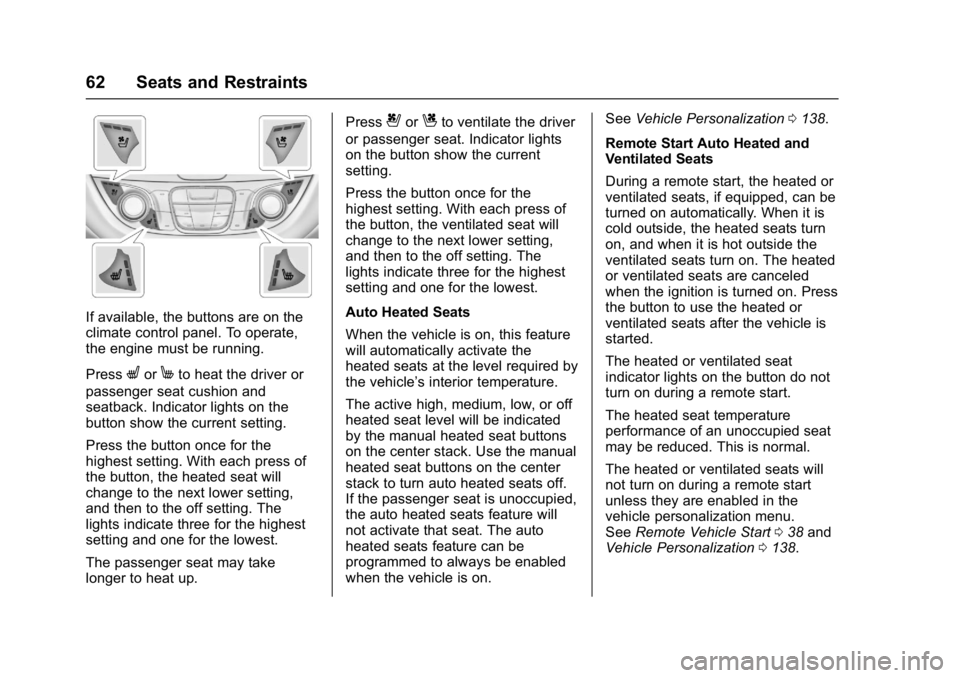
If available, the buttons are on the
climate control panel. To operate,
the engine must be running.
Press
LorMto heat the driver or
passenger seat cushion and
seatback. Indicator lights on the
button show the current setting.
Press the button once for the
highest setting. With each press of
the button, the heated seat will
change to the next lower setting,
and then to the off setting. The
lights indicate three for the highest
setting and one for the lowest.
The passenger seat may take
longer to heat up. Press
{orCto ventilate the driver
or passenger seat. Indicator lights
on the button show the current
setting.
Press the button once for the
highest setting. With each press of
the button, the ventilated seat will
change to the next lower setting,
and then to the off setting. The
lights indicate three for the highest
setting and one for the lowest.
Auto Heated Seats
When the vehicle is on, this feature
will automatically activate the
heated seats at the level required by
the vehicle’ s interior temperature.
The active high, medium, low, or off
heated seat level will be indicated
by the manual heated seat buttons
on the center stack. Use the manual
heated seat buttons on the center
stack to turn auto heated seats off.
If the passenger seat is unoccupied,
the auto heated seats feature will
not activate that seat. The auto
heated seats feature can be
programmed to always be enabled
when the vehicle is on. See
Vehicle Personalization 0138.
Remote Start Auto Heated and
Ventilated Seats
During a remote start, the heated or
ventilated seats, if equipped, can be
turned on automatically. When it is
cold outside, the heated seats turn
on, and when it is hot outside the
ventilated seats turn on. The heated
or ventilated seats are canceled
when the ignition is turned on. Press
the button to use the heated or
ventilated seats after the vehicle is
started.
The heated or ventilated seat
indicator lights on the button do not
turn on during a remote start.
The heated seat temperature
performance of an unoccupied seat
may be reduced. This is normal.
The heated or ventilated seats will
not turn on during a remote start
unless they are enabled in the
vehicle personalization menu.
See Remote Vehicle Start 038 and
Vehicle Personalization 0138.
Page 147 of 413
Chevrolet Malibu Owner Manual (GMNA-Localizing-U.S./Canada/Mexico-
11348460) - 2018 - crc - 5/3/17
146 Instruments and Controls
Auto Memory Recall
This feature automatically recalls
the current driver’s previously stored
1 or 2 button positions when the
ignition is changed from off to on or
ACC/ACCESSORY. See Memory
Seats 059.
Select Off or On.
Easy Exit Options
This feature automatically recalls
the previously stored Exit button
position when exiting the vehicle.
See Memory Seats 059.
Select Off or On.
Chime Volume
This allows the selection of the
chime volume level.
Touch + or −to adjust the volume.
Reverse Tilt Mirror
When on, driver, passenger, or both
driver and passenger outside
mirrors will tilt downward when the
vehicle is shifted to R (Reverse) to
improve visibility of the ground near
the rear wheels. They will return to
their previous driving position when the vehicle is shifted out of
R (Reverse) or the engine is turned
off. See
Reverse Tilt Mirrors 049.
Select Off, On - Driver and
Passenger, On - Driver, or On -
Passenger.
Extended Hill Start Assist
This allows the duration of the Hill
Start Assist to be changed.
Select Extended Hold or
Standard Hold.
Lighting
Select and the following may
display:
. Vehicle Locator Lights
. Exit Lighting
Vehicle Locator Lights
This feature will flash the exterior
lamps and allows the headlamps,
parking lamps, taillamps, and most
of the interior lamps to turn on
briefly when
Kon the Remote
Keyless Entry (RKE) transmitter is
pressed to locate the vehicle.
Select Off or On. Exit Lighting
This allows the selection of how
long the exterior lamps stay on
when leaving the vehicle when it is
dark outside.
Select Off, 30 Seconds, 60
Seconds, or 120 Seconds.
Power Door Locks
Select and the following may
display:
.
Unlocked Door Anti Lock Out
. Auto Door Unlock
. Delayed Door Lock
Unlocked Door Anti Lock Out
When on, this feature will keep the
driver door from locking when the
door is open. If this feature is turned
on, the Delayed Door Lock menu
will not be available.
Select Off or On.
Auto Door Unlock
This allows selection of which of the
doors will automatically unlock when
the vehicle is shifted into P (Park).
Select Off, All Doors, or Driver Door.
Page 159 of 413
Chevrolet Malibu Owner Manual (GMNA-Localizing-U.S./Canada/Mexico-
11348460) - 2018 - crc - 5/3/17
158 Lighting
Turn and Lane-Change
Signals
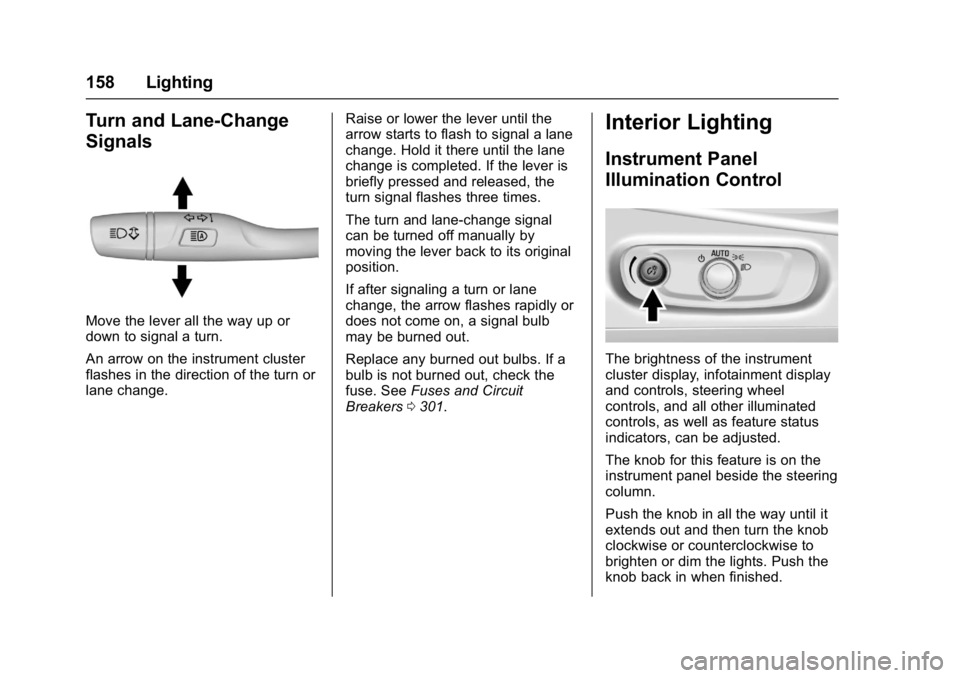
Move the lever all the way up or
down to signal a turn.
An arrow on the instrument cluster
flashes in the direction of the turn or
lane change.Raise or lower the lever until the
arrow starts to flash to signal a lane
change. Hold it there until the lane
change is completed. If the lever is
briefly pressed and released, the
turn signal flashes three times.
The turn and lane-change signal
can be turned off manually by
moving the lever back to its original
position.
If after signaling a turn or lane
change, the arrow flashes rapidly or
does not come on, a signal bulb
may be burned out.
Replace any burned out bulbs. If a
bulb is not burned out, check the
fuse. See
Fuses and Circuit
Breakers 0301.
Interior Lighting
Instrument Panel
Illumination Control
The brightness of the instrument
cluster display, infotainment display
and controls, steering wheel
controls, and all other illuminated
controls, as well as feature status
indicators, can be adjusted.
The knob for this feature is on the
instrument panel beside the steering
column.
Push the knob in all the way until it
extends out and then turn the knob
clockwise or counterclockwise to
brighten or dim the lights. Push the
knob back in when finished.
Page 161 of 413
Chevrolet Malibu Owner Manual (GMNA-Localizing-U.S./Canada/Mexico-
11348460) - 2018 - crc - 5/3/17
160 Lighting
Lighting Features
Entry Lighting
Some exterior lamps and most of
the interior lamps turn on briefly at
night or in areas with limited lighting
when the Remote Keyless Entry
(RKE) transmitter
Kbutton is
pressed. See Remote Keyless Entry
(RKE) System Operation 032. After
about 30 seconds the exterior lamps
turn off, then the dome lamps and
remaining interior lamps dim to off.
Entry lighting can be disabled
manually by turning the ignition on
or to ACC/ACCESSORY, or by
pressing
Qon the RKE transmitter.
This feature can be changed. See
Vehicle Personalization 0138.
Exit Lighting
Some exterior lamps and interior
lights come on at night, or in areas
with limited lighting, when the driver
door is opened after the ignition is
turned off. The dome lamp comes
on after the ignition is turned off. The exterior lamps and dome lamp
remain on for a set amount of time,
then automatically turn off.
The exterior lamps turn off
immediately by turning the exterior
lamp control off.
This feature can be changed. See
Vehicle Personalization
0138.
Battery Load
Management
The vehicle has Electric Power
Management (EPM) that estimates
the battery's temperature and state
of charge. It then adjusts the voltage
for best performance and extended
life of the battery.
When the battery's state of charge
is low, the voltage is raised slightly
to quickly bring the charge back up.
When the state of charge is high,
the voltage is lowered slightly to
prevent overcharging. If the vehicle
has a voltmeter gauge or a voltage
display on the Driver Information
Center (DIC), you may see the voltage move up or down. This is
normal. If there is a problem, an
alert will be displayed.
The battery can be discharged at
idle if the electrical loads are very
high. This is true for all vehicles.
This is because the generator
(alternator) may not be spinning fast
enough at idle to produce all of the
power needed for very high
electrical loads.
A high electrical load occurs when
several of the following are on, such
as: headlamps, high beams, rear
window defogger, climate control fan
at high speed, heated seats, engine
cooling fans, trailer loads, and loads
plugged into accessory power
outlets.
EPM works to prevent excessive
discharge of the battery. It does this
by balancing the generator's output
and the vehicle's electrical needs.
It can increase engine idle speed to
generate more power whenever
needed. It can temporarily reduce
the power demands of some
accessories.
Page 199 of 413
Chevrolet Malibu Owner Manual (GMNA-Localizing-U.S./Canada/Mexico-
11348460) - 2018 - crc - 5/3/17
198 Climate Controls
Rear Window Defogger
K:Press to turn the rear window
defogger on or off. An indicator light
on the button comes on to show that
the rear window defogger is on. The
defogger turns off when the ignition
is turned off or to ACC/
ACCESSORY.
The upper lines on the rear window
are antenna grids and are not
intended to defrost the glass.
The rear window defogger can be
set to automatic operation. See
“Climate and Air Quality” under
Vehicle Personalization 0138.
When Auto Rear Defog is selected,
the rear window defogger turns on
automatically when the interior
temperature is cold and the outside
temperature is about 7 °C (44 °F)
and below. The auto rear defogger
turns off automatically. If the vehicle is equipped with
heated outside mirrors, they turn on
when the rear window defogger
button is on and help to clear fog or
frost from the surface of the mirror.
See
Heated Mirrors 049.
Caution
Do not try to clear frost or other
material from the inside of the
front windshield and rear window
with a razor blade or anything
else that is sharp. This may
damage the rear window
defogger grid and affect the
radio's ability to pick up stations
clearly. The repairs would not be
covered by the vehicle warranty.
LorM:If equipped, pressLorMto heat the driver or passenger seat.
See Heated and Ventilated Front
Seats 061. Remote Start Climate Control
Operation :
If equipped with remote
start, the climate control system
may run when the vehicle is started
remotely. The system uses the
driver ’s previous settings to heat or
cool the inside of the vehicle. The
rear defog may come on during
remote start based on cold ambient
conditions. The rear defog indicator
light does not come on during a
remote start. The front heated seats
will turn on if it is cold outside. The
heated seat indicator lights do not
come on during a remote start.
Page 406 of 413

Chevrolet Malibu Owner Manual (GMNA-Localizing-U.S./Canada/Mexico-
11348460) - 2018 - crc - 5/3/17
Index 405
How to Wear Seat BeltsProperly . . . . . . . . . . . . . . . . . . . . . . . . 67
HVAC . . . . . . . . . . . . . . . . . . . . . . 196, 199
I
Ignition Positions . . . . . . . . . . . . . . . 216
Immobilizer . . . . . . . . . . . . . . . . . . . . . . 47
Indicator Pedestrian Ahead . . . . . . . . . . . . 126
Vehicle Ahead . . . . . . . . . . . . . . . . 126
Infants and Young Children, Restraints . . . . . . . . . . . . . . . . . . . . . . 86
Information Energy . . . . . . . . . . . . . . . . . . . . . . . 131
Infotainment . . . . . . . . . . . . . . . . . . . . 162
Infotainment System . . . . . . . . . . . . 388
Instrument Cluster . . . . . . . . . 112, 114
Instrument Panel Overview . . . . . . . 6
Interior Rearview Mirrors . . . . . . . . . 50
Introduction . . . . . . . . . . . . . . . . . . . . . . . 2
J
Jump Starting - North America . . . . . . . . . . . . . . . . . . . . . . . 343
K
Keyless EntryRemote (RKE) System . . . . . . . . . 32
Keys . . . . . . . . . . . . . . . . . . . . . . . . . . . . . 31
L
Labeling, Tire Sidewall . . . . . . . . . . 311
Lamps Courtesy . . . . . . . . . . . . . . . . . . . . . . 159
Daytime Running (DRL) . . . . . . 156
Dome . . . . . . . . . . . . . . . . . . . . . . . . . 159
Exterior Controls . . . . . . . . . . . . . . 154
Exterior Lamps OffReminder . . . . . . . . . . . . . . . . . . . 156
Exterior Lighting Battery
Saver . . . . . . . . . . . . . . . . . . . . . . . 161
License Plate . . . . . . . . . . . . . . . . . 300
Malfunction Indicator (Check Engine) . . . . . . . . . . . . . 122
On Reminder . . . . . . . . . . . . . . . . . 130
Reading . . . . . . . . . . . . . . . . . . . . . . 159
Lane Change Alert (LCA) . . . . . . . 253
Lane Departure Warning (LDW) . . . . . . . . . . . . . . . . 255
Lane Keep Assist (LKA) . . . . . . . . 255
Lane Keep Assist Light . . . . . . . . . 125
Lap-Shoulder Belt . . . . . . . . . . . . . . . 68
LATCH System Replacing Parts after a
Crash . . . . . . . . . . . . . . . . . . . . . . . . . 96
LATCH, Lower Anchors and Tethers for Children . . . . . . . . . . . . 91
LED Lighting . . . . . . . . . . . . . . . . . . . . 296 Lighting
Entry . . . . . . . . . . . . . . . . . . . . . . . . . 160
Exit . . . . . . . . . . . . . . . . . . . . . . . . . . . 160
Illumination Control . . . . . . . . . . . 158
LED . . . . . . . . . . . . . . . . . . . . . . . . . . 296
Lights Airbag Readiness . . . . . . . . . . . . . 120
Antilock Brake System
(ABS) Warning . . . . . . . . . . . . . . 125
Brake System Warning . . . . . . . 124
Charging System . . . . . . . . . . . . . 122
Check Engine (Malfunction Indicator) . . . . . . . . . . . . . . . . . . . . 122
Cruise Control . . . . . . . . . . . . . . . . 130
Door Ajar . . . . . . . . . . . . . . . . . . . . . 130
Electric Parking Brake . . . . . . . . 124
Engine Oil Pressure . . . . . . . . . . 128
Flash-to-Pass . . . . . . . . . . . . . . . . . 156
High-Beam On . . . . . . . . . . . . . . . . 129
High/Low Beam Changer . . . . . 156
Lane Keep Assist . . . . . . . . . . . . . 125
Low Fuel Warning . . . . . . . 128, 129
Seat Belt Reminders . . . . . . . . . . 120
Security . . . . . . . . . . . . . . . . . . . . . . 129
Service Electric Parking Brake . . . . . . . . . . . . . . . . . . . . . . . 125
StabiliTrak OFF . . . . . . . . . . . . . . . 127
Tire Pressure . . . . . . . . . . . . . . . . . 127
Page 407 of 413

Chevrolet Malibu Owner Manual (GMNA-Localizing-U.S./Canada/Mexico-
11348460) - 2018 - crc - 5/3/17
406 Index
Lights (cont'd)Traction Control System
(TCS)/StabiliTrak . . . . . . . . . . . . 127
Traction Off . . . . . . . . . . . . . . . . . . . 126
Vehicle Ready . . . . . . . . . . . . . . . . 129
Locks Automatic Door . . . . . . . . . . . . . . . . . 43
Delayed Locking . . . . . . . . . . . . . . . . 42
Door . . . . . . . . . . . . . . . . . . . . . . . . . . . . 40
Lockout Protection . . . . . . . . . . . . . . 43
Power Door . . . . . . . . . . . . . . . . . . . . . 42
Safety . . . . . . . . . . . . . . . . . . . . . . . . . . 44
Loss of Control . . . . . . . . . . . . . . . . . 209
Low Fuel Warning Light . . . . 128, 129
Low-Profile Tires . . . . . . . . . . . . . . . . 310
Lower Anchors and Tethers for Children (LATCH
System) . . . . . . . . . . . . . . . . . . . . . . . . 91
Lumbar Adjustment . . . . . . . . . . . . . . 57 Front Seats . . . . . . . . . . . . . . . . . . . . . 57
M
MaintenanceRecords . . . . . . . . . . . . . . . . . . . . . . 371
Maintenance and Care Additional . . . . . . . . . . . . . . . . . . . . . 366
Maintenance Schedule . . . . . . . . . 360 Maintenance Schedule (cont'd)
Recommended Fluids and
Lubricants . . . . . . . . . . . . . . . . . . . 369
Malfunction Indicator Lamp . . . . . 122
Manual Mode . . . . . . . . . . . . . . . . . . . 225
Media
Avoiding Untrusted Devices . . 176
Memory Features . . . . . . . . . . . . . . . . 12
Memory Seats . . . . . . . . . . . . . . . . . . . 59
Messages Engine Power . . . . . . . . . . . . . . . . 138
Vehicle . . . . . . . . . . . . . . . . . . . . . . . 137
Vehicle Speed . . . . . . . . . . . . . . . . 138
Mirrors
Automatic DimmingRearview . . . . . . . . . . . . . . . . . . . . . . 50
Convex . . . . . . . . . . . . . . . . . . . . . . . . . 48
Folding . . . . . . . . . . . . . . . . . . . . . . . . . 49
Heated . . . . . . . . . . . . . . . . . . . . . . . . . 49
Manual Rearview . . . . . . . . . . . . . . . 50
Power . . . . . . . . . . . . . . . . . . . . . . . . . . 49
Tilt in Reverse . . . . . . . . . . . . . . . . . . 49
Mirrors, Interior Rearview . . . . . . . . 50
Monitor System, Tire
Pressure . . . . . . . . . . . . . . . . . . . . . . 318
Multi-band Antenna . . . . . . . . . . . . . 175
N
Navigation OnStar . . . . . . . . . . . . . . . . . . . . . . . 391
Net, Convenience . . . . . . . . . . . . . . 103
New Vehicle Break-In . . . . . . . . . . . 216
O
Odometer . . . . . . . . . . . . . . . . . . . . . . . 117 Trip . . . . . . . . . . . . . . . . . . . . . . . . . . . .117
Off-Road Recovery . . . . . . . . . . . . . . . . . . . . . 208
Oil Engine . . . . . . . . . . . . . . . . . . . . . . . . 278
Engine Oil Life System . . . . . . . 281
Pressure Light . . . . . . . . . . . . . . . . 128
Older Children, Restraints . . . . . . . 84
Online Owner Center . . . . . . . . . . . 378
OnStar . . . . . . . . . . . . . . . . . . . . . . . . . 388
OnStar Additional Information . . . . . . . . . . . . . . . . . . . . 395
OnStar Connections . . . . . . . . . . . . 392
OnStar Diagnostics . . . . . . . . . . . . . 394
OnStar Emergency . . . . . . . . . . . . . 390
OnStar Navigation . . . . . . . . . . . . . . 391
OnStar Overview . . . . . . . . . . . . . . . 389
OnStar Security . . . . . . . . . . . . . . . . 391
Operation Infotainment System . . . . . . . . . . 167