2018 CHEVROLET CORVETTE C7 remote control
[x] Cancel search: remote controlPage 132 of 353
Chevrolet Corvette Owner Manual (GMNA-Localizing-U.S./Canada/Mexico-
11374030) - 2018 - crc - 3/29/17
Instruments and Controls 131
Universal Remote
System
SeeRadio Frequency Statement
0 326.
The FCC Grant of Equipment
Authorization Certificate number is
NZLSAHL5B.
The Canadian Registration ID
number is 4112A-SAHL5B.
Universal Remote System
Programming
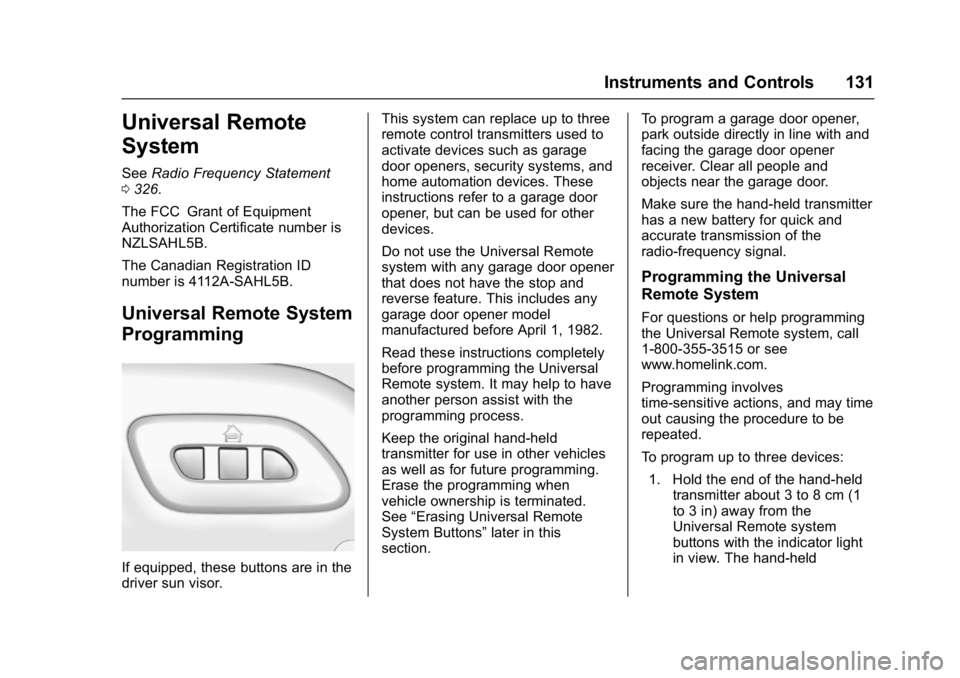
If equipped, these buttons are in the
driver sun visor. This system can replace up to three
remote control transmitters used to
activate devices such as garage
door openers, security systems, and
home automation devices. These
instructions refer to a garage door
opener, but can be used for other
devices.
Do not use the Universal Remote
system with any garage door opener
that does not have the stop and
reverse feature. This includes any
garage door opener model
manufactured before April 1, 1982.
Read these instructions completely
before programming the Universal
Remote system. It may help to have
another person assist with the
programming process.
Keep the original hand-held
transmitter for use in other vehicles
as well as for future programming.
Erase the programming when
vehicle ownership is terminated.
See
“Erasing Universal Remote
System Buttons” later in this
section. To program a garage door opener,
park outside directly in line with and
facing the garage door opener
receiver. Clear all people and
objects near the garage door.
Make sure the hand-held transmitter
has a new battery for quick and
accurate transmission of the
radio-frequency signal.
Programming the Universal
Remote System
For questions or help programming
the Universal Remote system, call
1-800-355-3515 or see
www.homelink.com.
Programming involves
time-sensitive actions, and may time
out causing the procedure to be
repeated.
To program up to three devices:
1. Hold the end of the hand-held transmitter about 3 to 8 cm (1
to 3 in) away from the
Universal Remote system
buttons with the indicator light
in view. The hand-held
Page 133 of 353
Chevrolet Corvette Owner Manual (GMNA-Localizing-U.S./Canada/Mexico-
11374030) - 2018 - crc - 3/29/17
132 Instruments and Controls
transmitter was supplied by the
manufacturer of the garage
door opener receiver.
2. At the same time, press and hold both the hand-held
transmitter button and one of
the three Universal Remote
system buttons to be used to
operate the garage door. Do
not release either button until
the indicator light changes from
a slow to a rapid flash. Then
release both buttons.
Some garage door openers
may require substitution of
Step 2 with the procedure
under “Radio Signals for
Canada and Some Gate
Operators” later in this section.
3. Press and hold the newly programmed Universal Remote
system button for five seconds
while watching the indicator
light and garage door
activation.
.If the indicator light stays on
continuously or the garage
door moves when the
button is pressed, then programming is complete.
There is no need to
complete Steps 4–6.
. If the indicator light does
not come on or the garage
door does not move, a
second button press may
be required. For a second
time, press and hold the
newly programmed button
for five seconds. If the light
stays on or the garage door
moves, programming is
complete.
. If the indicator light blinks
rapidly for two seconds,
then changes to a solid light
and the garage door does
not move, continue with
programming Steps 4–6.
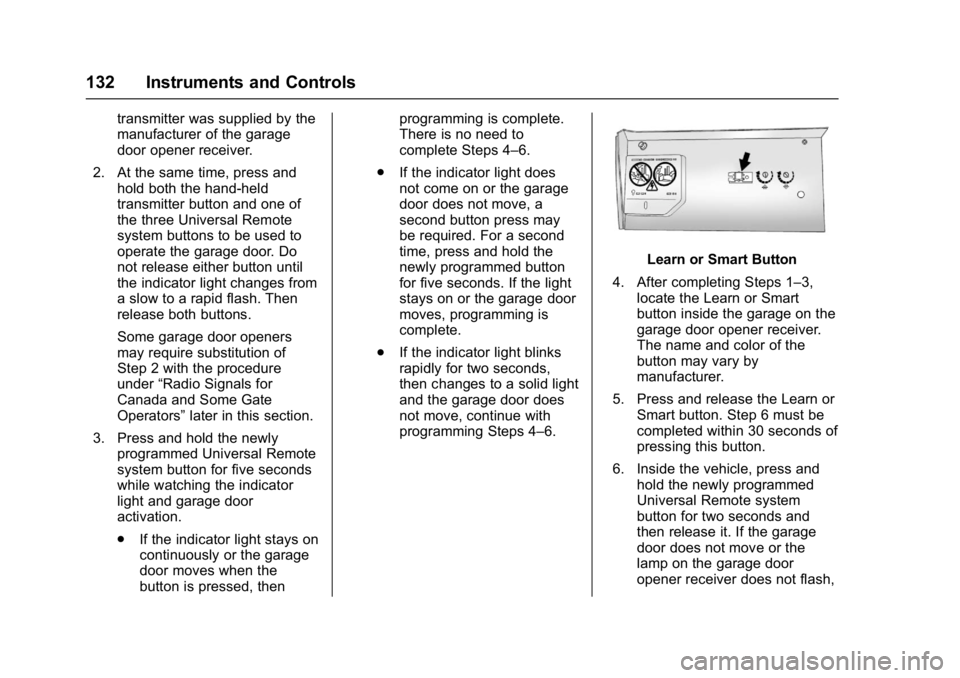
Learn or Smart Button
4. After completing Steps 1–3, locate the Learn or Smart
button inside the garage on the
garage door opener receiver.
The name and color of the
button may vary by
manufacturer.
5. Press and release the Learn or Smart button. Step 6 must be
completed within 30 seconds of
pressing this button.
6. Inside the vehicle, press and hold the newly programmed
Universal Remote system
button for two seconds and
then release it. If the garage
door does not move or the
lamp on the garage door
opener receiver does not flash,
Page 134 of 353
Chevrolet Corvette Owner Manual (GMNA-Localizing-U.S./Canada/Mexico-
11374030) - 2018 - crc - 3/29/17
Instruments and Controls 133
press and hold the same
button a second time for
two seconds, then release it.
Again, if the door does not
move or the garage door lamp
does not flash, press and hold
the same button a third time for
two seconds, then release it.
The Universal Remote system
should now activate the
garage door.
Repeat the process to program the
two remaining buttons.
Radio Signals for Canada and
Some Gate Operators
For questions or programming help
call 1-800-355-3515 or see
www.homelink.com.
Canadian radio-frequency laws and
some U.S. gate operators require
transmitter signals to time out or quit
after several seconds of
transmission. This may not be long
enough for the Universal Remote
system to pick up the signal during
programming. If the programming did not work,
replace Step 2 under
“Programming
the Universal Remote System” with
the following:
Press and hold the Universal
Remote system button while
pressing and releasing the
hand-held transmitter button every
two seconds until the signal has
been successfully accepted by the
Universal Remote system. The
Universal Remote system indicator
light will flash slowly at first and then
rapidly. Proceed with Step 3 under
“Programming the Universal Remote
System” to complete.Universal Remote System
Operation
Using the Universal Remote
System
Press and hold the appropriate
Universal Remote system button for
at least one-half second. The
indicator light will come on while the
signal is being transmitted.
Erasing Universal Remote
System Buttons
Erase all programmed buttons when
vehicle ownership is terminated.
To erase:
1. Press and hold the two outside buttons until the indicator light
begins to flash. This should
take about 10 seconds.
2. Release both buttons.
Page 135 of 353
Chevrolet Corvette Owner Manual (GMNA-Localizing-U.S./Canada/Mexico-
11374030) - 2018 - crc - 3/29/17
134 Instruments and Controls
Reprogramming a Single
Universal Remote System
Button
To reprogram any of the system
buttons:1. Press and hold any one of the buttons. Do not release the
button.
2. The indicator light will begin to flash after 20 seconds. Without
releasing the button, proceed
with Step 1 under
“Programming the Universal
Remote System.”
Page 141 of 353

Chevrolet Corvette Owner Manual (GMNA-Localizing-U.S./Canada/Mexico-
11374030) - 2018 - crc - 3/29/17
140 Lighting
Lighting Features
Entry Lighting
Some exterior lamps turn on briefly
at night, or in areas with limited
lighting, when
Kis pressed on the
Remote Keyless Entry (RKE)
transmitter. When the driver door is
opened, all control lights, Driver
Information Center (DIC) lights, and
door pocket lights turn on. After
about 30 seconds the exterior lamps
turn off, and then the dome and
remaining interior lamps dim to off.
Entry lighting can be disabled
manually by turning the ignition to
on or ACC/ACCESSORY, or by
pressing
Qon the RKE transmitter.
This feature can be changed. See
“Vehicle Locator Lights” under
Vehicle Personalization 0124.
Exit Lighting
Some exterior lamps come on at
night, or in areas with limited
lighting, when the driver door is
opened after the ignition is turned
off. The dome lamp comes on after
the ignition is turned off. The
exterior lamps and dome lamp
remain on after the door is closed
for a set amount of time, then
automatically turn off.
The exterior lamps turn off
immediately by turning the exterior
lamp control off.
This feature can be changed. See
Vehicle Personalization 0124.
Battery Power Protection
This vehicle has a feature to help
prevent the battery from being
drained in case any of the following
lamps are left on: vanity mirror
lamps, cargo lamps, reading lamps,
or glove box lamps. If any of these
lamps are left on, they will
automatically time-out after about
10 minutes. To reset it, the ignition
must be turned on.
Exterior Lighting Battery
Saver
The exterior lamps turn off about
10 minutes after the ignition is
turned off, if the parking lamps or
headlamps have been manually left
on. This protects against draining
the battery. To restart the 10-minute
timer, turn the exterior lamp control
to the off position and then back to
the parking lamp or headlamp
position.
To keep the lamps on for more than
10 minutes, the ignition must be on
or in ACC/ACCESSORY.
Page 151 of 353

Chevrolet Corvette Owner Manual (GMNA-Localizing-U.S./Canada/Mexico-
11374030) - 2018 - crc - 3/29/17
150 Climate Controls
If equipped with a power convertible
top, the rear window defogger and
heated mirrors are automatically
disabled when the power convertible
top is moving or down.
Caution
Using a razor blade or sharp
object on the inside rear window
can damage the antenna or
defogger. Repairs would not be
covered by the vehicle warranty.
Do not stick anything to the rear
window.
z/{:If equipped, press to heat
or ventilate the seat. See Heated
and Ventilated Front Seats 062.
Remote Start Climate Control
Operation (If Equipped) : If remote
start is used to start the vehicle, the
climate control system will come on.
The system uses the driver ’s
previous settings to heat or cool the
inside of the vehicle. The rear
window defogger or heated outside
mirrors, if equipped, may come on
based on cold ambient conditions. The rear defog indicator light may
not come on during a remote start.
The heated or ventilated seats may
turn on if it is cold or hot outside.
See
Remote Vehicle Start 033 and
Heated and Ventilated Front Seats
0 62, if equipped.
Sensors
The interior cabin air temperature
and solar sensor on top of the
instrument panel near the
windshield monitors the solar heat
and measures the initial interior
cabin temperature.
The climate control system uses the
sensor information to adjust the
temperature, fan speed,
recirculation, and air delivery mode
for best comfort.
The humidity and windshield
temperature sensor is on the
windshield glass inside surface near
the rearview mirror. The automatic
climate control system uses this
sensor to receive information to
determine the need for defogging. If any of these sensors are blocked
or covered, the automatic climate
control system may not work
properly.
There is also a sensor behind the
front bumper. This sensor reads the
outside air temperature and helps to
maintain the temperature inside the
vehicle. Any cover on the front of
the vehicle could give a false
reading in the temperature.
Page 181 of 353

Chevrolet Corvette Owner Manual (GMNA-Localizing-U.S./Canada/Mexico-
11374030) - 2018 - crc - 4/4/17
180 Driving and Operating
If you still are unable to shift out of
P (Park):1. Fully release the shift lever button, and let go of the shift
lever.
2. While holding down the brake pedal, press the shift lever
button again.
3. Move the shift lever to the desired position.
If you still cannot move the shift
lever from P (Park), consult your
dealer or a professional towing
service.
Parking (Manual
Transmission)
Before exiting the vehicle, move the
shift lever into 1 (First) or
R (Reverse), and apply the parking
brake. Once the shift lever has been
placed into 1 (First) or R (Reverse)
with the clutch pedal pressed in,
turn the ignition off and release the
clutch.
Parking over Things
That Burn
{Warning
Things that can burn could touch
hot exhaust parts under the
vehicle and ignite. Do not park
over papers, leaves, dry grass,
or other things that can burn.
Active Fuel Management
This system allows the engine to
operate on either all or half of its
cylinders, depending on the driving
conditions. With a manual
transmission, the system is only
active in Eco Mode. With an
automatic transmission, the system
is available in all modes, but is more
aggressive in Eco Mode. See Driver
Mode Control 0194.
When less power is required, such
as cruising at a constant vehicle
speed, the system will operate in
the half cylinder mode, allowing the
vehicle to achieve better fuel
economy. When greater power demands are required, such as
accelerating from a stop, passing,
or merging onto a freeway, the
system will maintain full-cylinder
operation.
Extended Parking
It is better not to park with the
vehicle running. If the vehicle is left
while running, follow the proper
steps to be sure the vehicle will not
move and there is adequate
ventilation.
See
Shifting Into Park 0178 and
Engine Exhaust 0181.
If the vehicle is left in P (Park) while
running and the Remote Keyless
Entry (RKE) transmitter is outside
the vehicle, the vehicle will turn off
after one hour.
If the vehicle is left in P (Park) while
running and the RKE transmitter is
inside, the vehicle will run for two
hours. At the end of the second
hour, the vehicle will turn off.
The timer will reset if the vehicle is
taken out of P (Park) while it is
running.
Page 214 of 353

Chevrolet Corvette Owner Manual (GMNA-Localizing-U.S./Canada/Mexico-
11374030) - 2018 - crc - 3/29/17
Vehicle Care 213
California Perchlorate
Materials Requirements
Certain types of automotive
applications, such as airbag
initiators, seat belt pretensioners,
and lithium batteries contained in
Remote Keyless Entry transmitters,
may contain perchlorate materials.
Special handling may be necessary.
For additional information, see
www.dtsc.ca.gov/hazardouswaste/
perchlorate.
Accessories and
Modifications
Adding non-dealer accessories or
making modifications to the vehicle
can affect vehicle performance and
safety, including such things as
airbags, braking, stability, ride and
handling, emissions systems,
aerodynamics, durability, and
electronic systems like antilock
brakes, traction control, and stability
control. These accessories or
modifications could even cause
malfunction or damage not covered
by the vehicle warranty.Damage to suspension components
caused by modifying vehicle height
outside of factory settings will not be
covered by the vehicle warranty.
Damage to vehicle components
resulting from modifications or the
installation or use of non-GM
certified parts, including control
module or software modifications, is
not covered under the terms of the
vehicle warranty and may affect
remaining warranty coverage for
affected parts.
GM Accessories are designed to
complement and function with other
systems on the vehicle. See your
dealer to accessorize the vehicle
using genuine GM Accessories
installed by a dealer technician.
Also, see
Adding Equipment to the
Airbag-Equipped Vehicle 079.
Lifting the Vehicle
{Warning
Lifting a vehicle can cause an
injury. The vehicle can slip off the
jack and roll over you or other
people. You and they could be
badly injured. Find a level place
to lift your vehicle. To help
prevent the vehicle from moving:
1. Set the parking brake firmly.
2. Put an automatictransmission in P (Park) or a
manual transmission in
1 (First) or R (Reverse).
3. Turn off the engine.
To be even more certain the
vehicle will not move, put blocks
in front of and behind the wheels.