2018 CHEVROLET CORVETTE C7 remote control
[x] Cancel search: remote controlPage 43 of 353

Chevrolet Corvette Owner Manual (GMNA-Localizing-U.S./Canada/Mexico-
11374030) - 2018 - crc - 4/4/17
42 Keys, Doors, and Windows
Immobilizer Operation
The vehicle has a passive
theft-deterrent system.
The security light comes on in the
instrument cluster if there is a
problem with arming or disarming
the theft-deterrent system. This light
also comes on briefly when the
engine is started.
The system is automatically armed
when the ignition is turned off.
The immobilization system is
disarmed when the ignition is turned
on or placed in ACC/ACCESSORY
and a valid transmitter is found in
the vehicle.
You do not have to manually arm or
disarm the system.The system has one or more RKE
transmitters that are matched to an
immobilizer control unit in the
vehicle. Only a correctly matched
RKE transmitter starts the vehicle.
The vehicle may not start if the RKE
transmitter is damaged.
If the engine does not start and the
security light comes on, there may
be a problem with the immobilizer
system. Press ENGINE START/
STOP again.
If the vehicle does not start and the
RKE transmitter appears to be
undamaged, try another RKE
transmitter. Or, place the transmitter
in the transmitter pocket. Check the
fuse. See
Fuses0247. If the engine
still does not start with the other
transmitter, the vehicle needs
service. If the engine does start, the
first transmitter may be faulty. See
your dealer or have a new RKE
transmitter programmed to the
vehicle. The immobilizer system can learn
new or replacement RKE
transmitters. Up to eight RKE
transmitters can be programmed for
the vehicle. To program additional
transmitters, see
“Programming
Transmitters to the Vehicle” under
Remote Keyless Entry (RKE)
System Operation 027.
Do not leave the key or device that
disarms or deactivates the
theft-deterrent system in the vehicle.
Page 59 of 353

Chevrolet Corvette Owner Manual (GMNA-Localizing-U.S./Canada/Mexico-
11374030) - 2018 - crc - 3/29/17
58 Seats and Restraints
Reclining Seatbacks
To adjust the seatback:
.Tilt the top of the control
rearward to recline.
. Tilt the top of the control forward
to raise.
{Warning
Sitting in a reclined position when
the vehicle is in motion can be
dangerous. Even when buckled
up, the seat belts cannot do
their job.
(Continued)
Warning (Continued)
For proper protection when the
vehicle is in motion, have the
seatback upright. Then sit well
back in the seat and wear the
seat belt properly.
Memory Seats
If equipped, memory seats allow two
drivers to store and recall their
unique seat positions for driving the
vehicle, and a shared exit position
for getting out of the vehicle. Other
feature positions may also be set, such as power mirrors and power
steering wheel. Memory positions
are linked to RKE transmitter 1 or 2
for automatic memory recalls.
Before storing, adjust all available
memory feature positions. Turn the
ignition on and then press and
release SET; a beep will sound.
Then immediately press and hold 1,
2, or
B(Exit) on the driver door
until two beeps sound. To manually
recall these positions, press and
hold 1, 2, or
Buntil the saved
position is reached.
The vehicle identifies the current
driver ’s RKE transmitter number (1–
8). See Remote Keyless Entry
(RKE) System Operation 027. Only
RKE transmitters 1 and 2 can be
used for automatic memory recalls.
A Driver Information Center (DIC)
welcome message indicating the
transmitter number may display for
the first few ignition cycles following
a transmitter change. For Auto
Memory Recall to work properly,
save the positions to the memory
button (1 or 2) matching the RKE
transmitter number displayed in the
Page 61 of 353
Chevrolet Corvette Owner Manual (GMNA-Localizing-U.S./Canada/Mexico-
11374030) - 2018 - crc - 3/29/17
60 Seats and Restraints
To stop manual recall movement,
release 1, 2, or
B. Recall can also
be stopped by pressing a power
seat, SET, power mirror, or power
steering wheel control, if memory
equipped. The driver or passenger
side mirror must be selected.
Auto Memory Recall
The vehicle identifies the number of
the current driver ’s RKE transmitter
(1–8). See Remote Keyless Entry
(RKE) System Operation 027. If the
RKE transmitter is 1 or 2, and Auto
Memory Recall is programmed on in
vehicle personalization, the
positions saved to the same
memory button number 1 or 2 are
automatically recalled when the
ignition is turned on, or turned from
off to ACC/ACCESSORY. RKE
transmitters 3–8 will not provide
automatic memory recalls.
To turn Auto Memory Recall on or
off, see "Vehicle Personalization
Settings" previously in this section
and Vehicle Personalization 0124. For vehicles equipped with an
automatic transmission, the
transmission must be in P (Park) to
initiate Auto Memory Recall. Auto
Memory Recall will complete if the
vehicle is shifted out of P (Park)
prior to reaching the stored memory
position.
For vehicles equipped with a
manual transmission, the parking
brake must be set to initiate Auto
Memory Recall. Auto Memory
Recall will complete if the parking
brake is released prior to reaching
the stored memory position.
To stop Auto Memory Recall
movement, turn the ignition off or
press any of the following memory
controls:
.
Power seat
. Memory SET, 1, 2, or
B
.Power mirror, with the driver or
passenger side mirror selected
. Power steering wheel
If the stored memory seat position
does not automatically recall or
recalls to the wrong positions, the driver
’s RKE transmitter number (1
or 2) may not match the memory
button number that positions were
saved to. Try storing the position to
the other memory button or try the
other RKE transmitter.
Easy Exit Recall
Easy Exit Recall is not linked to an
RKE transmitter. The position stored
to
Bis used for all drivers. To turn
Easy Exit Recall on or off, see
"Vehicle Personalization Settings"
previously in this section and
Vehicle Personalization 0124.
If turned on, the positions saved to
Bare automatically recalled when
one of the following occurs:
. The vehicle is turned off and the
driver door is opened within a
short time.
. The vehicle is turned off with the
driver door open.
To stop Easy Exit Recall movement,
press any of the following memory
controls:
. Power seat
Page 64 of 353
Chevrolet Corvette Owner Manual (GMNA-Localizing-U.S./Canada/Mexico-
11374030) - 2018 - crc - 3/29/17
Seats and Restraints 63
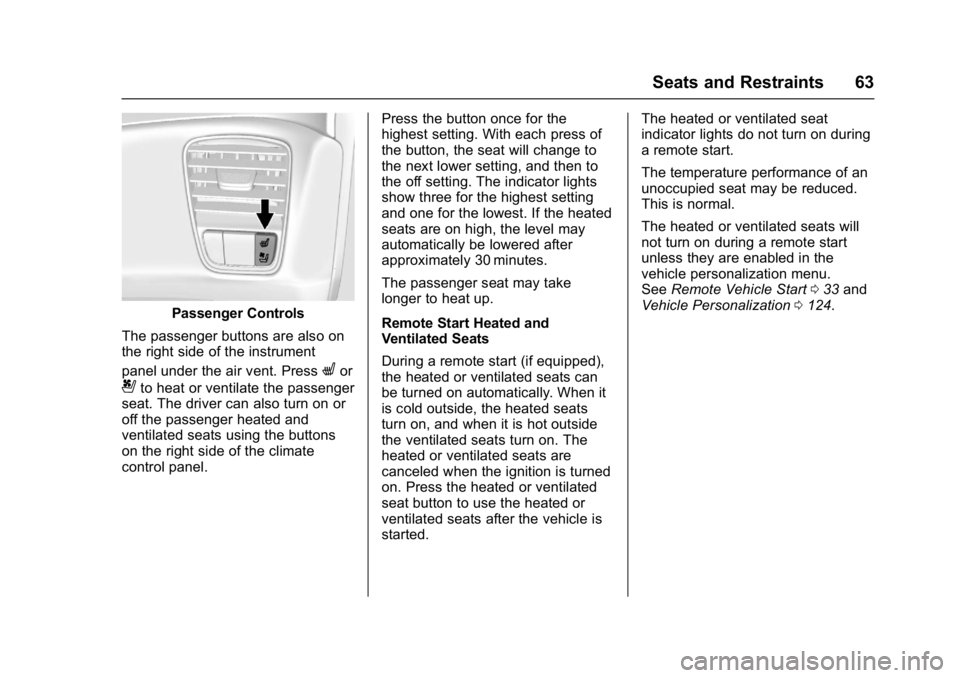
Passenger Controls
The passenger buttons are also on
the right side of the instrument
panel under the air vent. Press
Lor
{to heat or ventilate the passenger
seat. The driver can also turn on or
off the passenger heated and
ventilated seats using the buttons
on the right side of the climate
control panel. Press the button once for the
highest setting. With each press of
the button, the seat will change to
the next lower setting, and then to
the off setting. The indicator lights
show three for the highest setting
and one for the lowest. If the heated
seats are on high, the level may
automatically be lowered after
approximately 30 minutes.
The passenger seat may take
longer to heat up.
Remote Start Heated and
Ventilated Seats
During a remote start (if equipped),
the heated or ventilated seats can
be turned on automatically. When it
is cold outside, the heated seats
turn on, and when it is hot outside
the ventilated seats turn on. The
heated or ventilated seats are
canceled when the ignition is turned
on. Press the heated or ventilated
seat button to use the heated or
ventilated seats after the vehicle is
started.The heated or ventilated seat
indicator lights do not turn on during
a remote start.
The temperature performance of an
unoccupied seat may be reduced.
This is normal.
The heated or ventilated seats will
not turn on during a remote start
unless they are enabled in the
vehicle personalization menu.
See
Remote Vehicle Start 033 and
Vehicle Personalization 0124.
Page 95 of 353

Chevrolet Corvette Owner Manual (GMNA-Localizing-U.S./Canada/Mexico-
11374030) - 2018 - crc - 3/29/17
94 Instruments and Controls
Instruments and
Controls
Controls
Steering Wheel Adjustment . . . . 95
Steering Wheel Controls . . . . . . . 95
Horn . . . . . . . . . . . . . . . . . . . . . . . . . . . 95
Windshield Wiper/Washer . . . . . . 95
Compass . . . . . . . . . . . . . . . . . . . . . . 96
Clock . . . . . . . . . . . . . . . . . . . . . . . . . . 96
Power Outlets . . . . . . . . . . . . . . . . . 97
Warning Lights, Gauges, and
Indicators
Warning Lights, Gauges, andIndicators . . . . . . . . . . . . . . . . . . . . 98
Instrument Cluster . . . . . . . . . . . . . 99
Speedometer . . . . . . . . . . . . . . . . . 104
Odometer . . . . . . . . . . . . . . . . . . . . . 104
Trip Odometer . . . . . . . . . . . . . . . . 104
Tachometer . . . . . . . . . . . . . . . . . . . 104
Fuel Gauge . . . . . . . . . . . . . . . . . . . 105
Boost Gauge . . . . . . . . . . . . . . . . . 106
Engine Coolant Temperature Gauge . . . . . . . . . . . . . . . . . . . . . . 106
Seat Belt Reminders . . . . . . . . . 107
Airbag Readiness Light . . . . . . . 108
Passenger Airbag Status Indicator . . . . . . . . . . . . . . . . . . . . 108 Charging System Light . . . . . . . 109
Malfunction Indicator Lamp . . . 109
Brake System Warning
Light . . . . . . . . . . . . . . . . . . . . . . . . . 111
Electric Parking Brake
Light . . . . . . . . . . . . . . . . . . . . . . . . 112
Service Electric Parking Brake Light . . . . . . . . . . . . . . . . . . . . . . . . 112
Antilock Brake System (ABS) Warning Light . . . . . . . . . . . . . . . 112
Traction Off Light . . . . . . . . . . . . . 113
Traction Control System (TCS)/ Electronic Stability Control
Light . . . . . . . . . . . . . . . . . . . . . . . . 113
Electronic Stability Control (ESC) Off Light . . . . . . . . . . . . . . 113
Engine Coolant Temperature Warning Light . . . . . . . . . . . . . . . 114
Tire Pressure Light . . . . . . . . . . . 114
Engine Oil Pressure Light . . . . . 115
Low Fuel Warning Light . . . . . . . 115
Security Light . . . . . . . . . . . . . . . . . 115
High-Beam On Light . . . . . . . . . . 116
Lamps On Reminder . . . . . . . . . . 116
Cruise Control Light . . . . . . . . . . 116
Door Ajar Light . . . . . . . . . . . . . . . 116
Information Displays
Driver Information Center (DIC) . . . . . . . . . . . . . . . . 116
Head-Up Display (HUD) . . . . . . 118
Vehicle Messages
Vehicle Messages . . . . . . . . . . . . 123
Engine Power Messages . . . . . 123
Vehicle Speed Messages . . . . . 124
Vehicle Personalization
Vehicle Personalization . . . . . . . 124
Universal Remote System
Universal Remote System . . . . 131
Universal Remote System Programming . . . . . . . . . . . . . . . 131
Universal Remote System Operation . . . . . . . . . . . . . . . . . . . 133
Page 127 of 353

Chevrolet Corvette Owner Manual (GMNA-Localizing-U.S./Canada/Mexico-
11374030) - 2018 - crc - 3/29/17
126 Instruments and Controls
Maximum Start Up Volume
This feature sets the maximum
startup volume. If the vehicle is
started and the volume is greater
than this level, the volume is
adjusted to this level.
To set the maximum startup volume,
touch + or−to increase or
decrease.
Vehicle
Select and the following may
display:
. Climate and Air Quality
. Comfort and Convenience
. Lighting
. Power Door Locks
. Remote Lock, Unlock, Start
Climate and Air Quality
Select and the following may
display:
.
Auto Fan Speed
. Auto Defog
. Auto Rear Defog Auto Fan Speed
This feature will set the auto fan
speed.
Select Low, Medium, or High.
Auto Defog
When set to On, the front defog will
automatically react to temperature
and humidity conditions that may
cause fogging.
Select Off or On.
Auto Rear Defog
If equipped, this feature will
automatically turn on the rear defog.
Select Off or On.
Comfort and Convenience
Select and the following may
display:
.
Auto Memory Recall
. Easy Exit Options
. Chime Volume
. Reverse Tilt Mirror Auto Memory Recall
This feature automatically recalls
the current driver
’s previously stored
1 or 2 button positions when the
ignition is changed from off to on or
ACC/ACCESSORY. See Memory
Seats 058.
Select Off or On.
Easy Exit Options
This feature automatically recalls
the current driver ’s previously stored
Exit button position when exiting the
vehicle. See Memory Seats 058.
Select Off or On.
Chime Volume
This allows the selection of the
chime volume level.
Touch + or −to adjust the volume.
Reverse Tilt Mirror
This allows the feature to be turned
on or off.
Select Off, On - Driver and
Passenger, On - Driver, or On -
Passenger.
Page 128 of 353

Chevrolet Corvette Owner Manual (GMNA-Localizing-U.S./Canada/Mexico-
11374030) - 2018 - crc - 3/29/17
Instruments and Controls 127
Lighting
Select and the following may
display:
.Vehicle Locator Lights
. Exit Lighting
Vehicle Locator Lights
This feature will flash the turn signal
lamps and turn on some of the
exterior lamps when
Kon the
Remote Keyless Entry (RKE)
transmitter is pressed to locate the
vehicle.
Select Off or On.
Exit Lighting
This allows the selection of how
long the exterior lamps stay on
when leaving the vehicle when it is
dark outside.
Select Off, 30 Seconds, 60 Seconds,
or 120 Seconds.
Power Door Locks
Select and the following may
display:
. Unlocked Door Anti-Lockout .
Auto Door Unlock
. Delayed Door Lock
Unlocked Door Anti-Lockout
When on, this feature will keep the
driver door from locking when the
door is open. If Off is selected, the
Delayed Door Lock menu will be
available.
Select Off or On.
Auto Door Unlock
This allows selection of which of the
doors will automatically unlock when
the vehicle is shifted into P (Park)
with an automatic transmission or
when the vehicle is turned off with a
manual transmission.
Select Off, All Doors, or Driver Door.
Delayed Door Lock
When on, this feature will delay the
locking of the doors. To override the
delay, press the power door lock
switch on the door.
Select Off or On.
Remote Lock, Unlock, Start
Select and the following may
display:
. Remote Unlock Light Feedback
. Remote Lock Feedback
. Remote Door Unlock
. Remote Start Auto Cool Seats
. Remote Start Auto Heat Seats
. Passive Door Unlock
. Passive Door Lock
. Remote Left in Vehicle Alert
Remote Unlock Light Feedback
When on, the exterior lamps will
flash when unlocking the vehicle
with the RKE transmitter.
Select Off or Flash Lights.
Remote Lock Feedback
This allows selection of what type of
feedback is given when locking the
vehicle with the RKE transmitter.
Select Off, Lights and Horn, Lights
Only, or Horn Only.
Page 129 of 353

Chevrolet Corvette Owner Manual (GMNA-Localizing-U.S./Canada/Mexico-
11374030) - 2018 - crc - 3/29/17
128 Instruments and Controls
Remote Door Unlock
This allows selection of which doors
will unlock when pressing
Kon the
RKE transmitter.
Select All Doors or Driver Door.
Remote Start Auto Cool Seats
If equipped and turned on, this
feature will turn the ventilated seats
on when using remote start on
warm days.
Select Off or On.
Remote Start Auto Heat Seats
If equipped and turned on, this
feature will turn the heated seats on
when using remote start on
cold days.
Select Off or On.
Passive Door Unlock
This allows the selection of what
doors will unlock when using the
door handle sensor on the driver
door to unlock the vehicle.
Select All Doors or Driver Door. Passive Door Lock
This feature can be turned on or off,
or feedback can be selected. See
Remote Keyless Entry (RKE)
System Operation
027.
Select Off, On with Horn
Chirp, or On.
Remote Left in Vehicle Alert
This feature sounds an alert when
the RKE transmitter is left in the
vehicle. This menu also enables
Remote No Longer in Vehicle Alert.
Select Off or On.
Bluetooth
Select and the following may
display:
. Pair New Device
. Device Management
. Ringtones
. Voice Mail Numbers
. Text Message Alerts Pair New Device
Select to pair a new device. See
“Pairing”
in“Infotainment Controls”
under “Bluetooth” in the infotainment
manual.
Device Management
Select to connect to a different
phone source, disconnect a phone,
or delete a phone.
Ringtones
Press to change the ring tone for
the specific phone. The phone does
not need to be connected to change
the ring.
Voice Mail Numbers
This feature displays the voice mail
number for all connected phones.
To change the voice mail number,
select EDIT. Type a new number,
then select SAVE.
Text Message Alerts
This allows the feature to be turned
on or off.
Select Off or On.