2018 AUDI TT ROADSTER trailer
[x] Cancel search: trailerPage 72 of 310

Drivin g
Selector le ver em ergency r ele ase
.,. Press and hold the yellow release bu tton with
the screwdriver
c:::> fig. 76 .
.,. Press the lock button on the se lector lever (D
and move the lever into the N position .
.,. Clip the shift cover back into the shift gate after
us ing the emergency release .
If the ve hicle must be pushed or towed due to a
power failure (for example, the battery is dead),
the selector lever must first be moved to the N position us ing the emergency release mecha
n ism .
A WARNING
-Only activate the emergency release while
on a level su rface or a slight slope.
- Only move the selector lever out of the "P" pos it ion when the parking brake is set. If it
is not funct ioning, secu re the vehicle from
rolling using the b rake pedal o r othe r su ita
ble means, such as bloc king a front and a
rear whee l. An unsecured veh icle may roll
away, which increases the risk of an acci
dent.
Trailer towing
General information
Your Audi TT Roadster is not designed to tow a
trailer .
-
Towing a trailer w ith your Aud i TI Roadster is not
recommended and can cause damage to the car .
Damaged caused by tow ing a trailer is not cov
ered by your Audi Warranty .
70
Page 85 of 310
Cl co .... N ,....
N ...... 0 ,....
Vl co
General information
Applies to: ve hicles with rearview camera
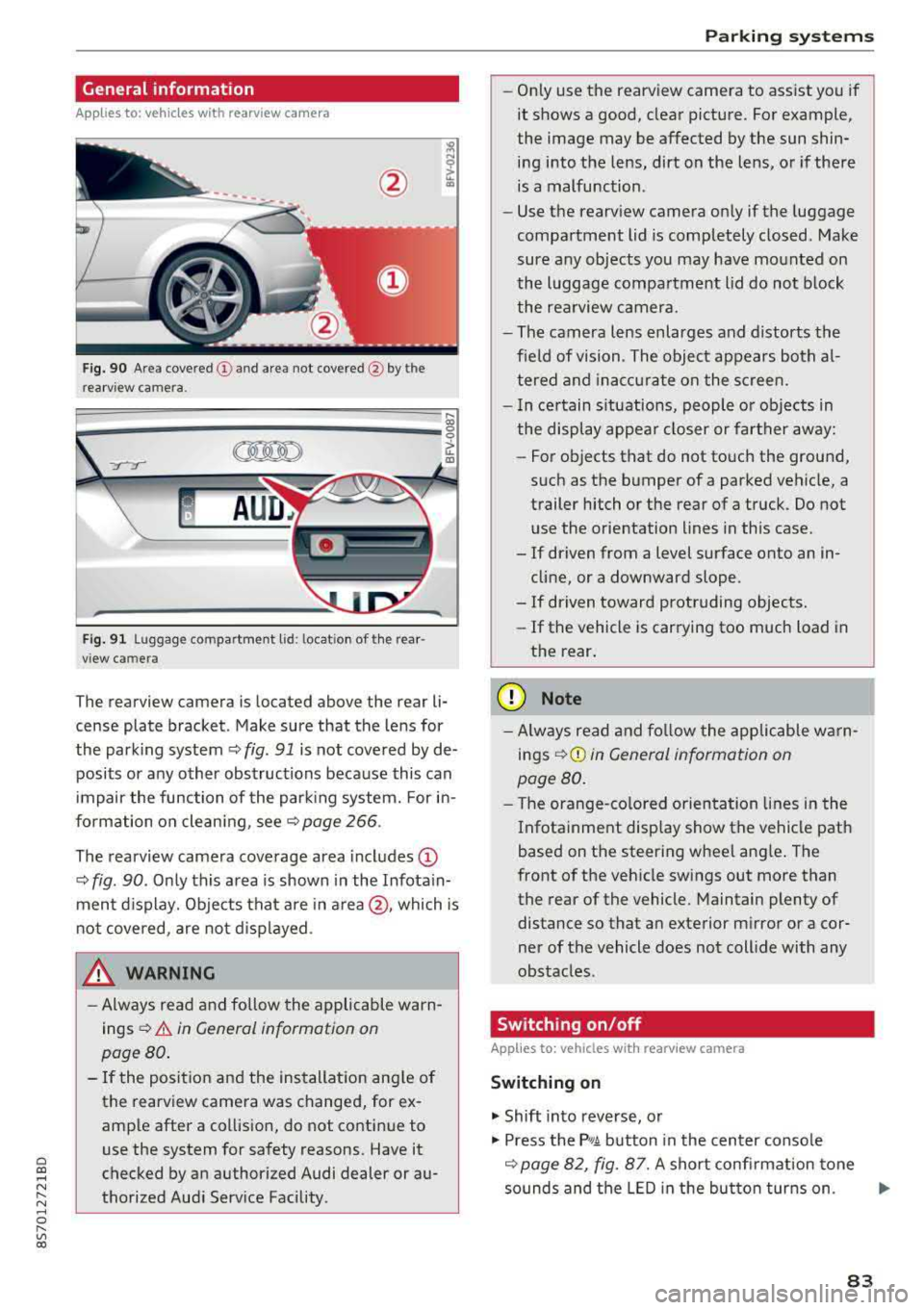
Fig . 90 Area covered (!) and area not covered @ by the
rea rview camera.
:;,
~;..------: :.·~- ---~ _.,- ,.,,.--------g
(Jo00oD ~
Fig. 91 Luggag e compartment lid: locat ion of the rear
view camera
The rearview camera is located above the rear li
cense plate bracket. Make sure that the lens for
the parking system¢
fig. 91 is not covered by de
posits or any other obstructions because this can
impair the function of the parking system. For in
formation on cleaning, see¢
page 266 .
The rearview camera coverage area includes
(D
¢ fig. 90. Only this area is shown in the Infotain
ment display. Objects that are in
area @, which is
not covered, are not displayed.
A WARNING
-Always read and follow the applicable warn
ings ¢
A in General information on
page 80.
- If the position and the installation angle of
the rearv iew camera was changed, for ex
ample after a collision, do not continue to
use the system for safety reasons. Have it
checked by an authorized Audi dealer or au
thorized Audi Service Facility .
Parking systems
-Only use the rearview camera to assist you if
it shows a good, clear picture. For example,
the image may be affected by the sun shin
ing into the lens, dirt on the lens, or if there
is a malfunction.
- Use the rearview camera only if the luggage
compartment lid is completely closed. Make
sure any objects you may have mounted on
the luggage compartment lid do not block
the rearview camera.
- The camera lens enlarges and distorts the
field of vision. The object appears both al
tered and inaccurate on the screen.
- In certain situations, people or objects in
the display appear closer or farther away:
- For objects that do not touch the ground,
such as the bumper of a parked vehicle, a
trailer hitch or the rear of a truck. Do not use the orientation lines in this case.
- If driven from a level surface onto an in cline, or a downward slope .
- If driven toward protruding objects.
- If the vehicle is carrying too much load in
the rear.
(D Note
-Always read and follow the applicable warn
ings
¢ (D in General information on
page 80.
- The orange-colored orientation lines in the
Infotainment display show the vehicle path
based on the steering wheel angle. The
front of the vehicle swings out more than
the rear of the vehicle. Maintain plenty of
distance so that an exterior mirror or a cor
ner of the vehicle does not collide with any
obstacles.
Switching on/off
App lies to : vehicles wi th rearv iew camera
Switching on
.,. Shift into reverse, or
.,. Press the P,q.A button in the center console
¢ page 82, fig. 87. A short confirmation tone
sounds and the LED in the button turns on.
..,.
83
Page 260 of 310

Wheels
Steps for Determining Correct Load Limit
1. Locate the statement "THE
COMBINED WEIGHT OF OCCUPANTS AND CARGO SHOULD
NEVER EXCEED XXX KG OR XXX
LBS" on your vehicle's placard
(tire inflation pressure label)
c:> page 254 , fig. 189 .
2. Determine the combined
weight of the driver and pas
sengers that will be riding in
your vehicle.
3 . Subtract the combined weight
of the driver and passengers
from
"XXX " kilograms or "XXX"
pounds shown on the sticker
c:> page 254 , fig. 189 .
4. The resulting figure equals the
available amount of cargo and
luggage load capacity. For ex
ample, if the
" XXX" amount
equals 1400 lbs and there will be five 150 lbs passengers in
your vehicle, the amount of available cargo and luggage load capacity is 650 lbs
(1400-750 (5
X 150) = 650 lbs)
5 . Determine the combined
weight of luggage and cargo
being loaded on the vehicle.
That weight may not safely ex
ceed the available cargo and
258
luggage load capa city cal culat
ed in Step 4.
6. If your vehicle will be towing a trailer, load from your trailer
will be tran sferred to your ve
hicle. Con sult thi s manual to
determine how this reduces
the available cargo and lug
gage load capacity of your vehi
c le .
~check the tire sidewall
(c:> page 245 , fig. 187) to deter
mine the designated load rating
for a spe cifi c tire.
Wheel bolts and rims
Wheel bolts
Wheel bolts mus t be clea n and loose n/tighte n
e asi ly.
Rims
Rims with a bo lted r im ring* o r with bo lted wheel
covers* cons ist of mult iple pieces . These com po
nen ts were bol ted togethe r using s pec ial bol ts
a nd a s pecial proc edur e. Yo u m ust no t rep air or
d isa sse mble th em
¢ & -
_& WARNING
Wh eel bolts th at are tig hte ned or re paired in
cor re ctly can be come loose and resu lt in los s
of ve hicle contro l, wh ic h increases the risk of
an accident. For t he cor rec t tighten ing s pec ifi
cation,
see¢ page 27 8, Finishing.
- Always keep the wheel bolts an d the
threads in the w heel h ub clean an d fre e of
greas e.
- On ly us e whee l bolts tha t fit th e rim.
- Always h ave damage d rims repaire d by an
auth orized Audi dealer or auth orized A udi
S erv ice Facility. Neve r repa ir o r disassemb le
~