2018 AUDI TT ROADSTER lane assist
[x] Cancel search: lane assistPage 9 of 310

Cl 00 .-< N r-N .-< 0 r-Vl 00
(D Side assist disp lay ..... ... .. .. .
@ Door handle
@ Cent ral locking swit ch ..... .. .. .
@ Air vent with seat heating controls
® Lever for:
- T urn s ignals and high beams
- Act ive lane assist ....... .. .. .
® M ultifunction steering whee l with :
- Horn
- Driver's airbag ........... .. .
- Buttons for the virtua l instr ument
cluster, including the dr iver infor
mation system, audio/video, tele
phone, navigation and voice rec
ognit ion system
- Shift paddles ............. . .
(J) A ud i v irtu al coc kp it (instrument
cluster) ... ... .. ..... ... .. .. .
@ W indshield washer system lever
® Starting the eng ine if the re is a
malfunc tion ............... .. .
@ Ad justable steer ing column . ... .
@ Cruise contro l lever .......... . .
@ Ins trumen t il lum ination ... .. .. .
@ Hood release .............. .. .
€3) H eadlight cont ro l sw itch .... .. .
@ Power exterio r mirror adj ustment
@) Power windows .............. .
@ A ir ven t incl uding climate con trol
system controls .. ..... ... .. .. .
@ Lockable g love compartment
@) D rives fo r CD, DV D, SIM/SD cards
@ Front passenger's ai rbag . ... .. .
75
26
39
7 2
198
67
8
42
60
58
71
41
233
38
4 1
29
5 1
1 55
198
Coc kpit o ver view
@ Rear window defogger button
@ Depend ing on equ ipment, buttons
for:
- drive select .. .............. .
- Elect ronic Stabili zation Cont rol
( E SC) . .. .. .. .............. .
- E me rge ncy flashers ......... .
- Retractable rear spoiler ...... .
@ Depending o n eq uipment, cen ter
console with:
- Mu ltimedia compartment for cell
p hone .. .. .. .. ............ .
@ In fota inment system o n/off
bu tton ... .... .. ... .. ..... .. .
@ Infotai nment system unit ..... .
@ Wind deflector butto n ........ .
@ Depending on eq uipment:
- Storage compartment
- Ashtray . .. .. .............. .
- Cup holder .... ... .. ..... .. .
@ Power top b utton ............ .
@ Parking b rake ... ... .. ..... .. .
@ Depend ing on eq uipment:
-I S TAR T ENGI NE STOP I button
- So und button for exhaust door
cont rol
@ Se lector lever (S tronic)
(D Tips
78
86
40
90
161
93
93 35
47
48
33
61
58
63
Some the equi pment listed he re is only ins tal
l e d in certa in models or is available as an op
tion.
7
Page 12 of 310

Instruments and indicator lights
10
Eng ine con trol
¢ page 14
Em iss ions co ntrol system
¢ page233
Eng ine speed limitat io n
¢ page 15
Eng ine oil level ( MIN) *
¢page 15
Engi ne oil senso r
¢page 15
Batte ry charge
¢ page 12
Tank sys tem
¢page 15
W ash er fluid level
¢page 15
W indshield wipe rs
¢ page 16
Remote con trol key
¢ page 59
Batte ry in remote control key
¢ page 24
Bulb failure ind icator*
¢page 1 6
H eadlight range control system
¢ pag e 16
Adaptive lig ht*
¢ page 16
Light/ rain sensor *
¢page 16
Trans miss io n
¢page 68
S teer ing lock
¢ page 13
Eng ine start system
¢ page 13
Ce ntral indicator light
¢ page 13
Elect romecha nica l steer ing/
¢ page8 9
Suspension cont rol*
¢ page 16
Rear spoiler
¢page 90
Other indicator lights
-Ii
ii T
ur n sign als
¢ page 16
CRUISE
USA models : cru ise co ntrol system*
¢ page 71
Canada models: cr uise con trol sys
t em*
¢ page 71
- Ac
tive lane ass ist*
¢ page 73
Conve nience key
¢ page 60
Electromechan ica l park ing bra ke
¢page 11
Active lane assist *
¢page 73
Audi side assist *
r=;, page 7 7
Tra nsm iss io n
c:::> page 68
Ele ct romecha nical par king brak e
¢page 11
USA models: speed war ning sys
t em *
¢page 71
Canada models: speed war ning sys
t em *
¢page 71
- H
igh beams
. ¢ page 39
BRAKE/{©) Brake system
If this indicato r light turns on, t here is a malf unc
tion in the brake system.
1111 (USA models) / . (Canada models)
Brakes : stop vehicle and check brake fluid level
Stop t he veh icle and check t he b rake fl uid leve l.
See a n au thor ized Audi de aler or au thor ized A udi
Se rvi ce Faci lity for assis tan ce if n ecess ary.
1111 (USA models) / . (Canada models)
Warning! No brake booster
Page 25 of 310

Replacing a key
If a key is lost, see an authorized Audi dealer or
authorized Audi Service Facility. Have
this key de
activated.
It is important to bring all keys with
you. If a key is lost, you should report it to your
insurance company.
Number of keys
You can check the number of keys ass igned to
your vehicle in the Infotainment system . To do
this, select the
I MENU I button > Vehicle > left
control button
> Service & checks > Vehicle in ·
formation .
This way, you can make sure that you
have all the keys when purchasing a used vehicle .
Electronic immobilizer
The immobilizer prevents unautho rized use of
the vehicle .
Unde r certain circumstances, the vehicle may not
be able to start if there is a remote contro l key
from a different vehicle manufacturer on the key
chain .
Data in the master key
When driving , service and maintenance- relevant
data is continuously stored in your remote con
trol key . Your Audi service adviso r can read out
this data and te ll you about the work your vehicle
needs. This applies also to veh icles with a con
venience key *.
Personal convenience settings
If two people use one vehicle, it is recommended
that each person always uses "their own" master
key. When the ignition is turned
off or when the
ve hicle is locked, persona l convenience settings
for the following systems are stored and as
signed to the remote master key .
- Climate control system
- Parking aid*
- Active lane assist*
- Side ass ist*
- Drive select
a The stored settings are automatically recalled co
;:::: when you unlock the vehicle, open the doors or ,....
~ turn on the ignition. 0 ,....
Vl co
Opening and closing
A WARNING
If you leave the vehicle, switch the ignition off
and take the vehicle key w ith you. This applies
particularly when children remain in the vehi
cle . Otherwise the child ren cou ld start the en
g ine or operate electrical equ ipment such as
power windows.
(D Note
Protect the remote control key against high
temperatures and direct sunl ight.
(D Tips
- The operation of the remote control key can
be temporarily disrupted by interference
from transmitters near the vehicle working
in the same frequency range (such as a cell
phone or radio equipment). Always check if
yo ur vehicle is locked!
- For an explanat ion on conformity with the
FCC regulatio ns in the United States and the
Industry Canada regulations, see
¢page 293.
Removing the mechanical key
Fig. 13 Remote co ntro l master key : removing the mechan i
cal key
.,. Press the re lease buttons (D ¢ fig . 13 and re
move the mechanical key from the remote con
trol key.
Using the mechanical key, you can:
- Lock/unlock the glove compartment.
- Manually lock/unloc k the vehicle s>
page 2 7.
- Mechanically loc k the doors s>
page 2 7.
23
Page 73 of 310

Cl co .... N ,....
N ...... 0 ,....
Vl co
Assistance systems Speed warning system
Description
App lies to: vehicles with speed warning system
The speed warning system helps you to stay be
low a specified maximum speed that can be set,
changed or deleted in the Infotainment system .
The speed warning system warns you if you are
exceeding the maximum speed that you have set .
A warning tone will sound as soon as your speed
exceeds the stored value slightly. The
(Ol (USA
models)/
(01 (Canada models) indicato r light
and a message appear i n the ins trumen t cluster
d isplay at the same time. The
(Sl (USA models)/
(O] (Canada models) indicator light and the mes
sage turn off when the ve hicle speed drops below
the stored maximum speed.
Sett ing a threshold is recommended if you would
like to be reminded when you reach a certain
maximum speed . Situations where you may want
to do so include driving in a country with a gener
al speed limit or if there is a specified maximum
speed for winter tires.
Setting the warning thr eshold
.. Se lect in the Infotainment system: ! MENUI b ut
ton
> Vehicle > left contro l button > Driver a s
s istan ce
> S peed warning > Manual.
@ Tips
Regard less of the speed warning system, you
should always monitor your speed using the
speedometer and make sure you are following
the legal speed limit.
A ssi st a nce systems
Cruise control system
Switching on
Applies to: vehicles with cruise control system
The cruise control system makes it possible to
drive at a constant speed starting at 15 mph
(20 km/h).
0
f
~
0
Fig . 7 7 Operat ing leve r: cru ise control system
.. To switch t he system on, pull the lever into po-
sition
(D ¢ fig. 77.
.. Drive at the speed to be maintained.
.. To store the speed, press the button @.
T he stored speed and the
@jltJ~i, (USA models) /
l'I (Canada models) ind icator lig ht are d isp layed
in the instrument cluster.
T he speed is maintained by modifying engine
power or through an active brake intervention.
_8 WARNING
---A lways pay attention to the traffic around
you when the cruise control system is in op
eration. You are always responsible for your
speed and the distance between your vehi
cle and othe r vehicles.
-For safety reasons, cruise control should not
be used in the city, in stop-and-go traffic, on
w inding roads a nd when road conditions a re
poor (such as ice, fog, g rave l, heavy rai n and
hydroplaning), because this in cr eases the
risk of an acciden t.
-Sw itch the cr uise con trol off tempora rily
when dr iv ing in tu rning lanes, highway exits
or in const ruc tion zones.
-Please no te that uncons ciously "resting"
your foo t on the accelera to r ped al prevents
-
71
Page 74 of 310

Ass is tanc e system s
the cruise control from braking. This is be
cause pressing the accelerator pedal over
rides the cruise contro l system .
- If a brake system ma lfunction such as over
heating occurs when the cruise control sys
tem is sw itched on, the braking function in
the system may be switched off . The rest of
the cruise control system functions remain act ive as long as
the @jll)~i~ (USA models) /
i'I (Canada models) indicator light is on.
(j) Tips
The brake lights turn on when the brakes are appl ied automatically .
Changing speed
Applies to: vehicles with cruise control system
.,. To inc rease/decrease the speed in increments,
br iefly
tap the leve r towa rd 0 10 ~ page 71,
fig.
77 up/down to the first level.
.. T o increase o r decrease the speed in incre
ments,
tap the lever toward 0 10 i::> page 71,
fig .
77 up/down to the second leve l.
.. To increase or decrease the speed quickly, hold
the lever in the
0 10 direct ion until the de
s ired speed is reached .
Overriding the speed
Applies to: vehicles with cruise control system
You can press the accelerator pedal to increase
your speed, for example if you want to pass someo ne. The speed yo u set ea rlier w ill res ume
as soon as yo u release the acceler ator pedal.
H owever , if you are driving cons iderably faster
than the stored speed fo r a long period of time,
the cruise co ntrol system w ill tempora rily swi tch
off.
Th e@jll )~i~ (USA mode ls) tl'II ( C anada mod
e ls) indicator light in the inst rument cluste r
turns off and the stored speed is maintained .
Preselecting the speed
Applies to: vehicles with cruise control system
You can pre -select your desired speed when the
vehicle is stationary.
.,. Switc h the ign ition on.
72
.. Pull the lever into position (D ¢ page 71,
fig.
77 .
.. To increase or decrease the speed, tap the lever
toward
0 10 .
This function makes it possible, for example, to
save the speed you want before driving on the
highway. Once you are on the expressway, acti
vate the cruise control system by pulling the lev er into position
(D .
Switching off
Applies to: vehicles with cruise control system
Deactivating temporarily
.. Press the brake pedal, or
.. Press the lever toward @ (not locked into
place)
~ page 71, fig . 77.
Switching off completely
.. Press the lever into position @(clicked into
place), or
.. Switch the ignit ion off .
T he speed you stored will be maintained if the
cruise contro l has been switched off temporarily .
To resume the stored speed, release the brake or
clutch pedal and pull the lever to position
(D .
Switch ing the ignit ion off w ill erase the stored
speed .
A WARNING
You should only resume the stored speed if it
is not too high for existing traff ic conditions.
Othe rw ise you can inc rease the risk of an acc i
dent.
Audi active lane assist
Description
Applies to: vehicles with Audi active lane assist
Active lane assist detects lane marker lines w ith -
i n the lim its of the system using a camera in the
windshield. If you are approach ing a detected
lane marker line and it appears likely that you
will leave the lane, the system w ill warn you with
cor rective stee ring . You can over ride this stee ring
at any t ime. If you pass ove r a line, the stee ring
1111>
Page 75 of 310

Cl co .... N ,....
N
wheel will vibrate lightly. In order for this warn
ing vibration to occur, it must first be switched
on in the Infotainment system. Active lane assist
is ready for operation when the lane marker line
is detected on a t least one side of the vehicle.
The system is design ed for driving on express
ways and highways and so it only activates at
speeds above approximately 40 mph (65 km/h)
(depending on the market).
Applies to vehicles with side assist* : if you acti
vate a turn s ignal when active lane assist is ready
and it classifies a lane change as critical because
of vehicles traveling alongside you or approach ing you, there will be noticeable corrective steer
in g shortly before you leave the lane . This will at
tempt to keep your vehicle in the lane.
Applies to vehicles without side assist *: the sys
tem does not warn when it is ready if you activate
the turn signal before crossing the lane marker line. In this case , it assumes that you are chang
ing lanes intentionally .
A WARNING
- The system warns the driver that the vehicle
is leaving the lane using corrective steer ing.
The driver is always responsible for keeping
the vehicle within the lane.
- The system can assist the driver in keeping
the vehicle in the lane, but it does not drive
by itself. Always keep your hands on the
steering wheel.
- Corrective steering may not occur in certain
situations, such as during heavy braking .
-There may be cases where the camera does
not recognize all lane marker lines . Correc
tive steering can only take place on the side
of the vehicle where lane marker lines are
detected .
-Other road structures or objects could possi
bly be identified unintentionally as lane
marker lines . As a result, corrective steering
may be unexpected or may not occur .
8 1l The corrective stee rin g func tion is not avail able in all mar,..._
~ ket s.
Assistance systems
-The camera view can be restricted, for ex
ample by vehicles driving ahead or by rain,
snow, heavy spray light shining into the
camera or by dirt on the window . This can
result in active lane assist not detecting the
lane marker lines or detecting them incor
rectly.
- In certain situations where visibility is low,
the vehicle may switch internally from "ear
ly " to "late" steering correction
l).
-Under certain conditions such as ruts in the
road, an inclined roadway or crosswinds, the
corrective steer ing alone may not be enough
to keep the vehicle in the middle of the lane .
- For safety reasons, act ive lane assist must
not be used when there are poor road and/
or weather conditions such as slippery roads, fog, gravel, heavy rain, snow and the
potential for hydroplaning. Using active lane
assist under these conditions may increase
the risk of a crash.
Switching on/off
Applies to : vehicles wit h Aud i act ive la ne ass ist
Fig. 78 Turn s ignal lever: but ton for activ e lane ass ist
"' N 0 > u. CD
Fig. 79 W inds hield: camera w indow for ac tive la n e ass ist ..,.
73
Page 76 of 310

Ass is tance sy stem s
,.. Press the button to switch the system on and
off¢ fig. 78. The . or rl1 indicator light in
the instrument cluster turns on or off.
Ind icat or light s
• Read y: the i ndicator light t urns on when the
system is ready for use. The system can now be
operated.
rl1 Not read y: the indicator light turns on if the
system is swi tched on but is inoperab le. Th is may
be due to the following reasons:
- There is no lane marker line .
- The relevant lane marker lines are not detected (for example, mark ings in a construction zone
o r because they are obstructed by snow, dirt,
water or lighting).
- The veh icle speed is below the activation speed
of approximately 40 mph (65 km/h) (the speed
may vary depending on yo ur country).
- The lane is too narrow or too wide.
- The curve is too narrow .
- The driver's hands are not on the steering
wheel.
(D Tips
- Make sure the camera's field of view
¢
fig. 79 is not obstructed by stickers or
anything else . For informat ion on cleaning,
see¢ page 266 .
-In certain markets : if the system is switched
on, it will sw itch on automat ically each time
the ign it ion is switched on .
Indicator in Infotainment d isplay
Ap plies to: ve hicles w ith Aud i active lane assist
F ig. 80 Instrument cluste r: active lane ass ist is switched
on and ready to prov ide warnings
74
You can call up the active lane ass ist display us
ing the buttons in the mu ltifunction steering
wheel
¢ page 17.
Green l i ne(s) Act ive lane assist is act ivated
and ready to provide warnings .
Red line(s) Active lane assist warns you
(left or right) before leav ing a
lane¢ fig. 80.
In addition, the steering wheel
vibrates lightly .
Gray line(s) Act ive lane assist is activated,
but is not ready to give warn-
ing
M essag es in Infotainm ent disp la y
If the active lane assist sw itches off automatical
l y, the indicato r light i n the display turns off and
one of the following messages appears :
Audi a ctive l ane ass is t: currentl y unavailable.
Camera view restricted . See ow ner' s ma nual
This message appears if the camera is unable to
detect the lines. This could happe n if:
- The camera field of
view ¢ page 73, fig. 79 is
dirty or covered in ice . Clean th is area on the
w indshield.
- The camera fie ld of view is fogged over. Wait
until the fog has clea red before switching the
active lane assist on aga in.
- T he system has been unable to detect the lanes
for an extended per iod of t ime due to road con
ditions . Switch ac tive lane assist ba ck on w hen
the lines a re more visib le.
A udi acti ve l ane as sis t: cur rentl y una vailable.
Se e owner' s manual
There is a temporary malfunction that may pre
vent the act ive lane assist from sw itching on . T ry
switching the active lane assist on again later .
Audi active lane assi st: mal func tion! See own
er 's manual
Drive to an authorized Audi dealer or authorized
Audi Service Facility immediately to have the malfunction corrected.
Audi a ctive lane a ssi st: Plea se take over stee r
ing !
Page 77 of 310
Cl co .... N ,....
N
This message appears if you are not stee ring by
yourse lf . If this is th e case, active lane ass ist does
not switch off, but it is "not ready" to provide a
warning . The system can he lp you keep the veh i
cle in the lane. However, you are responsible for
driving the vehicle and must steer it yourself .
A WARNING
Note that messages may be delayed or not
displayed on vehicles with accessor ies mount
ed on the steer ing whee l, such as a stee ring
wheel sp inner knob. Always keep you r hands
on t he steering whee l.
Adjusting the steering time and vibration
warning
Appl ies to: vehicles with Audi act ive lane ass ist
You con adjust individual act ive lone assist set
tings in the Infotainment system.
Selec t in the Infotai nment system : I MENUI but
ton>
Vehicle > left con trol button > Driv er a ssis
tance > Audi acti ve lane assist
Steering time
1>
Early : in this setting, the correct ive steering hap
pens continuously to help keep the vehicle in the
center of the lane .
Late : in this setting, the system provides correc
tive steering just before a vehicle whee l touches a
detected lane ma rker line .
Vibration warning
You can switch the additional vibration warning
in the steering wheel o n or off.
(I) Tips
In certain markets: your settings are stored
automatically and assigned to the remote
cont rol key in use .
8 1l The co rrect ive stee rin g fu nctio n is not ava ilabl e in all mar ,..._
~ kets.
A ssi st a nce systems
Audi side assist
Description
Applies to: veh icles w ith Audi side assist
0, :;; 0
it m
Fig . 81 Senso r de tect io n range
Fi g. 82 Disp lay on t he ex te ri or m irro r
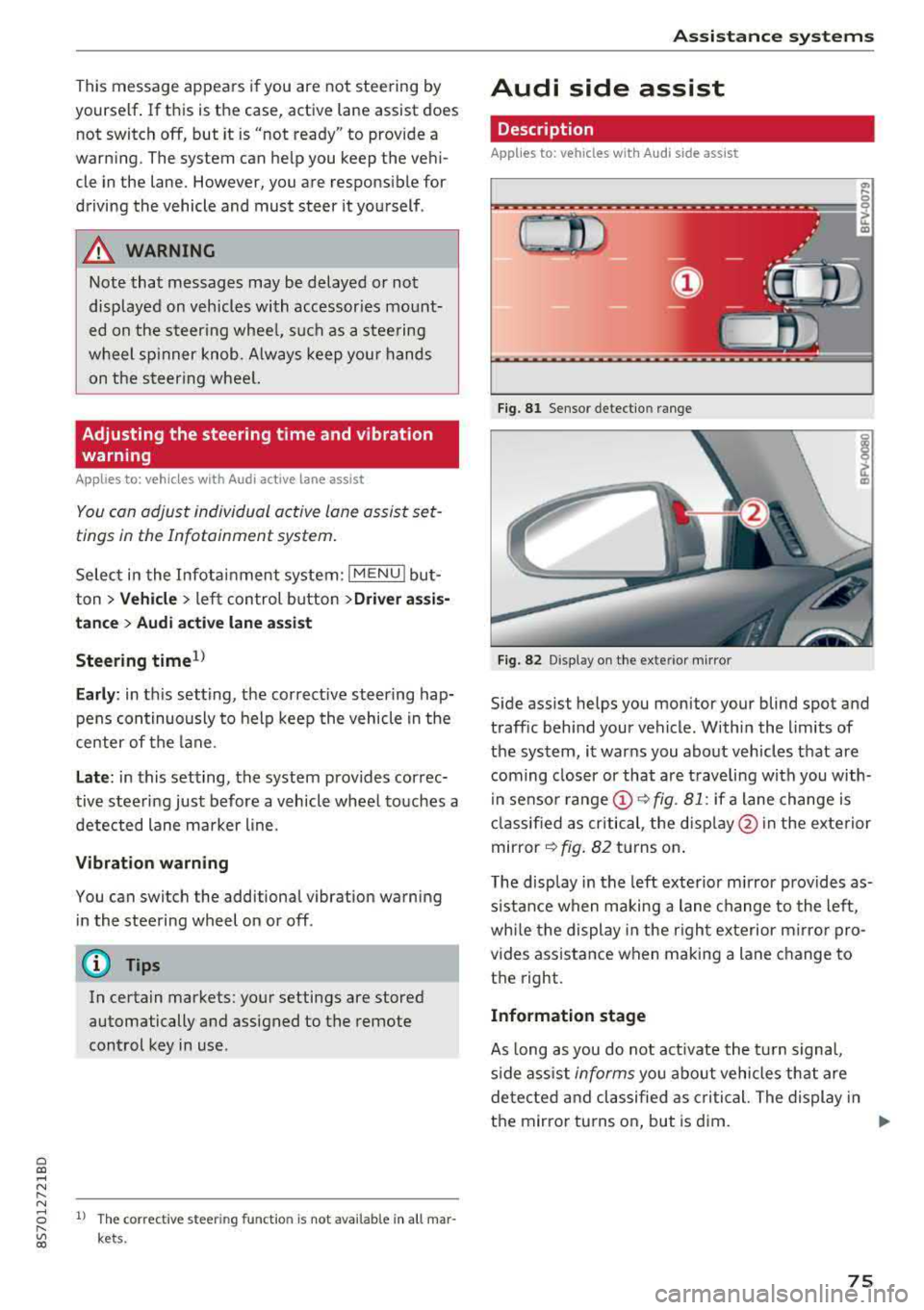
Side assist helps you monitor your blind spot and
traff ic beh ind your vehicle . Withi n the limits of
the system , it warns you abo ut vehicles that are
coming closer or that a re t raveling with you with
i n senso r
range @~ fig. 81: if a lane change is
cla ssified as critical , the disp lay @ in the e xte rior
mirror
~ fig . 82 turns on .
T he display in the left exterio r m irror p rovides as
s istance when making a lane change to the left,
whi le the display in the r ight exterior mirro r pro
vides ass istance when m aking a lane change to
the right.
Information stage
As long as you do not act ivate the tu rn s igna l,
s ide ass ist
informs you about vehicles tha t are
detec ted and classifie d as critical. The display in
t h e mirror tu rns on, but is d im.
75