2018 AUDI TT ROADSTER display
[x] Cancel search: displayPage 175 of 310
Cl 00 .-< N r-N .-< 0 r-Vl 00
System settings
Setting the date and
time
You can set the clock time manually or using the
CPS .
.. Select : IMENUI button> Settings> left control
button >
MMI settings > Date & time.
.. Or : select: IMENUI button> Vehicle> left con-
trol button >
Vehicle settings > Date & time .
Automatic setting
When this function is switched on~. the time
and date are automatically set.
Time
Requirement: the Automatic setting must be
switched
off .
Press the control knob. You can set the Time
manually by turning and pressing the control
knob.
Date
Requirement: the Automatic setting must be
switched
off.
Press the control knob . You can set the Date
manually by turning and press ing the control
knob.
Time zone
When selecting the appropriate time zone, a
sampling of countries in this zone will be listed .
Automatic time zone*
When this function is switched on~. the time
will automatically adjust to the corresponding
time zone.
Time format
If you select 24h , the clock will display, for ex
ample,
13:00. If you se lect AM/PM, the clock
will disp lay, for examp le,
1:00 PM.
Date format
I f you select DD.MM.YYYY , the date display will
show, for example,
31.08.2017 . If you select
MM/DD/YYYY , the date disp lay wi ll show, for ex-
System settings
ample, 08/31/2017. If you select YYYY-MM
DD ,
the date display will show, for example,
2017-08-31.
MMI settings
.. Select: IMENUI button> Settings > left control
button >
MMI settings .
Language
You can change the display language as well as
t h e la nguage for the voice guidance* and voice
recognition system*.
T he number of languages available depends on
the market .
Measurement units
The following measurement un its can be set de
pend ing on ava ilab ility:
Speed , Distance , Tem
perature , Fuel consumption , Volume , Pressure.
Tool tips
When this funct ion is switched on~. your MMI
shows you tips for input. The frequency of how
often it displays decreases w ith time . You can
switch
off the operating tips at any time .
Speech dialog system
Applies to: vehicles with voice recognition system
Command display: when this function is switch
ed
on~. the MMI will show you the possible
commands for voice input in the respective
menu. You can sw itch the funct ion
off at any
t ime .
Short dialog : when this function is sw itched on
~. a shorter form of the prompts is used . You
can switch the function
off at any time .
Speech dialog system volume: you can adjust
the volume of the prompts by turning the contro l
knob.
Individual speech training (only when the vehi
cle is stationary): you can adapt the voice recog
nition system to your voice or pronunciation in
order to improve the system's ability to recogn ize
your speech. Ind iv idual speech tra ining is com
prised of 20 speech entr ies that consist of com-
mands and sequences of numbers . You can
.,,_
173
Page 177 of 310

Cl 00 .-< N r--N .-< 0 r--Vl 00
Secondary phone
Applies to: vehicles with telephone
-Connect new device : search for and connec t a
c e ll phone.
- List of devices already paired : selec t your cell
p hone fro m the lis t of all the devices t hat are
al re ad y p aired.
Data connection
Applies to: vehicles with Audi connect
-Connect new device : search for and connec t a
mobile device (s uch as a smartp hone) .
-List of devices already paired : selec t your cell
p hone from the list of all the devices t hat are
al ready pa ired .
Or : insert a mini SI M card into
the S IM ca rd
reader* c> page 124.
({;D) Note
Always follow t he i nfo rmat ion foun d in c> (0) in
W i-F i hotspot on page 130 .
MMI connect app
Applies to: vehicles with Audi connect
Requirement: the Audi MMI connect app m ust
be i nstalled and open on your mobile device.
- Connect new device : search for and connect a
mobile device (s uch as a smartp hone) .
-List of devices already paired : select your mo
b ile device from the list of a ll the devices that
are already paired.
Audio player
Applies to vehicles with Bluetooth or Wi-Fi audio player
Bluetooth player
Requirement: the Bl uetooth funct ion and v is ibi li
ty must be sw itched on in the MMI
c> page 175
and on the B luetoot h aud io player.
- Connect new device : press the control knob.
Se lect
Bluetooth audio player . Search fo r and
connect a mobile device .
-List of devices already paired : select a Bl ue
tooth device from the list of a ll the devices that
are already paired.
System settings
Wi-Fi audio player
Re quiremen t: th e W i-Fi h otspo t on the M MI
c> page 1 29 an d the Wi -Fi on you r W i-Fi audio
player m ust be switched on .
-Connect new device : pres s t he co ntrol knob.
Se arch for and conne ct a Wi-Fi ca pabl e dev ice.
- Disconnect Wi-Fi audio player: deactivate t he
Wi-Fi on you r W i-Fi capa ble dev ice. The devi ce
w ill be au tom atic a lly removed from the lis t.
@ Note
Alway s follow the infor mation foun d in c> @ in
W i-F i ho tspo t on p age 130.
Directory
Applies to: vehicles with telephone
Display contacts from a cell phone (or an addi
tiona l cell phone).
Requirement: cell phones must not be connected
to the M MI t hro ugh the Blue too th remote SI M
ac cess profi le or throug h th e
Handsfree p ro file.
- Connect new device: search for and connect a
new ce ll phone .
-List of devices already paired : select yo ur cell
p ho ne from the list of all the cell phones that
are a lready paired .
Audi smartphone
Applies to: vehicles with Audi smartphone interface
-Con nect yo ur cell phone to the A udi music in
t erfa ce
c> p age 161 using a USB a dap ter
c> page 160, fig. 139 .
-Sele ct your cell p ho ne fro m th e list of cell
p hon es th at h ave alread y bee n connec ted.
Additional options
D epen ding o n the sele cte d fu nction, yo u can use
t h e right contro l button to access the avai la bl e
additional opt ions in t he connection mana ger.
Bluetooth settings
- Bluetooth:
selec t and co nfi rm a s etti ng for the
Bl uetoo th conne ct ion visib ility. Se lec t
Visible
for the MM I to be visib le to othe r devices . ..,.
175
Page 178 of 310

System settings
Select Invisible for t he MMI to not be v is ibl e to
othe r devices. Howeve r, it is still possib le to es
ta bli sh a B luetooth con nection with paired de
vices when the v is ibility is switched off . Se lect
Off to turn visibi lity off . Then a B luetooth con
nect io n is not possible .
-Bluetooth audio player : when this function is
switched on
g, t h e Blue tooth aud io player is
available as a so urce in t he
Media menu .
-Delete Bluetooth device : th e se lected cell
phone/mobile device is d isconnected from t he
MMI.
- Show Bluetooth profiles : you ca n Connect or
Disconnect the Handsfree profi le a nd the Di
rectory /contacts *
separately.
- Bluetooth audio player : switch th is function on
g to be a ble to selec t the B luetoo th a udio p lay
er as a source in t he M edia me nu.
-Bluetooth name : the MMI B luetoo th name (for
example ,,AUDI M MI 2017") is displayed and
can be changed .
W hen the function is switched on
g , the symbo l
@<=>page 102, fig . 110 appears in the Infotain
ment sys tem disp lay.
Online settings*
- Data connection settings :
see<=> page 130,
Configuring the data connection
- Data usage counter : th e amount of data pack
ets that a re sent and received throug h the MMI
is d isp layed. You can reset the data usage infor
mation to zero using the
Reset data counter
opt ion.
- Network status : the mobile netwo rk p rovider
for data se rvice as well as the network status
are disp layed .
Wi-Fi settings*
See <=> page 129, Wi -Fi hotspot.
SIM PIN settings*
- Automatic PIN entry:
when this funct ion is
swi tched on
g , th e S IM PIN is automatically
saved in the MMI after it is entered for t he first
time. The SI M PIN for four d ifferent SIM ca rds
can be saved i n the MMI. With the function
switched off, the cur rently stored SI M PIN i s
dele ted from the MMI. When the a utomat ic
176
P IN entry is swi tched on, the re a re no S IM P IN
prompts .
-Disable PIN query : when sw itche d on, there are
no SIM PIN queries . The a utomatic PIN entry is
not use d in this case .
-Change PIN : you can change the P IN on you r
SI M card . First ente r th e cur rent SI M PIN. T he
SI M PIN may on ly conta in digits 0 -9 . T he new
SI M PIN must be entered twice for security a nd
then it w ill be saved to the SI M card .
Apple CarPlay sound settings/ Android Auto
sound settings
App lies to : vehicles wit h Audi s m artph one interface
See<=> page 177.
About Apple CarPlay/ About Android Auto
App lies to : vehicles wi th Audi sma rtphone interface
Here you w ill find leg al inform ation reg arding
t h e use o f A pple Car Play o r And ro id Auto and in
fo rmat ion about devi ce -s p ecific data exc han ge.
Delete CarPlay device/Delete Android Auto
device
App lies to : vehicles wi th Audi s m artph one interface
Requirement: yo ur cell phone m ust not be con
necte d to the Au di music interface with a USB
adapter.
S e le ct :
Audi smartphone > a d evice from th e list
> righ t con trol button .
To re m ove your cell p ho ne from the list, se lect
a nd con firm
Delete CarPlay device or Delete An
droid Auto device .
© Tips
Some SIM cards do not allo w the SIM PIN
qu eri es to be sw itch ed off .
System update
.,. Selec t: !ME NUI butt on> Settings > left cont rol
bu tton >
System maintenance.
- System update :
slide the storage device with
t he upda te da ta into the a pprop ria te d rive
r=;, page 155. Selec t an d co nfirm t he drive>
Start update . The leng th of the p rocess de
pe nd s on the s ize of the up dat e.
Page 179 of 310
-Rese t driver in stallat ion: the selected media
driver package is reset to the settings at the
t ime of de livery.
- Ver sion inf orm ation : information on the MMI
software version and the navigat ion database *
software version is displayed. The
S oftwa re in
format io n
function a lso provides information
on the software contained in the MMI and the licens ing agreement .
Sound settings
The sound distribution and volume of the MMI
can be adjusted individually . The settings depend
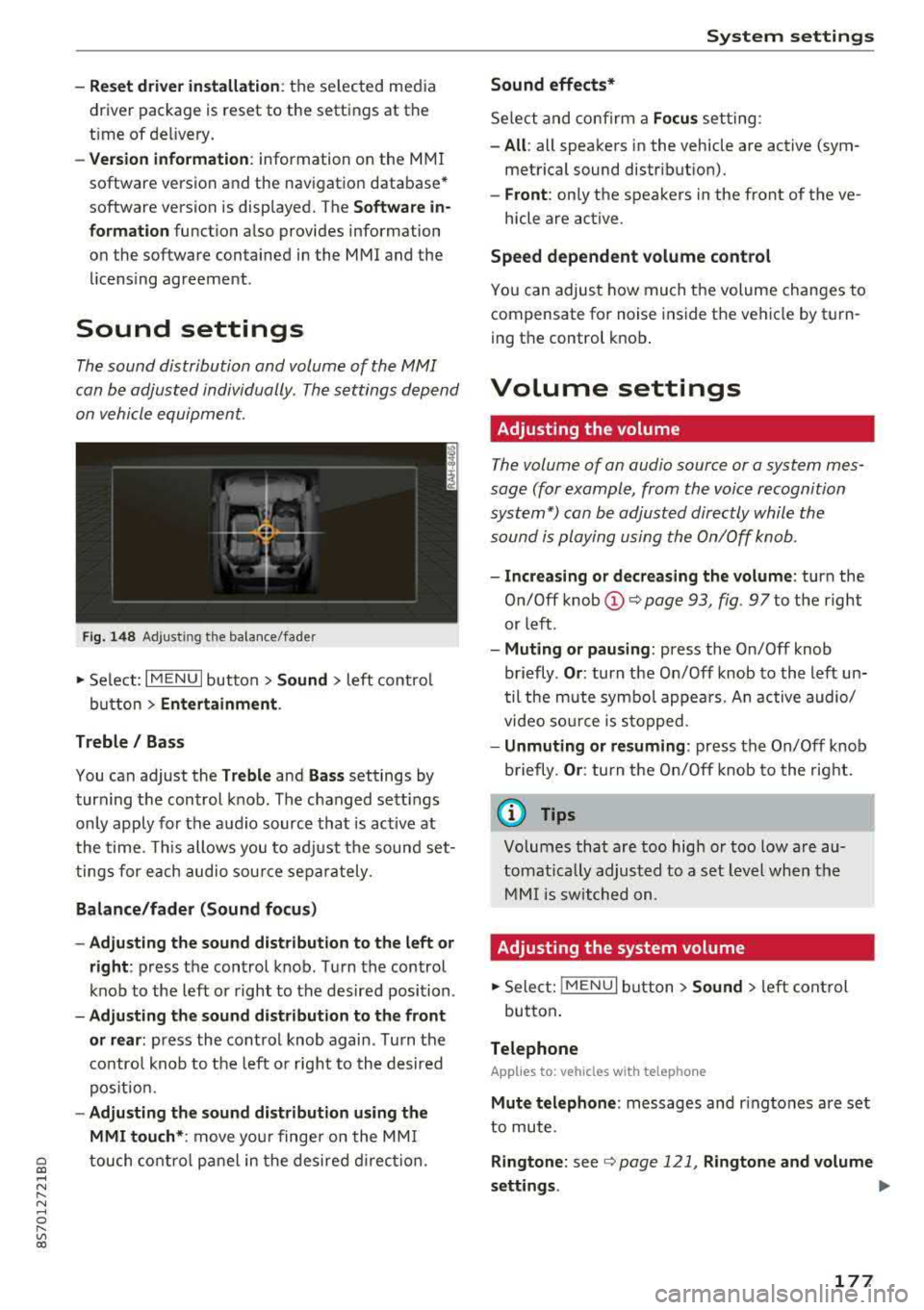
on vehicle equipment.
F ig . 1 48 Adj ustin g the balance /fade r
~ Select : I MENU I button >Sound > left contro l
button
> Ent ertainm ent .
Treble / Bass
You can adjust the Treble and Ba ss settings by
turn ing t he control knob . The changed sett ings
only apply for the audio source that is act ive at
the time. This allows you to ad just the sound set
t ings for each audio sour ce separately .
Bal ance /fader (Sound focus )
- Adju sting th e sound d istribution to the left or
right :
press the control knob . Turn the control
knob to the left or right to the desired position .
-Ad ju sting th e sound d istribution to the front
or rear :
press the control knob again . Turn the
contro l knob to the left o r right to the desired
pos ition.
- Adjusting the so und d istribution u sing th e
MMI touch* :
move your finger on the MM I
~ touch contro l panel in the desired d irec tion.
.... N ,....
N ...... 0 ,....
Vl co
S ys tem settings
Sound effects*
Select and confirm a Focu s setting:
-All : all speakers in the vehicle are active (sym
metrical sound distribut ion).
- Front : only the speakers in the front of the ve -
hicle are active .
Speed depend ent v olume control
You can adjust how much t he volume changes to
compensate for noise inside the vehicle by turn
ing t he control knob .
Volume settings
Adjusting the volume
The volume of an audio source or a system mes
sage (for example, from the voice recognition
system*) can be adjusted directly while the
sound is playing using the On/Off knob .
-Incr easing or decr eas ing the volume : turn the
O n/Off knob
(D ¢ page 93 , fig. 97 to t he right
or left .
-Muting or p au sing : press the On/Off knob
briefly .
Or: turn the On/Off knob to the left un
til the mute symbol appea rs. An active audio/
video so urce is stopped.
- Unmuting o r re suming : press the On/Off knob
briefly .
Or: turn the O n/Off knob to the right.
(D Tips
Volumes that are too high or too low are au
tomatically adjus ted to a set level when the
MM I is switched on.
Adjusting the system volume
~ Sele ct: ! MENU I button> Sound> le ft control
button .
Telephone
Applies to: vehicles with telephone
Mute t elephone : messages and r ingtones are set
to mute.
Ringtone : see ¢ page 121, Rin gton e and volume
s ettings .
.,.
177
Page 199 of 310
Cl 00 .-< N r-N .-< 0 r-Vl 00
A WARNING
If, in exceptional circumstances, you must in
stall a forward-facing child restraint on the
front passenger's seat:
- Always make sure the forward-fac ing seat
has been designed and certified by its man
ufacturer for use on a front seat with a pas
senger front and s ide a irbag.
- Never put the forward-facing child restraint
up against or ve ry near the instrument pan
el.
- Always move the front passenger seat to
the highest position in the up and down ad
justment range and move it back to the
re ar most position in the se at's fore and aft
adjustment range, as fa r away from the air
bag as possib le, before insta lling the for
ward-facing child restraint .
-Always make sure that the safety belt upper
anchorage is behind the child restraint and
not next to or in front of the chi ld restraint
so that the safety belt will be properly pos i
t ioned.
- Make sure that the
PASSENGER AIR BAG
OFF ~; light comes on and stays on a ll the
t ime whenever the ignition is switched on.
A WARNING
To red uce the risk of serious in jury, make s ure
that the
PASSENGER AIR BAG OFF ~; light
w ill be displayed whenever a child restra int is
installed on the front passenge r seat and the
ign ition is swi tched on.
-If the PASSENGER AIR BAG OFF ~; light
does not stay on, perfo rm the che cks descri
bed
¢ page 205, Monitoring the Advanced
Airbag System .
-Have the airbag system inspe cte d by your
Audi dealer imme diately.
- Always caref ully follow instru ctions from
ch ild res tra int m anufa ctu rers when instal
ling child restraints .
Airbag syste m
A WARNING
--
If, in exceptional c ircumstances, you must in
stall a forward or rearward-facing child re
stra int on the fron t passenger 's seat :
- Imp roper installat ion of child restraints can
reduce the ir effectiveness or even prevent
them from providing any pro tect ion .
- An improperly installed child restra int can
interfere wi th the airbag as it deploys and
serio usly injure or even kil l the chi ld -even
wit h an Advanced A irbag System.
- Always carefully follow the manufacturer's
instr uctions provided with the child seat or
earner.
- Always make sure that there is noth ing on
the front passenge r seat tha t will cause the
capacitive p assenge r de te ction system in
the sea t to signal to the Airb ag System th at
the seat is occup ied by a person when i t is
not, or to signal that it is occupied by some
one who is heavier than the person actually
sitt ing on the seat. The presence of addi
tional objects could cause the passenger
front ai rbag to be turned on when it should
be off, or cou ld cause the ai rbag to work in a
way that is different from the way it wou ld
h ave wo rked withou t the objec t on the seat.
197
Page 245 of 310

Cl 00 .-< N r-N .-< 0 r-Vl 00
authorized Audi Service Facility for more in
formation.
- Do not connect or disconnect the charging
cable while charging because this increases
the risk of an exp losion.
(D Tips
- Only charge the vehicle battery through the
connections in the engine compartment.
- Read all of the manufacturer's instructions
for the charger before charging the vehicle
battery.
Windshield washer system
Fig. 186 Engine compa rtment: washer flu id reservo ir cap
The windshield washer reservoir W contains the
cleaning solution for the windshie ld and the
headlight washer
system* ¢ page 236, fig . 180.
The reservoir capacity can be found in
¢page 288.
To reduce the risk of lime sca le deposits on the
spray nozzles, use clean water with low amounts
of calc ium. A lways add window cleaner to the wa
ter. When the outs ide temperatures are cold, an
anti -freezing agent should be added to the water
so that it does not freeze.
@ Note
-The concentration of anti-freezing agent
must be adjusted to the vehicle operating
cond itions in the respective climate. A con
ce ntrat ion that is too high can lead to vehi
cl e damage.
- Never add radiator anti-freeze or other addi
tives to the washer fluid.
Checking and Filling
- Do not use a glass cleaner that contains
paint so lvents, because t his could damage
the paint.
Service interval display
The service interval display detects when your ve
hicle is due for service .
The service interval display works in two stages:
-Inspection or oil change reminder : after a cer-
tain distance driven, a message appears in the
In fotainment system display each time the ig
nition is switched on or off. The remaining dis
tance or time is disp layed briefly.
- Inspection or oil change due: if your vehicle
has reached an inspection or oil change interval
or both intervals at the same t ime, the mes
sage
Inspection due! or Oil change due! or Oil
change and inspection due!
appears briefly af
ter switching the ignition on/off .
Checking service intervals
You can check the remaining distance or time un
t il the next oil change or next inspection. Se lect
in the Infotainment system: the
I MENU I button>
Vehicle > left control button > Service & checks >
Service intervals .
Resetting the indicator
An authorized Audi dea ler or authorized Audi
Service Facility w ill reset the service interval dis
play after performing service.
If you have ch anged the oi l yourse lf, you must re
set the oil change interval.
T o reset the disp lay, select in the Infotainment
system: the
I MENUI button> Vehicle> left con
trol button >
Service & checks > Service intervals
> Reset oil change interval.
@ Note
-Only reset the oil change indicator if the oi l
was changed.
- Following the service intervals is crit ica l to
maintaining the service life and value of
your vehicle, especially the engi ne. Even if
the mileage on the vehicle is low, do not ex
ceed the time for the next service.
243
Page 263 of 310

Cl 00 .-< N r-N .-< 0 r-Vl 00
Tire pressure monitoring system
(J_) General notes
Each tire, incl uding the spare (if provided),
should be checked month ly when co ld and inflat
ed to the inf lation pressure recommended by the
ve hicle manufacturer on the vehicle placard or
tire inflat ion pressure label. (If your vehicle has
tires of a d ifferent s ize tha n the s ize indicated on
the veh icle placa rd or t ire inflation pressure la
be l, you s hou ld determine the prope r tir e infla
tion pressure fo r th ose tires).
As an added safety feature, your ve hicle has been
equ ipped w ith a t ire pressu re monito ring system
(TPMS) that ill uminates a low tire p ress ure tell
tale whe n one or more of yo ur t ires is sign ificant
l y unde r-infla ted. Accord ingly, whe n the low tire
p ressure tellta le illuminates, yo u should stop and
check your tires as soon as possible, and inflate
them to the proper press ure. D riving on a signifi
cantly under-inflated tire causes the tire to ove r
h eat and can lead to t ire failure. Under-inflation
a lso reduces fuel efficiency and ti re tread life,
and may affect the veh icle's handling and stop
p ing ability .
P lease note that the TPMS is not a substitute for
proper tire maintenance, and it is the driver's re
sponsib il ity to ma inta in correct tire pressure,
even if u nder-inflation has not reached t he leve l
to tr igger illum inat io n of t he TPM S low tire p res
sure telltale.
Your veh icle has also been equ ipped w ith a TPMS
malfunct ion ind icator to indicate when the sys
tem is not operat ing properly. The TPMS ma l
f u nction ind icator is combined w ith the low tire
p ressure tellta le. Whe n the system det ects a
mal function, the te lltale wi ll flash fo r approxi
mate ly one mi nute and then remain continuous ly
illum inated. This sequence will continue upon
subseq uent ve hicle start-ups as long as the ma l
function ex ists .
W hen t he malfunctio n indicator is ill uminated,
the system may not be ab le to detect or signa l
low t ire press ure as intended. TPMS ma lfunctions
may occur for a var iety of reasons, including the
Wheels
insta llation o f replacement or alternate tires or
whee ls on the vehicle that prevent the TPMS
from functioning p roperly . Always check the
TPMS ma lfunction te lltale after replac ing one or
more tires or wheels on you r vehicle to ensure
t h at the rep lacement or a lternate tires a nd
wheels allow t he TPMS to continue to function
prope rly.
If the Tire Pressure Monitoring System
indicator appears
Applies to: vehicles with Tire Pressure Monitoring System in
dicator
The tire pressure indicator in the instrument
cluster informs you if the tire pressure is too low
or if there is a system malfunction.
U sing the ABS se nsors, the t ire pressure monitor
ing system compares the tire tread c ircumfer
ence and v ibration characterist ics of the ind ividu
al tires. If the pressu re changes in one o r more
t ir es, th is is indica ted in the Info tainment sys tem
display wi th an indica to r li ght
ti] and a message.
If only one ti re is affected, the location of tha t
tire will be indicated.
T he tire press ures mus t be store d in the Infota in
me nt system agai n ea ch t ime t he p ressures
change (switching between partia l and full load
pressure) or after c hanging or replacing a tire on
yo ur vehicle
¢ page 262 . The tire pressure moni
toring system on ly monitors the tire pressure you
have stored. Refer to the t ire pressure label for
the recommended t ire pressure for your vehicle
¢ page 254, fig . 190 .
Tire tread c ircumference and vibration character
istics can change and cause a tire pressu re warn
i ng if:
- the ti re pressure in one or more tires is too low
- the tire has str uctural damage
- t he t ire w as replaced or the t ire pressu re w as
changed and it was no t stored ¢
page 262
- the spare tire* is i nstalled
Indicator lights
ti] -loss of pressure in at least one tire ¢,& .
Check the t ires and replace or repair if necessary.
Check/correct the pressures of all fou r tires and
.,.
261
Page 264 of 310

Wheels
store the pressure again in the Infotainment sys
tem
i::> page 262 .
mm (Tir e Pr essure Monitoring System) Tire
pressure: malfunction! See owner's manual -
if
mm appears after switching on the ignition or
while driving and then the
[DJ indicator light in
the instrument cluster also starts to blink for
about one minute and then stays on permanen t
ly, there is a system malfunction. Try to store the
correct tire pressures
<=:> page 262 . If the indica
tor light does turn off or turns on again after a
short period of time, drive to an authorized Audi
dealer or authorized Aud i Serv ice Facility immedi
ately to have the malfunction corrected .
_& WARNING
-If the tire pressure indicator appears in the
display, reduce your speed immediately and
avoid any hard steering or braking maneu
vers. Stop as soon as possible and check the
tires and their pressure.
- The driver is responsible for maintaining the
correct tire pressures. You must check the
tire pressures regularly.
-Under certain conditions (such as a sporty
driving style, winter conditions or unpaved
roads), the pressure monitor indicator may
be delayed .
- Do not use run-flat tires on your vehicle. Us
ing them when not permitted can lead to
vehicle damage or accidents .
(D Tips
- The tire pressure monitoring system can al
so stop working when there is an ESC mal
function.
- Using snow chains may result in a system
malfunction.
- The tires with the identification
"AO"
¢page 251 have been matched with your
Audi tire pressure monitoring system . Using
these tires is recommended.
262
Storing tire pressures
Applies to: vehicles with Tire P ressure Monitoring System in
dicator
If the t ire pr essure chang es or a tire is replaced ,
it must be confirmed in the Infotainment sys
tem.
.,. Make sure before storing that the tire pressures
of all four tires meet the specified values and
a re adapted to the load
<=:>page 253.
.,. Switch the ignition on.
.,. Select in the Infotainment system : the!M ENUI
button > Vehicle > left control button > Service
& checks> Tire pressure monitoring .
(D Tips
Do not store the tire pressures if snow chains
are installed .
Tire pressure monitoring
system
ill General notes
Each tire, including the spare (if provided),
should be checked monthly when cold and inflat
ed to the inflation pressure recommended by the
vehicle manufacturer on the vehicle placard or
tire inflation pressure label. (If your vehicle has
tires of a different size than the size indicated on
the vehicle placard or tir e inflation pr essure la
bel, you should determine the proper tire infla
tion pressure for those tires).
As an added safety feature, your vehicle has been
equipped with a tire pressure monitoring system
( T PMS) that illuminates a low tire pressure tell
tale when one or more of you r tires is significant
ly under-inflated. Accordingly, when the low tire
pressure telltale illuminates, you should stop and
check your tires as soon as possible, and inflate
them to the proper pressure . Driving on a signifi
cant ly under-inflated t ire causes the tire to over
heat and can lead to tire failur e. Under-inflation
also reduces fuel efficiency and tire tread life,
and may affect the vehicle's handling and stop-
ping ability.
..,.