2018 AUDI S3 SEDAN warning light
[x] Cancel search: warning lightPage 55 of 404
LL co ..... N
" N ..... 0 N > co
~ Press the knob to release it.
~ Turn the knob toward "-"or"+" to reduce or in
crease the brightness.
~ Press the knob again to return it to its original
position.
(l') Tips
Depending on vehicle equipment, the instru
ment illumination (needles and gauges) may
turn on when the lights are off and the igni
tion is sw itched on . The illumination for the
gauges reduces automat ica lly and eventually
turns off as brightness outside increases. This
function reminds the driver to turn the low
beams on at the appropriate time.
Vision
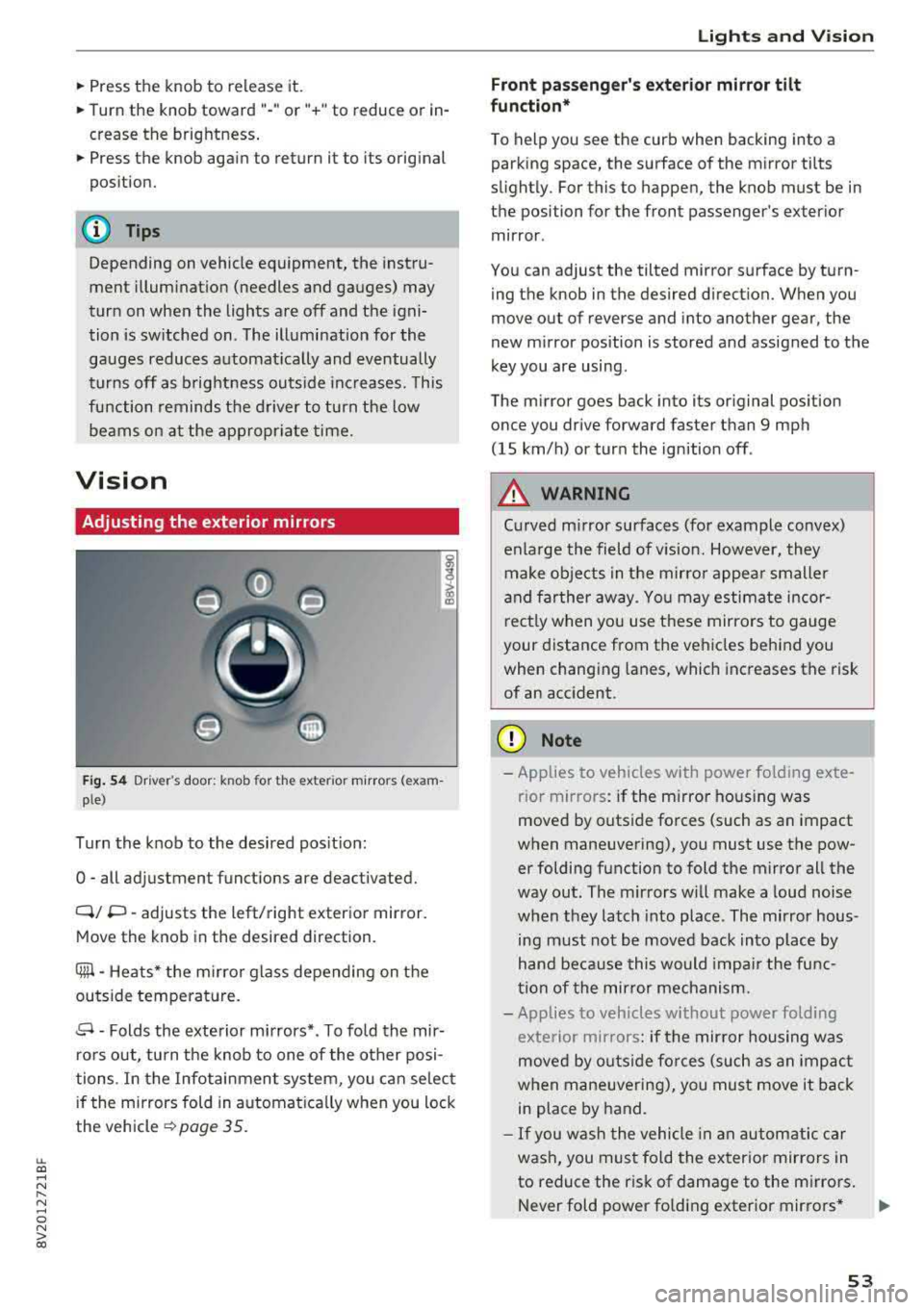
Adjusting the exterior mirrors
Fig. 54 Driv er's door: k n ob for the ex ter ior mirrors (exam
p le)
Turn the knob to the desired position:
0
-all adjustment functions are deactivated.
Q/ P -adjusts the left/right exterio r mirror.
Move the knob in the desired direction .
Cilll -Heats* the mirro r glass depending on the
outside temperature.
.9 -Folds the exterior mirrors* . To fold the mir
rors out, turn the knob to one of the other posi
tions . In the Infotainment system, you can select
if the mirrors fold in automat ically when you lock
the vehicle
~ page 35.
Lights and Vision
Front passenger 's exterior mirror tilt
function*
To help you see the curb when backing into a
parking space, the surface of the mirror tilts
slightly. For this to happen, the knob must be in the position for the front passenger's exterior
mirror .
You can adjust the tilted mirror surface by turn ing the knob in the desired direction. When you
move out of reverse and into another gear, the
new mirror position is stored and assigned to the
key you are using.
The mirror goes back into its original position
once you drive forward faster than 9 mph
(15 km/h) or turn the ignition off .
A WARNING
Curved mirror surfaces (for example convex)
enlarge the field of v is ion. However, they
make objects in the mirror appear smaller
and farther away . You may estimate incor
rectly when you use these mirrors to gauge
your distance from the vehicles behind you when changing lanes, which increases the risk
of an accident .
(D Note
-Applies to vehicles with power fo lding exte
r ior mirrors : if the mirror hous ing was
moved by outside forces (such as an impact
when maneuvering), you must use the pow er folding function to fold the mirror all the
way out. The mirrors will make a loud noise
when they latch into place. The mirror hous
ing must not be
moved back into place by
hand because this would impair the func
tion of the mirror mechanism.
- Applies to veh icles without power folding
exterior mirrors : if the mirror housing was
moved by outside forces (such as an impact
when maneuvering), you must
move it back
in place by hand.
- If you wash the vehicle in an automatic car
wash, you must fold the exterior mirrors in
to reduce the risk of damage to the mirrors .
Never fold power fo lding exterior mirrors*
.,.
53
Page 56 of 404

Lights and Vision
by hand. Only fo ld them in and out using
the power controls.
(D Tips
If the power adjustment fails, both mirrors
can be adjusted by hand by pressing on the
edge of the mirror surface .
Dimming the mirrors
Your vehicle is equipped with a manual or auto
matic* dimming rearview mirror .
Manual dimming rearview mirror
~ Pull the lever on the bottom of the mirror back .
Automatic dimming rearview mirror*
~ The interior and exterior mirrors dim automati
cally when light shines on them, for example
from headlights on a vehicle behind you .
.&_ WARNING
Applies to: vehicles with automa tic dimming rearview
m irror
Electro lyte fluid can leak out from broken
m irror glass. This liquid can irritate the skin,
eyes and resp iratory system.
If there is con
tact with the fluid, flush immediate ly with
plenty of water. Consult a physician if neces
sary.
- Repeated or long-term exposure to electro
lyte fluid can lead to irritation of the air
ways, especially in peop le with asthma or
other respiratory condit ions. Take deep
breaths immediate ly after leaving the vehi
cle or, if this is not possible, open all of the
doors and windows as wide as possible.
- If electrolyte fluid enters the eyes, flush
them thoroughly with a large amount of
clean water for at least 15 minutes and then
seek medical attention .
- If electrolyte flu id comes into contact w ith
the skin, flush the affected area with clean
water for at least 15 minutes and then clean
with soap and water and seek med ica l at
tention. Clean affected clothing and shoes
tho roughly before wearing again.
54
-
-If the fluid was swallowed and the person is
conscious, flush the mouth w ith water for at
least 15 minutes. Do not induce vomiting
unless this is recommended by medical pro
fessionals . Seek medical attention immedi
ately .
(D Note
Applies to: veh icles with automatic d imming rearv iew
mirro r
Electrolyte fluid can leak out from broken
mirror glass. This liquid damages plastic sur
faces . Clean this liquid as quickly as possible
with a wet sponge.
@ Tips
App lies to: veh icles with automatic d imm ing rearv iew
mirro r
-If the light reaching the rearview mirror is
obstructed, the automatic d imm ing mirror
will not function correctly,
- The automatic dimming m irrors do not dim
when the interior lighting is turned on or
the reverse gear is selected.
Sun visors
(~--- )
Fig. 55 Left side: sun viso r (example)
The sun visors can be moved out of their brackets
and turned toward the doors
(D. The sunshade
can a lso be moved back and forth lengthwise in
th is position*.
The mirror light switches on when the cover over
the van ity m irror* @opens .
Page 57 of 404

LL co .... N
" N .... 0 N > co
Windshield wipers
Switching the windshield wipers on
Fig. S6 Windshield wiper lever
Fig. S7 Rear window wiper• operatio n
t® I
a @
lll ®
Iii @
•®
Move the windshield wiper lever to the corre
spond ing pos ition:
@ -Windshield wipers off
(D-Interval mode. To increase/decrease the wip
er intervals, move the switch
@ to the left/right.
In vehicles with a rain sensor, the wipers turn on in the rain once the vehicle speed exceeds ap
proximately 2 mph (4 km/h). The higher the sen
sitivity of the rain sensor that is set (switch
@ to
the right), the earlier the w indshield w ipers react
to moisture on the windshield . You can deacti
vate the rain sensor mode in the Infotainment
system, wh ich switches the intermittent mode
on. To do this, select :
I MENU I button> Vehicle>
left control button > Driver a ssistance > Rain
se nsor.
@ -Slow wiping
@ -Fast wiping
@-Single wipe. If you hold the lever in this posi
tion longer, the wipers switch from slow wiping
to fast wiping.
Lights and Vision
®-Clean the windshield. To eliminate water
droplets, the windshield wipers perform one af
terw ipe after several seconds while dr iv ing in
temperatures above 39 °F (4 °C). You can switch
this function off by moving the lever to position
@within 10 seconds of the afterwipe . The after
wipe function is react ivated the next time you
switch the ignition on .
Clean the headlights. The headlight washer sys
tem operates only when the low beam headlights
are sw itched on . If you move the lever in position
®, the headlights will be cleaned in fixed inter
vals.
Applies to: vehicles wi th rear window wiper
@ -Wipe the rear window. The rear wiper moves
about every 6 seconds .
The rear wiper automatically switches on when
the reverse gear is selected and the front wind
sh ield wipers are on and running.
(j)-Clean the rear window . The number of wipes
depends on how long the lever is held in position
(j) .
A WARNING
-The rain sensor* is only intended to assist
the driver. The driver may still be responsi
ble for manually switch ing the w ipers on
based on visibility conditions.
-The windsh ield may not be treated w ith wa
ter-repelling windshield coating agents. Un
favorable conditions, such as wetness, dark
ness and when the sun is low, can cause in-
'
creased glare, which increases the r isk of an
accident. Wiper blade chatter is also possi
ble.
-Properly functioning windshield wiper
b lades are required for a clear view and safe
driving¢ page 56, Replacing the front
wiper blades.
(D Note
- If there is frost, make sure the windshield
wiper blades are not frozen to the wind
shield. Switching on the windshield wipers
when the blades are frozen to the wind
shield can damage the wiper blades .
-
55
Page 58 of 404

Lights and Vi sion
-The windshield wiper system must be
switched off (lever in position @) before us
i ng a car wash. This prevents the wipe rs
from sw itching on unintentionally and ca us
i ng damage to the w indshie ld w iper system .
(D Tips
-The windshield wipe rs switch off w hen t he
i gnition is switched off. Yo u can act ivate the
windsh ield wipers after the ign ition is
switched back on by moving the windsh ield
wiper leve r to any pos it io n.
-Worn or dirty windshield wiper blades result
i n streak ing . This can affect the ra in se nsor
f u nct io n. Check yo ur windsh ield wiper
blades regularly.
-The washer fl uid nozzles in the w indshield
washer system are heated* a t low tempera
tures whe n the ignition is on .
-When stop ping tempora rily, such as at a
traffic light, the speed of the windsh ie ld
wiper s automat ica lly re d uces by o ne leve l.
Cleaning the wiper blades
Clea n the w ipe r blades when you see wipe r
strea ks. Use a so ft clot h and a glass cleaner .
Windshield wiper
"' Place the windshield wipe r arms in the se rvice
pos it ion
<=> page 56.
"' Fo ld t he w indshield wipe r arms away from the
winds hield.
Rear window wiper
Applies to: vehicles with rear window wiper
"'Fold the wi per arm away from the rear w indow .
A WARNING
Dirty w indshield wi pe r blades can impair vi
sio n, which incre ases the risk of an accident.
«1j) Note
If you see streaks aga in a fter cleaning the
w iper blades, the blades mus t be replaced
<=> page 56.
56
-
Replacing the front wiper blades
Fig. 58 Removin g windsh ie ld wiper bl ades
Windshield wiper service po sition /blade
replacement position
a, ... M 9
I
"' To br ing the w ipers into the service position,
tur n the ignition off and move t he w indsh ie ld
w iper lever into pos it ion
@ for at least two sec
onds
c:> page 55, fig. 56.
"' To bring t he w indsh ie ld w ipers b ack to t he nor
ma l posi tion, switc h the ignition on and ho ld
the windshield wiper lever in position @ unti l
the windshi eld wipe rs go back to t he normal
position, or drive faster than 8 mph (12 km/h).
Removing the wiper blade
"' Fold th e w indsh ie ld w iper arm aw ay from t he
windshie ld.
"' Press the locking knob (D <=> fig . 58 on the wiper
blade. Ho ld the wipe r blade firmly.
"' Remove the w iper blade in the d irection of the
ar row.
Installing the wiper blade
"' Insert t he new wiper blade into the mount on
the wipe r
arm@ until you hear it latch into
place .
"'Place the wiper arm back on the winds hield.
"'Turn the service pos ition off .
A WARNING -
For safety reasons, the wi ndshield wipe r
b lades should be rep laced once o r twice eac h
ye ar.
Page 59 of 404

LL co ..... N
" N ..... 0 N > co
(D Note
-Only fold the windshield wipers away when
they are in the service position. Otherwise,
you risk damaging the paint on the hood or
the windshield wiper motor.
- You should not drive your vehicle or press
the windshield wiper lever when the wiper arms are folded away from the windshield .
The windshield wipers would move back in
to their orig inal position and could damage
the hood and windshield .
(D Tips
- You can also use the service position, for ex
ample, if you want to protect the windsh ield
from icing by using a cover.
- You cannot activate the service position
when the hood is open .
Replacing rear wiper blade
Applies to: vehicles wit h rear w indow wiper
Fig. 59 Rea r window w iper: removing t he wiper b lade
Removing the wiper blade
.. Fold the wiper arm away from the rear window .
.. Hold the wiper blade below the center -arrow-
¢ fig. 59 and pull it out of the retainer . Hold
the windshield wiper arm securely wh ile doing
this.
Installing the wiper blade
.. Press the wiper blade mount into the retainer.
Securely hold the wiper arm at the upper plas
t ic end .
Lights and Vision
.. Fold the window wiper arm back onto the rear
window.
A WARNING
For safety reasons, the windshield wiper
blades should be replaced once or twice each
year .
Digital compass
Switching the compass on and off
Appl ies to: veh icles w ith dig ital compass
Fig. 60 Rearview m irror: digital compass is sw itched on
gi N 0
> u.. m
.,. To turn the compass on or off, press the button
(D u nt il the compass d isplay in the mirror turns
on or off.
T he dig ital compass only works when the ignit ion
is turned on . The directions are indicated with ab
brev iat ions:
N (north), NE (northeast), E (east),
SE (so utheast), S (so uth), SW (southwest), W
(west), NW (northwest) .
(j) Tips
To prevent inaccurate compass readings, do
not br ing any remote controls, electrical devi
ces or metallic objects near the mirror.
57
Page 60 of 404

Lights and Vision
Adjusting the magnetic zone
Applies to: ve hicles w ith d ig ital compass
The magnetic zone must be adjusted correctly for the compass to read accurately.
Fig. 61 Magnetic zone map
~ Press and hold the button CD~ page 57, fig . 60
until the number of the magnetic zone appears
in the interior rearview mirror.
~ Press the button CD repeatedly to select the
correct magnetic zone . The selection mode
turns off after a few seconds.
Calibrating the compass
A pp lies to: ve hicles w ith d ig ital compass
If the display is incorrect or inaccurate, the com
pass must be recalibrated.
~ Press and hold the button CD until a "C" ap
pears in the interior rearview mirror.
~ Drive in a circle at about 6 mph (10 km/h) until
a dir ection is displayed in the in terior rearview
mirror.
58
A WARNING
To reduce the risk to yourself and other driv·
ers, calibrate the compass in an area where
there is no traffic.
Page 65 of 404

~ Then push the arm against the beverage con
tainer so that the arm lies closely against it.
~ To close the cup holders, push them back into
the slot.
A WARNING
-
- Do not put any hot beverages in the cup
holder while the vehicle is moving . Hot bev
erages could spill, wh ic h increases the risk
of injury.
- Do not use any breakable beverage contain
ers (for example, made out of glass or por celain). You cou ld be injured by them in the
event of an accident .
CD Note
Beverage containers in the cup holders should
always have a lid. If not, beverages could sp ill
and cause damage to vehicle equipment, such
electronics or seat covers.
Other storage
Applies to: sedan
F ig. 7 1 Lugg age comp artment : bag hooks*
There are additional storage compartments,
compartments and holders at other locations in
the vehicle :
- Glove compartment : the glove compartment
can be locked us ing the key*.
- Retaine r* for the vehicle key and cell phone in
the front center console
- Storag e compartment under th e front center
armrest*
~ - Storage compartment on the rear side of the
.... ~ front seat* . The compartment can hold a maxi -
8 mum weight of 2 lbs (1 kg).
~ -Garment hooks * on the 8-pillar ¢ .& co
S eats and storag e
- Garment hooks* above the rea r doo rs *
- Side bag hooks* in the luggage compartment
- App lies to: sedan: bag hooks* unde r the rear
shelf ¢
fig. 71
A WARNING
-No heavy or hard objec ts may be p laced on
the storage compartment behind the rear seat backrest . There is a risk of injuring the
veh icle passengers when braking sudden ly .
- Always keep the glove compartment lid
closed while dr iv ing to red uce the risk of in
jury.
- On ly use the storage compartments in the
door trim panels to store sma ll objects that
will not stick out of the compartment and impair the range of the side airbags.
- The bag hooks can ho ld a maximum weight
of 6.6 lbs (3 kg). Heavier objects are not ad
equate ly secured. There is risk of personal
in jur y.
A WARNING ,_
Applies to: vehicles with garment hooks
- Ma ke sure that t he view to the rear is not
obs truc ted by hanging ga rments.
- H ang only lightweight clothing and be sure
that the re are no heavy o r sharp-edged ob
jec ts in the po ckets.
- Do not use coat hangers to hang t he cloth
i n g beca use this could impair the effective
ness o f the side curtain airbags .
CD Note
Objects on the rear she lf that rub against the
r ear window can d amage the rear w indow
hea ting wires.
Luggage compartment
General information
.&, WARNING
Read and follow the impo rtant s afety preca u
tions in
~ page 255, Storing cargo correctly .
63
Page 66 of 404

Seats and stor age
Luggage compartment cover
App lies to: ve hicles w ith luggage co mpartme nt cover
The luggage compartment cover blocks the view
into the luggage compartment.
F ig. 72 Open luggage compartment lid wit h luggage com
par tme nt cover
Remo ving
.. Unhinge the straps CD and pull the cover @ in
the direction of the arrow out of the holder @.
Install ing
.. S lide the cover @ horizontally into the des ig
nated ho lder @in the side bracket unt il the
cover is lined up.
.. Hook the straps into the luggage compartment
lid
CD Q _A .
A WARNING
- To reduce the risk of accidents, the luggage
compartmen t cover should never be unse
cu red unde r any ci rc u mstances.
- The luggage compartment cover is not a
s u rface for sto ring objects. Objects placed
on the cover increase the risk of injury to all
vehicle occupants during sudden bra king
mane uvers o r in the event o f an accident .
64
Lowering the cargo floor
Applies to : vehicles with adjustable cargo floor
The cargo floor can lower to expand the storage
area in the luggage compartment.
Fig . 73 Luggage compartment: lowered cargo floor
.. Li ft the cargo floor in order to lower it .
.. Pull the cargo floor back slightly and insert it in
the lower position
@ .
To make load ing and unloading easier, bringing
the cargo floor back into posit io n @ after trans
porting bulky items is recommended .
Tie-downs
App lies to : vehicles wi th tie- downs
Fig . 74 Luggage compartment: locat io n of th e tie -downs
(example)
.. Secure the cargo to the tie-downs -arrows-.
.. Follow the safety precautions Q page 256.