2018 AUDI S3 SEDAN auto
[x] Cancel search: autoPage 238 of 404

Media
Gracenote onlin e datab ase*
Req uirement: the M MI mus t be connected to the
I n ternet.
Depending on availability , va rious informat io n
w ill load about the track cur rently play ing when
t his func tion is sw itched on
!;1.
Favorit es
See ~ page 234 .
Addition al options
Requirement: the vehicle must be stationary and
a video file* or a DVD* must be p lay ing .
Child safety loc k*
Playback o f video DVDs can be restric ted using
parental control.
E nter the password fo r parenta l control. Pass
wo rd set at t he f actory:
12 34 . Yo u have the fol
lowing options:
- Prot ection level: select and confirm the protec
t ion level (fo r example , Leve l 5). Eight diffe rent
pro tect io n leve ls c an be set fo r parenta l
cona
tro l. If you set the parental con trol leve l at Lev
el 5, a ll DVDs from level 1 -5 can be played . Vid
eo DVDs with a higher leve l will not play . Se lect
Un restri cted to remove all of the restrictions.
- Change pa ssword: edit the current password .
Switch to full screen
The video image is displayed. Turn the cont rol
knob to disp lay the playl ist.
Or : press the I BACKI
button.
Replay video1>
When th is function is sw itched on !;1, the current
video w ill replay .
Show DVD menu
The DVD main menu opens in the Infotainment
system display.
1> Th e fun ctio n au to m ati ca lly swi tches o ff when th e source
i s c ha nge d.
2> Depe nding o n th e DVD, th is may not be poss ib le dur ing
p layba ck.
236
- Selecting a menu item: select and confirm a
menu item.
Or : move your finger on the MMI
to uch control pad * and press the contro l knob .
Audio track2
)
Yo u can ma nually se t the aud io t rack (lang uage
and audio format). The lang uage and audio for
mat options depend on the video DVD .
Subtitles2>
You can set subtitles for playback manually. The
l anguages availab le depend o n the DVD.
Aspect
Audi recommends the Automati c setting for the
picture format . You can set the picture format
depend ing on the act ive file or source (for exam
ple v ideo fi le*, DVD*).
Picture for-
Description
mat
Automati c
The M MI detects the pict ure for-
mat of the so urce and displays the
i mage in the opt imum rat io. Black
bars may appea r on the sides of
the disp lay, depending on the
source format and the Infotain -
ment system display that is insta l-
led.
Z oo m The image is e nlarged to fi ll the
entire In fotainment system dis -
play. Switch the function off if the
image is distorted .
Cinema-Use this setting for fi lms in cinema
sc ope fo rmat 2 1:9. B lack bars are s hown
i n t he upper and lower edges of the
Infotainment system d isplay .
Origin al The image is d isplayed in the ratio
of the so urce fo rmat. Select this
opt ion if the image is disto rted or a
section of the image is cut off
when
Au to is selected.
Page 243 of 404

u. 00 ... N l' N ... 0 N > 00
Audi smartphone interface
Setup
A ppl ies to : ve hicles w ith Audi smartpho ne inte rfa ce
You con conn ect your smortphone to the MM I us
ing the Audi smortphon e int erfac e. Certain con
t e n t on you r sm ortphone is ado pted to th e Info
tainme nt system d is p lay while driving and con
be operated through the
MMI control panel .
Requirement
The vehicle must be stat ionary and the ignition
must be switched on .
iPhone generation 5 or h igher w ith Lightning
connector and iOS 7 .1.2 operating system or h igher.
O r:
Smartphone with Android Auto app and Android
5 .0 Loll ipop operating system or higher.
.,. Connec t your sma rtphone to the Audi music in
terface ¢ page 230 using a USB adapte r
¢ page 229, fig. 206.
.. Select and confirm A ctivate Apple CarPlay or
Acti vate And roid Auto now .
.. Follow the system instruct ions.
.. Pay attention to any additiona l system prompts
on your smartphone if applicable .
If yo u chose not to use Apple CarP lay or Android
Auto when connecting your smartphone for the
first time, you can start the Audi smartphone in
terface later on using the
Connection manager.
.,. Se lect : I MENU I button > Audi smartphone in-
terfa ce
> Change to connection manager .
.. Connect your sma rtphone to the A udi music in
terface using a USB
ad apter ¢ page 229,
fig. 206.
.. Select and confirm Audi smartphone in t he
Connection manager ¢ page 244. You can se
l ect your smartphone in the list of devices that
are already
paired¢ page 245.
.,. Follow the system instruct ions .
@ Note
Always follow the i nformat ion found in¢ @) in
Wi-Fi hotspot on page 195 .
Audi smartph one interfac e
(D Tips
-The functions that can be used depen d on
the fo llow ing factors, among others:
- the brand of your smartphone
- the vers io n of the ope rating system in
your smartphone
- the software ve rsion of the app used
- the USB adapter cab le and correct connec-
tion
- your cell phone se rvice provide r
- the customized settings on yo ur sma rt -
phone
- One of the factors above o r a com bina tion
of any of them could cause your sma rtphone
to be incompatib le wit h the Audi smart
phone inter face. Compatibility cannot be
guaranteed for all types of smartp hones.
For more informat io n and assistance, refer
t o the user guide and the man ufactu rer of
yo ur sma rtphone .
- If the connected smartphone has voice con
tr ol, you can ope rate yo ur smartp hon e usi ng
the ex ter nal voic e recognition system
¢page 175.
- Th e menu language show n in t he MMI is
based on t he sett ings in you r smartp ho ne .
- Th e time d is p layed in the M MI is based o n
the settings in yo ur sma rtphone .
- Severa l M MI functions a re not avai lab le
when Apple Car Play o r Andro id A uto is ac
t ive.
- Yo u ca nnot co nnect any mob ile dev ices via
B lu etooth whe n an App le CarPlay connec
tion is a ctive .
- Whe n the App le CarPlay connection is ac
t ive,
Tag this song for iTunes* is not av aila
ble
¢p age 219 .
Operating
A pp lies to: vehicles wit h Audi sm artph one interface
Opening a menu
Apple CarPlay :
you can go back to the Apple Ca r
Play main me nu regardless of the se lected me nu
i tem by p ressing and holdi ng the
I BACKI button .
Android Auto : to go back to the Andro id Auto
menu bar , push the control knob down .
241
Page 244 of 404

Audi smartphone interface
Opening a menu item
Select and confirm a menu item using the MMI
control panel.
Troubleshooting
Applies to: vehicles with Audi smartphone interface
Problem Solution
Audi smartphone
Check the charge level of your smartphone battery.
interface cannot be Check the USB cable and use a different one if necessary
.
opened. Check if Android Auto or Apple CarPlay is available in your country.
Android Auto : check if the Android Auto app is installed on you r smartphone .
Connecting the Check if you are using the correct USB adapter and if the USB adapter is connect-
smartphone to the ed correctly to your smartphone and the Aud i mus ic
interface ¢ page 229.
MMI failed . Apple CarPlay: check if App le CarPlay is activated on your sma rtphone .
Android Auto: check in the And raid Auto app if Android Auto permits new
veh icles .
T he smartphone is Check if you are using the correct USB adapter and
if the USB adapter is connect -
not automatically ed correctly to your smartphone and the Audi music
interface
¢ page 229.
detected. Check if the requirements needed to connect a smartphone have been met.
242
Page 245 of 404

u. 00 .-< N l' N .-< 0 N > 00
System settings
Setting the date and
time
You can set the clock time manually or using the
CPS* .
.. Select : IMENUI button> Settings> left control
button >
MMI settings > Date & time.
.. Or : select : IMENUI button> Vehicle> left con-
trol button >
Vehicle settings > Date & time .
Automatic setting
When this function is switched on g, the time
and date are automatically set.
Time
Requirement: the Automatic setting must be
switched
off .
Press the control knob. You can set the Time
manually by turning and pressing the control
knob.
Date
Requirement: the Automatic setting must be
switched
off.
Press the control knob . You can set the Date
manually by turning and press ing the control
knob.
Time zone
When selecting the appropriate time zone, a
sampling of countries in this zone will be listed .
Automatic time zone*
When this function is switched on g, the time
will automatically adjust to the corresponding
time zone.
Automatic daylight saving time*
When this function is switched on g, the time
will automatically switch to daylight saving time .
Time format
If you select 24h, the clock will display, for ex
ample,
13:00 . If you select AM/PM , the clock
will disp lay, for examp le,
1:00 PM .
System settings
Date format
If you select DD.MM.YYYY , the date display will
show, for example ,
31.08.2017. If you select
MM/DD/YYYY , the date display will show, for ex
amp le,
08/31/2017. If you select YYYY-MM
DD ,
the date display will show, for example,
2017-08-31 .
MMI settings
.. Select: !MENU I button> Settings> left control
button >
MMI settings .
Language
You can change the display language as well as
the language for the voice guidance* and voice
recognition system*.
T he number of languages available depends on
the market.
Measurement units
The following measurement units can be set de
pend ing on availability:
Speed , Distance , Tem
perature , Fuel consumption , Volume , Pressure.
Tool tips
When this funct ion is switched on g, your MMI
shows you tips for input . The frequency of how
often it displays decreases with time.
Speech dialog system
Applies to : vehicles wit h voice recog nitio n system
Depend ing on veh icle equipment, the following
funct ions may be ava ilable:
Command display : when this function is switch
ed on
g, the MMI will show you the possible
commands for voice input in the respective
menu.
Short dialog : when this function is switched on
g, a shorter form of the prompts is used .
Command during voice output*: thi s function is
switched on at the factory . W hen this function is
switched on
g, you can say new commands dur-
ing announcements. You do not need to wait for
the signal tone (beep) dur ing an announcement.
When the funct ion is swi tched off
0, you need to Iii>
243
Page 248 of 404

System settings
Delete Bluetooth device*
The se lecte d cell p ho ne/mo bile dev ice is dis con
nected from t he M MI and is removed from the
list of all devices that are alrea dy paire d.
Show Bluetooth profiles*
You can Connect or Disconnect the Handsfree ,
Me ssages *, Dire ctory /contacts
an d Bluetooth
audio player
pro files sep arately.
Bluetooth settings*
- Bluetooth :
select and confirm a set ting for the
B luetoot h connec tion v is ibility . Select
Visible
fo r th e MM I to be vis ib le to o ther dev ices. Se
l ec t
Invisible fo r th e M MI to not be v is ible t o
othe r devi ce s. H oweve r, it is still possib le to es
tab lish a Bl uetoo th con nection with pai red de
vices when the v is ibi lity is switched off. Se lect
Off to t urn visibi lity off . Then a B luetooth con
nect ion is not possible .
-Bluetooth audio player : when this function is
switc hed
on ~' the Bluetooth audio player is
available as a so urce in t he
Media menu .
-Bluetooth name : the MMI B luetooth name (for
example "AUDI MMI") is d isp layed and ca n be
c h anged.
Online settings*
- Data usage counter :
the amount of data pack
ets that a re sent a nd received throug h the MMI
is d isp layed. You can reset the data usage infor
mation to zero using the
Reset data counter
option.
- Network status : the mobile netwo rk p rovider
fo r data se rvice as well as the netwo rk status
are disp layed .
Wi-Fi settings*
See ¢ page 195, Wi -Fi hotspot.
Storing as a default telephone
Applies to: vehicles with telephone
Requir emen t: a cell phone must be connected to
t he MM I
¢page 17 7.
As soon as t he cell phone is i n range and the
B lue tooth func tion on the ce ll phone and in the
MM I is swi tched o n, this ce ll phone is g iven pr io r
ity ove r th e ot her Blue tooth devices and is c on-
246
necte d dir ectly to the M MI. The connec ted ce ll
p hone is d is pl ayed first in t he dev ice li st .
Network settings*
- Login :
you can chose an automatic log in to
your cell p ho ne servi ce pro vider 's ne twor k, or
you can ch oose a
manual log in from t he list of
avai la bl e netwo rks .
-Network selection : availabl e netwo rks in t he
presen t loca tion can be sele cte d unde r network
select io n. This f unction is on ly avai la bl e for the
Manual log in setting.
Apple CarPlay sound settings/ Android Auto
sound settings
Applies to: vehicles with Audi smartphone interface
See q page 24 7.
About Apple CarPlay/ About Android Auto
Applies to: vehicles with Audi smartphone interface
Here you w ill find l ega l informa tion regarding
t h e use o f A pple Car Play o r And ro id Aut o and in
fo rmat ion a bout device -s p eci fic d ata exch ange.
Delete Apple CarPlay device/Delete Android
Auto device
Applies to: vehicles with Audi smartphone interface
Require ment: yo ur cell phone must not be con
n ect ed to the Au di music interf ace wi th a USB
adap ter.
Se lec t:
Audi smartphone > a dev ice from t he lis t
> r igh t con trol b utto n.
To remove your cell p ho ne from the list, se lect
and co nfirm
Delete Apple CarPlay device or De
lete Android Auto device .
System update
"'Select : !ME NUI bu tton> Settings > left control
bu tton >
System maintenance.
- System update :
slide the storage device with
t he update da ta into the a pprop ria te drive
¢ page 224 . Selec t and conf irm the dr ive>
Start update . The length of the p rocess de
pe nds on the s ize of the upd ate.
- Reset driver installation: the selected media
dr iver p ackage is rese t to t he se ttings a t the
t im e of delivery .
Page 262 of 404

Safety belts
Safety belts
General notes
Always wear safety belts!
Wearing safety belts correctly saves lives!
This chapter explains why safety belts are neces
sary, how they work and how to adjust and wear
them correctly.
"'Read all the information that follows and heed
all of the instructions and WARNINGS.
A WARNING
Not wearing safety belts or wearing them im
properly increases the risk of serious personal
injury and death.
- Safety belts are the single most effective
means available to reduce the risk of serious
injury and death in automobile accidents.
For your protection and that of your passen
gers, always correctly wear safety belts
when the vehicle is moving.
- Pregnant women, injured, or physically im
paired persons must also use safety belts.
Like all vehicle occupants, they are more
likely to be seriously injured if they do not
wear safety belts. The best way to protect a
fetus is to protect the mother
-throughout
the entire pregnancy .
Number of seats
Applies to: vehicles without power top: Your Audi
has a total of five seating positions: two in the
front and three in the rear . Each seating position
has a safety belt .
Applies to: vehicles with power top: Your Audi
has a total of four seating positions: two in the
front and two in the rear. Each seating position
has a safety belt .
A WARNING
Not wearing safety belts or wearing them im
properly increases the risk of serious personal
injury and death.
260
-Never strap more than one person, includ
ing small children, into any belt. It is espe
cially dangerous to place a safety belt over a
child sitting on your lap .
- Never let more people ride in the vehicle
than there are safety belts available.
- Be sure everyone riding in the vehicle is
properly restrained with a separate safety
belt or child restraint .
Safety belt warning light
Your vehicle has a warning system for the driver
and front seat passenger to remind you about the importance of buckling-up.
Fig. 224 Safety belt warning ligh t in the instrument clus
ter
-enlarged
Before driving off, always:
"' Fasten your safety belt and make sure you are
wearing it properly.
U) N Ill 0 ..:.
and properly wear their safety belts .
"' Protect children with a child restraint system
appropriate for the size and age .
The warning light . in the instrument cluster
lights up when the ignition is on as a reminder to
fasten the safety belts. In addition , you will hear
a warning tone for a certain period of time.
Fasten your safety belt and make sure that your
passengers also properly put on their safety
belts.
A WARNING -
- Safety belts are the single most effective
means available to reduce the risk of serious
~
Page 263 of 404

LL co .... N
" N .... 0 N > co
injury and death in automobile accidents.
For your protect ion and that of your passen
gers, always correctly wear safety belts
when the vehicle is moving .
- Failure to pay attention to the warn ing light
that come on, could lead to personal injury.
Why use safety belts?
Frontal collisions and the law of physics
Frontal crashes create very strong forces for peo
ple riding in vehicles .
Fig . 225 Unbe lted occupants in a veh icle head ing fo r a wall
Fig . 2 26 The ve hicle c rashes into the wall
The physical principles are simple . Both the vehi
cle and the passengers possess energy which var
ies w ith veh icle speed and body we ight. Engi
neers call this energy "k inetic energy ."
The higher the speed of the vehicle and the
greater the vehicle's we ight, the more energy
that has to be "absorbed" in the crash.
Vehicle speed is the most signif icant facto r. If
the speed doubles from 15 to 30 mph (25 to
SO km/h), the energy increases 4 times!
Because the passengers of t his veh icle are not us
ing safety
belts ~ fig. 225, they will keep mov ing
Safet y bel ts
at the same speed the vehicle was moving just
before the crash, until something stops them -
here, the
wall ~ fig. 226 .
The same p rinciples apply to people s itting in a
vehicle that is invo lved in a fronta l co llision. Even
at city speeds of 20 to 30 mph (30 to SO km/h),
the forces acting on the body can reach one ton (2,000 lbs, o r 1,000 kg) or more. At greater
speeds, these forces are even higher.
People who do not use safety belts are a lso not
attached to the ir vehicle . In a frontal col lis ion
they will also keep mov ing forward at the speed
their vehicle was travelling just before the crash. Of course, the laws of physics don't just apply to
frontal collisions , they determine wha t happens
in a ll kinds of accidents and co llisions .
What happens to occupants not wearing
safety belts?
In crashes unbelted oc cupants cannot stop
them selves from flying forward and being in
jured or killed. Always wear your safety belts!
Fi g. 227 A driver not wear ing a safe ty belt is violen tly
throw n forward
Fig. 228 A rea r passe nge r not we aring a safety be lt w ill fly
forwa rd a nd strike t he drive r
Ill-
261
Page 266 of 404
Safe ty belts
Safety belts
Fastening safety belts
Safety first -everybody buckle up!
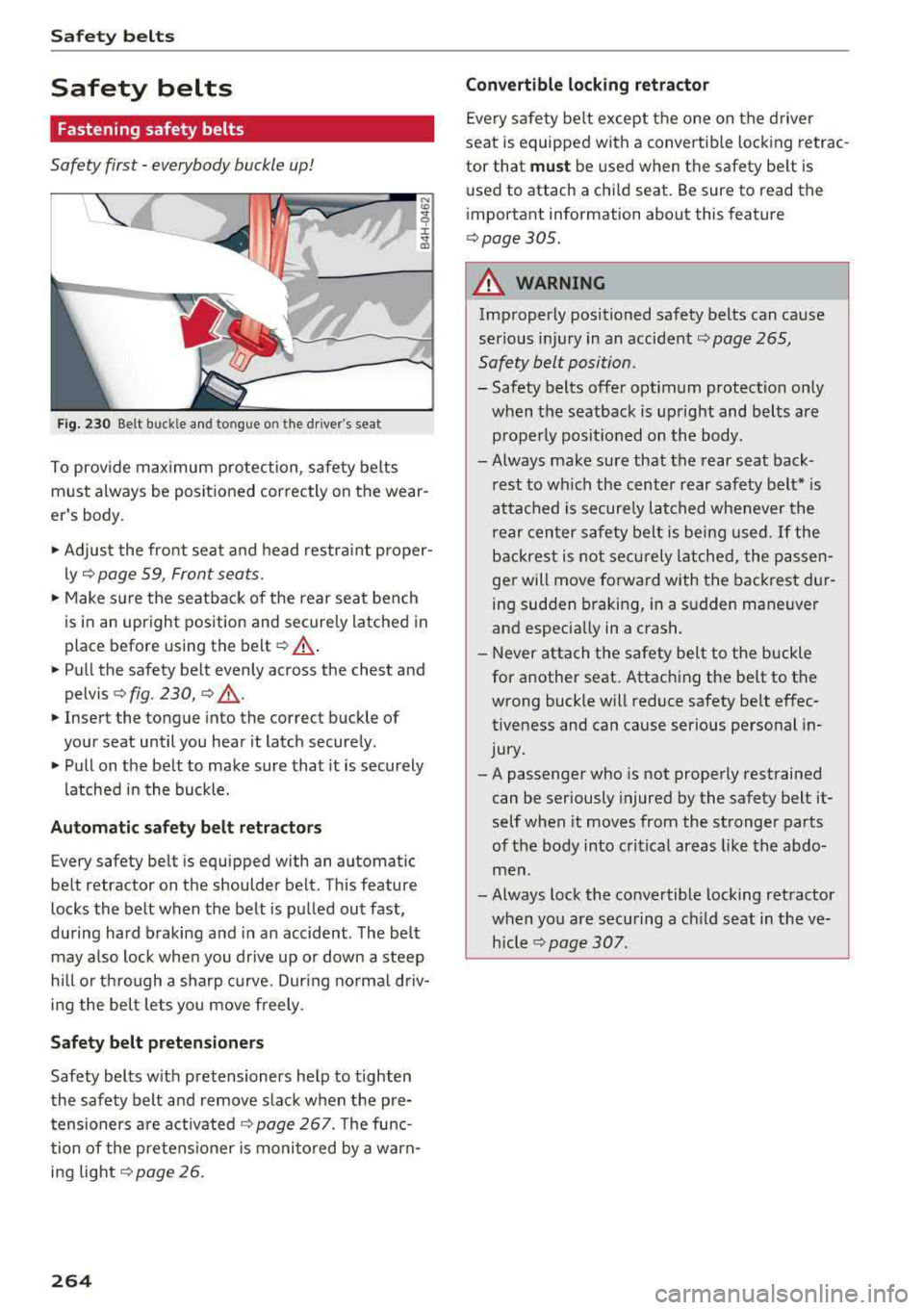
F ig. 230 Belt buckle and tong ue o n the dr iver's seat
N
To prov ide max imum protection, safety belts
must always be positioned correctly on the wear
er's body .
"'Adjust the fro nt sea t and head restra int proper
ly
¢ page 59 , Front seats .
"'Make su re the seatback of the rear sea t bench
is in an upright position and secure ly latched in
place before using the
belt ¢.&_ .
"'Pull the safety belt evenly across the chest and
pelvis ¢ fig. 230, ¢ .&_.
"'Insert the tongue into the correct buckle of
you r seat until you hear it latch securely .
"' Pull on the belt to make sure that it is securely
l atched in the buck le.
Autom atic safety belt retractors
Every safety belt is equipped with an automatic
belt retractor on the shoulder belt . This feature
locks the belt when the belt is pulled out fast,
du ring hard braking and in an accident . The be lt
may a lso lock when you drive up or down a steep
h ill or th rough a sharp curve. Dur ing no rma l dr iv
i n g the bel t lets you move freely.
Safety belt pretensioners
Safety belts w ith pretensioners help to tighten
the safety belt and remove slack when the pre tensioners a re
activated ¢ page 267. The func
tion of the pretens ioner is moni to red by a w arn
ing
light¢ page 26.
264
Convertible lock ing retractor
Eve ry safe ty belt except the one on t he d river
seat is equipped with a convertib le lock ing retrac
tor that
mu st be used when the safety be lt is
used to attach a ch ild seat. Be sure to read the
i mportant information about this feature
¢ page 305 .
A WARNING
Improperly positioned safety belts can cause
serious inj ury in an
accident ¢ page 265,
Safety belt position .
- Safety belts offer optimum protection only
when the seatback is up right and belts are
properly posit ioned on the body .
- Always make sure that the rear seat back
rest to which the center rear safety belt* is
at tached is securely latched whenever the
rear cen ter safety belt is being used.
If the
b ackrest is not sec urely latche d, the passen
ger will move forward with the bac krest du r
ing sudden b raking, in a sudden maneuver
and especia lly in a crash.
-Never attach the safety belt to the buckle
for another seat. Attaching the belt to the
wrong buckle will reduce safety be lt e ffec
tiveness and can cause serio us personal in
jury.
-A passenge r who is not properly restrained
can be seriously injured by the safety belt it
self when it moves from the stronger parts
of the body into cri tical areas like the abdo
men .
- Always lock the convertible locking retractor when yo u are securing a c hild seat in the ve
h icle
~ page 307.