2018 AUDI S3 SEDAN mirrors
[x] Cancel search: mirrorsPage 37 of 404

~ To lock the vehicle, press the ~ button ¢.&_ .
~ To unlock the vehicle, press the Iii button
¢ fig. 20.
When locking the vehicle with the centra l locking
switch, the fo llowing applies :
- Open ing the doors and the l uggage compart
ment lid from the
outside i s not possib le for se
curity reasons , such as when stopped at a light.
- T he L ED in the cent ral lock ing switch turns o n
when a ll doo rs a re closed and locked.
- Front doo rs: you can open the doors indiv idual
ly from the ins ide by p ulling the doo r hand le.
- Rear doors*: pu ll on the door hand le
once to
u nlock the door. Pull on the doo r hand le
again
to open t he door.
- In the event of a crash w ith airbag dep loyment,
the doors un lock automatically to a llow access
to the vehicle .
A WARNING
-Read and following all warnings ¢.& in De
scription on page 31 .
- The powe r locking sw itch works w ith the ig
nition off and a utomatically locks the entire
vehicle when
the [@] button is p ressed.
- T he centra l locking switc h is inoperative
when the vehicle is locked from the o utside .
- L ocked doors make it mo re difficult for
emergency worke rs to get into the vehicle,
which puts lives at risk. Do not leave anyone
behind in the vehicle, especially children.
(D Tips
Your veh icle locks automat ica lly w hen it
reaches a speed of 9 mph (15 km/h) (Auto
Lock)
¢ page 31. You can unloc k the vehicle
aga in using the
63 button in the centra l lock
ing sw itch.
u. 00 .-< N l' N .-< 0 N > ll Th is fun ctio n is not a vail abl e in a ll co untries. 00
Open ing and cl osing
Central locking settings
You con set which functions ore controlled by the
central locking system .
~ Select in the Infotainment system: I MENU! but
ton
> Vehicle > lef t control button > V ehicle
setting s> Central lo cking .
Door unloc king
-you can decide if All doors or
o n ly the
Dr iver's door shou ld unlock. The lug
gage compartment lid also unlocks when
All is
selected . If you select
Driver' s door in a veh icle
with a conve nience key*, on ly the doo r whose
hand le you p ull will u nlock .
If you se lect
Driver 's door , all the doors and lug
gage compartment l id w ill unlock if you press the
~ button on the remote co ntrol key twice .
Long press to open windo ws -the convenience
opening/closing function can be switched on/off
¢ page 40 .
Fold mirror s* -if you switch the function on, the
ex ter ior mirrors fold in automatically when the
vehicle is locked .
Confirmation tone -when checked off./, a tone
will sound when yo u lock the vehicle
l).
35
Page 55 of 404
LL co ..... N
" N ..... 0 N > co
~ Press the knob to release it.
~ Turn the knob toward "-"or"+" to reduce or in
crease the brightness.
~ Press the knob again to return it to its original
position.
(l') Tips
Depending on vehicle equipment, the instru
ment illumination (needles and gauges) may
turn on when the lights are off and the igni
tion is sw itched on . The illumination for the
gauges reduces automat ica lly and eventually
turns off as brightness outside increases. This
function reminds the driver to turn the low
beams on at the appropriate time.
Vision
Adjusting the exterior mirrors
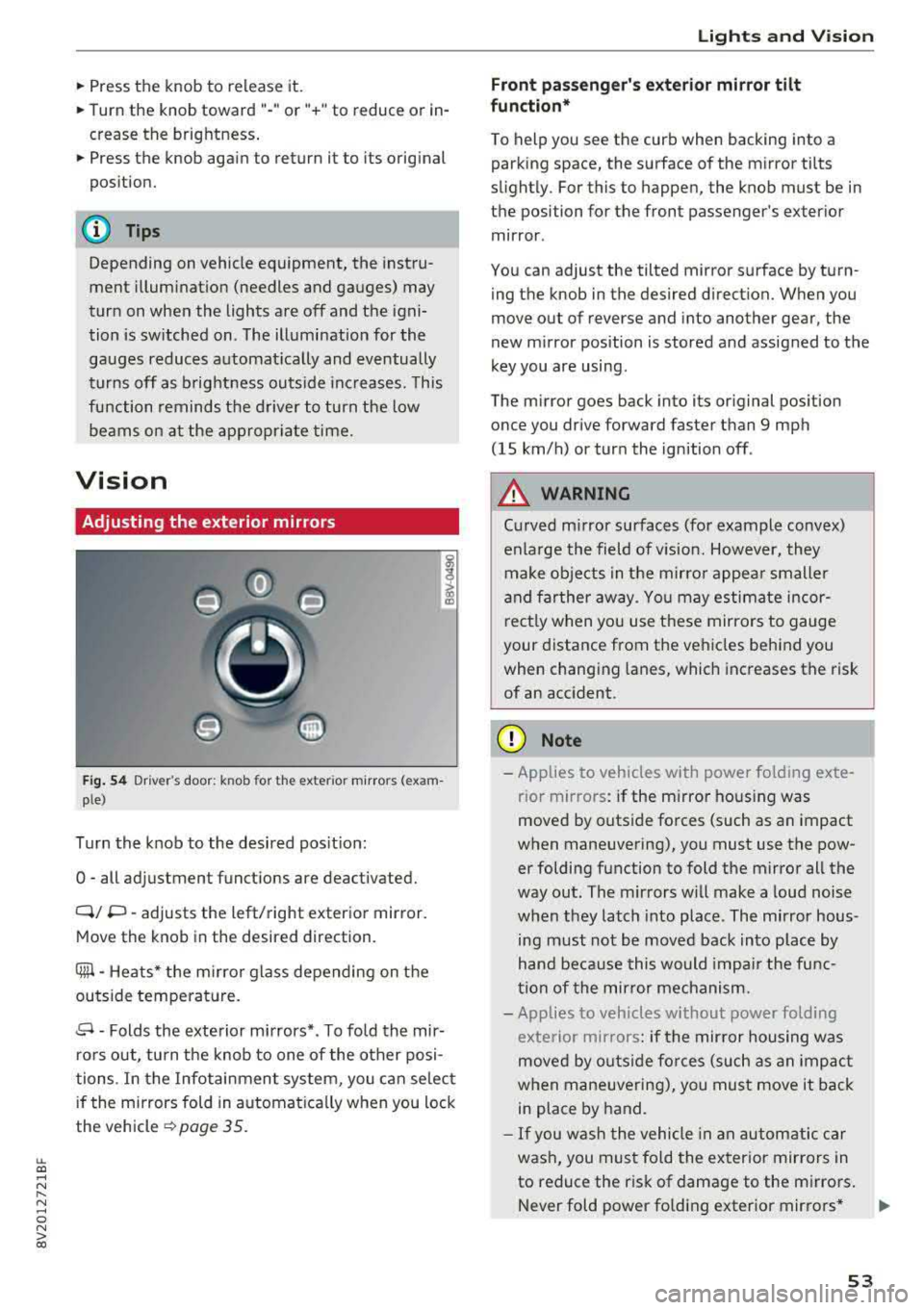
Fig. 54 Driv er's door: k n ob for the ex ter ior mirrors (exam
p le)
Turn the knob to the desired position:
0
-all adjustment functions are deactivated.
Q/ P -adjusts the left/right exterio r mirror.
Move the knob in the desired direction .
Cilll -Heats* the mirro r glass depending on the
outside temperature.
.9 -Folds the exterior mirrors* . To fold the mir
rors out, turn the knob to one of the other posi
tions . In the Infotainment system, you can select
if the mirrors fold in automat ically when you lock
the vehicle
~ page 35.
Lights and Vision
Front passenger 's exterior mirror tilt
function*
To help you see the curb when backing into a
parking space, the surface of the mirror tilts
slightly. For this to happen, the knob must be in the position for the front passenger's exterior
mirror .
You can adjust the tilted mirror surface by turn ing the knob in the desired direction. When you
move out of reverse and into another gear, the
new mirror position is stored and assigned to the
key you are using.
The mirror goes back into its original position
once you drive forward faster than 9 mph
(15 km/h) or turn the ignition off .
A WARNING
Curved mirror surfaces (for example convex)
enlarge the field of v is ion. However, they
make objects in the mirror appear smaller
and farther away . You may estimate incor
rectly when you use these mirrors to gauge
your distance from the vehicles behind you when changing lanes, which increases the risk
of an accident .
(D Note
-Applies to vehicles with power fo lding exte
r ior mirrors : if the mirror hous ing was
moved by outside forces (such as an impact
when maneuvering), you must use the pow er folding function to fold the mirror all the
way out. The mirrors will make a loud noise
when they latch into place. The mirror hous
ing must not be
moved back into place by
hand because this would impair the func
tion of the mirror mechanism.
- Applies to veh icles without power folding
exterior mirrors : if the mirror housing was
moved by outside forces (such as an impact
when maneuvering), you must
move it back
in place by hand.
- If you wash the vehicle in an automatic car
wash, you must fold the exterior mirrors in
to reduce the risk of damage to the mirrors .
Never fold power fo lding exterior mirrors*
.,.
53
Page 56 of 404

Lights and Vision
by hand. Only fo ld them in and out using
the power controls.
(D Tips
If the power adjustment fails, both mirrors
can be adjusted by hand by pressing on the
edge of the mirror surface .
Dimming the mirrors
Your vehicle is equipped with a manual or auto
matic* dimming rearview mirror .
Manual dimming rearview mirror
~ Pull the lever on the bottom of the mirror back .
Automatic dimming rearview mirror*
~ The interior and exterior mirrors dim automati
cally when light shines on them, for example
from headlights on a vehicle behind you .
.&_ WARNING
Applies to: vehicles with automa tic dimming rearview
m irror
Electro lyte fluid can leak out from broken
m irror glass. This liquid can irritate the skin,
eyes and resp iratory system.
If there is con
tact with the fluid, flush immediate ly with
plenty of water. Consult a physician if neces
sary.
- Repeated or long-term exposure to electro
lyte fluid can lead to irritation of the air
ways, especially in peop le with asthma or
other respiratory condit ions. Take deep
breaths immediate ly after leaving the vehi
cle or, if this is not possible, open all of the
doors and windows as wide as possible.
- If electrolyte fluid enters the eyes, flush
them thoroughly with a large amount of
clean water for at least 15 minutes and then
seek medical attention .
- If electrolyte flu id comes into contact w ith
the skin, flush the affected area with clean
water for at least 15 minutes and then clean
with soap and water and seek med ica l at
tention. Clean affected clothing and shoes
tho roughly before wearing again.
54
-
-If the fluid was swallowed and the person is
conscious, flush the mouth w ith water for at
least 15 minutes. Do not induce vomiting
unless this is recommended by medical pro
fessionals . Seek medical attention immedi
ately .
(D Note
Applies to: veh icles with automatic d imming rearv iew
mirro r
Electrolyte fluid can leak out from broken
mirror glass. This liquid damages plastic sur
faces . Clean this liquid as quickly as possible
with a wet sponge.
@ Tips
App lies to: veh icles with automatic d imm ing rearv iew
mirro r
-If the light reaching the rearview mirror is
obstructed, the automatic d imm ing mirror
will not function correctly,
- The automatic dimming m irrors do not dim
when the interior lighting is turned on or
the reverse gear is selected.
Sun visors
(~--- )
Fig. 55 Left side: sun viso r (example)
The sun visors can be moved out of their brackets
and turned toward the doors
(D. The sunshade
can a lso be moved back and forth lengthwise in
th is position*.
The mirror light switches on when the cover over
the van ity m irror* @opens .
Page 121 of 404

Outside mirrors
If yo u cannot see the traffic behind the tra iler
with the standard exterior mirrors, then you
must attach additiona l exterior mirrors . Adj ust
them so you have a sufficient visibility behind
you .
Exterior lighting
Follow the legal regulat ions regard ing the light
ing equipment on your trailer . Contact an author
ized Audi dealer or authorized Audi Service Facili
ty for more information.
Before starting to drive, check all lighti ng equip
ment on the hitched trailer.
The headlight range contro l adjusts automatical
l y to the light range of the headl ights.
Safety chains
Make sure the safety chains are correctly applied
when pull ing a trailer . The chains should hang
enough so that the trailer can dr ive around
curves. However, they must not touch the
g ro und .
(D Tips
-Use chocks whe n parking on incl ines if the
trailer is load ed.
- We recommend also hav ing the veh icle in
spected between the inspect ion intervals if
you are towing a trailer frequently.
- Avo id driving with a trailer during the vehi
cle break- in period .
Driving with a trailer
Driving with a trailer requires extra caution.
Speed
Adhere to the legal speed limits. Follow the legal
regulations specific to the country.
As the speed increases, the driving stability of
the trai ler decreases. Therefore you should not
exceed the maximum legal speed limit when
u. there are unfavorable road, weather and/or wind 00
~ conditions . This especially applies when driving
~ downhill.
0 N > 00
Trailer towing
You m ust always reduce your speed as soon as
you notice even the slightest swinging motion of
the tra iler. Never try to "stra ighten out" the tra il
er by acce lerating.
T he weight distribution is very poor if the vehicle
is empty and the trai ler is loaded . However if you
must drive under these circumstances, then dr ive
especially slowly .
Brakes
Brake in a timely manner. Downshift before driv
ing down hill so that t he engine can assist with
braking ~.&. .
When using a trailer w it h overrun brakes, first
brake gently then quickly. This reduces the r isk of
jerking while braking if the trailer wheels lock up .
Engine coolant temperature
Pay attention specifically to the coo lant tempera
ture display when there are high outside temper
a tur es, and when driving on long inclines
~page 11. Shift to a hig her gear in a timely man
ner .
A WARNING
= -
Constant braking causes the brakes to over-
heat and substantially reduces braking per
formance, increases braking distance or caus
es complete failure of the brake system.
119
Page 140 of 404

Ass is tanc e system s
-If the lanes are narrow or i f you are driving on
the edge of your lane. If this is the case, the
system may have detected a vehicle in another
lane that is
not adjacent to your current lane.
- If you are driving t hrough a curve. Side assist
may react to a vehicle that is one lane over
from the adjacent lane .
- If side assist reacts to other objects (such as
high or displaced guard rails).
- In poor weather conditions . The side assist
functions are limited.
Do not cove r the radar
sensors¢ fig . 141 with
stickers, deposits, bicycle whee ls or other ob
jects, beca use they wi ll impair the f unction . Do
not use side assist when towing a trailer. For in
formation on cleaning,
see¢ page 354 .
A WARNING
-Always pay atte ntion to traffic and to the
area aro und your vehicle. Side assist cannot
r ep lace a dr ive r's attent ion. The dr ive r alone
is a lways responsible for lane c hanges and
s imi lar d riving maneuvers.
- In some situat ions, the system may not
func tion or its f un ct io n may be lim ited. Fo r
exa mple:
- If vehicles are approach ing or being le ft
beh ind very quickly. The display may not
tur n on in t ime.
- In poor weather conditions s uch as heavy
rain, snow or heavy mist.
- On very wide lanes, in tight curves, or i f
there is a rise in the road su rface. Vehicles
in the adjacent lane may not be detected
because they are outs ide of the sensor
range.
@ Note
The sensors can be displaced by impacts or
damage to the bumpe r, whee l housing and
underbody. Th is can impa ir the system. Have
an au thor ized A udi dealer or au tho rized Aud i
Serv ice Facility c heck their fu nction .
(D Tips
- If the window g lass in the driver 's door o r
front passenger's doo r has been t inted, the
138 -
display in the exterior mirro
r may be incor
rect.
- For an exp lanat io n on co nform ity w it h t he
FCC reg ulations in the United States and the
Industry Canada regulations, see
¢page 386.
Switching on/off
App lies to : vehicles wit h Audi side ass ist
The system can be switched on/off in the Info
tainment system .
If the system is act ivated, the disp lays in the ex
terior mirrors wi ll turn on brief ly when the igni
tion is switched on .
.,. Select in the Infotainment system: IMENU! but
ton
> Vehicle > l eft control button > Driver as
sistance
> Audi side a ssist. Off switc hes the
system off.
Setting the display brightness
App lies to: vehicles wit h Aud i side ass ist
The display brightness can be adjusted in the In
fotainment system.
.,. Select in the Infotainment system: IMENU ! but
ton
> Vehicle > l e ft control button > Driver as
sistance
> Audi side assist.
The disp lay br igh tness adjusts au toma tically to
t h e b righ tness o f the sur ro undings, bo th in the
i nforma tion and in the warning stage. In very
dar k or very bright surroundings, the automatic
adjustment will set the display to the minim um
or max imum level. In such cases, yo u may notice
no change when adjusting the br ightness, or the
change may only be noticeab le once the sur
r ound ings change .
Adjust the br ightness to a leve l whe re the display
i n the information stage will not disrupt your
v iew ahead. If you change the br ightness, the dis
play in the exterior mirror w ill br iefly show the
brightness leve l in the i nfo rmation stage . The
br ightness of the warn ing stage is linked to the
br ightness in the infor mation stage an d is adjus t-
ed a long w ith the info rm ation st age .
..,.
Page 251 of 404
u. 00 .-< N l' N .-< 0 N > 00
Driving safety
Basics
Safe driving habits
Please remember -safety first!
The individual safety features of your vehicle can
work together as a system to help protect you
and your passengers in a wide range of accidents.
These features cannot work as a system if they
are not always correctly adjusted and correctly
used .
This chapter contains important informat ion,
tips, instructions and warnings that you need to
read and observe for your own safety, the safety
of your passengers and others . We have summar
iz ed here what you need to know about safety
belts, airbags, child restraints as well as child
safety. Your safety is for us
priority number 1. Al
ways observe the information and warnings in
this section -for your own safety as well as that
of your passengers.
The informa tion in t his section applies to all
model versions of your vehicle. Some of the fea
tures described in this sections may be standard
eq uip ment on some models, or may be optional
equ ipment on others. If you are not sure, ask
your author ized Audi dealer.
A WARNING
-Always make sure that you follow the in
struct ions and heed the WARNINGS in this
Manual. It is in your interest and in the in
terest of your passengers .
-
-Always keep the complete Owner's Litera
ture in your Audi when you lend or sell yo ur
vehicle so that this important information
w ill always be available to the driver and
passengers.
-Always keep the Owner's literature handy so
that you can find it easily if you have ques
tions .
Driving safety
Important things to do before driving
Safety is everybody 's job ! Vehicle and occupant
safety always depends on the informed and care
ful driver .
For your safety and the safety of your passen
gers,
before driving always:
.. Make sure that a ll lights and signals are operat
ing correctly.
.. Make sure tha t the tire pressure is correct .
.. Make sure that all w indows are clean and afford
good vis ibility to the outs ide.
.. Secure all luggage and othe r items ca refully
c::> page 63, c::> page 63 .
.. Make sure that nothing can interfere with the
peda ls .
.. Adjust front seat, head restraint and mirrors
correct ly for your height.
.. Instruct passengers to adjust the head re
straints according to their height.
.. Make sure to use the right child restraint cor
rectly to protect children
c::> page 294, Child
safety .
.. Sit properly in your seat and make sure t hat
your passengers do the same
c::> page 59, Front
seats .
.. Fasten your safety belt and wear it properly. Al
so instruct your passengers to fasten their safe
ty belts properly
c::> page 260.
What impairs driving safety?
Safe driving is directly related to the condition of
the vehicle , the driver as well as the driver 's abili
ty to concentrate on the road without being dis
tracted.
The driver is responsible for the safety of the ve
hicle and a ll of its occupants. If your ability to
drive is impa ired, safety risks for everybody in the
vehicle increase and you a lso become a hazard to
everyone else on the road
c::> &_ . Therefore:
.. Do not let yourse lf be distracted by passengers
or by using a cellular telephone .
.. NEVER drive when your driving abi lity is im
pa ired (by med ications, alcohol, drugs, etc .) .
.. Observe all traffic laws, rules of the road and
speed lim its and plain common sense .
.,.
249
Page 357 of 404

u. 00 .-< N l' N .-< 0 N > 00
Apply the product using a mic rofiber cloth. To
avoid damaging the paint surface, do not use too
much pressure .
R inse the veh icle t horo u ghly wi th wa ter. Then
clean using a neutra l shampoo and a soft micro
fiber cloth.
R inse the veh icle t horo u ghly again and let it a ir
d ry . Remove any water res idue using a ch amois.
A WARNING
-Only wash the vehicle when the ignition is
off and follow the instructions from the car
wash operator to reduce the risk of acci dents.
-T o reduce the risk of cuts, protect yourself
from sharp metal components when wash ing the underbody or the inside of the wheel
hous ings .
-After wash ing the vehicle, the brak ing effect
may be de layed due to mo isture on the
brake rotors or ice in the w inter . This in
c reases the risk of an acc ident. The brakes
must be d ried fi rst w it h a few careful b rake
app lications.
@ Note
-If you wash t he veh icle in an automatic car
wash, you m ust fold the exterior m irrors in
-
Care and cleaning
to reduce the r isk o f damage to the m irro rs .
Power fo lding exterior mirrors* m ust only
be folded in and o ut using the power fold ing
function.
-T o red uce the risk of paint damage, do not
was h the vehicle in direct s unlight.
-T o red uce the risk of damage, do not was h
the power top * w ith a pressu re washe r.
-T o red uce the risk of damage to the s urface,
do not use insect removing sponges, kitche n
sponges or s imilar items.
-Matte finish painted vehicle components:
-To reduce t he risk of damage to t he sur-
face, do not use pol ish ing agents or hard
wax.
-Neve r use protective wax. It can destroy
the matte finish effect .
-Do not place any st ickers or magnetic
s igns on vehicle parts painted with matte
finish paint. The paint cou ld be damaged
when the stickers or magnets a re re
moved.
@ For the sake of the environment
Only wash the veh icle in facilities spec ia lly de
s igned for that pu rpose. This will reduce the
r isk of di rty wate r contam ina ted with o il from
en te ring the sewe r sys tem.
Cleaning and care information
When clea ning and caring for individua l vehicle
components, refer to the follow ing tables . The
in fo rmat ion conta ined there is s imp ly recom
mendations . Fo r qu est io ns or for components t
h at are not listed, consult an authorized Aud i
dealer or authorized Audi Service Fac il ity. Also
fo llow the information found
in c:> ,& .
Exterior cleaning
Component Situation
Solution
Wind shield wip er
Deposits soft cloth wi th glass cleane r, ~ page 56
blade s
Headlights /
Deposits Soft sponge with a mild soap solutiona)
Tail light s
Sensors /
Deposits Sensors: soft cloth wit
h solvent -free cleaning solution
camera lenses Camera lenses: soft cloth with a lcohol-free cleaning so lu-
tion
Snow/ice Hand br ush/solven t-free de-icing spray
355
Page 360 of 404

Care and cl eaning
- Camera len se s
- Never use warm or hot water to remove
snow or ice from the camera lens. Th is
could cause the lens to crack .
- Never use abras ive clean ing mater ia ls or
alcohol to clean the camera lens . This
cou ld cause scratches and cracks.
- Pow er top
- Remove bi rd dropp ings immedia tely.
- Never use gasoline, spot remover, ben-
zene, pa int thinne r or other solvents to re
move.
- Door windows
- Remove snow and ice on windows and ex-
terior mirrors with a p lastic scraper. To
avoid scratches, move the scraper on ly in
one direction and not back and forth.
- Never remove snow or ice from door win
dows and m irrors using warm or hot water
because this could cause cracks to form .
- To avoid damage to the rear w indow de
fogger, do not apply any stickers on the
heating w ires on the inside of the window.
- Decorative parts /trim
- Never use chrome care or cleaning p rod-
ucts.
- Paint
-To red uce the risk of scratches, the vehicle
must be free of dirt and dust before pol
ishing or waxing.
- To prevent paint damage, do not polish or
wax the veh icle in direct sunlight.
- To red uce the risk of paint damage, do not
polish away rust spots.
- Remove cosmetics and sunscreen immedi
ately - these could damage the paint.
- Di spla ys/ instrument cluster
- The d isplays/instrument cluster and the
trim surrounding them must not be
cleaned with dry cleaning methods be
cause they could be scratched .
- Make sure that the instrument cluster is
switched off and has cooled off before
cleaning it .
- Make sure no fluids enter the spaces be tween the instrument cluster and the
trim, because that could ca use damage.
35 8
-Controls
- Make sure that no flu ids enter the con-
trols, because this could cause damage .
-Safety belts
- Do not remove the safety belts to clean
them.
- Never clean safety belts or their compo
nents chem ica lly or with co rrosive fluids
or solven ts and never allow sharp objec ts
to come into contact with the safety belts .
This could ca use damage to the belt web
bing.
- If there is damage to the webbing, the
connections, the retractors or the buckles, have them replaced by an authorized Audi
dealer or authorized Aud i Serv ice Facility .
-Te xtile s/artificial leather / Alcantara
- Never treat art ificial leather/Alcantara
with leathe r ca re products, solvents, floor
polish, shoe polish, spot remove o r similar
p rodu cts.
- H ave a spec ial ist remove stubborn stains
to prevent damage .
-Never use steam cleaners, brushes, hard
sponges, etc. when cleaning.
- Do not turn on the seat heating* to dry the seat .
- Objects w ith sharp edges, such as zippers
or rivets on clothing or belts, can cause
damage to the surface .
- Open hook and loop fasteners, for exam
ple on clothing, can damage seat covers .
Make sure hook and loop fastene rs a re
closed.
- Na tural leather
- Never treat leather with solvents, floor
polish, shoe polish, spot remover or simi
lar products.
- Objects with sharp edges, such as zippers
or rivets on clothing or belts, can cause
damage to the surface.
- Never use steam cleaners, brushes, hard
sponges, etc. when cleaning.
- Do not turn on the seat heating* to dry the
seat.
- To he lp prevent the leather from fading,
do not leave the vehicle in direct sunlight