2018 AUDI A6 driver assistance
[x] Cancel search: driver assistancePage 98 of 266
Assistance systems
-Under certain conditions such as ruts in the
road, a banked roadway or crosswinds, the
corrective steering alone may not be enough
to keep the vehicle in the middle of the lane.
- For safety reasons, active lane assist must
not be used when there are poor road and/
or weather conditions such as slippery
roads, fog, gravel, heavy rain, snow and the
potential for hydroplaning. Using active lane
assist under these conditions may increase
the risk of a crash.
Switching on/off
A pplies to: ve hicles w ith Audi active lane assist
-;g
9 ::i 00 CD
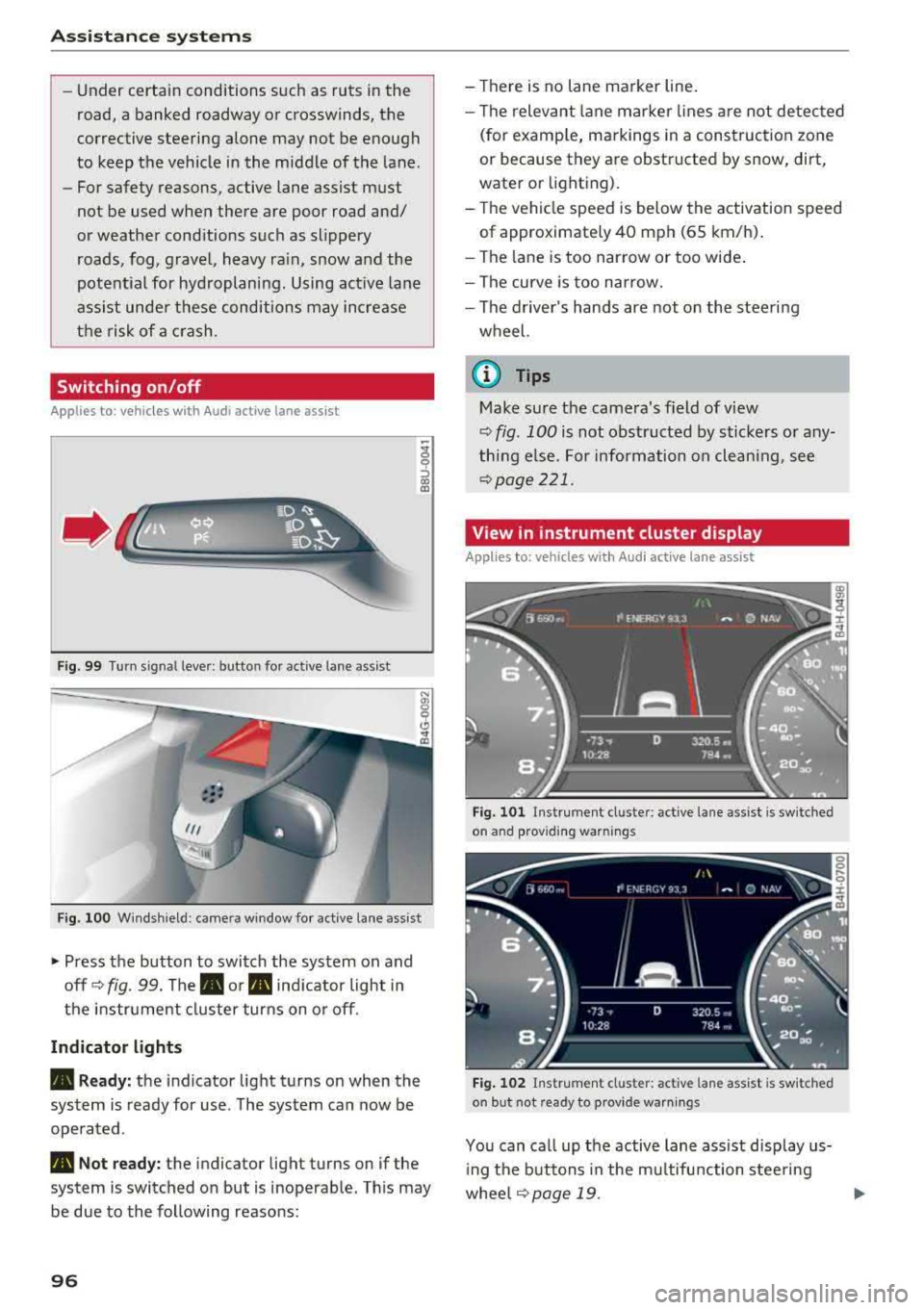
Fig. 99 Turn signa l lever: button for active lane assist
Fig. 100 Windshield: camera window for active lane assist
• Press the button to switch the system on and
off ¢
fig. 99. The. or. indicator light in
the instrument cluster turns on or off.
Indicator lights
• Ready: the indicator light turns on when the
system is ready for use . The system can now be
operated .
• Not ready: the indicator light turns on if the
system is switched on but is inoperable. This may
be due to the following reasons:
96
-Th ere is no lane marker line.
-The relevant lan e marker lines are not detected
(for example, markings in a construction zone
or because they are obstructed by snow, dirt,
water or lighting).
-Th e vehicle speed is below the activation speed
of approximate ly 40 mph (65 km/h).
-The lane is too narrow or too wide.
-The curve is too narrow.
-The driver's hands are not on the steering
wheel.
@ Tips
Make sure the camera's field of view
¢ fig. 100 is not obstructed by stickers or any
thing else. For information on cleaning, see
¢page 221.
View in instrument cluster display
Appl ies to: vehicles wi th Aud i ac tive la ne ass ist
Fig. 101 Instrument cl uste r: active lane assist is sw itched
on and providing warnings
Fig. 102 Instrument cluster: active lane assist is switched
on but not ready to provide warnings
You can call up the active lane assist display us
ing the buttons in the multifunction steering
wheel
¢page 19. Ill>
Page 104 of 266

Assistance systems
that are between approximately 32 ft (10 m) and
295
ft (90 m) in front of the vehicle and within
the detection zone. Within the limits of the sys
tem
c:> page 102, a pedestrian or wild animal de
tected when the low beams are switched on is
highlighted in yellow
c:> fig. 108. Animal recogni
tion is not active within highly developed areas.
The system only detects large wild animals such
as deer.
(D Tips
If another display such as navigation replaces
the image from the night vision assist
the~--,
symbol appears in a tab c:>fig. 109. You can
access night vision assist using the multifunc
tion steering wheel buttons
c:> page 20.
Pedestrian and wild animal warning
Applies to: vehicles with night vision assist
Fig . 110 Inst rument cluster :® pedestrian warning, ®
wild animal warning
Fig. 111 In strument cl uster: ® pedestrian warning/ @
w ild an imal warning, when the night vision assist image is
n ot selected in the instrument cl uster display
Image in the instrument cluster/head-up
display*
If there are pedestrians or wild animals in an
area in front of your vehicle that is classified as
102
critical, the system will direct your attention to
this :
- Pedestrians or wild animals are highlighted in
red and the corresponding
symbol . or.
turns on c:>fig. 110.
- There is also an audible signal.
The area classified as critical is based on the vehi
cle speed and the steering wheel angle. Pedes
trian and wild animal warning encourages you to pay more attention.
If the night vision assist image is replaced by an
other display (such as the on-board computer),
the
red . or. indicator light c:> fig. 111 will
appear if there is a pedestrian or wild animal
warning.
If the head-up display* is switched on and the
night vision assist content is activated, .
or.
will appear in the head-up display*.
Marking light*
To direct the driver's attention to a pedestrian,
the headlights can flash on the pedestrian three
times in a row when there is a pedestrian warn
ing.
This occurs at speeds above approximately
35 mph (60 km/h) if you are outside of illuminat
ed areas and no detected vehicles are shown. The
high beam assistant* controls the marking light*
c:> page 39, High beam assistant.
The marking light is not used for wild animals .
General information
Applies to: vehicles with night vision assist
Fig. 112 Fro nt of the vehicl e: night vision assist camera
Page 105 of 266
a co ,...,
N
" N ,...,
0 0 <..:l '
of the night vision assist system:
- Poor visibility such as snow, rain, fog or heavy
spray
- Dirty lens on the night vision assist camera
Make sure the night vision assist camera
c::> fig. 112 is not covered by stickers, deposits or
any other obstructions because that can affect
the camera function. For information on clean
ing, see
c::> page 221 .
The pedestrian and wild animal recognition de
pends on the temperature difference between
the person/wild animal and the background. Peo ple/wild animals may not be detected if the dif
ference is too small. The pedestrian/wild animal
marking and the marking light* deactivate at
temperatures above approximately 77 °F (25 °C)
and during daylight.
If the night vision assist im
age is selected in the instrument cluster display,
then the
D symbol appears at the top on the
right side .
_&, WARNING
Pay attention to traffic and the area around
your vehicle when night vision assist is switch
ed on. The driver is always responsible for as
sessing the traffic situation.
- Night vision assist can only warn about peo
ple and wild animals located within the visu
al range of the infrared camera. The visual
range corresponds to the image in the in
strument cluster display.
- Night vision assist may not detect people or
wild animals and mark them if
-they are not in an upright position, for ex
ample if they are sitting or lying down
and/or
-the silhouette in the display appears in
complete or interrupted, for example be
cause the person is partially covered by a
vehicle or the animal is partially covered
by tall grass. This could increase the risk
of an accident.
- Never try to swerve around animals if doing
so will endanger you or other road users, be
cause this increases the risk of an accident.
Assistance systems
(D Tips
-Even though the system evaluates the
shape and heat given off by all detected ob
jects, there are limits to the system . There
may be false warnings.
-For technical reasons, the image pauses in
split second intervals.
Switching on/off
Applies to: vehicles with night vision assist
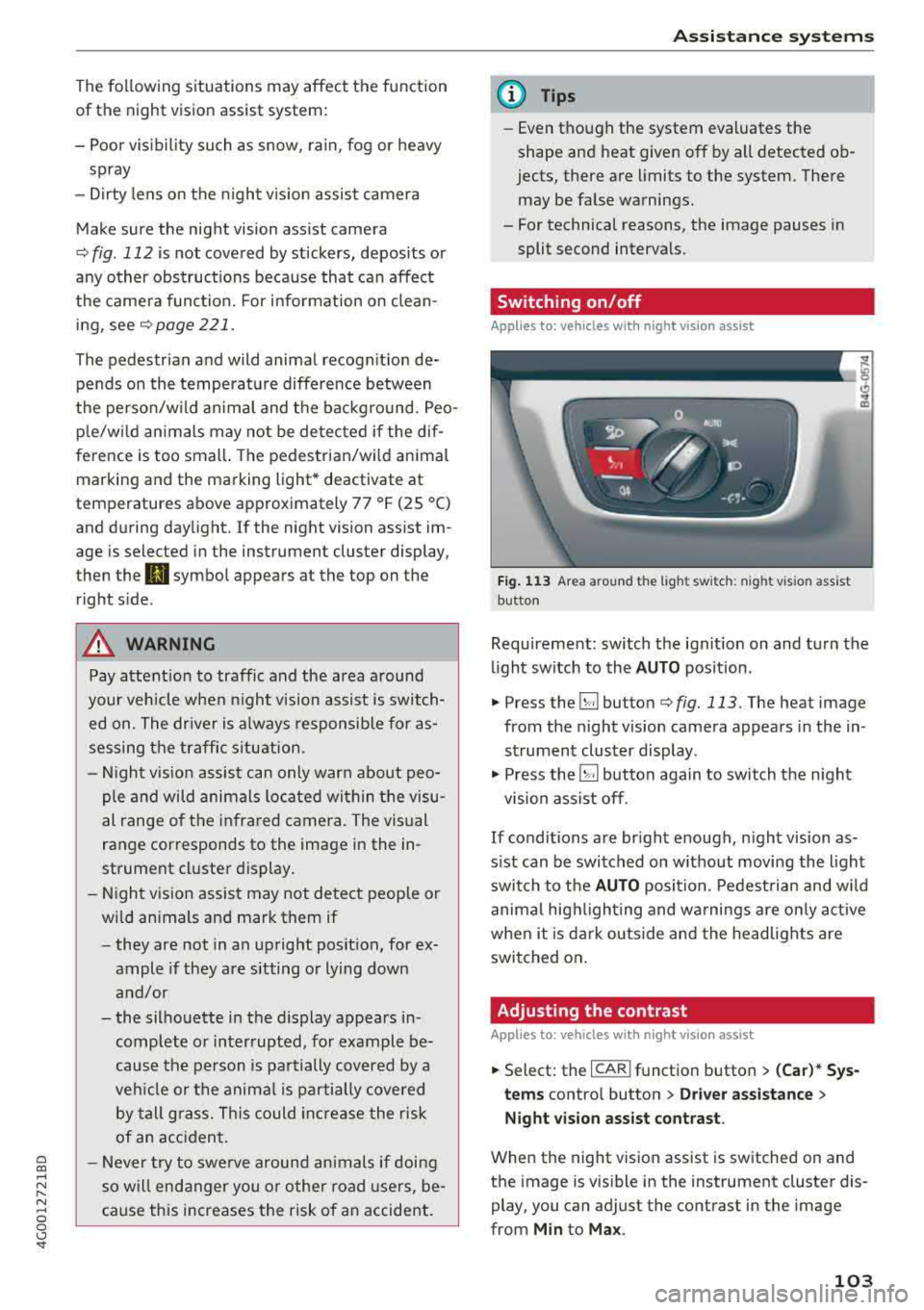
Fig. 113 Area around the light switc h: night vis ion assist
button
Requirement: switch the ignition on and turn the
light switch to the
AUTO position.
.. Press the~ button c::> fig. 113. The heat image
from the night vision camera appears in the in
strument cluster display .
., Press the~ button again to switch the night
vision assist off.
If conditions are bright enough, night vision as
sist can be switched on without moving the light
switch to the
AUTO position. Pedestrian and wild
animal highlighting and warnings are only active
when it is dark outside and the headlights are
switched on.
Adjusting the contrast
Applies to: vehicles with night vision assist
.. Select: the I CAR! function button > (Car)* Sys
tems
contro l button > Driver assistance >
Night vision assist contrast .
When the night vision assist is switched on and
the image is visible in the instrument cluster dis
play, you can adjust the contrast in the image
from
Min to Max .
103
Page 106 of 266

Assistance systems
Messages
App lies to: ve hicles w ith night v isio n ass ist
Night vision assist: System fault
The system cannot guarantee correct function
and is switched off . See an author ized Audi deal
er or authorized Audi Service Facility for assis
tance .
Night vision assist: Currently unavailable
The system cannot guarantee correct function at
this t ime and is switched off.
Night vision assist: Only available at night with
lights turned on
Night vision assist onl y works when it is dar k out
side and the head lights are on.
Night vision assist: Pedestrian marking current
ly unavailable
The pedestrian and wild animal marking was
sw itched off by the system.
Audi drive select (drive
settings)
Introduction
Drive select makes it possible to experience dif
ferent types of vehicle settings in one vehicle .
The driver can se lect
Comfort , Auto and Dynamic
modes in the Inf ota inme nt system to switch be
tween, for example, a sporty and a comfo rtable
driving mode .
I n the
Individual mode, the sett ings can be ad
justed to your perso nal preferences. This makes
it poss ible to comb ine settings such as a spo rty
engine setting with light steering.
Description
The following systems, among other things, are
influenced by drive select:
Engine and automatic transmission
Depending on the mode , the engine and a uto
mat ic tran smission respond more quickly or in a
mo re balanced manner to accelerator peda l
104 movements
. In the sporty dynamic mode, the
transmission shifts at higher speed ranges.
Adaptive air suspension*
The adaptive a ir suspens ion* is an electron ically
controlled air suspension and damping system.
The adjustment depends on the driving mode se
l ected, steering movements, the driver's braking
and acce leration, and as the road surface, vehicle
speed and load.
The vehicle ground clearance depends on the
mode selected and the speed . When you are in
the
auto mode, the highway setting is activated
when you drive above 75 mph (120 km/h) for
more than 30 seconds. The ground clearance is
i ncreased automatically if the speed drops below
44 mph (70 km/h) for more than 120 seconds .
Steering
The power steering adapts. Indirect steering that
moves easily as in comfort mode is especia lly
su ited to long drives on a highway. The dynamic
mode provides sporty, direct steering.
App lies to: vehicles wit h dynamic steer ing
The steering ratio changes based on vehicle
speed in order to maintain optimum steering ef
fort for the driver at all times. Th is sets the steer
i ng to be less sensitive at h igher speeds in order
to provide improved veh icle control. At reduced
speeds, steering is more direct in o rder to keep
t h e steer ing effort as minimal as possible whe n
the driver is maneuvering the vehicle. At low and
average speeds, dynamic steering* additionally
provides more responsive steering performance.
Sport differential*
As a component of the all whee l dr ive system
(quattro)
~ page 123, the sport differe ntial dis
tributes the driving power to the rear axle de
pending on the situation. The distribution of
power varies from ba lanced (comfort) to sporty
(dynamic) depending on the se lected mode. The
goal is a high level of agility and ability to accel
erate on curves. The vehicle is very responsive to
steering.
IJIJ,
Page 108 of 266

Assistance systems
Systems comfort auto dynamic
Engine/transmission
balanced balanced sporty
Air suspension* comfortable balanced sporty
Steering comfortable balanced sporty
Dynamic steering* comfortable/ind i recil: ba lan ced/d irect sporty/direct
Sport differential * balanced
Adaptive cruise control* comfortable
Engine sound * subtle
al Subtle in the selector lever position "D" an d sporty in "S".
(D Tips
Your Individual mode settings are automati
cally stored and assigned to the remote con
trol key being used .
Raising/lowering the vehicle
App lies to: ve hicles w ith a daptive a ir s uspens io n
You can raise your vehicle temporarily , for exam
p le to drive ove r a tall cu rb.
Raising the vehicle
"' Select the following in the Infotainment sys
tem : the
!CARI function button> Raise control
button.
"'W ait for the ar rows or segments in the Info
tainment system display to stop blinking and
the vehicle to reach its fina l position .
Lowering the vehicle
"'To lower the vehicle, select the following in the
Infotainment system: the
! CAR I function button
>
Lower control button.
"' Wait for the arrows or segments in the Info
tainment system display to stop blinking and
the vehicle to lower complete ly .
{LlJ) Note
- Remember that your vehi cle is not suitable
for driving offroad even when it is raised.
There is not enough ground clearance.
- If the vehicle is raised, it wi ll lo wer auto
matically when driving 62 mp h (100 km/h)
or faster.
106
ag ile sporty
ba lan ced sporty
subtle/sportyal sporty
Messages
Applies to: vehicles wi th adap tive a ir suspension
Air suspension: Vehicle is too high. Controlling
level. ..
Air suspension: Vehicle is too low. Controlling
level. ..
The driver message switches off when the leve l
contro l process is comp lete.
Page 118 of 266

Parking systems
,.. Turn the Infotainment system on and shift into
reverse gear. The parking system must be
turned on and the
Cross parking view must be
displayed .
,.. Press the control button on the Infotainment
unit(D ¢page 111, fig . 122 . The Parallel park
ing
view is displayed.
,.. Back up and align your vehicle so the b lue area
@ borders on the rear end of the vehicle be
hind you or on the parking space line
¢_& in
General information on page 112, ¢(D in Gen
eral information on page 112.
The blue area
represents an extension of the vehicle's outline
by approximately 16 ft (5 meters) to the rear .
The long side of the blue area should be on the
curb . The entire blue area must fit into the
parking space.
,.. With the veh icle stopped, turn the steer ing
wheel to the right as far as it w ill go .
,.. Back into the parking space until the blue curve
¢ page 111, fig . 123 to uch es the curb¢ _& in
General information on page 112,
¢ (D in Gen
eral information on page 112 .
Stop the vehicle.
,.. With the vehicle stopped, turn the steering
whee l to the left as far as it will go.
,.. Continue to back into the parking space until
the vehicle is parked parallel to the
curb¢ .&.
in General information on page 112, ¢(D in
General information on page 112. @ repre
sents the rear bumper. At the very latest, stop
the vehicle when the red orientation line ©
borders an object . Keep an eye on the front of
your vehicle while doing this .
Parking next to obstacles
If there is an obstacle (such as a wall) next to the
parking space, position the vehicle so there is
mo re space on that side. Position the long side of
the blue area so that there is sufficient space
from the object. The area must not be on the
curb . You will a lso need to start turning the
steer ing whee l earlier. The blue curve
¢ page 111, fig. 123 must not touch the obsta
cle, but rather there should be enough distance.
116
@ Tips
The left or right orientation lines and surfaces
will be disp layed, depending on the turn s ig
nal being used.
Trailer mode
Applies to: vehicles wit h peripheral ca meras a nd tra iler hitch
This view assists you in positioning the vehicle in
front of a trailer .
Fig. 136 Infotainment system: rea r m ode
Requirement: the trailer mode must be selected
¢page 114.
,.. Now you can posit ion your veh icle in front of
the trailer
¢ .&. in General information on
page 112,
¢ @ in General information on
page 112.
The orange orientation line indicates
the expected path toward the trailer h itch. Use
the blue lines to help you estimate the d istance
to the trailer h itch .
Setting the mode
App lies to: vehicles with peripheral ca meras
,.. Select: !CAR ! function button > (Car)* Systems
control button > Driver assistance > Parking
aid
> Change to front/rear > Auto or Manual.
Auto
-this view behind the vehicle (Rear mode) is
displayed automatically when you shift into re
verse. This view in front of the vehicle
( Front
mode) is displayed automatically when you shift
into the forward gears.
Manual -When you switch the system on, the
view behind the vehicle
( Rear mode) is always
displayed and it does not switch to the
Front
mode when a forward gear is selected.
Page 119 of 266

a co .... N
" N .... 0 0 \.J '
A ppl ies to : ve hicles w ith parkin g system plus/rearv iew cam
era/peripheral ca mera
The display and warning tones can be adjusted in
the Infotainment.
~ Se lect: the ICARI fu nction button > (Car)* Sys
tems
control b utton > Driver assistance > Park
ing aid .
Display
On * -
an op tical d isp lay is shown for the par kin g
system plus, a rearv iew camera image is s hown
for the rearview camera *.
Off -when the p arking sys tem is sw itche d off,
on ly audib le sign als are give n.
Signal tones
Front volume -
volume for the front area
Rear volume -volume for the rear area
Front frequency -frequency for the front area
Rear frequency -frequen cy fo r the rea r area
Music volume during nav . prompts -the volume
of the a udio/video so urce is lowe red when t he
pa rking system is turned o n
The new value is g iven briefly during the adjust
ment.
(D Tips
- The wa rning tones ca n also be ad justed d i
r ectly by the vis ual d isp lay or the pictu re
from the camera. Simply p ress the
Settings
co ntro l bu tton.
- Changed set tings are ac tivated whe n the
parking system is swi tched o n aga in.
- The settings for volume and frequency are
a utomat ica lly saved and ass igned to the re
mo te con trol key be ing used.
Error messages
A pp lies to: ve hicles with parking system plus/rearview cam
era/per ipheral ca mera
There is an erro r in the system if the LED in the
Pw , button is b link ing and yo u hear a continuous
Parking systems
alarm for a few seconds after sw itch ing on the
par king system or w hen the pa rking system is a l
r eady activated. If the erro r is not cor rected be
fo re you switch off the ignition, the
LED in the Pw ,
button w ill blink the next time you switch on the
park ing system by shifting into reverse.
Parking system plus*
If a senso r is fa ulty, the~ symbo l will appear i n
front of/beh ind the vehicle in the Infotainment
display. If a rear sensor is faulty, on ly obstacles
t h at are i n areas @and @ are shown
<=> page 108, fig . 114 . If a front se nsor is faulty,
o n ly obs tacles tha t are in a reas © and @are
shown. The re is a lso a sys tem ma lf u nct ion if all
seg ments arou nd the veh icle are red or if no seg
me nts are disp laye d.
Peripheral cameras*
The re is a system malfu nction if t he 00 • symbol
appea rs and the co rresponding d isp lay area is
s h own in bl ue. The camera is not wo rking in t his
are a.
Drive to an authorized A udi dealer or authorized
Audi Se rvice Facility immed iate ly to have the
malfu nction corrected.
Trailer hitch
App lies to: vehicles wit h parking system pl us/rea rv iew cam
e ra/peri phe ra l cameras an d tra ile r hitc h
When the trailer socket is in use, the par king sys
tem rear sensors are not act ivated when you sh ift
into reverse gear or when yo u press t he
p,,1A but
ton. This res ults in the following rest rict ions.
Parking system plus*
The re is no distance warning for the rear. The
front senso rs remain activated. T he v isua l disp lay
switches to trailer mode.
Rearview camera*/peripheral cameras*
T he re is no distance warning for the rea r. The
front senso rs remain activated . The visua l disp lay
switches to trailer mode. The rearview came ra
i mage will not s how the orie ntation lines and t he
bl ue surfaces.
.,..
117
Page 228 of 266

Emergency assistance
Emergency assistance
General information
.,. Park the vehicle as far as possible from moving
traffic in the event of a breakdown. In the event
of a flat tire, park the vehicle on a level surface .
It you are on a steep hill, be especially careful.
.,. Set the parking brake .
.,. Switch the emergency flashers on .
.,. Set up the warning triangle r=;,page 226 .
.,. Have the passengers exit the vehicle . They
should move to a safe place, for example be
hind a guard rail.
A WARNING
Follow the steps given above. This is for your
protection and the for the safety of other driv
ers.
Equipment
Warning triangle
A pplies to: ve hicles w ith warning triangle
Fig. 190 Luggage compa rtment lid : wa rnin g triangle
The warning triangle placed in the vehicle at the
factory is located in the luggage compartment.
.,. To remove the warning triangle, press the re-
tainer in the direction of the arrow
r:;, fig . 190
and fold the holder down.
The luggage compartment lid is only designed to
hold the warning triangle offered by the Audi
Genuine Accessories program.
226
Vehicle tool kit
Fig. 191 Luggage compartment: vehicle tool kit
The vehicle tools and vehicle jack* are stored in
the luggage compartment under the floor cover.
.,. Lift the cargo floor by the plastic handle.
.,. Hook the handle into the luggage compartment
weather strip.
.,. Turn the handle counter-clockwise and remove
the cover or the spare tire* .
.,. Unhook the cargo floor before clos ing the lug
gage compartment lid.
A WARNING
I mproper use of the veh icle jack can cause se
rious personal injuries.
- Never use the screw driver hex head to
tighten wheel bolts, since the bolts cannot
attain the necessary tightening torque if yo u
use the hex head, potentially causing an ac
cident.
- The factory-supplied jack is intended only
for your vehicle model. Under no circum
stances should it be used to lift heavy
vehicles or other loads; you risk injuring
yourself.
- Never start the engine when the vehicle is
raised, which could cause an accident .
- Support the vehicle securely with appropri ate stands if work is to be performed under
neath the vehicle; otherwise, there is a po
tential risk for injury .
- Never use the jack supplied with your Audi
on another vehicle, particularly on a heavier
one. The jack is only suitable for use on the
vehicle it came with.