2018 AUDI A6 sunroof
[x] Cancel search: sunroofPage 4 of 266

Table of contents
About this Owner's Manual . .. .. .
Cockpit ... .. ............... .... .. .
Cockpit overview .. ..... ... .. .. .. .
Controls at a glance . .. ..... ... .. .. .. .
Instruments and indicator lights
Instruments ....... .. ..... ... .. .. .. .
Indicato r lights .... .. ..... ... .. .. .. .
Driver information system ... .. .
Ove rview ....... ... .. ..... ... .. .. .. .
Operation . ........ .. ..... ... .. .. .. .
On-board computer ........... .... .. .
Eff iciency program ............ .... .. .
Odometer .. .. .. ................ ... .
T ime/date display ............... ... .
H ead-up display ................. ... .
Starting and driving ............ .
Opening and closing ............ .
Cent ral lock ing .. ............. .... .. .
L ugg age compa rtment lid ...... .. .. .. .
Ch ild safety lock . ............. .... .. .
P owe r windows .... .. ..... ... .. .. .. .
Sunroof . ....... ... .. ..... ... .. .. .. .
Va let par king function . ..... ... .. .. .. .
5
6
6
6
9
9
1 0
1 9
1 9
20
20
21
22
22
22
24
24
24
30
33
34
35
36
Garage door opener (Homelink) . . . . . . . . 36
Lights and Vision . . . . . . . . . . . . . . . . . 38
E xterior lighting . . . . . . . . . . . . . . . . . . . . . 38
Interior lighting . . . . . . . . . . . . . . . . . . . . .
41
V1s1on . . . . . . . . . . . . . . . . . . . . . . . . . . . . . 42
W indshield w ipers . . . . . . . . . . . . . . . . . . . 44
Seats and storage . . . . . . . . . . . . . . . . 47
General informa tion . . . . . . . . . . . . . . . . .
47
Front seats . . . . . . . . . . . . . . . . . . . . . . . . . 47
H ead restra ints . . . . . . . . . . . . . . . . . . . . . 48
M emory fu nction . . . . . . . . . . . . . . . . . . . . 49
Ashtray . . . . . . . . . . . . . . . . . . . . . . . . . . . .
51
Ciga rette lighte r . . . . . . . . . . . . . . . . . . . . 51
12
Volt sockets . . . . . . . . . . . . . . . . . . . . . 52
Storage . . . . . . . . . . . . . . . . . . . . . . . . . . . . 52
Luggage compartment . . . . . . . . . . . . . . . 54
2
Warm and cold .... ... .. ..... ... . .
Climate contro l system . .. .. ..... ... . .
Steering w heel heat ing . .. .. ..... ... . .
Driving . .. .. .. .... .. ... .. ..... ... . .
Genera l information . .... .. ..... ... . .
Steering .. .. .. .. .. .. ............. . .
Start ing and stopping the eng ine ..... . .
Start/Stop system .. .. ... .. ..... ... . .
E lectromechanical parking brake ...... .
Start ing to drive .. .. .. .............. .
A utomat ic transmission
Trailer towing ... .. .............. .
D riving with a tra ile r
Driver assi stance .. .............. .
Assistance systems ............. .
Speed warning system .............. . .
Cru ise cont ro l sys tem . ............. . .
Audi adaptive cruise contro l ...... ... . .
Audi pre sense ..... .. ... .. ..... ... . .
Audi active lane assist .... .. ..... ... . .
Audi s ide ass ist .. .. .. ............. . .
N ight vision assist w ith pedestrian and
wild animal detection . ............. . .
Audi drive select (drive settings) ....... .
58
58
63
6 4
64
66
68
70
72
74
7 4
81
81
84
8 4
84
8 4
86
94
95
98
101
104
Parking systems . . . . . . . . . . . . . . . . . 107
Genera l information . . . . . . . . . . . . . . . . . 107
Parking system plus . . . . . . . . . . . . . . . . . . 108
Rearv iew camera . . . . . . . . . . . . . . . . . . . . 109
Per iphera l came ras . . . . . . . . . . . . . . . . . . 112
Adjus ting the d isplay and the wa rn ing
tones.. ... .. .. .... .. ... .. ..... ... ..
11 7
Error messages . . . . . . . . . . . . . . . . . . . . . 117
Traile r hitch . . . . . . . . . . . . . . . . . . . . . . . . 117
Intelligent Technology . . . . . . . . . . 11 9
Electronic stabilization control (ESC) . . . . 119
B rakes . . . . . . . . . . . . . . . . . . . . . . . . . . . . . 120
E lectromechanical steering, dynamic
steering . . . . . . . . . . . . . . . . . . . . . . . . . . .
122
All wheel drive (quattro) . . . . . . . . . . . . . . 123
Energy management . . . . . . . . . . . . . . . . . 123
Notice abo ut data recorded by the Event
Data Recorder and veh icle co ntro l
modules . . . . . . . . . . . . . . . . . . . . . . . . . . .
12 4
Page 36 of 266
Opening and clo sin g
particularly when children remain in the vehi
cle. Otherw ise children could start the eng ine
or operate electrical equipment (such as pow
er windows), wh ich increases the risk of an ac
cident .
Power windows
Controls
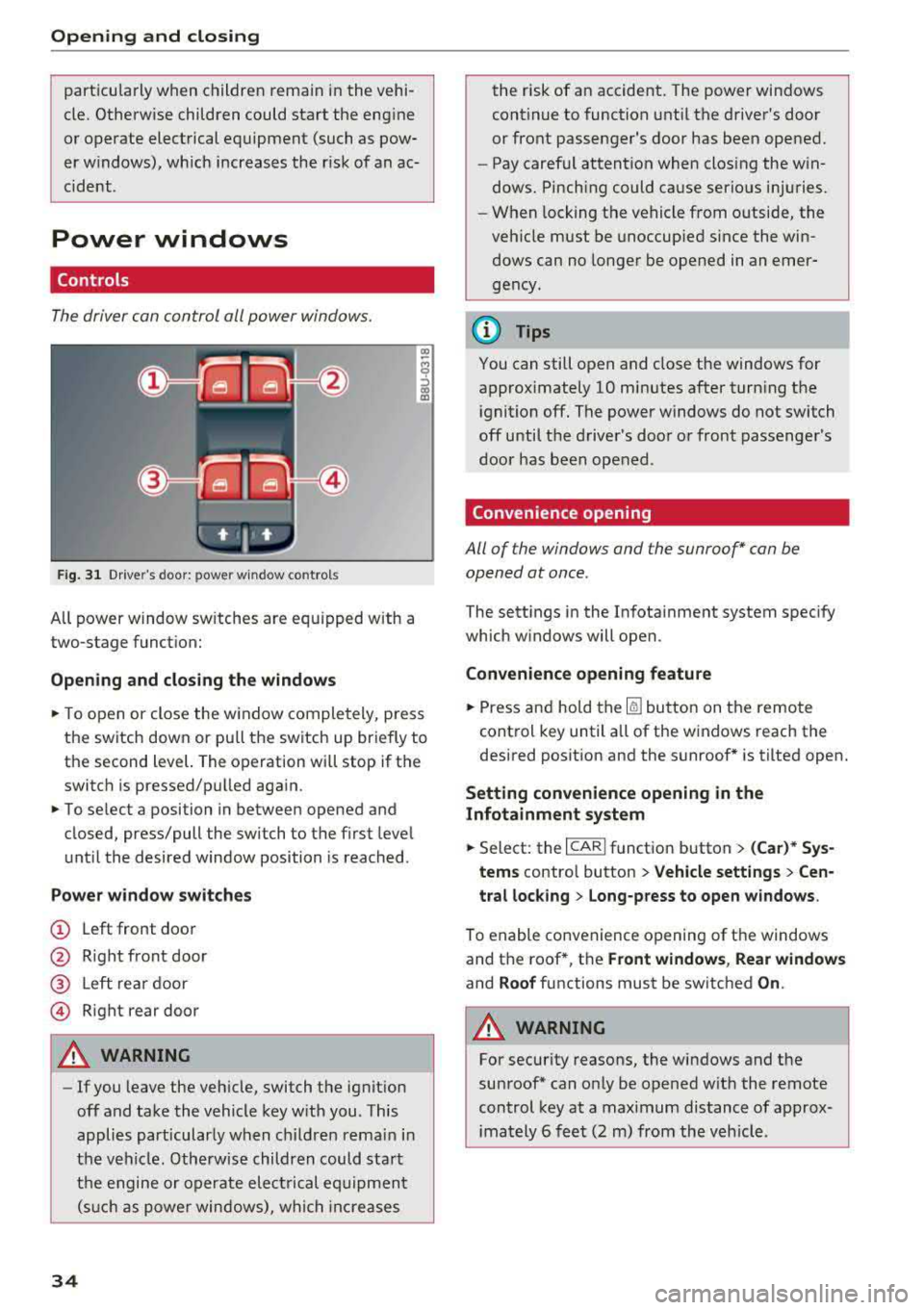
The driver can control all power windows.
Fig . 31 Dr ive r's door : power w indow co ntro ls
All power window sw itches are equ ipped with a
two-stage function:
Op en ing and closing the window s
.. To open or close the w indow completely, p ress
the switch down or pu ll the switch up briefly to
th e second level. The operation will stop if the
switch is p ressed/pu lled again.
.. To se lect a position in between opened and
closed, press/pull the switch to the first level
until the desired window position is reached .
Power wind ow switch es
@ Left front door
@ R ight front door
@ L eft rear door
© Right rear door
A WARNING
- If you leave the veh icle, switch the ignition
off and take the vehicle key with you . This
applies particularly when children remain in
the vehicle . Otherwise children could start
the engine or operate electrical equipment (suc h as power windows), wh ich increases
34
the risk of an accident. The power windows
continue to function until the driver's door
or front passenger's door has been opened.
- Pay careful attention when closing the win
dows. Pinching could cause serious injuries .
- When locking the vehicle from outside, the
vehicle must be unoccup ied since the win
dows can no longer be opened in an emer
gency.
(D Tips
You can still open and close the windows for
approximately 10 minutes after turn ing the
ignition off. The power windows do not switch
off until the driver's door or front passenger's
door has been opened .
Convenience opening
All of the window s and the sunroof* can be
opened at once.
The sett ings in the Infota inment system spec ify
which w indows will open.
Convenience opening feature
.. Press and hold the Iii button on the remote
control key until a ll of the windows reach the
desired posit ion and the sunroof* is tilted open.
Setting convenience opening in the
Infotainment system
.. Select: the I CAR I function button > (Car )* Sys
tem s contro l button > Vehicle settings > Cen
tral loc king > Long-p ress to open wi ndows .
To enable convenience opening of the windows
and the roof *, the
Front window s, Rear windo ws
and Roof functions must be switched On .
A WARNING
-
For security reasons, the windows and the
sunroof* can on ly be opened w it h the remote
control key at a maximum distance of approx
imately 6 feet (2 m) from the veh icle .
Page 37 of 266

a
Correcting power window malfunctions
You can reactivate the one-touch up/down func
tion if it malfunctions.
... Pull the power window switch up until the win
dow is completely raised.
... Release the switch and pull it up again for at
least one second .
Sunroof
Description
Applies to: veh icles with sl iding/tilting sunroof
Fig. 32 Headl ine r: sunroof button
@ Tilting/sliding
... To tilt the sunroof completely, press the switch
br iefly to the second level.
... To open the sunroof completely, pull the switch
briefly to the second
level ¢,&. .
... To select an intermediate position, press/pull
the switch to the first level until the desired po
sition is reached.
@ Opening/sliding (version 1)
... To move the roof into the reduced wind noise
position, press the button back briefly to the
second level. The roof will open all the way if
you press the button back to the second level
again.
... To close the sunroof completely, press the
switch forward briefly to the second
level¢ ,&..
... To select an intermediate position, press/pull
the switch forward/back to the first level until
the desired position is reached.
~ @ Opening/sliding (version 2)
" ~ ... To open the sunroof completely, press the 0
8 switch back to just before the second level. '
... To close the sunroof completely, press the
switch forward briefly to the second
level ~,&. .
... To select an intermediate position, press/pull
the switch forward/back to the first level until
the desired position is reached .
The sunshade can be opened and closed by hand
when the roof is closed . The sunshade opens au
tomatically when the roof is opened .
You can sti ll operate the sliding/tilting sunroof
for about 10 minutes after the ignition is switch
ed off. The switch is deactivated once the driver's
or front passenger's door is opened.
A WARNING
---To reduce the risk of injury, always pay atten-
tion when closing the sliding/tilting sunroof .
Always switch the ignition off when leaving
the vehicle and always take the vehicle with
you .
(D Note
Always close your slid ing/tilting sunroof when
leaving your vehicle . Sudden rain can cause
damage to the interior equipment of your ve
hicle, particularl y the electronic equipment.
(D Tips
-For information on conven ience opening, re
fer to
¢ page 34 .
-The sunroof will only open down to -20 °(
(-4 °F).
Sunroof power emergency closing
Applies to: vehicles with sliding/tilting sunroof
If the sunroof detects an object in its path when
it is closing, it will open again automatically . In
th is case, you can close the roof with the power
emergency closing function .
... Within five seconds after the sunroof opens au
tomatically, pull the switch until the roof
closes.
If you let go of the switch early, the sunroof will
open again.
35
Page 56 of 266

Seats and stor age
with proper deployment of the side curtain
airbags in an accident.
-Do not hang heavy objects on the coat
hooks, as they could cause personal injury in
a sudden stop .
CD Note
Objects on the rear shelf that rub against the
rear window can damage the rear window
heating wires.
Roof rack
A pp lies to: ve hicles w ith roo f rac k
-
r~
Fig . 64 Attachment poi nts for the roof rack
If luggage or cargo is to be carried on the roof,
you must observe the following:
-Only a specia lly designed roof ra ck may be used
o n your veh icle. These roof racks are the basis
for a complete roof rack system. Additional at
tachments/carrier systems are necessary to
transport luggage and sports equipment. We
recommend roof racks and attachments from
the Audi Genu ine Accessor ies program.
-When installing the roof rack, make sure that it
is mounted only at the designated points on
the roof
i:> fig. 64 .
-Note the perm itted axle load, permitted total
weight, and permitted roof load of your vehicle
<=> page 246. The roof load is the tota l of the
weight of t he roof rack, the attachments and
the cargo you are carrying. However, you must
also note the permitted load of the carrier sys
tem being used .
54
A WARNING
,-
-Follow the installation instructions provided
w it h the roof rack system. If you do not se
cure the roof rack system and objects on the
roof correctly, they could come loose from
the vehicle and ca use an accident .
-Using a roof rack system increases the r isk
of an accident, because it changes the ve hi
cle handling characte rist ics wh ile driving by
shifting the center of grav ity and/or the in
creasing the sur face area exposed to wind .
You may need to adapt your driving sty le
and speed to the current conditions.
CD Note
Make sure that the luggage compartment lid
and the sunroof* do not come into contact
with objects on the roof when they are open .
@ For the sake of the environment
Your vehi cle will require mo re fuel d ue to the
increased wind resistance. So remove the roof
rack after using it.
Luggage compartment
General information
A WARNING
Read and fo llow the important safety precau
tions
in¢ page 130, Storing cargo correctly .
-
Page 60 of 266

Warm and cold
Warm and cold
Climate control system
Description
The climate control system warms, cools and re moves humidity from the air in the vehicle interi
or. It is the most effective when the windows and
sunroof* are closed. If there is a bui ld-up of heat
inside the vehicle, ventilation can he lp to speed
up the cooling process.
I n all heating mode functions, except for defrost,
the blower only switches to a higher speed once
the engine coolant has reached a sufficient tem
perature.
Pollutant filt er
The po llutant filter removes poll utants such as
dust and pollen from the a ir .
Ke y re cognition
A pp lies to: ve hicles w ith de luxe au toma tic clima te co ntrol
The blower sett ing and air distribution are stored
automatically and ass igned to the remote control
key that you are using.
A pp lies to: ve hicles w ith 4 -zo ne del uxe automatic c limate
co ntrol
The climate control set tings are automatically
stored and assigned to the remote control key
that is in use.
A WARNING
Poor visibility can lead to accidents.
- For safer driving, keep all windows free of
ice, snow and fog .
- Become familiar as quickly as possible with
the correct use and function of the climate contro l system, especially with the defrost
ing and defogg ing function.
58
- When the temperature is below freezing,
only use the windshield washer system after
the windshield has been warmed by the cli mate control system . The washer fluid could
freeze on the w indsh ield and impair v isib il i
ty .
@ Note
-If you suspect that the climate contro l sys
tem is damaged, switch the system
off to
prevent further damage and have it checked
by an authorized Aud i dea ler or authorized
Audi Serv ice Facility.
- Repa irs to t he Aud i climate control system
require special techn ical know ledge and
special tools. See an aut ho rized Aud i dea le r
or authorized Aud i Serv ice Fac ility .
@) For the sake of the environment
To save fue l, turn off cooling mode by press
i ng the
IA/Cl button. This will a lso reduce
emissions.
(D Tips
- T o prevent i nterference with t he heat ing
and cooli ng outpu t and to p revent the win
dows from fogging over, the a ir intake in
front of the windshie ld must be free of ice,
snow or leaves.
- C ondensation from the coo ling system can
drip and form a pudd le o f water under the
vehicle . This is norma l and does not mean
there is a leak.
- Th e energy management system may tem
porarily switc h
off certain functions, such as
the seat heating* or rear window defogger.
These systems are ava ilable again as soon
as the energy supply has been restored.
Page 96 of 266

Ass is tanc e system s
because the driver has not fastened their safety
be lt .
D oo r open
The adaptive cruise control system cannot sw itch
on when a door is open .
Sta tion ary obj ect ahead
This message appears if you would like to switch
adaptiv e cruis e control on and there is a station
ary object or obstacle directly ahead of your vehi
cle.
Audi pre sense
Preventative passenger protection
Applies to: vehicles with Audi pre sense
P re sense can initiate steps to p rotect vehicle oc
cupants in certain dangerous situations. The
functions described are available depending on
vehicle equipment :
Pre sense basic *
The fo llow ing f unc tions can be t rigge red in ce r
tain driving s it u ations:
- T ens ion ing of the safety belts (for example,
dur ing heavy b raking): the front safety belts
have reve rsible belt tensioners. If a coll is io n
does not occur, the safe ty belts loosen slightly
and are ready to trigger again.
- Clos ing the w indows and the sun roof* (for ex
amp le, when ove r-or unde rsteer ing) : the w in
dows and the sunroof * close until there is only
a small gap open .
The function of the pre sense basi c is act ivated at
a speed o f 20 mph (30 km/h) o r higher.
Dr ive se lect : th e deployment time is adapted in
Dynam ic mode.
Pre sense front (vehicles with adapti ve cru ise
control *}
Pre sense front contains t he f unct ions of p re
sense basic. In add it ion, the like lih ood of a rear
e n d coll is io n with the veh icle ahead is also calcu
lated, withi n the limits of the system .
If the risk
of a collision is detected, t he following functions
can trigger :
94
-Braking guard r::!> poge 91
-Tensioning of the safety bel ts
- Clos ing the windows and the sunroof*
Pre sense rear (vehicles with side a ssi st * }
Pre sense rear contains the funct ions of pre sense
basic . In addition, the likelihood of a rear-end
collision from the vehicle behind is also calculat
ed, within the limits of the system . If the r isk of a
collision is detected, the following functions can
t rigge r:
- Tensioning of the safety belts
- Closing the windows and the sunroof*
Pre sen se plu s*
Pre sense plus contains t he functions of pre
sense front and pre sense rear.
Error messag e
Audi pre sen se : Unavailable
Preventative passenger protect ion is not ava ila
ble . Drive to an autho rized Aud i deale r or author
i zed Audi Se rvice Facility immed iate ly to have the
malfunction cor rected .
_&. WARNING
Pre sense cannot overcome natural phys ic al
laws .
It is a system designed to assist and it
cannot prevent a co llision. Do not let the in
creased safety p rovided tempt you into tak ing
risks. This could increase your risk of a colli-
sion.
- The system can dep loy incorrectly .
- Please note that the sensors do not always
detect all objects . Th is increases the r isk of
a co llision.
- Pre sense does not react to peop le or ani
mals or objects that are crossing the vehi
cle 's path o r are difficu lt to detect
r::!>poge86.
- Reflective objects such as guard ra ils or the
entrance to a tunne l, heavy rain and ice can
affect the funct ion of the radar sensors and
-
the system's ability to detect a collision risk . ~
Page 237 of 266

a co ,...,
N
" N ,...,
0 0 \,;J '
assignment
F ig. 202 Drive r side cockp it : fuse panel w it h plastic bracket
Fuse panel @ ( black)
No . Equipment
Electromechan ica l powe r stee ring, trailer
1 hitch, ionizer, switch st
rip, seat heating
(rear), electromechan ica l park ing brake
Ho rn, climate con trol system, Gateway,
2 au
tomati c dimm ing in ter ior rearv iew m ir-
ro r, On -Board Unit
4 Park ing aid, headlight range adjustment
5
Dynamic steering, electronic stabilization
control (ESC)
6 Headlights
7 Adapt ive cru ise control
8 Front passenger's seat senso rs, a irbag
9 Gateway
10 Engine sound, nig
ht vision ass ist, garage
door opene r (H ome link), parki ng aid
11 Video camera
image processi ng
12 Headlights
13 Steering column sw
itch module
Fuses
Fuse panel @ (black)
14 Termina l 15 (luggage compartment)
1 5 Starte r
Fuse panel @ (brown)
No . Equipment
1 Infotainment system
2 Infot ainment system
3 Front passenger's seat
5
A
ir bag, e lec tronic sta bi liz ation con trol
( E SC)
6 Ant
i- theft alarm system
7 E lectromec ha nical pa rking brake
8 Inter io r li ghts
9
Windshie ld video came ra heating, light/
r ain sensor
10 Lumbar support (dr iver's se at)
11 Driver
's seat
12 Electronic stab ilizati on con trol
13 Horn
1 4 Head lights
lS Front seat heating
16 Dynamic s tee ring
Fuse panel © (red)
No . Equipment
1 Clutch peda l
2 Fuel p ump
3 Brake
light sensor
4 Engine acoustics
5 Rear door
6 Fr
ont door
7 Elec tronic stab iliza tion control
8 Windshie ld wiper motor
9 H ead light washer system
10 Interio
r light ing, climate control system
1 1 Head lights
12 Sunroof
235
Page 239 of 266

a co .... N
" N .... 0 0 \,;J '
10 Rear seat entertainment
1 2 Rea r spo ile r (Sportbac k), sunroof
Fuse panel © (brown )
N o. Equipm ent
1 Infotainment system
2 Infota inment system
3
Infotainment, automatic dimming interior
rearview mirror
4 Rearview camera/peripheral cameras
5 TV tuner
6 Tank leak detection system
7 Sockets
8 Parking heater
1 0 Lumbar support (front passenger's seat)
11 Emergency
call
1 2 Infotainment system
Fuse panel @ (black )
N o. Equipm ent
Air suspension, adaptive dampers, sport
1 different
ial, electromechanical parking
brake
2 Clutch pedal position sensor/automatic
transmission
3 Seats
4 Rear wiper (Avant)
5 Side assist
6 Engine sound
7 Infotainment/sound amplifier
8 Gateway
9 Sport diffe rential
10 Climate control
system
11 T
ir e pressu re monito ring system, park ing
heate r
12 Start/Stop
system
Fuse panel © (black )
N o. E quipm ent
1 Special purpose vehicles/ rear seats
Fuses
Fuse panel ® (blac k)
N o. Equipm en t
1 Rear w indow defogge r
237