2018 AUDI A5 COUPE brake
[x] Cancel search: brakePage 110 of 409

Ass is tan ce sys tems
operation. You are always responsible for
your speed and the distance between your
vehicle and other vehicles.
- For safety reasons, cruise control should not
be used in the city, in stop-and-go traffic, on
winding roads and when road condit ions are
poor (such as ice, fog, gravel, heavy rain and
hydroplaning), because th is increases the
risk of an accide nt.
- Switch the cru ise control off temporar ily
when driving in turn ing lanes, h ighway exits
o r in construction zones.
- Please note that u nconsciously "resting"
your foot on the accelerator pedal prevents
the cruise control from braking. This is be
ca use p ressing the acce le rato r pedal
over
rides the cruise contro l system.
- If a brake system ma lf u nction such as over
heating occu rs when the c ruise control sys
tem is switched on, the braking function in
the system may be switched off . The rest of
the cruise control system functions remain
act ive as long as the
tij;jl)~i# (USA models) /
ii (Canada models) indicator light is on.
(D Note
Before driving downhill a long distance on a
steep hill, decrease your speed and select a
lower gear. Th is makes use of the eng ine
braking effect and relieves the brakes.
(D Tips
- Applies to: vehicles with manual transmis
sion: The set speed can on ly be reached if
the engaged gear permits it so that the en
gine is not over-rewed and will run smooth ly. Therefore, sh ift into the higher or lower
gear in a timely manner .
- The brake lights turn on when the brakes are applied automatically.
Changing the speed
Applies to: vehicle s with cruise control system
.. To inc rease/decrease the speed in 1 mph (1
km/ h) increments, br iefly
t ap the leve r toward
0 10 q page 107, fig. 107 t o the first level.
108
.. To increase/decrease the speed in 5 mph (10
km/h) increments, briefly
tap the lever toward
0 10 to the second level.
.. To increase or decrease the speed qu ickly, hold
the lever toward 0 10 to the first or second
level unt il the desired speed is reached .
· Overriding the speed
Applies to: vehicles with cruise control system
You can press the acce lerator pedal to increase
you r speed, fo r example if you want to pass
someone . The speed you set earl ie r will resume
as soon as you release the acce lerato r pedal.
However, if you are exceeding the stored speed
by a considerable amount fo r a long time, the
cruise contro l system will tempo rar ily switch off.
The
(ij;ji)~i# (USA mode ls) !ill (Canada mode ls) in
dicator light in the inst rument cluste r turns
off
and the stored speed is maintained.
Preselecting a speed
Applies to: vehicles with cruise control system
You can pre-select your desired speed when the
vehicle is stationary.
.. Switch the ignit io n on.
.. Pull the lever i nto pos ition @ q page 10 7,
fig. 107 .
.. To increase or decrease the speed, tap the lever
toward
0 10 .
This function makes it possible, fo r example, to
save the speed you want before driving on the
highway. Once you are on the expressway, acti
vate the cruise contro l system by pulling the lev
er into
position @.
Switching off
Applies to: vehicles with cruise control system
Deactiva ting temporarily
.. Press the brake pedal, or
.. Press the lever toward @ (not locked into
place)
q page 107, fig . 107 .
Page 111 of 409

Switching off completely
• Press the lever into position @(clicked into
place), or
• Switch the ignition off .
The speed yo u stored w ill be mainta ined if the
cru ise control has been switched off tempora rily .
To resume the stored speed, release the brake or
clutch pedal and p ull the lever into
position (!).
Sw itching the ig nition off will erase the stored
speed .
A WARNING
You should only resume the stored speed if it
is not too high for existing traffic conditions .
Otherwise you can increase the r isk of an acci
dent.
Camera-based traffic
sign recognition
Description
A pp lies to: ve hicles with camera-based t raffic sign recogni
tion
~ 180 m, & I ~ IPFl '1 iJ
I I /I
:I)' mmml ll : I tm ,, '
) ' ' ' ,,' :
Fig. 108 Inst ru ment cluste r: traffic s ig n recognit ion
F ig. 109 Windshield : came ra window for traffic sign recog
n it io n
Assistance systems
Traffic sign recognition assists you when driving
by displaying detected speed limits or signs pro
hibiting passing in the instrument cluster display
¢ fig . 108. Within the limits of the system , the
legal speed limits in school zones are detected
and displayed.
General information
Traffic sign recognition can detect standard
speed limit signs that are within the camera's vis
ual field. With assistance from navigation data,
detected speed limits are evaluated and shown in
the display. The traffic s ign for the current de
tected speed lim it w ill blink in the disp lay if you
exceed the warning threshold set in the Infotain
ment
system ¢ page 110.
The traffic sign recognition is subject to certain
system limitat ions and may be unavailable or on
ly part ially ava ilable in the follow ing s ituations:
- when visibility is poor, such as in snow, rain,
fog or heavy spray
- when there is glare, for example from oncom
ing traffic or the sun
- at high speeds
- if the camera's visual
field ¢ fig. 109 is covered ,
for examp le by dirt or stickers. For information
on cleaning, see
¢ page 362
- if the traffic signs are completely or partially
covered, for examp le by trees, snow, dirt or
other vehicles
- if speed traffic signs do not conform to the standards
- if traffic signs are damaged or bent
- if traffic signs are displayed on sign holders
with electronic signs
- if the traffic signs or the configuration of the
road have changed (navigation data is no lon
ger up-to-date)
A WARNING
-Pay attention to traffic and the area around
your vehicle when traff ic sign recognition is
turned on. The traff ic signs installed on the
road always take precedence over the display.
The drive r is a lways responsible for assessing
the traffic situation .
-
109
Page 115 of 409

-No messages are displayed when at speeds
under
20 mph (30 km/h) .
Settings in the Infotainment system
Applies to: veh icles with predictive efficiency assist
~ In the Infotainment system, select: IMENU !
button > Vehicle > left control button > Driver
assistance
> Efficiency assist .
Predictive messages are shown when this f unc
tion is sw itched on.
(D Tips
No predictive messages are shown on vehicles
w ithout a navigation system .
Audi adaptive cruise
control
Description
Applies to: veh icles with Audi adaptive cruise contro l
Fig. 111 De tect ion range
The adaptive cruise control system is a combina
t ion of speed and distance regulation.
It assists
the driver by both regulating the speed and
maintaining a distance to the vehicle driving
ahead, within the limits of the system . If the sys
tem detects a veh icle driving ahead, the adaptive
cru ise control can brake and acce lerate your vehi
cle . This increases driving comfort dur ing long
tr ips on highways and in stop-and -go traff ic (au
tomatic transm iss ion*) .
What can adaptive cruise control do?
<( ~ The adaptive cruise contro l system uses video, ra-
"' ~ dar, ultrasound and navigation data. Veh icles
.... 0 \0
3
driving ahead can be recognized up to 650 feet
(200 m) away.
Predictive functions offer the driver additional
comfort and contr ibute to the reduction in fue l
consumption and CO2 emissions
¢ page 120.
On open roads with no traffic , it functions like a
cruise control system. The stored speed is main
tained . When approaching a vehicle driving
ahead, the adaptive cruise contro l system auto
matically brakes to match that vehicle's speed
and then mainta ins the set distance. As soon as
the system does not detect a vehicle dr iv ing
ahead, adaptive cru ise control accelerates up to
the stored speed .
Applies to: vehicles with automatic transmissions
In stop-and-go traffic, adaptive cruise control can
brake until the veh icle is stationary and then can
also start driving again automat ically under cer
ta in cond itions
¢ page 117.
In traffic jams or stop-and -go traffic, traffic jam
ass ist can assist the
driver ¢ page 121.
Which functions can be controlled?
When you switc h adapt ive cruise control on, you
can set the current speed as the "contro l speed"
¢ page 115, Switching on/off.
When driving, you can stop cru ise control
¢ page 118 or change the speed ¢ page 117 at
any time.
You can also set the distance to the vehicle driv ing ahead and set the driving mode of the adap
t ive cru ise control
¢ page 118.
113
Page 116 of 409

Assistance systems
General information
Applies to: ve hicles w ith Aud i adapt ive cruise co ntro l
Fig. 112 Fro nt of th e ve hicle: senso rs an d video camera
The areas with the radar and ultrasonic sensors
and the video camera ¢
fig. 112 must not be cov
ered by stickers, deposits or any other objects ,
because this can interfere with the adaptive
cruise control function. For information on clean
ing, see
c::> page 362 . The same applies for any
modifications made in the front area .
In some driving situations , the adaptive cruise
control function is restricted :
-Vehicles can only be detected when they are
within the sensor detection zones
<:;> page 113,
fig. 111 .
-The system has a limited ability to detect
vehicles that are a short distance ahead, off to
the side of your vehicle or moving into your
lane.
-Objects that are difficu lt to detect such as mo
torcycles, vehicles with high ground clearance
or an overhanging load are detected late or not
detected at all.
-When driving through curves
c::>page 115 .
-When the vehicle is stationary <:;> page 115.
_& WARNING
Always pay attention to the traffic around you
when adaptive cruise control is switched on.
As the driver, you are still responsible for your
own speed and the distance to other vehicles.
The adaptive cruise control is used to assist
you. The driver must always take action to
avoid a collision. The driver is always responsi
ble for braking at the correct time.
114
-For safety reasons, do not use adaptive
cruise control when the road surface is in
poor condition and/or in bad weather condi
tions (such as ice, fog, gravel, heavy rain and
hydroplaning) . Using the system under
these conditions increases the risk of an ac
cident.
- Switch adaptive cruise control off tempora
rily when driving in turning lanes, on ex
pressway exits (except if predictive control
is switched on) or in construction zones.
This prevents the vehicle from accelerating
to the stored speed when in these situa
tions.
-The adaptive cruise control system will not
brake by itself if you put your foot on the ac
celerator pedal. Doing so can override the
speed and distance regulation.
-When approaching stationary obstacles
such as stopped traffic, adaptive cruise con
trol will respond with limited function .
- Adaptive cruise control does not respond to
people, animals, or crossing or oncoming
objects.
-The function of the radar sensors can be af
fected by reflective objects such as guard rails, the entrance to a tunnel, heavy rain or
ice .
(D Note
The sensors can be displaced by impacts or damage to the bumper, wheel housing and underbody. This can impair the adaptive
cruise control. Have an authorized Audi dealer
or authorized Audi Service Facility check their
funct ion.
@ Tips
For an explanation on conformity with the
FCC regulations in the United States and the
Industry Canada regulations, see
c::> page 392.
Page 117 of 409

In curves
Applies to: vehicles with Audi adaptive cruise contro l
Fig. 113 Example: driving into a curve
When driving into a curve <=>fig. 113 and out of a
curve , the adaptive cruise control may react to a
vehicle in the neighboring lane and apply the
brakes. You can prevent that by pressing the ac
celerator pedal briefly.
Stationary vehicles
Applies to: vehicles with Audi adaptive cruise control
)))
Fig. 114 Example: vehicle changing lanes and stationary
vehicle
Within the limits of the system, adaptive cruise
control can react to stationary vehicles
c::> fig. 114, as long as you are driving slower than
30 mph (SO km/h) and the system classifies the possible passing maneuver as low. For example,
if a vehicle that was already detected
@ turns or
changes lanes, the adaptive cruise control reacts
to the stationary vehicle ahead of
it @ .
Assistance systems
Vehicles with manual transmission
Applies to: vehicles with Audi adaptive cruise control and
manual transmissio n
The adaptive cruise control is available from 1st
gear through 6th gear in the normal speed
range .
When the adaptive cruise control is turned on,
you must press the clutch to shift gears (as usu al). When shifting normally or when pressing the
clutch, the adaptive cruise control remains
turned on.
After you have engaged the gear, you do
not
need to press the gas pedal. The adaptive cruise
control accelerates automatically if necessary .
If you press down on the clutch for too long or
shift/couple improperly, the adaptive cruise con
trol may turn off automatically.
Switching on/off
Applies to: vehicles with Audi adaptive cruise control
Fig. 115 Ope rating leve r: switching on and off
Fig. 116 Ins trumen t cluster: adapt ive cr uise control
You can set any speed between 20 and 95 mph
(30 and 150 km/h).
.,._
115
Page 118 of 409

Assistance systems
Indicator lights and messages in the instrument
cluster display inform you about the current sit
uation and setting.
An add itiona l ind icator appears in the head-up
disp lay*.
Switching adaptive cruise control on
.,. Pull the lever toward you into position@
<::;,fig. 115.
Storing the speed and activating regulation
.,. To store the current speed, press the !SET ! but
ton
¢ fig . 115 . The stored speed is shown in the
speedometer in the LED line @and appears
briefly in the status
line @c:;, fig. 116 .
.,. Applies to: vehicles with automatic transmis
sion: To activate the control when stationary,
also press the brake pedal.
Switching adaptive cruise control off
.,. Push the lever away from you into position @
until it clicks into place. The message
ACC: off
appears.
@ Indicator lights
Ill-Adaptive cruise control is switched on . No
veh icles are detected ahead . The stored speed is
maintained.
• -A vehicle driving ahead was detected. The
adapt ive cruise control system regulates the
speed and distance to the vehicle dr iv ing ahead
and accelerates/brakes automatically.
• -Automatic transmission : adaptive cruise
control must be switched on . A vehicle was de
tected ahead . Your vehicle is stat ionary and will
not start driving automatically .
fai-Automatic transmission : adaptive cruise
control must be switched on . No vehicles were
detected ahead. Your vehicle is stationary and
will not start dr iving automatically .
•-The automatic braking is not enough to
maintain a sufficient distance to a vehicle driving
ahead . You must intervene
c:;, page 119, Driver
intervention request.
116
© Instrument cluster display
If the Driver assistance display is not shown in
the instrument cluster display, you can open it
using the multif unction steering wheel buttons
c:;, page 13.
Based on the graphic display, you can determine
if the system is maintaining a distance to the ve
hicle driving ahead and what that distance is .
No vehicle -no veh icle was detected driv ing
ahead .
Silver vehicle -a vehicle was detected driving
ahead.
Red vehicle -request for driver intervention
¢ page 119 .
The five distance bars on the gauge© represent
the set distance (refer to
c:;, page 118 for infor
mation on how to change the distance). If you
fall below the selected d istance, the distance
bars become red from the bottom upwa rd .
A WARNING
Applies to: vehicles with automatic transmis
sion: If you press the
ISET ! button when driv
ing at speeds below 20 mph (30 km/h), the
vehicle accelerates automatically up to 20
mph (30 km/h), which is the minimum speed
that can be set.
(D Tips
- If you switch the ignitio n or the adaptive
cruise control system off, the set speed is
erased for safety reasons .
- T he electronic stabilization control (ESC)
and the anti-slip-regulation (ASR) are auto
matically switched on when the adaptive
cruise control is switched on.
Page 119 of 409
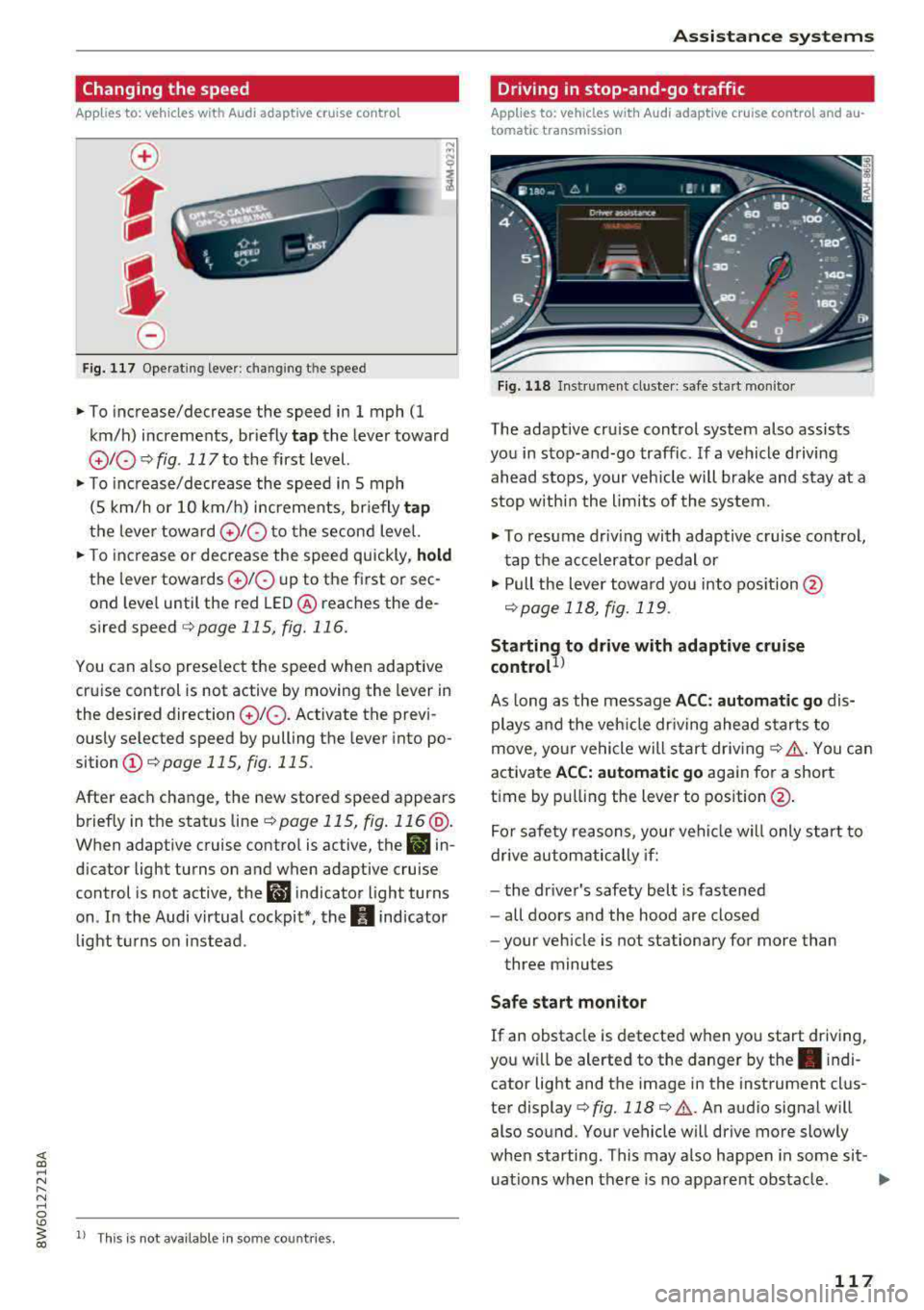
Changing the speed
Applies to: vehicles with Audi adaptive cruise contro l
0
f
' 0
Fig. 117 Operating lever: chang ing the speed
.,. To increase/decrease the speed in 1 mph (1
km/h) increments, br iefly
tap the lever toward
010 ¢ fig. 117 to the first level.
.,. To increase/decrease the speed in 5 mph
(5 km/h or 10 km/h) increments, br iefly
tap
the lever toward 0 10 to the second level.
.,. To increase or decrease the speed quickly, hold
the lever towards 0 10 up to the first or sec
ond level until the red LED@ reaches the de
s ired speed
¢page 115, fig. 116.
You can a lso preselect the speed when adaptive
cruise control is not active by moving the lever in
the desired direction
0 10 . Activate the previ
ously selected speed by pulling the lever into po
sition
(I) ¢ page 115, fig. 115.
After each change, the new stored speed appears
briefly in the status
line¢ page 115, fig. 116 @.
When adaptive cruise control is active, the II in
d icator light turns on and when adaptive cruise
control is not active, the
I.I indicator light turns
on . In the Audi virtual cockpit*, the
II indicator
light t urns on instead .
ll This is not available in some countries.
Assistance systems
Driving in stop-and-go traffic
Applies to: vehicles with Audi adaptive cruise control and au
tomatic transmission
Fig. 118 Instrume nt cluste r: safe start monitor
The adaptive cru ise control system also assists
you in stop-and-go traffic. If a vehicle driving
ahead stops, your vehicle will brake and stay at a
stop within the limits of the system.
"' To resume driv ing with adaptive cruise control,
tap the accelerator pedal or
"' Pull the lever toward you into pos ition @
<:!)page 118, fig. 119 .
Starting to drive with adaptive cruise
controt1>
As long as the message ACC: automatic go dis
plays and the vehicle dr iving ahead starts to
move, your vehicle will start driv ing
r:!) .&. -You can
activate
ACC: automatic go again for a short
time by pulling the lever to position@.
For safe ty reasons, your vehicle w ill only start to
drive automatically if:
- the driver's safety belt is fastened
- all doors and the hood are closed
- your veh icle is not stationary for more than
three minutes
Safe start monitor
If an obstacle is detected when you start driving,
you w ill be alerted to the danger by
the. indi
cator light and the image in the instrument clus
ter
display¢ fig. 118 ¢ .&,. .An audio signal will
also sound. Your vehicle will drive more slowly
when starti ng. This may also happen in some sit-
uations when there is no apparent obstacle.
.,.
117
Page 120 of 409

Assistance systems
-Press the brake pedal to slow your vehicle
down.
A WARNING
If the message ACC : automatic go1> appears,
your vehicle will start driving even if there is an obstacle between your vehicle and the ve
hicle drivi ng ahead. This increases the risk of
an acc ident.
(D Tips
If adaptive cruise contro l is active and your
veh icle does not start driving even though the
message
ACC: automatic go1l appears, you
can start driving by tapping the accelerator
pedal.
Interrupting cruise control
App lies to: veh icles with Audi adaptive cruise control
Fig. 119 Selecto r lever
Requirement: adaptive cruise control must be
sw itched on.
Overriding cruise control
.,. To accelerate manually, p ull the lever toward
you into position @and hold it there or press
the accelerator pedal. The message
ACC: over
ride
appears.
.,. To resume cruise cont rol, release the lever or
take your foot off the acce lerat or pedal.
Canceling cruise control while driving
.,. Move the lever into posit ion @. The message
ACC: standby appears . Or
.,. Press the brake pedal.
l ) Thi s is not ava ilab le in some countr ies .
118
.,. To resume the stored speed, move the lever in-
to position @.
Automatic transmission: canceling cruise
control when stopped
.,. Push the lever away from you into posit ion@.
The message
ACC: standby appears.
.,. To resume cruise control, press the brake pedal
and pull the lever toward you into position @.
A WARNING
It is dangerous to activate cruise control and
resume the stored speed when the current
road, traffic o r weather conditions do not per
mit this . This increases the risk of an accident .
Setting the distance
Applies to: vehicles with Audi adaptive cruise control
,
0
Fig. 120 Operating lever: setting the distance
.,. Tap the sw itch to display the current set dis
tance
c:> fig. 120.
.,. To increase or reduce the distance in incre
ments, tap the switch upward/dow nward
again. The distance between the two vehicles
w ill change in the instr ument cluster display.
When approaching a vehicle driving ahead, the
adaptive cruise control system brakes to match
that vehicle's speed and then adjusts to the set
distance. If the vehi cle driving ahead accelerates,
then the adaptive cruise control will also acceler
ate up to the speed that you have set .
The higher the speed, the greater the distance
c:> &. The Distance 3 setti ng is recommended .