2018 AUDI A5 COUPE door lock
[x] Cancel search: door lockPage 57 of 409

_& WARNING
-When operating the power top, make sure
the funct ion is not affected by wind or other
factors and that it does not interfere with other dr ivers .
- Visibility to the rear is limited when operat ing the power top . Avoid operating the top
wh ile driving in reverse .
- Never drive with the power top unlocked .
The wind from driving could cause the pow
er top to open. This can result in injur ies and
damage to the vehicle.
- Make sure no one will be injured by the pow
er top suppo rts or other moving compo
nents when open ing and closing the top.
- T he headroom in the rear is reduced when
opening a nd clos ing the power top. Make
sure the rear passengers keep enough d is
tance from the power top to reduce the risk
of injury.
(D Note
To prevent damage to the power top:
- do not store any objects in the power top storage compartment.
- make sure there is enough space above the
vehicle when opening or clos ing the power
top.
@ Tips
- To prevent the vehicle battery from draining unnecessari ly, do not open or close the pow
er top repea tedly whe n the engine is switch
ed off.
- The power top can also be operated manual
l y temporari ly if there is a malfunc tion
c::, page 58, Power top emergency opera·
tion . An author ized A udi dealer or author
ized Audi Service Facility should diagnose
and correct the cause of the ma lfunction as
soon as possib le.
- If the vehicle is parked with the power top
open, the vehicle inter ior is not protected
from damaging weather or unauthorized ac
cess. Lock any items you leave behind in the
luggage compartment . C lose the power top
before leaving the vehicle .
Powe r top
-The side windows automatically lower
slightly when opening or closing the power
top .
Power top convenience opening/closing
App lies to : vehicles wit h powe r top
Fi g. 48 Turni ng th e key to open a nd close
Convenien ce opening feature
.,. Remove the mec hanical key c::> page 39 .
.,. Turn the mechanica l key in the driver door lock
to the opening position one time @
c::, fig. 48.
.,. Turn the mechanica l key to the opening posi
tion a second time
wi th in tw o se cond s and
hold it there until the power top opens com
ple tely .
Co nven ien ce opening with th e co nv eni enc e
key*
.,. Press and hold the m button on the remote con-
trol key until the power top is completely open.
Conv enience clo sing featur e
.,. Remove the mechanical key c::, page 39.
.,. Turn the mechanical key in the dr iver door lock
to the closing posit ion one time @
c:> fig. 48.
.,. Turn the mechanical key to the clos ing position
a second time
within two seconds and hold it
there until the power top is completely closed .
Convenienc e closing with th e con ven ience
key*
.,. Press the tfJ button on the remote control key
to lock the vehicle .
.,. Press the CD button a second time within two
s e cond s
and hold it until the powe r top is com
ple tely closed, o r
.,. Touch the sensor * on the door handle long
enough until the power top is completely
Ill>
55
Page 61 of 409

Step 2: Lift the power top storage
compartment lid out
Applies to: vehicles with power top
Fig. 54 Rear of the vehicle: lifting the power top storage
compartment lid out and secur ing
0
"' N 0
~ 00 CD
.. Lift the power top storage compartment lid out
of the storage compartment
(D q fig. 54.
.. Secure the lifted power top storage compart
ment lid by inserting the screwdriver into the
hinge @. Make sure to insert the screwdriver
through both holes in the hinge.
.. Allow the power top storage compartment lid
to lower slowly until it remains stationary.
Step 3: Lock the power top
Applies to: vehicles with power top
Fig. 55 Windsh ield: closi ng the power top
N N
5'. CX) Ill
Fig. 56 Inside of the powe r top: lock ing the powe r top wit h
the emergency relea se handle
Power top
.. Stand next to the vehicle when the door is
open .
.. Hold the power top by its front edge and pull it
out completely
q A in Preparation on
page 58.
.. Press the power top onto the windshield frame
qfig. 55 .
.. Remove the cap from the inside of the power
top
¢ fig. 56 .
.. Insert the emergency release handle into the
open ing and turn it clockw ise until it stops .
.. To check the power top lock, try pushing
against the points in the roof to lift the power
top. If locked correctly, the power top w ill not
lift any farther .
Step 4: Close the power top
Applies to: vehicles with power top
Fig. 57 Rear of t he vehicle: closing the power top storage
compartment
Fig . 58 Rear bench seat: locking the power top storage
compartment lid with the emergency release handle
N
"' N
~ 00 CD
.. Lift the rear edge of the power top and remove
the inserted screwdriver from the hinge .
.. Close the power top storage compartment
lid
(D and let the rear edge of the power top
lower @¢(D . ll>
59
Page 65 of 409

• Headlight assista nt: m alfun cti on! See own
e r's manual
Drive to an autho rized Aud i deale r or a uthorized
Aud i Service Facility immedia tely to have the
malfunct ion corrected. You can still switch the
high beams on or off manually.
• Headlight a ssi stant : currently unavailabl e.
C amera view re stricted due to surrounding s.
See owne r's manual
The camera view is b locked, fo r example by a
sticker o r debris.
The sensor is located between the interior rear
view mirror and the windshield . Do not place any
stickers in th is area on the wi ndsh ield .
& WARNING
High beam assistan t is only i ntended to assist
the drive r. The dr iver is still responsible for
controlling the headlights and may need to
switch them on and off manually depend ing
on light and visibility conditions. It may be
necessary to ope rate them manually in s itua
tions such as:
- In adverse weather conditions such as fog, heavy ra in, b low ing snow or spraying water .
- On roads where oncoming traffic may be
partially obsc ured, such as expressways.
- When there are road users that do not have
su fficient lighting, s uch as bicyclers or
vehicles with dirty ta il lamps.
- In tight cu rves and on steep hills .
- In poorly lit areas.
- Wi th strong ref lec to rs , such as s igns.
- If the area of the windsh ield near the senso r
is f ogged ove r, dirty, icy or covere d wi th a
st icker.
Adjusting the exterior lighting
The functions ore adjust ed in the Infotainment
system.
• Select in the Info tainment system : IM ENUI but-
~ ton >Vehicle > left contro l button > Vehicle ~
~ setting s> Exterior lighting . N ~ 0
'° ~ co
Lights and Vision
Automatic headlights
You can adjust the following se ttings in the Au
t o matic headlights
menu :
Activation tim e -you can adjust if the headlights
switch on
Early , Medium or Late accord ing to the
sensit ivi ty of the light sensor .
Headlight assistant * -you can switch the high
beam assistant* on and off.
Entry /exit lighting
When it is dark, the Ent ry /e xit lighting ill umi
nates the area around the vehicle when unlocking
the vehicle and after switching off the ignit ion
and opening the dr iver's door .
The
Entry /exit lighting only works when it is
dark and the light sw itch is in the
AUTO position.
Daytime running l ight s
USA model s:
the daytime running lights can be
switched on/off . Sel ect
On or Off.
Canad a model s:
this f unction canno t be switched
off. They activate automatically eac h time the ig
nition is switched on .
Emergency flashers
-- ---
] -~ ~-
--------
Fig . 61 Ce nte r con so le: emergency flas her butto n
T he emergen cy flashe rs makes othe r d rivers
aware of your vehicle in dangerous situat ions.
• Press the 11 b utton to switch the emergency
flashe rs on or off .
You can ind icate a lane change or a turn when the
eme rgency flashers are switched on by using the
tu rn s ignal lever. The emergency flashe rs stop
tempora rily.
.,.
63
Page 67 of 409

@ Tips
The setting is automatica lly stored and as
signed to the remote control key that is be ing
used.
Instrument illumination
The brightness of the illumination for the instru
ments, display and head-up display* con be ad
justed.
Fig. 64 Instrument illum inatio n
~ Press the knob to release it.
~ Turn the knob toward "-" or"+" to reduce o r in
crease the brightness.
~ Press the knob again to return it to its original
position .
(D Tips
Depending on vehicle equ ipment, the instru
ment illumination (needles and gauges) may
turn on when the lights are off and the igni
tion is sw itched on. The illumination for the
gauges reduces automat ica lly and eventually
turns off as brightness outside increases. This
function reminds the driver to turn the low
beams on at the appropr iate time .
Lights and V ision
Vision
Adjusting exterior mirrors
Fig. 65 Driver's door: knob for the exterior mirrors
Turn the knob to the des ired position:
0
-a ll adjustment functions are deactivated.
q / P -adjusts the left/ right exter io r mirror.
Move the knob in the des ired direct ion.
Qiµ -Heats* the mirror glass depend ing on the
outside tempe rature.
8 -Folding exterior mirrors*. To fold the mirrors
out, turn the knob to one of the other positions.
In the Infotainment system, you can se lect if the
mir rors fold in a utomat ically when you lock the
vehicle
~ page 41.
Front passenger's exterior mirror tilt
function*
T o help you see the curb when backing into a
parking space, the surface of the mi rro r tilts
s lightl y. For this to happen, the knob must be in
the position for the front passenger 's exterio r
mirror .
You can adjust the tilted mirror s urfa ce by turn
i ng the knob in the desired direct ion. When you
move out of reverse and into another gear, the
new m irror pos ition is stored and assigned to the
key you are using .
The mirror goes back into i ts or iginal pos ition
once you drive forward faster than 9 mph
(15 km/h) or turn the ignition off .
.&_ WARNING
-C urved mirror surfaces (for example convex)
enlarge the field of vision. However, they
65
Page 74 of 409

Sea ts and stor age
Operating
.. If you turn the m ultif unction bu tton CD
¢ page 71, fig . 72 to the left or to the right,
the possible seat settings @ are shown in the
Infotainment system
~ fig . 73 .
.. To se lect a seat setting, turn the multifunction
button
CD in the corresponding direction until
the des ired seat setting is outlined in red.
• The arrows @ represent the possible adjust
ments . Fo r example, to lower the lumbar sup
po rt, p ress the m ultifunction bu tton
CD down.
T he co rresponding arrow © lights up.
The fo llowing seat sett ings @ are possible :
Massage func tion * -select the massage type
Wave, St retch , Knead or Off . You can adjust the
i n tens ity of each massage from 1 to 3 . You can
sw itch the selected massage on/off using the
button @~ fig. 73 .
Lumb ar support -you can adjust t he lumbar sup
port up/down and to be stronger/weaker .
Side bolsters * -you can increase/decrease the
side support in the seat using the side bo lsters
on the seat backrest .
(I) Tips
-The massage function switches off a uto
matically after approx imately 10 minutes.
- The air in the side bo lsters* is released as
soon as the driver's door opens. This makes
i s possible to enter and exit the vehicle
mo re comfortab ly. As soon as you sta rt driv
i ng the veh icle, the s ide bo lsters fill.
1l Requ irem en t: the ve hicl e battery m ust have a suff icien t
c ha rge le v e l.
72
Easy seat entry
App lies to: vehicles with entry ass istance
Entry assistance makes it easier for the rear pas
sengers to enter and leave the vehicle .
Fig . 7 4 Fro nt seat: © backrest re lease, @powe r entry as
s ista nce*
• Lift the hand le CD and fold the seat backrest
forward .
• Press the button@ briefly . T he seat automati
cally moves a ll the way fo rwa rd . When the seat
is moved back, it will stop in its o rig inal posi
tion . The operation will stop if t he b utton is
pressed again.
If you p ress and hold the butto n
@while the
bac kres t is in the upright posi tion, the sea t will
move unt il you release the b utton .
& WARNING
Always make su re the front seats are upright
and securely locked in p lace .
- Power entry assistance also works when the
ignit ion is switched off
1
) or when the igni
tion key is removed , so t hat rear seat pas
sengers can still move to the front of the ve
hicle in an emergency s ituation. To red uce
the risk of inj ury, childre n should never be
left unattended in the vehicle for this rea
son .
(D Note
Be very careful when adjusting the seats to
avo id damaging the head restraints, headline r
or the sunroof*.
Page 76 of 409
Sea ts and stor age
Rear head restraints
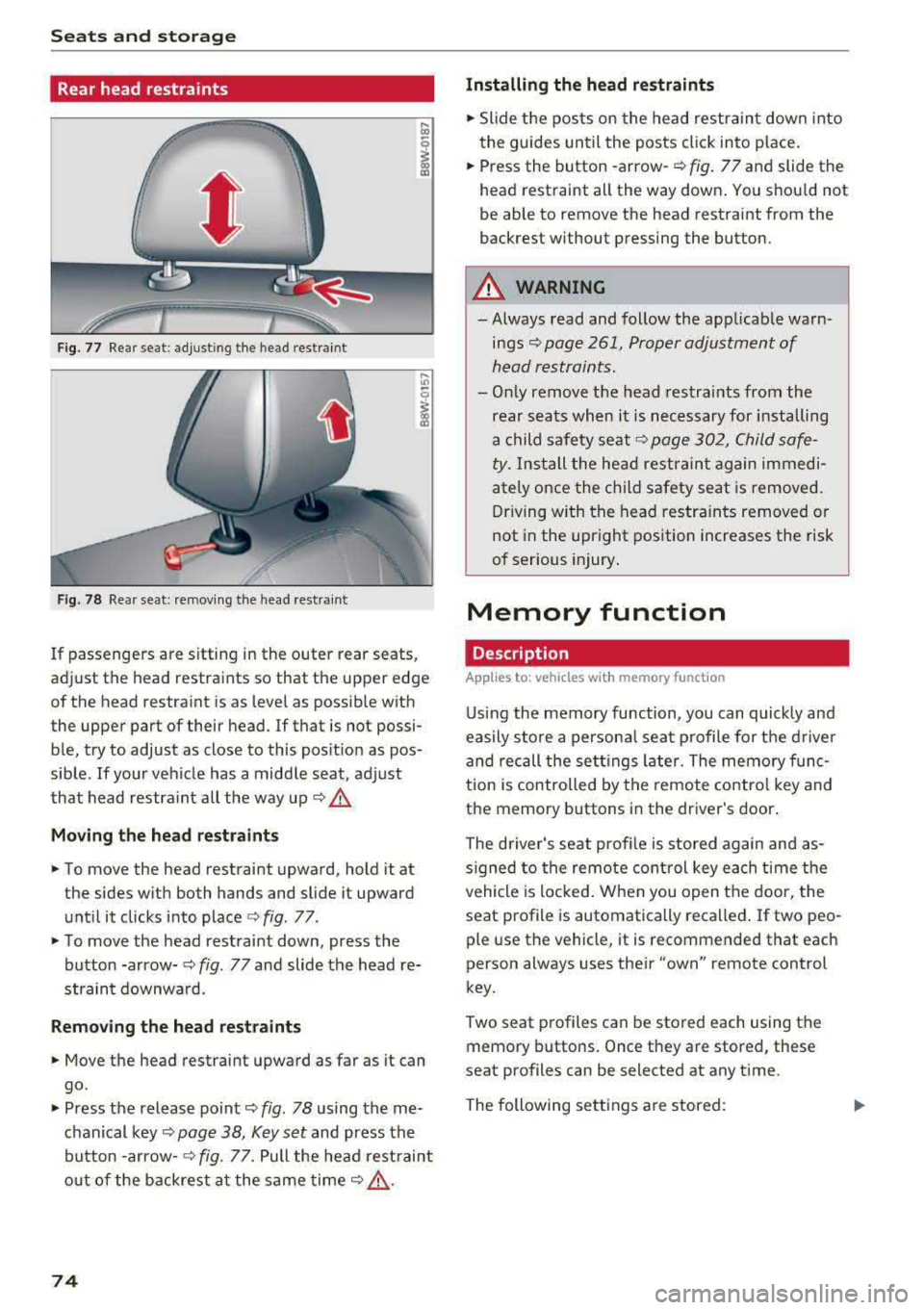
Fig. 77 Rear seat: adjust ing the head restraint
F ig. 78 Rear seat: remov ing the head rest rai nt
If passengers are s itting in the outer rear seats,
adjust the head restraints so that the upper edge
of the head restraint is as level as possible with
the upper part of their head . If that is not possi
ble, try to adjust as close to this position as pos
sible . If your vehicle has a middle seat, adjust
that head restra int all the way up
c::> .&.
Mov ing the he ad re st raints
• To move the head restraint upward, hold it at
the sides w ith both hands and slide it upward
unt il it clicks into place
c::> fig . 77.
• To move the head restraint down, press the
button -arrow-
c::> fig. 77 and slide the head re
straint downwa rd.
Remo ving the he ad rest raints
• Move the head restraint upward as far as it can
go.
• Press the release point c::> fig. 78 using the me
chanical
key~ page 38, Key set and press the
button -arrow-
c::> fig. 77. Pull the head rest raint
o ut of the backrest a t the same
time~ ,&..
74
Installing the head re straints
• Slide the posts on the head restraint down into
the guides until the posts click into place .
• Press the button -arrow-c::> fig. 77 and slide the
head restraint all the way down . You should not
be able to remove the head restraint from the
backrest without pressing the button.
A WARNING
-Always read and follow the applicable warn
ings~ page 261, Proper adjustment of
head restraints.
-Only remove the head restraints from the
rear seats when it is necessary for installing
a child safety seat
c::> page 302, Child safe
ty. Install the head restraint again immedi
ately once the ch ild safety seat is removed.
Driving w ith the head restra ints removed or
not in the upright position increases the risk
of serious injury .
Memory function
Description
Applies to: vehicles wit h memo ry funct ion
Using the memory function, you can quick ly and
easily store a persona l seat profile for t he driver
and recall the sett ings later. The memory func
tion is controlled by the remote control key and
the memory buttons in the driver's door.
The driver's seat prof ile is stored again and as
s igned to the remote control key each time the
vehicle is locked . When you open the door, the
seat profile is automatically recalled . If two peo
ple use the vehicle, it is recommended that each
person always uses their
"own" remote control
key.
Two seat profiles can be stored each using the
memory buttons. Once they are stored, these
seat profiles can be selected at any time.
The following sett ings a re stored:
Page 77 of 409

Remote con- Memory but-trol key ton
Driver Driver
Sea t X X
Both exterior
X X mirrors*
Remote control key
Applies to: vehicles with memory function
The driver's seat profile can be assigned to the
remote control key when the vehicle is locked .
.. Select in the Infotainment system: !MENUI but
ton
> Vehicle> left control button > Vehicle
settings
> Seats > Driver's seat > Store set
tings on remote control key.
@ Tips
If you do not wish to have the seat profile for
another driver assigned to the remote control
key, switch the memory function off in the In
fotainment system.
Memory buttons
Applies to: vehicles with memory function
Fig. 79 Driver's door: memory functio n buttons
Storing a seat profile
.. Press the ISET I button. The LED in the button
turns o n .
.. Press memory button IT] or~ -
A signal tone will sound when it is successfully
stored.
;:::: Accessing a seat profile ...... N
8 .. If the driver's door is open and the ignition is
'° ~ switched off, press the memory b utton. co
Seats and storage
.. If the driver's door is closed or the ignition is
switched on, press and hold the memory but
ton until the seat adjustment is complete .
_& WARNING
-For safety reasons, the seat setting can only
be recalled when the vehicle is stationary to
reduce the risk of an accident.
- In an emergency, seat adjustment operat ion
can be stopped by pressing the
ISE TI button
or the buttons @ or@
~ page 71, fig. 72.
Sockets
Fig. 80 Cen ter console : 12 vo lt socket
Fig. 81 Rear center console: 12 volt socket •
The 12-volt sockets can be used for electr ical ac
cessories . The power usage must not exceed
120 watts.
T here is an additiona l 12 volt socket* located on
the side tr im panel in the luggage compartment.
A WARNING
The sockets and the e lectrical accessories con
nected to them only function when the igni
tion is switched on. Incorrect usage can lead
to serious injuries or burns. To reduce the r isk
Ji--
75
Page 78 of 409

Sea ts and stor age
of injuries, never leave ch ildren unattended in
the vehicle with the veh icle key.
CD Note
- To reduce the risk of damage to the vehicle
electrica l system, never attempt to charge
the vehicle battery by connecting accesso ries that prov ide power, such as solar panels
or battery chargers, to the 12 Volt sockets
or the cigarette lighter.
- To reduce the risk of damage to the sockets,
only use plugs that fit correct ly.
Storage
Cup holders
F ig . 8 2 Rear cente r armrest: cup holders•
Your vehicle has cup ho lders in the front cen ter
console, in the cente r of the rear bench seat* or
in the rea r center a rm rest * as well as on the right
and left side in t he rear*.
Cup hold ers in the rear c enter armrest*
• Fold the center armrest downward.
• To open the cup ho lders, pull th e top cover on
the cup holders forward
¢ fig. 82.
• Set yo ur beverage in the holde r.
• To close the cup holder, fold the cover back un
ti l it clicks into place .
&_ WARNING
-
-Do not put any hot beverages in the cup
holder w hile the vehicle is mov ing. Hot bev
erages could spill, wh ich increases the r isk
of injury.
-Do not use any breakable beverage contain
ers (for example, made out of glass or por-
76
celain). You could be injured by them in the
event of an accident.
CD Note
Beverage containers in the cup holders should
a lways have a lid .
If not, beverages could spill
and ca use damage to veh icle equipment, such
e lectron ics or seat covers.
Cooled glove compartment
Applies to: vehicles with cooled g love co mpartment
The cooled glove compartment only functions
when the AIC system is switched on.
F ig. 83 G love compartment: sw itch ing cooling mode on/
off
• Turn the knob @ counter-clockwise to switch
the cooling on . The symbols on the knob must
appear as they do in
¢ fig. 83.
• Turn the knob @ clockwise to switch the cool
ing off .
If the heating is switched on, switching the glove
compartment cooling mode off is recommended.
Addit ional storage compartments
You w ill find a variety of storage compartments
and holders at various locat io ns in the vehicle .
- Glove compartment: the glove compartment
can be locked using the mechanical key
¢ page 38, Key set .
-In the door trim panels
- Safety vest compartment in the door trim pan-
els on the dr iver's side and front passenger's
side
-Storage compartment under the front center
armrest
.,.