2018 Alfa Romeo Stelvio 000
[x] Cancel search: 000Page 5 of 276
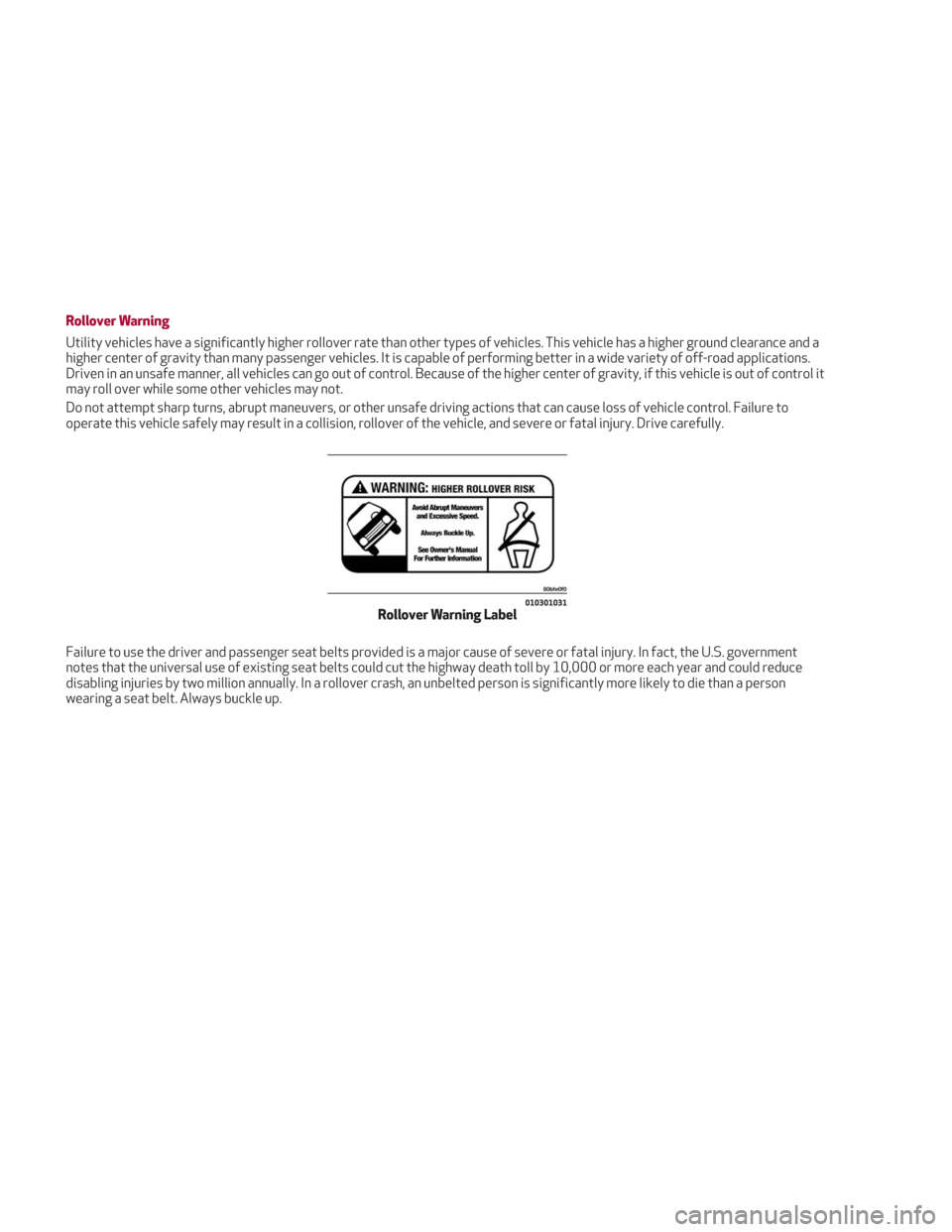
Rollover Warning
Utility vehicles have a significantly higher rollover rate than other types of vehicles. This vehicle has a higher ground clearance and a
higher center of gravity than many passenger vehicles. It is capable of performing better in a wide variety of off-road applications.
Driven in an unsafe manner, all vehicles can go out of control. Because of the higher center of gravity, if this vehicle is out of control it
may roll over while some other vehicles may not.
Do not attempt sharp turns, abrupt maneuvers, or other unsafe driving actions that can cause loss of vehicle control. Failure to
operate this vehicle safely may result in a collision, rollover of the vehicle, and severe or fatal injury. Drive carefully.
Failure to use the driver and passenger seat belts provided is a major cause of severe or fatal injury. In fact, the U.S. government
notes that the universal use of existing seat belts could cut the highway death toll by 10,000 or more each year and could reduce
disabling injuries by two million annually. In a rollover crash, an unbelted person is significantly more likely to die than a person
wearing a seat belt. Always buckle up.
010301031Rollover Warning Label
Page 18 of 276

KEYS
Key Fob
Your vehicle uses a keyless ignition
system. This system includes a key fob
and a keyless push button ignition.
The Remote Keyless Entry key fob allows
you to lock or unlock the doors and
liftgate or activate the Panic Alarm from
a distance. The key fob does not need to
be pointed at the vehicle to activate the
system.
PANIC Function
The key fob contains a PANIC button.
Should you ever feel threatened, push
this button and the vehicle security alarm
will sound.
To activate the PANIC function, push and
hold the PANIC button for at least one
second. When the panic alarm is active,
the headlights turn on, the turn signals
flash, the horn honks intermittently, and
all interior adjustable lights turn on. Thepanic alarm will remain active for three
minutes, and can be deactivated:By pushing the PANIC button again.
Automatically if the vehicle speed
exceeds 5 mph (8 km/h).
In both cases, the panic alarm is
immediately deactivated.
Warning!
Before exiting a vehicle, always shift the
automatic transmission into PARK, apply
the parking brake, turn the engine OFF,
remove the key fob from the vehicle and
lock your vehicle.
Never leave children alone in a vehicle, or
with access to an unlocked vehicle.
Allowing children to be in a vehicle
unattended is dangerous for a number of
reasons. A child or others could be seriously
or fatally injured. Children should be warned
not to touch the parking brake, brake pedal
or the gear selector.
Do not leave the key fob in or near the
vehicle, or in a location accessible to
children. A child could operate power
windows, other controls, or move the
vehicle.
Do not leave children or animals inside
parked vehicles in hot weather. Interior heat
build-up may cause serious injury or death.
Operation
Unlocking The Doors And The Liftgate
Briefly pushing the unlock button on the
key fob will unlock the doors and liftgate,
turn on the interior lights, and flash the
turn signals once (if activated from the
Information and Entertainment System).
Push and release the unlock button on the
key fob once to unlock the driver side
front door or twice within one second to
unlock all doors and the liftgate.
It is, however, possible to change the
current setting through the Information
and Entertainment System menu, so that
the system unlocks:
All doors on the first push of the key
fob unlock button.
The driver door on the first push of the
key fob unlock button.
The liftgate "independently" or "with
doors".
Flashing of the turn signals upon
locking/unlocking the doors, and
activation of the courtesy light upon
unlocking the doors, can be activated or
deactivated through the Information and
Entertainment System. For further
information, refer to the Information and
Entertainment System Owner’s Manual
Supplement.
The doors can also be unlocked by using
the emergency key, located inside the
key fob.
04016S0001EMKey Fob
16
GETTING TO KNOW YOUR VEHICLE
Page 19 of 276

Door And Liftgate Locking
Briefly pushing the lock button on the key
fob will lock the doors and liftgate, switch
off the internal lights, and flash the turn
signals (if activated in the Information
and Entertainment System).
If one or more doors are open, these
doors will also lock, and this is indicated
by a rapid flashing of the turn signals. The
doors will unlock again only if the key fob
is detected inside the passenger
compartment.
The doors can be locked by using the
emergency key in the driver’s side door
lock.
Opening The Liftgate
Rapidly push the button on the key fob
twice to open the liftgate. The turn
signals will flash to indicate that the
liftgate has been opened.
Remote StartThe remote start
button on the key fob
enables engine starting
(push the remote start
button on the key fob
twice to enable engine
starting). Car Finder
The Car Finder feature will temporarily
activate the turn signals and headlights
to assist with locating the vehicle in a
crowded area.
To activate, push the lock or unlock
button to remotely and temporarily
activate the turn signals and headlights.
Pushing the lock or unlock button again
will reactivate the lights switch on timer
(if the parking lights function was already
active, it will remain active).
This function is available only if the doors
are closed.Replacing The Electronic Key Fob
Battery
To replace the battery, proceed as
follows:
1. Push the sides of the key fob inward
and extract the cover pulling downwards.
2. Remove the emergency key from its
housing.
04016S0099EMKey Fob
04016S0002EMKey Fob Cover Removal
04016S0003EMRemoving Emergency Key
17
Page 20 of 276

3. Remove the battery plug by rotating it
counter clockwise.
4. Remove the battery from its slot and
replace it with a new one of the same
type.Proceed in reverse order to reassemble
the key.
Caution!
The battery replacement operation must be
done with care, in order not to damage the
electronic key.
Request For Additional Keys
The system can recognize up to eight key
fobs with remote control.
To guarantee that the engine starts and
the vehicle operates correctly, use only
electronic key fobs specifically coded for
the vehicle’s electronics.
If an electronic key fob is coded for a
vehicle, it cannot be used on any other
vehicle.
General Information
The following regulatory statement
applies to all radio frequency (RF)
devices equipped in this vehicle:
This device complies with Part 15 of the
FCC Rules and with Industry Canada
license-exempt RSS standard(s).
Operation is subject to the following two
conditions:
1. This device may not cause harmful
interference, and
2. This device must accept any
interference received, including
interference that may cause undesired
operation.
Note:
Changes or modifications not
expressly approved by the party
responsible for compliance could void the
user’s authority to operate the
equipment.
04016S0004EMRemoving Battery Plug
04016S0005EMBattery Location
18
GETTING TO KNOW YOUR VEHICLE
Page 22 of 276

Starting With A Discharged Key Fob
Battery
If the key fob battery is discharged,
proceed as follows to start the vehicle:
1. Lift the front armrest.
2. Lay the key fob on the key fob outline
found on the floor of the armrest
compartment while pushing the
START/STOP button to start the ignition.
Steering Wheel Lock — If Equipped
Your vehicle may be equipped with a
passive electronic steering wheel lock.
The steering wheel lock is engaged when
the driver door is opened with the ignition
OFF. The steering wheel lock releases
when the ignition is cycled ON.
General Information
The following regulatory statement
applies to all radio frequency (RF)
devices equipped in this vehicle:
This device complies with Part 15 of the
FCC Rules and with Industry Canada
license-exempt RSS standard(s).
Operation is subject to the following two
conditions:
1. This device may not cause harmful
interference, and
2. This device must accept any
interference received, including
interference that may cause undesired
operation.
Note:Changes or modifications not
expressly approved by the party
responsible for compliance could void the
user’s authority to operate the
equipment.
ENGINE IMMOBILIZER
Engine Immobilizer Operation
The Engine Immobilizer system prevents
unauthorized use of the vehicle by
disabling engine starting.
The system does not need to be enabled
or activated. Operation of the
immobilizer is automatic whether the
vehicle's doors are locked or unlocked.
When the ignition is set to ON, the Engine
Immobilizer system identifies the code
transmitted by the key. If the code is
recognized as valid, the Engine
Immobilizer system enables engine
starting.
When the ignition is brought back to
STOP, the Engine Immobilizer system
deactivates the engine control unit,
disabling engine starting.
For the correct engine starting
procedures, refer to “Starting The
Engine” in “Starting And Operating.”
04026V0002EMKey Fob Placement Location
20
GETTING TO KNOW YOUR VEHICLE
Page 25 of 276

When the function is disabled, this is
indicated by the light on the
Volumetric/Anti-Lift Protection button
flashing for several seconds.
Any disabling of the Volumetric/Anti-Lift
Protection must be repeated each time
the ignition is cycled off.
To Disarm The Alarm Using Passive
Entry
To completely deactivate the alarm (e.g.
during a long period of vehicle inactivity),
insert the blade of the emergency key,
found inside the key fob, into the door
handle lock cylinder and turn the
emergency key to the right (clockwise) to
lock the door(s).
DOORS
Locking And Unlocking Doors From The
Inside
If all doors are closed properly, they will
automatically lock once the vehicle has
exceeded approximately 12 MPH
(20 km/h) (“Auto Relock” function active).
Push the interior lock button on the driver
or passenger side door panel trim to lock
the doors.
Push the interior lock button on the rear
door panel trim to lock the rear doors
only.
With doors locked, push the unlock
button on the interior trim panel to
unlock the doors.
Warning!
Do not leave children or animals inside
parked vehicles in hot weather. Interior heat
build-up may cause serious injury or death.
For personal security and safety in the
event of a collision, lock the vehicle doors as
you drive as well as when you park and leave
the vehicle.
Before exiting a vehicle, always shift the
automatic transmission into PARK, apply
the parking brake, turn the engine OFF,
remove the key fob from the vehicle and
lock your vehicle.
Never leave children alone in a vehicle, or
with access to an unlocked vehicle.
Allowing children to be in a vehicle
unattended is dangerous for a number of
reasons. A child or others could be seriously
or fatally injured. Children should be warned
not to touch the parking brake, brake pedal
or the gear selector.
Do not leave the key fob in or near the
vehicle, or in a location accessible to
children. A child could operate power
windows, other controls, or move the
vehicle.
04046S0002EMVolumetric/Anti-Lift Protection Button
0101132136USDoor Lock And Unlock Switch Panel
23
Page 27 of 276
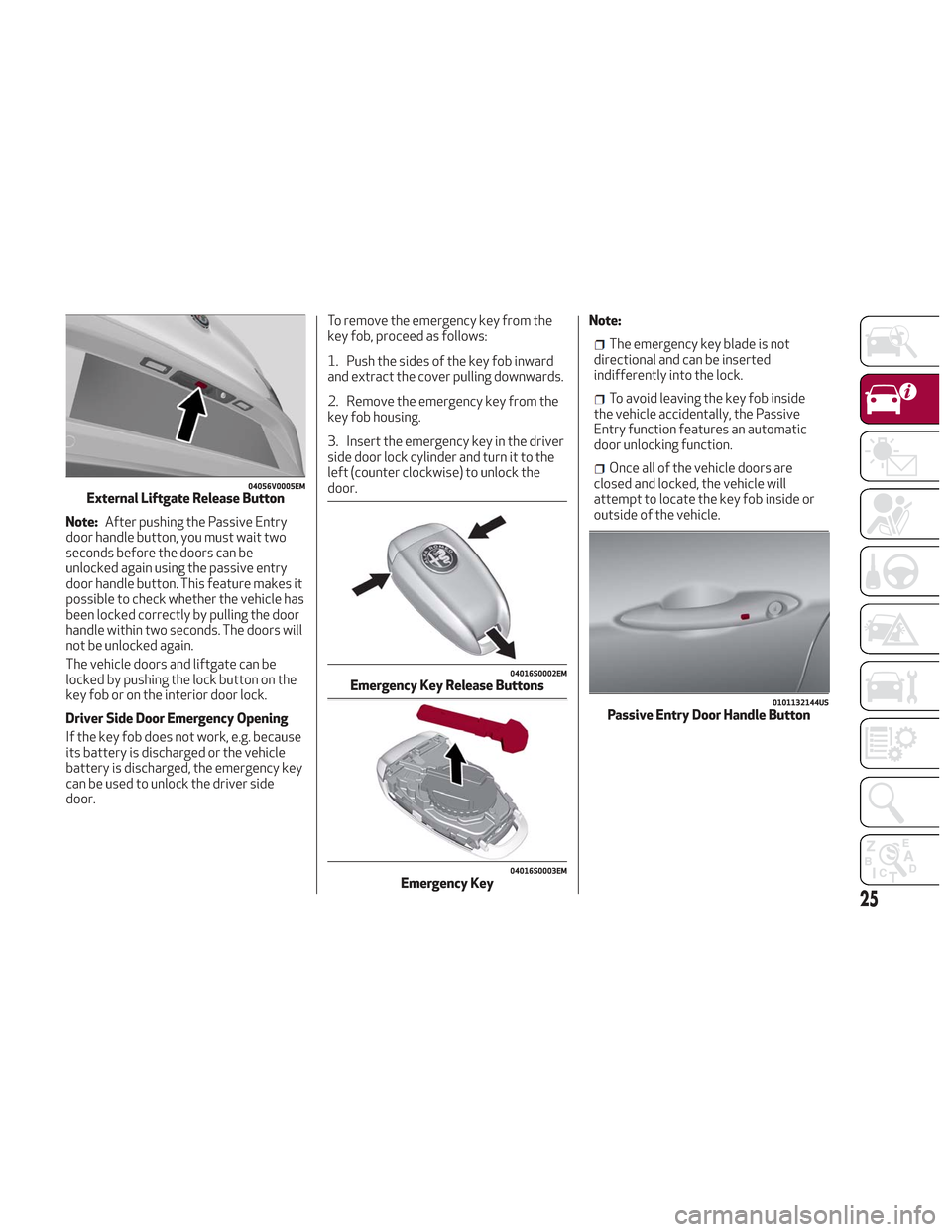
Note:After pushing the Passive Entry
door handle button, you must wait two
seconds before the doors can be
unlocked again using the passive entry
door handle button. This feature makes it
possible to check whether the vehicle has
been locked correctly by pulling the door
handle within two seconds. The doors will
not be unlocked again.
The vehicle doors and liftgate can be
locked by pushing the lock button on the
key fob or on the interior door lock.
Driver Side Door Emergency Opening
If the key fob does not work, e.g. because
its battery is discharged or the vehicle
battery is discharged, the emergency key
can be used to unlock the driver side
door. To remove the emergency key from the
key fob, proceed as follows:
1. Push the sides of the key fob inward
and extract the cover pulling downwards.
2. Remove the emergency key from the
key fob housing.
3. Insert the emergency key in the driver
side door lock cylinder and turn it to the
left (counter clockwise) to unlock the
door.
Note:
The emergency key blade is not
directional and can be inserted
indifferently into the lock.
To avoid leaving the key fob inside
the vehicle accidentally, the Passive
Entry function features an automatic
door unlocking function.
Once all of the vehicle doors are
closed and locked, the vehicle will
attempt to locate the key fob inside or
outside of the vehicle.
04056V0005EMExternal Liftgate Release Button
04016S0002EMEmergency Key Release Buttons
04016S0003EMEmergency Key
0101132144USPassive Entry Door Handle Button
25
Page 28 of 276
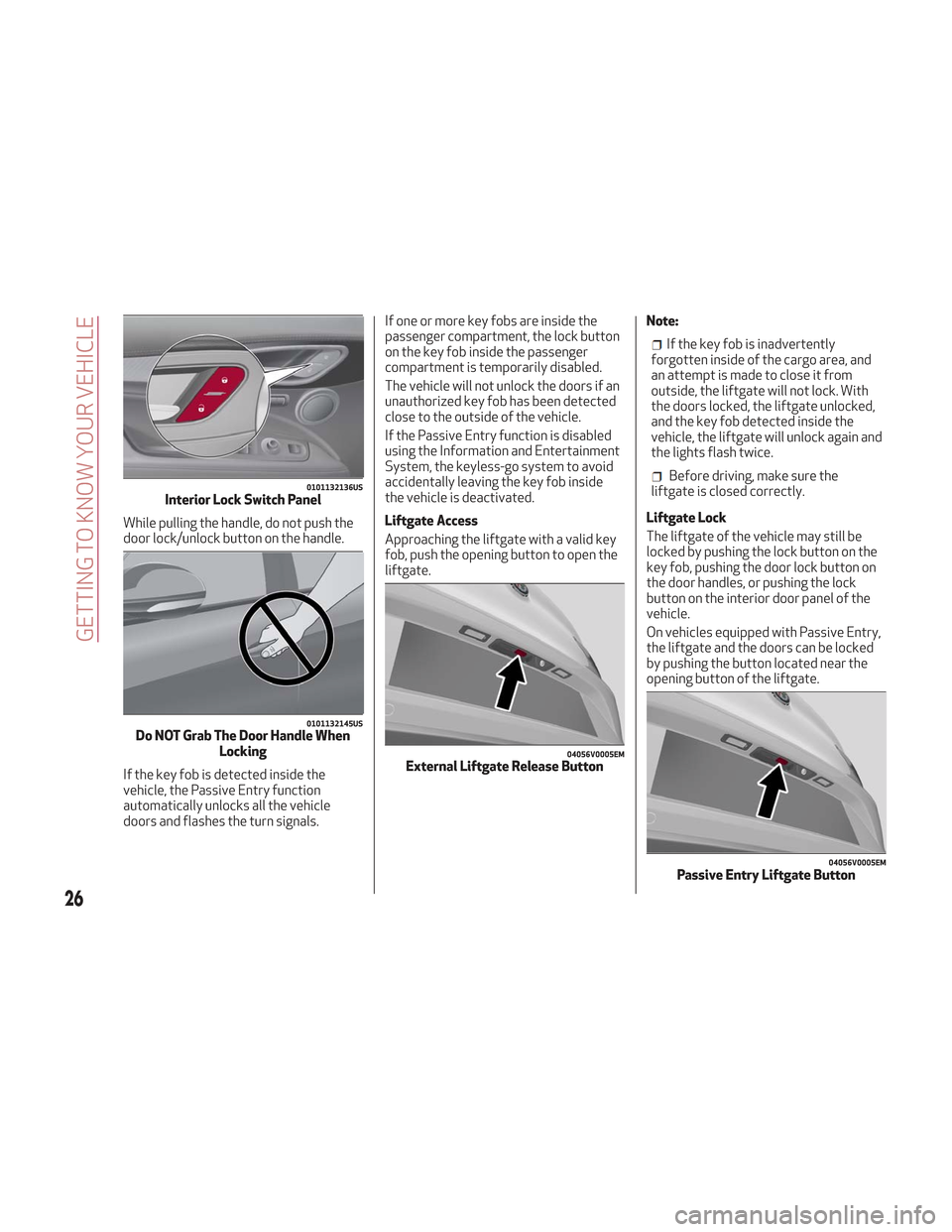
While pulling the handle, do not push the
door lock/unlock button on the handle.
If the key fob is detected inside the
vehicle, the Passive Entry function
automatically unlocks all the vehicle
doors and flashes the turn signals.If one or more key fobs are inside the
passenger compartment, the lock button
on the key fob inside the passenger
compartment is temporarily disabled.
The vehicle will not unlock the doors if an
unauthorized key fob has been detected
close to the outside of the vehicle.
If the Passive Entry function is disabled
using the Information and Entertainment
System, the keyless-go system to avoid
accidentally leaving the key fob inside
the vehicle is deactivated.
Liftgate Access
Approaching the liftgate with a valid key
fob, push the opening button to open the
liftgate.
Note:
If the key fob is inadvertently
forgotten inside of the cargo area, and
an attempt is made to close it from
outside, the liftgate will not lock. With
the doors locked, the liftgate unlocked,
and the key fob detected inside the
vehicle, the liftgate will unlock again and
the lights flash twice.
Before driving, make sure the
liftgate is closed correctly.
Liftgate Lock
The liftgate of the vehicle may still be
locked by pushing the lock button on the
key fob, pushing the door lock button on
the door handles, or pushing the lock
button on the interior door panel of the
vehicle.
On vehicles equipped with Passive Entry,
the liftgate and the doors can be locked
by pushing the button located near the
opening button of the liftgate.0101132136USInterior Lock Switch Panel
0101132145USDo NOT Grab The Door Handle When Locking
04056V0005EMExternal Liftgate Release Button
04056V0005EMPassive Entry Liftgate Button
26
GETTING TO KNOW YOUR VEHICLE