2018 Alfa Romeo Stelvio ECO mode
[x] Cancel search: ECO modePage 160 of 276
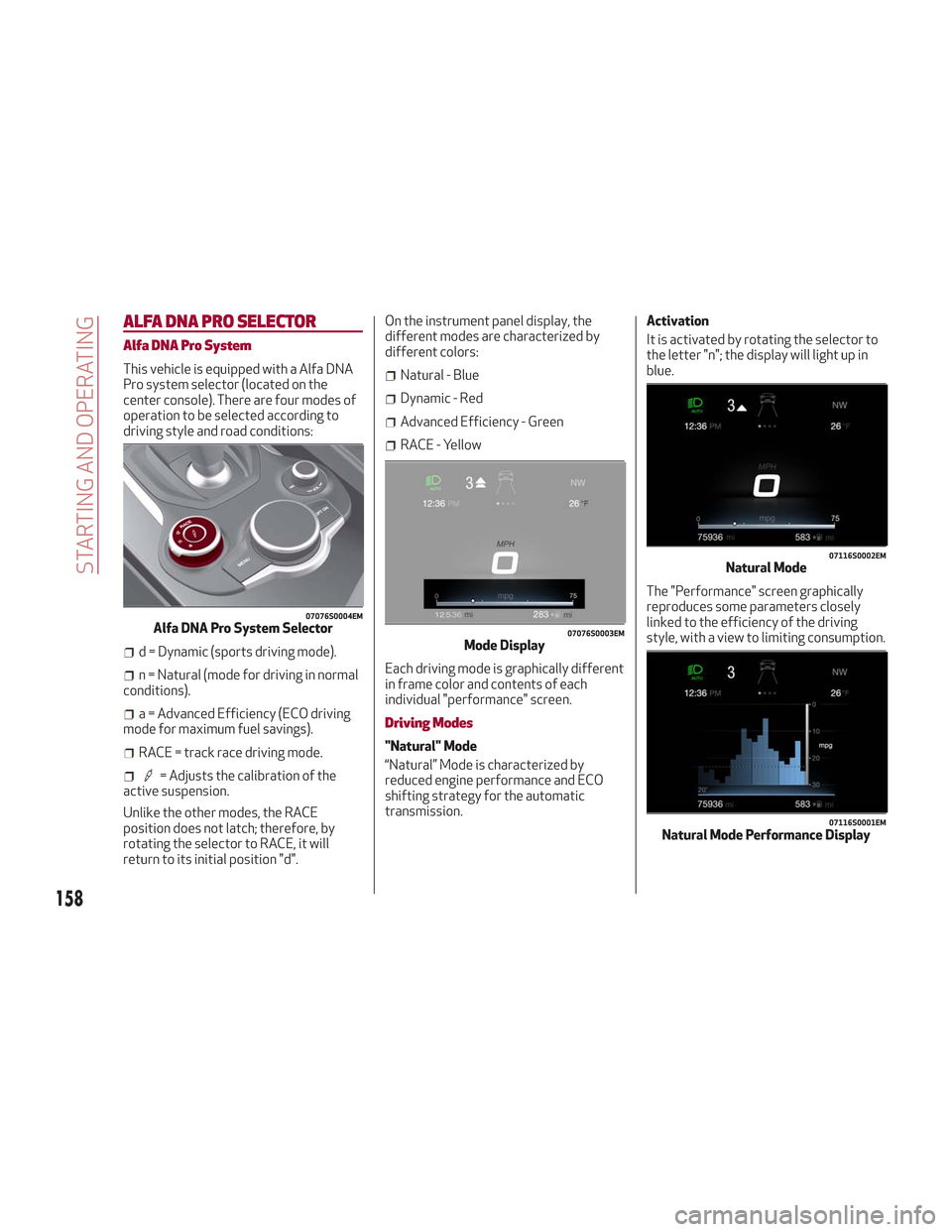
ALFA DNA PRO SELECTOR
Alfa DNA Pro System
This vehicle is equipped with a Alfa DNA
Pro system selector (located on the
center console). There are four modes of
operation to be selected according to
driving style and road conditions:
d = Dynamic (sports driving mode).
n = Natural (mode for driving in normal
conditions).
a = Advanced Efficiency (ECO driving
mode for maximum fuel savings).
RACE = track race driving mode.
= Adjusts the calibration of the
active suspension.
Unlike the other modes, the RACE
position does not latch; therefore, by
rotating the selector to RACE, it will
return to its initial position "d". On the instrument panel display, the
different modes are characterized by
different colors:
Natural - Blue
Dynamic - Red
Advanced Efficiency - Green
RACE - Yellow
Each driving mode is graphically different
in frame color and contents of each
individual "performance" screen.
Driving Modes
"Natural" Mode
“Natural” Mode is characterized by
reduced engine performance and ECO
shifting strategy for the automatic
transmission. Activation
It is activated by rotating the selector to
the letter "n"; the display will light up in
blue.
The "Performance" screen graphically
reproduces some parameters closely
linked to the efficiency of the driving
style, with a view to limiting consumption.
07076S0004EMAlfa DNA Pro System Selector07076S0003EMMode Display
07116S0002EMNatural Mode
07116S0001EMNatural Mode Performance Display
158
STARTING AND OPERATING
Page 162 of 276
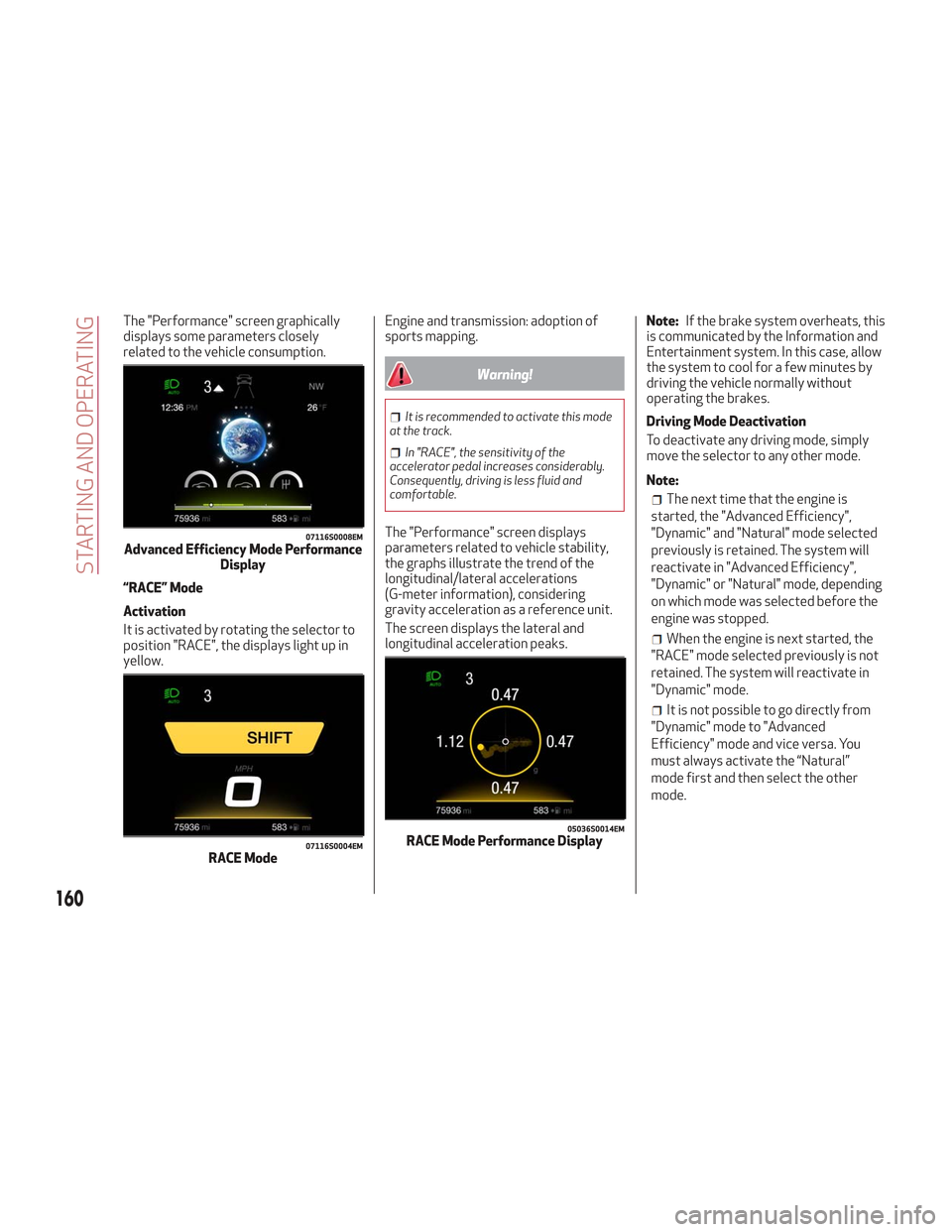
The "Performance" screen graphically
displays some parameters closely
related to the vehicle consumption.
“RACE” Mode
Activation
It is activated by rotating the selector to
position "RACE", the displays light up in
yellow.Engine and transmission: adoption of
sports mapping.
Warning!
It is recommended to activate this mode
at the track.
In "RACE", the sensitivity of the
accelerator pedal increases considerably.
Consequently, driving is less fluid and
comfortable.
The "Performance" screen displays
parameters related to vehicle stability,
the graphs illustrate the trend of the
longitudinal/lateral accelerations
(G-meter information), considering
gravity acceleration as a reference unit.
The screen displays the lateral and
longitudinal acceleration peaks. Note:
If the brake system overheats, this
is communicated by the Information and
Entertainment system. In this case, allow
the system to cool for a few minutes by
driving the vehicle normally without
operating the brakes.
Driving Mode Deactivation
To deactivate any driving mode, simply
move the selector to any other mode.
Note:
The next time that the engine is
started, the "Advanced Efficiency",
"Dynamic" and "Natural" mode selected
previously is retained. The system will
reactivate in "Advanced Efficiency",
"Dynamic" or "Natural" mode, depending
on which mode was selected before the
engine was stopped.
When the engine is next started, the
"RACE" mode selected previously is not
retained. The system will reactivate in
"Dynamic" mode.
It is not possible to go directly from
"Dynamic" mode to "Advanced
Efficiency" mode and vice versa. You
must always activate the “Natural”
mode first and then select the other
mode.
07116S0008EMAdvanced Efficiency Mode Performance Display
07116S0004EMRACE Mode
05036S0014EMRACE Mode Performance Display
160
STARTING AND OPERATING
Page 165 of 276

Note:After setting the ignition to STOP
and having closed the driver side door,
wait at least one minute before
disconnecting the electrical supply from
the battery. When reconnecting the
electrical supply to the battery, make
sure that the ignition is in the STOP mode
and the driver side door is closed.
SPEED LIMITER
Description
This feature allows the speed of the
vehicle to be limited to speeds, which can
be set by the driver.
The maximum speed can be set with the
vehicle stationary or in motion. The
minimum speed that can be set is 18 mph
(30mk/h).
When this feature is active, the vehicle
speed depends on the pressing of the
accelerator pedal until the programmed
speed limit is reached (see "Speed Limit
Programming" paragraph).
Activation
The feature can be activated/
deactivated through the Information and
Entertainment System.
Activating The Device
To access this feature on the main menu,
select the following items in sequence:
"Settings", "Safety", “Speed Limiter” and
“ON”.
The activation of this feature is signaled
by the displaying of the green symbol
along with the last speed set. The Speed
Limiter feature can remain active
concurrently with the Speed Control
system. If a speed limit below the one
indicated in the Speed Control is
selected, the Speed Control speed will be
lowered to that of the Speed Limiter. This
function remains available in RACE mode.
Speed Limit Programming
The speed limit can be programmed
through the Information and
Entertainment System.
To access the function on the main menu,
select the following items in sequence:
"Settings", "Safety" and "Speed Limiter
Set Speed".
By turning the Rotary Pad, the speed
increases by 5 mph (5 km/h), from a
minimum of 18 mph (30 km/h) to a
maximum of 112 mph (180 km/h).
Exceeding The Programmed Speed
By fully pressing the accelerator pedal,
the programmed speed can be exceeded
even with the device active (e.g. in the
event of overtaking).
The device is disabled until the speed
drops below the set limit, after which it
reactivates automatically.
07126V0002EMBattery Power Supply
1 — Socket
2 — Sensor
3 — Connector
07136S0001EMSpeed Limiter Display
163
Page 170 of 276

Setting a speed activates the system.
The display shows the icon in green with
the set speed.
Note:The system cannot be enabled
when RACE mode is active.
Warning!
Leaving the Adaptive Cruise Control (ACC)
system on when not in use is dangerous. You
could accidentally set the system or cause it
to go faster than you want. You could lose
control and have a collision. Always leave
the system off when you are not using it.
Pausing / Deactivating
With the system enabled (speed not set),
push the
(on/off) button to disable.
With the system active (speed set), push
the
(on/off) button to pause. The
display will show the icon in white with
the speed in brackets. To then deactivate
the system, push the
(on/off) button
again.
Setting The Desired Speed
The speed can be set from a minimum of
20 mph (30 km/h) to a maximum of
110 mph (180 km/h).
When the vehicle reaches the desired
speed, push the SET switch upward or
downward and release it to activate the
system. When the accelerator is released,
the vehicle will maintain the set speed
automatically. While the accelerator pedal is pressed,
the system will not be able to control the
distance between the vehicle and the one
ahead. In this case, the speed will be
determined only by the position of the
accelerator pedal.
The system will return to normal
operation as soon as the accelerator
pedal is released.
The system
cannotbe set:
When pressing the brake pedal.
When the brakes are overheated.
When the electric park brake has been
operated.
When either PARK (P), REVERSE (R) or
NEUTRAL (N) is engaged.
When the engine rpm is above a
maximum threshold.
When the vehicle speed is not within
the operational speed range.
When the ESC (or ABS or other
stability control systems) are operating
or have just operated.
When the ESC system is off.
When the Forward Collision Warning
system (if equipped) is braking
automatically.
In the event of system failure.
When the engine is OFF.
In case of obstruction of the radar
sensor (in this case the bumper area
where it is located must be cleaned).
If the system is set, the conditions
described above also cause a
cancellation or deactivation of the
system. These situations may vary
according to the conditions.
Note: The system will not be deactivated
when speeds higher than those set are
reached by pressing the accelerator
pedal above 110 mph (180 km/h). In
these situations, the system may not
work correctly and it is recommended to
deactivate it.
To Vary The Speed Setting
Increasing Speed
Once the system has been activated, you
can increase the speed by lifting the SET
switch. Each time it is operated, the
speed increases by 1 mph.
By holding the button up, the set speed
will increase in increments of 5 mph until
0403132201USSET Switch
168
STARTING AND OPERATING
Page 173 of 276

The driver is fully responsible for holding
a safe distance from the vehicle ahead
respecting the highway code in force in the
respective country.
“Stop And Go” Function
The “Stop and Go” feature allows you to
maintain a safe distance from the vehicle
ahead until the vehicle has completely
stopped. It will also restart the vehicle
automatically if the vehicle ahead drives
away within two seconds, otherwise it is
necessary to press the accelerator pedal
or push the RES button to restart.
Warning!
When the ACC system is resumed, the driver
must ensure that there are no pedestrians,
vehicles or objects in the path of the vehicle.
Failure to follow these warnings can result in
a collision and death or serious personal
injury.
Deactivation
The system is deactivated and the set
speed is canceled if:
The(on/off) button is pushed (when
the system is on or paused).
The ignition is in STOP mode.
RACE mode is activated.
The system is canceled (the set speed
and distance are stored):
When the system is paused (refer to
the “Activation / Deactivation” section).
When the conditions shown in the
“Setting The Desired Speed” section
occur.
Limited Operation Warning
If the dedicated message is shown on the
display, a condition limiting the Adaptive
Cruise Control operation may have
occurred.
This could be due to an obstruction of the
vehicle’s sensor or camera. It could also
be due to a fault in the system. If an
obstruction is detected, clean the area of
the windshield opposite the interior rear
view mirror, where the camera is located,
as well as the area of the front bumper
where the sensor is located. Then check
that the message has disappeared.
When the conditions limiting the system
functions end, normal operation will
resume.
Should the fault persist, contact your
authorized dealer.
Precautions While Driving
The system may not work correctly in
some driving conditions (see below). The
driver must control the vehicle at all
times. Vehicle Not Aligned
The system may not detect a vehicle
traveling in the same lane, in the same
direction, but is not aligned. It also may
not detect a vehicle which is cutting in
from a side lane. Sufficient distance from
the vehicles ahead may not be
guaranteed in these cases.
The non-aligned vehicle can weave in and
out of the driving lane causing the vehicle
to brake or accelerate unexpectedly.
Steering And Curves
Driving on curves with the system set
could limit speed and acceleration to
guarantee vehicle stability, even if no
vehicles are detected ahead.
When leaving the curve, the system
resets the previously set speed.
06016V0005EMSteering And Curves
171
Page 176 of 276

System Activation/Deactivation
When the REVERSE gear is engaged and
the system is on, the front and rear
sensors are activated. If the vehicle
moves from REVERSE to a forward gear,
the rear sensors are deactivated, while
the front sensors remain active until the
speed of 9 mph (15 km/h) is exceeded.
Note:In certain operating conditions, the
system could start detecting an obstacle
only after the vehicle has moved slightly
(a few inches).
Acoustic Signal
In the presence of an obstacle at the
front or the rear of the vehicle, an
acoustic signal with variable frequency
will sound:
The acoustic signal increases in
frequency as the distance between the
vehicle and the obstacle decreases.
The acoustic signal becomes
continuous when the distance between
the vehicle and the obstacle is less than
11 inches (30 cm), and stops if the
distance increases.
The acoustic signal is constant if the
distance between the vehicle and the
obstacle is unchanged.
Note: If the sensors detect several front
and rear obstacles, the closest obstacle
is considered. An intermittent signal will
sound if the obstacles are at the same
distance (front and rear). When the system emits an acoustic
signal, the volume of the Information and
Entertainment System, if activated, is
automatically lowered.
Indication On Display
The driver can select the type of warning
they would like to be displayed through
the Information and Entertainment
System. To access the function on the
main menu, select in the following order:
1. “Settings.”
2. “Driver Assistance.”
3. “ParkSense.”
4. “Mode.”
5. “Sound-Display.”
Visual Indications
The system indicates the presence of an
obstacle by displaying a single red arc in
the detected areas, in relation to the
distance of the object and the position of
the vehicle.
If the obstacle is detected in the front or
rear central area, a single red arc will be
displayed as the obstacle approaches,
first constant, then flashing, in addition
to an acoustic signal.
If the obstacle is detected in the front or
rear left and/or right area, a single red
flashing arc will be shown in the
corresponding area on the display and
the system will emit an acoustic signal,
either at frequent intervals or constantly.If several obstacles are detected
simultaneously in the front and rear area,
the display will show all of them,
regardless of the area in which they were
detected.
In general, the vehicle is closer to the
obstacle when a single or several flashing
arcs are shown on the display and the
acoustic signal becomes continuous.
It is not possible to exit from the display
screen while the vehicle is in REVERSE.
Fault Indication
Parking sensor faults, if any, will be
indicated by a message on the display on
the instrument cluster. Refer to "Warning
Lights And Messages On The Instrument
Panel" in "Getting To Know Your
Instrument Panel" for further
information.
Messages On The Display
In case of system failure, a dedicated
message appears on the instrument
cluster for about 5 seconds.
Cleaning the front or rear sensors
:If
the display shows a message requiring
the sensors to be cleaned, make sure that
the outer surface and the underside of
the front and rear bumpers are free of
debris (e.g. snow, mud, ice, etc.). Once
these areas are clear, place the ignition in
STOP mode. Then, return it to ON mode.
If the message is still displayed, contact
your authorized dealer.
174
STARTING AND OPERATING
Page 178 of 276

LANE DEPARTURE WARNING
(LDW) SYSTEM — IF EQUIPPED
Description
The Lane Departure Warning system uses
a forward looking camera located on the
windshield to detect lane markings and
measure vehicle position within the lane
boundaries.
When one or both lane limits are
detected and the vehicle passes over one
without an activated turn signal, the
system emits a visual as well as an
acoustic signal.
If the vehicle continues to go beyond the
line of the lane without any intervention
from the driver, the surpassed line will
light up on the display (left or right) to
urge the driver to bring the vehicle back
into the limits of the lane.
Caution!
Do not tamper with nor operate on the
camera. Do not close the openings in the
aesthetic cover located under the interior
rear view mirror. In the event of a failure of
the camera, contact your authorized dealer.
The camera may have limited or absent
operation due to weather conditions such
as: heavy rain, hail, thick fog, heavy snow,
formation of ice layers on the windshield.
Camera operation may also be
compromised by the presence of dust,
condensation, dirt or ice on the windshield,
by traffic conditions (e.g. vehicles that are
driving not aligned with yours, vehicle
driving in a transverse or opposite way on
the same lane, bend with a small radius of
curvature), by road surface conditions and
by driving conditions (e.g. off-road driving).
Make sure the windshield is always clean.
Use specific detergents and clean cloths to
avoid scratching the windshield. The camera
operation may also be limited or absent in
some driving, traffic and road surface
conditions.
If the windshield must be replaced due to
scratches, chipping or breakage, contact
exclusively your authorized dealer. Do not
replace the windshield on your own. It is
advisable to replace the windshield if it is
damaged in the area of the camera.
System Activation/Deactivation
The system is activated/deactivated by
pushing the button located on the end of
the multifunction lever.
Note: When the engine is started, the
system maintains the operating mode
that was selected when it was turned
OFF.
Activation Conditions
Once turned on, the system becomes
active only if the following conditions are
met:
The vehicle speed is above 37 mph
(60 km/h).
The lane limit lines are visible at least
on one side.
07226S0001EMLane Departure Warning System Activation/Deactivation Button
176
STARTING AND OPERATING
Page 187 of 276
Brakes
The car braking system may be available
with four carbon-ceramic material brake
discs, one on each wheel.
In order to guarantee the maximum
braking capacity for the first use, Alfa
Romeo performs a "run-in" procedure for
discs and pads directly at the factory.
The use of carbon-ceramic material
brake discs guarantees braking features
(better deceleration/pedal load ratio,
braking distances, fading resistance)
proportional to the dynamic features of
the car in addition to considerably
decreasing the unsprung component
weight.
The materials used and the structural
features of the system could generate
unusual noises which have absolutely no
adverse effect on correct operation and
reliability of the braking system.
Greater pressure may need to be applied
to the brake pedal the first time to keep
the same braking capacities in presence
of condensation or salt on the braking
surfaces, for example after washing or if
the car is not used for a long time.
Note:Given the high technological level
of this system, any servicing on it must be
performed by your authorized dealer
which exclusively has the skills needed
for the repair operations. In case of intensive, high-performance
use of the car, have the efficiency of the
carbon-ceramic material braking system
inspected as shown on the Maintenance
Plan at your authorized dealer.
Driving On Race Tracks
Before driving on a track using a racing
style, it is necessary to:
Attend a race track driving course.
Check the liquid levels in the engine
compartment. For more information, see
the “Checking Levels” section in the
“Servicing And Maintenance” chapter.
Have the car inspected at an
authorized dealer.
Remember that the car was not designed
to be driven exclusively on the race track
and that this use increases stress and
component wear.
Note: Quadrifoglio front brakes are
equipped with NAO type pads. These
pads are NOT suitable for high termic
loads (vehicle track use). If you want to
use vehicle on a track it is necessary to
use the optional CCM (Carbon Ceramic
Brake disc). Preheating the carbon ceramic material
brake discs
The brake discs must be warmed up to
make them fully efficient. You are
advised to perform the following
procedure:
Brake nine times from 80 mph to
18 mph (130 km/h to 30 km/h) with
deceleration equal to 0.7g (the
longitudinal acceleration value is shown
on the instrument panel display by
setting RACE mode and selecting the
“Performance” page) with 20 second
intervals between brake applications;
keep the car at a speed comprised
between 37 mph and 62 mph (60 km/h
and 100 km/h) and do not brake for
4 minutes to allow the brakes to cool
down;
Then brake three times from 124 mph
to 18 mph (200 km/h to 30 km/h) with
deceleration equal to 1.1g (ABS
operation) with 30 second intervals
between brake applications; keep the car
at a speed comprised between 37 mph
and 62 mph (60 km/h and 100 km/h) and
do not brake for 5 minutes to allow the
brakes to cool down.
185