2018 Alfa Romeo Stelvio brake
[x] Cancel search: brakePage 106 of 276
ACTIVE SAFETY SYSTEMS
The vehicle may be equipped with the
following active safety devices:
Anti-Lock Braking (ABS) System
Drive Train Control (DTC) System
Electronic Stability Control (ESC)
System
Traction Control System (TCS)
Panic Brake Assist (PBA) System
Hill Start Assist (HSA) System
Dynamic Steering Torque (DST)
System
Active Torque Vectoring (ATV) System
For system operation, see the following
pages.
Anti-Lock Braking (ABS) System
An integral part of the braking system,
the ABS prevents one or more wheels
from locking and slipping in all road
surface conditions, regardless of the
intensity of the braking action. The
system ensures that the vehicle can be
controlled even during emergency
braking, allowing the driver to optimize
stopping distances.
The system intervenes during braking
when the wheels are about to lock,
typically in emergency braking or
low-grip conditions where locking may be
more frequent. The system also improves control and
stability of the vehicle when braking on a
surface where the grip of the left and
right wheels varies, such as in a corner.
The Electronic Braking Force Distribution
(EBD) system works with the ABS,
allowing the brake force to be distributed
between the front and rear wheels.
System Intervention
The ABS equipped on this vehicle is
provided with the "Brake-By-Wire"
(Integrated Brake System - IBS) function.
With this system, the command given by
pressing the brake pedal is not
transmitted hydraulically, but electrically.
Therefore, the light pulsation that is felt
on the pedal with the traditional system
is no longer noticeable.Warning!
The ABS contains sophisticated
electronic equipment that may be
susceptible to interference caused by
improperly installed or high output radio
transmitting equipment. This interference
can cause possible loss of anti-lock braking
capability. Installation of such equipment
should be performed by qualified
professionals.
Pumping of the Anti-Lock Brakes will
diminish their effectiveness and may lead to a
collision. Pumping makes the stopping distance
longer. Just press firmly on your brake pedal
when you need to slow down or stop.
The ABS cannot prevent the natural laws
of physics from acting on the vehicle, nor
can it increase braking or steering efficiency
beyond that afforded by the condition of the
vehicle brakes and tires or the traction
afforded.
The ABS cannot prevent collisions,
including those resulting from excessive
speed in turns, following another vehicle too
closely, or hydroplaning.
The capabilities of an ABS equipped
vehicle must never be exploited in a reckless
or dangerous manner that could jeopardize
the user’s safety or the safety of others.
Drive Train Control (DTC) System
Some models of this vehicle are equipped
with an All-Wheel Drive system (AWD),
which offers an optimal drive for
countless driving conditions and road
surfaces. The system reduces tire
slipping to a minimum, automatically
redistributing the torque to the front and
rear wheels as needed.
To maximize fuel savings, the vehicle with
AWD automatically passes to rear-wheel
drive (RWD) when the road and
environmental conditions are such that
they wouldn't cause the tires to slip.
When the road and environmental
conditions require better traction, the
vehicle automatically switches to AWD
mode.
104
SAFETY
Page 107 of 276

Note:
There may be a brief delay in shifting
to AWD mode after a tire slipping event
occurs.
If the system failure symbol switches
on, after starting the engine or while
driving, it means that the AWD system is
not working properly. If the warning
message activates frequently, it is
recommended to carry out the
maintenance operations.
Electronic Stability Control (ESC)
System
The ESC system improves the directional
control and stability of the vehicle in
various driving conditions.
The ESC system corrects the vehicle’s
understeer and oversteer, distributing
the brake force on the appropriate
wheels. The torque supplied by the
engine can also be reduced in order to
maintain control of the vehicle.
The ESC system uses sensors installed
on the vehicle to determine the path that
the driver intends to follow and
compares it with the vehicle’s effective
path. When the real path deviates from
the desired path, the ESC system
intervenes to counter the vehicle’s
understeer or oversteer.
Oversteer occurs when the vehicle is
turning more than it should according to
the angle of the steering wheel.
Understeer occurs when the vehicle is turning less than it should according to
the angle of the steering wheel.
System Intervention
The intervention of the system is
indicated by the flashing of the ESC
warning light on the instrument panel, to
inform the driver that the vehicle
stability and grip are critical.
Warning!
Electronic Stability Control (ESC) cannot
prevent the natural laws of physics from
acting on the vehicle, nor can it increase the
traction afforded by prevailing road
conditions. ESC cannot prevent accidents,
including those resulting from excessive
speed in turns, driving on very slippery
surfaces, or hydroplaning. ESC also cannot
prevent accidents resulting from loss of
vehicle control due to inappropriate driver
input for the conditions. Only a safe,
attentive, and skillful driver can prevent
accidents. The capabilities of an ESC
equipped vehicle must never be exploited in
a reckless or dangerous manner which could
jeopardize the user’s safety or the safety of
others.
Vehicle modifications, or failure to
properly maintain your vehicle, may change
the handling characteristics of your vehicle,
and may negatively affect the performance
of the ESC system. Changes to the steering
system, suspension, braking system, tire
type and size or wheel size may adversely
affect ESC performance. Improperly inflated and unevenly worn tires may also
degrade ESC performance. Any vehicle
modification or poor vehicle maintenance
that reduces the effectiveness of the ESC
system can increase the risk of loss of
vehicle control, vehicle rollover, personal
injury and death.
Traction Control System (TCS)
The system automatically operates in the
event of slipping, loss of grip on wet
roads (hydroplaning), and acceleration on
one or both drive wheels on roads that
are slippery, snowy, icy, etc. Depending
on the slipping conditions, two different
control systems are activated:
If the slipping involves both drive
wheels, the system intervenes, reducing
the power transmitted by the engine.
If the slipping only involves one of the
drive wheels, the Brake Limited
Differential (BLD) function is activated,
automatically braking the wheel which is
slipping (the behavior of a self-locking
differential is simulated). This will
increase the engine torque transferred to
the wheel which isn't slipping.
System Intervention
The intervention of the system is
indicated by the flashing of the ESC
warning light on the instrument panel, to
inform the driver that the vehicle
stability and grip are critical.
105
Page 108 of 276

Panic Brake Assist (PBA) System
The PBA system is designed to improve
the vehicle’s braking capacity during
emergency braking.
The system detects emergency braking
by monitoring the speed and force with
which the brake pedal is pressed, and
consequently applies the optimal brake
pressure. This can reduce the braking
distance: the PBA system therefore
complements the ABS.
Maximum assistance from the PBA
system is obtained by pressing the brake
pedal very quickly. In addition, the brake
pedal should be pressed continuously
during braking, avoiding intermittent
presses, to get the most out of the
system. Do not reduce pressure on the
brake pedal until braking is no longer
necessary.
The PBA system is deactivated when the
brake pedal is released.Warning!
The Panic Brake Assist (PBA) cannot prevent
the natural laws of physics from acting on
the vehicle, nor can it increase the traction
afforded by prevailing road conditions. PBA
cannot prevent collisions, including those
resulting from excessive speed in turns,
driving on very slippery surfaces, or
hydroplaning. The capabilities of a
PBA-equipped vehicle must never be
exploited in a reckless or dangerous manner,
which could jeopardize the user's safety or
the safety of others.
Hill Start Assist (HSA) System
This is an integral part of the ESC system
that facilitates starting on slopes,
activating automatically in the following
cases:
Uphill: the vehicle is stationary on a
road with a gradient higher than 5%, the
engine is running, the brake is pressed,
and the transmission is in NEUTRAL (N)
or a gear other than REVERSE (R) is
engaged.
Downhill: the vehicle is stationary on a
road with a gradient higher than 5%, the
engine is running, the brake is pressed,
and the transmission is in REVERSE (R). When starting from a stop, the ESC
system control unit maintains the braking
pressure on the wheels until the engine
torque necessary for starting is reached,
or in any case for a maximum of two
seconds, allowing your right foot to be
moved easily from the brake pedal to the
accelerator.
The system will automatically deactivate
after two seconds without starting,
gradually releasing the braking pressure.
During this release stage, it is possible to
hear a typical mechanical brake release
noise, indicating the imminent movement
of the vehicle.
Warning!
There may be situations where the Hill Start
Assist (HSA) will not activate and slight
rolling may occur, such as on minor hills or
with a loaded vehicle, or while pulling a
trailer. HSA is not a substitute for active
driving involvement. It is always the driver’s
responsibility to be attentive to distance to
other vehicles, people, and objects, and most
importantly brake operation to ensure safe
operation of the vehicle under all road
conditions. Your complete attention is
always required while driving to maintain
safe control of your vehicle. Failure to follow
these warnings can result in a collision or
serious personal injury.
106
SAFETY
Page 109 of 276

Dynamic Steering Torque (DST) System
The DST function uses the integration of
the ESC system with the electric power
steering to increase the safety level of
the whole vehicle.
In critical situations for example (braking
on surfaces with different grip
conditions), the ESC system influences
the steering through the DST function to
implement an additional torque
contribution on the steering wheel in
order to suggest the most correct
maneuver to the driver.
The coordinated action of the brakes and
steering increases the safety and control
of the vehicle.
Note:The DST feature is only meant to
help the driver realize the correct course
of action through small torques on the
steering wheel, which means the
effectiveness of the DST feature is highly
dependent on the driver’s sensitivity and
overall reaction to the applied torque. It
is very important to realize that this
feature will not steer the vehicle,
meaning the driver is still responsible for
steering the vehicle.
Active Torque Vectoring (ATV) System
The dynamic drive control is used to
optimize and balance the drive torque
between the wheels of the same axles.
The ATV system improves the grip in
turns, sending more drive torque to the
external wheel.
Given that, in a turn, the external wheels
of the car travel more than the internal
ones and therefore turn faster, sending a
higher thrust to the external rear wheel
allows for the car to be more stable and
to not suffer an "understeer" condition.
Understeer occurs when the vehicle is
turning less than appropriate for the
steering wheel position.
AUXILIARY DRIVING SYSTEMS
The following auxiliary driving systems
are available in this vehicle:
Blind Spot Monitoring (BSM)
Forward Collision Warning Plus
(FCW+)
Tire Pressure Monitoring System
(TPMS)
Blind Spot Monitoring (BSM) System
The Blind Spot Monitoring (BSM) system
uses two radar sensors, located in the
rear bumper (one on each side), to detect
the presence of other vehicles in the rear
side blind spots of your vehicle.
The system warns the driver about the
presence of other vehicles in the
detection area by illuminating the
warning light located within the door
mirror on the side in which the other
vehicle was detected.
0403132303USRear Sensor Location
107
Page 112 of 276
Forward Collision Warning Plus (FCW+)
System
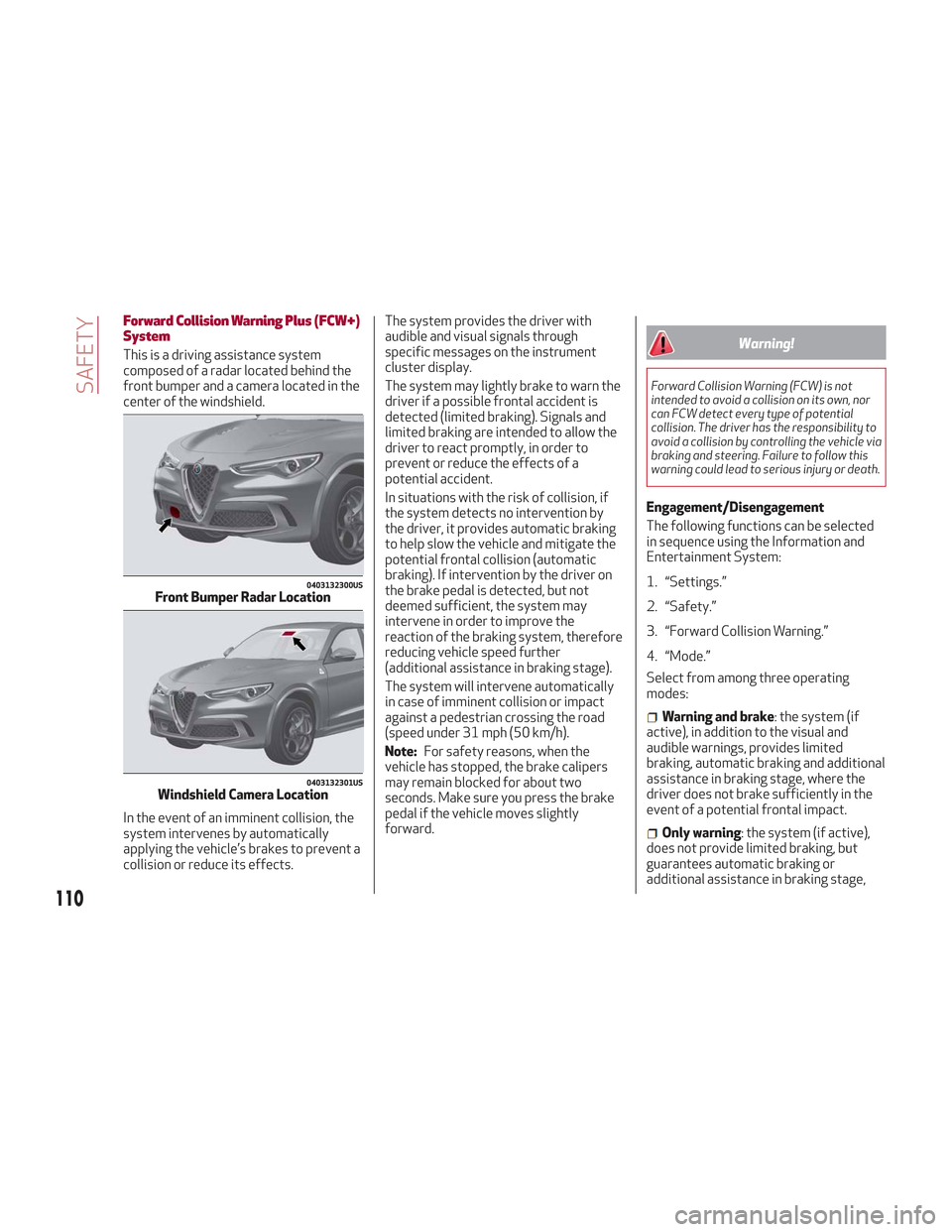
This is a driving assistance system
composed of a radar located behind the
front bumper and a camera located in the
center of the windshield.
In the event of an imminent collision, the
system intervenes by automatically
applying the vehicle’s brakes to prevent a
collision or reduce its effects.The system provides the driver with
audible and visual signals through
specific messages on the instrument
cluster display.
The system may lightly brake to warn the
driver if a possible frontal accident is
detected (limited braking). Signals and
limited braking are intended to allow the
driver to react promptly, in order to
prevent or reduce the effects of a
potential accident.
In situations with the risk of collision, if
the system detects no intervention by
the driver, it provides automatic braking
to help slow the vehicle and mitigate the
potential frontal collision (automatic
braking). If intervention by the driver on
the brake pedal is detected, but not
deemed sufficient, the system may
intervene in order to improve the
reaction of the braking system, therefore
reducing vehicle speed further
(additional assistance in braking stage).
The system will intervene automatically
in case of imminent collision or impact
against a pedestrian crossing the road
(speed under 31 mph (50 km/h).
Note:
For safety reasons, when the
vehicle has stopped, the brake calipers
may remain blocked for about two
seconds. Make sure you press the brake
pedal if the vehicle moves slightly
forward.Warning!
Forward Collision Warning (FCW) is not
intended to avoid a collision on its own, nor
can FCW detect every type of potential
collision. The driver has the responsibility to
avoid a collision by controlling the vehicle via
braking and steering. Failure to follow this
warning could lead to serious injury or death.
Engagement/Disengagement
The following functions can be selected
in sequence using the Information and
Entertainment System:
1. “Settings.”
2. “Safety.”
3. “Forward Collision Warning.”
4. “Mode.”
Select from among three operating
modes:
Warning and brake : the system (if
active), in addition to the visual and
audible warnings, provides limited
braking, automatic braking and additional
assistance in braking stage, where the
driver does not brake sufficiently in the
event of a potential frontal impact.
Only warning : the system (if active),
does not provide limited braking, but
guarantees automatic braking or
additional assistance in braking stage,
0403132300USFront Bumper Radar Location
0403132301USWindshield Camera Location
110
SAFETY
Page 113 of 276

where the driver does not brake at all or
not sufficiently in the event of a potential
frontal impact.
Disable: the system does not provide
visual and audible warnings, limited
braking, automatic braking or additional
assistance in braking stage. The system
will therefore provide no indication of a
possible collision.
Activation/Deactivation
The Forward Collision Warning system is
activated whenever the engine is started
regardless of what is shown in the
Information and Entertainment System.
Following a deactivation, the system will
not warn the driver about the possible
collision with a preceding vehicle,
regardless of the setting selected in the
Information and Entertainment System.
Note: Each time the engine is started,
the system is activated regardless of
what setting was selected when the
engine was turned OFF.
This function is not active at a speed
lower than 4 mph (7 km/h) or higher than
124 mph (200 km/h).
The system is active:
Each time the engine is started.
When feature is selected within the
Information and Entertainment System.
When the ignition is in the ON position.
When the vehicle speed is between
4 mph (7 km/h) and 124 mph (200 km/h).
When the front seat belts are
fastened.
The "Alfa DNA Pro" selector is not in
RACE position (if equipped).
Changing The System Sensitivity
The sensitivity of the system can be
changed through the Information and
Entertainment System menu, choosing
from one of the following three options:
"Near", "Med" or "Far". Refer to the
description in the Information and
Entertainment System Supplement for
how to change the settings.
The default setting is "Med". With this
setting, the system warns the driver of a
possible collision with the vehicle in front
when that vehicle is at a standard
distance, between that of the other two
settings.
With the system sensitivity set to "Far",
the system will warn the driver of a
possible collision with the vehicle in front
when that vehicle is at a greater distance,
thus providing the possibility of acting on
the brakes more lightly and gradually.
This setting provides the drivers with the
maximum possible reaction time to
prevent a potential accident.
With the option set to "Near", the system
will alert the driver of a possible collision
with the vehicle in front when that vehicle
is close. This setting offers the driver a
lower reaction time compared to the "Med" and "Far" settings, in the event of a
potential collision, but permits more
dynamic driving of the vehicle.
The system sensitivity setting is kept in
the memory when the engine is turned
OFF.
System Limited Operation Warning
If a dedicated message is displayed, a
condition limiting the system operation
may have occurred. The possible reasons
of this limitation are something is
blocking the camera view or a fault.
If an obstruction is signaled, clean the
area of the radar on the front bumper,
and the camera area on the windshield.
If a fault in the system is occurring, it will
still be possible to drive the vehicle
normally, but automatic braking will not
be available in the event of an impending
collision.
When the conditions limiting the system
functions end, this will go back to normal
and complete operation. Should the fault
persist, contact your authorized dealer.
System Failure Signaling
If the system turns off and a dedicated
message is shown on the display, it
means that there is a fault with the
system.
In this case, it is still possible to drive the
vehicle, but you are advised to contact
your authorized dealer as soon as
possible.
111
Page 114 of 276

Radar Indication Not Available
If conditions are such that the radar
cannot detect obstacles correctly, the
system is deactivated and a dedicated
message appears on the display. This
generally occurs in the event of poor
visibility, such as when it is snowing or
raining heavily.
The function of this system can also be
temporarily reduced due to obstructions
such as mud, dirt or ice on the bumper. In
such cases, a dedicated message will be
shown on the display and the system will
be deactivated. This message can
sometimes appear in conditions of high
reflectivity (e.g. tunnels with reflective
tiles or ice or snow). When the conditions
limiting the system functions end, it will
go back to normal and complete
operation.
In certain cases, this dedicated message
could be displayed when the radar is not
detecting any vehicles or objects within
its view range.
If atmospheric conditions are not the
reason behind this message, check if the
sensor is dirty. It could be necessary to
clean or remove any obstructions in the
area.If the message appears frequently, even
in the absence of atmospheric conditions
such as snow, rain, mud or other
obstructions, contact your authorized
dealer for a sensor alignment check.
In the absence of visible obstructions,
manually removing the decorative cover
trim and cleaning the radar surface could
be required. Have this operation
performed at your authorized dealer.
Note:
It is recommended that you do not
install devices, accessories or
aerodynamic attachments in front of the
sensor or darken it in any way, as this can
compromise the correct functioning of
the system.
Frontal Collision Alarm With Active
Braking
If this function is selected, the brakes are
operated to reduce the speed of the
vehicle in the event of potential frontal
impact.
This function applies an additional
braking pressure if the braking pressure
applied by the driver does not suffice to
prevent potential frontal impact.
The function is active with speed above
4 mph (7 km/h).
Driving In Special Conditions
In certain driving conditions, system
intervention might be unexpected or
delayed. The driver must therefore be
very careful, keeping control of the
vehicle to drive in complete safety.Driving close to a bend.
The vehicle ahead is leaving a
roundabout.
Vehicles with small dimensions and/or
not aligned in the driving lane.
Lane change by other vehicles.
Vehicles traveling at right angles to the
vehicle.
Note: In particularly complex traffic
conditions, the driver can deactivate the
system manually through the Information
and Entertainment System.
Driving Close To A Bend
When entering or leaving a wide bend, the
system may detect a vehicle in front you,
but not driving in the same driving lane. In
cases such as these, the system may
intervene.
06016V0005EMDriving Around Wide Curves
112
SAFETY
Page 131 of 276
Warning!
Deployed air bags and seat belt
pretensioners cannot protect you in another
collision. Have the air bags, seat belt
pretensioners, and the seat belt retractor
assemblies replaced by an authorized dealer
immediately. Also, have the Occupant
Restraint Controller System serviced as
well.
Note:
Air bag covers may not be obvious in
the interior trim, but they will open
during air bag deployment.
After any collision, the vehicle should
be taken to an authorized dealer
immediately.
Enhanced Accident Response
System
In the event of an impact, if the
communication network remains intact,
and the power remains intact, depending
on the nature of the event, the ORC will
determine whether to have the Enhanced
Accident Response System perform the
following functions:
Cut off fuel to the engine (If Equipped)
Cut off battery power to the electric
motor (If Equipped)
Flash hazard lights as long as the
battery has power
Turn on the interior lights, which
remain on as long as the battery has
power or for 15 minutes from the
intervention of the Enhanced Accident
Response System.
Unlock the power door locks.
Your vehicle may also be designed to
perform any of these other functions in
response to the Enhanced Accident
Response System:
Turn off the Fuel Filter Heater, Turn off
the HVAC Blower Motor, Close the HVAC
Circulation Door
Cut off battery power to the:
– Engine
– Electric Motor (if equipped)
– Electric power steering
– Brake booster
– Electric park brake
– Automatic transmission gear selector
– Horn
– Front wiper
– Headlamp washer pump
Note: After an accident, remember to
cycle the ignition to the STOP
(OFF/LOCK) position and remove the key from the ignition switch to avoid draining
the battery. Carefully check the vehicle
for fuel leaks in the engine compartment
and on the ground near the engine
compartment and fuel tank before
resetting the system and starting the
engine. If there are no fuel leaks or
damage to the vehicle electrical devices
(e.g. headlights) after an accident, reset
the system by following the procedure
described below.
Enhanced Accident Response
System Reset Procedure
After the event occurs, when the system
is active, a message regarding fuel cutoff
is displayed. Turn the ignition switch from
ignition AVV/START or MAR/ACC/ON/
RUN to ignition STOP/OFF/LOCK.
Carefully check the vehicle for fuel leaks
in the engine compartment and on the
ground near the engine compartment and
fuel tank before resetting the system and
starting the engine.
Depending on the nature of the event the
left and right turn signal lights, located in
the instrument panel, may both be
blinking and will continue to blink. In order
to move your vehicle to the side of the
road, you must follow the system reset
procedure.
129