Page 162 of 216
Weights1.4 Turbo Petrol/LPG
120 HP1750 Turbo Petrol
240 HP TCT(*)1.6 JTDM(**)
Unladen weight (with all fluids, fuel tank filled to 90% and
without optional equipment)1317 1320 1310
Payload including the driver
(***)503 535 540
Maximum permitted loads
(****)
– front axle 1100 1100 1100
– rear axle 890 850 850
– total 1820 1855 1850
Towable loads (kg)
– braked trailer 1300 1000 1300
– trailer without brakes 500 500 500
Maximum load on roof 50 50 50
Maximum load on tow hitch (trailer with brakes) 60 60 60
(*) For versions/markets, where provided
(**) Versions with manual gearbox
(***) If special equipment is fitted (sunroof, tow hitch, etc.) the unladen car weight increases, thus reducing the specified payload in relation to the maximum permissible
loads.
(****) Loads not to be exceeded. The user is responsible for arranging goods in the luggage compartment and/or load platform within the maximum permitted loads.
160
TECHNICAL SPECIFICATIONS
Page 163 of 216
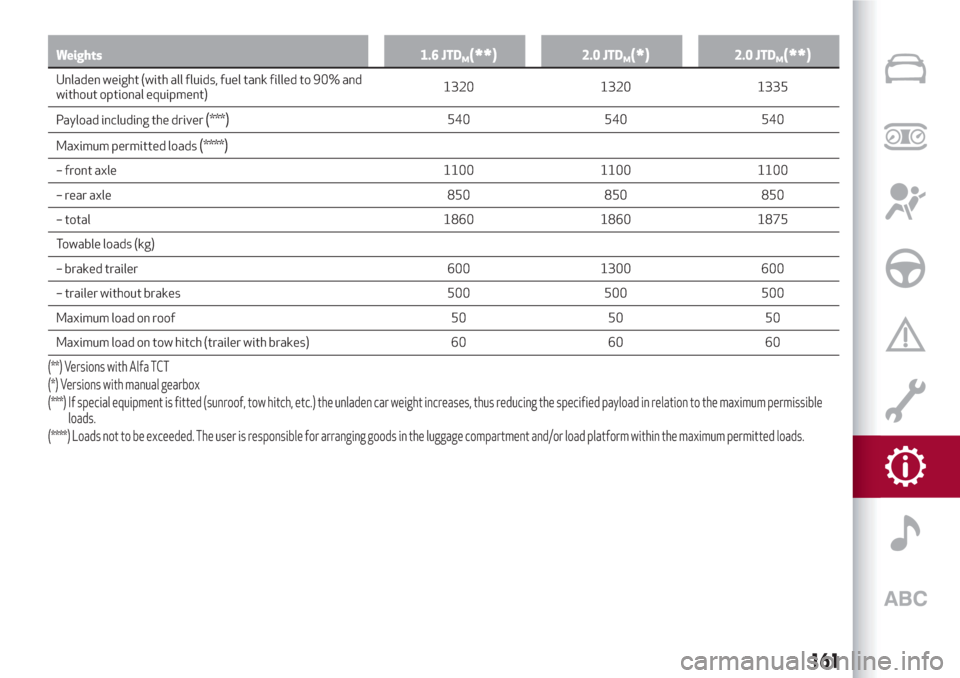
Weights 1.6 JTDM(**)2.0 JTDM(*)2.0 JTDM(**)
Unladen weight (with all fluids, fuel tank filled to 90% and
without optional equipment)1320 1320 1335
Payload including the driver
(***)540 540 540
Maximum permitted loads
(****)
– front axle 1100 1100 1100
– rear axle 850 850 850
– total 1860 1860 1875
Towable loads (kg)
– braked trailer 600 1300 600
– trailer without brakes 500 500 500
Maximum load on roof 50 50 50
Maximum load on tow hitch (trailer with brakes) 60 60 60
(**) Versions with Alfa TCT
(*) Versions with manual gearbox
(***) If special equipment is fitted (sunroof, tow hitch, etc.) the unladen car weight increases, thus reducing the specified payload in relation to the maximum permissible
loads.
(****) Loads not to be exceeded. The user is responsible for arranging goods in the luggage compartment and/or load platform within the maximum permitted loads.
161
Page 199 of 216

NAVIGATION MODE
Main navigation menu
IMPORTANT The volume of the navigator
can only be adjusted while the voice
guidance instructions are being
reproduced by operating button/knob
(ON/OFF).
To activate the navigation main menu,
press the NAV button on the front panel,
then press one of the following buttons
on the screen:
"Where to?": find or navigate to the
destination;
"View map": display the map;
"Info": display all the navigation
information;
"Emergency": search for Hospitals,
Police stations, etc.
The following graphic buttons are also
present:
“Settings”: choose the system
settings;
"Stop": interrupt navigation;
“Reroute”: possible diversions from
the set route;
"Repeat": recalculate route to the last
direction selected.Where to?
From the Navigation Main Menu, press
the "Where To?" button then select one of
the following options to reach the
destination:
“Address": find a destination by
entering the street name and number;
“Recent”: recall a previous destination;
"Point of interest": plan a journey to a
(POI) chosen from a list of locales and
public places;
"Favourites": recall previously stored
addresses and destinations;
"Junction": travel to a road junction;
"Go Home": plan or confirm a journey
to your home address;
"Trip": plan a new journey or recall one
which is already stored;
"City Centre": travel to the centre of
the specified city;
"Closest Towns": travel to a nearby
town.
"Trips": store the route that you are
taking in order to recall it later on.
You can also select a destination by
entering the geographical coordinates,
selecting a point on the map or by its POI
(Point of Interest) number.View Map
Press the "Map view" button in the
Navigation Main Menu to display the map
relative to the current position.
When the display shows the map, the
following options are available:
"Menu": return to the Navigation Main
Menu;
"+/–": map zoom;
Arrival time/Time to destination
time/Distances": display one of the
following options: "Arrival time", "Time to
destination", "Distances" (during
navigation only);
“Turn list”: displays a list of the
possible diversions along the route (only
while navigating);
"Options": allows you to change the
map view, change the navigator settings,
repeat the last direction, view the list of
directions and interrupt navigation.
Map update
To update the navigator maps, contact an
Alfa Romeo Dealership.
Settings Menu
The following settings are available for
the Map:
"Map configuration": customization of
the map display mode;
"Speed limit": activation/deactivation
of the acoustic warning given on
197
Page 213 of 216

Performance...............169
Pollen filter ................141
Pre-Fill system (RAB - Ready Alert
Brake)...................61
Pre-tensioners...............66
Load limiters..............66
Radio................181 ,193
Rain sensor.................21
Rear fog lights...............18
Rear fog lights/reversing lights
bulb replacement...........105
Rear view mirrors.............16
Door mirrors...............16
Rear window washer
rear window washer fluid level . . .139
Rear window wiper/washer.......21
Reconfigurable multifunction
display..................40
Refuelling.................162
Refuelling capacity............95
Refuelling the car.............94
Refuelling the vehicle...........95
Replacing a bulb.............100
General instructions.........100
Rims and tyres provided........156
Safe Lock (device).............8
SBR system (Seat Belt Reminder)....65
Scheduled servicing...........126Scheduled Servicing Plan........127
Screen wiper/washer...........20
“Smart washing” function.......21
Seat belts..................64
Use....................64
Seats.....................13
Front seats...............13
Rear seats................14
Servicing and maintenance
Demanding use of the car......134
periodic checks............134
Servicing procedures
Headlight washer...........142
Nozzles.................141
Setup menu.................41
Side airbags (Side bags - Window
bags)...................81
Side bags (front side airbags)......81
Side lights/brake lights
Side lights/daytime running lights
(DRL)
Side lights/dipped beam
headlights................17
Smart Bag system (multistage
front airbags)..............77
Start&Stop system............89
Starting the engine.........84,120
Bump starting.............120Jump starting.............120
Steering lock.................9
Steering wheel . . .............15
Steering wheel controls.....179 ,191
Technical data . .............148
The keys....................8
Mechanical key..............8
Third brake lights
Towing the car...............123
Towing the vehicle
Attaching the tow ring........123
Towing trailers . . .............94
Installing a tow hook..........94
Trip Computer . . .............43
Tyres
Fix&Go (kit)..............117
USB source.............183 ,195
Vehicle changes/alterations.......4
Warning lights and messages . .....44
Weights..................159
Wheels...................156
Wheels and tyres
When parked................85
Window bags (side airbags for head
protection)................81
Exterior lights.............104Bulb replacement...........105
Bulb replacement...........104Bulb replacement...........106
Inflation pressures..........157
Changing a wheel...........114
Tyre inflation pressure........157