2018 Acura RDX lights
[x] Cancel search: lightsPage 415 of 453
414
Handling the Unexpected
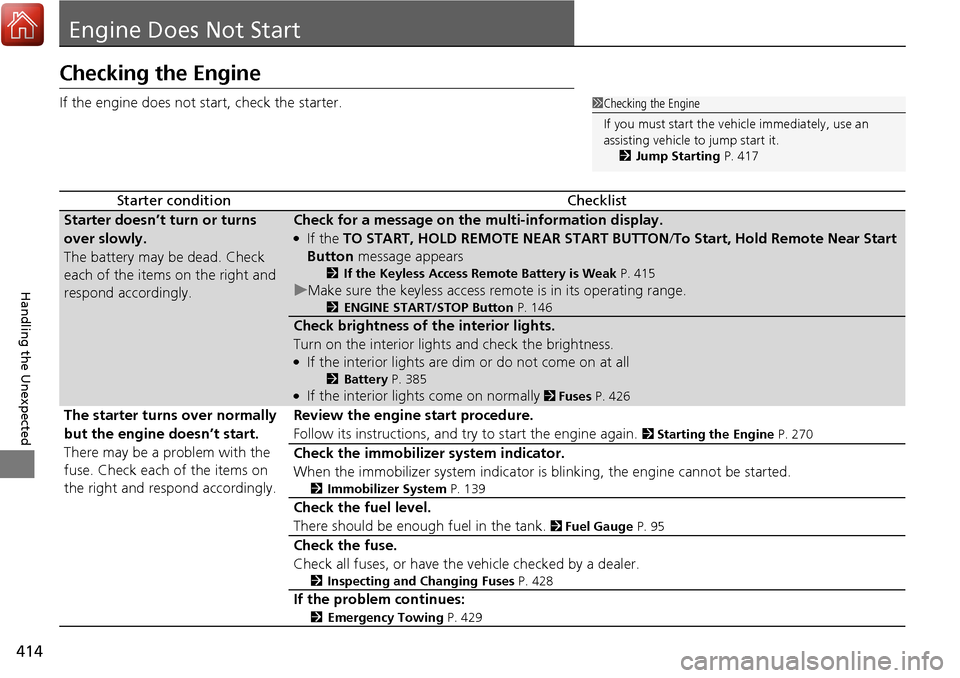
Engine Does Not Start
Checking the Engine
If the engine does not start, check the starter.
Starter conditionChecklist
Starter doesn’t turn or turns
over slowly.
The battery may be dead. Check
each of the items on the right and
respond accordingly.Check for a message on the multi-information display.
●If the TO START, HOLD REMOTE NEAR START BUTTON /To Start, Hold Remote Near Start
Button message appears
2If the Keyless Access Remote Battery is Weak P. 415
uMake sure the keyless access remo te is in its operating range.
2ENGINE START/STOP Button P. 146
Check brightness of the interior lights.
Turn on the interior lights and check the brightness.
●If the interior lights are dim or do not come on at all
2Battery P. 385●If the interior lights come on normally 2 Fuses P. 426
The starter turns over normally
but the engine doesn’t start.
There may be a problem with the
fuse. Check each of the items on
the right and respond accordingly. Review the engine start procedure.
Follow its instructions, and try to start the engine again.
2
Starting the Engine P. 270
Check the immobilizer system indicator.
When the immobilizer system indicator is blinking, the engine cannot be started.
2Immobilizer System P. 139
Check the fuel level.
There should be enough fuel in the tank.
2 Fuel Gauge P. 95
Check the fuse.
Check all fuses, or have the vehicle checked by a dealer.
2Inspecting and Changing Fuses P. 428
If the problem continues:
2Emergency Towing P. 429
1Checking the Engine
If you must start the vehi cle immediately, use an
assisting vehicle to jump start it.
2 Jump Starting P. 417
Page 418 of 453

417Continued
Handling the Unexpected
Jump Starting
Turn off the power to electric devices, such as audio and lights. Turn off the engine,
then open the hood. 1.Connect the first jumper cable to your
vehicle’s battery + terminal.
2. Connect the other end of the first jumper
cable to the booster battery + terminal.
u Use a 12-volt booster battery only.
3. Connect the second ju mper cable to the
booster battery - terminal.
4. Connect the other end of the second
jumper cable to the engine hanger as
shown. Do not connect this jumper cable to
any other part.
5. If your vehicle is connected to another
vehicle, start the assisting vehicle’s engine
and increase its rpm slightly.
6. Attempt to start your ve hicle’s engine. If it
turns over slowly, check that the jumper
cables have good metal-to-metal contact.
■Jump Starting Procedure1 Jump Starting
Securely attach the jumper cables clips so that they
do not come off when the e ngine vibrates. Also be
careful not to tangle the ju mper cables or allow the
cable ends to touch each other while attaching or
detaching the jumper cables.
Battery performance degrades in cold conditions and
may prevent the engi ne from starting.
3WARNING
A battery can explode if you do not follow
the correct procedure, seriously injuring
anyone nearby.
Keep all sparks, open flames, and smoking
materials away from the battery.
Booster Battery
Page 421 of 453

420
Handling the Unexpected
Overheating
How to Handle Overheating
Overheating symptoms are as follows:
•The temperature gauge needle is at the mark or the engine suddenly loses
power.
• Steam or spray comes out of the engine compartment.
■First thing to do
1. Immediately park the vehicle in a safe place.
2. Turn off all accessories and turn on the hazard warning lights.
u No steam or spray present: Keep the engine running and open the hood.
u Steam or spray is present: Turn off the engine and wait until it subsides.
Then, open the hood.
1 How to Handle Overheating
NOTICE
Continuing to drive with the temperature gauge
needle at the mark may damage the engine.
3WARNING
Steam and spray from an overheated
engine can seriously scald you.
Do not open the hood if steam is coming
out.
H
H
Page 423 of 453

422
Handling the Unexpected
Indicator, Coming On/Blinking
If the Low Oil Pressure Indicator Comes On
■Reasons for the indicator to come on
Comes on when the engine oil pressure is low.
■What to do as soon as the indicator comes on
1. Immediately park the vehicle in a safe place.
2. If necessary, turn the ha zard warning lights on.
■What to do after parking the vehicle
1. Stop the engine and let it sit for about one minute.
2. Open the hood and check the oil level.
u Add oil as necessary.
3. Start the engine and check the low oil pressure indicator.
u The indicator goes off: Start driving again.
u The indicator does not go off within 10 seconds: Stop the
engine and contact a dealer for repairs immediately.
If the Charging System Indicator Comes On
■Reasons for the indicator to come on
Comes on when the battery is not being charged.
■What to do when the indicator comes on
Turn off the climate con trol system, rear defogger, and other electrical
systems, and immediately contact a dealer for repairs.
1 If the Low Oil Pressure Indicator Comes On
NOTICE
Running the engine with low oil pressure can cause
serious mechanical damage almost immediately.
1If the Charging System Indicator Comes On
If you need to stop temporarily, do not turn off the
engine. Restarting the engi ne may rapidly discharge
the battery.
Page 427 of 453

426
Handling the Unexpected
Fuses
Fuse Locations
If any electrical devices are not working, set
the power mode to VEHICLE OFF (LOCK)
and check to see if any applicable fuse is
blown.
Fuse locations are shown on the fuse box
cover. Locate the fuse in question by the
fuse number and box cover number.
Located near the brake fluid reservoir. Push
the tabs to open the box.
■Engine Compartment Fuse Box
Tab
■Circuit protected and fuse rating
Circuit ProtectedAmps
1
EPS70 A
Power Tailgate Motor(40 A)
ABS/VSA FSR20 A
ABS/VSA Motor40 A
E-DPS(30 A)
Main Fuse120 A
2
−50 A
Fuse Box Main 1 60 A
Fuse Box Main 260 A
IG Main 50 A
Headlight Washer*(30 A)
Sub Fan Motor 30 A Rear Defogger 40 A
Main Fan Motor 30 A Headlight Main 30 A Blower 40 A
3
ST CUT140 A
IG Main130 A
Sub Fuse Main(40 A)
IG Main230 A
4 Rear Seat Heaters*(20 A)
5STR Diagnosis Fuse7.5 A
6Audio (ODMD)*(15 A)
7−−
8− −
9−−
10 − −
11Oil Level7.5 A
12 Fog Lights*(20 A)
13Power Tailgate Closer(20 A)
14 Hazard 10 A
15IGP215 A
16 IG Coil 15 A
17Stop10 A
18 Horn 10 A
19ACM20 A
20 Right Headlight Low Beam 15 A
21MG Clutch7.5 A
22 DBW 15 A
23Left Headlight Low Beam15 A
24 DRL (10 A)
25FI Main15 A
26 Trailer (20 A)
27Small20 A
28 Interior Lights 7.5 A
29Back Up10 A
Circuit ProtectedAmps
* Not available on all models
Page 428 of 453

427
uuFuses uFuse Locations
Handling the Unexpected
Located under the dashboard.
Fuse locations are shown on the label on
the side panel.
Locate the fuse in question by the fuse
number and label number.
■Circuit protected and fuse rating
■Interior Fuse Box
Fuse Label
Fuse Box
Circuit ProtectedAmps
1−−
2ACG15 A
3ODS7.5 A
4Fuel Pump15 A
5Meter7.5 A
6Rear Wiper10 A
7VB SOL10 A
8Front Right Side
Door Lock Motor (Unlock)15 A
9Rear Left Side
Door Lock Motor (Unlock)15 A
10 Power Lumbar 7.5 A
11Moonroof20 A
12 Accessory Power Socket
(Center Console) 20 A
13Washer Main15 A
14 Seat Heaters 20 A
15Driver’s Door Lock Motor (Unlock)10 A
16 Driver’s Power Seat Sliding 20 A
17Driver’s Power Seat Reclining20 A
18
Passenger’s Power Seat Sliding20 A
19ACC7.5 A
20 ACC Key Lock 7.5 A
21Daytime Running Lights7.5 A
22 A/C 7.5 A
23Option10 A
24 ABS/VSA 7.5 A
25IDAS(10 A)
26 Audio Amp 20 A*1
30 A*2
27Accessory Power Socket
(Front)20 A
28 − −
29SRS10 A
Circuit ProtectedAmps
*1:Models without navigation system
*2:Models with navigation system30
Driver’s Door Lock Motor
(Lock) 10 A
31Smart10 A
32 Front Right Side
Door Lock Motor (Lock) 15 A
33Rear Left Side
Door Lock Motor (Lock)15 A
34 Small Lights 7.5 A
35Illumination7.5 A
36 Rear Wiper Main 10 A
37Passenger’s Power Seat Reclining20 A
38 Left Headlight High Beam 10 A
39Right Headlight High Beam10 A
40 − −
41Door Lock20 A
42 Driver’s Power Window 20 A
43Rear Right Side Power Window20 A
44 Front Right Side Power
Window 20 A
45Rear Left Side Power
Window20 A
46 Wiper 30 A
Circuit ProtectedAmps
Page 433 of 453

432
Information
Specifications
■Vehicle Specifications
*1: 2WD models
*2: AWD models
■Air Conditioning
ModelAcura RDX
No. of Passengers:
Front 2
Rear 3
Total 5
Weights:Gross Vehicle
Weight RatingU.S.:4,850 lbs (2,200 kg)*1
4,982 lbs (2,260 kg)*2
Canada:2,260 kgGross Axle Weight
Rating (Front)U.S.:2,557 lbs (1,160 kg)*1
2,623 lbs (1,190 kg)*2
Canada:1,190 kgGross Axle Weight
Rating (Rear)U.S.:2,293 lbs (1,040 kg)*1
2,381 lbs (1,080 kg)*2
Canada:1,080 kg
Gross Combined Weight
Rating U.S.: 6,349 lbs (2,880 kg)*1
6,482 lbs (2,940 kg)*2
Canada:2,940 kg
Refrigerant Type HFC-134a (R-134a)Charge Quantity15.2 – 16.9 oz (430 – 480 g)Lubricant TypeND-OIL8Quantity4.3 – 5.0 cu-in (70 – 82 cm3)
■
Engine Specifications
■ Fuel
■ Washer Fluid
Displacement211.8 cu-in (3,471 cm3)
Spark Plugs NGK ILZKR7B11
DENSO SXU22HCR11
TypeUnleaded premium gasoline, Pump octane
number of 91 or higher
Fuel Tank Capacity 16 US gal (60.5 ℓ)
Tank CapacityU.S.: 2.6 US qt (2.5 ℓ)
Canada: 5.1 US qt (4.85 ℓ)
■ Light Bulbs
■ Brake Fluid
Headlights (High Beams)LED
Headlights (Low Beams) LED
Fog Lights*55W (H11)
Front Turn Signal/Parking Lights/
Daytime running light LED
Side Turn Signal Lights
(on Door Mirrors)LED
Front Side Marker Lights 3CP
Rear Side Marker/Brake/TaillightsLED
Back-Up Lights 16W
Rear Turn Signal Lights21W (Amber)
High-Mount Brake Light LED
Rear License Plate Light5W
Cargo Area Lights 5W
Vanity Mirror Lights1.4W
Interior Lights
Map LightsLED
Ceiling Light 8W
Door Courtesy Lights2CP
Console Compartment Light 1.4W
Glove Box Light1.4W
Center Pocket Light LED
SpecifiedAcura Heavy Duty Brake Fluid DOT 3
* Not available on all models
Page 445 of 453

444
Index
Bluetooth® HandsFreeLink ®..................... 226
Booster Seats (For Children) ....................... 63
Brake System ............................................. 320
Anti-lock Brake System (ABS) ................... 322
Brake Assist System ................................. 323
Fluid ........................................................ 363
Foot Brake ............................................... 321
Indicator ............................................ 68, 424
Parking Brake .......................................... 320
Brightness Control (Instrument Panel) .... 156
BSI (Blind spot information) System ........ 313
Bulb Replacement ..................................... 365
Back-Up Light and Taillight ...................... 370
Brake Light/Taillight/Rear Side Marker Light and
Rear Turn Signal Light Bulbs ................... 368
Fog Lights ................................................ 365
Front Turn Signal Light /Parking Light/Daytime
Running Light and Front Side Marker Light
Bulbs ..................................................... 367
Headlights ............................................... 365
High-Mount Brake Light .......................... 371
Rear License Plate Light............................ 371
Side Turn Signal Light /Emergency Indicator
Light ...................................................... 366
Bulb Specifications .................................... 432
C
Carbon Monoxide Gas ................................ 64
Cargo Hook ............................................... 177
Carrying Cargo .................................. 259, 261 CD Player
................................................... 204
Certification Label .................................... 434
Changing Bulbs ........................................ 365
Charging System Indicator ................. 70, 422
Child Safety ................................................. 52
Childproof Door Locks............................. 131
Child Seat .................................................... 52
Booster Seats ............................................ 63
Child Seat for Infants................................. 54
Child Seat for Small Children ..................... 55
Installing a Child Seat with a Lap/Shoulder Seat
Belt ......................................................... 59
Larger Children ......................................... 62
Rear-facing Child Seat ............................... 54
Selecting a Child Seat ................................ 56
Childproof Door Locks ............................. 131
Cleaning the Exterior ............................... 391
Cleaning the Interior ................................ 389
Client Service Information ....................... 442
Climate Control System ............................ 182
Changing the Mode ................................ 182
Defrosting the Windshield and
Windows ............................................... 183
Dust and Pollen Filter............................... 388
Recirculation/Fresh Air Mode ................... 182
Sensors ................................................... 185
Synchronized Mode................................. 184
Using Automatic Climate Control ............ 182
Clock .......................................................... 120
CMBSTM (Collision Mitigation Braking
SystemTM) ................................................. 324 Coat Hook
................................................ 177
Collision Mitigation Braking System
TM
(CMBSTM) ................................................. 324
Compact Spare Tire .......................... 397, 433
Compass .................................................... 255
Console Compartment ............................. 174
Controls .................................................... 119
Coolant (Engine) ...................................... 360
Adding to the Radiator ........................... 361
Adding to the Reserve Tank .................... 360
Overheating ............................................ 420
Creeping (Automatic Transmission) ........ 276
Cross Traffic Monitor ............................... 337
Cruise Control .......................................... 281
Indicator ................................................... 78
Cup Holders .............................................. 175
Customized Features ....................... 102, 108
D
Daytime Running Lights .......................... 152
Dead Battery ............................................ 417
Defrosting the Windshield and Windows ................................................. 183
Detachable Anchor .................................... 36
Devices that Emit Radio Waves ............... 435
Dimming
Headlights .............................................. 149
Rearview Mirror ...................................... 161
Dipstick (Engine Oil) ................................ 356
Directional Signals (Turn Signal) ............. 149