2017 VOLVO XC90 T8 warning
[x] Cancel search: warningPage 111 of 580
INSTRUMENTS AND CONTROLS
}}
* Option/accessory.109
Operating the laminated panoramic roof*
When opened automatically, the sun shade and roof open first to the "comfort" position thathelps reduce wind noise and then open com-pletely. In the tilt (ventilation) position, the rear edge of the front section of the roof is raised.
Operation
WARNING
• During manual closing, if the laminated panoramic roof is obstructed, immediatelyopen it again.
• Never open or close the laminated panor-amic roof if it is obstructed in any way.
• Never allow a child to operate the lamina-ted panoramic roof.
• Never leave a child alone in a vehicle.
• When leaving the vehicle, ensure that the ignition is in mode
0. Never leave a
remote key in the vehicle.
• Never extend any object or body part though the open laminated panoramicroof, even if the vehicle's ignition is com-pletely switched off.
CAUTION
The optional panoramic roof should not be opened while load carriers are installed onthe vehicle.
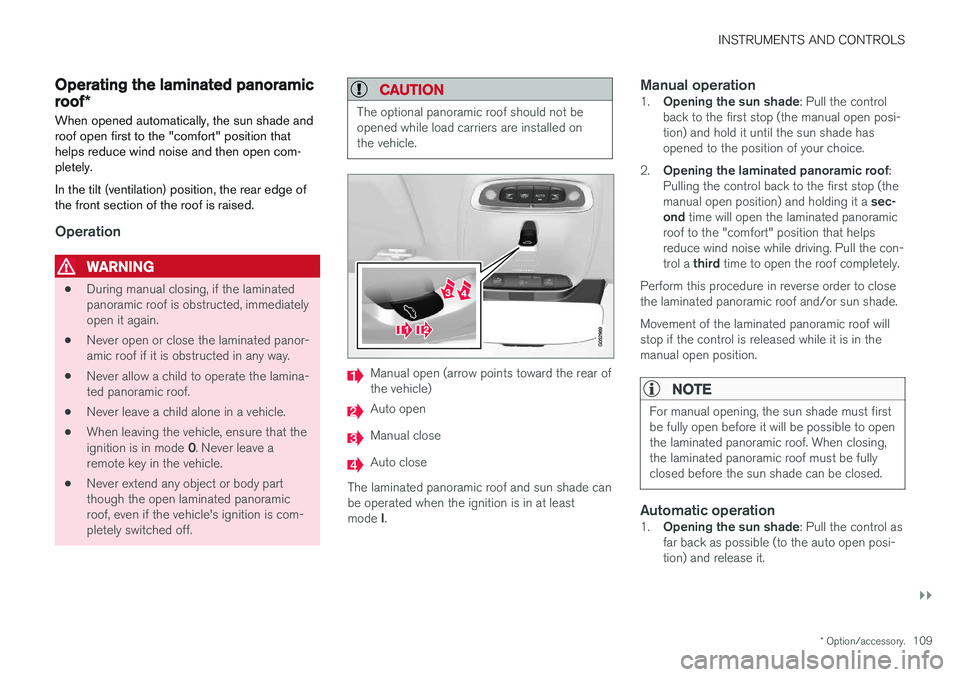
Manual open (arrow points toward the rear of the vehicle)
Auto open
Manual close
Auto close
The laminated panoramic roof and sun shade can be operated when the ignition is in at least mode I.
Manual operation1.
Opening the sun shade : Pull the control
back to the first stop (the manual open posi- tion) and hold it until the sun shade hasopened to the position of your choice.
2. Opening the laminated panoramic roof :
Pulling the control back to the first stop (the manual open position) and holding it a sec-
ond time will open the laminated panoramic
roof to the "comfort" position that helps reduce wind noise while driving. Pull the con- trol a third time to open the roof completely.
Perform this procedure in reverse order to close the laminated panoramic roof and/or sun shade. Movement of the laminated panoramic roof will stop if the control is released while it is in themanual open position.
NOTE
For manual opening, the sun shade must first be fully open before it will be possible to openthe laminated panoramic roof. When closing,the laminated panoramic roof must be fullyclosed before the sun shade can be closed.
Automatic operation1. Opening the sun shade : Pull the control as
far back as possible (to the auto open posi- tion) and release it.
Page 113 of 580

INSTRUMENTS AND CONTROLS
}}
* Option/accessory.111
Pinch protection (auto-stop)The laminated panoramic roof has a pinch pro- tection feature that is triggered if the glass sec-tion of the roof and/or the sun shade is blockedin any way when being closed. In this case, thelaminated panoramic roof and/or sun shade willstop and reverse automatically approximately 2 in.(5 cm) from the point at which it was blocked (orwill open fully to the tilt position). The pinch protection feature also functions when the laminated panoramic roof and/or sun shadeis being opened.
WARNING
If the pinch protection (auto-stop) feature has been triggered, the laminated panoramic roofand/or sun shade can still be operated once more within 10 seconds without pinch pro-
tection . Pinch protection can be overridden if
the closing procedure has been interrupted (e.g., due to ice around the laminated panor-amic roof) by pressing and holding the controlforward/downward until the laminated panor-amic roof and/or sun shade is closed.
Power windows
All power windows can be operated using the control panel in the driver's door. The controlpanels in the other doors only operate the win-dow in the respective doors.
Driver's door control panel
Switch for power child safety locks * and dis-
engaging rear power window buttons
Rear window controls
Front window controls
Related information
• Operating the power windows (p. 111)
• Child safety locks (p. 254)
Operating the power windows
WARNING
•
Always put the ignition in mode
0 and
remove the ignition key from the vehicle when the vehicle is unattended
• Never leave children unattended in thevehicle.
• Make sure that the windows are com-pletely unobstructed before they areoperated.
Operating
Operating the power windows
Manual up/down
Auto up/down.
Page 120 of 580

||
INSTRUMENTS AND CONTROLS
1183.
Tap
OK to confirm your choice.
For
Reset Personal Settings, tap Reset
for the active profile or Reset for all
profiles for confirmation.
> The selected settings will be reset.
Related information
• Settings view (p. 113)
• Resetting user data when the vehicle changes owners (p. 118)
• Changing system settings in Settings view(p. 116)
Resetting user data when the vehicle changes owners
When the vehicle changes owners, all user set- tings should be reset to the factory defaults.
When the vehicle changes owners, it is essential to reset all user data and system settings to theirfactory defaults, including Volvo On Call.
Related information
• Resetting the settings view (p. 117)
• Volvo ID (p. 32)
Ambient temperature sensor
The ambient temperature sensor displays the temperature outside the vehicle in the instrumentpanel.
Location of the ambient temperature sensor in 12" (upper) and 8" (lower) instrument panels (temperatureshown here in degrees Celsius)
NOTE
When the ambient temperature is between 23° and 36 °F (–5° and +2 °C), a snowflakesymbol will be displayed next to the tempera-ture. This symbol serves as a warning for pos-sible slippery road surfaces. Please note that this symbol does not indicate a fault with your
vehicle. At low speeds or when the vehicle is not mov- ing, the temperature readings may be slightlyhigher than the actual ambient temperature.
Page 122 of 580

INSTRUMENTS AND CONTROLS
* Option/accessory.
120
Head-up display (HUD) *
The head-up display provides information such as speed, cruise control functions, navigation,traffic sign information, incoming phone calls,etc. at the base of the windshield in the driver'sfield of vision.
Incoming phone call
The HUD supplements the instrument panel and projects information on the lower section of thewindshield. The projected information can only beseen from the driver's seat.
CAUTION
The HUD's projection unit is located in the dashboard. Avoid scratching or placingobjects on the unit's glass surface.
Example of information in the head-up display. The infor- mation shown is generic and may vary slightly from mar-ket to market or in terms of units of measure
Speed
Cruise control
Navigation
Road signs
Symbols such as the following ones may appear temporarily in the HUD. If the warning symbol appears, read thewarning text in the instrument panel.
If the information symbol appears, read the warning text in the instrumentpanel.
NOTE
If the City Safety is activated, the information in the HUD will be replaced by a City Safety-related graphic. This graphic will illuminateeven if the HUD is turned off.
A graphic for the City Safety flashes to attract the driv- er's attention
Page 125 of 580

INSTRUMENTS AND CONTROLS
}}
* Option/accessory.123
Voice control
Voice commands make it possible for the driver to voice-control certain functions in the mediaplayer, a Bluetooth-connected cell phone, cli- mate system and the Volvo navigation system *.
Voice control offers convenience and enables the driver to keep his/her hands on the steeringwheel and concentrate on driving and the trafficsituation around the vehicle.
WARNING
As the driver, you have full responsibility for operating the vehicle safely and adhering toall applicable traffic regulations.
Input to the system is in dialog form and compri- ses commands from the driver and a verbalresponse from the system. The voice control system uses the same micro- phone as the Bluetooth hands-free system and system responses come via the infotainment sys-tem's speakers. In certain cases, text messages are also provided in the instrument panel. The functions are controlled using the right-side steering wheel keypad and settings are madefrom the center console.
System updates
The voice control system is being constantly improved and updates should be downloaded foroptimal functionality. See the support sitesupport.volvocars.com.
Related information
•
Using voice commands (p. 123)
• Voice control settings (p. 128)
• Voice control for radio and media (p. 125)
• Voice control for cell phones (p. 124)
• System updates (p. 500)
• Navigation system voice commands (p. 127)
• Climate system voice commands (p. 126)
Using voice commands
The following is an introduction for using voice commands.
Press the button on the right- side steering wheel keypad toactivate the system and initiatea voice command dialog.
Keep the following points in mind when using voice commands:
• When giving a command, speak at your usual speed and in a normal tone of voice
after
the tone .
• Avoid speaking while the system is respond- ing. Commands cannot be processed duringa response.
• Avoid background noises in the cabin whenusing the system by closing the vehicle's doors, windows and panoramic roof
* when
giving voice commands.
Voice command dialogs can be cancelled by:
• Saying "
Cancel".
• By pressing and holding the
button on
the right-side steering wheel keypad.
To speed up a command dialog or to skip system responses, press the
button on the right-
side steering wheel keypad when the system is responding and give your next command.
Page 130 of 580

INSTRUMENTS AND CONTROLS
* Option/accessory.
128
Voice control settings
There are a number of settings that can be made for the voice control system.
Open the center display's Top view and tap
SettingsSystemVoice Control and
select settings. •
Repeat Voice Command
•Gender
•Speech Rate
Sound settings
Open Top view and tap SettingsSound
System VolumesVoice Control.
Changing languages
The voice control system only understands the languages marked by the
symbol in the list
of possible system languages. Changing the language for this system also affects menus, messages and help texts. Open Top view and tap
SettingsSystemSystem Language.
Related information
• Voice control (p. 123)
• Using voice commands (p. 123)
• Navigation system voice commands (p. 127)
Instrument panel
The instrument panel displays vehicle- and driv- ing-related information.
The gauges, indicators, symbols and functions displayed in the instrument panel depend on theequipment/systems installed in the vehicle andwhich functions are currently activated. Some of the functions listed below are optional.
WARNING
• If the instrument panel is not functioning properly, information about e.g., brakes,airbags or other safety-related messagescannot be displayed and the driver cannotbe alerted to possible problems.
• If the instrument panel turns off, does notactivate when the ignition is switched onor is completely/partially not possible toread, do not drive the vehicle. Contact atrained and qualified Volvo service techni-cian.
Instrument panel
Left side
• Speedometer
• Trip odometer
• Odometer
• Cruise control/speed limiter information
• Road sign information
*
Page 131 of 580

INSTRUMENTS AND CONTROLS
129
Center
•Indicator and warning symbols
• Ambient temperature sensor
• Clock
• Messages (in certain cases also graphics)
• Door and seat belt status
• Hybrid battery charge information
• Media player
• Navigation system map
• Cell phone
• Voice control
• Compass
Right side
•Tachometer (depending on current driving mode)
• Hybrid gauge (depending on current drivingmode)
• Gear indicator
• Current driving mode (Hybrid, Off Road, Pure,Power and AWD)
• Fuel gauge
• Hybrid battery's charge level
• Driving distance to empty fuel tank
• Driving distance to discharged hybrid battery
• Current fuel consumption
• App menu (activated using the right-sidesteering wheel keypad)
Position for variable symbols
Sample indicator symbol in the 12" instrument panel
Different symbols for various types of messages will be displayed in the center of the instrumentpanel. This may consist of an indicator or warningsymbol or may be a series of graphics in thisposition which then convert to a larger graphic.
Activating the instrument panelThe instrument panel is activated as soon as a door is opened (i.e., ignition mode
0). After a
short period, the panel will go out if it is not used. To reactivate it, do one of the following:
• Press the brake pedal
• Turn the start knob to
START and release it
(without pressing the brake pedal). This acti- vates ignition mode I
• Open one of the doors
Related information
• Instrument panel App menu (p. 159)
• Warning symbols in the instrument panel (p. 140)
• Indicator symbols in the instrument panel(p. 131)
• Instrument panel licenses (p. 135)
Page 133 of 580

INSTRUMENTS AND CONTROLS
}}
131
Indicator symbols in the instrument panelThe indicator symbols alert the driver when cer- tain functions are activated, that a system isactively working or that a fault may have occur-red in a system or function.
Symbol Explanation
Information, see the text mes- sage in the instrument panel The information symbol illuminates in combination with a text mes-sage if one of the vehicle's sys-tems requires the driver's atten-tion. The information symbol canalso illuminate in combination withother symbols.
A
BBrake system
Symbol
Explanation
A
BABS brake system This symbol indicates a possible fault in the ABS braking function.The vehicle's normal brakes willstill function but without ABSbrake modulation.
A
B
Parking brake/Auto-brake This function keeps the vehicle at a standstill after it has stopped.The symbol is on when the func-tion is activated and the brakes orparking brake are being used.
Tire pressure system The symbol illuminates to indicate low tire pressure or a fault in thetire pressure system.
Malfunction indicator light (check engine light) This symbol will illuminate if there is a fault in the emissions controlsystem. If this happens, pleasehave your vehicle checked by atrained and qualified Volvo servicetechnician as soon as possible.
Symbol
Explanation
Left/right turn signals Both turn signal indicators will flash when the hazard warningflashers are being used.
Forward lights
Active Bending Lights (ABL) This symbol will illuminate if there is a fault in the ABL system or ifany other fault is detected in theheadlight system.
Automatic/active high beams on The symbol will be blue when the automatic high beams are on.
Automatic/active high beams offThe symbol will be white when
the automatic high beams are off.
High beam indicator The symbol will illuminate when the high beams are on or whenhigh beam flash is being used.