2017 VOLVO V90 ECO mode
[x] Cancel search: ECO modePage 348 of 594

||
DRIVER SUPPORT
* Option/accessory.
346
Keep the surface clean - on both the left and right-hand sides of the car 18
.
To ensure optimal functionality, the surfaces in front of the sensors must be kept clean. Do not affix any objects, tape, labels or similar within the area of the sensors.
IMPORTANT
Repair of the BLIS and CTA functions' com- ponents or repainting the bumpers must onlybe performed by a workshop - an authorisedVolvo workshop is recommended.
Related information
• Cross Traffic Alert
* (p. 343)
• Activate/deactivate Cross Traffic Alert
*
(p. 344) •
Messages for Blind Spot Information
* and
Cross Traffic Alert * (p. 347)
• Limitations of Blind Spot Information
*
(p. 343)
18 NOTE: The illustration is schematic - details may vary depending on car model.
Page 356 of 594

||
DRIVER SUPPORT
* Option/accessory.
354 2.
Press
My CarIntelliSafeDriver Alert
Control.
3. Select
Rest Stop Guidance to activate/
deactivate the rest place guide.
Related information
• Driver Alert Control (p. 352)
• Limitations of Driver Alert Control (p. 354)
Limitations of Driver Alert Control
The Driver Alert Control (DAC) function may have limitations in certain situations.
In some cases, driving behaviour may not be affected, despite the driver being tired - e.g. whenusing the Pilot Assist function - with the resultthat the driver is then not given a warning fromDAC. For this reason, it is always very importantto stop and take a break in the event of theslightest sign of driver fatigue, regardless ofwhether DAC has given a warning. In some cases the system may issue a warning despite driving ability not deteriorating, for exam-ple:
• in strong side winds
• on rutted road surfaces.
NOTE
The function uses the car's camera unit, which has some general limitations, see the"Limitations for camera unit" section.
Related information
•
Driver Alert Control (p. 352)
• Activate/deactivate Driver Alert Control (p. 353)
• Limitations of the camera unit (p. 327)
• Pilot Assist
* (p. 304)
Lane Keeping Aid
The function of lane assistance is to help the driver to reduce the risk of the car accidentallyleaving its own lane on motorways and similarmajor routes.
Lane assistance steers the car back into its lane and/or warns the driver with an acoustic signal orsteering wheel vibration. Lane Keeping Aid is active within the speed range 65-200 km/h (40-125 mph) on roads withclearly visible side lines. On narrow roads the function may be unavailable, in which case it goes into standby mode. Thefunction becomes available again when the roadis wide enough.
A camera reads the side lines of the road/lane.
Page 361 of 594

DRIVER SUPPORT
359
SymbolMessage Specification
Driver support system Reduced functionality Service requiredThe system does not function as it should. A workshop should be contacted - an authorised Volvo workshop is recommended.
Windscreen sensor Sensor blocked, see Owner's manualThe ability of the camera to scan the roadway in front of the car is reduced.
Lane Keeping Aid Apply steeringThe LKA steering assistance does not function if the driver does not hold the wheel. Follow the instruction and steer the car.
Lane Keeping Aid Standby until steering appliedLKA is set in standby mode until the driver starts to steer the car again.
Related information
•Lane Keeping Aid (p. 354)
• Activate/deactivate Lane Keeping Aid (p. 356)
Page 365 of 594

DRIVER SUPPORT
}}
* Option/accessory.363
Park Assist*
Parking assistance assists the driver when manoeuvring in tight spaces by indicating thedistance to obstacles by acoustic signals com-bined with graphics on the centre display.
Screen view showing obstacle zones and sensor sectors.
The centre display shows an overview of the rela- tionship between the car and detected obstacles. The highlighted sector indicates the location of the obstacle. The closer the car symbol is to ahighlighted sector box, the shorter the distancebetween the car and detected obstacle. The shorter the distance to the obstacle, the faster the signal sounds. Other sound from theaudio system is muted automatically. The acoustic signal for obstacles ahead and to the sides is active when the car is moving butstops after the car has been stationary for approx. 2 seconds. The acoustic signal for obsta-cles behind is also active when the car is station-ary. At a distance within 30 cm from an obstacle behind or in front of the car, the tone is constantand the active sensor's field closest to the carsymbol is filled. The volume of the parking assistance signal can be adjusted while the signal is sounding by means of the [
>II] knob on the centre console.
Adjustment can also be performed in the top view's
Settings menu option.
NOTE
• Acoustic warnings are only given for objects directly on the vehicle's route.
WARNING
•Parking assistance does not relinquish the driver's own responsibility duringparking.
• The sensors have blind spots whereobstacles cannot be detected.
• Be aware of e.g. people or animals nearthe car.
Backwards
NOTE: The illustration is schematic - details may vary depending on car model.
The sensors for reverse are activated if the car rolls backward without a gear engaged or whenthe gear lever is moved to reverse position. The measuring range starts approx. 1.5 metres behind the car. When reversing with a hitched trailer, parking assistance backward is deactivated automatically.
NOTE
When reversing with e.g. a trailer or bike car- rier on the towbar - without Volvo genuinetrailer wiring - parking assistance may need tobe switched off manually in order that thesensors do not react to them.
Page 371 of 594

DRIVER SUPPORT
* Option/accessory.369
Backwards
The backwards-facing camera 27
is fitted above the reg-
istration plate.
The backward-facing camera shows a wide area behind the car. For certain models, part of thebumper can be seen as well as the towbar insome cases. Objects shown in the centre display may appear slightly tilted — this is normal.
NOTE
Objects on the centre display may be closer to the car than they appear to be on thescreen.
Forwards
The forwards parking camera 27
is located in the grille.
The front camera can be helpful on an exit road with limited visibility to the sides, e.g. when thereare high hedges. It is active at speeds up to25 km/h (16 mph) - following which, the frontcamera is switched off. If the car does not reach 50 km/h (30 mph), and the speed falls below 22 km/h (14 mph) within60 seconds after the forward-facing camera hasbeen switched off, the camera is reactivated.
NOTE
Automatic reactivation of the front camera on speed reduction requires that Auto Camera
Reverse Activation is selected in Settings
My CarPark Assist.
The sides
The side cameras 27
are positioned in each door mirror.
The side cameras show what is along each side of the car.
Related information
• Starting the Park Assist Camera
* (p. 372)
• Park assist lines and fields for the Park Assist Camera
* (p. 370)
• Limitations of the Park Assist Camera
*
(p. 373)
• Park Assist
* (p. 363)
• Cross Traffic Alert
* (p. 343)
• Park Assist Pilot
* (p. 374)
27
The illustration is schematic - details may vary depending on car model.
Page 382 of 594

||
DRIVER SUPPORT
* Option/accessory.
380
IMPORTANT
Changing to another approved wheel rim and/or tyre dimension may involve a changedtyre circumference, which means that thePAP system's parameters may then need tobe updated. Consult a workshop - an author-ised Volvo workshop is recommended.
Maintenance
PAP sensor locations 29
.
For the PAP function to work correctly, its sen- sors must be cleaned regularly with water and carshampoo.
Related information
• Park Assist Pilot
* (p. 374)
• Parking with Active parking assistance
*
(p. 376)
29 NOTE: The illustration is schematic - details may vary depending on car model.
Page 386 of 594

STARTING AND DRIVING
* Option/accessory.
384
Alcohol lock *
The function of the alcohol lock is to prevent the car from being driven by individuals under theinfluence of alcohol. Before the engine can bestarted the driver must take a breath test thatverifies that he/she is not under the influence ofalcohol. Alcohol lock calibration takes place inaccordance with each market's limit value inforce for driving legally.
The car has an interface for the electrical con- nection of the different makes and models ofalcohol lock recommended by Volvo. The inter-face facilitates alcohol lock connection, and givesthe option of an integrated function includingmessages related to the alcohol lock in the car'smain display. For information about a specificalcohol lock, please refer to its owner's manual.
WARNING
The alcohol lock is an aid and does not exempt the driver from responsibility. It isalways the responsibility of the driver to besober and to drive the car safely.
Bypass of the alcohol lock *
In the event of an emergency situation or the alcohol lock is out of order, it is possible tobypass the alcohol lock in order to drive the car.
For deactivation via the alcohol lock, see the sep- arate instructions for that specific lock. Activating the bypass function (Bypass)
NOTE
All bypass activation is logged and saved in the memory in the alcohol lock's control unit.It is not possible to undo a bypass.
The message, Blow into alcolock Bypass
instead?, is shown in the screen:
–Select Bypass by pressing once on the O
button on the steering wheel's right-hand keypad.
> The alcohol lock is now bypassed and the car can be started.
The number of bypasses possible before service is required is selected during alcohol lock instal-lation.
Related information
• Before starting the engine with the alcohollock (p. 384)
• Starting the car (p. 386)
Before starting the engine with the alcohol lock
The alcohol lock is activated automatically and is then ready for use when the car is opened.
To bear in mindIn order to obtain correct function and as accu- rate a measurement result as possible: • Avoid eating or drinking approx. 5 minutes before the breath test.
• Avoid excess windscreen washing - the alco-hol in the washer fluid may result in an incor-rect measurement result.
NOTE
After a completed period of driving, the engine can be restarted within 30 minuteswithout a new breath test.
Related information
•
Bypass of the alcohol lock
* (p. 384)
• Starting the car (p. 386)
Page 392 of 594
||
STARTING AND DRIVING
* Option/accessory.
390
Symbol Specification
Information or error message for gearbox. Follow the recommenda-tion given.
Hot or overheated gearbox. Follow the recommendation given.
Related information
•Gear positions for automatic gearbox (p. 390)
• Manual gearbox (p. 392)
• Gear shift indicator
* (p. 392)
Gear positions for automatic gearbox
With an automatic gearbox, the system chooses the gear so that driving is optimal. The gearboxalso has a manual gearshift mode.
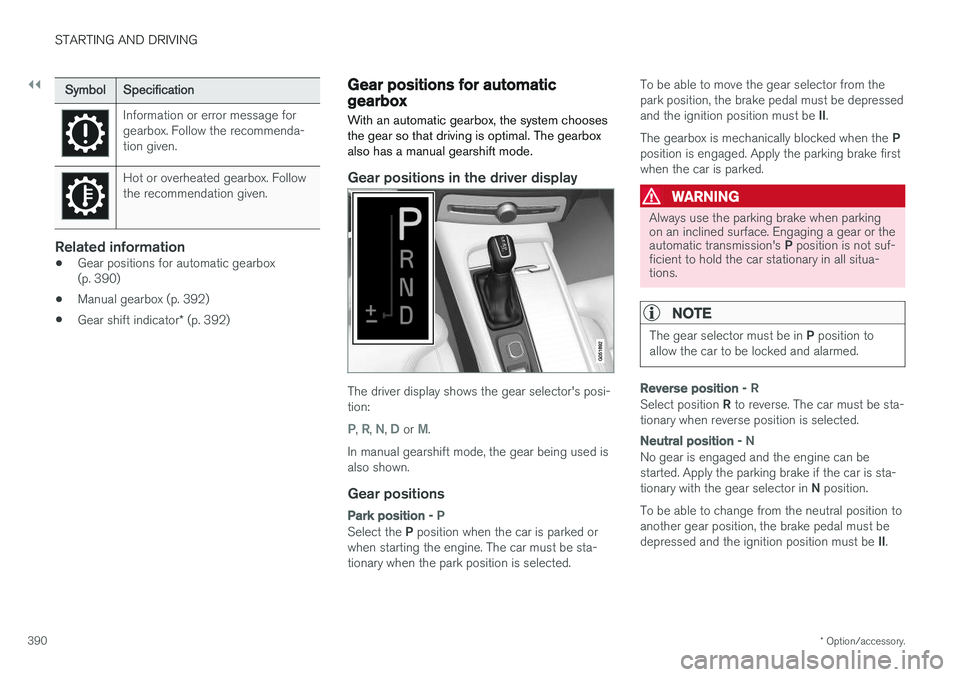
Gear positions in the driver display
The driver display shows the gear selector's posi- tion:
P, R, N, D or M.
In manual gearshift mode, the gear being used is also shown.
Gear positions
Park position - P
Select the P position when the car is parked or
when starting the engine. The car must be sta- tionary when the park position is selected. To be able to move the gear selector from thepark position, the brake pedal must be depressed and the ignition position must be
II.
The gearbox is mechanically blocked when the P
position is engaged. Apply the parking brake first when the car is parked.
WARNING
Always use the parking brake when parking on an inclined surface. Engaging a gear or the automatic transmission's P position is not suf-
ficient to hold the car stationary in all situa- tions.
NOTE
The gear selector must be in P position to
allow the car to be locked and alarmed.
Reverse position - R
Select position R to reverse. The car must be sta-
tionary when reverse position is selected.
Neutral position - N
No gear is engaged and the engine can be started. Apply the parking brake if the car is sta- tionary with the gear selector in N position.
To be able to change from the neutral position to another gear position, the brake pedal must be depressed and the ignition position must be II.