2017 VOLVO V90 tow
[x] Cancel search: towPage 370 of 594

DRIVER SUPPORT
* Option/accessory.
368
Park Assist Camera *
The Park Assist Camera helps the driver when manoeuvring in tight spaces by indicating obsta-cles with a camera image and graphics in thecentre display.
OverviewThe Park Assist Camera is activated either auto- matically, when reverse gear is selected or man-ually via the centre display - depending on theselected setting.
Lines - activates/deactivates park assist
lines
Towbar* - activates/deactivates the towbar
assist line *25
PAS*
- activates/deactivates Parking assis-
tance
CTA* - activate/deactivate Cross Traffic Alert
Zoom26
- zoom in/out
WARNING
• The parking camera serves as an aid. It does not relieve the driver of responsibil-ity when reversing.
• The camera has blind spots, where obsta-cles cannot be detected.
• Be aware of people and animals in thevicinity of the car.
Camera viewsThe function can display a composite 360° viewand separate views for each of the four cameras:rear, front, left or right camera view. The upper-most in the selected view denotes which camerais active.
360° view camera
*
The approximate coverage area of the Park Assist Cam- eras.
The four sides of the car are shown simultane- ously in the centre display, which helps the driverto observe what is around the car when manoeu-vring at slow speeds. Every camera view can be activated separately by tapping on the screen on the desired camera's"field of vision" - e.g. in front of or above the frontcamera. If the car is also equipped with Parking assis- tance* then distance to detected obstacles is
illustrated with fields in different colours.
25 Not available in all markets.
26 The park assist lines are switched off when zooming in.
Page 371 of 594

DRIVER SUPPORT
* Option/accessory.369
Backwards
The backwards-facing camera 27
is fitted above the reg-
istration plate.
The backward-facing camera shows a wide area behind the car. For certain models, part of thebumper can be seen as well as the towbar insome cases. Objects shown in the centre display may appear slightly tilted — this is normal.
NOTE
Objects on the centre display may be closer to the car than they appear to be on thescreen.
Forwards
The forwards parking camera 27
is located in the grille.
The front camera can be helpful on an exit road with limited visibility to the sides, e.g. when thereare high hedges. It is active at speeds up to25 km/h (16 mph) - following which, the frontcamera is switched off. If the car does not reach 50 km/h (30 mph), and the speed falls below 22 km/h (14 mph) within60 seconds after the forward-facing camera hasbeen switched off, the camera is reactivated.
NOTE
Automatic reactivation of the front camera on speed reduction requires that Auto Camera
Reverse Activation is selected in Settings
My CarPark Assist.
The sides
The side cameras 27
are positioned in each door mirror.
The side cameras show what is along each side of the car.
Related information
• Starting the Park Assist Camera
* (p. 372)
• Park assist lines and fields for the Park Assist Camera
* (p. 370)
• Limitations of the Park Assist Camera
*
(p. 373)
• Park Assist
* (p. 363)
• Cross Traffic Alert
* (p. 343)
• Park Assist Pilot
* (p. 374)
27
The illustration is schematic - details may vary depending on car model.
Page 372 of 594

DRIVER SUPPORT
* Option/accessory.
370
Park assist lines and fields for the Park Assist Camera *
The Park Assist Camera indicates the position of the car in relation to its surroundings by display-ing lines on the camera image.
Park assist lines
Examples of how the park assist lines can be displayed for the driver.
Park assist lines show the intended route for the car's external dimensions with the current steer-ing wheel angle - this facilitates parallel parking,reversing into tight spaces and when connectinga trailer. The lines on the screen are projected as if they were at ground level behind the car and responddirectly to steering wheel movements, showingthe driver the path the car will take - also whenthe car is turning. These park assist lines include the car's mostprotruding parts, e.g. towbar, door mirrors andcorners.
NOTE
Park assist lines are not shown when zoom- ing in.
NOTE
•
When reversing with a trailer which is not connected electrically to the car, the lines on the display show the route the
car will
take - not the trailer.
• The screen shows no lines when a trailer is connected electrically to the car's elec-trical system.
IMPORTANT
Remember that when rear camera view is selected, the centre display only shows thearea behind the car. Keep an eye on the sidesand front of the car when turning the steeringwheel while reversing. The same applies vice versa - note what hap- pens to the rear parts of the car when thefront camera view is selected. Note that the guide lines show the
shortest
route. Therefore, pay extra attention to the car's sides so that they do not go against/over something when the steering wheel isturned when driving forward or that the frontsweeps against/over something when thesteering wheel is turned when reversing.
Page 373 of 594

DRIVER SUPPORT
}}
* Option/accessory.371
Park assist lines in 360° view *
360° view with park assist lines.
With the 360° view, park assist lines are shown behind, in front of and at the side of the car(depending on the direction of travel):
• When driving forwards: Front lines
• When reversing: Side lines and reversinglines.
If front camera or reversing camera has beenselected, park assist lines are displayed withoutregard to the car's direction of travel. Theselected side camera is used to show the parkassist lines only while reversing.
Towbar assist line
Towbar with assist line.
Towbar - activates the towbar assist line *.
Zoom - zoom in/out.
The camera can facilitate connecting up to a trailer by showing an assist line representing thetowbar's intended "path" to the trailer. 1. Press
Towbar (1).
> The assist line for the intended "path" of the towbar is shown. At the same time the car's park assist lines are extinguished.
2. Press
Zoom (2) when a more precise
manoeuvring is required.
> The camera view zooms in.
Park assist lines for both car and towbar cannot be shown at the same time.
Sensor field from Parking assistance *
If the car is equipped with Parking assistance *
then the distance is shown in the 360° view withcoloured fields for each sensor that registers anobstacle.
Sensor fields backwards and forwards
The screen can show coloured sensor fields on the car symbol to the right.
The fields for the front and reversing sensors change colour as the distance to the obstacledecreases — from yellow through orange to red.
Colours of front and
reversing fields Distance (metres)
Yellow 0,6–1,5
Orange 0,4–0,6 Red 0–0,4
Page 381 of 594

DRIVER SUPPORT
}}
* Option/accessory.379
Limitations of Park Assist Pilot *
The Active parking assistance (Park Assist Pilot – PAP) function may have limitations in certainsituations.
Parking is discontinuedA parking sequence will be discontinued:
• if the driver moves the steering wheel
• if the car is driven too quickly - above 7 km/h (4 mph)
• if the driver presses
Cancel in the centre
display
• when the anti-lock brakes or the Electronic stability control are engaged - e.g. when awheel loses grip on a slippery road.
Where applicable, a message in the centre dis-play states the reason for a parking sequencebeing discontinued.
NOTE
Dirt, ice and snow covering the sensors will reduce their function and may prevent meas-urement.
IMPORTANT
Under certain circumstances, PAP is unable to find parking spaces - one reason for thismay be the fact that there is interference withthe sensors from external sound sourceswhich emit the same ultrasound frequenciesas those with which the system works. Examples of such sources include horns, wet tyres on asphalt, pneumatic brakes andexhaust noises from motorcycles etc.
Driver responsibilityThe driver should bear in mind that the PAP is an aid – not an infallible, fully-automatic function.The driver must therefore be prepared to inter-rupt a parking step. There are also a few details to bear in mind while parking, e.g.:
• PAP bases itself on the locations of vehiclesalready parked nearby - if they are inap-propriately parked, your own car's tyres andwheel rims may be damaged by contact withthe kerb.
• PAP is designed for parking on straightstreets - not sharp curves or bends. For thisreason, make sure the car is parallel to theparking space when PAP measures thespace. •
Parking spaces on narrow streets are notalways feasible, since the space required formanoeuvring may not be sufficient.
• Bear in mind that the front of the car mayswing out towards oncoming traffic whilebeing parked.
• Objects situated higher than the detectionareas of the sensors are not taken intoaccount when calculating the parkingmanoeuvre. This may cause PAP to turn intothe parking space too early, and hence suchparking spaces should be avoided.
• The driver is responsible for determiningwhether the space selected by PAP is suita-ble for parking.
• Use approved tyres 28
with the correct tyre
pressure - this affects the ability of PAP topark the car.
• Heavy rain or snow may cause the system tomeasure the parking space incorrectly.
• Do not use PAP if snow chains or a sparewheel are fitted.
• Do not use PAP if cargo items are protrudingfrom the car.
• Perpendicular parking spaces may be missedor offered unnecessarily if one parked car isprotruding more than other parked cars.
28
"Approved tyres" refers to tyres of the same type and make as those fitted new on delivery from the factory.
Page 388 of 594

||
STARTING AND DRIVING
* Option/accessory.
386
NOTE
To reach level I or II without starting the
engine - do not depress the brake pedal, or
the clutch pedal for cars with manual gear changing, when these ignition positions are tobe selected.
• Ignition position I
- Turn the ignition dial to
START and release it. The control automati-
cally returns to its starting position.
• Ignition position II
- Turn the ignition dial to
START and hold it in the START position for
approx. 4 seconds. Then release the knob, which automatically returns to its startingposition.
• Back to ignition position 0
- To return to
ignition position 0 from position I and II -
Turn the ignition dial to STOP and release it.
The control automatically returns to its star-ting position.
Related information
• Starting the car (p. 386)
• Switching off the car (p. 387)
• Driver display (p. 90)
Starting the car
The car is started using the remote control key and the start knob in the tunnel console.
Start knob in the tunnel console.
The remote control key is not physically used when starting the car since the car is equippedwith support for keyless starting (Passive Start). To start the car:
1. The remote control key must be inside the car. For cars with Passive Start, the key needs to be located in the front part of thepassenger compartment. With the keyless locking/unlocking option (Passive Entry *),
the key can be anywhere in the car. 2. For cars with automatic gear changing, make
sure that gear position P or N is selected.
For cars with manual gear changing, make sure that the gear lever is in neutral positionand that either the clutch pedal or the brakepedal is depressed.
3. Depress the brake pedal fully 1
.
4. Turn the start knob to START and release it.
The control automatically returns to its star-ting position.
NOTE
For diesel-engined cars, there may be a slight delay before starting is initiated.
When the engine is started the starter motor works until the engine is started or until its over-heating protection triggers.
Backup reader's location in the tunnel console.
1 If the car is moving, then you simply need to turn the start knob towards START to start the engine.
Page 389 of 594
STARTING AND DRIVING
387
If the message
Car key not found is shown in
the driver display when starting, place the remote control key on the backup reader in the cupholder. Then try to start again.
NOTE
When the remote control key is placed in the cup holder, make sure that no other car keys,metal objects or electronic apparatus (e.g.mobile phones, tablets, laptops or chargers)are in the cup holder. Several car keys closeto each other in the cup holder can causeinterference with each other.
IMPORTANT
If the engine fails to start after 3 attempts - wait for 3 minutes before making a furtherattempt. Starting capacity increases if the bat-tery is allowed to recover.
WARNING
Never remove the remote control key from
the car while driving or during towing.
WARNING
Always take the remote control key out from the car when leaving the car and make surethe car's electrical system is in ignition posi- tion 0 - especially if there are children in the
car.
NOTE
The idling speed can be noticeably higher than normal for certain engine types duringcold starting. This is done in order that theemissions system can reach normal operatingtemperature as quickly as possible, whichminimises exhaust emissions and protects theenvironment.
Related information
• Ignition positions (p. 385)
• Switching off the car (p. 387)
• Remote control key (p. 236)
• Replacing the battery in the remote control key (p. 257)
Switching off the car
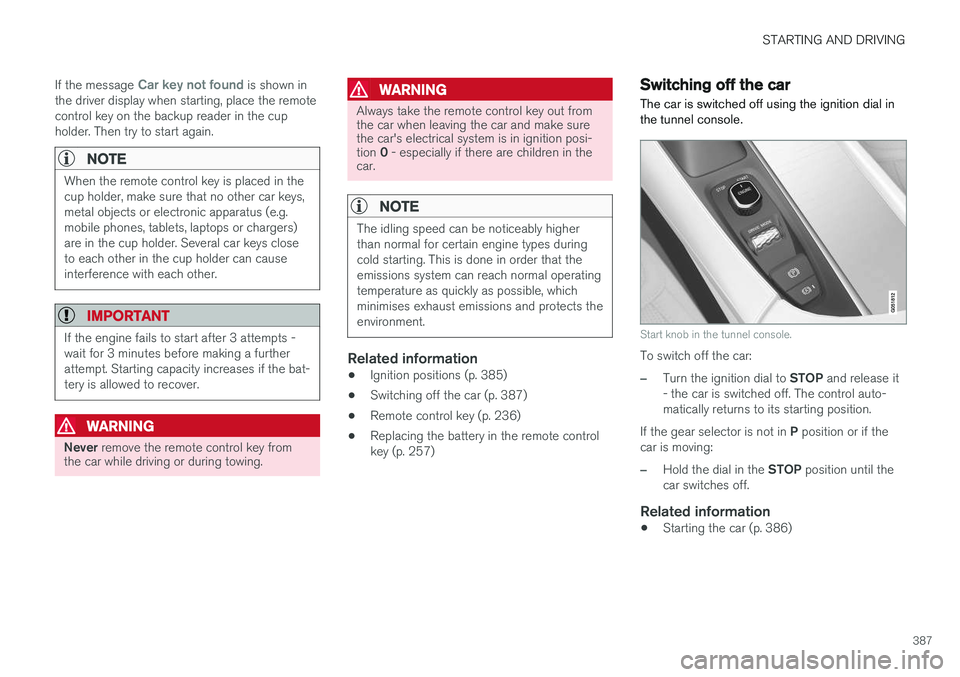
The car is switched off using the ignition dial in the tunnel console.
Start knob in the tunnel console.
To switch off the car:
–Turn the ignition dial to STOP and release it
- the car is switched off. The control auto- matically returns to its starting position.
If the gear selector is not in P position or if the
car is moving:
–Hold the dial in the STOP position until the
car switches off.
Related information
• Starting the car (p. 386)
Page 390 of 594

STARTING AND DRIVING
388
Steering lock
The steering lock makes steering difficult if the car is e.g. taken unlawfully. A mechanical noisecan be perceived when the steering lock locksor unlocks.
Activating the steering lockThe steering lock is activated when the car is locked from the outside and the engine isswitched off. If the car is left unlocked then thesteering lock will lock automatically after a while.
Deactivating the steering lockThe steering lock is deactivated when the car isunlocked from outside. If the car is not locked, itis sufficient that the remote control key is insidethe passenger compartment and the engine is started by turning the start knob towards START
in order to unlock the steering lock.
Related information
• Starting the car (p. 386)
• Switching off the car (p. 387)
• Steering wheel (p. 131)
Using jump starting with another battery
If the starter battery is discharged then the car can be started with current from another battery.
When jump starting the car, the following steps are recommended to avoid short circuits or otherdamage:
1. Set the car's electrical system in ignition position 0.
2. Check that the donor battery has a voltage of 12 V.
3. If the donor battery is installed in another car - switch off the donor car's engine and make sure that the two cars do not touch eachother. 4. Connect one of the red jump lead's clamps
to the donor battery's positive terminal (1).
IMPORTANT
Connect the start cable carefully to avoid short circuits with other components in theengine compartment.
5. Open the positive jump-starting point's cover(2).
6. Connect the red jump lead's other clamp onto the car's positive jump-starting point (2).
7. Connect one of the black jump lead's clamps to the donor battery's negative terminal (3).
8. Connect the black jump lead's other clamp onto the car's negative jump-starting point(4).
9. Check that the jump lead clamps are affixed securely so that there are no sparks duringthe starting attempt.
10. Start the engine of the "donor car" and allow it to run a few minutes at a speed slightlyhigher than idle approx. 1500 rpm.