2017 VOLVO V90 speed camera
[x] Cancel search: speed cameraPage 340 of 594

||
DRIVER SUPPORT
338
Low speed
City Safety is not activated at very low speeds - below 4 km/h (3 mph) - and the system there-fore does not intervene in situations where yourcar is approaching a vehicle ahead very slowly,e.g. when parking.
Active driver
Driver commands are always prioritised, which is why City Safety does not intervene or postponewarning/intervention in situations where thedriver is steering and accelerating in a decisivemanner, even if a collision is unavoidable. Active and aware driving behaviour can therefore delay a collision warning and intervention in orderto minimise unnecessary warnings.
Miscellaneous
WARNING
Warnings and brake interventions could be implemented late or not at all if a traffic situa-tion or external influences mean that the cam-era and radar unit cannot detect pedestrians,cyclists, large animals or vehicles correctly. For vehicles to be detected at night, their headlamps and rear lamp cluster must beswitched on and shining clearly. The camera and radar unit has a limited range for pedestrians and cyclists. The system canprovide effective warnings and brake interven-tions as long as the relative speed is below50 km/h (30 mph). For stationary or slow-moving vehicles, warnings and brake interven-tions are effective at vehicle speeds up to70 km/h (43 mph). Speed reduction for largeanimals is less than 15 km/h (9 mph) andcan be achieved at vehicle speeds above70 km/h (43 mph). The warning and brakeintervention for large animals is less effectiveat lower speeds. Warnings for stationary or slow-moving vehi- cles and large animals could be disengageddue to darkness or poor visibility. Warnings and brake interventions for pedes- trians and cyclists are deactivated at vehiclespeeds exceeding 70 km/h (43 mph). Do not place, stick or mount anything on the outside or inside of the windscreen in front ofor around the camera and radar unit — thiscan interfere with camera-dependent func-tions.
Objects, snow, ice or dirt in the area of the camera sensor may reduce its function, fullydeactivate it or give incorrect functionresponse.
NOTE
The function uses the car's camera unit, which has some general limitations, see the"Limitations for camera unit" section.
NOTE
The function uses the car's radar unit, which has some general limitations, see the "Limita-tions for radar unit" section.
Related information
•City Safety (p. 330)
• Limitations of the camera unit (p. 327)
• Limitations of the radar unit (p. 319)
Page 350 of 594

DRIVER SUPPORT
* Option/accessory.
348
Road Sign Information *
The Road Sign Information function (Road Sign Information – RSI) helps the driver to observespeed signs and certain prohibition signs as thecar passes them.
Examples of readable signs 19
.
RSI provides information about such things as current speed, when a motorway or road is star-ting/ending, when overtaking is prohibited orwhen the direction of travel is one-way. In the case where both a sign for motorway/dual carriageway and a sign for the speed limit arepassed, RSI selects to show a sign symbol formotorway/dual carriageway. The new speed limitis shown directly with a line in the driver display'sspeed scale.
WARNING
RSI does not work in all situations but is designed merely as a supplementary aid. The driver always bears ultimate responsibility for ensuring that the vehicle is driven safelyand that applicable road traffic rules and reg-ulations are followed.
Related information
• Sign display with Road Sign Information (p. 348)
• Speed camera information
* (p. 350)
• Activating/deactivating Road Sign Informa-tion (p. 351)
• Limitations of Road Sign Information
*
(p. 352)
Sign display with Road Sign Information
The Road Sign Information function (Road Sign
Information - RSI) registers and shows roadsigns in different ways depending on the signand the situation.
Example of detected speed information 20
.
When RSI detects a road sign with an imposed speed limit, the driver display shows the sign as asymbol plus an indication in red on the speedom-eter.
19 Road signs are market-dependent - illustrations in these instructions only show a few examples.
20 Road signs are market-dependent - illustrations in these instructions only show a few examples.
Page 352 of 594

||
DRIVER SUPPORT
* Option/accessory.
350
Sensus NavigationIf the car is equipped with Sensus Navigation, speed information is read from the navigationunit in the following cases:
• On detecting signs that indirectly indicate aspeed limit, such as motorway, dual carriage-way and city limit signs.
• If a previously detected sign is assumed notto apply any longer, but no new sign hasbeen detected.
NOTE
If a downloaded third-party app is used for navigation then there is no support for speed-related information.
Sign for "School" and "Children at play"
If the warning sign for "School" or "Children at play" is includedin the satellite navigator's mapdata, the driver display shows a sign20
of this type.
Related information
• Road Sign Information
* (p. 348)
• Activating/deactivating Road Sign Informa- tion (p. 351)
Speed camera information
*
A car equipped with Sensus Navigation can pro- vide information on an upcoming speed camerain the driver display.
Speed camera warning in the driver display.
If the car exceeds a detected speed limit, the driver can bewarned when the carapproaches a speed camera,provided that the navigationmaps for the market in ques-tion contain information on
speed cameras.
For more information on speed warning in con- nection with speed camera, see the heading"Activating/deactivating speed warnings" in thesection "Activating/deactivating Road Sign Infor- mation" as well as the section "Limitations forRoad Sign Information".
NOTE
Information about speed cameras in the navi- gation maps is not available for all markets.
Related information
•
Road Sign Information
* (p. 348)
• Activating/deactivating Road Sign Informa- tion (p. 351)
• Limitations of Road Sign Information
*
(p. 352)
20 Road signs are market-dependent - illustrations in these instructions only show a few examples.
Page 353 of 594

DRIVER SUPPORT
* Option/accessory.351
Activating/deactivating Road Sign Information
The Road Sign Information (Road Sign Information - RSI) function can be activated/deactivated.
Activating/deactivating Road Sign
Information
The function is activated/deac- tivated in function view in thecentre display.
–Tap on the Road Sign Information button
in function view.
> RSI is activated and the button shows a green indicator - a grey indicator means that RSI is deactivated.
Activating/deactivating speed warningsThe speed warning function warns the driverwhen the applicable speed limit is exceeded. Aspeed warning is always given if the speed limit isexceeded in connection with speed camera infor-mation. The driver can choose to have the func-tion activated or deactivated. The speed warning is given bythe driver display symbol show-ing the applicable maximumpermitted speed temporarilyflashing when this speed isexceeded.
1.
Press Settings in the centre display's top
view.
2. Press
My CarIntelliSafeRoad Sign
Information.
3. Select
Speed Limit Warning to activate/
deactivate speed warnings.
> A speed selector is shown if the function is activated.
4. Adjust the limit for when a speed warning is to be given, either up or down, by pressing the up/down arrows. Note that no consideration is given to any boundary adjustment made when the driverdisplay shows the speed camera symbol.
Activating/deactivating the acoustic warning.
It is also possible to have an acoustic warning in connection with a speed warning: 1.Press
Settings in the centre display's top
view. 2.
Press
My CarIntelliSafeRoad Sign
Information.
3. Select
Audio Warning to activate/deacti-
vate the acoustic warning.
With the
Audio Warning function activated, the
driver is also warned when driving towards a no- entry entrance.
Related information
• Road Sign Information
* (p. 348)
• Speed camera information
* (p. 350)
• Sign display with Road Sign Information(p. 348)
Page 354 of 594
DRIVER SUPPORT
* Option/accessory.
352
Limitations of Road Sign Information *
The Road Sign Information Road Sign Information - RSI function may have limitations incertain situations.
Examples of things that can reduce the RSI func- tion are as follows:
• Faded signs
• Signs positioned on bends
• Rotated or damaged signs
• Signs positioned high above the roadway
• Fully/partially obscured or poorly positionedsigns
• signs completely or partly covered with frost,snow and/or dirt
• digital road maps 21
are out-of-date, inaccu-
rate or have no speed information 22
.
NOTE
The RSI function can interpret some types of bicycle rack (connected to the electricalsocket for trailers) as a connected trailer. Insuch cases the driver may be shown incorrectspeed information.
NOTE
The function uses the car's camera unit, which has some general limitations, see the"Limitations for camera unit" section.
Related information
• Road Sign Information
* (p. 348)
• Activating/deactivating Road Sign Informa- tion (p. 351)
• Sign display with Road Sign Information(p. 348)
• Limitations of the camera unit (p. 327)
Driver Alert Control
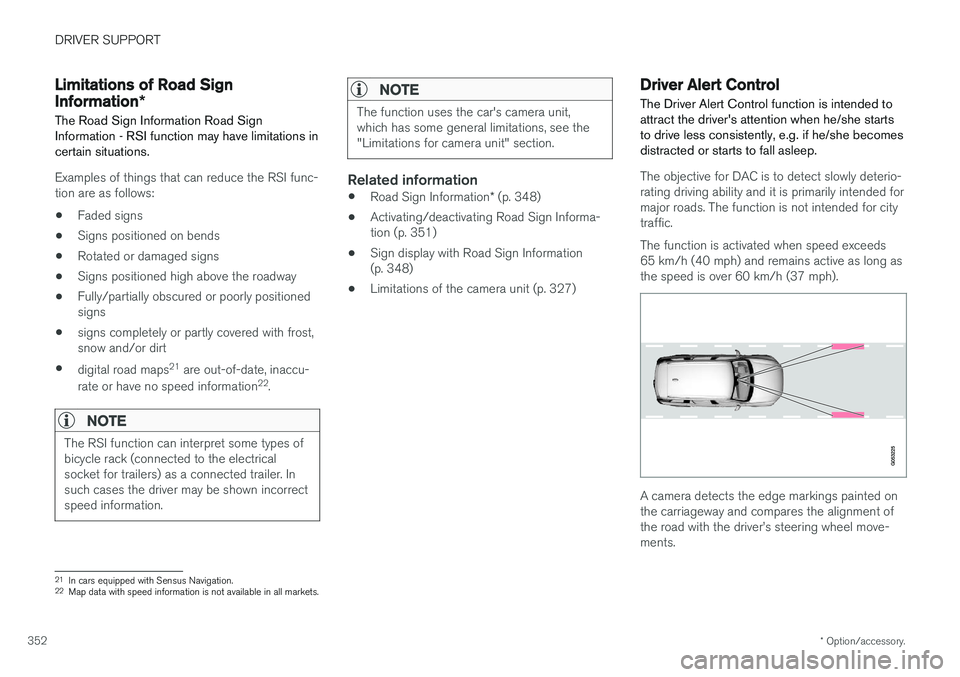
The Driver Alert Control function is intended to attract the driver's attention when he/she startsto drive less consistently, e.g. if he/she becomesdistracted or starts to fall asleep.
The objective for DAC is to detect slowly deterio- rating driving ability and it is primarily intended formajor roads. The function is not intended for citytraffic. The function is activated when speed exceeds 65 km/h (40 mph) and remains active as long asthe speed is over 60 km/h (37 mph).
A camera detects the edge markings painted on the carriageway and compares the alignment ofthe road with the driver
Page 356 of 594

||
DRIVER SUPPORT
* Option/accessory.
354 2.
Press
My CarIntelliSafeDriver Alert
Control.
3. Select
Rest Stop Guidance to activate/
deactivate the rest place guide.
Related information
• Driver Alert Control (p. 352)
• Limitations of Driver Alert Control (p. 354)
Limitations of Driver Alert Control
The Driver Alert Control (DAC) function may have limitations in certain situations.
In some cases, driving behaviour may not be affected, despite the driver being tired - e.g. whenusing the Pilot Assist function - with the resultthat the driver is then not given a warning fromDAC. For this reason, it is always very importantto stop and take a break in the event of theslightest sign of driver fatigue, regardless ofwhether DAC has given a warning. In some cases the system may issue a warning despite driving ability not deteriorating, for exam-ple:
• in strong side winds
• on rutted road surfaces.
NOTE
The function uses the car's camera unit, which has some general limitations, see the"Limitations for camera unit" section.
Related information
•
Driver Alert Control (p. 352)
• Activate/deactivate Driver Alert Control (p. 353)
• Limitations of the camera unit (p. 327)
• Pilot Assist
* (p. 304)
Lane Keeping Aid
The function of lane assistance is to help the driver to reduce the risk of the car accidentallyleaving its own lane on motorways and similarmajor routes.
Lane assistance steers the car back into its lane and/or warns the driver with an acoustic signal orsteering wheel vibration. Lane Keeping Aid is active within the speed range 65-200 km/h (40-125 mph) on roads withclearly visible side lines. On narrow roads the function may be unavailable, in which case it goes into standby mode. Thefunction becomes available again when the roadis wide enough.
A camera reads the side lines of the road/lane.
Page 362 of 594

DRIVER SUPPORT
360
Run-off Mitigation
The function of Run-off Mitigation is to assist the driver to reduce the risk of the car accidentallyleaving the road by means of actively steeringthe car back onto the road.
The function is active within the speed range 65-140 km/h (40-87 mph) on roads with clearlyvisible side markings/lane lines. A camera scans the edges of the road and the painted side markings. If the car is about to crossthe edge of the road, Run-off Mitigation willactively steer the car back onto the road. In addi-tion, if steering intervention is considered insuffi-cient to avoid run-off, brake intervention may alsobe activated. Run-off Mitigation does not intervene with either steering assistance or brake intervention if thedirection indicators are used. If the functiondetects that the driver is driving the car in anactive way, activation of Run-off Mitigation will besuppressed for a short time. The function has two activation levels: • Steering assistance only
• Steering assistance with brake intervention
Run-off Mitigation with steering assistance
Run-off Mitigation intervenes with steering assistance.
Run-off Mitigation with steering assistance
and brake intervention
Run-off Mitigation intervenes with steering assistance and braking.
Brake intervention helps in situations where steering assistance alone is not sufficient. Thebrake force is adapted automatically dependingon the situation at the time of run-off.
Settings for Run-off MitigationThe Run-off Mitigation function is selectable -the driver can select On or Off by dragging downthe centre display's top view and there searchingfor the following:
SettingsMy CarIntelliSafeLane
Assistance
To activate Run-off Mitigation:
• Select the box at
Collision Avoidance
Assistance, Steering aid during
increased collision risk - the function is
then activated.
The current setting for Run-off Mitigation when the engine is switched off remains the next timethe engine is started.
Limitations of Run-off MitigationIn certain demanding conditions, Run-off Mitiga-tion may have difficulty helping the driver cor-rectly. In such cases, it is recommended that thefunction be switched off. Examples of such conditions are:
• road works
• winter road conditions
Page 366 of 594

||
DRIVER SUPPORT
* Option/accessory.
364
Along the sides
Parking assistance side sensors are activated automatically when the engine is started. Theyare active at speeds below 10 km/h (6 mph). The measuring range starts approx. 30 cm from the sides. The acoustic signal for obstacles onthe sides comes from the side loudspeakers.
Forwards
NOTE: The illustration is schematic - details may vary depending on car model.
The front parking assistance sensors are acti- vated automatically when the engine is started.The front sensors are active at speedsbelow 10 km/h (6 mph). The measuring range starts approx. 0.8 metres in front of the car.
NOTE
Parking assistance is deactivated when the parking brake is applied or P mode is
selected in a car with an automatic gearbox.
IMPORTANT
When auxiliary lamps are fitted: Remember that these must not obscure the sensors - theauxiliary lamps may then be perceived as anobstacle.
Related information
• Activating/deactivating Parking assistance
*
(p. 365)
• Limitations of Parking assistance
* (p. 365)
• Messages for Park Assist
* (p. 367)
• Park Assist Camera
* (p. 368)
• Park Assist Pilot
* (p. 374)